
Working with change stores
Last updated: 2026-11-06Change stores contain the user edits to editable columns in write tables.
What is a change store?
A change store is a Qlik-managed storage location that contains the user-added changes from editable columns in a write table. The change store is a temporary storage location—changes are stored for a maximum of 90 days, after which they are deleted.
You can either keep the automatically assigned change store or select an existing change store from the current space. When selecting an existing change store, make sure the primary keys in the write table match the primary keys defined in that change store.
Change store content is accessed via the change-stores API. With your change store ID, you can formulate API requests and automations that extract user changes to a permanent location such as a spreadsheet or database. For more information, see Extracting changes from write tables.
Managing change stores
By default, a new change store is created for newly created write tables. With respect to change stores, you can customize the following:
-
Select an exist change store to connect to your write table.
-
Give change stores unique names.
Selecting a different change store for a write table
Optionally, under Change store in the properties panel, select an existing change store from the current space.
Requirements and behavior are as follows:
-
The primary keys need to match between the current write table and the selected change store.
-
A single change store cannot be connected to multiple write tables.
Do the following:
-
In the properties panel, expand Change store.
-
Next to Change store ID, click Select.
Renaming change stores
Change stores have customizable names. You can rename each change store to make them unique and recognizable.
Do the following:
-
In the properties panel, expand Change store.
-
Click
 .
. -
Type the change store name, and click to confirm.
Copying the change store ID
You can copy the change store ID in two ways:
-
In sheet edit mode after you create the write table. In the properties panel, under Change store > Change store ID, click
 Copy ID.
Copying the change store ID from the properties panel.

-
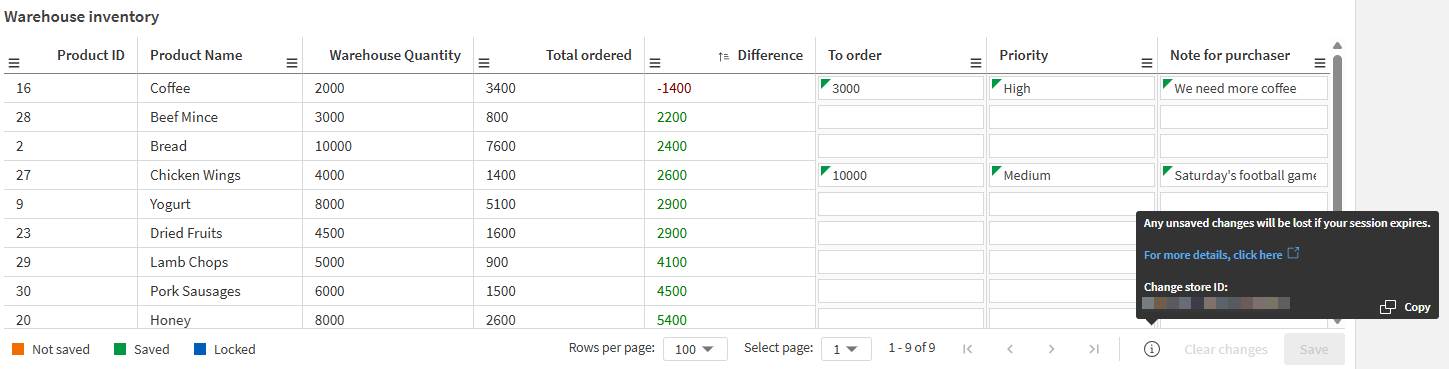
In analysis mode when viewing the write table. Click the
 icon in the bottom right corner. Click to copy the change store ID.
Copying the change store ID when viewing a write table.
Extracting changes from a change store
Application developers and system integrators can extract change store data from write tables, using it to implement real-time automations and other workflows. See Extracting changes from write tables.
Change store lifecycle
This section outlines the expected behavior for change stores when content is moved, published, and deleted.
Publishing
Different behavior is expected between when the application is first published to a managed space, and for each time the application is subsequently republished.
First publish
When an application with a write table is first published to a managed space:
-
New change stores are created in the target space
-
The published application will use these new change stores
Republishing without changes to write configuration
In this scenario, nothing changes. The published application continues to use the change stores in the managed space.
Republishing after new editable columns are added in the source application
In this scenario, the target change stores are updated to support these new columns.
Republishing after removing editable columns in the source application
In this scenario:
-
The write table in the published application will no longer show the deleted editable columns.
-
The target change stores retain these deleted columns.
Deletion
Deletion involves the deleting of charts, sheets, applications, and spaces.
Delete chart, sheet, or application
After a chart, sheet, or application containing a write table is deleted, the change store still exists in the space. You can still:
-
Access the change store via the change-stores API.
-
Connect a different write table to the change store, if the primary keys match. See Selecting a different change store for a write table.
Delete space
When a space containing write tables is deleted, any change stores that were in the space are lost and not recoverable.
Moving
Moving happens when an application with a write table is moved to a different space. With moving, the following happens:
-
An empty change store will be created in the target space.
-
The write table in the application will no longer be linked to the change store in the original space.
After the move, you can reconfigure the write table to select an existing change store in the target space.
Limitations
For change store limitations, see Change store and data retention.