Constrain
The Constrain statement can be used in combination with Let or Set statements for defining script variables. The Constrain statement allows you to define constraints on possible values for these variables. If a variable definition violates the constraints, the reload fails. With constraints, you can require variable values to match specific types, fall within specific numeric ranges, and match with acceptable values that you define.
Syntax:
Constrain variablename = json
Where:
-
variablename is a script variable.
-
json is a valid JSON object specifying the constraints. Individual constraints are added within this object as key-value pairs.
| Constraint type (key) | Meaning | Constraint requirements (value) | Examples |
|---|---|---|---|
| "type" | Constrain variable values to a specific data type. |
"text" specifies a text type. "number" specifies a numeric type. |
|
| "maxnum" | Set a maximum value for a variable. | Numbers only (integer or floating point). Scientific notation is allowed. |
|
| "minnum" | Set a minimum value for a variable. | Numbers only (integer or floating point). Scientific notation is allowed. |
|
| "valuesnum" | Define a list of acceptable numeric values for the variable. | Comma-separated list of numbers enclosed in square brackets. For example: [1,2,3] |
|
| "valuestext" | Define a list of acceptable text values for the variable. | Comma-separated list of strings enclosed in square brackets. For example: ["a","b","c"] |
|
When to use a Constrain statement
Use the Constrain statement to prevent unwanted variable values from being loaded into analytics applications.
Considerations
-
The Constrain definition for the variable must be a valid JSON object.
-
You can specify more than one constraint for a single variable. All constraints for a variable need to be contained within a single constraint object. For examples, see Examples - Multiple constraints.
-
If you have already loaded a script variable with a certain name into the application, future attempts to define constraints and values for that variable can fail due to conflicts between the original and the redefined variables.
To resolve these conflicts, reset the variable constraints and values by inserting blank definitions. Examples:
CONSTRAIN x;
LET x;
CONSTRAIN x; SET x;You can then redefine the variable and its constraints in subsequent sections in the load script. For a long-form example, see Example - Resolving variable definition conflicts.
-
The order of the variable definition and the constraint definition does not matter. However, in the event of variable-related reload failure, the line at which the break point occurs will be different.
-
The Constrain script statement only restricts variable definitions for script variables. You can also apply constraints on script and end-user variables (those created or updated in sheet view or as session variables using the API) by using the public API. For more information, see Developer alternatives for defining variable constraints.
-
Constraints are validated to avoid scenarios that cannot match any value for the variable. Examples of invalid constraints:
-
{"minnum": 5000, "maxnum": 4}
-
{"type": "text", "maxnum": 4}
-
Developer alternatives for defining variable constraints
You can also use the public API to define variable constraints, rather than using the Constrain statement in the load script. When defining constraints via API, all attempts to update variable values—whether directly in the load script or in sheet view—will be subject to the constraints.
To define variable constraints via the public API, use the GenericVariableConstraints property in the Qlik Engine JSON API: GenericVariableProperties.
Example - type
Example - maxnum
Example - minnum
Example - valuesnum
Example - valuestext
Examples - SET versus LET
These examples show the differences between how constraints are applied when using SET or LET during variable definition. All examples use constraints applying a type requirement, but these principles apply to all constraint types generally.
Examples - Multiple constraints
Example - Resolving variable definition conflicts
Overview
This example shows how variable definition conflicts can occur when adding constraints for a variable that has already been defined in the application from a previous load.
Load script 1: Setting a script variable
Open the Data load editor. Add the following script:
LET vConflictExample = 'Department C';Load the data. The reload is successful. Variable vConflictExample has been created in the application as a script variable.
Load script 2: Attempting constraint definition on previously loaded script variable
Delete load script 1. Add the following script:
CONSTRAIN vConflictExample = {"type": "number"};
LET vConflictExample = 123;
Load the data.
The reload fails with a constraint error, even though the new constraint and value definition are compatible. This is because load script 1 already loaded the variable into the application, with a text value, and this value is still persisted in the application. To resolve this issue, we need to reset the variable constraint and definition. See load script 3.
Load script 3: Resetting constraint and value definitions
Delete load script 2. Add the following script:
CONSTRAIN vConflictExample;
LET vConflictExample;

CONSTRAIN vConflictExample = {"type": "number"};
LET vConflictExample = 123;

MockData:
LOAD
*
Inline [
id, date, amount
1, 05/30/2025, 23.56
];
Load the data.
The reload succeeds. The script above can be broken down into three parts, each separated by blank lines:
-
The first part resets the constraint and value definition for vConflictExample. This removes the definition that was loaded into the application with load script 1.
-
The second part reapplies the new constraint and value definitions that failed in load script 2.
-
The third part adds mock data simply so we can open sheet view and inspect the variable value (see below).
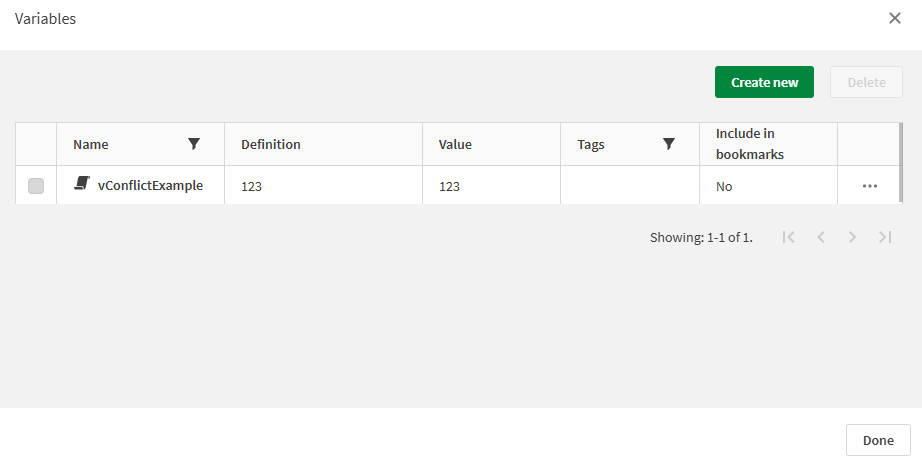
Open sheet view in edit mode, and open the  Variables dialog. We can see that variable vConflictExample has been successfully created.
Variables dialog in sheet view showing that the variable definition conflict for vConflictExample has been resolved.