
Browse spaces and apps
Last updated: 10/28/2026Once signed in, the Qlik Cloud panel in the Explorer sidebar lists the spaces, apps , and QVF script assets you have access to.
Browsing content in the Qlik Cloud panel in VS Code.
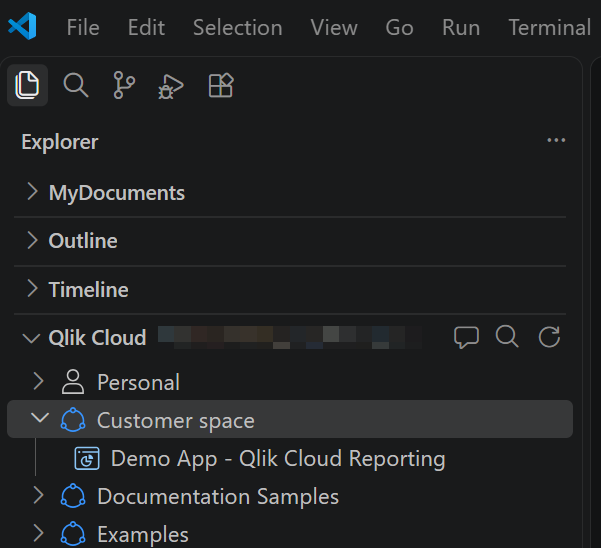
Browsing the Explorer
You need to select a folder or workspace in the Explorer before you can use the Qlik Cloud panel.
Available options
Depending on your current location in the user interface, different options are available.
Toolbar actions
Toolbar actions appear at the top of the Qlik Cloud panel. These options allow general and bulk actions.
| Option | Function | Link to more information |
|---|---|---|
| Filter Apps (the search icon in the panel toolbar) / Clear Filter (exit icon) | Narrow the list of apps and QVF scripts shown, or remove the filter. | - |
| Refresh | Reload the content list after changes made elsewhere in Qlik Cloud. | - |
Update all from Qlik Cloud ( ) / Push all changes to Qlik Cloud ( ) / Push all changes to Qlik Cloud ( ) ) |
Batch pull and push script changes to and from the remote Qlik Cloud version. | Update load scripts with controlled editing |
Right-click actions for apps
Right-click an application (or QVF script asset) in the Qlik Cloud panel to access specific options for individual assets. Options change depending on whether the app or script is bound to a local file, whether it is read-only, and whether you have edit permission on it in Qlik Cloud.
| Option | Function | Link to more information |
|---|---|---|
| Download working copy / Downloaded resources... | Download a copy of the script for local editing, and bind it to the workspace root for direct syncing with the Qlik Cloud version. If the script is already downloaded to the elected workspace, you can view the current location of this local copy. | Update load scripts with controlled editing |
| Unlock remote editing / Lock remote editing | Lock or unlock the resource's load script for remote editing against a cloud-backed version. | Update load scripts directly against Qlik Cloud |
| Reload Application | Reload the application (or QVF script asset) in Qlik Cloud. | Reload and preview apps |
| View Data Model |
Open the data model viewer directly in Qlik Code. Not applicable to QVF script assets. |
Visualize the data model |
| Open in browser | Options for opening the resource in Qlik Cloud. | Open applications in the browser |
Right-click actions for locally saved scripts
Right-click a local script file in the Explorer file browser to view available actions. Options depend on whether the script is bound to an application (or QVF script asset) in Qlik Cloud.
For full details, see Update load scripts with controlled editing.
| Option | Function | Link to more information |
|---|---|---|
| Reload Application | Reload the application (or QVF script asset) in Qlik Cloud. | Reload and preview apps |
| View Data Model |
Open the data model viewer directly in Qlik Code. Not applicable to QVF script assets. |
Visualize the data model |
| Add from data catalog | Add data to the load script using a built-in version of the Qlik data catalog. | Insert data and catalog content into a script |
| Include scripts | Include other Qlik Cloud scripts within the current load script. | Insert data and catalog content into a script |
| Pull from Qlik Cloud / Push changes to Qlik Cloud | Update the local script file with incoming changes to the remote Qlik Cloud version, or push changes to your local version to the remote Qlik Cloud version. | Update load scripts with controlled editing |
| Unlock remote editing / Lock remote editing | Lock or unlock the resource's script for remote editing against a cloud-backed version. | Update load scripts directly against Qlik Cloud |
| Bind to Qlik Cloud script | Bind a separate QVS script file from your local machine to the load script of an application or QVF script asset in Qlik Cloud. | Update load scripts with controlled editing |