
Mirroring data to a cloud data warehouse
Last updated: 10/21/2026Mirror tasks enable you to query data stored in your Qlik Open Lakehouse from your cloud data warehouses. Data is reflected in your warehouse without duplication. Mirrored tables ensure storage and engineering costs are minimal and maintains a single source of truth.
After onboarding your data to a Qlik Open Lakehouse, you can mirror your data to your cloud data warehouse using mirror tables. Data in Iceberg can be queried using a query engine that natively supports Iceberg, such as Amazon Athena. However, mirror tables are ideal when you want to implement the open Iceberg lakehouse architecture and continue to use your data warehouse query engine. The Mirror data task automates the process of making Iceberg tables accessible in declaring them as external tables and views in your data warehouse. The data warehouse refers to the Iceberg table as an external view because it does not manage the table, it only reads from it. External tables and views allow you to query your Iceberg data in your data warehouse without migrating data or the management of your tables to your data warehouse.
The mirror task executes the necessary DDL statements to create the external tables and views. The table (schema) is displayed in the data warehouse, along with the changes and history tables, but if you look at the table definition, it displays as a view created on top of the external table. Data consumers can query the views as if the data is stored in their data warehouse environment. Mirrored data offers high performance, as Qlik continues to manage and optimize the data.
The following data warehouses are supported:
-
Amazon Redshift
-
Databricks
-
Snowflake
Mirror to multiple data warehouses
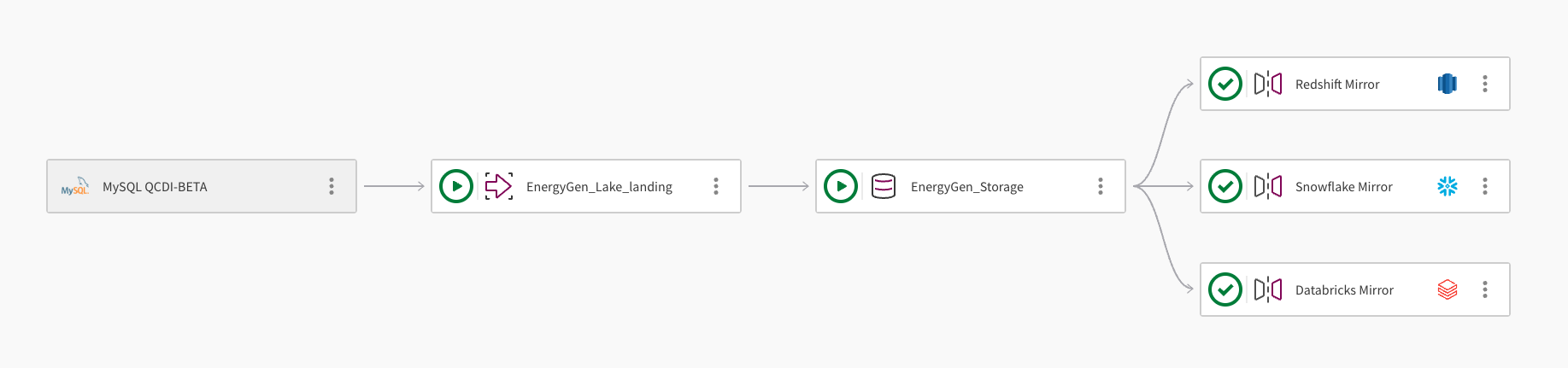
A single dataset can be mirrored to multiple cloud data warehouses. The following image demonstrates how a Qlik Open Lakehouse pipeline project can be used to mirror data to Amazon Redshift, Snowflake, and Databricks:
-
The pipeline ingests data from a MySQL database using the connection, MySQL QCDI-BETA.
-
The Lake landing task, EnergyGen_Lake_landing ingests the raw data to an Amazon S3 bucket.
-
Next, the storage task, EnergyGen_Storage copies the data to a S3 location to store the data in Apache Iceberg format.
-
The Mirror data task, Redshift Mirror, creates the necessary views to enable the data to be queried from Amazon Redshift, and automatically refreshes the data.
-
A second Mirror data task, Snowflake Mirror, is added to create the necessary views to enable the data to be queried from Snowflake. The mirror task uses the Qlik-managed refresh mechanism, which allows downstream transformations.
-
A third Mirror data task, Databricks Mirror, is added to enable the data to be queried from Databricks through a foreign catalog in Databricks Unity Catalog.
Refresh mechanism
The refresh mechanism available to you depends on your cloud data warehouse provider, as detailed below.
Amazon Redshift
Data mirrored to Amazon Redshift is automatically refreshed and there is no need to schedule or run the task. All table and view names are converted to lower case in Amazon Redshift, as Qlik Open Lakehouse does not support case sensitive object names (database, schema, table, or column).
Snowflake
Snowflake points to the metadata that reflects the latest snapshot of the available data within Iceberg. There are two ways to refresh the metadata:
-
Qlik-managed: This option requires an active Snowflake warehouse, and includes monitoring and data preview. Select this option when you want to create downstream transformations, and monitor and schedule the task. Qlik owns the metadata refresh operation, so you can configure this manually, for example, to run every 30 minutes. This option is particularly relevant for multi-table transformations, as the metadata for all tables updates simultaneously. While you may lose some of the real-time gain that the Snowflake-managed refresh offers, you maintain consistency between tables. For multi-table transformations, you can trigger the refresh as often as needed. Qlik recommends that you set event-based triggering on downstream transformation tasks that follow the scheduled mirror task.
-
Snowflake-managed: A serverless operation that leverages Snowpipe infrastructure without requiring or activating a compute warehouse. This option is recommended when you do not require downstream transformations. The refresh interval is configured when you create the Snowflake catalog integration. To monitor the status of the automatic refresh, query the SYSTEM$AUTO_REFRESH_STATUS in Snowflake. Qlik loses ownership of the process and is unable to monitor tasks of this type.
The parquet file 'tg_open_lakehouse/bronze/sales/tables/tg_sales_ingestion_bronze__internal.order_details__internal/data/hdr__scd_partition=asset_state/2025_09_12_00_37_asset_state_apply-4bcbb2eb-4ad3-4d88-bea6-ea611576624e.parquet' for table 'OPENLAKEHOUSE."snowflake_mirror__internal"."ext__order_details"' was inaccessible.
Databricks
Databricks foreign catalog reads Iceberg metadata directly from AWS Glue. After you run the mirror task, the latest data snapshot is available for query in Databricks without additional refresh steps.
Prerequisites
The following requirements apply to all supported data warehouse targets:
-
A Mirror data task can be added only after a storage task has been created in a Qlik Open Lakehouse project.
-
A storage task can have multiple Mirror data tasks, each targeting a different data warehouse.
-
A Mirror data task can only be associated with one storage task.
-
To perform transformations, create a data warehouse project and use the Mirror data task as the source. The project and mirror task must use the same data warehouse platform, for example, Redshift.
To mirror your data, configure the settings for your target data warehouse.
Amazon Redshift
-
A connection to the data warehouse database where you want to mirror your data. Optionally, you can create a new connection during the mirror task creation. For more information, see Amazon Redshift.
-
An IAM role assumed by Redshift with Glue Data Catalog read permissions. The following script provides the necessary permissions to access your catalog. Ensure you replace <ICEBERG_BUCKET_NAME>, with your bucket name:
{
	 "Version": "2012-10-17",
        "Statement": [
             {
            	 "Effect": "Allow",
                "Action": [
                    "glue:GetDatabase",
                    "glue:GetDatabases",
                    "glue:GetTable",
                    "glue:GetTables",
                    "glue:GetPartition",
                    "glue:GetPartitions"
                ],
                "Resource": "*"
             },
             {
                "Effect": "Allow",
                "Action": [
                    "s3:GetObject",
                    "s3:ListBucket"
                ],
                "Resource": [
                    "arn:aws:s3:::<ICEBERG_BUCKET_NAME>",
                    "arn:aws:s3:::<ICEBERG_BUCKET_NAME>/*"
                ]
            }
}
This role requires the following trust relationship:
{
	"Version": "2012-10-17",
        "Statement": [
             {
                 "Effect": "Allow",
                 "Principal": {
                       "Service": "redshift-serverless.amazonaws.com"
                  },
                 "Action": "sts:AssumeRole"
             },
             {
                 "Effect": "Allow",
                 "Principal": {
                    "Service": "redshift.amazonaws.com"
                    },
                    "Action": "sts:AssumeRole"
             }
      ]
}
Information noteFor more information, see IAM policies for Amazon Redshift Spectrum. -
An external schema in Redshift that points to the storage task database. You must create an external Redshift schema, by executing the CREATE EXTERNAL SCHEMA command and pointing to the source Iceberg storage task internal database. External consumers should consume from the mirror task schema consumption views. To create your external schema, use the following syntax, ensuring the DATABASE property is the database created by the storage task:
CREATE EXTERNAL SCHEMA <local_schema_name>
FROM DATA CATALOG
DATABASE '<database_name>'
IAM_ROLE 'arn:aws:iam::<AWS account-id>:role/<role-name>'
REGION '<aws-region>'
Snowflake
-
A connection to the data warehouse database where you want to mirror your data. Optionally, you can create a new connection during the mirror task creation. For more information, see Snowflake.
-
A Snowflake external volume. This grants Snowflake with restricted access to your S3 location. To configure the volume, see Configure an external volume for Amazon S3.
-
An AWS Glue Data Catalog integration. This enables Snowflake to connect to data held in Iceberg open table format in your object store. To configure a catalog integration, see Configure a catalog integration for AWS Glue.
Databricks
-
A connection to the Databricks workspace where you want to mirror your data. Optionally, you can create a new connection during the mirror task creation. For more information, see Databricks.
-
The following objects must be configured in AWS and Databricks before creating the mirror task:
-
A Glue connection in AWS. This enables Databricks to federate metadata queries through the AWS Glue Data Catalog. For more information, see AWS Glue > Connecting to data.
-
An AWS-linked service credential in Databricks Unity Catalog. This grants Databricks the permissions required to access AWS services. For more information, see Databricks > Create service credentials.
-
An external location in Databricks Unity Catalog that points to your S3 bucket. This authorizes Databricks to read Iceberg data at the S3 path managed by the storage task. For more information, see Databricks > External locations.
-
A foreign catalog in Databricks Unity Catalog. This exposes the Iceberg tables registered in AWS Glue as queryable tables in Databricks. For more information, see the Databricks > Foreign catalogs.
-
Creating a mirror data task
To mirror data to your data warehouse, do the following:
-
Open the project that contains the storage task for the data you want to mirror.
-
Click
 More actions on the storage task. Select Mirror data, and configure it:
 -
Name: Enter a name for your mirror task.
-
Description: Optionally, describe the purpose of the task.
-
Data warehouse: Select your target data warehouse.
-
Connection:
-
To use an existing connection, click Select to open the Secure source connection dialog. Choose the Space where your connection is located, then select the connection. Click Edit to amend the connection properties.
-
To create a new connection, click Create connection to open the Create connection dialog and follow the instructions.
-
-
Database: Enter the name of the database where you want to mirror the data.
-
To mirror to Amazon Redshift:
-
External schema: Enter the name of the schema where the views will be created.
Information noteAll table and view names are converted to lower case in Amazon Redshift.
-
-
To mirror to Snowflake:
-
Snowflake external volume: Enter the name of the external volume created in Snowflake.
-
Snowflake catalog integration: Enter the name of the catalog integration created in Snowflake.
-
Select how you want your data to be refreshed in Snowflake:
-
Qlik-managed: Select this option if you want to create downstream transformations. This requires an active Snowflake warehouse and is monitored by Qlik.
-
Snowflake-managed: Select this option when you do not want to perform downstream transformations. A Snowflake warehouse is not required and therefore not monitored by Qlik. This is administered and monitored in Snowflake.
-
-
-
To mirror to Databricks:
-
Databricks catalog: Enter the name of the Databricks Unity Catalog. This is usually hive_metastore.
-
Databricks foreign catalog: Enter the name of the Databricks foreign catalog that is connected to AWS Glue.
-
-
Click OK to create the mirror task and add it to the storage task in your pipeline.
-
Click
More actions on the mirror task and select Open. Ensure you are displaying the Design view. -
To select a subset of the available datasets, click Select source data and remove any unwanted datasets.
-
Click Prepare to create the external objects and mirror the data.
Performing transformations
If you need to transform your data, you can create a Redshift, Snowflake, or Databricks project and use a Mirror data task within your Qlik Open Lakehouse project as the source. The mirror task source must be the same cloud data warehouse platform as the project. For example, when you create a Amazon Redshift project to perform transformations, you must use a Amazon Redshift Mirror data task as the source.
Viewing task information
Click  on the menu bar to view task information, such as:
-
Owner
-
Space
-
Data platform
-
Project ID
-
Data task runtime ID
Deleting a Mirror data task
When you delete a mirror task, the internal schemas and views created by the mirror task are dropped. External schemas and table in Redshift are not dropped. If a table is deleted from AWS Glue, for example, when a user drops the dataset in storage or deletes the entire storage task, the change is automatically reflected in the Redshift external schema. The table is removed and does not need to be dropped separately. As a best practice, drop the external schema entirely if it is no longer in use.
To delete a Mirror data task, do the following:
-
On the Mirror data task you want to delete, click the
 More actions menu on the task and select Delete.
 -
In the confirmation dialog, click Delete.