
Managing business glossaries with Qlik Answers
Last updated: 10/20/2026Build, edit, and explore business glossaries using natural language with the business glossary manager.

Business glossary manager in Qlik Answers

What the business glossary manager can do
The business glossary manager allows you to do the following:
-
Search for and explore available glossaries and their content.
-
Generate business glossaries automatically from applications and data products.
-
Manage glossaries and their properties, performing actions such as editing, deleting, and moving between spaces.
-
Manage glossary terms and categories, including management of links between glossaries, their terms, and other resources such as data products.
For specific workflows and example questions, see Workflows.
Before you begin
Prerequisites:
-
Your tenant has cross-region inference turned on and is enabled for the agentic Qlik Answers experience.
-
Your tenant and subscription have capacity for Qlik Answers.
-
You have the required administrator-assigned permissions, as well as access to the required applications, datasets, data products, and glossaries.
Opening the business glossary manager
Do the following:
-
Click Open Answers to open Qlik Answers.
-
In the dropdown menu, select Glossary.
Opening business glossary manager in Qlik Answers
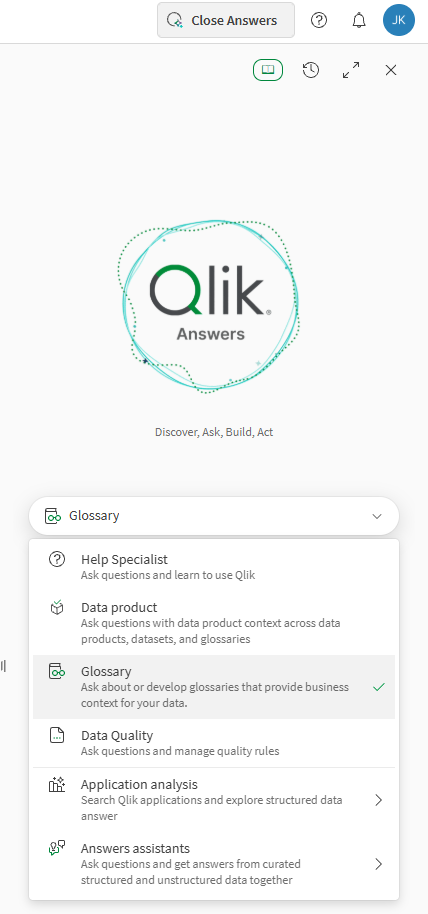
If Glossary is not available, verify tenant enablement, user permissions, and available Qlik Answers capacity.
Workflows
These workflows contain helpful example questions to get you started working with the business glossary manager.
Glossary search and exploration
| Action | Example questions | Notes |
|---|---|---|
| Search |
|
- |
| Exploration |
|
- |
Glossary generation
You can generate glossaries from applications, data products, and datasets.
-
Terms and categories are created unless you create a blank glossary.
-
When you create a glossary from an applications, terms are extracted from application dimensions and measures.
-
When you create a glossary based on a data product, you are prompted to link the glossary to the data product.
| Action | Example questions | Notes |
|---|---|---|
| Glossary generation—resource not specified |
|
- |
| Glossary generation—from application |
|
- |
| Glossary generation—from data product |
|
- |
| Glossary generation—blank glossary |
|
- |
Glossary management
| Action | Example questions | Notes |
|---|---|---|
| Glossary deletion |
|
If you have a glossary open, you can often ask questions without needing to reference the glossary name. |
| Glossary update |
|
If you have a glossary open, you can often ask questions without needing to reference the glossary name. |
Linking, term, and category management
| Action | Example questions | Notes |
|---|---|---|
| Term linking |
|
For best results, open the related glossary before asking the question. |
| Term and category management |
|
For best results, open the related glossary before asking the question. |
Permissions
For full access to the business glossary manager, you need the required Qlik Answers access and permissions to the data and glossary assets used in glossary workflows.
Administrator-assigned permissions
You need the following permissions, assigned by a tenant admin:
-
The Agentic AI > Data governance permission set to Allowed.
-
Permissions to access and manage business glossaries and related data assets.
Information noteFull access requires permissions for managing related glossaries and data products. If you only have permissions to view these items, you can still use the agent to explore and learn about the items without editing them.-
For glossaries, one of the following:
-
Steward built-in security role
-
Manage glossaries and approve terms permission set to Allowed through the default permissions or a custom role
-
-
For data products, one of the following:
-
Data Product Manager built-in security role
-
Manage data products permission set to Allowed through the default permissions or a custom role
-
-
To learn more about assigning permissions as an administrator, refer to the following:
-
Roles and permissions for users and administrators (capacity-based subscriptions)
-
Roles and permissions for users and administrators (user-based subscriptions)
Space access
You need access to the spaces where the applications, datasets, data products, and glossaries are located. See:
Limitations
Language support
The business glossary manager officially supports English. Other languages might work, but behavior is not guaranteed and generated terms, categories, and definitions are translated to English unless you explicitly instruct the agent to preserve the source language.
Searching for resources
Support is limited for complex questions that search generally for data products, datasets, and glossaries. For example, the following questions are not supported:
-
"find me data products that contain the dataset XYZ"
-
"find me data products that contain this dataset"
Instead, refine the question so that it asks about a specific data product, dataset, or glossary. For example:
-
"for the glossary XYZ, what terms are matching ABC"
-
"for the data product XYZ, what datasets are matching ABC"