
Heap
Dernière mise à jour : 09/10/2026Heap is an analytics platform that automatically tracks and analyzes all user interactions on a website or app.
Heap integration replicates data from Avro files published to Amazon S3 via Heap’s Connect for Amazon S3 feature.
See the Schema section for a list of objects available for replication.Preparing for authentication
To access your data, you need to authenticate the connection with your account credentials.
To obtain your account ID:
- Log into your Amazon Web Services (AWS) account.
- Click the user menu, located between the bell and Global menus in the top-right corner of the page.
- Click My Account.
In the Account Settings section of the page, locate the Account Id field:
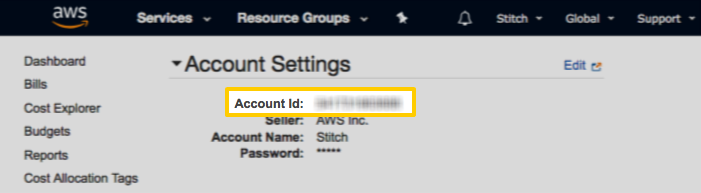
Copy the ID.
Creating the connection
Pour plus d'informations, consultez Connexion à des applications SaaS.
- Complétez les propriétés de connexion requises.
Fournissez un nom pour la connexion dans Nom de la connexion.
Sélectionnez Ouvrir les métadonnées de connexion pour définir les métadonnées de la connexion lors de sa création.
Cliquez sur Créer.
| Setting | Description |
|---|---|
| Data gateway | Sélectionnez une Passerelle de déplacement des données si cela est nécessaire pour votre cas d'utilisation. Note Informations Ce champ n'est pas disponible avec l'abonnement Démarreur Qlik Talend Cloud, car il ne supporte pas Passerelle de déplacement des données. Si vous avez un autre niveau d'abonnement et si vous ne souhaitez pas utiliser Passerelle de déplacement des données, sélectionnez Aucune. Pour des informations sur les avantages de Passerelle de déplacement des données et les cas d'utilisation qui la nécessitent, consultez Passerelle de données Qlik - Déplacement des données. |
| Start Date | Saisissez la date, au format |
| S3 Bucket | The name of the S3 bucket. |
| AWS Account ID | AWS account ID. |
Schema
Schemas and naming conventions can change from version to version. It is recommended to verify your version before continuing.
Custom attributes
Heap’s data model is dynamic, meaning it changes as custom attributes are added to object types in your account. For example: Adding new user attributes to the user object.
This means that the Heap schema in your destination may also change over time as you add new attributes in Heap.
When a new attribute is added to an object in Heap, it will display as a selectable field in the Stitch app. Note: To include the field in replication, you’ll need to select it in Stitch. Stitch will not automatically select new fields.
The schema documentation following this section outlines the default attributes for each object type according to Heap’s documentation.
Event tables
For each event type you define in Heap, a table for that event will be available for selection in Stitch.
For example: If there’s a Sign up - Click button event, there will be a table named sign_up_click_button.
Refer to the [event_type] schema documentation for a list of default event attributes.
Note: When new event types are added in Heap, you will need to select the table and fields in Stitch to include it in replication.
Depending on your destination, table and column names may not appear as they are outlined below.
event_tables
For every event type defined in Heap, a table will display in the Stitch app. The name of the table will be the event name, which Heap will first strip the non-alphanumeric characters from. For example: The table name for Sign Up - Click Link will be transformed into sign_up_click_link by Heap.
Note: Custom attributes are supported b for this table. As Heap schemas are dynamic, event_tables documentation will only list the non-custom attributes outlined in Heap’s documentation.
Replication Method | CDC |
Primary Key | event_id |
| Useful links |
pageviews
The pageviews table contains info about pageviews.
Note: Custom attributes are supported for this table. As Heap schemas are dynamic, pageviews documentation will only list the non-custom attributes outlined in Heap’s documentation.
Replication Method | CDC |
Primary Key | event_id |
| Useful links |
sessions
The sessions table contains info about sessions. In Heap, a web session ends after 30 minutes of user inactivity, while in iOS, a session ends after the app has entered the background.
Note: Custom attributes are supported for this table. As Heap schemas are dynamic, sessions documentation will only list the non-custom attributes outlined in Heap’s documentation.
Replication Method | CDC |
Primary Key | event_id |
| Useful links |
user_migrations
The user_migrations table contains info about user migrations.
Note: Custom attributes are supported for this table. As Heap schemas are dynamic, user_migrations documentation will only list the non-custom attributes outlined in Heap’s documentation.
Replication Method | CDC |
Primary Key | from_user_id |
| Useful links |
users
The users table contains info about users.
Note: Custom attributes are supported for this table. As Heap schemas are dynamic, users documentation will only list the non-custom attributes outlined in Heap’s documentation.
Replication Method | CDC |
Primary Key | user_id |
| Useful links |