Skip to main content Skip to complementary content

Adding a direct navigation link to Talend Cloud

You can help users access Talend Cloud more easily by adding a direct link in the Qlik Cloud navigation menu.

Talend is an ETL (extract, transform, load) platform that supports data integration, data quality management, data preparation, big data processing, and application integration. If your subscription includes Talend Cloud capabilities, you should connect Talend Cloud to Qlik Cloud. Adding a direct link to Talend Cloud lets users quickly launch Talend services directly from Qlik Cloud. For more information about subscription options, see Qlik Talend Cloud subscription options.

Information noteStarting July 22, 2025, Qlik Talend Cloud purchases include automatic tenant linking. Manual setup is only required for purchases made before this date.

Setting up a direct link

Do the following:

  1. In the Administration activity center, go to the Settings page, then select the Talend Cloud tab.

    Talend Cloud settings.
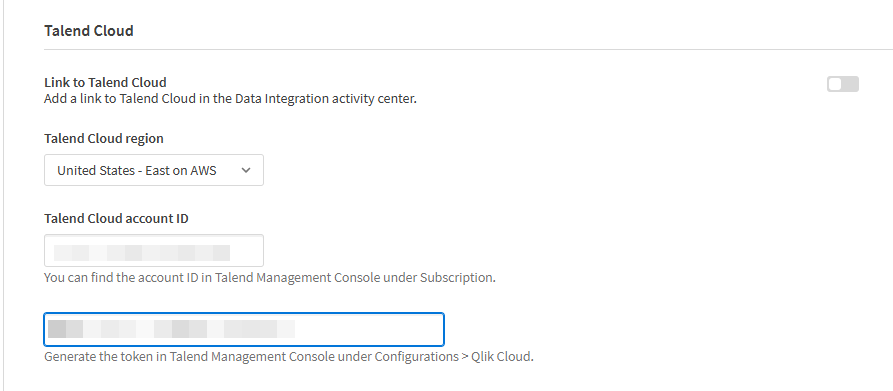
    Settings pane showing settings for Talend Cloud
  2. Choose a Talend Cloud region in the dropdown list.

  3. Enter the Talend Cloud account ID.

    You can find the account ID in the Talend Management Console under Subscription.

    Account information on the Subscription page in the Talend Management Console.

    Subscription pane with account information in Talend Management Console
  4. Turn on the Link to Talend Cloud toggle.

After setup, a new Talend Cloud button appears in the Qlik Cloud navigation menu (Navigation menu). Clicking this button takes you directly to the Talend Cloud login page.

Navigate to Talend Cloud from the Data Integration activity center.
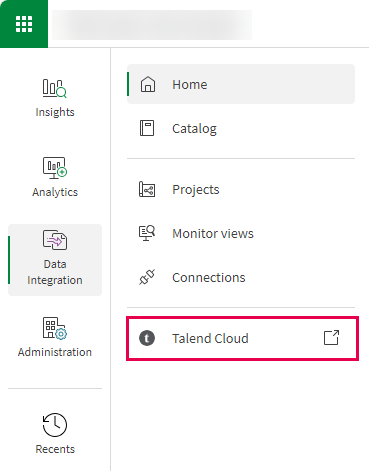
Navigation menu with Data Integration section selected showing the link to Talend Cloud.

Did this page help you?

If you find any issues with this page or its content – a typo, a missing step, or a technical error – please let us know!