
Detecting bias in machine learning models
You can identify bias in machine learning models you train in ML experiments. Address detected bias by dropping skewed features, correcting improper data collection, or changing the structure of your training dataset.
Understanding bias
In machine learning, bias is an undesired phenomenon in which models favor, or could favor, certain groups over others. Bias negatively affects fairness and has ethical implications for predictions and the decisions they influence. Bias can be introduced in training data, in the outcomes predicted by trained models, or both.
Examples of bias—and its consequences for decision-making—include:
-
Training models on data that disproportionately represents certain income levels or health statuses, resulting in unfair decisions for insurance claims.
-
Training models on skewed data with respect to race and gender of candidates, affecting hiring decisions.
-
Training models that associate ZIP codes with creditworthiness.
Data bias
Data bias occurs when the data used to train a model is skewed in a way that favors certain groups over others. Data bias is caused by unequal representation between groups in the training data.
For example, a dataset for predicting hiring outcomes could contain data that represents one gender as being more successful than others.
Data bias can be introduced into training data in several ways, including:
-
Improper data collection in which certain groups are underrepresented or overrepresented.
-
Data that reflects historical patterns accurately, but exposes the underlying bias in these trends and practices.
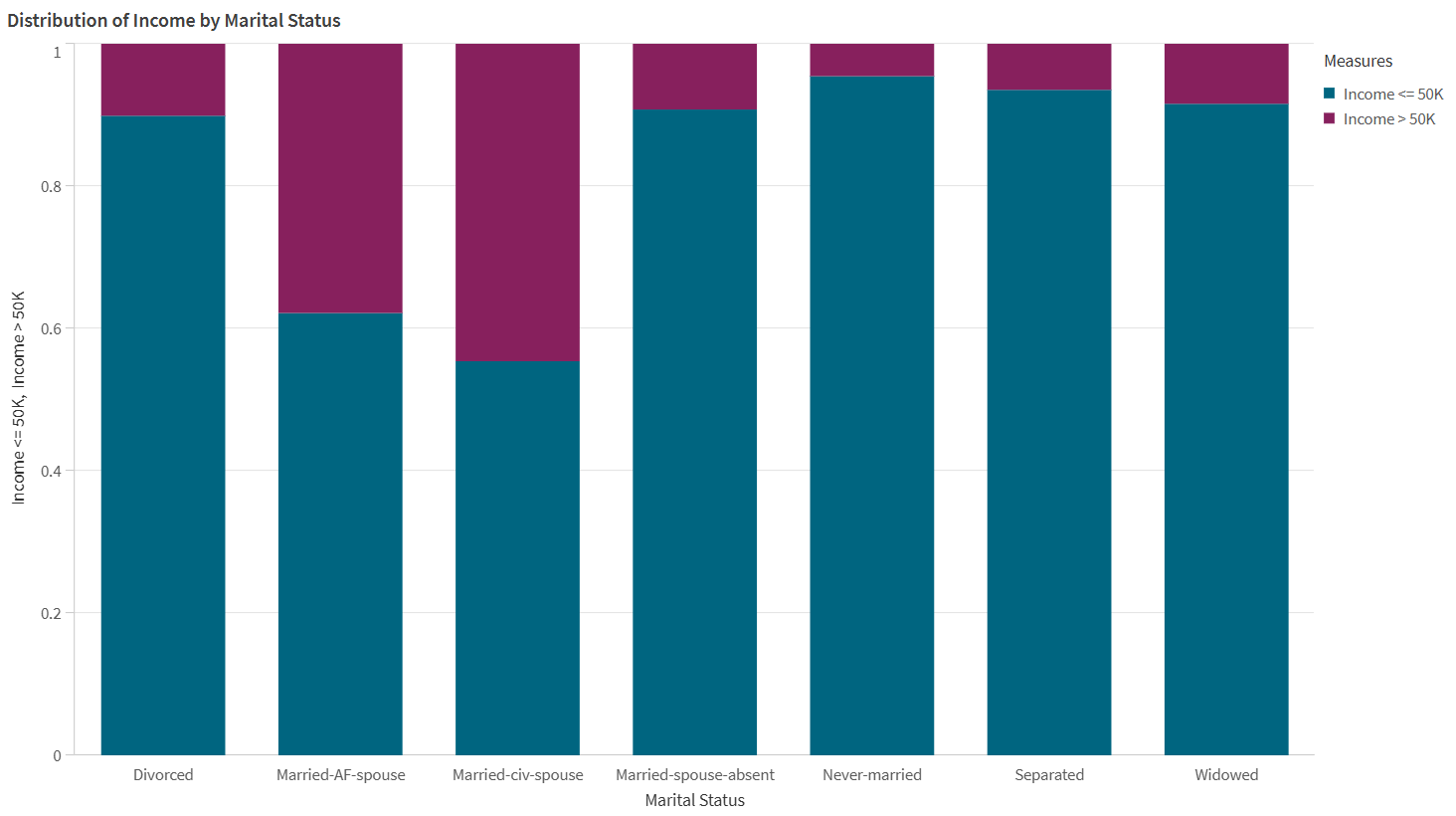
The data in the visualization below indicates data bias.
An example of data bias, visualized by a bar chart. In the source data, certain marital statuses are overrepresented compared to others with respect to income levels.
Model bias
Model bias, or algorithmic bias, occurs when the predictions made by a machine learning model favor some groups over others. With model bias, models make associations between certain groups and outcomes, negatively impacting other groups. Model bias can be caused by improperly collected or skewed data, as well as behaviors specific to the training algorithm that is in use.
For example, a model could predict disproportionately negative hiring rates for certain age groups because of unfair associations made by the model.
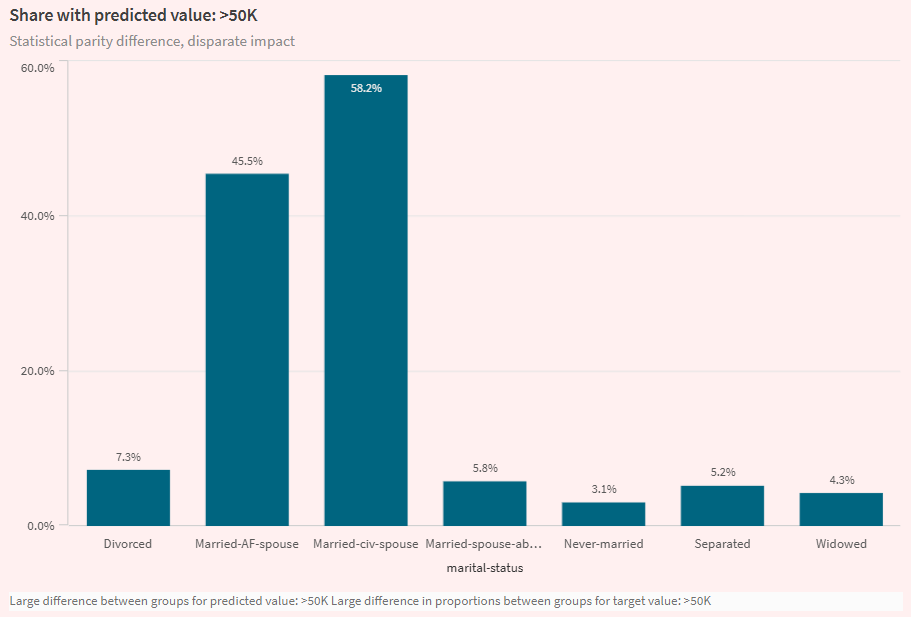
Visualization from the Analyze tab in an ML experiment, highlighting model bias. The visualization shows that a model makes higher income predictions for certain marital statuses than others.
Data bias metrics
In Qlik Predict, data bias is measured by analyzing:
-
Representation rate: Compares the distribution of data belonging to each group in the feature, in comparison to all data in the feature. The calculated metric is representation rate parity ratio.
-
Conditional distribution parity ratio: Compares the balance between data for each group in the feature, with respect to the values of the target column. The calculated metric is conditional distribution parity ratio.
To learn more about the acceptable values for these metrics, see Acceptable values for bias metrics.
Model bias metrics
In Qlik Predict, model bias metrics are best understood in the context of the model type for the experiment. Broadly speaking, there are the following bias metric categories:
-
Classification model metrics
-
Regression and time series model metrics
To learn more about the acceptable values for these metrics, see Acceptable values for bias metrics.
Classification models
In binary and multiclass classification models, bias is measured by analyzing predicted target values (outcomes). In particular, differences in positive and negative outcome rates for groups are compared ("positive" and "negative" here refer to outcomes that are favorable versus unfavorable—for example, a value of yes or no for a Hired target column.). These models have the following bias metrics:
-
Disparate impact
-
Statistical parity difference
-
Equal opportunity difference
Disparate impact
Disparate impact ratio (DI) assesses whether groups in a sensitive feature are being favored or harmed in the model's predicted outcomes. It is measured by calculating how often each group is selected as the predicted value, comparing it to the rate of selection for the most favored group in the feature.
Statistical parity difference
Similar to disparate impact, statistical parity difference (SPD) assesses model predictions to determine if they favor or harm any individual groups. The metric is calculated by comparing the positive outcome rates between the largest and smallest groups.
Equal opportunity difference
Equal opportunity difference (EOD) is similar to the other two classification model bias metrics. EOD compares the highest and lowest true positive rates across groups in a feature.
Regression and time series models
In regression and time series models, bias is measured by comparing how often models make errors in their predictions, using parity ratios to determine fairness of predicted outcomes.
The following bias metrics are calculated, using error metrics that are commonly used for evaluating model accuracy:
Acceptable values for bias metrics
| Bias metric | Bias category | Applicable model types | Acceptable values |
|---|---|---|---|
| Representation rate parity ratio | Data bias | All |
Ideal value: between 0.8 and 1. A lower ratio indicates disproportionate representation. |
| Conditional distribution parity ratio | Data bias | All |
Ideal value: between 0.8 and 1. A lower ratio indicates disproportionate representation. |
| Statistical parity difference (SPD) | Model bias | Binary classification, multiclass classification |
Ideal value: 0. A value above 0.2 is a strong signal of unfairness. |
| Disparate impact (DI) | Model bias | Binary classification, multiclass classification |
Ideal value: 1. A value below 0.8 signals unfairness. |
| Equal opportunity difference (EOD) | Model bias | Binary classification, multiclass classification |
Ideal value: 0. A value above 0.1 signals unfairness. |
| MAE parity ratio | Model bias | Regression |
Ideal value: between 0.8 and 1. A value above 1.25 signals unfairness. |
| MSE parity ratio | Model bias | Regression |
Ideal value: between 0.8 and 1. A value above 1.25 signals unfairness. |
| RMSE parity ratio | Model bias | Regression |
Ideal value: between 0.8 and 1. A value above 1.25 signals unfairness. |
| R2 gap | Model bias | Regression |
Ideal value: 0. A value above 0.2 signals unfairness. |
| MASE parity ratio | Model bias | Time series | A value above 1.25 signals unfairness. |
| MAPE parity ratio | Model bias | Time series | A value above 1.25 signals unfairness. |
| SMAPE parity ratio | Model bias | Time series | A value above 1.25 signals unfairness. |
Configuring bias detection
Bias detection is configured per training feature in the experiment version.
Do the following:
-
In an ML experiment, expand Bias in the training configuration panel.
-
Select the features on which you want to run bias detection.
Alternatively, toggle on bias detection for the desired features in  Schema view.
Quick analysis of bias results
After training completes, you can get a quick overview of the bias detection results in the Models tab.
Scroll down through the quick analysis items to find Bias detection. Expand sections using the  icons. You can analyze features with possible data and model biases.
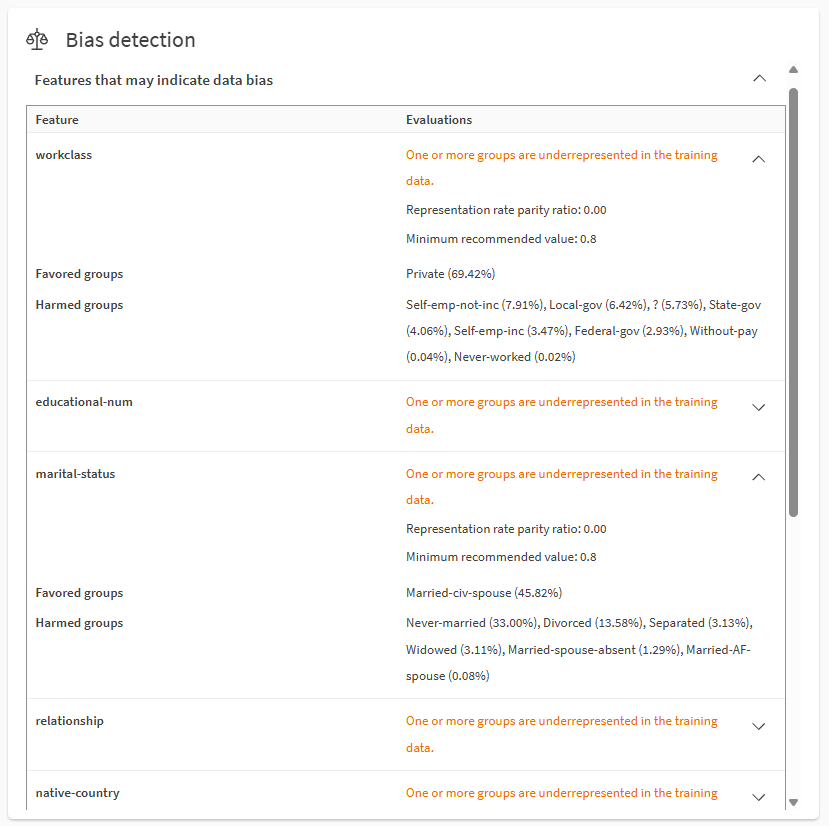
Analyzing data bias using the Bias detection section in the Models tab.
Notes
-
Favored groups are the target values or ranges that are overrepresented in the data or projected outcomes of the target, based on the bias metrics. Harmed groups are the target values or ranges that are underrepresented in the data or projected outcomes of the target, based on the bias metrics.
For information about how the bias metrics are used, see Acceptable values for bias metrics.
The numbers in parentheses describe the criteria used to calculate the metric. For example, if the metric is equal opportunity difference (EOD), female (10%) and male (80%) indicates true positive rates of 80% for male and 10% for female.
-
Target outcome refers to the value of the target column that is predicted by the model.
-
Not all bias metrics and values are shown in the Models tab due to limited space. For example:
-
Depending on the metric and model types, some metrics and groups may only include minimums and maximums.
-
If multiple metrics exceed the bias threshold for a feature, the metric indicating the highest degree of unfairness is shown.
-
For biased features in multiclass classification models, only the metric indicating the highest degree of unfairness is shown.
-
-
More detailed information is available in the Analyze tab and model training report. See Detailed analysis of bias results.
- For more information about terminology in this section, see Terminology on this page.
Detailed analysis of bias results
You can dive deeper into bias results in the Analyze tab.
Do the following:
-
In an ML experiment, select a model and go to the Analyze tab.
-
Open the Bias sheet.
-
Select between Data bias and Model bias depending on the desired analysis.
-
In the Features with potential bias table, select a single feature.
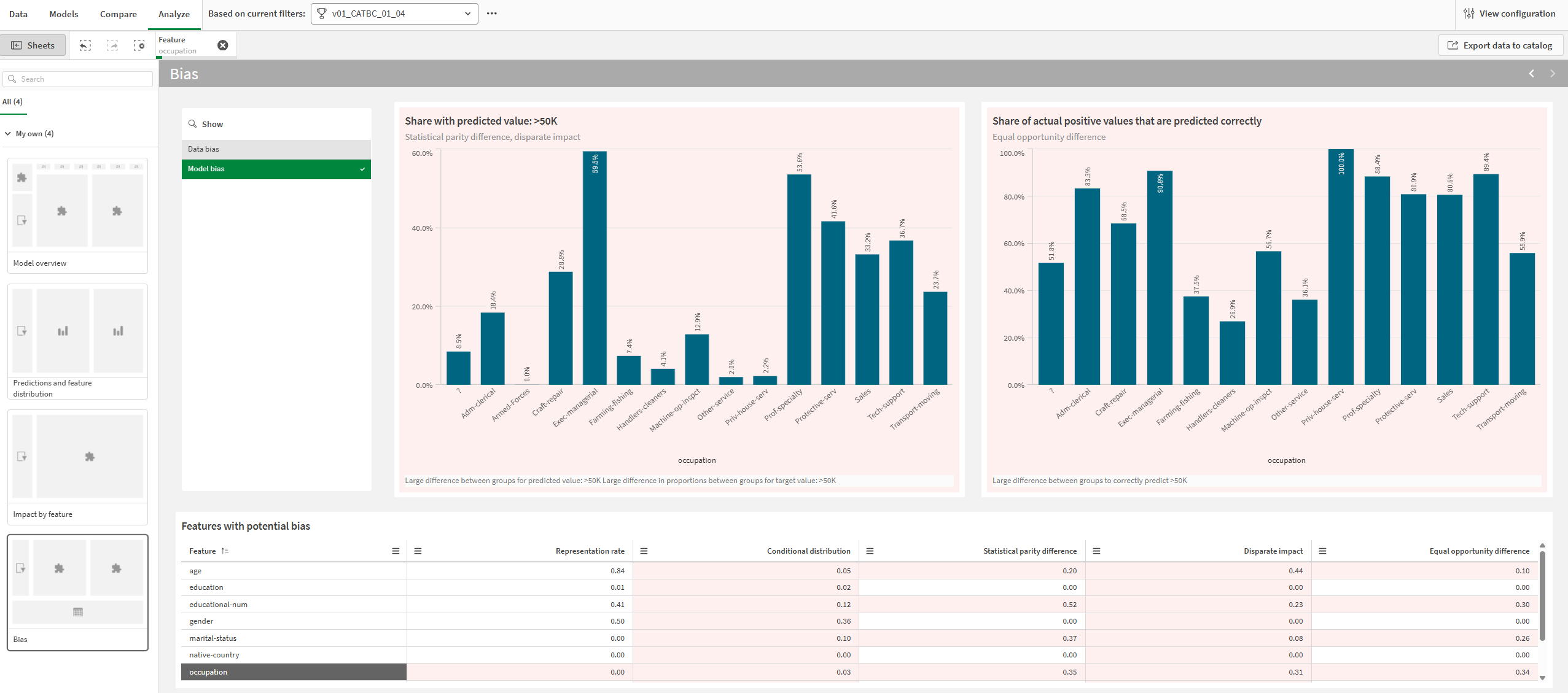
Charts and metrics that indicate possible bias are displayed with a red background. You can select features by clicking and drawing in visualizations.
Metrics in the table are static for bias metrics corresponding to standard features. For future features, bias metrics change dynamically depending on time series group selection.
Analyze tab showing an analysis of model bias for the select feature. Possible bias is indicated by red backgrounds for charts and metrics.
For more information about navigating detailed model analyses, see Performing detailed model analysis.
Bias results in training reports
Bias metrics are also presented in ML training reports. They are included in a dedicated Bias section in the report.
For more information about training reports, see Downloading ML training reports.
Addressing bias
After analyzing the bias detection results for your models, you might want to do any of the following:
-
Run new experiment versions after dropping the biased features.
-
Avoid deploying models that display bias, instead deploying models that meet the recommended criteria for bias metrics.
-
Update your dataset to correct any improper data collection or to address unequal representation rates.
-
Redefine your machine learning problem using the structured framework. For example, if your original machine learning question is inherently biased, models will likely always be unreliable in creating fair predictions.
Terminology on this page
On this page, and in Qlik Predict,"groups" is a term that has different meanings depending on context:
-
"Groups" refers to the values or ranges in features that are being analyzed for bias. For example, a Marital Status feature might have four possible groups in the training data: Married, Divorced, Separated, or Widowed.
-
In time series experiments, "groups" refers to functionality that allows target outcomes to be tracked for specific values of compatible features. On this page, these groups are referred to as "time series groups". For more information about these groups, see Groups.
Limitations
-
You cannot activate bias detection for:
-
The target feature.
-
Free text features (even if the feature type is changed to categorical).
-
Date features that are used as the date index in time series experiments.
-
Auto-engineered date features. You can run bias detection on these feature, but you do not activate them independently. Instead, activate the parent date feature for bias detection and ensure the auto-engineered date features are included for training.
-