
Distinctions between data files and datasets
Last updated: 10/27/2026
File-based data sources stored locally within Qlik Cloud are, at their source, data files. Each data file also exists as a dataset that can be analyzed and edited using catalog, lineage, and impact analysis tools.
How data files and datasets are shown
When you store a data file directly within Qlik Cloud, the resource is created as a data file. Across Qlik Cloud, the same file will be shown in two different ways:
-
In Space settings > Data files, the underlying data file is shown.
-
From the general overview in Catalog, as well as in Home, Favorites and Collections, the dataset is shown. Depending on your access and location in the user interface, you might also be able to view the underlying data file for a dataset.
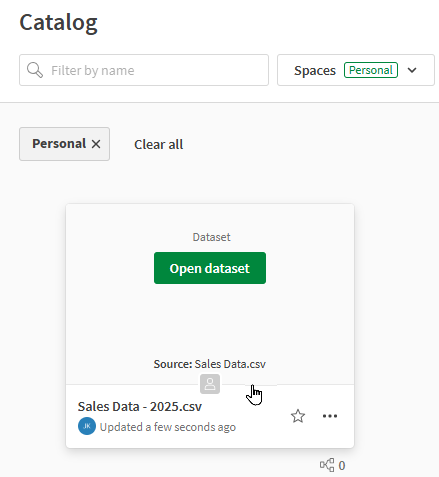
In the following image, the name of the dataset is Sales - Updated.xlsx. Hovering over the dataset, it is also possible to see that the Source of the dataset is the file Sales.xlsx. This indicates that the dataset has been given an alias Sales - Updated.xlsx, but the name of the underlying data file is unchanged from the original name Sales.xlsx.
Catalog general view showing both the name of a dataset and its underlying data file (Source).
Renaming a dataset
You can edit the name of a dataset from Catalog (general view), Home, Favorites, Collections, Dataset view, and other areas across Qlik Cloud. When you edit the name of a dataset that has been uploaded as a file within Qlik Cloud, you are creating an alias for the data resource. The name of the underlying data file is not changed when you rename its dataset.
Similarly, when you rename the underlying data file behind a dataset, the dataset name is not always automatically updated. For information, see Renaming a data file.
When you use data from a data file in a load script, the underlying data file is referenced and not the dataset. This means that renaming a dataset does not affect the file references as they exist in load scripts. This behavior offers flexibility, particularly for datasets that are accessed only with catalog tools and not for load script development.
However, renaming a dataset also means that the names of a data file and its dataset are out of sync. This can cause confusion if the data file is used in load script development.
Datasets that are not stored as Qlik Cloud files
Across Qlik Cloud, datasets can also exist as references to data that is external to Qlik Cloud—for example, a dataset created from a data connection. These datasets are not stored as local data files within Qlik Cloud, so renaming these datasets does not affect any scripts or applications where they are referenced via load script.
Renaming a data file
For users who work in load script development, if you need to update the name of a data file, you need to do so in Catalog > Space settings > Data files. When renaming a data file in this way, the following behavior can be expected:
-
If the name of the dataset for the data file has never been updated before (see Renaming a dataset), the dataset name is also updated to the new data file name when you rename the data file.
-
If the name of the dataset for the data file has already been updated at least once (see Renaming a dataset), the dataset name is not automatically updated when you rename the data file.
Additionally, any load scripts that use this data file will now need to be updated to reference the updated file name. For more information about renaming a data file, see Renaming a data file or folder.