
Working with time series experiments
Last updated: 10/23/2026With time series experiments, you can train models to forecast metrics corresponding to specific future time periods—for example, sales for the next week or month. In Qlik Predict, time series models generate multivariate forecasts that support grouped targets and future features. Time series forecasting is available for experiments involving a numeric target.
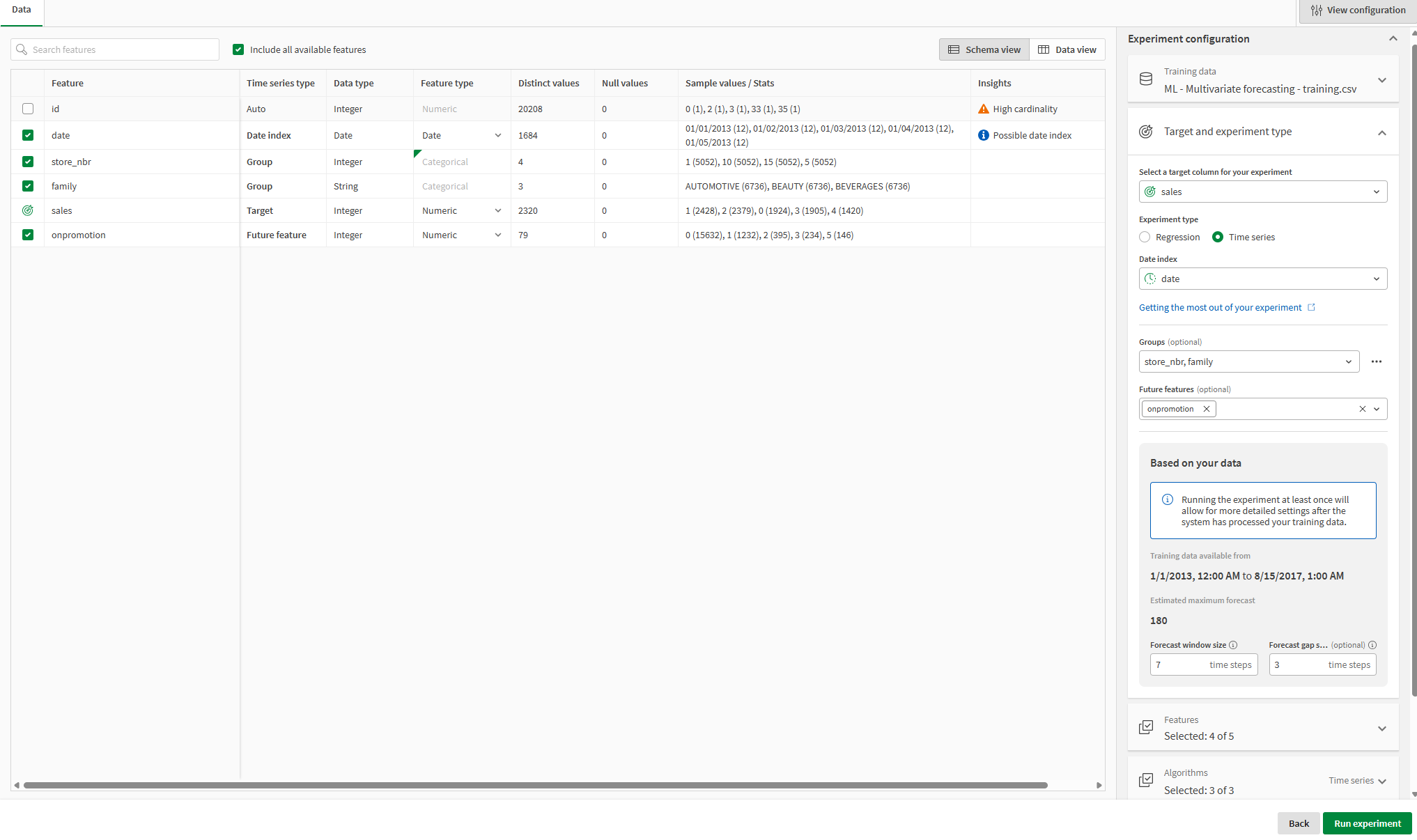
Configuring a time series experiment
Use cases
Time series forecasting is useful whenever you need date-sensitive predictions for numeric metrics. There are many scenarios in which time series forecasting is useful, including:
-
Sales and financial forecasting
-
Predicting inventory and stock
-
Predicting energy usage and demand
-
Predicting expenses
What is multivariate time series forecasting?
Multivariate time series forecasting is the prediction of future data for scenarios involving more than one variable. Time series experiments allow you to explore time-specific patterns between multiple targets (introduced via groups) and multiple features. Unlike predictions made with classification and regression models, time series predictions are specific to a particular date or time. For example, you might want to predict your sales for the next two weeks, with the associated dates being January 1 to 14.
Part 1: Prepare a training dataset
Start by preparing a training dataset. The training dataset must include historical data measured at consistent time intervals. For full details, see Preparing a training dataset.
Part 2: Create a time series experiment
You create a time series experiment by creating an ML experiment, and then selecting Time series as the Experiment type.
To configure an experiment as a time series experiment, the target needs to be numeric and have more than 11 unique values (although many more are needed to produce a high-quality model). The dataset also needs to have a column containing date or datetime information recorded over a consistent time interval.
Do the following:
-
Create an ML experiment from the Analytics activity center. See Creating experiments.
-
After selecting a training dataset, click
 View configuration to expand the experiment configuration panel.
 -
Expand Experiment settings.
-
Use the drop down menu to select a target.
-
Under Experiment type, select Time series.
Part 3: Configure your time series experiment
Next, you need to configure parameters specific to the predictions you want to make with your time series model. These parameters are specific to time series experiments. For descriptions of what each parameter means, see Working with multivariate time series forecasting.
Do the following:
-
Under Date index, select the index column to use.
-
In the Based on your data section, set the Desired forecast window size and Desired forecast gap size, in time steps.
-
Optionally, use the drop down menus for Groups and Future features to add target groupings and future features to the model training.
Part 4: Configure other experiment parameters
As with other experiment types, there are other properties — not unique to time series experiments — that you may need to adjust in your experiment configuration. These include:
-
Selecting features
-
Selecting algorithms
-
Changing feature types
-
Configuring bias detection
For full details, see Configuring experiments.
Part 5: Run the training
Do the following:
-
Click Run experiment.
Next steps
Model analysis
After the training has completed, you can analyze the models and assess their quality. As needed, create further iterations of the experiment to refine the results.
For more information, see Reviewing models.
Model deployment and approval
After analyzing the models, deploy the best one to an ML deployment, and then activate it for making predictions.
For more information, see Deploying models and Approving deployed models.
Preparing apply datasets and creating predictions
After deploying your model, understand the requirements for the apply datasets that you will use for generating predictions. See Preparing an apply dataset.
When you have prepared the apply dataset, create predictions using your time series model. You can create:
Limitations and considerations
-
You can select up to two groups for a time series experiment. The column you select as a group needs to be categorical. This column can contain numeric data, but during training, the column is treated as categorical.
-
The maximum forecast window can be as large as 180 time steps. For more information, see Maximum forecast window.
-
Intelligent model optimization is not applicable to time series experiments.
-
Time series experiments do not support manual optimization.
-
Time series experiments do not support hyperparameter optimization.
-
Time series experiments do not support time-aware training.
-
Automatic free text feature engineering is not available for time series experiments.
-
When you select a date index column for a time series experiment, the date feature type is used for this column. However, date feature engineering is not supported for time series models. Auto-engineered date features are not available to be derived from the column.
-
Time series experiments train models with deep learning algorithms. Therefore, depending on data size and forecast window, time series models usually take longer to train than regression and classification models.
-
Time series experiments support training datasets up to 1 GiB in size. For more information, see Training dataset and profiling limitations.
For limitations related to creating predictions with time series models, see Limitations.
Tutorial
For a full tutorial demonstrating time series forecasting, from model training to prediction, see Tutorial – Predicting sales with multivariate time series forecasting.