Zuora (v1) ON THIS PAGE Last updated: 9/15/2026
Zuora integration summaryStitch’s Zuora integration can use one of two APIs: REST API and AQuA API . When setting up the integration in Stitch, you can choose which API to use.
Additionally, Stitch supports replicating custom fields for any object that supports custom fields in Zuora. Custom fields are supported for both the REST API and AQuA API .
Note : Each API has its benefits and limitations. For example: With the AQuA API, you can replicate large data sets and deleted records for objects that support it . Once an integration is saved, the API selected can’t be changed. Learn more about the APIs .
Refer to the Schema section for a list of objects available for replication.
Zuora feature snapshotA high-level look at Stitch's Zuora (v1) integration, including release status, useful links, and the features supported in Stitch.
Connecting ZuoraZuora setup requirements
To set up Zuora in Stitch, you need:
Step 1: Create a Stitch Zuora user
Information note
Basic Auth only
This section applies only if you plan to use Basic Authentication as your authentication method. If using OAuth , skip to the next step.
In this step, you’ll create a Zuora user for Stitch. Creating a Stitch-specific user will ensure that Stitch is distinguishable in any logs or audits.
Information note
Important: Zuora user requirements
To replicate your Zuora data using Basic Authentication, Stitch requires a user that:
Has Standard user permissions. While Stitch will only ever read your data, these permissions are required to access certain objects in Zuora.Has two-factor authentication disabled. If this is enabled, connection and replication issues will occur after setup. Refer to the Disable or Reset Two-Factor Authentication section in this Zuora documentation for help disabling this setting.Has credentials that don’t expire. This is applicable only if your company enforces Password Expiration rules. If Stitch’s Zuora credentials expire, connection issues may arise. Refer to this Zuora support article for a workaround .
Create the Zuora user
Zuora user permissions
Sign into your Zuora account, if you haven’t already.
Click your username in the top-right corner.
Click Administration , then Manage Users .
Click Add Single User .
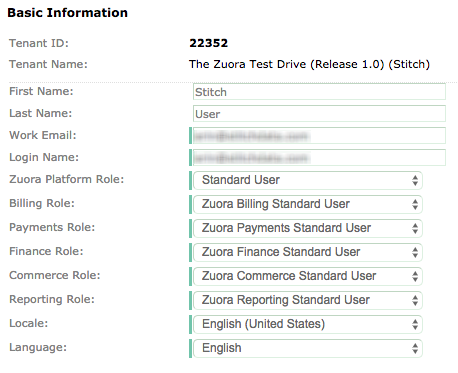
Enter a first and last name for the user.
Enter an email address in the Work Email field.
Enter an email address in the Login Field .
In the Zuora Platform Role field, select Standard User .
For the remaining Role fields, select the Standard User option.
There aren’t any requirements for the Locale and Language fields - leave them as the defaults.
Click Save to create the user.
After the user is created, Zuora will send a verification email to the email address in the Work Email field. Complete the verification and set a password for the Stitch user before moving on to the next step.
Step 2: Add Zuora as a Stitch data source
Sign into your Stitch account .
On the Stitch Dashboard page, click the Add Integration button.
Click the Zuora icon.
Enter a name for the integration. This is the name that will display on the Stitch Dashboard for the integration; it’ll also be used to create the schema in your destination.
For example, the name “Stitch Zuora” would create a schema called stitch_zuora in the destination. Note : Schema names cannot be changed after you save the integration.
If the Zuora instance you want to connect to Stitch is a sandbox, check the Connect to a Sandbox Environment checkbox.
Select your authentication method using the radio button selector:
Basic (recommended) : Use if you have created a Stitch Zuora user with username and password credentials.OAuth : Use if your Zuora administrator has created an OAuth application and provided you with client ID and client secret.
If you selected Basic (recommended):
In the Zuora Username field, enter the Stitch Zuora user’s username. This is the email address that was in the Login Name field when you created the user.
In the Zuora Password field, enter the password associated with the Stitch Zuora user.
If you selected OAuth:
Your Zuora administrator must create an OAuth application in Zuora to obtain the Zuora Client ID and Zuora Client Secret . If you don’t have these credentials yet, refer to Zuora documentation .
Note: This value will be securely stored by Stitch and will not be displayed again. Keep it secure and do not share it via email or unsecured channels.
If the Zuora instance you want to connect to Stitch is based in Europe , check the Connect to a European endpoint box. If you aren’t sure if this is applicable to you, refer to Zuora’s documentation .
Step 3: Select a Zuora extraction API
Stitch’s Zuora integration gives you the ability to select the API that you want Stitch to use to extract data. If you aren’t sure which API you should use, take a look at the brief comparison below.
Note : This setting can be changed at any time, but will only affect extractions that take place after the change.
Once you’ve decided, click the radio button next to the API you want to use.
Information note
If using the AQuA API, you’ll also need to enter a partner ID in the
Zuora Partner ID field. If you don’t already have this credential, reach out to
Zuora Global Support before proceeding.
REST API
AQuA API
Good for replicating
Small data sets, more frequently
Large data sets, less frequently
Deleted records
Unsupported
Supported . An additional column (deleted) will be added to objects that support deletions, which indicates the record’s deletion status.
Deleted data extraction is unsupported by the AQuA API for the following objects :
Refer to Zuora’s documentation for more info.
Requires additional Zuora credentials
Not required
Required . Using the AQuA API requires a Partner ID - to obtain one, reach out to Zuora Global Support .
Step 4: Define the historical replication start date
The Sync Historical Data setting defines the starting date for your Zuora integration.
This means that data equal to or newer than this date will be replicated to your data warehouse.
Change this setting if you want to replicate data beyond Zuora’s default setting of 1 year . For a detailed look at historical replication jobs, check out the Syncing Historical SaaS Data guide.
Step 5: Create a replication schedule
Information note
Replication schedules affect the time Extraction begins, not the time to data loaded. Refer to the
Replication Scheduling documentation for more information.
In the Replication Frequency section, you’ll create the integration’s replication schedule . An integration’s replication schedule determines how often Stitch runs a replication job, and the time that job begins.
Zuora integrations support the following replication scheduling methods:
To keep your row usage low, consider setting the integration to replicate less frequently. See the Understanding and Reducing Your Row Usage guide for tips on reducing your usage.
Step 6: Set objects to replicate
Information note
Is an object missing or not replicating? Verify that the object meets the requirements for
selection and
replication .
The last step is to select the tables and columns you want to replicate. Learn about the available tables for this integration.
Note : If a replication job is currently in progress, new selections won’t be used until the next job starts.
Selection options
Individual tables and columns
All tables and columns
For Zuora integrations, you can select:
Individual tables and columns
All tables and columns
Click the tabs to view instructions for each selection method.
In the integration’s Tables to Replicate tab , locate a table you want to replicate.
To track a table, click the checkbox next to the table’s name. A blue checkmark means the table is set to replicate.
To track a column, click the checkbox next to the column’s name. A blue checkmark means the column is set to replicate.
Repeat this process for all the tables and columns you want to replicate.
When finished, click the Finalize Your Selections button at the bottom of the screen to save your selections.
Information note
Important :
Using the
Select All feature will overwrite any previous selections. However, selections aren’t final until
Finalize Your Selections is clicked. Clicking
Cancel will restore your previous selections.
Refer to the
Select All guide for more info about this feature.
Click into the integration from the Stitch Dashboard page.
Click the Tables to Replicate tab.
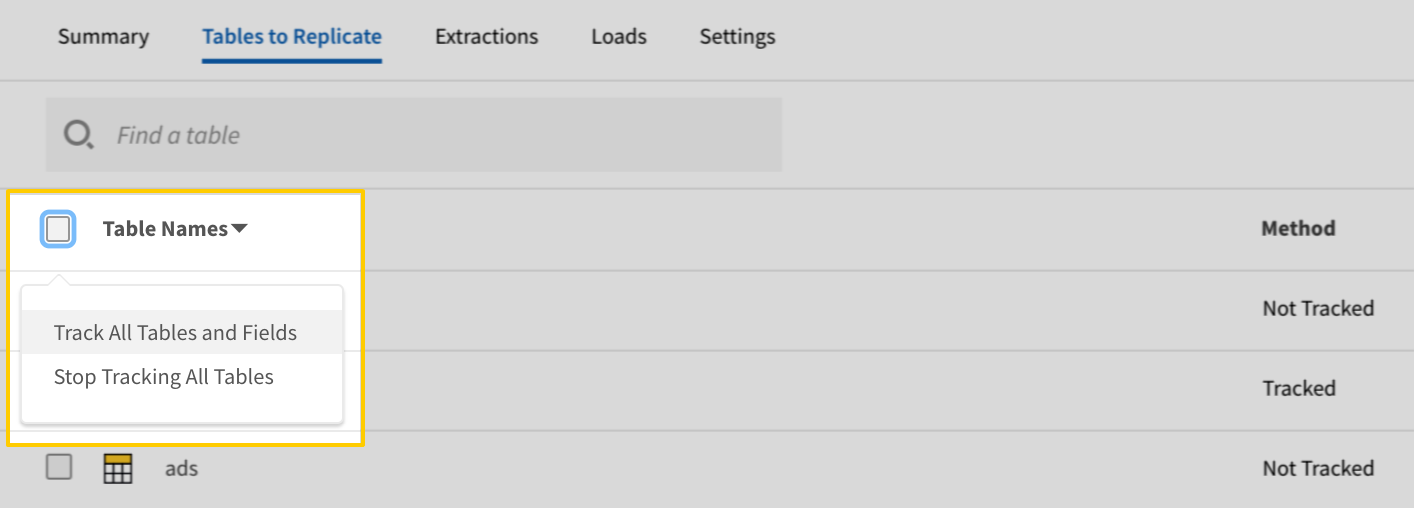
In the list of tables, click the box next to the Table Names column.
In the menu that displays, click Track all Tables and Fields :
The Track all Tables and Fields menu in the Tables to Replicate tab
Click the Finalize Your Selections button at the bottom of the page to save your data selections.
Initial and historical replication jobs
After you finish setting up Zuora, its Sync Status may show as Pending on either the Stitch Dashboard or in the Integration Details page.
For a new integration, a Pending status indicates that Stitch is in the process of scheduling the initial replication job for the integration. This may take some time to complete.
Information note
Initial replication jobs with Anchor Scheduling
If using Anchor Scheduling, an initial replication job may not kick off immediately. This depends on the selected Replication Frequency and Anchor Time. Refer to the Anchor Scheduling documentation for more information.
Free historical data loads
The first seven days of replication, beginning when data is first replicated, are free. Rows replicated from the new integration during this time won’t count towards your quota. Stitch offers this as a way of testing new integrations, measuring usage, and ensuring historical data volumes don’t quickly consume your quota.
Information note
Replication will continue after the seven days are over . If you’re no longer interested in this source, be sure to pause or delete the integration to prevent unwanted usage.
Zuora replicationReplicate deleted data
Information note
Note : This section is only applicable if using the
AQuA API for data extraction . Zuora’s REST API does not support extracting deleted data.
If using the AQuA API for data extraction, deleted data will be replicated for objects that support it. Supported objects will contain a boolean column named deleted that indicates a record’s deletion status.
Note : This column won’t be automatically included for replication - it must be set to replicate .
Deleted data is supported for all objects with the exception of the following:
Custom field replication
Custom object properties, or attributes, are supported by Stitch’s Zuora integration. If custom fields are available through Zuora’s API, Stitch will replicate them to your destination.
This is applicable to any object that supports custom fields in Zuora. Refer to Zuora’s documentation for info on which objects support custom fields.
Unsupported objects
Stitch’s Zuora integration doesn’t currently support replication for the following objects:
Zuora table referenceInformation note
Schemas and versioning
Schemas and naming conventions can change from version to version, so we recommend verifying your integration’s version before continuing.
The schema and info displayed below is for version 1 of this integration.
This is the latest version of the Zuora integration.
Zuora object relationships
To get a better understanding of how Zuora objects relate to each other, check out Zuora’s Entity Relationship Diagram .
Understanding the relationships between different data sets will allow you to perform more in-depth and complex analyses.
Don’t see a table listed here? The list of tables shown below is not an exhaustive list of all the tables Stitch can replicate from Zuora.
We’re working on adding documentation for additional Zuora tables. If there’s a specific table you’d like to see here, let us know by opening an issue in the Stitch Docs GitHub repo .
Information note
Table and column names in your destination
Depending on your destination, table and column names may not appear as they are outlined below.
For example: Object names are lowercased in Redshift (CusTomERs > customers), while case is maintained in PostgreSQL destinations (CusTomERs > CusTomERs). Refer to the Loading Guide for your destination for more info.
Account
The Account table contains information about the customer accounts in your Zuora instance.
Replication Method
Key-based Incremental
Primary Key
id
Replication Key
updatedDate
Useful links
Zuora documentation
Account table foreign keys
Join Account with
on
ContactSnapshot
Account.id = ContactSnapshot.accountId
Account.billToContactId = ContactSnapshot.contactId
Account.soldToContactId = ContactSnapshot.contactId
Invoice
Account.id = Invoice.accountId
Account.billToContactId = Invoice.billToContactId
Account.soldToContactId = Invoice.billToContactId
Account.billToContactId = Invoice.soldToContactId
Account.soldToContactId = Invoice.soldToContactId
Account.defaultPaymentMethodId = Invoice.defaultPaymentMethodId
Account.parentAccountId = Invoice.parentAccountId
Payment
Account.id = Payment.accountId
Refund
Account.id = Refund.accountId
Account.billToContactId = Refund.billToContactId
Account.soldToContactId = Refund.billToContactId
Account.billToContactId = Refund.soldToContactId
Account.soldToContactId = Refund.soldToContactId
Account.parentAccountId = Refund.parentAccountId
Subscription
Account.id = Subscription.accountId
Contact
Account.billToContactId = Contact.id
Account.soldToContactId = Contact.id
CreditBalanceAdjustment
Account.billToContactId = CreditBalanceAdjustment.billToContactId
Account.soldToContactId = CreditBalanceAdjustment.billToContactId
Account.billToContactId = CreditBalanceAdjustment.soldToContactId
Account.soldToContactId = CreditBalanceAdjustment.soldToContactId
Account.parentAccountId = CreditBalanceAdjustment.parentAccountId
DiscountAppliedMetrics
Account.billToContactId = DiscountAppliedMetrics.billToContactId
Account.soldToContactId = DiscountAppliedMetrics.billToContactId
Account.billToContactId = DiscountAppliedMetrics.soldToContactId
Account.soldToContactId = DiscountAppliedMetrics.soldToContactId
Account.parentAccountId = DiscountAppliedMetrics.parentAccountId
InvoiceItemAdjustment
Account.billToContactId = InvoiceItemAdjustment.billToContactId
Account.soldToContactId = InvoiceItemAdjustment.billToContactId
Account.billToContactId = InvoiceItemAdjustment.soldToContactId
Account.soldToContactId = InvoiceItemAdjustment.soldToContactId
Account.parentAccountId = InvoiceItemAdjustment.parentAccountId
ProcessedUsage
Account.billToContactId = ProcessedUsage.billToContactId
Account.soldToContactId = ProcessedUsage.billToContactId
Account.billToContactId = ProcessedUsage.soldToContactId
Account.soldToContactId = ProcessedUsage.soldToContactId
Account.parentAccountId = ProcessedUsage.parentAccountId
RatePlan
Account.billToContactId = RatePlan.billToContactId
Account.soldToContactId = RatePlan.billToContactId
RevenueChargeSummaryItem
Account.billToContactId = RevenueChargeSummaryItem.billToContactId
Account.soldToContactId = RevenueChargeSummaryItem.billToContactId
Account.billToContactId = RevenueChargeSummaryItem.soldToContactId
Account.soldToContactId = RevenueChargeSummaryItem.soldToContactId
Account.parentAccountId = RevenueChargeSummaryItem.parentAccountId
RevenueEventItem
Account.billToContactId = RevenueEventItem.billToContactId
Account.soldToContactId = RevenueEventItem.billToContactId
Account.billToContactId = RevenueEventItem.soldToContactId
Account.soldToContactId = RevenueEventItem.soldToContactId
Account.id = RevenueEventItem.deferredRevenueAccountingCodeId
Account.parentAccountId = RevenueEventItem.parentAccountId
RevenueEventItemInvoiceItem
Account.billToContactId = RevenueEventItemInvoiceItem.billToContactId
Account.soldToContactId = RevenueEventItemInvoiceItem.billToContactId
Account.billToContactId = RevenueEventItemInvoiceItem.soldToContactId
Account.soldToContactId = RevenueEventItemInvoiceItem.soldToContactId
Account.id = RevenueEventItemInvoiceItem.deferredRevenueAccountingCodeId
Account.parentAccountId = RevenueEventItemInvoiceItem.parentAccountId
RevenueEventItemInvoiceItemAdjustment
Account.billToContactId = RevenueEventItemInvoiceItemAdjustment.billToContactId
Account.soldToContactId = RevenueEventItemInvoiceItemAdjustment.billToContactId
Account.billToContactId = RevenueEventItemInvoiceItemAdjustment.soldToContactId
Account.soldToContactId = RevenueEventItemInvoiceItemAdjustment.soldToContactId
Account.id = RevenueEventItemInvoiceItemAdjustment.deferredRevenueAccountingCodeId
Account.parentAccountId = RevenueEventItemInvoiceItemAdjustment.parentAccountId
RevenueScheduleItem
Account.billToContactId = RevenueScheduleItem.billToContactId
Account.soldToContactId = RevenueScheduleItem.billToContactId
Account.billToContactId = RevenueScheduleItem.soldToContactId
Account.soldToContactId = RevenueScheduleItem.soldToContactId
Account.id = RevenueScheduleItem.deferredRevenueAccountingCodeId
Account.parentAccountId = RevenueScheduleItem.parentAccountId
RevenueScheduleItemInvoiceItem
Account.billToContactId = RevenueScheduleItemInvoiceItem.billToContactId
Account.soldToContactId = RevenueScheduleItemInvoiceItem.billToContactId
Account.billToContactId = RevenueScheduleItemInvoiceItem.soldToContactId
Account.soldToContactId = RevenueScheduleItemInvoiceItem.soldToContactId
Account.id = RevenueScheduleItemInvoiceItem.deferredRevenueAccountingCodeId
Account.parentAccountId = RevenueScheduleItemInvoiceItem.parentAccountId
RevenueScheduleItemInvoiceItemAdjustment
Account.billToContactId = RevenueScheduleItemInvoiceItemAdjustment.billToContactId
Account.soldToContactId = RevenueScheduleItemInvoiceItemAdjustment.billToContactId
Account.billToContactId = RevenueScheduleItemInvoiceItemAdjustment.soldToContactId
Account.soldToContactId = RevenueScheduleItemInvoiceItemAdjustment.soldToContactId
Account.id = RevenueScheduleItemInvoiceItemAdjustment.deferredRevenueAccountingCodeId
Account.parentAccountId = RevenueScheduleItemInvoiceItemAdjustment.parentAccountId
CommunicationProfile
Account.communicationProfileId = CommunicationProfile.id
PaymentMethod
Account.defaultPaymentMethodId = PaymentMethod.id
Account table schema
accountNumber
STRING
additionalEmailAddresses
STRING
allowInvoiceEdit
BOOLEAN
autoPay
BOOLEAN
balance
DECIMAL
batch
STRING
bcdSettingOption
STRING
billCycleDay
INTEGER
billToContactId
STRING
communicationProfileId
STRING
createdById
STRING
createdDate
DATE-TIME
creditBalance
DECIMAL
crmId
STRING
currency
STRING
customerServiceRepName
STRING
defaultPaymentMethodId
STRING
deleted
BOOLEAN
id
STRING
invoiceDeliveryPrefsEmail
BOOLEAN
invoiceDeliveryPrefsPrint
BOOLEAN
invoiceTemplateId
STRING
lastInvoiceDate
DATE-TIME
name
STRING
notes
STRING
parentAccountId
STRING
paymentGateway
STRING
paymentTerm
STRING
purchaseOrderNumber
STRING
salesRepName
STRING
soldToContactId
STRING
status
STRING
taxExemptCertificateId
STRING
taxExemptCertificateType
STRING
taxExemptDescription
STRING
taxExemptEffectiveDate
DATE-TIME
taxExemptExpirationDate
DATE-TIME
taxExemptIssuingJurisdiction
STRING
taxExemptStatus
STRING
totalInvoiceBalance
DECIMAL
updatedById
STRING
updatedDate
DATE-TIME
AccountingCode
The AccountingCode table contains information about the accounting codes in your Zuora instance. Accounting codes are used to categorize transactions for accounting purposes.
Note : To replicate this table, you must have Zuora Finance enabled.
Replication Method
Key-based Incremental
Primary Key
id
Replication Key
updatedDate
Useful links
Zuora documentation
AccountingCode table foreign keys
Join AccountingCode with
on
CreditBalanceAdjustment
AccountingCode.id = CreditBalanceAdjustment.accountingCode
AccountingCode.id = CreditBalanceAdjustment.accountReceivableAccountingCodeId
AccountingCode.id = CreditBalanceAdjustment.cashOnAccountAccountingCodeId
InvoiceItem
AccountingCode.id = InvoiceItem.accountingCode
InvoiceItemAdjustment
AccountingCode.id = InvoiceItemAdjustment.accountingCode
AccountingCode.id = InvoiceItemAdjustment.accountReceivableAccountingCodeId
AccountingCode.id = InvoiceItemAdjustment.recognizedRevenueAccountingCodeId
AccountingCode.id = InvoiceItemAdjustment.salesTaxPayableAccountingCodeId
ProductRatePlanCharge
AccountingCode.id = ProductRatePlanCharge.accountingCode
RevenueEventItem
AccountingCode.id = RevenueEventItem.recognizedRevenueAccountingCodeId
RevenueEventItemInvoiceItem
AccountingCode.id = RevenueEventItemInvoiceItem.recognizedRevenueAccountingCodeId
RevenueEventItemInvoiceItemAdjustment
AccountingCode.id = RevenueEventItemInvoiceItemAdjustment.recognizedRevenueAccountingCodeId
RevenueScheduleItem
AccountingCode.id = RevenueScheduleItem.recognizedRevenueAccountingCodeId
RevenueScheduleItemInvoiceItem
AccountingCode.id = RevenueScheduleItemInvoiceItem.recognizedRevenueAccountingCodeId
RevenueScheduleItemInvoiceItemAdjustment
AccountingCode.id = RevenueScheduleItemInvoiceItemAdjustment.recognizedRevenueAccountingCodeId
AccountingCode table schema
category
STRING
createdById
STRING
createdDate
DATE-TIME
deleted
BOOLEAN
glAccountName
STRING
glAccountNumber
STRING
id
STRING
name
STRING
notes
STRING
status
STRING
type
STRING
updatedById
STRING
updatedDate
DATE-TIME
AccountingPeriod
The AccountingPeriod table contains information about the accounting periods in your Zuora account.
Note : To replicate this table, you must have Zuora Finance enabled.
Replication Method
Key-based Incremental
Primary Key
id
Replication Key
updatedDate
Useful links
Zuora documentation
AccountingPeriod table foreign keys
AccountingPeriod table schema
createdById
STRING
createdDate
DATE-TIME
endDate
DATE-TIME
fiscalQuarter
STRING
fiscalYear
STRING
id
STRING
name
STRING
notes
STRING
runTrialBalanceEnd
DATE-TIME
runTrialBalanceErrorMessage
STRING
runTrialBalanceStart
DATE-TIME
runTrialBalanceStatus
STRING
startDate
DATE-TIME
status
STRING
updatedById
STRING
updatedDate
DATE-TIME
Amendment
The Amendment table contains information about subscription amendments, which are changes to customer subscriptions. For example: Changing the terms of a contract, adding/removing a product, canceling a subscription, etc.
Replication Method
Key-based Incremental
Primary Key
id
Replication Key
updatedDate
Useful links
Zuora documentation
Amendment table foreign keys
Join Amendment with
on
DiscountAppliedMetrics
Amendment.id = DiscountAppliedMetrics.amendmentId
Amendment.subscriptionId = DiscountAppliedMetrics.subscriptionId
InvoiceItemAdjustment
Amendment.id = InvoiceItemAdjustment.amendmentId
Amendment.subscriptionId = InvoiceItemAdjustment.subscriptionId
ProcessedUsage
Amendment.id = ProcessedUsage.amendmentId
RatePlan
Amendment.id = RatePlan.amendmentId
Amendment.subscriptionId = RatePlan.subscriptionId
RatePlanChargeTier
Amendment.id = RatePlanChargeTier.amendmentId
Amendment.subscriptionId = RatePlanChargeTier.subscriptionId
RevenueChargeSummaryItem
Amendment.id = RevenueChargeSummaryItem.amendmentId
Amendment.subscriptionId = RevenueChargeSummaryItem.subscriptionId
RevenueEventItem
Amendment.id = RevenueEventItem.amendmentId
Amendment.subscriptionId = RevenueEventItem.subscriptionId
RevenueEventItemInvoiceItem
Amendment.id = RevenueEventItemInvoiceItem.amendmentId
Amendment.subscriptionId = RevenueEventItemInvoiceItem.subscriptionId
RevenueEventItemInvoiceItemAdjustment
Amendment.id = RevenueEventItemInvoiceItemAdjustment.amendmentId
Amendment.subscriptionId = RevenueEventItemInvoiceItemAdjustment.subscriptionId
RevenueScheduleItem
Amendment.id = RevenueScheduleItem.amendmentId
RevenueScheduleItemInvoiceItem
Amendment.id = RevenueScheduleItemInvoiceItem.amendmentId
RevenueScheduleItemInvoiceItemAdjustment
Amendment.id = RevenueScheduleItemInvoiceItemAdjustment.amendmentId
Amendment.subscriptionId = RevenueScheduleItemInvoiceItemAdjustment.subscriptionId
Subscription
Amendment.subscriptionId = Subscription.id
InvoiceItem
Amendment.subscriptionId = InvoiceItem.subscriptionId
Amendment table schema
autoRenew
BOOLEAN
code
STRING
contractEffectiveDate
DATE-TIME
createdById
STRING
createdDate
DATE-TIME
currentTerm
INTEGER
currentTermPeriodType
STRING
customerAcceptanceDate
DATE-TIME
deleted
BOOLEAN
description
STRING
effectiveDate
DATE-TIME
id
STRING
name
STRING
renewalSetting
STRING
renewalTerm
STRING
renewalTermPeriodType
STRING
serviceActivationDate
DATE-TIME
specificUpdateDate
DATE-TIME
status
STRING
subscriptionId
STRING
termStartDate
STRING
type
STRING
updatedById
STRING
updatedDate
DATE-TIME
BillingRun
The BillingRun table contains information about billing runs.
Replication Method
Key-based Incremental
Primary Key
id
Replication Key
updatedDate
Useful links
Zuora documentation
BillingRun table foreign keys
Join BillingRun with
on
PaymentRun
BillingRun.id = PaymentRun.billingRunId
BillingRun table schema
autoEmail
BOOLEAN
autoPost
BOOLEAN
autoRenewal
BOOLEAN
batch
STRING
billCycleDay
STRING
billRunNumber
STRING
chargeTypeToExclude
STRING
createdById
STRING
createdDate
DATE-TIME
deleted
BOOLEAN
errorMessage
STRING
executedDate
DATE-TIME
id
STRING
invoiceDate
DATE-TIME
invoicesEmailed
BOOLEAN
lastEmailSentTime
DATE-TIME
noEmailForZeroAmountInvoice
BOOLEAN
numberOfAccounts
INTEGER
numberOfInvoices
INTEGER
status
STRING
targetDate
DATE-TIME
updatedById
STRING
updatedDate
DATE-TIME
CommunicationProfile
The CommunicationProfile table contains information about communication profiles, which are sets of policies that determine how to communicate with the contacts associated with a specific customer account.
Replication Method
Key-based Incremental
Primary Key
id
Replication Key
updatedDate
Useful links
Zuora documentation
CommunicationProfile table foreign keys
Join CommunicationProfile with
on
Account
CommunicationProfile.id = Account.communicationProfileId
CommunicationProfile table schema
createdById
STRING
createdDate
DATE-TIME
deleted
BOOLEAN
description
STRING
id
STRING
profileName
STRING
updatedById
STRING
updatedDate
DATE-TIME
The Contact table contains info about an account’s point-of-contact.
Replication Method
Key-based Incremental
Primary Key
id
Replication Key
updatedDate
Useful links
Zuora documentation
The ContactSnapshot table contains ‘snapshot’ records of Bill-To or Sold-To contacts on customer accounts. Snapshots are record preservations at specific points in time. When invoices are posted, Zuora will preserve the data for the Bill-To and Sold-To contacts at that point in time.
Replication Method
Key-based Incremental
Primary Key
id
Replication Key
updatedDate
Useful links
Zuora documentation
CreditBalanceAdjustment
The CreditBalanceAdjustment table contains information about credit balance adjustments , or the application of credit balances to invoices, payments, and refunds.
Replication Method
Key-based Incremental
Primary Key
id
Replication Key
updatedDate
Useful links
Zuora documentation
CreditBalanceAdjustment table foreign keys
Join CreditBalanceAdjustment with
on
AccountingCode
CreditBalanceAdjustment.accountingCode = AccountingCode.id
CreditBalanceAdjustment.accountReceivableAccountingCodeId = AccountingCode.id
CreditBalanceAdjustment.cashOnAccountAccountingCodeId = AccountingCode.id
InvoiceItem
CreditBalanceAdjustment.accountingCode = InvoiceItem.accountingCode
InvoiceItemAdjustment
CreditBalanceAdjustment.accountingCode = InvoiceItemAdjustment.accountingCode
CreditBalanceAdjustment.accountingPeriodId = InvoiceItemAdjustment.accountingPeriodId
CreditBalanceAdjustment.accountReceivableAccountingCodeId = InvoiceItemAdjustment.accountReceivableAccountingCodeId
CreditBalanceAdjustment.billToContactId = InvoiceItemAdjustment.billToContactId
CreditBalanceAdjustment.soldToContactId = InvoiceItemAdjustment.billToContactId
CreditBalanceAdjustment.billToContactId = InvoiceItemAdjustment.soldToContactId
CreditBalanceAdjustment.soldToContactId = InvoiceItemAdjustment.soldToContactId
CreditBalanceAdjustment.journalEntryId = InvoiceItemAdjustment.journalEntryId
CreditBalanceAdjustment.journalRunId = InvoiceItemAdjustment.journalRunId
CreditBalanceAdjustment.parentAccountId = InvoiceItemAdjustment.parentAccountId
ProductRatePlanCharge
CreditBalanceAdjustment.accountingCode = ProductRatePlanCharge.accountingCode
AccountingPeriod
CreditBalanceAdjustment.accountingPeriodId = AccountingPeriod.id
JournalEntry
CreditBalanceAdjustment.accountingPeriodId = JournalEntry.accountingPeriodId
CreditBalanceAdjustment.journalEntryId = JournalEntry.id
RevenueChargeSummaryItem
CreditBalanceAdjustment.accountingPeriodId = RevenueChargeSummaryItem.accountingPeriodId
CreditBalanceAdjustment.billToContactId = RevenueChargeSummaryItem.billToContactId
CreditBalanceAdjustment.soldToContactId = RevenueChargeSummaryItem.billToContactId
CreditBalanceAdjustment.billToContactId = RevenueChargeSummaryItem.soldToContactId
CreditBalanceAdjustment.soldToContactId = RevenueChargeSummaryItem.soldToContactId
CreditBalanceAdjustment.parentAccountId = RevenueChargeSummaryItem.parentAccountId
RevenueEventItemInvoiceItem
CreditBalanceAdjustment.accountingPeriodId = RevenueEventItemInvoiceItem.accountingPeriodId
CreditBalanceAdjustment.billToContactId = RevenueEventItemInvoiceItem.billToContactId
CreditBalanceAdjustment.soldToContactId = RevenueEventItemInvoiceItem.billToContactId
CreditBalanceAdjustment.billToContactId = RevenueEventItemInvoiceItem.soldToContactId
CreditBalanceAdjustment.soldToContactId = RevenueEventItemInvoiceItem.soldToContactId
CreditBalanceAdjustment.journalEntryId = RevenueEventItemInvoiceItem.journalEntryId
CreditBalanceAdjustment.journalRunId = RevenueEventItemInvoiceItem.journalRunId
CreditBalanceAdjustment.parentAccountId = RevenueEventItemInvoiceItem.parentAccountId
RevenueEventItemInvoiceItemAdjustment
CreditBalanceAdjustment.accountingPeriodId = RevenueEventItemInvoiceItemAdjustment.accountingPeriodId
CreditBalanceAdjustment.billToContactId = RevenueEventItemInvoiceItemAdjustment.billToContactId
CreditBalanceAdjustment.soldToContactId = RevenueEventItemInvoiceItemAdjustment.billToContactId
CreditBalanceAdjustment.billToContactId = RevenueEventItemInvoiceItemAdjustment.soldToContactId
CreditBalanceAdjustment.soldToContactId = RevenueEventItemInvoiceItemAdjustment.soldToContactId
CreditBalanceAdjustment.journalEntryId = RevenueEventItemInvoiceItemAdjustment.journalEntryId
CreditBalanceAdjustment.journalRunId = RevenueEventItemInvoiceItemAdjustment.journalRunId
CreditBalanceAdjustment.parentAccountId = RevenueEventItemInvoiceItemAdjustment.parentAccountId
RevenueScheduleItem
CreditBalanceAdjustment.accountingPeriodId = RevenueScheduleItem.accountingPeriodId
CreditBalanceAdjustment.billToContactId = RevenueScheduleItem.billToContactId
CreditBalanceAdjustment.soldToContactId = RevenueScheduleItem.billToContactId
CreditBalanceAdjustment.billToContactId = RevenueScheduleItem.soldToContactId
CreditBalanceAdjustment.soldToContactId = RevenueScheduleItem.soldToContactId
CreditBalanceAdjustment.parentAccountId = RevenueScheduleItem.parentAccountId
RevenueScheduleItemInvoiceItem
CreditBalanceAdjustment.accountingPeriodId = RevenueScheduleItemInvoiceItem.accountingPeriodId
CreditBalanceAdjustment.billToContactId = RevenueScheduleItemInvoiceItem.billToContactId
CreditBalanceAdjustment.soldToContactId = RevenueScheduleItemInvoiceItem.billToContactId
CreditBalanceAdjustment.billToContactId = RevenueScheduleItemInvoiceItem.soldToContactId
CreditBalanceAdjustment.soldToContactId = RevenueScheduleItemInvoiceItem.soldToContactId
CreditBalanceAdjustment.parentAccountId = RevenueScheduleItemInvoiceItem.parentAccountId
RevenueScheduleItemInvoiceItemAdjustment
CreditBalanceAdjustment.accountingPeriodId = RevenueScheduleItemInvoiceItemAdjustment.accountingPeriodId
CreditBalanceAdjustment.billToContactId = RevenueScheduleItemInvoiceItemAdjustment.billToContactId
CreditBalanceAdjustment.soldToContactId = RevenueScheduleItemInvoiceItemAdjustment.billToContactId
CreditBalanceAdjustment.billToContactId = RevenueScheduleItemInvoiceItemAdjustment.soldToContactId
CreditBalanceAdjustment.soldToContactId = RevenueScheduleItemInvoiceItemAdjustment.soldToContactId
CreditBalanceAdjustment.parentAccountId = RevenueScheduleItemInvoiceItemAdjustment.parentAccountId
Account
CreditBalanceAdjustment.billToContactId = Account.billToContactId
CreditBalanceAdjustment.soldToContactId = Account.billToContactId
CreditBalanceAdjustment.billToContactId = Account.soldToContactId
CreditBalanceAdjustment.soldToContactId = Account.soldToContactId
CreditBalanceAdjustment.parentAccountId = Account.parentAccountId
Contact
CreditBalanceAdjustment.billToContactId = Contact.id
CreditBalanceAdjustment.soldToContactId = Contact.id
ContactSnapshot
CreditBalanceAdjustment.billToContactId = ContactSnapshot.contactId
CreditBalanceAdjustment.soldToContactId = ContactSnapshot.contactId
DiscountAppliedMetrics
CreditBalanceAdjustment.billToContactId = DiscountAppliedMetrics.billToContactId
CreditBalanceAdjustment.soldToContactId = DiscountAppliedMetrics.billToContactId
CreditBalanceAdjustment.billToContactId = DiscountAppliedMetrics.soldToContactId
CreditBalanceAdjustment.soldToContactId = DiscountAppliedMetrics.soldToContactId
CreditBalanceAdjustment.parentAccountId = DiscountAppliedMetrics.parentAccountId
Invoice
CreditBalanceAdjustment.billToContactId = Invoice.billToContactId
CreditBalanceAdjustment.soldToContactId = Invoice.billToContactId
CreditBalanceAdjustment.billToContactId = Invoice.soldToContactId
CreditBalanceAdjustment.soldToContactId = Invoice.soldToContactId
CreditBalanceAdjustment.invoiceId = Invoice.id
CreditBalanceAdjustment.sourceTransactionId = Invoice.id
CreditBalanceAdjustment.sourceTransactionNumber = Invoice.invoiceNumber
CreditBalanceAdjustment.parentAccountId = Invoice.parentAccountId
ProcessedUsage
CreditBalanceAdjustment.billToContactId = ProcessedUsage.billToContactId
CreditBalanceAdjustment.soldToContactId = ProcessedUsage.billToContactId
CreditBalanceAdjustment.billToContactId = ProcessedUsage.soldToContactId
CreditBalanceAdjustment.soldToContactId = ProcessedUsage.soldToContactId
CreditBalanceAdjustment.parentAccountId = ProcessedUsage.parentAccountId
RatePlan
CreditBalanceAdjustment.billToContactId = RatePlan.billToContactId
CreditBalanceAdjustment.soldToContactId = RatePlan.billToContactId
Refund
CreditBalanceAdjustment.billToContactId = Refund.billToContactId
CreditBalanceAdjustment.soldToContactId = Refund.billToContactId
CreditBalanceAdjustment.billToContactId = Refund.soldToContactId
CreditBalanceAdjustment.soldToContactId = Refund.soldToContactId
CreditBalanceAdjustment.parentAccountId = Refund.parentAccountId
CreditBalanceAdjustment.paymentMethodId = Refund.paymentMethodId
CreditBalanceAdjustment.paymentMethodSnapshotId = Refund.paymentMethodSnapshotId
CreditBalanceAdjustment.refundId = Refund.id
CreditBalanceAdjustment.sourceTransactionId = Refund.id
RevenueEventItem
CreditBalanceAdjustment.billToContactId = RevenueEventItem.billToContactId
CreditBalanceAdjustment.soldToContactId = RevenueEventItem.billToContactId
CreditBalanceAdjustment.billToContactId = RevenueEventItem.soldToContactId
CreditBalanceAdjustment.soldToContactId = RevenueEventItem.soldToContactId
CreditBalanceAdjustment.journalEntryId = RevenueEventItem.journalEntryId
CreditBalanceAdjustment.journalRunId = RevenueEventItem.journalRunId
CreditBalanceAdjustment.parentAccountId = RevenueEventItem.parentAccountId
JournalEntryItem
CreditBalanceAdjustment.journalEntryId = JournalEntryItem.journalEntryId
CreditBalanceAdjustment.journalRunId = JournalEntryItem.journalRunId
JournalRun
CreditBalanceAdjustment.journalRunId = JournalRun.id
Payment
CreditBalanceAdjustment.paymentId = Payment.id
CreditBalanceAdjustment.sourceTransactionId = Payment.id
CreditBalanceAdjustment.paymentMethodId = Payment.paymentMethodId
CreditBalanceAdjustment.paymentMethodSnapshotId = Payment.paymentMethodSnapshotId
PaymentMethod
CreditBalanceAdjustment.paymentMethodId = PaymentMethod.id
PaymentMethodSnapshot
CreditBalanceAdjustment.paymentMethodSnapshotId = PaymentMethodSnapshot.id
CreditBalanceAdjustment table schema
accountId
STRING
accountReceivableAccountingCodeId
STRING
accountingCode
STRING
accountingPeriodId
STRING
adjustmentDate
DATE-TIME
amount
DOUBLE
billToContactId
STRING
cancelledOn
DATE-TIME
cashOnAccountAccountingCodeId
STRING
comment
STRING
createdById
STRING
createdDate
DATE-TIME
defaultPaymentMethodId
STRING
deleted
BOOLEAN
id
STRING
invoiceId
STRING
journalEntryId
STRING
journalRunId
STRING
number
STRING
parentAccountId
STRING
paymentId
STRING
paymentMethodId
STRING
paymentMethodSnapshotId
STRING
reasonCode
STRING
referenceId
STRING
refundId
STRING
soldToContactId
STRING
sourceTransactionId
STRING
sourceTransactionNumber
STRING
sourceTransactionType
STRING
status
STRING
transferredToAccounting
STRING
updatedById
STRING
updatedDate
DATE-TIME
DiscountAppliedMetrics
The DiscountAppliedMetrics table contains information about rate plan charges that use either a discount-fixed amount or discount-percentage charge model.
Replication Method
Key-based Incremental
Primary Key
id
Replication Key
updatedDate
Useful links
Zuora documentation
DiscountAppliedMetrics table foreign keys
Join DiscountAppliedMetrics with
on
Amendment
DiscountAppliedMetrics.amendmentId = Amendment.id
DiscountAppliedMetrics.subscriptionId = Amendment.subscriptionId
InvoiceItemAdjustment
DiscountAppliedMetrics.amendmentId = InvoiceItemAdjustment.amendmentId
DiscountAppliedMetrics.billToContactId = InvoiceItemAdjustment.billToContactId
DiscountAppliedMetrics.soldToContactId = InvoiceItemAdjustment.billToContactId
DiscountAppliedMetrics.billToContactId = InvoiceItemAdjustment.soldToContactId
DiscountAppliedMetrics.soldToContactId = InvoiceItemAdjustment.soldToContactId
DiscountAppliedMetrics.parentAccountId = InvoiceItemAdjustment.parentAccountId
DiscountAppliedMetrics.productId = InvoiceItemAdjustment.productId
DiscountAppliedMetrics.productRatePlanChargeId = InvoiceItemAdjustment.productRatePlanChargeId
DiscountAppliedMetrics.ratePlanChargeId = InvoiceItemAdjustment.ratePlanChargeId
DiscountAppliedMetrics.ratePlanId = InvoiceItemAdjustment.ratePlanId
DiscountAppliedMetrics.subscriptionId = InvoiceItemAdjustment.subscriptionId
ProcessedUsage
DiscountAppliedMetrics.amendmentId = ProcessedUsage.amendmentId
DiscountAppliedMetrics.billToContactId = ProcessedUsage.billToContactId
DiscountAppliedMetrics.soldToContactId = ProcessedUsage.billToContactId
DiscountAppliedMetrics.billToContactId = ProcessedUsage.soldToContactId
DiscountAppliedMetrics.soldToContactId = ProcessedUsage.soldToContactId
DiscountAppliedMetrics.parentAccountId = ProcessedUsage.parentAccountId
DiscountAppliedMetrics.productId = ProcessedUsage.productId
DiscountAppliedMetrics.productRatePlanChargeId = ProcessedUsage.productRatePlanChargeId
DiscountAppliedMetrics.productRatePlanId = ProcessedUsage.productRatePlanId
DiscountAppliedMetrics.ratePlanChargeId = ProcessedUsage.ratePlanChargeId
DiscountAppliedMetrics.ratePlanId = ProcessedUsage.ratePlanId
RatePlan
DiscountAppliedMetrics.amendmentId = RatePlan.amendmentId
DiscountAppliedMetrics.billToContactId = RatePlan.billToContactId
DiscountAppliedMetrics.soldToContactId = RatePlan.billToContactId
DiscountAppliedMetrics.productRatePlanId = RatePlan.productRatePlanId
DiscountAppliedMetrics.ratePlanId = RatePlan.id
DiscountAppliedMetrics.subscriptionId = RatePlan.subscriptionId
RatePlanChargeTier
DiscountAppliedMetrics.amendmentId = RatePlanChargeTier.amendmentId
DiscountAppliedMetrics.productRatePlanId = RatePlanChargeTier.productRatePlanId
DiscountAppliedMetrics.ratePlanChargeId = RatePlanChargeTier.ratePlanChargeId
DiscountAppliedMetrics.ratePlanId = RatePlanChargeTier.ratePlanId
DiscountAppliedMetrics.subscriptionId = RatePlanChargeTier.subscriptionId
RevenueChargeSummaryItem
DiscountAppliedMetrics.amendmentId = RevenueChargeSummaryItem.amendmentId
DiscountAppliedMetrics.billToContactId = RevenueChargeSummaryItem.billToContactId
DiscountAppliedMetrics.soldToContactId = RevenueChargeSummaryItem.billToContactId
DiscountAppliedMetrics.billToContactId = RevenueChargeSummaryItem.soldToContactId
DiscountAppliedMetrics.soldToContactId = RevenueChargeSummaryItem.soldToContactId
DiscountAppliedMetrics.parentAccountId = RevenueChargeSummaryItem.parentAccountId
DiscountAppliedMetrics.productId = RevenueChargeSummaryItem.productId
DiscountAppliedMetrics.productRatePlanChargeId = RevenueChargeSummaryItem.productRatePlanChargeId
DiscountAppliedMetrics.productRatePlanId = RevenueChargeSummaryItem.productRatePlanId
DiscountAppliedMetrics.ratePlanChargeId = RevenueChargeSummaryItem.ratePlanChargeId
DiscountAppliedMetrics.ratePlanId = RevenueChargeSummaryItem.ratePlanId
DiscountAppliedMetrics.subscriptionId = RevenueChargeSummaryItem.subscriptionId
RevenueEventItem
DiscountAppliedMetrics.amendmentId = RevenueEventItem.amendmentId
DiscountAppliedMetrics.billToContactId = RevenueEventItem.billToContactId
DiscountAppliedMetrics.soldToContactId = RevenueEventItem.billToContactId
DiscountAppliedMetrics.billToContactId = RevenueEventItem.soldToContactId
DiscountAppliedMetrics.soldToContactId = RevenueEventItem.soldToContactId
DiscountAppliedMetrics.parentAccountId = RevenueEventItem.parentAccountId
DiscountAppliedMetrics.productId = RevenueEventItem.productId
DiscountAppliedMetrics.productRatePlanChargeId = RevenueEventItem.productRatePlanChargeId
DiscountAppliedMetrics.productRatePlanId = RevenueEventItem.productRatePlanId
DiscountAppliedMetrics.ratePlanChargeId = RevenueEventItem.ratePlanChargeId
DiscountAppliedMetrics.ratePlanId = RevenueEventItem.ratePlanId
DiscountAppliedMetrics.subscriptionId = RevenueEventItem.subscriptionId
RevenueEventItemInvoiceItem
DiscountAppliedMetrics.amendmentId = RevenueEventItemInvoiceItem.amendmentId
DiscountAppliedMetrics.billToContactId = RevenueEventItemInvoiceItem.billToContactId
DiscountAppliedMetrics.soldToContactId = RevenueEventItemInvoiceItem.billToContactId
DiscountAppliedMetrics.billToContactId = RevenueEventItemInvoiceItem.soldToContactId
DiscountAppliedMetrics.soldToContactId = RevenueEventItemInvoiceItem.soldToContactId
DiscountAppliedMetrics.parentAccountId = RevenueEventItemInvoiceItem.parentAccountId
DiscountAppliedMetrics.productId = RevenueEventItemInvoiceItem.productId
DiscountAppliedMetrics.productRatePlanChargeId = RevenueEventItemInvoiceItem.productRatePlanChargeId
DiscountAppliedMetrics.productRatePlanId = RevenueEventItemInvoiceItem.productRatePlanId
DiscountAppliedMetrics.ratePlanChargeId = RevenueEventItemInvoiceItem.ratePlanChargeId
DiscountAppliedMetrics.ratePlanId = RevenueEventItemInvoiceItem.ratePlanId
DiscountAppliedMetrics.subscriptionId = RevenueEventItemInvoiceItem.subscriptionId
RevenueEventItemInvoiceItemAdjustment
DiscountAppliedMetrics.amendmentId = RevenueEventItemInvoiceItemAdjustment.amendmentId
DiscountAppliedMetrics.billToContactId = RevenueEventItemInvoiceItemAdjustment.billToContactId
DiscountAppliedMetrics.soldToContactId = RevenueEventItemInvoiceItemAdjustment.billToContactId
DiscountAppliedMetrics.billToContactId = RevenueEventItemInvoiceItemAdjustment.soldToContactId
DiscountAppliedMetrics.soldToContactId = RevenueEventItemInvoiceItemAdjustment.soldToContactId
DiscountAppliedMetrics.parentAccountId = RevenueEventItemInvoiceItemAdjustment.parentAccountId
DiscountAppliedMetrics.productId = RevenueEventItemInvoiceItemAdjustment.productId
DiscountAppliedMetrics.productRatePlanChargeId = RevenueEventItemInvoiceItemAdjustment.productRatePlanChargeId
DiscountAppliedMetrics.productRatePlanId = RevenueEventItemInvoiceItemAdjustment.productRatePlanId
DiscountAppliedMetrics.ratePlanChargeId = RevenueEventItemInvoiceItemAdjustment.ratePlanChargeId
DiscountAppliedMetrics.ratePlanId = RevenueEventItemInvoiceItemAdjustment.ratePlanId
DiscountAppliedMetrics.subscriptionId = RevenueEventItemInvoiceItemAdjustment.subscriptionId
RevenueScheduleItem
DiscountAppliedMetrics.amendmentId = RevenueScheduleItem.amendmentId
DiscountAppliedMetrics.billToContactId = RevenueScheduleItem.billToContactId
DiscountAppliedMetrics.soldToContactId = RevenueScheduleItem.billToContactId
DiscountAppliedMetrics.billToContactId = RevenueScheduleItem.soldToContactId
DiscountAppliedMetrics.soldToContactId = RevenueScheduleItem.soldToContactId
DiscountAppliedMetrics.parentAccountId = RevenueScheduleItem.parentAccountId
DiscountAppliedMetrics.productId = RevenueScheduleItem.productId
DiscountAppliedMetrics.productRatePlanChargeId = RevenueScheduleItem.productRatePlanChargeId
DiscountAppliedMetrics.productRatePlanId = RevenueScheduleItem.productRatePlanId
DiscountAppliedMetrics.ratePlanChargeId = RevenueScheduleItem.ratePlanChargeId
DiscountAppliedMetrics.ratePlanId = RevenueScheduleItem.ratePlanId
RevenueScheduleItemInvoiceItem
DiscountAppliedMetrics.amendmentId = RevenueScheduleItemInvoiceItem.amendmentId
DiscountAppliedMetrics.billToContactId = RevenueScheduleItemInvoiceItem.billToContactId
DiscountAppliedMetrics.soldToContactId = RevenueScheduleItemInvoiceItem.billToContactId
DiscountAppliedMetrics.billToContactId = RevenueScheduleItemInvoiceItem.soldToContactId
DiscountAppliedMetrics.soldToContactId = RevenueScheduleItemInvoiceItem.soldToContactId
DiscountAppliedMetrics.parentAccountId = RevenueScheduleItemInvoiceItem.parentAccountId
DiscountAppliedMetrics.productId = RevenueScheduleItemInvoiceItem.productId
DiscountAppliedMetrics.productRatePlanChargeId = RevenueScheduleItemInvoiceItem.productRatePlanChargeId
DiscountAppliedMetrics.productRatePlanId = RevenueScheduleItemInvoiceItem.productRatePlanId
DiscountAppliedMetrics.ratePlanChargeId = RevenueScheduleItemInvoiceItem.ratePlanChargeId
DiscountAppliedMetrics.ratePlanId = RevenueScheduleItemInvoiceItem.ratePlanId
RevenueScheduleItemInvoiceItemAdjustment
DiscountAppliedMetrics.amendmentId = RevenueScheduleItemInvoiceItemAdjustment.amendmentId
DiscountAppliedMetrics.billToContactId = RevenueScheduleItemInvoiceItemAdjustment.billToContactId
DiscountAppliedMetrics.soldToContactId = RevenueScheduleItemInvoiceItemAdjustment.billToContactId
DiscountAppliedMetrics.billToContactId = RevenueScheduleItemInvoiceItemAdjustment.soldToContactId
DiscountAppliedMetrics.soldToContactId = RevenueScheduleItemInvoiceItemAdjustment.soldToContactId
DiscountAppliedMetrics.parentAccountId = RevenueScheduleItemInvoiceItemAdjustment.parentAccountId
DiscountAppliedMetrics.productId = RevenueScheduleItemInvoiceItemAdjustment.productId
DiscountAppliedMetrics.productRatePlanChargeId = RevenueScheduleItemInvoiceItemAdjustment.productRatePlanChargeId
DiscountAppliedMetrics.productRatePlanId = RevenueScheduleItemInvoiceItemAdjustment.productRatePlanId
DiscountAppliedMetrics.ratePlanChargeId = RevenueScheduleItemInvoiceItemAdjustment.ratePlanChargeId
DiscountAppliedMetrics.ratePlanId = RevenueScheduleItemInvoiceItemAdjustment.ratePlanId
DiscountAppliedMetrics.subscriptionId = RevenueScheduleItemInvoiceItemAdjustment.subscriptionId
Account
DiscountAppliedMetrics.billToContactId = Account.billToContactId
DiscountAppliedMetrics.soldToContactId = Account.billToContactId
DiscountAppliedMetrics.billToContactId = Account.soldToContactId
DiscountAppliedMetrics.soldToContactId = Account.soldToContactId
DiscountAppliedMetrics.parentAccountId = Account.parentAccountId
Contact
DiscountAppliedMetrics.billToContactId = Contact.id
DiscountAppliedMetrics.soldToContactId = Contact.id
ContactSnapshot
DiscountAppliedMetrics.billToContactId = ContactSnapshot.contactId
DiscountAppliedMetrics.soldToContactId = ContactSnapshot.contactId
CreditBalanceAdjustment
DiscountAppliedMetrics.billToContactId = CreditBalanceAdjustment.billToContactId
DiscountAppliedMetrics.soldToContactId = CreditBalanceAdjustment.billToContactId
DiscountAppliedMetrics.billToContactId = CreditBalanceAdjustment.soldToContactId
DiscountAppliedMetrics.soldToContactId = CreditBalanceAdjustment.soldToContactId
DiscountAppliedMetrics.parentAccountId = CreditBalanceAdjustment.parentAccountId
Invoice
DiscountAppliedMetrics.billToContactId = Invoice.billToContactId
DiscountAppliedMetrics.soldToContactId = Invoice.billToContactId
DiscountAppliedMetrics.billToContactId = Invoice.soldToContactId
DiscountAppliedMetrics.soldToContactId = Invoice.soldToContactId
DiscountAppliedMetrics.parentAccountId = Invoice.parentAccountId
Refund
DiscountAppliedMetrics.billToContactId = Refund.billToContactId
DiscountAppliedMetrics.soldToContactId = Refund.billToContactId
DiscountAppliedMetrics.billToContactId = Refund.soldToContactId
DiscountAppliedMetrics.soldToContactId = Refund.soldToContactId
DiscountAppliedMetrics.parentAccountId = Refund.parentAccountId
RatePlanCharge
DiscountAppliedMetrics.discountRatePlanChargeId = RatePlanCharge.id
DiscountAppliedMetrics.ratePlanChargeId = RatePlanCharge.id
Product
DiscountAppliedMetrics.productId = Product.id
InvoiceItem
DiscountAppliedMetrics.productId = InvoiceItem.productId
DiscountAppliedMetrics.productRatePlanChargeId = InvoiceItem.productRatePlanChargeId
DiscountAppliedMetrics.ratePlanChargeId = InvoiceItem.ratePlanChargeId
DiscountAppliedMetrics.subscriptionId = InvoiceItem.subscriptionId
ProductRatePlan
DiscountAppliedMetrics.productId = ProductRatePlan.productId
DiscountAppliedMetrics.productRatePlanId = ProductRatePlan.id
ProductRatePlanCharge
DiscountAppliedMetrics.productRatePlanChargeId = ProductRatePlanCharge.id
DiscountAppliedMetrics.productRatePlanId = ProductRatePlanCharge.productRatePlanId
ProductRatePlanChargeTier
DiscountAppliedMetrics.productRatePlanChargeId = ProductRatePlanChargeTier.productRatePlanChargeId
DiscountAppliedMetrics.productRatePlanId = ProductRatePlanChargeTier.productRatePlanId
DiscountAppliedMetrics.ratePlanChargeId = ProductRatePlanChargeTier.ratePlanChargeId
DiscountAppliedMetrics.ratePlanId = ProductRatePlanChargeTier.ratePlanId
Subscription
DiscountAppliedMetrics.subscriptionId = Subscription.id
DiscountAppliedMetrics table schema
accountId
STRING
amendmentId
STRING
billToContactId
STRING
createdById
STRING
createdDate
DATE-TIME
defaultPaymentMethodId
STRING
discountRatePlanChargeId
STRING
id
STRING
mrr
STRING
parentAccountId
STRING
productId
STRING
productRatePlanChargeId
STRING
productRatePlanId
STRING
ratePlanChargeId
STRING
ratePlanId
STRING
soldToContactId
STRING
startDate
DATE-TIME
subscriptionId
STRING
tcv
STRING
updatedById
STRING
updatedDate
DATE-TIME
Export
The Export table contains information about export jobs and files.
Replication Method
Key-based Incremental
Primary Key
id
Replication Key
updatedDate
Useful links
Zuora documentation
Export table schema
convertToCurrencies
STRING
createdById
STRING
createdDate
DATE-TIME
deleted
BOOLEAN
encrypted
BOOLEAN
fileId
STRING
format
STRING
id
STRING
name
STRING
query
STRING
size
INTEGER
status
STRING
statusReason
STRING
updatedById
STRING
updatedDate
DATE-TIME
zip
BOOLEAN
Import
The Import table contains information about content uploads.
Replication Method
Key-based Incremental
Primary Key
id
Replication Key
updatedDate
Useful links
Zuora documentation
Import table schema
createdById
STRING
createdDate
DATE-TIME
deleted
BOOLEAN
id
STRING
importType
STRING
importedCount
INTEGER
md5
STRING
name
STRING
originalResourceUrl
STRING
resultResourceUrl
STRING
status
STRING
statusReason
STRING
totalCount
INTEGER
updatedById
STRING
updatedDate
DATE-TIME
Invoice
The Invoice table contains info about invoices, which are bills to customers.
Replication Method
Key-based Incremental
Primary Key
id
Replication Key
updatedDate
Useful links
Zuora documentation
Invoice table foreign keys
Join Invoice with
on
Account
Invoice.accountId = Account.id
Invoice.billToContactId = Account.billToContactId
Invoice.soldToContactId = Account.billToContactId
Invoice.billToContactId = Account.soldToContactId
Invoice.soldToContactId = Account.soldToContactId
Invoice.defaultPaymentMethodId = Account.defaultPaymentMethodId
Invoice.parentAccountId = Account.parentAccountId
ContactSnapshot
Invoice.accountId = ContactSnapshot.accountId
Invoice.billToContactId = ContactSnapshot.contactId
Invoice.billToContactSnapshotId = ContactSnapshot.contactId
Invoice.soldToContactId = ContactSnapshot.contactId
Invoice.soldToContactSnapshotId = ContactSnapshot.contactId
Payment
Invoice.accountId = Payment.accountId
Invoice.id = Payment.id
Invoice.invoiceNumber = Payment.number
Refund
Invoice.accountId = Refund.accountId
Invoice.billToContactId = Refund.billToContactId
Invoice.soldToContactId = Refund.billToContactId
Invoice.billToContactId = Refund.soldToContactId
Invoice.soldToContactId = Refund.soldToContactId
Invoice.parentAccountId = Refund.parentAccountId
Invoice.id = Refund.id
Invoice.invoiceNumber = Refund.number
Subscription
Invoice.accountId = Subscription.accountId
Contact
Invoice.billToContactId = Contact.id
Invoice.soldToContactId = Contact.id
CreditBalanceAdjustment
Invoice.billToContactId = CreditBalanceAdjustment.billToContactId
Invoice.soldToContactId = CreditBalanceAdjustment.billToContactId
Invoice.billToContactId = CreditBalanceAdjustment.soldToContactId
Invoice.soldToContactId = CreditBalanceAdjustment.soldToContactId
Invoice.id = CreditBalanceAdjustment.invoiceId
Invoice.id = CreditBalanceAdjustment.sourceTransactionId
Invoice.invoiceNumber = CreditBalanceAdjustment.sourceTransactionNumber
Invoice.parentAccountId = CreditBalanceAdjustment.parentAccountId
DiscountAppliedMetrics
Invoice.billToContactId = DiscountAppliedMetrics.billToContactId
Invoice.soldToContactId = DiscountAppliedMetrics.billToContactId
Invoice.billToContactId = DiscountAppliedMetrics.soldToContactId
Invoice.soldToContactId = DiscountAppliedMetrics.soldToContactId
Invoice.parentAccountId = DiscountAppliedMetrics.parentAccountId
InvoiceItemAdjustment
Invoice.billToContactId = InvoiceItemAdjustment.billToContactId
Invoice.soldToContactId = InvoiceItemAdjustment.billToContactId
Invoice.billToContactId = InvoiceItemAdjustment.soldToContactId
Invoice.soldToContactId = InvoiceItemAdjustment.soldToContactId
Invoice.parentAccountId = InvoiceItemAdjustment.parentAccountId
ProcessedUsage
Invoice.billToContactId = ProcessedUsage.billToContactId
Invoice.soldToContactId = ProcessedUsage.billToContactId
Invoice.billToContactId = ProcessedUsage.soldToContactId
Invoice.soldToContactId = ProcessedUsage.soldToContactId
Invoice.parentAccountId = ProcessedUsage.parentAccountId
RatePlan
Invoice.billToContactId = RatePlan.billToContactId
Invoice.soldToContactId = RatePlan.billToContactId
RevenueChargeSummaryItem
Invoice.billToContactId = RevenueChargeSummaryItem.billToContactId
Invoice.soldToContactId = RevenueChargeSummaryItem.billToContactId
Invoice.billToContactId = RevenueChargeSummaryItem.soldToContactId
Invoice.soldToContactId = RevenueChargeSummaryItem.soldToContactId
Invoice.parentAccountId = RevenueChargeSummaryItem.parentAccountId
RevenueEventItem
Invoice.billToContactId = RevenueEventItem.billToContactId
Invoice.soldToContactId = RevenueEventItem.billToContactId
Invoice.billToContactId = RevenueEventItem.soldToContactId
Invoice.soldToContactId = RevenueEventItem.soldToContactId
Invoice.parentAccountId = RevenueEventItem.parentAccountId
RevenueEventItemInvoiceItem
Invoice.billToContactId = RevenueEventItemInvoiceItem.billToContactId
Invoice.soldToContactId = RevenueEventItemInvoiceItem.billToContactId
Invoice.billToContactId = RevenueEventItemInvoiceItem.soldToContactId
Invoice.soldToContactId = RevenueEventItemInvoiceItem.soldToContactId
Invoice.parentAccountId = RevenueEventItemInvoiceItem.parentAccountId
RevenueEventItemInvoiceItemAdjustment
Invoice.billToContactId = RevenueEventItemInvoiceItemAdjustment.billToContactId
Invoice.soldToContactId = RevenueEventItemInvoiceItemAdjustment.billToContactId
Invoice.billToContactId = RevenueEventItemInvoiceItemAdjustment.soldToContactId
Invoice.soldToContactId = RevenueEventItemInvoiceItemAdjustment.soldToContactId
Invoice.parentAccountId = RevenueEventItemInvoiceItemAdjustment.parentAccountId
RevenueScheduleItem
Invoice.billToContactId = RevenueScheduleItem.billToContactId
Invoice.soldToContactId = RevenueScheduleItem.billToContactId
Invoice.billToContactId = RevenueScheduleItem.soldToContactId
Invoice.soldToContactId = RevenueScheduleItem.soldToContactId
Invoice.parentAccountId = RevenueScheduleItem.parentAccountId
RevenueScheduleItemInvoiceItem
Invoice.billToContactId = RevenueScheduleItemInvoiceItem.billToContactId
Invoice.soldToContactId = RevenueScheduleItemInvoiceItem.billToContactId
Invoice.billToContactId = RevenueScheduleItemInvoiceItem.soldToContactId
Invoice.soldToContactId = RevenueScheduleItemInvoiceItem.soldToContactId
Invoice.parentAccountId = RevenueScheduleItemInvoiceItem.parentAccountId
RevenueScheduleItemInvoiceItemAdjustment
Invoice.billToContactId = RevenueScheduleItemInvoiceItemAdjustment.billToContactId
Invoice.soldToContactId = RevenueScheduleItemInvoiceItemAdjustment.billToContactId
Invoice.billToContactId = RevenueScheduleItemInvoiceItemAdjustment.soldToContactId
Invoice.soldToContactId = RevenueScheduleItemInvoiceItemAdjustment.soldToContactId
Invoice.parentAccountId = RevenueScheduleItemInvoiceItemAdjustment.parentAccountId
PaymentMethod
Invoice.defaultPaymentMethodId = PaymentMethod.id
Invoice table schema
accountId
STRING
adjustmentAccount
DOUBLE
amount
DOUBLE
amountWithoutTax
DOUBLE
autoPay
BOOLEAN
balance
DOUBLE
billRunId
STRING
billToContactId
STRING
billToContactSnapshotId
STRING
comments
STRING
createdById
STRING
createdDate
DATE-TIME
creditBalanceAdjustmentAmount
DOUBLE
defaultPaymentMethodId
STRING
deleted
BOOLEAN
dueDate
DATE-TIME
id
STRING
includesOneTime
BOOLEAN
includesRecurring
BOOLEAN
includesUsage
BOOLEAN
invoiceDate
DATE-TIME
invoiceNumber
STRING
lastEmailSentDate
DATE-TIME
parentAccountId
STRING
paymentAmount
DOUBLE
postedBy
STRING
postedDate
DATE-TIME
refundAmount
DOUBLE
soldToContactId
STRING
soldToContactSnapshotId
STRING
source
STRING
sourceId
STRING
status
STRING
targetDate
DATE-TIME
taxAmount
DOUBLE
taxExemptAmount
DOUBLE
transferredToAccounting
STRING
updatedById
STRING
updatedDate
DATE-TIME
InvoiceItem
The InvoiceItem table contains info about the line items in invoices.
Replication Method
Key-based Incremental
Primary Key
id
Replication Key
updatedDate
Useful links
Zuora documentation
InvoiceItem table foreign keys
Join InvoiceItem with
on
AccountingCode
InvoiceItem.accountingCode = AccountingCode.id
CreditBalanceAdjustment
InvoiceItem.accountingCode = CreditBalanceAdjustment.accountingCode
InvoiceItemAdjustment
InvoiceItem.accountingCode = InvoiceItemAdjustment.accountingCode
InvoiceItem.productId = InvoiceItemAdjustment.productId
InvoiceItem.productRatePlanChargeId = InvoiceItemAdjustment.productRatePlanChargeId
InvoiceItem.ratePlanChargeId = InvoiceItemAdjustment.ratePlanChargeId
InvoiceItem.subscriptionId = InvoiceItemAdjustment.subscriptionId
ProductRatePlanCharge
InvoiceItem.accountingCode = ProductRatePlanCharge.accountingCode
InvoiceItem.productRatePlanChargeId = ProductRatePlanCharge.id
ProcessedUsage
InvoiceItem.id = ProcessedUsage.invoiceItemId
InvoiceItem.productId = ProcessedUsage.productId
InvoiceItem.productRatePlanChargeId = ProcessedUsage.productRatePlanChargeId
InvoiceItem.ratePlanChargeId = ProcessedUsage.ratePlanChargeId
RevenueEventItemInvoiceItem
InvoiceItem.id = RevenueEventItemInvoiceItem.invoiceItemId
InvoiceItem.productId = RevenueEventItemInvoiceItem.productId
InvoiceItem.productRatePlanChargeId = RevenueEventItemInvoiceItem.productRatePlanChargeId
InvoiceItem.ratePlanChargeId = RevenueEventItemInvoiceItem.ratePlanChargeId
InvoiceItem.subscriptionId = RevenueEventItemInvoiceItem.subscriptionId
RevenueEventItemInvoiceItemAdjustment
InvoiceItem.id = RevenueEventItemInvoiceItemAdjustment.invoiceItemId
InvoiceItem.productId = RevenueEventItemInvoiceItemAdjustment.productId
InvoiceItem.productRatePlanChargeId = RevenueEventItemInvoiceItemAdjustment.productRatePlanChargeId
InvoiceItem.ratePlanChargeId = RevenueEventItemInvoiceItemAdjustment.ratePlanChargeId
InvoiceItem.subscriptionId = RevenueEventItemInvoiceItemAdjustment.subscriptionId
RevenueScheduleItemInvoiceItem
InvoiceItem.id = RevenueScheduleItemInvoiceItem.invoiceItemId
InvoiceItem.productId = RevenueScheduleItemInvoiceItem.productId
InvoiceItem.productRatePlanChargeId = RevenueScheduleItemInvoiceItem.productRatePlanChargeId
InvoiceItem.ratePlanChargeId = RevenueScheduleItemInvoiceItem.ratePlanChargeId
RevenueScheduleItemInvoiceItemAdjustment
InvoiceItem.id = RevenueScheduleItemInvoiceItemAdjustment.invoiceItemId
InvoiceItem.productId = RevenueScheduleItemInvoiceItemAdjustment.productId
InvoiceItem.productRatePlanChargeId = RevenueScheduleItemInvoiceItemAdjustment.productRatePlanChargeId
InvoiceItem.ratePlanChargeId = RevenueScheduleItemInvoiceItemAdjustment.ratePlanChargeId
InvoiceItem.subscriptionId = RevenueScheduleItemInvoiceItemAdjustment.subscriptionId
Product
InvoiceItem.productId = Product.id
DiscountAppliedMetrics
InvoiceItem.productId = DiscountAppliedMetrics.productId
InvoiceItem.productRatePlanChargeId = DiscountAppliedMetrics.productRatePlanChargeId
InvoiceItem.ratePlanChargeId = DiscountAppliedMetrics.ratePlanChargeId
InvoiceItem.subscriptionId = DiscountAppliedMetrics.subscriptionId
ProductRatePlan
InvoiceItem.productId = ProductRatePlan.productId
RevenueChargeSummaryItem
InvoiceItem.productId = RevenueChargeSummaryItem.productId
InvoiceItem.productRatePlanChargeId = RevenueChargeSummaryItem.productRatePlanChargeId
InvoiceItem.ratePlanChargeId = RevenueChargeSummaryItem.ratePlanChargeId
InvoiceItem.subscriptionId = RevenueChargeSummaryItem.subscriptionId
RevenueEventItem
InvoiceItem.productId = RevenueEventItem.productId
InvoiceItem.productRatePlanChargeId = RevenueEventItem.productRatePlanChargeId
InvoiceItem.ratePlanChargeId = RevenueEventItem.ratePlanChargeId
InvoiceItem.subscriptionId = RevenueEventItem.subscriptionId
RevenueScheduleItem
InvoiceItem.productId = RevenueScheduleItem.productId
InvoiceItem.productRatePlanChargeId = RevenueScheduleItem.productRatePlanChargeId
InvoiceItem.ratePlanChargeId = RevenueScheduleItem.ratePlanChargeId
ProductRatePlanChargeTier
InvoiceItem.productRatePlanChargeId = ProductRatePlanChargeTier.productRatePlanChargeId
InvoiceItem.ratePlanChargeId = ProductRatePlanChargeTier.ratePlanChargeId
RatePlanCharge
InvoiceItem.ratePlanChargeId = RatePlanCharge.id
RatePlanChargeTier
InvoiceItem.ratePlanChargeId = RatePlanChargeTier.ratePlanChargeId
InvoiceItem.subscriptionId = RatePlanChargeTier.subscriptionId
Subscription
InvoiceItem.subscriptionId = Subscription.id
Amendment
InvoiceItem.subscriptionId = Amendment.subscriptionId
RatePlan
InvoiceItem.subscriptionId = RatePlan.subscriptionId
InvoiceItem table schema
accountingCode
STRING
appliedToChargeNumber
STRING
appliedToInvoiceItemId
STRING
chargeAmount
DECIMAL
chargeDate
DATE-TIME
chargeName
STRING
createdById
STRING
createdDate
DATE-TIME
deleted
BOOLEAN
id
STRING
invoiceId
STRING
processingType
DECIMAL
productDescription
STRING
productId
STRING
productRatePlanChargeId
STRING
quantity
DECIMAL
ratePlanChargeId
STRING
revRecCode
STRING
revRecStartDate
DATE-TIME
revRecTriggerCondition
STRING
serviceEndDate
DATE-TIME
serviceStartDate
DATE-TIME
sku
STRING
subscriptionId
STRING
taxAmaount
DOUBLE
taxCode
STRING
taxExemptAmount
DOUBLE
taxMode
STRING
unitPrice
DOUBLE
uom
STRING
updatedById
STRING
updatedDate
DATE-TIME
InvoiceItemAdjustment
The InvoiceItemAdjustment table contains info about adjustments applied to invoice line items.
Replication Method
Key-based Incremental
Primary Key
id
Replication Key
updatedDate
Useful links
Zuora documentation
InvoiceItemAdjustment table foreign keys
Join InvoiceItemAdjustment with
on
AccountingCode
InvoiceItemAdjustment.accountingCode = AccountingCode.id
InvoiceItemAdjustment.accountReceivableAccountingCodeId = AccountingCode.id
InvoiceItemAdjustment.recognizedRevenueAccountingCodeId = AccountingCode.id
InvoiceItemAdjustment.salesTaxPayableAccountingCodeId = AccountingCode.id
CreditBalanceAdjustment
InvoiceItemAdjustment.accountingCode = CreditBalanceAdjustment.accountingCode
InvoiceItemAdjustment.accountingPeriodId = CreditBalanceAdjustment.accountingPeriodId
InvoiceItemAdjustment.accountReceivableAccountingCodeId = CreditBalanceAdjustment.accountReceivableAccountingCodeId
InvoiceItemAdjustment.billToContactId = CreditBalanceAdjustment.billToContactId
InvoiceItemAdjustment.soldToContactId = CreditBalanceAdjustment.billToContactId
InvoiceItemAdjustment.billToContactId = CreditBalanceAdjustment.soldToContactId
InvoiceItemAdjustment.soldToContactId = CreditBalanceAdjustment.soldToContactId
InvoiceItemAdjustment.journalEntryId = CreditBalanceAdjustment.journalEntryId
InvoiceItemAdjustment.journalRunId = CreditBalanceAdjustment.journalRunId
InvoiceItemAdjustment.parentAccountId = CreditBalanceAdjustment.parentAccountId
InvoiceItem
InvoiceItemAdjustment.accountingCode = InvoiceItem.accountingCode
InvoiceItemAdjustment.productId = InvoiceItem.productId
InvoiceItemAdjustment.productRatePlanChargeId = InvoiceItem.productRatePlanChargeId
InvoiceItemAdjustment.ratePlanChargeId = InvoiceItem.ratePlanChargeId
InvoiceItemAdjustment.subscriptionId = InvoiceItem.subscriptionId
ProductRatePlanCharge
InvoiceItemAdjustment.accountingCode = ProductRatePlanCharge.accountingCode
InvoiceItemAdjustment.productRatePlanChargeId = ProductRatePlanCharge.id
AccountingPeriod
InvoiceItemAdjustment.accountingPeriodId = AccountingPeriod.id
JournalEntry
InvoiceItemAdjustment.accountingPeriodId = JournalEntry.accountingPeriodId
InvoiceItemAdjustment.journalEntryId = JournalEntry.id
RevenueChargeSummaryItem
InvoiceItemAdjustment.accountingPeriodId = RevenueChargeSummaryItem.accountingPeriodId
InvoiceItemAdjustment.amendmentId = RevenueChargeSummaryItem.amendmentId
InvoiceItemAdjustment.billToContactId = RevenueChargeSummaryItem.billToContactId
InvoiceItemAdjustment.soldToContactId = RevenueChargeSummaryItem.billToContactId
InvoiceItemAdjustment.billToContactId = RevenueChargeSummaryItem.soldToContactId
InvoiceItemAdjustment.soldToContactId = RevenueChargeSummaryItem.soldToContactId
InvoiceItemAdjustment.parentAccountId = RevenueChargeSummaryItem.parentAccountId
InvoiceItemAdjustment.productId = RevenueChargeSummaryItem.productId
InvoiceItemAdjustment.productRatePlanChargeId = RevenueChargeSummaryItem.productRatePlanChargeId
InvoiceItemAdjustment.ratePlanChargeId = RevenueChargeSummaryItem.ratePlanChargeId
InvoiceItemAdjustment.ratePlanId = RevenueChargeSummaryItem.ratePlanId
InvoiceItemAdjustment.subscriptionId = RevenueChargeSummaryItem.subscriptionId
RevenueEventItemInvoiceItem
InvoiceItemAdjustment.accountingPeriodId = RevenueEventItemInvoiceItem.accountingPeriodId
InvoiceItemAdjustment.amendmentId = RevenueEventItemInvoiceItem.amendmentId
InvoiceItemAdjustment.billToContactId = RevenueEventItemInvoiceItem.billToContactId
InvoiceItemAdjustment.soldToContactId = RevenueEventItemInvoiceItem.billToContactId
InvoiceItemAdjustment.billToContactId = RevenueEventItemInvoiceItem.soldToContactId
InvoiceItemAdjustment.soldToContactId = RevenueEventItemInvoiceItem.soldToContactId
InvoiceItemAdjustment.journalEntryId = RevenueEventItemInvoiceItem.journalEntryId
InvoiceItemAdjustment.journalRunId = RevenueEventItemInvoiceItem.journalRunId
InvoiceItemAdjustment.parentAccountId = RevenueEventItemInvoiceItem.parentAccountId
InvoiceItemAdjustment.productId = RevenueEventItemInvoiceItem.productId
InvoiceItemAdjustment.productRatePlanChargeId = RevenueEventItemInvoiceItem.productRatePlanChargeId
InvoiceItemAdjustment.ratePlanChargeId = RevenueEventItemInvoiceItem.ratePlanChargeId
InvoiceItemAdjustment.ratePlanId = RevenueEventItemInvoiceItem.ratePlanId
InvoiceItemAdjustment.recognizedRevenueAccountingCodeId = RevenueEventItemInvoiceItem.recognizedRevenueAccountingCodeId
InvoiceItemAdjustment.subscriptionId = RevenueEventItemInvoiceItem.subscriptionId
RevenueEventItemInvoiceItemAdjustment
InvoiceItemAdjustment.accountingPeriodId = RevenueEventItemInvoiceItemAdjustment.accountingPeriodId
InvoiceItemAdjustment.amendmentId = RevenueEventItemInvoiceItemAdjustment.amendmentId
InvoiceItemAdjustment.billToContactId = RevenueEventItemInvoiceItemAdjustment.billToContactId
InvoiceItemAdjustment.soldToContactId = RevenueEventItemInvoiceItemAdjustment.billToContactId
InvoiceItemAdjustment.billToContactId = RevenueEventItemInvoiceItemAdjustment.soldToContactId
InvoiceItemAdjustment.soldToContactId = RevenueEventItemInvoiceItemAdjustment.soldToContactId
InvoiceItemAdjustment.id = RevenueEventItemInvoiceItemAdjustment.invoiceItemAdjustmentId
InvoiceItemAdjustment.journalEntryId = RevenueEventItemInvoiceItemAdjustment.journalEntryId
InvoiceItemAdjustment.journalRunId = RevenueEventItemInvoiceItemAdjustment.journalRunId
InvoiceItemAdjustment.parentAccountId = RevenueEventItemInvoiceItemAdjustment.parentAccountId
InvoiceItemAdjustment.productId = RevenueEventItemInvoiceItemAdjustment.productId
InvoiceItemAdjustment.productRatePlanChargeId = RevenueEventItemInvoiceItemAdjustment.productRatePlanChargeId
InvoiceItemAdjustment.ratePlanChargeId = RevenueEventItemInvoiceItemAdjustment.ratePlanChargeId
InvoiceItemAdjustment.ratePlanId = RevenueEventItemInvoiceItemAdjustment.ratePlanId
InvoiceItemAdjustment.recognizedRevenueAccountingCodeId = RevenueEventItemInvoiceItemAdjustment.recognizedRevenueAccountingCodeId
InvoiceItemAdjustment.subscriptionId = RevenueEventItemInvoiceItemAdjustment.subscriptionId
RevenueScheduleItem
InvoiceItemAdjustment.accountingPeriodId = RevenueScheduleItem.accountingPeriodId
InvoiceItemAdjustment.amendmentId = RevenueScheduleItem.amendmentId
InvoiceItemAdjustment.billToContactId = RevenueScheduleItem.billToContactId
InvoiceItemAdjustment.soldToContactId = RevenueScheduleItem.billToContactId
InvoiceItemAdjustment.billToContactId = RevenueScheduleItem.soldToContactId
InvoiceItemAdjustment.soldToContactId = RevenueScheduleItem.soldToContactId
InvoiceItemAdjustment.parentAccountId = RevenueScheduleItem.parentAccountId
InvoiceItemAdjustment.productId = RevenueScheduleItem.productId
InvoiceItemAdjustment.productRatePlanChargeId = RevenueScheduleItem.productRatePlanChargeId
InvoiceItemAdjustment.ratePlanChargeId = RevenueScheduleItem.ratePlanChargeId
InvoiceItemAdjustment.ratePlanId = RevenueScheduleItem.ratePlanId
InvoiceItemAdjustment.recognizedRevenueAccountingCodeId = RevenueScheduleItem.recognizedRevenueAccountingCodeId
RevenueScheduleItemInvoiceItem
InvoiceItemAdjustment.accountingPeriodId = RevenueScheduleItemInvoiceItem.accountingPeriodId
InvoiceItemAdjustment.amendmentId = RevenueScheduleItemInvoiceItem.amendmentId
InvoiceItemAdjustment.billToContactId = RevenueScheduleItemInvoiceItem.billToContactId
InvoiceItemAdjustment.soldToContactId = RevenueScheduleItemInvoiceItem.billToContactId
InvoiceItemAdjustment.billToContactId = RevenueScheduleItemInvoiceItem.soldToContactId
InvoiceItemAdjustment.soldToContactId = RevenueScheduleItemInvoiceItem.soldToContactId
InvoiceItemAdjustment.parentAccountId = RevenueScheduleItemInvoiceItem.parentAccountId
InvoiceItemAdjustment.productId = RevenueScheduleItemInvoiceItem.productId
InvoiceItemAdjustment.productRatePlanChargeId = RevenueScheduleItemInvoiceItem.productRatePlanChargeId
InvoiceItemAdjustment.ratePlanChargeId = RevenueScheduleItemInvoiceItem.ratePlanChargeId
InvoiceItemAdjustment.ratePlanId = RevenueScheduleItemInvoiceItem.ratePlanId
InvoiceItemAdjustment.recognizedRevenueAccountingCodeId = RevenueScheduleItemInvoiceItem.recognizedRevenueAccountingCodeId
RevenueScheduleItemInvoiceItemAdjustment
InvoiceItemAdjustment.accountingPeriodId = RevenueScheduleItemInvoiceItemAdjustment.accountingPeriodId
InvoiceItemAdjustment.amendmentId = RevenueScheduleItemInvoiceItemAdjustment.amendmentId
InvoiceItemAdjustment.billToContactId = RevenueScheduleItemInvoiceItemAdjustment.billToContactId
InvoiceItemAdjustment.soldToContactId = RevenueScheduleItemInvoiceItemAdjustment.billToContactId
InvoiceItemAdjustment.billToContactId = RevenueScheduleItemInvoiceItemAdjustment.soldToContactId
InvoiceItemAdjustment.soldToContactId = RevenueScheduleItemInvoiceItemAdjustment.soldToContactId
InvoiceItemAdjustment.id = RevenueScheduleItemInvoiceItemAdjustment.invoiceItemAdjustmentId
InvoiceItemAdjustment.parentAccountId = RevenueScheduleItemInvoiceItemAdjustment.parentAccountId
InvoiceItemAdjustment.productId = RevenueScheduleItemInvoiceItemAdjustment.productId
InvoiceItemAdjustment.productRatePlanChargeId = RevenueScheduleItemInvoiceItemAdjustment.productRatePlanChargeId
InvoiceItemAdjustment.ratePlanChargeId = RevenueScheduleItemInvoiceItemAdjustment.ratePlanChargeId
InvoiceItemAdjustment.ratePlanId = RevenueScheduleItemInvoiceItemAdjustment.ratePlanId
InvoiceItemAdjustment.recognizedRevenueAccountingCodeId = RevenueScheduleItemInvoiceItemAdjustment.recognizedRevenueAccountingCodeId
InvoiceItemAdjustment.subscriptionId = RevenueScheduleItemInvoiceItemAdjustment.subscriptionId
Amendment
InvoiceItemAdjustment.amendmentId = Amendment.id
InvoiceItemAdjustment.subscriptionId = Amendment.subscriptionId
DiscountAppliedMetrics
InvoiceItemAdjustment.amendmentId = DiscountAppliedMetrics.amendmentId
InvoiceItemAdjustment.billToContactId = DiscountAppliedMetrics.billToContactId
InvoiceItemAdjustment.soldToContactId = DiscountAppliedMetrics.billToContactId
InvoiceItemAdjustment.billToContactId = DiscountAppliedMetrics.soldToContactId
InvoiceItemAdjustment.soldToContactId = DiscountAppliedMetrics.soldToContactId
InvoiceItemAdjustment.parentAccountId = DiscountAppliedMetrics.parentAccountId
InvoiceItemAdjustment.productId = DiscountAppliedMetrics.productId
InvoiceItemAdjustment.productRatePlanChargeId = DiscountAppliedMetrics.productRatePlanChargeId
InvoiceItemAdjustment.ratePlanChargeId = DiscountAppliedMetrics.ratePlanChargeId
InvoiceItemAdjustment.ratePlanId = DiscountAppliedMetrics.ratePlanId
InvoiceItemAdjustment.subscriptionId = DiscountAppliedMetrics.subscriptionId
ProcessedUsage
InvoiceItemAdjustment.amendmentId = ProcessedUsage.amendmentId
InvoiceItemAdjustment.billToContactId = ProcessedUsage.billToContactId
InvoiceItemAdjustment.soldToContactId = ProcessedUsage.billToContactId
InvoiceItemAdjustment.billToContactId = ProcessedUsage.soldToContactId
InvoiceItemAdjustment.soldToContactId = ProcessedUsage.soldToContactId
InvoiceItemAdjustment.parentAccountId = ProcessedUsage.parentAccountId
InvoiceItemAdjustment.productId = ProcessedUsage.productId
InvoiceItemAdjustment.productRatePlanChargeId = ProcessedUsage.productRatePlanChargeId
InvoiceItemAdjustment.ratePlanChargeId = ProcessedUsage.ratePlanChargeId
InvoiceItemAdjustment.ratePlanId = ProcessedUsage.ratePlanId
RatePlan
InvoiceItemAdjustment.amendmentId = RatePlan.amendmentId
InvoiceItemAdjustment.billToContactId = RatePlan.billToContactId
InvoiceItemAdjustment.soldToContactId = RatePlan.billToContactId
InvoiceItemAdjustment.ratePlanId = RatePlan.id
InvoiceItemAdjustment.subscriptionId = RatePlan.subscriptionId
RatePlanChargeTier
InvoiceItemAdjustment.amendmentId = RatePlanChargeTier.amendmentId
InvoiceItemAdjustment.ratePlanChargeId = RatePlanChargeTier.ratePlanChargeId
InvoiceItemAdjustment.ratePlanId = RatePlanChargeTier.ratePlanId
InvoiceItemAdjustment.subscriptionId = RatePlanChargeTier.subscriptionId
RevenueEventItem
InvoiceItemAdjustment.amendmentId = RevenueEventItem.amendmentId
InvoiceItemAdjustment.billToContactId = RevenueEventItem.billToContactId
InvoiceItemAdjustment.soldToContactId = RevenueEventItem.billToContactId
InvoiceItemAdjustment.billToContactId = RevenueEventItem.soldToContactId
InvoiceItemAdjustment.soldToContactId = RevenueEventItem.soldToContactId
InvoiceItemAdjustment.journalEntryId = RevenueEventItem.journalEntryId
InvoiceItemAdjustment.journalRunId = RevenueEventItem.journalRunId
InvoiceItemAdjustment.parentAccountId = RevenueEventItem.parentAccountId
InvoiceItemAdjustment.productId = RevenueEventItem.productId
InvoiceItemAdjustment.productRatePlanChargeId = RevenueEventItem.productRatePlanChargeId
InvoiceItemAdjustment.ratePlanChargeId = RevenueEventItem.ratePlanChargeId
InvoiceItemAdjustment.ratePlanId = RevenueEventItem.ratePlanId
InvoiceItemAdjustment.recognizedRevenueAccountingCodeId = RevenueEventItem.recognizedRevenueAccountingCodeId
InvoiceItemAdjustment.subscriptionId = RevenueEventItem.subscriptionId
Account
InvoiceItemAdjustment.billToContactId = Account.billToContactId
InvoiceItemAdjustment.soldToContactId = Account.billToContactId
InvoiceItemAdjustment.billToContactId = Account.soldToContactId
InvoiceItemAdjustment.soldToContactId = Account.soldToContactId
InvoiceItemAdjustment.parentAccountId = Account.parentAccountId
Contact
InvoiceItemAdjustment.billToContactId = Contact.id
InvoiceItemAdjustment.soldToContactId = Contact.id
ContactSnapshot
InvoiceItemAdjustment.billToContactId = ContactSnapshot.contactId
InvoiceItemAdjustment.soldToContactId = ContactSnapshot.contactId
Invoice
InvoiceItemAdjustment.billToContactId = Invoice.billToContactId
InvoiceItemAdjustment.soldToContactId = Invoice.billToContactId
InvoiceItemAdjustment.billToContactId = Invoice.soldToContactId
InvoiceItemAdjustment.soldToContactId = Invoice.soldToContactId
InvoiceItemAdjustment.parentAccountId = Invoice.parentAccountId
Refund
InvoiceItemAdjustment.billToContactId = Refund.billToContactId
InvoiceItemAdjustment.soldToContactId = Refund.billToContactId
InvoiceItemAdjustment.billToContactId = Refund.soldToContactId
InvoiceItemAdjustment.soldToContactId = Refund.soldToContactId
InvoiceItemAdjustment.parentAccountId = Refund.parentAccountId
JournalEntryItem
InvoiceItemAdjustment.journalEntryId = JournalEntryItem.journalEntryId
InvoiceItemAdjustment.journalRunId = JournalEntryItem.journalRunId
JournalRun
InvoiceItemAdjustment.journalRunId = JournalRun.id
Product
InvoiceItemAdjustment.productId = Product.id
ProductRatePlan
InvoiceItemAdjustment.productId = ProductRatePlan.productId
ProductRatePlanChargeTier
InvoiceItemAdjustment.productRatePlanChargeId = ProductRatePlanChargeTier.productRatePlanChargeId
InvoiceItemAdjustment.ratePlanChargeId = ProductRatePlanChargeTier.ratePlanChargeId
InvoiceItemAdjustment.ratePlanId = ProductRatePlanChargeTier.ratePlanId
RatePlanCharge
InvoiceItemAdjustment.ratePlanChargeId = RatePlanCharge.id
Subscription
InvoiceItemAdjustment.subscriptionId = Subscription.id
InvoiceItemAdjustment table schema
accountId
STRING
accountReceivableAccountingCodeId
STRING
accountingCode
STRING
accountingPeriodId
STRING
adjustmentDate
DATE-TIME
adjustmentNumber
STRING
amendmentId
STRING
amount
DOUBLE
billToContactId
STRING
cancelledById
STRING
cancelledDate
DATE-TIME
comment
STRING
createdById
STRING
createdDate
DATE-TIME
customerName
STRING
customerNumber
STRING
deleted
BOOLEAN
id
STRING
invoiceId
STRING
invoiceItemName
STRING
invoiceNumber
STRING
journalEntryId
STRING
journalRunId
STRING
parentAccountId
STRING
productId
STRING
productRatePlanChargeId
STRING
ratePlanChargeId
STRING
ratePlanId
STRING
reasonCode
STRING
recognizedRevenueAccountingCodeId
DATE-TIME
referenceId
STRING
salesTaxPayableAccountingCodeId
STRING
serviceEndDate
DATE-TIME
serviceStartDate
DATE-TIME
soldToContactId
STRING
sourceId
STRING
sourceType
STRING
status
STRING
subscriptionId
STRING
taxationItemId
STRING
transferredToAccounting
STRING
updatedById
STRING
updatedDate
DATE-TIME
JournalEntry
The JournalEntry table contains information about
Replication Method
Key-based Incremental
Primary Key
id
Replication Key
updatedDate
Useful links
Zuora documentation
JournalEntry table foreign keys
Join JournalEntry with
on
AccountingPeriod
JournalEntry.accountingPeriodId = AccountingPeriod.id
CreditBalanceAdjustment
JournalEntry.accountingPeriodId = CreditBalanceAdjustment.accountingPeriodId
JournalEntry.id = CreditBalanceAdjustment.journalEntryId
InvoiceItemAdjustment
JournalEntry.accountingPeriodId = InvoiceItemAdjustment.accountingPeriodId
JournalEntry.id = InvoiceItemAdjustment.journalEntryId
RevenueChargeSummaryItem
JournalEntry.accountingPeriodId = RevenueChargeSummaryItem.accountingPeriodId
RevenueEventItemInvoiceItem
JournalEntry.accountingPeriodId = RevenueEventItemInvoiceItem.accountingPeriodId
JournalEntry.id = RevenueEventItemInvoiceItem.journalEntryId
RevenueEventItemInvoiceItemAdjustment
JournalEntry.accountingPeriodId = RevenueEventItemInvoiceItemAdjustment.accountingPeriodId
JournalEntry.id = RevenueEventItemInvoiceItemAdjustment.journalEntryId
RevenueScheduleItem
JournalEntry.accountingPeriodId = RevenueScheduleItem.accountingPeriodId
RevenueScheduleItemInvoiceItem
JournalEntry.accountingPeriodId = RevenueScheduleItemInvoiceItem.accountingPeriodId
RevenueScheduleItemInvoiceItemAdjustment
JournalEntry.accountingPeriodId = RevenueScheduleItemInvoiceItemAdjustment.accountingPeriodId
JournalEntryItem
JournalEntry.id = JournalEntryItem.journalEntryId
RevenueEventItem
JournalEntry.id = RevenueEventItem.journalEntryId
JournalEntry table schema
accountingPeriodId
STRING
createdById
STRING
createdDate
DATE-TIME
currency
STRING
deleted
BOOLEAN
id
STRING
journalEntryDate
DATE-TIME
journalRunId
STRING
notes
STRING
number
STRING
status
STRING
transferDate
DATE-TIME
transferredBy
STRING
updatedDate
DATE-TIME
JournalEntryItem
The JournalEntryItem table contains information about journal entry items.
Replication Method
Key-based Incremental
Primary Key
id
Replication Key
updatedDate
Useful links
Zuora documentation
JournalEntryItem table foreign keys
Join JournalEntryItem with
on
JournalEntry
JournalEntryItem.journalEntryId = JournalEntry.id
CreditBalanceAdjustment
JournalEntryItem.journalEntryId = CreditBalanceAdjustment.journalEntryId
JournalEntryItem.journalRunId = CreditBalanceAdjustment.journalRunId
InvoiceItemAdjustment
JournalEntryItem.journalEntryId = InvoiceItemAdjustment.journalEntryId
JournalEntryItem.journalRunId = InvoiceItemAdjustment.journalRunId
RevenueEventItem
JournalEntryItem.journalEntryId = RevenueEventItem.journalEntryId
JournalEntryItem.journalRunId = RevenueEventItem.journalRunId
RevenueEventItemInvoiceItem
JournalEntryItem.journalEntryId = RevenueEventItemInvoiceItem.journalEntryId
JournalEntryItem.journalRunId = RevenueEventItemInvoiceItem.journalRunId
RevenueEventItemInvoiceItemAdjustment
JournalEntryItem.journalEntryId = RevenueEventItemInvoiceItemAdjustment.journalEntryId
JournalEntryItem.journalRunId = RevenueEventItemInvoiceItemAdjustment.journalRunId
JournalRun
JournalEntryItem.journalRunId = JournalRun.id
JournalEntryItem table schema
accountingCodeId
STRING
accountingCodeType
STRING
amount
DOUBLE
createdById
STRING
createdDate
DATE-TIME
deleted
BOOLEAN
id
STRING
journalEntryId
STRING
journalRunId
STRING
type
STRING
updatedById
STRING
updatedDate
DATE-TIME
JournalRun
The JournalRun table contains information about journal runs.
Replication Method
Key-based Incremental
Primary Key
id
Replication Key
updatedDate
Useful links
Zuora documentation
JournalRun table foreign keys
JournalRun table schema
createdById
STRING
createdDate
DATE-TIME
deleted
BOOLEAN
executedOn
DATE-TIME
id
STRING
number
STRING
segmentationRuleName
STRING
status
STRING
targetEndDate
DATE-TIME
targetStartDate
DATE-TIME
totalJournalEntryCount
INTEGER
updatedById
STRING
updatedDate
DATE-TIME
Payment
The payment table contains info about customer payments.
Replication Method
Key-based Incremental
Primary Key
id
Replication Key
updatedDate
Useful links
Zuora documentation
Payment table foreign keys
Join Payment with
on
Account
Payment.accountId = Account.id
ContactSnapshot
Payment.accountId = ContactSnapshot.accountId
Invoice
Payment.accountId = Invoice.accountId
Payment.id = Invoice.id
Payment.number = Invoice.invoiceNumber
Refund
Payment.accountId = Refund.accountId
Payment.paymentMethodId = Refund.paymentMethodId
Payment.paymentMethodSnapshotId = Refund.paymentMethodSnapshotId
Payment.id = Refund.id
Payment.number = Refund.number
Subscription
Payment.accountId = Subscription.accountId
CreditBalanceAdjustment
Payment.id = CreditBalanceAdjustment.paymentId
Payment.id = CreditBalanceAdjustment.sourceTransactionId
Payment.paymentMethodId = CreditBalanceAdjustment.paymentMethodId
Payment.paymentMethodSnapshotId = CreditBalanceAdjustment.paymentMethodSnapshotId
PaymentMethod
Payment.paymentMethodId = PaymentMethod.id
PaymentMethodSnapshot
Payment.paymentMethodSnapshotId = PaymentMethodSnapshot.id
Payment table schema
accountId
STRING
amount
NUMBER
appliedAmount
STRING
authTransactionId
STRING
bankIdentificationNumber
STRING
cancelledOn
DATE-TIME
comment
STRING
createdById
STRING
createdDate
DATE-TIME
creditBalanceAmount
NUMBER
currency
STRING
deleted
BOOLEAN
effectiveDate
DATE-TIME
gatewayId
STRING
gatewayResponse
STRING
gatewayResponseCode
STRING
gatewayState
STRING
id
STRING
markedForSubmissionOn
DATE-TIME
number
STRING
paymentDate
DATE-TIME
paymentId
STRING
paymentMethodId
STRING
paymentMethodSnapshotId
STRING
paymentTransactionTime
DATE-TIME
referenceId
STRING
refundAmount
NUMBER
secondPaymentReferenceId
STRING
settledOn
DATE-TIME
softDescriptor
STRING
softDescriptorPhone
STRING
status
STRING
submittedOn
DATE-TIME
success
BOOLEAN
type
STRING
unappliedAmount
NUMBER
updatedById
STRING
updatedDate
DATE-TIME
PaymentRun
The PaymentRun table contains information about payment runs.
Replication Method
Key-based Incremental
Primary Key
id
Replication Key
updatedDate
Useful links
Zuora documentation
PaymentRun table foreign keys
Join PaymentRun with
on
BillingRun
PaymentRun.billingRunId = BillingRun.id
PaymentRun table schema
batch
STRING
billCycleDay
STRING
billingRunId
STRING
completedOn
DATE-TIME
consolidatedPayment
BOOLEAN
createdById
STRING
createdDate
DATE-TIME
currency
STRING
deleted
BOOLEAN
executedOn
DATE-TIME
id
STRING
number
STRING
numberOfErrors
INTEGER
numberOfInvoices
INTEGER
numberOfPayments
INTEGER
status
STRING
targetDate
DATE-TIME
updatedById
STRING
updatedDate
DATE-TIME
ProcessedUsage
The ProcessedUsage table contains information about usage.
Replication Method
Key-based Incremental
Primary Key
id
Replication Key
updatedDate
Useful links
Zuora documentation
ProcessedUsage table foreign keys
Join ProcessedUsage with
on
Amendment
ProcessedUsage.amendmentId = Amendment.id
DiscountAppliedMetrics
ProcessedUsage.amendmentId = DiscountAppliedMetrics.amendmentId
ProcessedUsage.billToContactId = DiscountAppliedMetrics.billToContactId
ProcessedUsage.soldToContactId = DiscountAppliedMetrics.billToContactId
ProcessedUsage.billToContactId = DiscountAppliedMetrics.soldToContactId
ProcessedUsage.soldToContactId = DiscountAppliedMetrics.soldToContactId
ProcessedUsage.parentAccountId = DiscountAppliedMetrics.parentAccountId
ProcessedUsage.productId = DiscountAppliedMetrics.productId
ProcessedUsage.productRatePlanChargeId = DiscountAppliedMetrics.productRatePlanChargeId
ProcessedUsage.productRatePlanId = DiscountAppliedMetrics.productRatePlanId
ProcessedUsage.ratePlanChargeId = DiscountAppliedMetrics.ratePlanChargeId
ProcessedUsage.ratePlanId = DiscountAppliedMetrics.ratePlanId
InvoiceItemAdjustment
ProcessedUsage.amendmentId = InvoiceItemAdjustment.amendmentId
ProcessedUsage.billToContactId = InvoiceItemAdjustment.billToContactId
ProcessedUsage.soldToContactId = InvoiceItemAdjustment.billToContactId
ProcessedUsage.billToContactId = InvoiceItemAdjustment.soldToContactId
ProcessedUsage.soldToContactId = InvoiceItemAdjustment.soldToContactId
ProcessedUsage.parentAccountId = InvoiceItemAdjustment.parentAccountId
ProcessedUsage.productId = InvoiceItemAdjustment.productId
ProcessedUsage.productRatePlanChargeId = InvoiceItemAdjustment.productRatePlanChargeId
ProcessedUsage.ratePlanChargeId = InvoiceItemAdjustment.ratePlanChargeId
ProcessedUsage.ratePlanId = InvoiceItemAdjustment.ratePlanId
RatePlan
ProcessedUsage.amendmentId = RatePlan.amendmentId
ProcessedUsage.billToContactId = RatePlan.billToContactId
ProcessedUsage.soldToContactId = RatePlan.billToContactId
ProcessedUsage.productRatePlanId = RatePlan.productRatePlanId
ProcessedUsage.ratePlanId = RatePlan.id
RatePlanChargeTier
ProcessedUsage.amendmentId = RatePlanChargeTier.amendmentId
ProcessedUsage.productRatePlanId = RatePlanChargeTier.productRatePlanId
ProcessedUsage.ratePlanChargeId = RatePlanChargeTier.ratePlanChargeId
ProcessedUsage.ratePlanId = RatePlanChargeTier.ratePlanId
RevenueChargeSummaryItem
ProcessedUsage.amendmentId = RevenueChargeSummaryItem.amendmentId
ProcessedUsage.billToContactId = RevenueChargeSummaryItem.billToContactId
ProcessedUsage.soldToContactId = RevenueChargeSummaryItem.billToContactId
ProcessedUsage.billToContactId = RevenueChargeSummaryItem.soldToContactId
ProcessedUsage.soldToContactId = RevenueChargeSummaryItem.soldToContactId
ProcessedUsage.parentAccountId = RevenueChargeSummaryItem.parentAccountId
ProcessedUsage.productId = RevenueChargeSummaryItem.productId
ProcessedUsage.productRatePlanChargeId = RevenueChargeSummaryItem.productRatePlanChargeId
ProcessedUsage.productRatePlanId = RevenueChargeSummaryItem.productRatePlanId
ProcessedUsage.ratePlanChargeId = RevenueChargeSummaryItem.ratePlanChargeId
ProcessedUsage.ratePlanId = RevenueChargeSummaryItem.ratePlanId
RevenueEventItem
ProcessedUsage.amendmentId = RevenueEventItem.amendmentId
ProcessedUsage.billToContactId = RevenueEventItem.billToContactId
ProcessedUsage.soldToContactId = RevenueEventItem.billToContactId
ProcessedUsage.billToContactId = RevenueEventItem.soldToContactId
ProcessedUsage.soldToContactId = RevenueEventItem.soldToContactId
ProcessedUsage.parentAccountId = RevenueEventItem.parentAccountId
ProcessedUsage.productId = RevenueEventItem.productId
ProcessedUsage.productRatePlanChargeId = RevenueEventItem.productRatePlanChargeId
ProcessedUsage.productRatePlanId = RevenueEventItem.productRatePlanId
ProcessedUsage.ratePlanChargeId = RevenueEventItem.ratePlanChargeId
ProcessedUsage.ratePlanId = RevenueEventItem.ratePlanId
RevenueEventItemInvoiceItem
ProcessedUsage.amendmentId = RevenueEventItemInvoiceItem.amendmentId
ProcessedUsage.billToContactId = RevenueEventItemInvoiceItem.billToContactId
ProcessedUsage.soldToContactId = RevenueEventItemInvoiceItem.billToContactId
ProcessedUsage.billToContactId = RevenueEventItemInvoiceItem.soldToContactId
ProcessedUsage.soldToContactId = RevenueEventItemInvoiceItem.soldToContactId
ProcessedUsage.invoiceItemId = RevenueEventItemInvoiceItem.invoiceItemId
ProcessedUsage.parentAccountId = RevenueEventItemInvoiceItem.parentAccountId
ProcessedUsage.productId = RevenueEventItemInvoiceItem.productId
ProcessedUsage.productRatePlanChargeId = RevenueEventItemInvoiceItem.productRatePlanChargeId
ProcessedUsage.productRatePlanId = RevenueEventItemInvoiceItem.productRatePlanId
ProcessedUsage.ratePlanChargeId = RevenueEventItemInvoiceItem.ratePlanChargeId
ProcessedUsage.ratePlanId = RevenueEventItemInvoiceItem.ratePlanId
RevenueEventItemInvoiceItemAdjustment
ProcessedUsage.amendmentId = RevenueEventItemInvoiceItemAdjustment.amendmentId
ProcessedUsage.billToContactId = RevenueEventItemInvoiceItemAdjustment.billToContactId
ProcessedUsage.soldToContactId = RevenueEventItemInvoiceItemAdjustment.billToContactId
ProcessedUsage.billToContactId = RevenueEventItemInvoiceItemAdjustment.soldToContactId
ProcessedUsage.soldToContactId = RevenueEventItemInvoiceItemAdjustment.soldToContactId
ProcessedUsage.invoiceItemId = RevenueEventItemInvoiceItemAdjustment.invoiceItemId
ProcessedUsage.parentAccountId = RevenueEventItemInvoiceItemAdjustment.parentAccountId
ProcessedUsage.productId = RevenueEventItemInvoiceItemAdjustment.productId
ProcessedUsage.productRatePlanChargeId = RevenueEventItemInvoiceItemAdjustment.productRatePlanChargeId
ProcessedUsage.productRatePlanId = RevenueEventItemInvoiceItemAdjustment.productRatePlanId
ProcessedUsage.ratePlanChargeId = RevenueEventItemInvoiceItemAdjustment.ratePlanChargeId
ProcessedUsage.ratePlanId = RevenueEventItemInvoiceItemAdjustment.ratePlanId
RevenueScheduleItem
ProcessedUsage.amendmentId = RevenueScheduleItem.amendmentId
ProcessedUsage.billToContactId = RevenueScheduleItem.billToContactId
ProcessedUsage.soldToContactId = RevenueScheduleItem.billToContactId
ProcessedUsage.billToContactId = RevenueScheduleItem.soldToContactId
ProcessedUsage.soldToContactId = RevenueScheduleItem.soldToContactId
ProcessedUsage.parentAccountId = RevenueScheduleItem.parentAccountId
ProcessedUsage.productId = RevenueScheduleItem.productId
ProcessedUsage.productRatePlanChargeId = RevenueScheduleItem.productRatePlanChargeId
ProcessedUsage.productRatePlanId = RevenueScheduleItem.productRatePlanId
ProcessedUsage.ratePlanChargeId = RevenueScheduleItem.ratePlanChargeId
ProcessedUsage.ratePlanId = RevenueScheduleItem.ratePlanId
RevenueScheduleItemInvoiceItem
ProcessedUsage.amendmentId = RevenueScheduleItemInvoiceItem.amendmentId
ProcessedUsage.billToContactId = RevenueScheduleItemInvoiceItem.billToContactId
ProcessedUsage.soldToContactId = RevenueScheduleItemInvoiceItem.billToContactId
ProcessedUsage.billToContactId = RevenueScheduleItemInvoiceItem.soldToContactId
ProcessedUsage.soldToContactId = RevenueScheduleItemInvoiceItem.soldToContactId
ProcessedUsage.invoiceItemId = RevenueScheduleItemInvoiceItem.invoiceItemId
ProcessedUsage.parentAccountId = RevenueScheduleItemInvoiceItem.parentAccountId
ProcessedUsage.productId = RevenueScheduleItemInvoiceItem.productId
ProcessedUsage.productRatePlanChargeId = RevenueScheduleItemInvoiceItem.productRatePlanChargeId
ProcessedUsage.productRatePlanId = RevenueScheduleItemInvoiceItem.productRatePlanId
ProcessedUsage.ratePlanChargeId = RevenueScheduleItemInvoiceItem.ratePlanChargeId
ProcessedUsage.ratePlanId = RevenueScheduleItemInvoiceItem.ratePlanId
RevenueScheduleItemInvoiceItemAdjustment
ProcessedUsage.amendmentId = RevenueScheduleItemInvoiceItemAdjustment.amendmentId
ProcessedUsage.billToContactId = RevenueScheduleItemInvoiceItemAdjustment.billToContactId
ProcessedUsage.soldToContactId = RevenueScheduleItemInvoiceItemAdjustment.billToContactId
ProcessedUsage.billToContactId = RevenueScheduleItemInvoiceItemAdjustment.soldToContactId
ProcessedUsage.soldToContactId = RevenueScheduleItemInvoiceItemAdjustment.soldToContactId
ProcessedUsage.invoiceItemId = RevenueScheduleItemInvoiceItemAdjustment.invoiceItemId
ProcessedUsage.parentAccountId = RevenueScheduleItemInvoiceItemAdjustment.parentAccountId
ProcessedUsage.productId = RevenueScheduleItemInvoiceItemAdjustment.productId
ProcessedUsage.productRatePlanChargeId = RevenueScheduleItemInvoiceItemAdjustment.productRatePlanChargeId
ProcessedUsage.productRatePlanId = RevenueScheduleItemInvoiceItemAdjustment.productRatePlanId
ProcessedUsage.ratePlanChargeId = RevenueScheduleItemInvoiceItemAdjustment.ratePlanChargeId
ProcessedUsage.ratePlanId = RevenueScheduleItemInvoiceItemAdjustment.ratePlanId
Account
ProcessedUsage.billToContactId = Account.billToContactId
ProcessedUsage.soldToContactId = Account.billToContactId
ProcessedUsage.billToContactId = Account.soldToContactId
ProcessedUsage.soldToContactId = Account.soldToContactId
ProcessedUsage.parentAccountId = Account.parentAccountId
Contact
ProcessedUsage.billToContactId = Contact.id
ProcessedUsage.soldToContactId = Contact.id
ContactSnapshot
ProcessedUsage.billToContactId = ContactSnapshot.contactId
ProcessedUsage.soldToContactId = ContactSnapshot.contactId
CreditBalanceAdjustment
ProcessedUsage.billToContactId = CreditBalanceAdjustment.billToContactId
ProcessedUsage.soldToContactId = CreditBalanceAdjustment.billToContactId
ProcessedUsage.billToContactId = CreditBalanceAdjustment.soldToContactId
ProcessedUsage.soldToContactId = CreditBalanceAdjustment.soldToContactId
ProcessedUsage.parentAccountId = CreditBalanceAdjustment.parentAccountId
Invoice
ProcessedUsage.billToContactId = Invoice.billToContactId
ProcessedUsage.soldToContactId = Invoice.billToContactId
ProcessedUsage.billToContactId = Invoice.soldToContactId
ProcessedUsage.soldToContactId = Invoice.soldToContactId
ProcessedUsage.parentAccountId = Invoice.parentAccountId
Refund
ProcessedUsage.billToContactId = Refund.billToContactId
ProcessedUsage.soldToContactId = Refund.billToContactId
ProcessedUsage.billToContactId = Refund.soldToContactId
ProcessedUsage.soldToContactId = Refund.soldToContactId
ProcessedUsage.parentAccountId = Refund.parentAccountId
InvoiceItem
ProcessedUsage.invoiceItemId = InvoiceItem.id
ProcessedUsage.productId = InvoiceItem.productId
ProcessedUsage.productRatePlanChargeId = InvoiceItem.productRatePlanChargeId
ProcessedUsage.ratePlanChargeId = InvoiceItem.ratePlanChargeId
Product
ProcessedUsage.productId = Product.id
ProductRatePlan
ProcessedUsage.productId = ProductRatePlan.productId
ProcessedUsage.productRatePlanId = ProductRatePlan.id
ProductRatePlanCharge
ProcessedUsage.productRatePlanChargeId = ProductRatePlanCharge.id
ProcessedUsage.productRatePlanId = ProductRatePlanCharge.productRatePlanId
ProductRatePlanChargeTier
ProcessedUsage.productRatePlanChargeId = ProductRatePlanChargeTier.productRatePlanChargeId
ProcessedUsage.productRatePlanId = ProductRatePlanChargeTier.productRatePlanId
ProcessedUsage.ratePlanChargeId = ProductRatePlanChargeTier.ratePlanChargeId
ProcessedUsage.ratePlanId = ProductRatePlanChargeTier.ratePlanId
RatePlanCharge
ProcessedUsage.ratePlanChargeId = RatePlanCharge.id
ProcessedUsage table schema
accountId
STRING
amendmentId
STRING
amount
DOUBLE
billToContactId
STRING
billingPeriodEndDate
DATE-TIME
billingPeriodStartDate
DATE-TIME
createdById
STRING
createdDate
DATE-TIME
defaultPaymentMethodId
STRING
id
STRING
invoiceId
STRING
invoiceItemId
STRING
parentAccountId
STRING
productId
STRING
productRatePlanChargeId
STRING
productRatePlanId
STRING
ratePlanChargeId
STRING
ratePlanId
STRING
soldToContactId
STRING
updatedById
STRING
updatedDate
DATE-TIME
usageId
STRING
Product
The Product table contains info about your company’s product offerings.
Replication Method
Key-based Incremental
Primary Key
id
Replication Key
updatedDate
Useful links
Zuora documentation
Product table foreign keys
Product table schema
allowFeatureChanges
BOOLEAN
category
STRING
createdById
STRING
createdDate
DATE-TIME
deleted
BOOLEAN
description
STRING
effectiveEndDate
DATE-TIME
effectiveStartDate
DATE-TIME
id
STRING
name
STRING
sku
STRING
updatedById
STRING
updatedDate
DATE-TIME
ProductRatePlan
The ProductRatePlan table contains info about product rate plans, or the part of a product that customers can subscribe to.
Replication Method
Key-based Incremental
Primary Key
id
Replication Key
updatedDate
Useful links
Zuora documentation
ProductRatePlan table foreign keys
Join ProductRatePlan with
on
Product
ProductRatePlan.productId = Product.id
DiscountAppliedMetrics
ProductRatePlan.productId = DiscountAppliedMetrics.productId
ProductRatePlan.id = DiscountAppliedMetrics.productRatePlanId
InvoiceItem
ProductRatePlan.productId = InvoiceItem.productId
InvoiceItemAdjustment
ProductRatePlan.productId = InvoiceItemAdjustment.productId
ProcessedUsage
ProductRatePlan.productId = ProcessedUsage.productId
ProductRatePlan.id = ProcessedUsage.productRatePlanId
RevenueChargeSummaryItem
ProductRatePlan.productId = RevenueChargeSummaryItem.productId
ProductRatePlan.id = RevenueChargeSummaryItem.productRatePlanId
RevenueEventItem
ProductRatePlan.productId = RevenueEventItem.productId
ProductRatePlan.id = RevenueEventItem.productRatePlanId
RevenueEventItemInvoiceItem
ProductRatePlan.productId = RevenueEventItemInvoiceItem.productId
ProductRatePlan.id = RevenueEventItemInvoiceItem.productRatePlanId
RevenueEventItemInvoiceItemAdjustment
ProductRatePlan.productId = RevenueEventItemInvoiceItemAdjustment.productId
ProductRatePlan.id = RevenueEventItemInvoiceItemAdjustment.productRatePlanId
RevenueScheduleItem
ProductRatePlan.productId = RevenueScheduleItem.productId
ProductRatePlan.id = RevenueScheduleItem.productRatePlanId
RevenueScheduleItemInvoiceItem
ProductRatePlan.productId = RevenueScheduleItemInvoiceItem.productId
ProductRatePlan.id = RevenueScheduleItemInvoiceItem.productRatePlanId
RevenueScheduleItemInvoiceItemAdjustment
ProductRatePlan.productId = RevenueScheduleItemInvoiceItemAdjustment.productId
ProductRatePlan.id = RevenueScheduleItemInvoiceItemAdjustment.productRatePlanId
ProductRatePlanCharge
ProductRatePlan.id = ProductRatePlanCharge.productRatePlanId
ProductRatePlanChargeTier
ProductRatePlan.id = ProductRatePlanChargeTier.productRatePlanId
RatePlan
ProductRatePlan.id = RatePlan.productRatePlanId
RatePlanChargeTier
ProductRatePlan.id = RatePlanChargeTier.productRatePlanId
ProductRatePlan table schema
createdById
STRING
createdDate
DATE-TIME
defaultPaymentMethodId
STRING
deleted
BOOLEAN
description
STRING
effectiveEndDate
DATE-TIME
effectiveStartDate
DATE-TIME
id
STRING
name
STRING
productId
STRING
updatedById
STRING
updatedDate
DATE-TIME
ProductRatePlanCharge
The ProductRatePlanCharge table contains info about product rate plan charges, which are a charge model or set of fees associated with a product rate plan.
Replication Method
Key-based Incremental
Primary Key
id
Replication Key
updatedDate
Useful links
Zuora documentation
ProductRatePlanCharge table foreign keys
Join ProductRatePlanCharge with
on
AccountingCode
ProductRatePlanCharge.accountingCode = AccountingCode.id
CreditBalanceAdjustment
ProductRatePlanCharge.accountingCode = CreditBalanceAdjustment.accountingCode
InvoiceItem
ProductRatePlanCharge.accountingCode = InvoiceItem.accountingCode
ProductRatePlanCharge.id = InvoiceItem.productRatePlanChargeId
InvoiceItemAdjustment
ProductRatePlanCharge.accountingCode = InvoiceItemAdjustment.accountingCode
ProductRatePlanCharge.id = InvoiceItemAdjustment.productRatePlanChargeId
DiscountAppliedMetrics
ProductRatePlanCharge.id = DiscountAppliedMetrics.productRatePlanChargeId
ProductRatePlanCharge.productRatePlanId = DiscountAppliedMetrics.productRatePlanId
ProcessedUsage
ProductRatePlanCharge.id = ProcessedUsage.productRatePlanChargeId
ProductRatePlanCharge.productRatePlanId = ProcessedUsage.productRatePlanId
ProductRatePlanChargeTier
ProductRatePlanCharge.id = ProductRatePlanChargeTier.productRatePlanChargeId
ProductRatePlanCharge.productRatePlanId = ProductRatePlanChargeTier.productRatePlanId
RevenueChargeSummaryItem
ProductRatePlanCharge.id = RevenueChargeSummaryItem.productRatePlanChargeId
ProductRatePlanCharge.productRatePlanId = RevenueChargeSummaryItem.productRatePlanId
RevenueEventItem
ProductRatePlanCharge.id = RevenueEventItem.productRatePlanChargeId
ProductRatePlanCharge.productRatePlanId = RevenueEventItem.productRatePlanId
RevenueEventItemInvoiceItem
ProductRatePlanCharge.id = RevenueEventItemInvoiceItem.productRatePlanChargeId
ProductRatePlanCharge.productRatePlanId = RevenueEventItemInvoiceItem.productRatePlanId
RevenueEventItemInvoiceItemAdjustment
ProductRatePlanCharge.id = RevenueEventItemInvoiceItemAdjustment.productRatePlanChargeId
ProductRatePlanCharge.productRatePlanId = RevenueEventItemInvoiceItemAdjustment.productRatePlanId
RevenueScheduleItem
ProductRatePlanCharge.id = RevenueScheduleItem.productRatePlanChargeId
ProductRatePlanCharge.productRatePlanId = RevenueScheduleItem.productRatePlanId
RevenueScheduleItemInvoiceItem
ProductRatePlanCharge.id = RevenueScheduleItemInvoiceItem.productRatePlanChargeId
ProductRatePlanCharge.productRatePlanId = RevenueScheduleItemInvoiceItem.productRatePlanId
RevenueScheduleItemInvoiceItemAdjustment
ProductRatePlanCharge.id = RevenueScheduleItemInvoiceItemAdjustment.productRatePlanChargeId
ProductRatePlanCharge.productRatePlanId = RevenueScheduleItemInvoiceItemAdjustment.productRatePlanId
ProductRatePlan
ProductRatePlanCharge.productRatePlanId = ProductRatePlan.id
RatePlan
ProductRatePlanCharge.productRatePlanId = RatePlan.productRatePlanId
RatePlanChargeTier
ProductRatePlanCharge.productRatePlanId = RatePlanChargeTier.productRatePlanId
ProductRatePlanCharge table schema
accountingCode
STRING
applyDiscountTo
STRING
billCycleDay
INTEGER
billCycleType
STRING
billingPeriod
STRING
billingPeriodAlignment
STRING
billingTiming
STRING
chargeModel
STRING
chargeType
STRING
createdById
STRING
createdDate
DATE-TIME
defaultQuantity
DECIMAL
deferredRevenueAccount
STRING
deleted
BOOLEAN
description
STRING
discountClass
STRING
discountLevel
STRING
endDateCondition
STRING
id
STRING
includedUnits
DECIMAL
listPriceBase
STRING
maxQuantity
DECIMAL
minQuantity
DECIMAL
name
STRING
numberOfPeriod
INTEGER
overCalculationOption
STRING
overageUnusedUnitsCreditOption
STRING
priceChangeOption
STRING
priceIncreaseOption
STRING
productRatePlanId
STRING
recognizedRevenueAccount
STRING
revRecCode
STRING
revRecTriggerCondition
STRING
revenueRecognitionRuleName
STRING
smoothingModel
STRING
specificBillingPeriod
INTEGER
taxCode
STRING
taxMode
STRING
taxable
BOOLEAN
triggerEvent
STRING
uom
STRING
upToPeriods
INTEGER
upToPeriodsType
STRING
updatedById
STRING
updatedDate
DATE-TIME
useDiscountSpecificAccountingCode
BOOLEAN
useTenantDefaultForPriceChange
BOOLEAN
weeklyBillCycleDay
STRING
ProductRatePlanChargeTier
The ProductRatePlanChargeTier table contains pricing info for product rate plan charges.
Replication Method
Key-based Incremental
Primary Key
id
Replication Key
updatedDate
Useful links
Zuora documentation
ProductRatePlanChargeTier table foreign keys
Join ProductRatePlanChargeTier with
on
ProductRatePlanCharge
ProductRatePlanChargeTier.productRatePlanChargeId = ProductRatePlanCharge.id
ProductRatePlanChargeTier.productRatePlanId = ProductRatePlanCharge.productRatePlanId
DiscountAppliedMetrics
ProductRatePlanChargeTier.productRatePlanChargeId = DiscountAppliedMetrics.productRatePlanChargeId
ProductRatePlanChargeTier.productRatePlanId = DiscountAppliedMetrics.productRatePlanId
ProductRatePlanChargeTier.ratePlanChargeId = DiscountAppliedMetrics.ratePlanChargeId
ProductRatePlanChargeTier.ratePlanId = DiscountAppliedMetrics.ratePlanId
InvoiceItem
ProductRatePlanChargeTier.productRatePlanChargeId = InvoiceItem.productRatePlanChargeId
ProductRatePlanChargeTier.ratePlanChargeId = InvoiceItem.ratePlanChargeId
InvoiceItemAdjustment
ProductRatePlanChargeTier.productRatePlanChargeId = InvoiceItemAdjustment.productRatePlanChargeId
ProductRatePlanChargeTier.ratePlanChargeId = InvoiceItemAdjustment.ratePlanChargeId
ProductRatePlanChargeTier.ratePlanId = InvoiceItemAdjustment.ratePlanId
ProcessedUsage
ProductRatePlanChargeTier.productRatePlanChargeId = ProcessedUsage.productRatePlanChargeId
ProductRatePlanChargeTier.productRatePlanId = ProcessedUsage.productRatePlanId
ProductRatePlanChargeTier.ratePlanChargeId = ProcessedUsage.ratePlanChargeId
ProductRatePlanChargeTier.ratePlanId = ProcessedUsage.ratePlanId
RevenueChargeSummaryItem
ProductRatePlanChargeTier.productRatePlanChargeId = RevenueChargeSummaryItem.productRatePlanChargeId
ProductRatePlanChargeTier.productRatePlanId = RevenueChargeSummaryItem.productRatePlanId
ProductRatePlanChargeTier.ratePlanChargeId = RevenueChargeSummaryItem.ratePlanChargeId
ProductRatePlanChargeTier.ratePlanId = RevenueChargeSummaryItem.ratePlanId
RevenueEventItem
ProductRatePlanChargeTier.productRatePlanChargeId = RevenueEventItem.productRatePlanChargeId
ProductRatePlanChargeTier.productRatePlanId = RevenueEventItem.productRatePlanId
ProductRatePlanChargeTier.ratePlanChargeId = RevenueEventItem.ratePlanChargeId
ProductRatePlanChargeTier.ratePlanId = RevenueEventItem.ratePlanId
RevenueEventItemInvoiceItem
ProductRatePlanChargeTier.productRatePlanChargeId = RevenueEventItemInvoiceItem.productRatePlanChargeId
ProductRatePlanChargeTier.productRatePlanId = RevenueEventItemInvoiceItem.productRatePlanId
ProductRatePlanChargeTier.ratePlanChargeId = RevenueEventItemInvoiceItem.ratePlanChargeId
ProductRatePlanChargeTier.ratePlanId = RevenueEventItemInvoiceItem.ratePlanId
RevenueEventItemInvoiceItemAdjustment
ProductRatePlanChargeTier.productRatePlanChargeId = RevenueEventItemInvoiceItemAdjustment.productRatePlanChargeId
ProductRatePlanChargeTier.productRatePlanId = RevenueEventItemInvoiceItemAdjustment.productRatePlanId
ProductRatePlanChargeTier.ratePlanChargeId = RevenueEventItemInvoiceItemAdjustment.ratePlanChargeId
ProductRatePlanChargeTier.ratePlanId = RevenueEventItemInvoiceItemAdjustment.ratePlanId
RevenueScheduleItem
ProductRatePlanChargeTier.productRatePlanChargeId = RevenueScheduleItem.productRatePlanChargeId
ProductRatePlanChargeTier.productRatePlanId = RevenueScheduleItem.productRatePlanId
ProductRatePlanChargeTier.ratePlanChargeId = RevenueScheduleItem.ratePlanChargeId
ProductRatePlanChargeTier.ratePlanId = RevenueScheduleItem.ratePlanId
RevenueScheduleItemInvoiceItem
ProductRatePlanChargeTier.productRatePlanChargeId = RevenueScheduleItemInvoiceItem.productRatePlanChargeId
ProductRatePlanChargeTier.productRatePlanId = RevenueScheduleItemInvoiceItem.productRatePlanId
ProductRatePlanChargeTier.ratePlanChargeId = RevenueScheduleItemInvoiceItem.ratePlanChargeId
ProductRatePlanChargeTier.ratePlanId = RevenueScheduleItemInvoiceItem.ratePlanId
RevenueScheduleItemInvoiceItemAdjustment
ProductRatePlanChargeTier.productRatePlanChargeId = RevenueScheduleItemInvoiceItemAdjustment.productRatePlanChargeId
ProductRatePlanChargeTier.productRatePlanId = RevenueScheduleItemInvoiceItemAdjustment.productRatePlanId
ProductRatePlanChargeTier.ratePlanChargeId = RevenueScheduleItemInvoiceItemAdjustment.ratePlanChargeId
ProductRatePlanChargeTier.ratePlanId = RevenueScheduleItemInvoiceItemAdjustment.ratePlanId
ProductRatePlan
ProductRatePlanChargeTier.productRatePlanId = ProductRatePlan.id
RatePlan
ProductRatePlanChargeTier.productRatePlanId = RatePlan.productRatePlanId
ProductRatePlanChargeTier.ratePlanId = RatePlan.id
RatePlanChargeTier
ProductRatePlanChargeTier.productRatePlanId = RatePlanChargeTier.productRatePlanId
ProductRatePlanChargeTier.ratePlanChargeId = RatePlanChargeTier.ratePlanChargeId
ProductRatePlanChargeTier.ratePlanId = RatePlanChargeTier.ratePlanId
RatePlanCharge
ProductRatePlanChargeTier.ratePlanChargeId = RatePlanCharge.id
ProductRatePlanChargeTier table schema
createdById
STRING
createdDate
DATE-TIME
currency
STRING
deleted
BOOLEAN
endingUnit
NUMBER
id
STRING
price
NUMBER
priceFormat
STRING
productRatePlanChargeId
STRING
productRatePlanId
STRING
ratePlanChargeId
STRING
ratePlanId
STRING
startingUnit
NUMBER
tier
INTEGER
updatedById
STRING
updatedDate
DATE-TIME
RatePlan
The RatePlan table contains info about rate plans, which is a price or collection of prices for services.
Custom fields
In addition to the attributes listed below, our Zuora integration will also replicate any custom fields.
Replication Method
Key-based Incremental
Primary Key
id
Replication Key
updatedDate
Useful links
Zuora documentation
RatePlan table foreign keys
Join RatePlan with
on
Amendment
RatePlan.amendmentId = Amendment.id
RatePlan.subscriptionId = Amendment.subscriptionId
DiscountAppliedMetrics
RatePlan.amendmentId = DiscountAppliedMetrics.amendmentId
RatePlan.billToContactId = DiscountAppliedMetrics.billToContactId
RatePlan.billToContactId = DiscountAppliedMetrics.soldToContactId
RatePlan.productRatePlanId = DiscountAppliedMetrics.productRatePlanId
RatePlan.id = DiscountAppliedMetrics.ratePlanId
RatePlan.subscriptionId = DiscountAppliedMetrics.subscriptionId
InvoiceItemAdjustment
RatePlan.amendmentId = InvoiceItemAdjustment.amendmentId
RatePlan.billToContactId = InvoiceItemAdjustment.billToContactId
RatePlan.billToContactId = InvoiceItemAdjustment.soldToContactId
RatePlan.id = InvoiceItemAdjustment.ratePlanId
RatePlan.subscriptionId = InvoiceItemAdjustment.subscriptionId
ProcessedUsage
RatePlan.amendmentId = ProcessedUsage.amendmentId
RatePlan.billToContactId = ProcessedUsage.billToContactId
RatePlan.billToContactId = ProcessedUsage.soldToContactId
RatePlan.productRatePlanId = ProcessedUsage.productRatePlanId
RatePlan.id = ProcessedUsage.ratePlanId
RatePlanChargeTier
RatePlan.amendmentId = RatePlanChargeTier.amendmentId
RatePlan.productRatePlanId = RatePlanChargeTier.productRatePlanId
RatePlan.id = RatePlanChargeTier.ratePlanId
RatePlan.subscriptionId = RatePlanChargeTier.subscriptionId
RevenueChargeSummaryItem
RatePlan.amendmentId = RevenueChargeSummaryItem.amendmentId
RatePlan.billToContactId = RevenueChargeSummaryItem.billToContactId
RatePlan.billToContactId = RevenueChargeSummaryItem.soldToContactId
RatePlan.productRatePlanId = RevenueChargeSummaryItem.productRatePlanId
RatePlan.id = RevenueChargeSummaryItem.ratePlanId
RatePlan.subscriptionId = RevenueChargeSummaryItem.subscriptionId
RevenueEventItem
RatePlan.amendmentId = RevenueEventItem.amendmentId
RatePlan.billToContactId = RevenueEventItem.billToContactId
RatePlan.billToContactId = RevenueEventItem.soldToContactId
RatePlan.productRatePlanId = RevenueEventItem.productRatePlanId
RatePlan.id = RevenueEventItem.ratePlanId
RatePlan.subscriptionId = RevenueEventItem.subscriptionId
RevenueEventItemInvoiceItem
RatePlan.amendmentId = RevenueEventItemInvoiceItem.amendmentId
RatePlan.billToContactId = RevenueEventItemInvoiceItem.billToContactId
RatePlan.billToContactId = RevenueEventItemInvoiceItem.soldToContactId
RatePlan.productRatePlanId = RevenueEventItemInvoiceItem.productRatePlanId
RatePlan.id = RevenueEventItemInvoiceItem.ratePlanId
RatePlan.subscriptionId = RevenueEventItemInvoiceItem.subscriptionId
RevenueEventItemInvoiceItemAdjustment
RatePlan.amendmentId = RevenueEventItemInvoiceItemAdjustment.amendmentId
RatePlan.billToContactId = RevenueEventItemInvoiceItemAdjustment.billToContactId
RatePlan.billToContactId = RevenueEventItemInvoiceItemAdjustment.soldToContactId
RatePlan.productRatePlanId = RevenueEventItemInvoiceItemAdjustment.productRatePlanId
RatePlan.id = RevenueEventItemInvoiceItemAdjustment.ratePlanId
RatePlan.subscriptionId = RevenueEventItemInvoiceItemAdjustment.subscriptionId
RevenueScheduleItem
RatePlan.amendmentId = RevenueScheduleItem.amendmentId
RatePlan.billToContactId = RevenueScheduleItem.billToContactId
RatePlan.billToContactId = RevenueScheduleItem.soldToContactId
RatePlan.productRatePlanId = RevenueScheduleItem.productRatePlanId
RatePlan.id = RevenueScheduleItem.ratePlanId
RevenueScheduleItemInvoiceItem
RatePlan.amendmentId = RevenueScheduleItemInvoiceItem.amendmentId
RatePlan.billToContactId = RevenueScheduleItemInvoiceItem.billToContactId
RatePlan.billToContactId = RevenueScheduleItemInvoiceItem.soldToContactId
RatePlan.productRatePlanId = RevenueScheduleItemInvoiceItem.productRatePlanId
RatePlan.id = RevenueScheduleItemInvoiceItem.ratePlanId
RevenueScheduleItemInvoiceItemAdjustment
RatePlan.amendmentId = RevenueScheduleItemInvoiceItemAdjustment.amendmentId
RatePlan.billToContactId = RevenueScheduleItemInvoiceItemAdjustment.billToContactId
RatePlan.billToContactId = RevenueScheduleItemInvoiceItemAdjustment.soldToContactId
RatePlan.productRatePlanId = RevenueScheduleItemInvoiceItemAdjustment.productRatePlanId
RatePlan.id = RevenueScheduleItemInvoiceItemAdjustment.ratePlanId
RatePlan.subscriptionId = RevenueScheduleItemInvoiceItemAdjustment.subscriptionId
Account
RatePlan.billToContactId = Account.billToContactId
RatePlan.billToContactId = Account.soldToContactId
Contact
RatePlan.billToContactId = Contact.id
ContactSnapshot
RatePlan.billToContactId = ContactSnapshot.contactId
CreditBalanceAdjustment
RatePlan.billToContactId = CreditBalanceAdjustment.billToContactId
RatePlan.billToContactId = CreditBalanceAdjustment.soldToContactId
Invoice
RatePlan.billToContactId = Invoice.billToContactId
RatePlan.billToContactId = Invoice.soldToContactId
Refund
RatePlan.billToContactId = Refund.billToContactId
RatePlan.billToContactId = Refund.soldToContactId
ProductRatePlan
RatePlan.productRatePlanId = ProductRatePlan.id
ProductRatePlanCharge
RatePlan.productRatePlanId = ProductRatePlanCharge.productRatePlanId
ProductRatePlanChargeTier
RatePlan.productRatePlanId = ProductRatePlanChargeTier.productRatePlanId
RatePlan.id = ProductRatePlanChargeTier.ratePlanId
Subscription
RatePlan.subscriptionId = Subscription.id
InvoiceItem
RatePlan.subscriptionId = InvoiceItem.subscriptionId
RatePlan table schema
amendmentId
STRING
amendmentType
STRING
billToContactId
STRING
createdById
STRING
createdDate
DATE-TIME
deleted
BOOLEAN
id
STRING
name
STRING
productRatePlanId
STRING
subscriptionId
STRING
updatedById
STRING
updatedDate
DATE-TIME
RatePlanChargeTier
The RatePlanChargeTier table contains pricing info for rate plan charges.
Replication Method
Key-based Incremental
Primary Key
id
Replication Key
updatedDate
Useful links
Zuora documentation
RatePlanChargeTier table foreign keys
Join RatePlanChargeTier with
on
Amendment
RatePlanChargeTier.amendmentId = Amendment.id
RatePlanChargeTier.subscriptionId = Amendment.subscriptionId
DiscountAppliedMetrics
RatePlanChargeTier.amendmentId = DiscountAppliedMetrics.amendmentId
RatePlanChargeTier.productRatePlanId = DiscountAppliedMetrics.productRatePlanId
RatePlanChargeTier.ratePlanChargeId = DiscountAppliedMetrics.ratePlanChargeId
RatePlanChargeTier.ratePlanId = DiscountAppliedMetrics.ratePlanId
RatePlanChargeTier.subscriptionId = DiscountAppliedMetrics.subscriptionId
InvoiceItemAdjustment
RatePlanChargeTier.amendmentId = InvoiceItemAdjustment.amendmentId
RatePlanChargeTier.ratePlanChargeId = InvoiceItemAdjustment.ratePlanChargeId
RatePlanChargeTier.ratePlanId = InvoiceItemAdjustment.ratePlanId
RatePlanChargeTier.subscriptionId = InvoiceItemAdjustment.subscriptionId
ProcessedUsage
RatePlanChargeTier.amendmentId = ProcessedUsage.amendmentId
RatePlanChargeTier.productRatePlanId = ProcessedUsage.productRatePlanId
RatePlanChargeTier.ratePlanChargeId = ProcessedUsage.ratePlanChargeId
RatePlanChargeTier.ratePlanId = ProcessedUsage.ratePlanId
RatePlan
RatePlanChargeTier.amendmentId = RatePlan.amendmentId
RatePlanChargeTier.productRatePlanId = RatePlan.productRatePlanId
RatePlanChargeTier.ratePlanId = RatePlan.id
RatePlanChargeTier.subscriptionId = RatePlan.subscriptionId
RevenueChargeSummaryItem
RatePlanChargeTier.amendmentId = RevenueChargeSummaryItem.amendmentId
RatePlanChargeTier.productRatePlanId = RevenueChargeSummaryItem.productRatePlanId
RatePlanChargeTier.ratePlanChargeId = RevenueChargeSummaryItem.ratePlanChargeId
RatePlanChargeTier.ratePlanId = RevenueChargeSummaryItem.ratePlanId
RatePlanChargeTier.subscriptionId = RevenueChargeSummaryItem.subscriptionId
RevenueEventItem
RatePlanChargeTier.amendmentId = RevenueEventItem.amendmentId
RatePlanChargeTier.productRatePlanId = RevenueEventItem.productRatePlanId
RatePlanChargeTier.ratePlanChargeId = RevenueEventItem.ratePlanChargeId
RatePlanChargeTier.ratePlanId = RevenueEventItem.ratePlanId
RatePlanChargeTier.subscriptionId = RevenueEventItem.subscriptionId
RevenueEventItemInvoiceItem
RatePlanChargeTier.amendmentId = RevenueEventItemInvoiceItem.amendmentId
RatePlanChargeTier.productRatePlanId = RevenueEventItemInvoiceItem.productRatePlanId
RatePlanChargeTier.ratePlanChargeId = RevenueEventItemInvoiceItem.ratePlanChargeId
RatePlanChargeTier.ratePlanId = RevenueEventItemInvoiceItem.ratePlanId
RatePlanChargeTier.subscriptionId = RevenueEventItemInvoiceItem.subscriptionId
RevenueEventItemInvoiceItemAdjustment
RatePlanChargeTier.amendmentId = RevenueEventItemInvoiceItemAdjustment.amendmentId
RatePlanChargeTier.productRatePlanId = RevenueEventItemInvoiceItemAdjustment.productRatePlanId
RatePlanChargeTier.ratePlanChargeId = RevenueEventItemInvoiceItemAdjustment.ratePlanChargeId
RatePlanChargeTier.ratePlanId = RevenueEventItemInvoiceItemAdjustment.ratePlanId
RatePlanChargeTier.subscriptionId = RevenueEventItemInvoiceItemAdjustment.subscriptionId
RevenueScheduleItem
RatePlanChargeTier.amendmentId = RevenueScheduleItem.amendmentId
RatePlanChargeTier.productRatePlanId = RevenueScheduleItem.productRatePlanId
RatePlanChargeTier.ratePlanChargeId = RevenueScheduleItem.ratePlanChargeId
RatePlanChargeTier.ratePlanId = RevenueScheduleItem.ratePlanId
RevenueScheduleItemInvoiceItem
RatePlanChargeTier.amendmentId = RevenueScheduleItemInvoiceItem.amendmentId
RatePlanChargeTier.productRatePlanId = RevenueScheduleItemInvoiceItem.productRatePlanId
RatePlanChargeTier.ratePlanChargeId = RevenueScheduleItemInvoiceItem.ratePlanChargeId
RatePlanChargeTier.ratePlanId = RevenueScheduleItemInvoiceItem.ratePlanId
RevenueScheduleItemInvoiceItemAdjustment
RatePlanChargeTier.amendmentId = RevenueScheduleItemInvoiceItemAdjustment.amendmentId
RatePlanChargeTier.productRatePlanId = RevenueScheduleItemInvoiceItemAdjustment.productRatePlanId
RatePlanChargeTier.ratePlanChargeId = RevenueScheduleItemInvoiceItemAdjustment.ratePlanChargeId
RatePlanChargeTier.ratePlanId = RevenueScheduleItemInvoiceItemAdjustment.ratePlanId
RatePlanChargeTier.subscriptionId = RevenueScheduleItemInvoiceItemAdjustment.subscriptionId
ProductRatePlan
RatePlanChargeTier.productRatePlanId = ProductRatePlan.id
ProductRatePlanCharge
RatePlanChargeTier.productRatePlanId = ProductRatePlanCharge.productRatePlanId
ProductRatePlanChargeTier
RatePlanChargeTier.productRatePlanId = ProductRatePlanChargeTier.productRatePlanId
RatePlanChargeTier.ratePlanChargeId = ProductRatePlanChargeTier.ratePlanChargeId
RatePlanChargeTier.ratePlanId = ProductRatePlanChargeTier.ratePlanId
RatePlanCharge
RatePlanChargeTier.ratePlanChargeId = RatePlanCharge.id
InvoiceItem
RatePlanChargeTier.ratePlanChargeId = InvoiceItem.ratePlanChargeId
RatePlanChargeTier.subscriptionId = InvoiceItem.subscriptionId
Subscription
RatePlanChargeTier.subscriptionId = Subscription.id
RatePlanChargeTier table schema
amendmentId
STRING
createdById
STRING
createdDate
DATE-TIME
deleted
BOOLEAN
id
STRING
price
NUMBER
priceFormat
STRING
productRatePlanChargeId
STRING
productRatePlanId
STRING
ratePlanChargeId
STRING
ratePlanId
STRING
startingUnit
NUMBER
subscriptionId
STRING
tier
INTEGER
updatedById
STRING
updatedDate
DATE-TIME
Refund
The Refund table contains info about refunds, or transactions where money is returned to a customer.
Replication Method
Key-based Incremental
Primary Key
id
Replication Key
updatedDate
Useful links
Zuora documentation
Refund table foreign keys
Join Refund with
on
Account
Refund.accountId = Account.id
Refund.billToContactId = Account.billToContactId
Refund.soldToContactId = Account.billToContactId
Refund.billToContactId = Account.soldToContactId
Refund.soldToContactId = Account.soldToContactId
Refund.parentAccountId = Account.parentAccountId
ContactSnapshot
Refund.accountId = ContactSnapshot.accountId
Refund.billToContactId = ContactSnapshot.contactId
Refund.soldToContactId = ContactSnapshot.contactId
Invoice
Refund.accountId = Invoice.accountId
Refund.billToContactId = Invoice.billToContactId
Refund.soldToContactId = Invoice.billToContactId
Refund.billToContactId = Invoice.soldToContactId
Refund.soldToContactId = Invoice.soldToContactId
Refund.parentAccountId = Invoice.parentAccountId
Refund.id = Invoice.id
Refund.number = Invoice.invoiceNumber
Payment
Refund.accountId = Payment.accountId
Refund.paymentMethodId = Payment.paymentMethodId
Refund.paymentMethodSnapshotId = Payment.paymentMethodSnapshotId
Refund.id = Payment.id
Refund.number = Payment.number
Subscription
Refund.accountId = Subscription.accountId
Contact
Refund.billToContactId = Contact.id
Refund.soldToContactId = Contact.id
CreditBalanceAdjustment
Refund.billToContactId = CreditBalanceAdjustment.billToContactId
Refund.soldToContactId = CreditBalanceAdjustment.billToContactId
Refund.billToContactId = CreditBalanceAdjustment.soldToContactId
Refund.soldToContactId = CreditBalanceAdjustment.soldToContactId
Refund.parentAccountId = CreditBalanceAdjustment.parentAccountId
Refund.paymentMethodId = CreditBalanceAdjustment.paymentMethodId
Refund.paymentMethodSnapshotId = CreditBalanceAdjustment.paymentMethodSnapshotId
Refund.id = CreditBalanceAdjustment.refundId
Refund.id = CreditBalanceAdjustment.sourceTransactionId
DiscountAppliedMetrics
Refund.billToContactId = DiscountAppliedMetrics.billToContactId
Refund.soldToContactId = DiscountAppliedMetrics.billToContactId
Refund.billToContactId = DiscountAppliedMetrics.soldToContactId
Refund.soldToContactId = DiscountAppliedMetrics.soldToContactId
Refund.parentAccountId = DiscountAppliedMetrics.parentAccountId
InvoiceItemAdjustment
Refund.billToContactId = InvoiceItemAdjustment.billToContactId
Refund.soldToContactId = InvoiceItemAdjustment.billToContactId
Refund.billToContactId = InvoiceItemAdjustment.soldToContactId
Refund.soldToContactId = InvoiceItemAdjustment.soldToContactId
Refund.parentAccountId = InvoiceItemAdjustment.parentAccountId
ProcessedUsage
Refund.billToContactId = ProcessedUsage.billToContactId
Refund.soldToContactId = ProcessedUsage.billToContactId
Refund.billToContactId = ProcessedUsage.soldToContactId
Refund.soldToContactId = ProcessedUsage.soldToContactId
Refund.parentAccountId = ProcessedUsage.parentAccountId
RatePlan
Refund.billToContactId = RatePlan.billToContactId
Refund.soldToContactId = RatePlan.billToContactId
RevenueChargeSummaryItem
Refund.billToContactId = RevenueChargeSummaryItem.billToContactId
Refund.soldToContactId = RevenueChargeSummaryItem.billToContactId
Refund.billToContactId = RevenueChargeSummaryItem.soldToContactId
Refund.soldToContactId = RevenueChargeSummaryItem.soldToContactId
Refund.parentAccountId = RevenueChargeSummaryItem.parentAccountId
RevenueEventItem
Refund.billToContactId = RevenueEventItem.billToContactId
Refund.soldToContactId = RevenueEventItem.billToContactId
Refund.billToContactId = RevenueEventItem.soldToContactId
Refund.soldToContactId = RevenueEventItem.soldToContactId
Refund.parentAccountId = RevenueEventItem.parentAccountId
RevenueEventItemInvoiceItem
Refund.billToContactId = RevenueEventItemInvoiceItem.billToContactId
Refund.soldToContactId = RevenueEventItemInvoiceItem.billToContactId
Refund.billToContactId = RevenueEventItemInvoiceItem.soldToContactId
Refund.soldToContactId = RevenueEventItemInvoiceItem.soldToContactId
Refund.parentAccountId = RevenueEventItemInvoiceItem.parentAccountId
RevenueEventItemInvoiceItemAdjustment
Refund.billToContactId = RevenueEventItemInvoiceItemAdjustment.billToContactId
Refund.soldToContactId = RevenueEventItemInvoiceItemAdjustment.billToContactId
Refund.billToContactId = RevenueEventItemInvoiceItemAdjustment.soldToContactId
Refund.soldToContactId = RevenueEventItemInvoiceItemAdjustment.soldToContactId
Refund.parentAccountId = RevenueEventItemInvoiceItemAdjustment.parentAccountId
RevenueScheduleItem
Refund.billToContactId = RevenueScheduleItem.billToContactId
Refund.soldToContactId = RevenueScheduleItem.billToContactId
Refund.billToContactId = RevenueScheduleItem.soldToContactId
Refund.soldToContactId = RevenueScheduleItem.soldToContactId
Refund.parentAccountId = RevenueScheduleItem.parentAccountId
RevenueScheduleItemInvoiceItem
Refund.billToContactId = RevenueScheduleItemInvoiceItem.billToContactId
Refund.soldToContactId = RevenueScheduleItemInvoiceItem.billToContactId
Refund.billToContactId = RevenueScheduleItemInvoiceItem.soldToContactId
Refund.soldToContactId = RevenueScheduleItemInvoiceItem.soldToContactId
Refund.parentAccountId = RevenueScheduleItemInvoiceItem.parentAccountId
RevenueScheduleItemInvoiceItemAdjustment
Refund.billToContactId = RevenueScheduleItemInvoiceItemAdjustment.billToContactId
Refund.soldToContactId = RevenueScheduleItemInvoiceItemAdjustment.billToContactId
Refund.billToContactId = RevenueScheduleItemInvoiceItemAdjustment.soldToContactId
Refund.soldToContactId = RevenueScheduleItemInvoiceItemAdjustment.soldToContactId
Refund.parentAccountId = RevenueScheduleItemInvoiceItemAdjustment.parentAccountId
PaymentMethod
Refund.paymentMethodId = PaymentMethod.id
PaymentMethodSnapshot
Refund.paymentMethodSnapshotId = PaymentMethodSnapshot.id
Refund table schema
accountId
STRING
amount
NUMBER
billToContactId
STRING
cancelledOn
DATE-TIME
comment
STRING
createdById
STRING
createdDate
DATE-TIME
creditMemoId
STRING
defaultPaymentMethodId
STRING
deleted
BOOLEAN
gatewayId
STRING
gatewayResponse
STRING
gatewayResponseCode
STRING
gatewayState
STRING
id
STRING
markedForSubmissionOn
DATE-TIME
methodType
STRING
number
STRING
parentAccountId
STRING
paymentId
STRING
paymentMethodId
STRING
paymentMethodSnapshotId
STRING
reasonCode
STRING
referenceId
STRING
refundDate
DATE-TIME
refundTransactionTime
DATE-TIME
secondRefundReferenceId
STRING
settledOn
DATE-TIME
softDescriptor
STRING
softDescriptorPhone
STRING
soldToContactId
STRING
status
STRING
submittedOn
DATE-TIME
success
BOOLEAN
type
STRING
updatedById
STRING
updatedDate
DATE-TIME
RevenueChargeSummaryItem
The RevenueChargeSummaryItem table contains information about charge revenue summaries , which are summaries of all revenue distributions associated with a subscription charge.
Replication Method
Key-based Incremental
Primary Key
id
Replication Key
updatedDate
Useful links
Zuora documentation
RevenueChargeSummaryItem table foreign keys
Join RevenueChargeSummaryItem with
on
AccountingPeriod
RevenueChargeSummaryItem.accountingPeriodId = AccountingPeriod.id
CreditBalanceAdjustment
RevenueChargeSummaryItem.accountingPeriodId = CreditBalanceAdjustment.accountingPeriodId
RevenueChargeSummaryItem.billToContactId = CreditBalanceAdjustment.billToContactId
RevenueChargeSummaryItem.soldToContactId = CreditBalanceAdjustment.billToContactId
RevenueChargeSummaryItem.billToContactId = CreditBalanceAdjustment.soldToContactId
RevenueChargeSummaryItem.soldToContactId = CreditBalanceAdjustment.soldToContactId
RevenueChargeSummaryItem.parentAccountId = CreditBalanceAdjustment.parentAccountId
InvoiceItemAdjustment
RevenueChargeSummaryItem.accountingPeriodId = InvoiceItemAdjustment.accountingPeriodId
RevenueChargeSummaryItem.amendmentId = InvoiceItemAdjustment.amendmentId
RevenueChargeSummaryItem.billToContactId = InvoiceItemAdjustment.billToContactId
RevenueChargeSummaryItem.soldToContactId = InvoiceItemAdjustment.billToContactId
RevenueChargeSummaryItem.billToContactId = InvoiceItemAdjustment.soldToContactId
RevenueChargeSummaryItem.soldToContactId = InvoiceItemAdjustment.soldToContactId
RevenueChargeSummaryItem.parentAccountId = InvoiceItemAdjustment.parentAccountId
RevenueChargeSummaryItem.productId = InvoiceItemAdjustment.productId
RevenueChargeSummaryItem.productRatePlanChargeId = InvoiceItemAdjustment.productRatePlanChargeId
RevenueChargeSummaryItem.ratePlanChargeId = InvoiceItemAdjustment.ratePlanChargeId
RevenueChargeSummaryItem.ratePlanId = InvoiceItemAdjustment.ratePlanId
RevenueChargeSummaryItem.subscriptionId = InvoiceItemAdjustment.subscriptionId
JournalEntry
RevenueChargeSummaryItem.accountingPeriodId = JournalEntry.accountingPeriodId
RevenueEventItemInvoiceItem
RevenueChargeSummaryItem.accountingPeriodId = RevenueEventItemInvoiceItem.accountingPeriodId
RevenueChargeSummaryItem.amendmentId = RevenueEventItemInvoiceItem.amendmentId
RevenueChargeSummaryItem.billToContactId = RevenueEventItemInvoiceItem.billToContactId
RevenueChargeSummaryItem.soldToContactId = RevenueEventItemInvoiceItem.billToContactId
RevenueChargeSummaryItem.billToContactId = RevenueEventItemInvoiceItem.soldToContactId
RevenueChargeSummaryItem.soldToContactId = RevenueEventItemInvoiceItem.soldToContactId
RevenueChargeSummaryItem.parentAccountId = RevenueEventItemInvoiceItem.parentAccountId
RevenueChargeSummaryItem.productId = RevenueEventItemInvoiceItem.productId
RevenueChargeSummaryItem.productRatePlanChargeId = RevenueEventItemInvoiceItem.productRatePlanChargeId
RevenueChargeSummaryItem.productRatePlanId = RevenueEventItemInvoiceItem.productRatePlanId
RevenueChargeSummaryItem.ratePlanChargeId = RevenueEventItemInvoiceItem.ratePlanChargeId
RevenueChargeSummaryItem.ratePlanId = RevenueEventItemInvoiceItem.ratePlanId
RevenueChargeSummaryItem.revenueChargeSummaryId = RevenueEventItemInvoiceItem.revenueChargeSummaryId
RevenueChargeSummaryItem.subscriptionId = RevenueEventItemInvoiceItem.subscriptionId
RevenueEventItemInvoiceItemAdjustment
RevenueChargeSummaryItem.accountingPeriodId = RevenueEventItemInvoiceItemAdjustment.accountingPeriodId
RevenueChargeSummaryItem.amendmentId = RevenueEventItemInvoiceItemAdjustment.amendmentId
RevenueChargeSummaryItem.billToContactId = RevenueEventItemInvoiceItemAdjustment.billToContactId
RevenueChargeSummaryItem.soldToContactId = RevenueEventItemInvoiceItemAdjustment.billToContactId
RevenueChargeSummaryItem.billToContactId = RevenueEventItemInvoiceItemAdjustment.soldToContactId
RevenueChargeSummaryItem.soldToContactId = RevenueEventItemInvoiceItemAdjustment.soldToContactId
RevenueChargeSummaryItem.parentAccountId = RevenueEventItemInvoiceItemAdjustment.parentAccountId
RevenueChargeSummaryItem.productId = RevenueEventItemInvoiceItemAdjustment.productId
RevenueChargeSummaryItem.productRatePlanChargeId = RevenueEventItemInvoiceItemAdjustment.productRatePlanChargeId
RevenueChargeSummaryItem.productRatePlanId = RevenueEventItemInvoiceItemAdjustment.productRatePlanId
RevenueChargeSummaryItem.ratePlanChargeId = RevenueEventItemInvoiceItemAdjustment.ratePlanChargeId
RevenueChargeSummaryItem.ratePlanId = RevenueEventItemInvoiceItemAdjustment.ratePlanId
RevenueChargeSummaryItem.revenueChargeSummaryId = RevenueEventItemInvoiceItemAdjustment.revenueChargeSummaryId
RevenueChargeSummaryItem.subscriptionId = RevenueEventItemInvoiceItemAdjustment.subscriptionId
RevenueScheduleItem
RevenueChargeSummaryItem.accountingPeriodId = RevenueScheduleItem.accountingPeriodId
RevenueChargeSummaryItem.amendmentId = RevenueScheduleItem.amendmentId
RevenueChargeSummaryItem.billToContactId = RevenueScheduleItem.billToContactId
RevenueChargeSummaryItem.soldToContactId = RevenueScheduleItem.billToContactId
RevenueChargeSummaryItem.billToContactId = RevenueScheduleItem.soldToContactId
RevenueChargeSummaryItem.soldToContactId = RevenueScheduleItem.soldToContactId
RevenueChargeSummaryItem.parentAccountId = RevenueScheduleItem.parentAccountId
RevenueChargeSummaryItem.productId = RevenueScheduleItem.productId
RevenueChargeSummaryItem.productRatePlanChargeId = RevenueScheduleItem.productRatePlanChargeId
RevenueChargeSummaryItem.productRatePlanId = RevenueScheduleItem.productRatePlanId
RevenueChargeSummaryItem.ratePlanChargeId = RevenueScheduleItem.ratePlanChargeId
RevenueChargeSummaryItem.ratePlanId = RevenueScheduleItem.ratePlanId
RevenueChargeSummaryItem.revenueChargeSummaryId = RevenueScheduleItem.revenueChargeSummaryId
RevenueScheduleItemInvoiceItem
RevenueChargeSummaryItem.accountingPeriodId = RevenueScheduleItemInvoiceItem.accountingPeriodId
RevenueChargeSummaryItem.amendmentId = RevenueScheduleItemInvoiceItem.amendmentId
RevenueChargeSummaryItem.billToContactId = RevenueScheduleItemInvoiceItem.billToContactId
RevenueChargeSummaryItem.soldToContactId = RevenueScheduleItemInvoiceItem.billToContactId
RevenueChargeSummaryItem.billToContactId = RevenueScheduleItemInvoiceItem.soldToContactId
RevenueChargeSummaryItem.soldToContactId = RevenueScheduleItemInvoiceItem.soldToContactId
RevenueChargeSummaryItem.parentAccountId = RevenueScheduleItemInvoiceItem.parentAccountId
RevenueChargeSummaryItem.productId = RevenueScheduleItemInvoiceItem.productId
RevenueChargeSummaryItem.productRatePlanChargeId = RevenueScheduleItemInvoiceItem.productRatePlanChargeId
RevenueChargeSummaryItem.productRatePlanId = RevenueScheduleItemInvoiceItem.productRatePlanId
RevenueChargeSummaryItem.ratePlanChargeId = RevenueScheduleItemInvoiceItem.ratePlanChargeId
RevenueChargeSummaryItem.ratePlanId = RevenueScheduleItemInvoiceItem.ratePlanId
RevenueChargeSummaryItem.revenueChargeSummaryId = RevenueScheduleItemInvoiceItem.revenueChargeSummaryId
RevenueScheduleItemInvoiceItemAdjustment
RevenueChargeSummaryItem.accountingPeriodId = RevenueScheduleItemInvoiceItemAdjustment.accountingPeriodId
RevenueChargeSummaryItem.amendmentId = RevenueScheduleItemInvoiceItemAdjustment.amendmentId
RevenueChargeSummaryItem.billToContactId = RevenueScheduleItemInvoiceItemAdjustment.billToContactId
RevenueChargeSummaryItem.soldToContactId = RevenueScheduleItemInvoiceItemAdjustment.billToContactId
RevenueChargeSummaryItem.billToContactId = RevenueScheduleItemInvoiceItemAdjustment.soldToContactId
RevenueChargeSummaryItem.soldToContactId = RevenueScheduleItemInvoiceItemAdjustment.soldToContactId
RevenueChargeSummaryItem.parentAccountId = RevenueScheduleItemInvoiceItemAdjustment.parentAccountId
RevenueChargeSummaryItem.productId = RevenueScheduleItemInvoiceItemAdjustment.productId
RevenueChargeSummaryItem.productRatePlanChargeId = RevenueScheduleItemInvoiceItemAdjustment.productRatePlanChargeId
RevenueChargeSummaryItem.productRatePlanId = RevenueScheduleItemInvoiceItemAdjustment.productRatePlanId
RevenueChargeSummaryItem.ratePlanChargeId = RevenueScheduleItemInvoiceItemAdjustment.ratePlanChargeId
RevenueChargeSummaryItem.ratePlanId = RevenueScheduleItemInvoiceItemAdjustment.ratePlanId
RevenueChargeSummaryItem.revenueChargeSummaryId = RevenueScheduleItemInvoiceItemAdjustment.revenueChargeSummaryId
RevenueChargeSummaryItem.subscriptionId = RevenueScheduleItemInvoiceItemAdjustment.subscriptionId
Amendment
RevenueChargeSummaryItem.amendmentId = Amendment.id
RevenueChargeSummaryItem.subscriptionId = Amendment.subscriptionId
DiscountAppliedMetrics
RevenueChargeSummaryItem.amendmentId = DiscountAppliedMetrics.amendmentId
RevenueChargeSummaryItem.billToContactId = DiscountAppliedMetrics.billToContactId
RevenueChargeSummaryItem.soldToContactId = DiscountAppliedMetrics.billToContactId
RevenueChargeSummaryItem.billToContactId = DiscountAppliedMetrics.soldToContactId
RevenueChargeSummaryItem.soldToContactId = DiscountAppliedMetrics.soldToContactId
RevenueChargeSummaryItem.parentAccountId = DiscountAppliedMetrics.parentAccountId
RevenueChargeSummaryItem.productId = DiscountAppliedMetrics.productId
RevenueChargeSummaryItem.productRatePlanChargeId = DiscountAppliedMetrics.productRatePlanChargeId
RevenueChargeSummaryItem.productRatePlanId = DiscountAppliedMetrics.productRatePlanId
RevenueChargeSummaryItem.ratePlanChargeId = DiscountAppliedMetrics.ratePlanChargeId
RevenueChargeSummaryItem.ratePlanId = DiscountAppliedMetrics.ratePlanId
RevenueChargeSummaryItem.subscriptionId = DiscountAppliedMetrics.subscriptionId
ProcessedUsage
RevenueChargeSummaryItem.amendmentId = ProcessedUsage.amendmentId
RevenueChargeSummaryItem.billToContactId = ProcessedUsage.billToContactId
RevenueChargeSummaryItem.soldToContactId = ProcessedUsage.billToContactId
RevenueChargeSummaryItem.billToContactId = ProcessedUsage.soldToContactId
RevenueChargeSummaryItem.soldToContactId = ProcessedUsage.soldToContactId
RevenueChargeSummaryItem.parentAccountId = ProcessedUsage.parentAccountId
RevenueChargeSummaryItem.productId = ProcessedUsage.productId
RevenueChargeSummaryItem.productRatePlanChargeId = ProcessedUsage.productRatePlanChargeId
RevenueChargeSummaryItem.productRatePlanId = ProcessedUsage.productRatePlanId
RevenueChargeSummaryItem.ratePlanChargeId = ProcessedUsage.ratePlanChargeId
RevenueChargeSummaryItem.ratePlanId = ProcessedUsage.ratePlanId
RatePlan
RevenueChargeSummaryItem.amendmentId = RatePlan.amendmentId
RevenueChargeSummaryItem.billToContactId = RatePlan.billToContactId
RevenueChargeSummaryItem.soldToContactId = RatePlan.billToContactId
RevenueChargeSummaryItem.productRatePlanId = RatePlan.productRatePlanId
RevenueChargeSummaryItem.ratePlanId = RatePlan.id
RevenueChargeSummaryItem.subscriptionId = RatePlan.subscriptionId
RatePlanChargeTier
RevenueChargeSummaryItem.amendmentId = RatePlanChargeTier.amendmentId
RevenueChargeSummaryItem.productRatePlanId = RatePlanChargeTier.productRatePlanId
RevenueChargeSummaryItem.ratePlanChargeId = RatePlanChargeTier.ratePlanChargeId
RevenueChargeSummaryItem.ratePlanId = RatePlanChargeTier.ratePlanId
RevenueChargeSummaryItem.subscriptionId = RatePlanChargeTier.subscriptionId
RevenueEventItem
RevenueChargeSummaryItem.amendmentId = RevenueEventItem.amendmentId
RevenueChargeSummaryItem.billToContactId = RevenueEventItem.billToContactId
RevenueChargeSummaryItem.soldToContactId = RevenueEventItem.billToContactId
RevenueChargeSummaryItem.billToContactId = RevenueEventItem.soldToContactId
RevenueChargeSummaryItem.soldToContactId = RevenueEventItem.soldToContactId
RevenueChargeSummaryItem.parentAccountId = RevenueEventItem.parentAccountId
RevenueChargeSummaryItem.productId = RevenueEventItem.productId
RevenueChargeSummaryItem.productRatePlanChargeId = RevenueEventItem.productRatePlanChargeId
RevenueChargeSummaryItem.productRatePlanId = RevenueEventItem.productRatePlanId
RevenueChargeSummaryItem.ratePlanChargeId = RevenueEventItem.ratePlanChargeId
RevenueChargeSummaryItem.ratePlanId = RevenueEventItem.ratePlanId
RevenueChargeSummaryItem.revenueChargeSummaryId = RevenueEventItem.revenueChargeSummaryId
RevenueChargeSummaryItem.subscriptionId = RevenueEventItem.subscriptionId
Account
RevenueChargeSummaryItem.billToContactId = Account.billToContactId
RevenueChargeSummaryItem.soldToContactId = Account.billToContactId
RevenueChargeSummaryItem.billToContactId = Account.soldToContactId
RevenueChargeSummaryItem.soldToContactId = Account.soldToContactId
RevenueChargeSummaryItem.parentAccountId = Account.parentAccountId
Contact
RevenueChargeSummaryItem.billToContactId = Contact.id
RevenueChargeSummaryItem.soldToContactId = Contact.id
ContactSnapshot
RevenueChargeSummaryItem.billToContactId = ContactSnapshot.contactId
RevenueChargeSummaryItem.soldToContactId = ContactSnapshot.contactId
Invoice
RevenueChargeSummaryItem.billToContactId = Invoice.billToContactId
RevenueChargeSummaryItem.soldToContactId = Invoice.billToContactId
RevenueChargeSummaryItem.billToContactId = Invoice.soldToContactId
RevenueChargeSummaryItem.soldToContactId = Invoice.soldToContactId
RevenueChargeSummaryItem.parentAccountId = Invoice.parentAccountId
Refund
RevenueChargeSummaryItem.billToContactId = Refund.billToContactId
RevenueChargeSummaryItem.soldToContactId = Refund.billToContactId
RevenueChargeSummaryItem.billToContactId = Refund.soldToContactId
RevenueChargeSummaryItem.soldToContactId = Refund.soldToContactId
RevenueChargeSummaryItem.parentAccountId = Refund.parentAccountId
Product
RevenueChargeSummaryItem.productId = Product.id
InvoiceItem
RevenueChargeSummaryItem.productId = InvoiceItem.productId
RevenueChargeSummaryItem.productRatePlanChargeId = InvoiceItem.productRatePlanChargeId
RevenueChargeSummaryItem.ratePlanChargeId = InvoiceItem.ratePlanChargeId
RevenueChargeSummaryItem.subscriptionId = InvoiceItem.subscriptionId
ProductRatePlan
RevenueChargeSummaryItem.productId = ProductRatePlan.productId
RevenueChargeSummaryItem.productRatePlanId = ProductRatePlan.id
ProductRatePlanCharge
RevenueChargeSummaryItem.productRatePlanChargeId = ProductRatePlanCharge.id
RevenueChargeSummaryItem.productRatePlanId = ProductRatePlanCharge.productRatePlanId
ProductRatePlanChargeTier
RevenueChargeSummaryItem.productRatePlanChargeId = ProductRatePlanChargeTier.productRatePlanChargeId
RevenueChargeSummaryItem.productRatePlanId = ProductRatePlanChargeTier.productRatePlanId
RevenueChargeSummaryItem.ratePlanChargeId = ProductRatePlanChargeTier.ratePlanChargeId
RevenueChargeSummaryItem.ratePlanId = ProductRatePlanChargeTier.ratePlanId
RatePlanCharge
RevenueChargeSummaryItem.ratePlanChargeId = RatePlanCharge.id
Subscription
RevenueChargeSummaryItem.subscriptionId = Subscription.id
RevenueChargeSummaryItem table schema
accountId
STRING
accountingPeriodId
STRING
amendmentId
STRING
amount
DOUBLE
billToContactId
STRING
createdById
STRING
createdDate
DATE-TIME
currency
STRING
defaultPaymentMethodId
STRING
deleted
BOOLEAN
id
STRING
parentAccountId
STRING
productId
STRING
productRatePlanChargeId
STRING
productRatePlanId
STRING
ratePlanChargeId
STRING
ratePlanId
STRING
revenueChargeSummaryId
STRING
soldToContactId
STRING
subscriptionId
STRING
updatedById
STRING
updatedDate
DATE-TIME
RevenueEventItem
The RevenueEventItem table contains information about revenue events. A revenue event is a change to a revenue schedule, such as creating the initial schedule, canceling an invoice, or recognizing an undistributed amount.
Replication Method
Key-based Incremental
Primary Key
id
Replication Key
updatedDate
Useful links
Zuora documentation
RevenueEventItem table foreign keys
Join RevenueEventItem with
on
Amendment
RevenueEventItem.amendmentId = Amendment.id
RevenueEventItem.subscriptionId = Amendment.subscriptionId
DiscountAppliedMetrics
RevenueEventItem.amendmentId = DiscountAppliedMetrics.amendmentId
RevenueEventItem.billToContactId = DiscountAppliedMetrics.billToContactId
RevenueEventItem.soldToContactId = DiscountAppliedMetrics.billToContactId
RevenueEventItem.billToContactId = DiscountAppliedMetrics.soldToContactId
RevenueEventItem.soldToContactId = DiscountAppliedMetrics.soldToContactId
RevenueEventItem.parentAccountId = DiscountAppliedMetrics.parentAccountId
RevenueEventItem.productId = DiscountAppliedMetrics.productId
RevenueEventItem.productRatePlanChargeId = DiscountAppliedMetrics.productRatePlanChargeId
RevenueEventItem.productRatePlanId = DiscountAppliedMetrics.productRatePlanId
RevenueEventItem.ratePlanChargeId = DiscountAppliedMetrics.ratePlanChargeId
RevenueEventItem.ratePlanId = DiscountAppliedMetrics.ratePlanId
RevenueEventItem.subscriptionId = DiscountAppliedMetrics.subscriptionId
InvoiceItemAdjustment
RevenueEventItem.amendmentId = InvoiceItemAdjustment.amendmentId
RevenueEventItem.billToContactId = InvoiceItemAdjustment.billToContactId
RevenueEventItem.soldToContactId = InvoiceItemAdjustment.billToContactId
RevenueEventItem.billToContactId = InvoiceItemAdjustment.soldToContactId
RevenueEventItem.soldToContactId = InvoiceItemAdjustment.soldToContactId
RevenueEventItem.journalEntryId = InvoiceItemAdjustment.journalEntryId
RevenueEventItem.journalRunId = InvoiceItemAdjustment.journalRunId
RevenueEventItem.parentAccountId = InvoiceItemAdjustment.parentAccountId
RevenueEventItem.productId = InvoiceItemAdjustment.productId
RevenueEventItem.productRatePlanChargeId = InvoiceItemAdjustment.productRatePlanChargeId
RevenueEventItem.ratePlanChargeId = InvoiceItemAdjustment.ratePlanChargeId
RevenueEventItem.ratePlanId = InvoiceItemAdjustment.ratePlanId
RevenueEventItem.recognizedRevenueAccountingCodeId = InvoiceItemAdjustment.recognizedRevenueAccountingCodeId
RevenueEventItem.subscriptionId = InvoiceItemAdjustment.subscriptionId
ProcessedUsage
RevenueEventItem.amendmentId = ProcessedUsage.amendmentId
RevenueEventItem.billToContactId = ProcessedUsage.billToContactId
RevenueEventItem.soldToContactId = ProcessedUsage.billToContactId
RevenueEventItem.billToContactId = ProcessedUsage.soldToContactId
RevenueEventItem.soldToContactId = ProcessedUsage.soldToContactId
RevenueEventItem.parentAccountId = ProcessedUsage.parentAccountId
RevenueEventItem.productId = ProcessedUsage.productId
RevenueEventItem.productRatePlanChargeId = ProcessedUsage.productRatePlanChargeId
RevenueEventItem.productRatePlanId = ProcessedUsage.productRatePlanId
RevenueEventItem.ratePlanChargeId = ProcessedUsage.ratePlanChargeId
RevenueEventItem.ratePlanId = ProcessedUsage.ratePlanId
RatePlan
RevenueEventItem.amendmentId = RatePlan.amendmentId
RevenueEventItem.billToContactId = RatePlan.billToContactId
RevenueEventItem.soldToContactId = RatePlan.billToContactId
RevenueEventItem.productRatePlanId = RatePlan.productRatePlanId
RevenueEventItem.ratePlanId = RatePlan.id
RevenueEventItem.subscriptionId = RatePlan.subscriptionId
RatePlanChargeTier
RevenueEventItem.amendmentId = RatePlanChargeTier.amendmentId
RevenueEventItem.productRatePlanId = RatePlanChargeTier.productRatePlanId
RevenueEventItem.ratePlanChargeId = RatePlanChargeTier.ratePlanChargeId
RevenueEventItem.ratePlanId = RatePlanChargeTier.ratePlanId
RevenueEventItem.subscriptionId = RatePlanChargeTier.subscriptionId
RevenueChargeSummaryItem
RevenueEventItem.amendmentId = RevenueChargeSummaryItem.amendmentId
RevenueEventItem.billToContactId = RevenueChargeSummaryItem.billToContactId
RevenueEventItem.soldToContactId = RevenueChargeSummaryItem.billToContactId
RevenueEventItem.billToContactId = RevenueChargeSummaryItem.soldToContactId
RevenueEventItem.soldToContactId = RevenueChargeSummaryItem.soldToContactId
RevenueEventItem.parentAccountId = RevenueChargeSummaryItem.parentAccountId
RevenueEventItem.productId = RevenueChargeSummaryItem.productId
RevenueEventItem.productRatePlanChargeId = RevenueChargeSummaryItem.productRatePlanChargeId
RevenueEventItem.productRatePlanId = RevenueChargeSummaryItem.productRatePlanId
RevenueEventItem.ratePlanChargeId = RevenueChargeSummaryItem.ratePlanChargeId
RevenueEventItem.ratePlanId = RevenueChargeSummaryItem.ratePlanId
RevenueEventItem.revenueChargeSummaryId = RevenueChargeSummaryItem.revenueChargeSummaryId
RevenueEventItem.subscriptionId = RevenueChargeSummaryItem.subscriptionId
RevenueEventItemInvoiceItem
RevenueEventItem.amendmentId = RevenueEventItemInvoiceItem.amendmentId
RevenueEventItem.billToContactId = RevenueEventItemInvoiceItem.billToContactId
RevenueEventItem.soldToContactId = RevenueEventItemInvoiceItem.billToContactId
RevenueEventItem.billToContactId = RevenueEventItemInvoiceItem.soldToContactId
RevenueEventItem.soldToContactId = RevenueEventItemInvoiceItem.soldToContactId
RevenueEventItem.deferredRevenueAccountingCodeId = RevenueEventItemInvoiceItem.deferredRevenueAccountingCodeId
RevenueEventItem.journalEntryId = RevenueEventItemInvoiceItem.journalEntryId
RevenueEventItem.journalRunId = RevenueEventItemInvoiceItem.journalRunId
RevenueEventItem.parentAccountId = RevenueEventItemInvoiceItem.parentAccountId
RevenueEventItem.productId = RevenueEventItemInvoiceItem.productId
RevenueEventItem.productRatePlanChargeId = RevenueEventItemInvoiceItem.productRatePlanChargeId
RevenueEventItem.productRatePlanId = RevenueEventItemInvoiceItem.productRatePlanId
RevenueEventItem.ratePlanChargeId = RevenueEventItemInvoiceItem.ratePlanChargeId
RevenueEventItem.ratePlanId = RevenueEventItemInvoiceItem.ratePlanId
RevenueEventItem.recognizedRevenueAccountingCodeId = RevenueEventItemInvoiceItem.recognizedRevenueAccountingCodeId
RevenueEventItem.revenueChargeSummaryId = RevenueEventItemInvoiceItem.revenueChargeSummaryId
RevenueEventItem.subscriptionId = RevenueEventItemInvoiceItem.subscriptionId
RevenueEventItemInvoiceItemAdjustment
RevenueEventItem.amendmentId = RevenueEventItemInvoiceItemAdjustment.amendmentId
RevenueEventItem.billToContactId = RevenueEventItemInvoiceItemAdjustment.billToContactId
RevenueEventItem.soldToContactId = RevenueEventItemInvoiceItemAdjustment.billToContactId
RevenueEventItem.billToContactId = RevenueEventItemInvoiceItemAdjustment.soldToContactId
RevenueEventItem.soldToContactId = RevenueEventItemInvoiceItemAdjustment.soldToContactId
RevenueEventItem.deferredRevenueAccountingCodeId = RevenueEventItemInvoiceItemAdjustment.deferredRevenueAccountingCodeId
RevenueEventItem.journalEntryId = RevenueEventItemInvoiceItemAdjustment.journalEntryId
RevenueEventItem.journalRunId = RevenueEventItemInvoiceItemAdjustment.journalRunId
RevenueEventItem.parentAccountId = RevenueEventItemInvoiceItemAdjustment.parentAccountId
RevenueEventItem.productId = RevenueEventItemInvoiceItemAdjustment.productId
RevenueEventItem.productRatePlanChargeId = RevenueEventItemInvoiceItemAdjustment.productRatePlanChargeId
RevenueEventItem.productRatePlanId = RevenueEventItemInvoiceItemAdjustment.productRatePlanId
RevenueEventItem.ratePlanChargeId = RevenueEventItemInvoiceItemAdjustment.ratePlanChargeId
RevenueEventItem.ratePlanId = RevenueEventItemInvoiceItemAdjustment.ratePlanId
RevenueEventItem.recognizedRevenueAccountingCodeId = RevenueEventItemInvoiceItemAdjustment.recognizedRevenueAccountingCodeId
RevenueEventItem.revenueChargeSummaryId = RevenueEventItemInvoiceItemAdjustment.revenueChargeSummaryId
RevenueEventItem.subscriptionId = RevenueEventItemInvoiceItemAdjustment.subscriptionId
RevenueScheduleItem
RevenueEventItem.amendmentId = RevenueScheduleItem.amendmentId
RevenueEventItem.billToContactId = RevenueScheduleItem.billToContactId
RevenueEventItem.soldToContactId = RevenueScheduleItem.billToContactId
RevenueEventItem.billToContactId = RevenueScheduleItem.soldToContactId
RevenueEventItem.soldToContactId = RevenueScheduleItem.soldToContactId
RevenueEventItem.deferredRevenueAccountingCodeId = RevenueScheduleItem.deferredRevenueAccountingCodeId
RevenueEventItem.parentAccountId = RevenueScheduleItem.parentAccountId
RevenueEventItem.productId = RevenueScheduleItem.productId
RevenueEventItem.productRatePlanChargeId = RevenueScheduleItem.productRatePlanChargeId
RevenueEventItem.productRatePlanId = RevenueScheduleItem.productRatePlanId
RevenueEventItem.ratePlanChargeId = RevenueScheduleItem.ratePlanChargeId
RevenueEventItem.ratePlanId = RevenueScheduleItem.ratePlanId
RevenueEventItem.recognizedRevenueAccountingCodeId = RevenueScheduleItem.recognizedRevenueAccountingCodeId
RevenueEventItem.revenueChargeSummaryId = RevenueScheduleItem.revenueChargeSummaryId
RevenueScheduleItemInvoiceItem
RevenueEventItem.amendmentId = RevenueScheduleItemInvoiceItem.amendmentId
RevenueEventItem.billToContactId = RevenueScheduleItemInvoiceItem.billToContactId
RevenueEventItem.soldToContactId = RevenueScheduleItemInvoiceItem.billToContactId
RevenueEventItem.billToContactId = RevenueScheduleItemInvoiceItem.soldToContactId
RevenueEventItem.soldToContactId = RevenueScheduleItemInvoiceItem.soldToContactId
RevenueEventItem.deferredRevenueAccountingCodeId = RevenueScheduleItemInvoiceItem.deferredRevenueAccountingCodeId
RevenueEventItem.parentAccountId = RevenueScheduleItemInvoiceItem.parentAccountId
RevenueEventItem.productId = RevenueScheduleItemInvoiceItem.productId
RevenueEventItem.productRatePlanChargeId = RevenueScheduleItemInvoiceItem.productRatePlanChargeId
RevenueEventItem.productRatePlanId = RevenueScheduleItemInvoiceItem.productRatePlanId
RevenueEventItem.ratePlanChargeId = RevenueScheduleItemInvoiceItem.ratePlanChargeId
RevenueEventItem.ratePlanId = RevenueScheduleItemInvoiceItem.ratePlanId
RevenueEventItem.recognizedRevenueAccountingCodeId = RevenueScheduleItemInvoiceItem.recognizedRevenueAccountingCodeId
RevenueEventItem.revenueChargeSummaryId = RevenueScheduleItemInvoiceItem.revenueChargeSummaryId
RevenueScheduleItemInvoiceItemAdjustment
RevenueEventItem.amendmentId = RevenueScheduleItemInvoiceItemAdjustment.amendmentId
RevenueEventItem.billToContactId = RevenueScheduleItemInvoiceItemAdjustment.billToContactId
RevenueEventItem.soldToContactId = RevenueScheduleItemInvoiceItemAdjustment.billToContactId
RevenueEventItem.billToContactId = RevenueScheduleItemInvoiceItemAdjustment.soldToContactId
RevenueEventItem.soldToContactId = RevenueScheduleItemInvoiceItemAdjustment.soldToContactId
RevenueEventItem.deferredRevenueAccountingCodeId = RevenueScheduleItemInvoiceItemAdjustment.deferredRevenueAccountingCodeId
RevenueEventItem.parentAccountId = RevenueScheduleItemInvoiceItemAdjustment.parentAccountId
RevenueEventItem.productId = RevenueScheduleItemInvoiceItemAdjustment.productId
RevenueEventItem.productRatePlanChargeId = RevenueScheduleItemInvoiceItemAdjustment.productRatePlanChargeId
RevenueEventItem.productRatePlanId = RevenueScheduleItemInvoiceItemAdjustment.productRatePlanId
RevenueEventItem.ratePlanChargeId = RevenueScheduleItemInvoiceItemAdjustment.ratePlanChargeId
RevenueEventItem.ratePlanId = RevenueScheduleItemInvoiceItemAdjustment.ratePlanId
RevenueEventItem.recognizedRevenueAccountingCodeId = RevenueScheduleItemInvoiceItemAdjustment.recognizedRevenueAccountingCodeId
RevenueEventItem.revenueChargeSummaryId = RevenueScheduleItemInvoiceItemAdjustment.revenueChargeSummaryId
RevenueEventItem.subscriptionId = RevenueScheduleItemInvoiceItemAdjustment.subscriptionId
Account
RevenueEventItem.billToContactId = Account.billToContactId
RevenueEventItem.soldToContactId = Account.billToContactId
RevenueEventItem.billToContactId = Account.soldToContactId
RevenueEventItem.soldToContactId = Account.soldToContactId
RevenueEventItem.deferredRevenueAccountingCodeId = Account.id
RevenueEventItem.parentAccountId = Account.parentAccountId
Contact
RevenueEventItem.billToContactId = Contact.id
RevenueEventItem.soldToContactId = Contact.id
ContactSnapshot
RevenueEventItem.billToContactId = ContactSnapshot.contactId
RevenueEventItem.soldToContactId = ContactSnapshot.contactId
CreditBalanceAdjustment
RevenueEventItem.billToContactId = CreditBalanceAdjustment.billToContactId
RevenueEventItem.soldToContactId = CreditBalanceAdjustment.billToContactId
RevenueEventItem.billToContactId = CreditBalanceAdjustment.soldToContactId
RevenueEventItem.soldToContactId = CreditBalanceAdjustment.soldToContactId
RevenueEventItem.journalEntryId = CreditBalanceAdjustment.journalEntryId
RevenueEventItem.journalRunId = CreditBalanceAdjustment.journalRunId
RevenueEventItem.parentAccountId = CreditBalanceAdjustment.parentAccountId
Invoice
RevenueEventItem.billToContactId = Invoice.billToContactId
RevenueEventItem.soldToContactId = Invoice.billToContactId
RevenueEventItem.billToContactId = Invoice.soldToContactId
RevenueEventItem.soldToContactId = Invoice.soldToContactId
RevenueEventItem.parentAccountId = Invoice.parentAccountId
Refund
RevenueEventItem.billToContactId = Refund.billToContactId
RevenueEventItem.soldToContactId = Refund.billToContactId
RevenueEventItem.billToContactId = Refund.soldToContactId
RevenueEventItem.soldToContactId = Refund.soldToContactId
RevenueEventItem.parentAccountId = Refund.parentAccountId
JournalEntry
RevenueEventItem.journalEntryId = JournalEntry.id
JournalEntryItem
RevenueEventItem.journalEntryId = JournalEntryItem.journalEntryId
RevenueEventItem.journalRunId = JournalEntryItem.journalRunId
JournalRun
RevenueEventItem.journalRunId = JournalRun.id
Product
RevenueEventItem.productId = Product.id
InvoiceItem
RevenueEventItem.productId = InvoiceItem.productId
RevenueEventItem.productRatePlanChargeId = InvoiceItem.productRatePlanChargeId
RevenueEventItem.ratePlanChargeId = InvoiceItem.ratePlanChargeId
RevenueEventItem.subscriptionId = InvoiceItem.subscriptionId
ProductRatePlan
RevenueEventItem.productId = ProductRatePlan.productId
RevenueEventItem.productRatePlanId = ProductRatePlan.id
ProductRatePlanCharge
RevenueEventItem.productRatePlanChargeId = ProductRatePlanCharge.id
RevenueEventItem.productRatePlanId = ProductRatePlanCharge.productRatePlanId
ProductRatePlanChargeTier
RevenueEventItem.productRatePlanChargeId = ProductRatePlanChargeTier.productRatePlanChargeId
RevenueEventItem.productRatePlanId = ProductRatePlanChargeTier.productRatePlanId
RevenueEventItem.ratePlanChargeId = ProductRatePlanChargeTier.ratePlanChargeId
RevenueEventItem.ratePlanId = ProductRatePlanChargeTier.ratePlanId
RatePlanCharge
RevenueEventItem.ratePlanChargeId = RatePlanCharge.id
AccountingCode
RevenueEventItem.recognizedRevenueAccountingCodeId = AccountingCode.id
Subscription
RevenueEventItem.subscriptionId = Subscription.id
RevenueEventItem table schema
accountId
STRING
amendmentId
STRING
amount
DOUBLE
billToContactId
STRING
createdById
STRING
createdDate
DATE-TIME
defaultPaymentMethodId
STRING
deferredRevenueAccountingCodeId
STRING
deleted
BOOLEAN
id
STRING
journalEntryId
STRING
journalRunId
STRING
parentAccountId
STRING
productId
STRING
productRatePlanChargeId
STRING
productRatePlanId
STRING
ratePlanChargeId
STRING
ratePlanId
STRING
recognizedRevenueAccountingCodeId
STRING
revenueChargeSummaryId
STRING
revenueEventId
STRING
revenueEventTypeId
STRING
revenueScheduleId
STRING
soldToContactId
STRING
subscriptionId
STRING
updatedById
STRING
updatedDate
DATE-TIME
RevenueEventItemInvoiceItem
The RevenueEventItemInvoiceItem table contains information about revenue event items that are associated with invoice items.
Replication Method
Key-based Incremental
Primary Key
id
Replication Key
updatedDate
Useful links
Zuora documentation
RevenueEventItemInvoiceItem table foreign keys
Join RevenueEventItemInvoiceItem with
on
AccountingPeriod
RevenueEventItemInvoiceItem.accountingPeriodId = AccountingPeriod.id
CreditBalanceAdjustment
RevenueEventItemInvoiceItem.accountingPeriodId = CreditBalanceAdjustment.accountingPeriodId
RevenueEventItemInvoiceItem.billToContactId = CreditBalanceAdjustment.billToContactId
RevenueEventItemInvoiceItem.soldToContactId = CreditBalanceAdjustment.billToContactId
RevenueEventItemInvoiceItem.billToContactId = CreditBalanceAdjustment.soldToContactId
RevenueEventItemInvoiceItem.soldToContactId = CreditBalanceAdjustment.soldToContactId
RevenueEventItemInvoiceItem.journalEntryId = CreditBalanceAdjustment.journalEntryId
RevenueEventItemInvoiceItem.journalRunId = CreditBalanceAdjustment.journalRunId
RevenueEventItemInvoiceItem.parentAccountId = CreditBalanceAdjustment.parentAccountId
InvoiceItemAdjustment
RevenueEventItemInvoiceItem.accountingPeriodId = InvoiceItemAdjustment.accountingPeriodId
RevenueEventItemInvoiceItem.amendmentId = InvoiceItemAdjustment.amendmentId
RevenueEventItemInvoiceItem.billToContactId = InvoiceItemAdjustment.billToContactId
RevenueEventItemInvoiceItem.soldToContactId = InvoiceItemAdjustment.billToContactId
RevenueEventItemInvoiceItem.billToContactId = InvoiceItemAdjustment.soldToContactId
RevenueEventItemInvoiceItem.soldToContactId = InvoiceItemAdjustment.soldToContactId
RevenueEventItemInvoiceItem.journalEntryId = InvoiceItemAdjustment.journalEntryId
RevenueEventItemInvoiceItem.journalRunId = InvoiceItemAdjustment.journalRunId
RevenueEventItemInvoiceItem.parentAccountId = InvoiceItemAdjustment.parentAccountId
RevenueEventItemInvoiceItem.productId = InvoiceItemAdjustment.productId
RevenueEventItemInvoiceItem.productRatePlanChargeId = InvoiceItemAdjustment.productRatePlanChargeId
RevenueEventItemInvoiceItem.ratePlanChargeId = InvoiceItemAdjustment.ratePlanChargeId
RevenueEventItemInvoiceItem.ratePlanId = InvoiceItemAdjustment.ratePlanId
RevenueEventItemInvoiceItem.recognizedRevenueAccountingCodeId = InvoiceItemAdjustment.recognizedRevenueAccountingCodeId
RevenueEventItemInvoiceItem.subscriptionId = InvoiceItemAdjustment.subscriptionId
JournalEntry
RevenueEventItemInvoiceItem.accountingPeriodId = JournalEntry.accountingPeriodId
RevenueEventItemInvoiceItem.journalEntryId = JournalEntry.id
RevenueChargeSummaryItem
RevenueEventItemInvoiceItem.accountingPeriodId = RevenueChargeSummaryItem.accountingPeriodId
RevenueEventItemInvoiceItem.amendmentId = RevenueChargeSummaryItem.amendmentId
RevenueEventItemInvoiceItem.billToContactId = RevenueChargeSummaryItem.billToContactId
RevenueEventItemInvoiceItem.soldToContactId = RevenueChargeSummaryItem.billToContactId
RevenueEventItemInvoiceItem.billToContactId = RevenueChargeSummaryItem.soldToContactId
RevenueEventItemInvoiceItem.soldToContactId = RevenueChargeSummaryItem.soldToContactId
RevenueEventItemInvoiceItem.parentAccountId = RevenueChargeSummaryItem.parentAccountId
RevenueEventItemInvoiceItem.productId = RevenueChargeSummaryItem.productId
RevenueEventItemInvoiceItem.productRatePlanChargeId = RevenueChargeSummaryItem.productRatePlanChargeId
RevenueEventItemInvoiceItem.productRatePlanId = RevenueChargeSummaryItem.productRatePlanId
RevenueEventItemInvoiceItem.ratePlanChargeId = RevenueChargeSummaryItem.ratePlanChargeId
RevenueEventItemInvoiceItem.ratePlanId = RevenueChargeSummaryItem.ratePlanId
RevenueEventItemInvoiceItem.revenueChargeSummaryId = RevenueChargeSummaryItem.revenueChargeSummaryId
RevenueEventItemInvoiceItem.subscriptionId = RevenueChargeSummaryItem.subscriptionId
RevenueEventItemInvoiceItemAdjustment
RevenueEventItemInvoiceItem.accountingPeriodId = RevenueEventItemInvoiceItemAdjustment.accountingPeriodId
RevenueEventItemInvoiceItem.amendmentId = RevenueEventItemInvoiceItemAdjustment.amendmentId
RevenueEventItemInvoiceItem.billToContactId = RevenueEventItemInvoiceItemAdjustment.billToContactId
RevenueEventItemInvoiceItem.soldToContactId = RevenueEventItemInvoiceItemAdjustment.billToContactId
RevenueEventItemInvoiceItem.billToContactId = RevenueEventItemInvoiceItemAdjustment.soldToContactId
RevenueEventItemInvoiceItem.soldToContactId = RevenueEventItemInvoiceItemAdjustment.soldToContactId
RevenueEventItemInvoiceItem.deferredRevenueAccountingCodeId = RevenueEventItemInvoiceItemAdjustment.deferredRevenueAccountingCodeId
RevenueEventItemInvoiceItem.invoiceItemId = RevenueEventItemInvoiceItemAdjustment.invoiceItemId
RevenueEventItemInvoiceItem.journalEntryId = RevenueEventItemInvoiceItemAdjustment.journalEntryId
RevenueEventItemInvoiceItem.journalRunId = RevenueEventItemInvoiceItemAdjustment.journalRunId
RevenueEventItemInvoiceItem.parentAccountId = RevenueEventItemInvoiceItemAdjustment.parentAccountId
RevenueEventItemInvoiceItem.productId = RevenueEventItemInvoiceItemAdjustment.productId
RevenueEventItemInvoiceItem.productRatePlanChargeId = RevenueEventItemInvoiceItemAdjustment.productRatePlanChargeId
RevenueEventItemInvoiceItem.productRatePlanId = RevenueEventItemInvoiceItemAdjustment.productRatePlanId
RevenueEventItemInvoiceItem.ratePlanChargeId = RevenueEventItemInvoiceItemAdjustment.ratePlanChargeId
RevenueEventItemInvoiceItem.ratePlanId = RevenueEventItemInvoiceItemAdjustment.ratePlanId
RevenueEventItemInvoiceItem.recognizedRevenueAccountingCodeId = RevenueEventItemInvoiceItemAdjustment.recognizedRevenueAccountingCodeId
RevenueEventItemInvoiceItem.revenueChargeSummaryId = RevenueEventItemInvoiceItemAdjustment.revenueChargeSummaryId
RevenueEventItemInvoiceItem.subscriptionId = RevenueEventItemInvoiceItemAdjustment.subscriptionId
RevenueScheduleItem
RevenueEventItemInvoiceItem.accountingPeriodId = RevenueScheduleItem.accountingPeriodId
RevenueEventItemInvoiceItem.amendmentId = RevenueScheduleItem.amendmentId
RevenueEventItemInvoiceItem.billToContactId = RevenueScheduleItem.billToContactId
RevenueEventItemInvoiceItem.soldToContactId = RevenueScheduleItem.billToContactId
RevenueEventItemInvoiceItem.billToContactId = RevenueScheduleItem.soldToContactId
RevenueEventItemInvoiceItem.soldToContactId = RevenueScheduleItem.soldToContactId
RevenueEventItemInvoiceItem.deferredRevenueAccountingCodeId = RevenueScheduleItem.deferredRevenueAccountingCodeId
RevenueEventItemInvoiceItem.parentAccountId = RevenueScheduleItem.parentAccountId
RevenueEventItemInvoiceItem.productId = RevenueScheduleItem.productId
RevenueEventItemInvoiceItem.productRatePlanChargeId = RevenueScheduleItem.productRatePlanChargeId
RevenueEventItemInvoiceItem.productRatePlanId = RevenueScheduleItem.productRatePlanId
RevenueEventItemInvoiceItem.ratePlanChargeId = RevenueScheduleItem.ratePlanChargeId
RevenueEventItemInvoiceItem.ratePlanId = RevenueScheduleItem.ratePlanId
RevenueEventItemInvoiceItem.recognizedRevenueAccountingCodeId = RevenueScheduleItem.recognizedRevenueAccountingCodeId
RevenueEventItemInvoiceItem.revenueChargeSummaryId = RevenueScheduleItem.revenueChargeSummaryId
RevenueScheduleItemInvoiceItem
RevenueEventItemInvoiceItem.accountingPeriodId = RevenueScheduleItemInvoiceItem.accountingPeriodId
RevenueEventItemInvoiceItem.amendmentId = RevenueScheduleItemInvoiceItem.amendmentId
RevenueEventItemInvoiceItem.billToContactId = RevenueScheduleItemInvoiceItem.billToContactId
RevenueEventItemInvoiceItem.soldToContactId = RevenueScheduleItemInvoiceItem.billToContactId
RevenueEventItemInvoiceItem.billToContactId = RevenueScheduleItemInvoiceItem.soldToContactId
RevenueEventItemInvoiceItem.soldToContactId = RevenueScheduleItemInvoiceItem.soldToContactId
RevenueEventItemInvoiceItem.deferredRevenueAccountingCodeId = RevenueScheduleItemInvoiceItem.deferredRevenueAccountingCodeId
RevenueEventItemInvoiceItem.invoiceItemId = RevenueScheduleItemInvoiceItem.invoiceItemId
RevenueEventItemInvoiceItem.parentAccountId = RevenueScheduleItemInvoiceItem.parentAccountId
RevenueEventItemInvoiceItem.productId = RevenueScheduleItemInvoiceItem.productId
RevenueEventItemInvoiceItem.productRatePlanChargeId = RevenueScheduleItemInvoiceItem.productRatePlanChargeId
RevenueEventItemInvoiceItem.productRatePlanId = RevenueScheduleItemInvoiceItem.productRatePlanId
RevenueEventItemInvoiceItem.ratePlanChargeId = RevenueScheduleItemInvoiceItem.ratePlanChargeId
RevenueEventItemInvoiceItem.ratePlanId = RevenueScheduleItemInvoiceItem.ratePlanId
RevenueEventItemInvoiceItem.recognizedRevenueAccountingCodeId = RevenueScheduleItemInvoiceItem.recognizedRevenueAccountingCodeId
RevenueEventItemInvoiceItem.revenueChargeSummaryId = RevenueScheduleItemInvoiceItem.revenueChargeSummaryId
RevenueScheduleItemInvoiceItemAdjustment
RevenueEventItemInvoiceItem.accountingPeriodId = RevenueScheduleItemInvoiceItemAdjustment.accountingPeriodId
RevenueEventItemInvoiceItem.amendmentId = RevenueScheduleItemInvoiceItemAdjustment.amendmentId
RevenueEventItemInvoiceItem.billToContactId = RevenueScheduleItemInvoiceItemAdjustment.billToContactId
RevenueEventItemInvoiceItem.soldToContactId = RevenueScheduleItemInvoiceItemAdjustment.billToContactId
RevenueEventItemInvoiceItem.billToContactId = RevenueScheduleItemInvoiceItemAdjustment.soldToContactId
RevenueEventItemInvoiceItem.soldToContactId = RevenueScheduleItemInvoiceItemAdjustment.soldToContactId
RevenueEventItemInvoiceItem.deferredRevenueAccountingCodeId = RevenueScheduleItemInvoiceItemAdjustment.deferredRevenueAccountingCodeId
RevenueEventItemInvoiceItem.invoiceItemId = RevenueScheduleItemInvoiceItemAdjustment.invoiceItemId
RevenueEventItemInvoiceItem.parentAccountId = RevenueScheduleItemInvoiceItemAdjustment.parentAccountId
RevenueEventItemInvoiceItem.productId = RevenueScheduleItemInvoiceItemAdjustment.productId
RevenueEventItemInvoiceItem.productRatePlanChargeId = RevenueScheduleItemInvoiceItemAdjustment.productRatePlanChargeId
RevenueEventItemInvoiceItem.productRatePlanId = RevenueScheduleItemInvoiceItemAdjustment.productRatePlanId
RevenueEventItemInvoiceItem.ratePlanChargeId = RevenueScheduleItemInvoiceItemAdjustment.ratePlanChargeId
RevenueEventItemInvoiceItem.ratePlanId = RevenueScheduleItemInvoiceItemAdjustment.ratePlanId
RevenueEventItemInvoiceItem.recognizedRevenueAccountingCodeId = RevenueScheduleItemInvoiceItemAdjustment.recognizedRevenueAccountingCodeId
RevenueEventItemInvoiceItem.revenueChargeSummaryId = RevenueScheduleItemInvoiceItemAdjustment.revenueChargeSummaryId
RevenueEventItemInvoiceItem.subscriptionId = RevenueScheduleItemInvoiceItemAdjustment.subscriptionId
Amendment
RevenueEventItemInvoiceItem.amendmentId = Amendment.id
RevenueEventItemInvoiceItem.subscriptionId = Amendment.subscriptionId
DiscountAppliedMetrics
RevenueEventItemInvoiceItem.amendmentId = DiscountAppliedMetrics.amendmentId
RevenueEventItemInvoiceItem.billToContactId = DiscountAppliedMetrics.billToContactId
RevenueEventItemInvoiceItem.soldToContactId = DiscountAppliedMetrics.billToContactId
RevenueEventItemInvoiceItem.billToContactId = DiscountAppliedMetrics.soldToContactId
RevenueEventItemInvoiceItem.soldToContactId = DiscountAppliedMetrics.soldToContactId
RevenueEventItemInvoiceItem.parentAccountId = DiscountAppliedMetrics.parentAccountId
RevenueEventItemInvoiceItem.productId = DiscountAppliedMetrics.productId
RevenueEventItemInvoiceItem.productRatePlanChargeId = DiscountAppliedMetrics.productRatePlanChargeId
RevenueEventItemInvoiceItem.productRatePlanId = DiscountAppliedMetrics.productRatePlanId
RevenueEventItemInvoiceItem.ratePlanChargeId = DiscountAppliedMetrics.ratePlanChargeId
RevenueEventItemInvoiceItem.ratePlanId = DiscountAppliedMetrics.ratePlanId
RevenueEventItemInvoiceItem.subscriptionId = DiscountAppliedMetrics.subscriptionId
ProcessedUsage
RevenueEventItemInvoiceItem.amendmentId = ProcessedUsage.amendmentId
RevenueEventItemInvoiceItem.billToContactId = ProcessedUsage.billToContactId
RevenueEventItemInvoiceItem.soldToContactId = ProcessedUsage.billToContactId
RevenueEventItemInvoiceItem.billToContactId = ProcessedUsage.soldToContactId
RevenueEventItemInvoiceItem.soldToContactId = ProcessedUsage.soldToContactId
RevenueEventItemInvoiceItem.invoiceItemId = ProcessedUsage.invoiceItemId
RevenueEventItemInvoiceItem.parentAccountId = ProcessedUsage.parentAccountId
RevenueEventItemInvoiceItem.productId = ProcessedUsage.productId
RevenueEventItemInvoiceItem.productRatePlanChargeId = ProcessedUsage.productRatePlanChargeId
RevenueEventItemInvoiceItem.productRatePlanId = ProcessedUsage.productRatePlanId
RevenueEventItemInvoiceItem.ratePlanChargeId = ProcessedUsage.ratePlanChargeId
RevenueEventItemInvoiceItem.ratePlanId = ProcessedUsage.ratePlanId
RatePlan
RevenueEventItemInvoiceItem.amendmentId = RatePlan.amendmentId
RevenueEventItemInvoiceItem.billToContactId = RatePlan.billToContactId
RevenueEventItemInvoiceItem.soldToContactId = RatePlan.billToContactId
RevenueEventItemInvoiceItem.productRatePlanId = RatePlan.productRatePlanId
RevenueEventItemInvoiceItem.ratePlanId = RatePlan.id
RevenueEventItemInvoiceItem.subscriptionId = RatePlan.subscriptionId
RatePlanChargeTier
RevenueEventItemInvoiceItem.amendmentId = RatePlanChargeTier.amendmentId
RevenueEventItemInvoiceItem.productRatePlanId = RatePlanChargeTier.productRatePlanId
RevenueEventItemInvoiceItem.ratePlanChargeId = RatePlanChargeTier.ratePlanChargeId
RevenueEventItemInvoiceItem.ratePlanId = RatePlanChargeTier.ratePlanId
RevenueEventItemInvoiceItem.subscriptionId = RatePlanChargeTier.subscriptionId
RevenueEventItem
RevenueEventItemInvoiceItem.amendmentId = RevenueEventItem.amendmentId
RevenueEventItemInvoiceItem.billToContactId = RevenueEventItem.billToContactId
RevenueEventItemInvoiceItem.soldToContactId = RevenueEventItem.billToContactId
RevenueEventItemInvoiceItem.billToContactId = RevenueEventItem.soldToContactId
RevenueEventItemInvoiceItem.soldToContactId = RevenueEventItem.soldToContactId
RevenueEventItemInvoiceItem.deferredRevenueAccountingCodeId = RevenueEventItem.deferredRevenueAccountingCodeId
RevenueEventItemInvoiceItem.journalEntryId = RevenueEventItem.journalEntryId
RevenueEventItemInvoiceItem.journalRunId = RevenueEventItem.journalRunId
RevenueEventItemInvoiceItem.parentAccountId = RevenueEventItem.parentAccountId
RevenueEventItemInvoiceItem.productId = RevenueEventItem.productId
RevenueEventItemInvoiceItem.productRatePlanChargeId = RevenueEventItem.productRatePlanChargeId
RevenueEventItemInvoiceItem.productRatePlanId = RevenueEventItem.productRatePlanId
RevenueEventItemInvoiceItem.ratePlanChargeId = RevenueEventItem.ratePlanChargeId
RevenueEventItemInvoiceItem.ratePlanId = RevenueEventItem.ratePlanId
RevenueEventItemInvoiceItem.recognizedRevenueAccountingCodeId = RevenueEventItem.recognizedRevenueAccountingCodeId
RevenueEventItemInvoiceItem.revenueChargeSummaryId = RevenueEventItem.revenueChargeSummaryId
RevenueEventItemInvoiceItem.subscriptionId = RevenueEventItem.subscriptionId
Account
RevenueEventItemInvoiceItem.billToContactId = Account.billToContactId
RevenueEventItemInvoiceItem.soldToContactId = Account.billToContactId
RevenueEventItemInvoiceItem.billToContactId = Account.soldToContactId
RevenueEventItemInvoiceItem.soldToContactId = Account.soldToContactId
RevenueEventItemInvoiceItem.deferredRevenueAccountingCodeId = Account.id
RevenueEventItemInvoiceItem.parentAccountId = Account.parentAccountId
Contact
RevenueEventItemInvoiceItem.billToContactId = Contact.id
RevenueEventItemInvoiceItem.soldToContactId = Contact.id
ContactSnapshot
RevenueEventItemInvoiceItem.billToContactId = ContactSnapshot.contactId
RevenueEventItemInvoiceItem.soldToContactId = ContactSnapshot.contactId
Invoice
RevenueEventItemInvoiceItem.billToContactId = Invoice.billToContactId
RevenueEventItemInvoiceItem.soldToContactId = Invoice.billToContactId
RevenueEventItemInvoiceItem.billToContactId = Invoice.soldToContactId
RevenueEventItemInvoiceItem.soldToContactId = Invoice.soldToContactId
RevenueEventItemInvoiceItem.parentAccountId = Invoice.parentAccountId
Refund
RevenueEventItemInvoiceItem.billToContactId = Refund.billToContactId
RevenueEventItemInvoiceItem.soldToContactId = Refund.billToContactId
RevenueEventItemInvoiceItem.billToContactId = Refund.soldToContactId
RevenueEventItemInvoiceItem.soldToContactId = Refund.soldToContactId
RevenueEventItemInvoiceItem.parentAccountId = Refund.parentAccountId
InvoiceItem
RevenueEventItemInvoiceItem.invoiceItemId = InvoiceItem.id
RevenueEventItemInvoiceItem.productId = InvoiceItem.productId
RevenueEventItemInvoiceItem.productRatePlanChargeId = InvoiceItem.productRatePlanChargeId
RevenueEventItemInvoiceItem.ratePlanChargeId = InvoiceItem.ratePlanChargeId
RevenueEventItemInvoiceItem.subscriptionId = InvoiceItem.subscriptionId
JournalEntryItem
RevenueEventItemInvoiceItem.journalEntryId = JournalEntryItem.journalEntryId
RevenueEventItemInvoiceItem.journalRunId = JournalEntryItem.journalRunId
JournalRun
RevenueEventItemInvoiceItem.journalRunId = JournalRun.id
Product
RevenueEventItemInvoiceItem.productId = Product.id
ProductRatePlan
RevenueEventItemInvoiceItem.productId = ProductRatePlan.productId
RevenueEventItemInvoiceItem.productRatePlanId = ProductRatePlan.id
ProductRatePlanCharge
RevenueEventItemInvoiceItem.productRatePlanChargeId = ProductRatePlanCharge.id
RevenueEventItemInvoiceItem.productRatePlanId = ProductRatePlanCharge.productRatePlanId
ProductRatePlanChargeTier
RevenueEventItemInvoiceItem.productRatePlanChargeId = ProductRatePlanChargeTier.productRatePlanChargeId
RevenueEventItemInvoiceItem.productRatePlanId = ProductRatePlanChargeTier.productRatePlanId
RevenueEventItemInvoiceItem.ratePlanChargeId = ProductRatePlanChargeTier.ratePlanChargeId
RevenueEventItemInvoiceItem.ratePlanId = ProductRatePlanChargeTier.ratePlanId
RatePlanCharge
RevenueEventItemInvoiceItem.ratePlanChargeId = RatePlanCharge.id
AccountingCode
RevenueEventItemInvoiceItem.recognizedRevenueAccountingCodeId = AccountingCode.id
Subscription
RevenueEventItemInvoiceItem.subscriptionId = Subscription.id
RevenueEventItemInvoiceItem table schema
accountId
STRING
accountingPeriodId
STRING
amendmentId
STRING
amount
DOUBLE
billToContactId
STRING
createdById
STRING
createdDate
DATE-TIME
currency
STRING
defaultPaymentMethodId
STRING
deferredRevenueAccountingCodeId
STRING
deleted
BOOLEAN
id
STRING
invoiceId
STRING
invoiceItemId
STRING
journalEntryId
STRING
journalRunId
STRING
parentAccountId
STRING
productId
STRING
productRatePlanChargeId
STRING
productRatePlanId
STRING
ratePlanChargeId
STRING
ratePlanId
STRING
recognizedRevenueAccountingCodeId
STRING
revenueChargeSummaryId
STRING
revenueEventId
STRING
revenueEventInvoiceId
STRING
revenueEventTypeId
STRING
revenueScheduleId
STRING
soldToContactId
STRING
subscriptionId
STRING
updatedById
STRING
updatedDate
DATE-TIME
RevenueEventItemInvoiceItemAdjustment
The RevenueEventItemInvoiceItemAdjustment table contains information about revenue event items that are associated with invoice item adjustments.
Replication Method
Key-based Incremental
Primary Key
id
Replication Key
updatedDate
Useful links
Zuora documentation
RevenueEventItemInvoiceItemAdjustment table foreign keys
Join RevenueEventItemInvoiceItemAdjustment with
on
AccountingPeriod
RevenueEventItemInvoiceItemAdjustment.accountingPeriodId = AccountingPeriod.id
CreditBalanceAdjustment
RevenueEventItemInvoiceItemAdjustment.accountingPeriodId = CreditBalanceAdjustment.accountingPeriodId
RevenueEventItemInvoiceItemAdjustment.billToContactId = CreditBalanceAdjustment.billToContactId
RevenueEventItemInvoiceItemAdjustment.soldToContactId = CreditBalanceAdjustment.billToContactId
RevenueEventItemInvoiceItemAdjustment.billToContactId = CreditBalanceAdjustment.soldToContactId
RevenueEventItemInvoiceItemAdjustment.soldToContactId = CreditBalanceAdjustment.soldToContactId
RevenueEventItemInvoiceItemAdjustment.journalEntryId = CreditBalanceAdjustment.journalEntryId
RevenueEventItemInvoiceItemAdjustment.journalRunId = CreditBalanceAdjustment.journalRunId
RevenueEventItemInvoiceItemAdjustment.parentAccountId = CreditBalanceAdjustment.parentAccountId
InvoiceItemAdjustment
RevenueEventItemInvoiceItemAdjustment.accountingPeriodId = InvoiceItemAdjustment.accountingPeriodId
RevenueEventItemInvoiceItemAdjustment.amendmentId = InvoiceItemAdjustment.amendmentId
RevenueEventItemInvoiceItemAdjustment.billToContactId = InvoiceItemAdjustment.billToContactId
RevenueEventItemInvoiceItemAdjustment.soldToContactId = InvoiceItemAdjustment.billToContactId
RevenueEventItemInvoiceItemAdjustment.billToContactId = InvoiceItemAdjustment.soldToContactId
RevenueEventItemInvoiceItemAdjustment.soldToContactId = InvoiceItemAdjustment.soldToContactId
RevenueEventItemInvoiceItemAdjustment.invoiceItemAdjustmentId = InvoiceItemAdjustment.id
RevenueEventItemInvoiceItemAdjustment.journalEntryId = InvoiceItemAdjustment.journalEntryId
RevenueEventItemInvoiceItemAdjustment.journalRunId = InvoiceItemAdjustment.journalRunId
RevenueEventItemInvoiceItemAdjustment.parentAccountId = InvoiceItemAdjustment.parentAccountId
RevenueEventItemInvoiceItemAdjustment.productId = InvoiceItemAdjustment.productId
RevenueEventItemInvoiceItemAdjustment.productRatePlanChargeId = InvoiceItemAdjustment.productRatePlanChargeId
RevenueEventItemInvoiceItemAdjustment.ratePlanChargeId = InvoiceItemAdjustment.ratePlanChargeId
RevenueEventItemInvoiceItemAdjustment.ratePlanId = InvoiceItemAdjustment.ratePlanId
RevenueEventItemInvoiceItemAdjustment.recognizedRevenueAccountingCodeId = InvoiceItemAdjustment.recognizedRevenueAccountingCodeId
RevenueEventItemInvoiceItemAdjustment.subscriptionId = InvoiceItemAdjustment.subscriptionId
JournalEntry
RevenueEventItemInvoiceItemAdjustment.accountingPeriodId = JournalEntry.accountingPeriodId
RevenueEventItemInvoiceItemAdjustment.journalEntryId = JournalEntry.id
RevenueChargeSummaryItem
RevenueEventItemInvoiceItemAdjustment.accountingPeriodId = RevenueChargeSummaryItem.accountingPeriodId
RevenueEventItemInvoiceItemAdjustment.amendmentId = RevenueChargeSummaryItem.amendmentId
RevenueEventItemInvoiceItemAdjustment.billToContactId = RevenueChargeSummaryItem.billToContactId
RevenueEventItemInvoiceItemAdjustment.soldToContactId = RevenueChargeSummaryItem.billToContactId
RevenueEventItemInvoiceItemAdjustment.billToContactId = RevenueChargeSummaryItem.soldToContactId
RevenueEventItemInvoiceItemAdjustment.soldToContactId = RevenueChargeSummaryItem.soldToContactId
RevenueEventItemInvoiceItemAdjustment.parentAccountId = RevenueChargeSummaryItem.parentAccountId
RevenueEventItemInvoiceItemAdjustment.productId = RevenueChargeSummaryItem.productId
RevenueEventItemInvoiceItemAdjustment.productRatePlanChargeId = RevenueChargeSummaryItem.productRatePlanChargeId
RevenueEventItemInvoiceItemAdjustment.productRatePlanId = RevenueChargeSummaryItem.productRatePlanId
RevenueEventItemInvoiceItemAdjustment.ratePlanChargeId = RevenueChargeSummaryItem.ratePlanChargeId
RevenueEventItemInvoiceItemAdjustment.ratePlanId = RevenueChargeSummaryItem.ratePlanId
RevenueEventItemInvoiceItemAdjustment.revenueChargeSummaryId = RevenueChargeSummaryItem.revenueChargeSummaryId
RevenueEventItemInvoiceItemAdjustment.subscriptionId = RevenueChargeSummaryItem.subscriptionId
RevenueEventItemInvoiceItem
RevenueEventItemInvoiceItemAdjustment.accountingPeriodId = RevenueEventItemInvoiceItem.accountingPeriodId
RevenueEventItemInvoiceItemAdjustment.amendmentId = RevenueEventItemInvoiceItem.amendmentId
RevenueEventItemInvoiceItemAdjustment.billToContactId = RevenueEventItemInvoiceItem.billToContactId
RevenueEventItemInvoiceItemAdjustment.soldToContactId = RevenueEventItemInvoiceItem.billToContactId
RevenueEventItemInvoiceItemAdjustment.billToContactId = RevenueEventItemInvoiceItem.soldToContactId
RevenueEventItemInvoiceItemAdjustment.soldToContactId = RevenueEventItemInvoiceItem.soldToContactId
RevenueEventItemInvoiceItemAdjustment.deferredRevenueAccountingCodeId = RevenueEventItemInvoiceItem.deferredRevenueAccountingCodeId
RevenueEventItemInvoiceItemAdjustment.invoiceItemId = RevenueEventItemInvoiceItem.invoiceItemId
RevenueEventItemInvoiceItemAdjustment.journalEntryId = RevenueEventItemInvoiceItem.journalEntryId
RevenueEventItemInvoiceItemAdjustment.journalRunId = RevenueEventItemInvoiceItem.journalRunId
RevenueEventItemInvoiceItemAdjustment.parentAccountId = RevenueEventItemInvoiceItem.parentAccountId
RevenueEventItemInvoiceItemAdjustment.productId = RevenueEventItemInvoiceItem.productId
RevenueEventItemInvoiceItemAdjustment.productRatePlanChargeId = RevenueEventItemInvoiceItem.productRatePlanChargeId
RevenueEventItemInvoiceItemAdjustment.productRatePlanId = RevenueEventItemInvoiceItem.productRatePlanId
RevenueEventItemInvoiceItemAdjustment.ratePlanChargeId = RevenueEventItemInvoiceItem.ratePlanChargeId
RevenueEventItemInvoiceItemAdjustment.ratePlanId = RevenueEventItemInvoiceItem.ratePlanId
RevenueEventItemInvoiceItemAdjustment.recognizedRevenueAccountingCodeId = RevenueEventItemInvoiceItem.recognizedRevenueAccountingCodeId
RevenueEventItemInvoiceItemAdjustment.revenueChargeSummaryId = RevenueEventItemInvoiceItem.revenueChargeSummaryId
RevenueEventItemInvoiceItemAdjustment.subscriptionId = RevenueEventItemInvoiceItem.subscriptionId
RevenueScheduleItem
RevenueEventItemInvoiceItemAdjustment.accountingPeriodId = RevenueScheduleItem.accountingPeriodId
RevenueEventItemInvoiceItemAdjustment.amendmentId = RevenueScheduleItem.amendmentId
RevenueEventItemInvoiceItemAdjustment.billToContactId = RevenueScheduleItem.billToContactId
RevenueEventItemInvoiceItemAdjustment.soldToContactId = RevenueScheduleItem.billToContactId
RevenueEventItemInvoiceItemAdjustment.billToContactId = RevenueScheduleItem.soldToContactId
RevenueEventItemInvoiceItemAdjustment.soldToContactId = RevenueScheduleItem.soldToContactId
RevenueEventItemInvoiceItemAdjustment.deferredRevenueAccountingCodeId = RevenueScheduleItem.deferredRevenueAccountingCodeId
RevenueEventItemInvoiceItemAdjustment.parentAccountId = RevenueScheduleItem.parentAccountId
RevenueEventItemInvoiceItemAdjustment.productId = RevenueScheduleItem.productId
RevenueEventItemInvoiceItemAdjustment.productRatePlanChargeId = RevenueScheduleItem.productRatePlanChargeId
RevenueEventItemInvoiceItemAdjustment.productRatePlanId = RevenueScheduleItem.productRatePlanId
RevenueEventItemInvoiceItemAdjustment.ratePlanChargeId = RevenueScheduleItem.ratePlanChargeId
RevenueEventItemInvoiceItemAdjustment.ratePlanId = RevenueScheduleItem.ratePlanId
RevenueEventItemInvoiceItemAdjustment.recognizedRevenueAccountingCodeId = RevenueScheduleItem.recognizedRevenueAccountingCodeId
RevenueEventItemInvoiceItemAdjustment.revenueChargeSummaryId = RevenueScheduleItem.revenueChargeSummaryId
RevenueScheduleItemInvoiceItem
RevenueEventItemInvoiceItemAdjustment.accountingPeriodId = RevenueScheduleItemInvoiceItem.accountingPeriodId
RevenueEventItemInvoiceItemAdjustment.amendmentId = RevenueScheduleItemInvoiceItem.amendmentId
RevenueEventItemInvoiceItemAdjustment.billToContactId = RevenueScheduleItemInvoiceItem.billToContactId
RevenueEventItemInvoiceItemAdjustment.soldToContactId = RevenueScheduleItemInvoiceItem.billToContactId
RevenueEventItemInvoiceItemAdjustment.billToContactId = RevenueScheduleItemInvoiceItem.soldToContactId
RevenueEventItemInvoiceItemAdjustment.soldToContactId = RevenueScheduleItemInvoiceItem.soldToContactId
RevenueEventItemInvoiceItemAdjustment.deferredRevenueAccountingCodeId = RevenueScheduleItemInvoiceItem.deferredRevenueAccountingCodeId
RevenueEventItemInvoiceItemAdjustment.invoiceItemId = RevenueScheduleItemInvoiceItem.invoiceItemId
RevenueEventItemInvoiceItemAdjustment.parentAccountId = RevenueScheduleItemInvoiceItem.parentAccountId
RevenueEventItemInvoiceItemAdjustment.productId = RevenueScheduleItemInvoiceItem.productId
RevenueEventItemInvoiceItemAdjustment.productRatePlanChargeId = RevenueScheduleItemInvoiceItem.productRatePlanChargeId
RevenueEventItemInvoiceItemAdjustment.productRatePlanId = RevenueScheduleItemInvoiceItem.productRatePlanId
RevenueEventItemInvoiceItemAdjustment.ratePlanChargeId = RevenueScheduleItemInvoiceItem.ratePlanChargeId
RevenueEventItemInvoiceItemAdjustment.ratePlanId = RevenueScheduleItemInvoiceItem.ratePlanId
RevenueEventItemInvoiceItemAdjustment.recognizedRevenueAccountingCodeId = RevenueScheduleItemInvoiceItem.recognizedRevenueAccountingCodeId
RevenueEventItemInvoiceItemAdjustment.revenueChargeSummaryId = RevenueScheduleItemInvoiceItem.revenueChargeSummaryId
RevenueScheduleItemInvoiceItemAdjustment
RevenueEventItemInvoiceItemAdjustment.accountingPeriodId = RevenueScheduleItemInvoiceItemAdjustment.accountingPeriodId
RevenueEventItemInvoiceItemAdjustment.amendmentId = RevenueScheduleItemInvoiceItemAdjustment.amendmentId
RevenueEventItemInvoiceItemAdjustment.billToContactId = RevenueScheduleItemInvoiceItemAdjustment.billToContactId
RevenueEventItemInvoiceItemAdjustment.soldToContactId = RevenueScheduleItemInvoiceItemAdjustment.billToContactId
RevenueEventItemInvoiceItemAdjustment.billToContactId = RevenueScheduleItemInvoiceItemAdjustment.soldToContactId
RevenueEventItemInvoiceItemAdjustment.soldToContactId = RevenueScheduleItemInvoiceItemAdjustment.soldToContactId
RevenueEventItemInvoiceItemAdjustment.deferredRevenueAccountingCodeId = RevenueScheduleItemInvoiceItemAdjustment.deferredRevenueAccountingCodeId
RevenueEventItemInvoiceItemAdjustment.invoiceItemAdjustmentId = RevenueScheduleItemInvoiceItemAdjustment.invoiceItemAdjustmentId
RevenueEventItemInvoiceItemAdjustment.invoiceItemId = RevenueScheduleItemInvoiceItemAdjustment.invoiceItemId
RevenueEventItemInvoiceItemAdjustment.parentAccountId = RevenueScheduleItemInvoiceItemAdjustment.parentAccountId
RevenueEventItemInvoiceItemAdjustment.productId = RevenueScheduleItemInvoiceItemAdjustment.productId
RevenueEventItemInvoiceItemAdjustment.productRatePlanChargeId = RevenueScheduleItemInvoiceItemAdjustment.productRatePlanChargeId
RevenueEventItemInvoiceItemAdjustment.productRatePlanId = RevenueScheduleItemInvoiceItemAdjustment.productRatePlanId
RevenueEventItemInvoiceItemAdjustment.ratePlanChargeId = RevenueScheduleItemInvoiceItemAdjustment.ratePlanChargeId
RevenueEventItemInvoiceItemAdjustment.ratePlanId = RevenueScheduleItemInvoiceItemAdjustment.ratePlanId
RevenueEventItemInvoiceItemAdjustment.recognizedRevenueAccountingCodeId = RevenueScheduleItemInvoiceItemAdjustment.recognizedRevenueAccountingCodeId
RevenueEventItemInvoiceItemAdjustment.revenueChargeSummaryId = RevenueScheduleItemInvoiceItemAdjustment.revenueChargeSummaryId
RevenueEventItemInvoiceItemAdjustment.subscriptionId = RevenueScheduleItemInvoiceItemAdjustment.subscriptionId
Amendment
RevenueEventItemInvoiceItemAdjustment.amendmentId = Amendment.id
RevenueEventItemInvoiceItemAdjustment.subscriptionId = Amendment.subscriptionId
DiscountAppliedMetrics
RevenueEventItemInvoiceItemAdjustment.amendmentId = DiscountAppliedMetrics.amendmentId
RevenueEventItemInvoiceItemAdjustment.billToContactId = DiscountAppliedMetrics.billToContactId
RevenueEventItemInvoiceItemAdjustment.soldToContactId = DiscountAppliedMetrics.billToContactId
RevenueEventItemInvoiceItemAdjustment.billToContactId = DiscountAppliedMetrics.soldToContactId
RevenueEventItemInvoiceItemAdjustment.soldToContactId = DiscountAppliedMetrics.soldToContactId
RevenueEventItemInvoiceItemAdjustment.parentAccountId = DiscountAppliedMetrics.parentAccountId
RevenueEventItemInvoiceItemAdjustment.productId = DiscountAppliedMetrics.productId
RevenueEventItemInvoiceItemAdjustment.productRatePlanChargeId = DiscountAppliedMetrics.productRatePlanChargeId
RevenueEventItemInvoiceItemAdjustment.productRatePlanId = DiscountAppliedMetrics.productRatePlanId
RevenueEventItemInvoiceItemAdjustment.ratePlanChargeId = DiscountAppliedMetrics.ratePlanChargeId
RevenueEventItemInvoiceItemAdjustment.ratePlanId = DiscountAppliedMetrics.ratePlanId
RevenueEventItemInvoiceItemAdjustment.subscriptionId = DiscountAppliedMetrics.subscriptionId
ProcessedUsage
RevenueEventItemInvoiceItemAdjustment.amendmentId = ProcessedUsage.amendmentId
RevenueEventItemInvoiceItemAdjustment.billToContactId = ProcessedUsage.billToContactId
RevenueEventItemInvoiceItemAdjustment.soldToContactId = ProcessedUsage.billToContactId
RevenueEventItemInvoiceItemAdjustment.billToContactId = ProcessedUsage.soldToContactId
RevenueEventItemInvoiceItemAdjustment.soldToContactId = ProcessedUsage.soldToContactId
RevenueEventItemInvoiceItemAdjustment.invoiceItemId = ProcessedUsage.invoiceItemId
RevenueEventItemInvoiceItemAdjustment.parentAccountId = ProcessedUsage.parentAccountId
RevenueEventItemInvoiceItemAdjustment.productId = ProcessedUsage.productId
RevenueEventItemInvoiceItemAdjustment.productRatePlanChargeId = ProcessedUsage.productRatePlanChargeId
RevenueEventItemInvoiceItemAdjustment.productRatePlanId = ProcessedUsage.productRatePlanId
RevenueEventItemInvoiceItemAdjustment.ratePlanChargeId = ProcessedUsage.ratePlanChargeId
RevenueEventItemInvoiceItemAdjustment.ratePlanId = ProcessedUsage.ratePlanId
RatePlan
RevenueEventItemInvoiceItemAdjustment.amendmentId = RatePlan.amendmentId
RevenueEventItemInvoiceItemAdjustment.billToContactId = RatePlan.billToContactId
RevenueEventItemInvoiceItemAdjustment.soldToContactId = RatePlan.billToContactId
RevenueEventItemInvoiceItemAdjustment.productRatePlanId = RatePlan.productRatePlanId
RevenueEventItemInvoiceItemAdjustment.ratePlanId = RatePlan.id
RevenueEventItemInvoiceItemAdjustment.subscriptionId = RatePlan.subscriptionId
RatePlanChargeTier
RevenueEventItemInvoiceItemAdjustment.amendmentId = RatePlanChargeTier.amendmentId
RevenueEventItemInvoiceItemAdjustment.productRatePlanId = RatePlanChargeTier.productRatePlanId
RevenueEventItemInvoiceItemAdjustment.ratePlanChargeId = RatePlanChargeTier.ratePlanChargeId
RevenueEventItemInvoiceItemAdjustment.ratePlanId = RatePlanChargeTier.ratePlanId
RevenueEventItemInvoiceItemAdjustment.subscriptionId = RatePlanChargeTier.subscriptionId
RevenueEventItem
RevenueEventItemInvoiceItemAdjustment.amendmentId = RevenueEventItem.amendmentId
RevenueEventItemInvoiceItemAdjustment.billToContactId = RevenueEventItem.billToContactId
RevenueEventItemInvoiceItemAdjustment.soldToContactId = RevenueEventItem.billToContactId
RevenueEventItemInvoiceItemAdjustment.billToContactId = RevenueEventItem.soldToContactId
RevenueEventItemInvoiceItemAdjustment.soldToContactId = RevenueEventItem.soldToContactId
RevenueEventItemInvoiceItemAdjustment.deferredRevenueAccountingCodeId = RevenueEventItem.deferredRevenueAccountingCodeId
RevenueEventItemInvoiceItemAdjustment.journalEntryId = RevenueEventItem.journalEntryId
RevenueEventItemInvoiceItemAdjustment.journalRunId = RevenueEventItem.journalRunId
RevenueEventItemInvoiceItemAdjustment.parentAccountId = RevenueEventItem.parentAccountId
RevenueEventItemInvoiceItemAdjustment.productId = RevenueEventItem.productId
RevenueEventItemInvoiceItemAdjustment.productRatePlanChargeId = RevenueEventItem.productRatePlanChargeId
RevenueEventItemInvoiceItemAdjustment.productRatePlanId = RevenueEventItem.productRatePlanId
RevenueEventItemInvoiceItemAdjustment.ratePlanChargeId = RevenueEventItem.ratePlanChargeId
RevenueEventItemInvoiceItemAdjustment.ratePlanId = RevenueEventItem.ratePlanId
RevenueEventItemInvoiceItemAdjustment.recognizedRevenueAccountingCodeId = RevenueEventItem.recognizedRevenueAccountingCodeId
RevenueEventItemInvoiceItemAdjustment.revenueChargeSummaryId = RevenueEventItem.revenueChargeSummaryId
RevenueEventItemInvoiceItemAdjustment.subscriptionId = RevenueEventItem.subscriptionId
Account
RevenueEventItemInvoiceItemAdjustment.billToContactId = Account.billToContactId
RevenueEventItemInvoiceItemAdjustment.soldToContactId = Account.billToContactId
RevenueEventItemInvoiceItemAdjustment.billToContactId = Account.soldToContactId
RevenueEventItemInvoiceItemAdjustment.soldToContactId = Account.soldToContactId
RevenueEventItemInvoiceItemAdjustment.deferredRevenueAccountingCodeId = Account.id
RevenueEventItemInvoiceItemAdjustment.parentAccountId = Account.parentAccountId
Contact
RevenueEventItemInvoiceItemAdjustment.billToContactId = Contact.id
RevenueEventItemInvoiceItemAdjustment.soldToContactId = Contact.id
ContactSnapshot
RevenueEventItemInvoiceItemAdjustment.billToContactId = ContactSnapshot.contactId
RevenueEventItemInvoiceItemAdjustment.soldToContactId = ContactSnapshot.contactId
Invoice
RevenueEventItemInvoiceItemAdjustment.billToContactId = Invoice.billToContactId
RevenueEventItemInvoiceItemAdjustment.soldToContactId = Invoice.billToContactId
RevenueEventItemInvoiceItemAdjustment.billToContactId = Invoice.soldToContactId
RevenueEventItemInvoiceItemAdjustment.soldToContactId = Invoice.soldToContactId
RevenueEventItemInvoiceItemAdjustment.parentAccountId = Invoice.parentAccountId
Refund
RevenueEventItemInvoiceItemAdjustment.billToContactId = Refund.billToContactId
RevenueEventItemInvoiceItemAdjustment.soldToContactId = Refund.billToContactId
RevenueEventItemInvoiceItemAdjustment.billToContactId = Refund.soldToContactId
RevenueEventItemInvoiceItemAdjustment.soldToContactId = Refund.soldToContactId
RevenueEventItemInvoiceItemAdjustment.parentAccountId = Refund.parentAccountId
InvoiceItem
RevenueEventItemInvoiceItemAdjustment.invoiceItemId = InvoiceItem.id
RevenueEventItemInvoiceItemAdjustment.productId = InvoiceItem.productId
RevenueEventItemInvoiceItemAdjustment.productRatePlanChargeId = InvoiceItem.productRatePlanChargeId
RevenueEventItemInvoiceItemAdjustment.ratePlanChargeId = InvoiceItem.ratePlanChargeId
RevenueEventItemInvoiceItemAdjustment.subscriptionId = InvoiceItem.subscriptionId
JournalEntryItem
RevenueEventItemInvoiceItemAdjustment.journalEntryId = JournalEntryItem.journalEntryId
RevenueEventItemInvoiceItemAdjustment.journalRunId = JournalEntryItem.journalRunId
JournalRun
RevenueEventItemInvoiceItemAdjustment.journalRunId = JournalRun.id
Product
RevenueEventItemInvoiceItemAdjustment.productId = Product.id
ProductRatePlan
RevenueEventItemInvoiceItemAdjustment.productId = ProductRatePlan.productId
RevenueEventItemInvoiceItemAdjustment.productRatePlanId = ProductRatePlan.id
ProductRatePlanCharge
RevenueEventItemInvoiceItemAdjustment.productRatePlanChargeId = ProductRatePlanCharge.id
RevenueEventItemInvoiceItemAdjustment.productRatePlanId = ProductRatePlanCharge.productRatePlanId
ProductRatePlanChargeTier
RevenueEventItemInvoiceItemAdjustment.productRatePlanChargeId = ProductRatePlanChargeTier.productRatePlanChargeId
RevenueEventItemInvoiceItemAdjustment.productRatePlanId = ProductRatePlanChargeTier.productRatePlanId
RevenueEventItemInvoiceItemAdjustment.ratePlanChargeId = ProductRatePlanChargeTier.ratePlanChargeId
RevenueEventItemInvoiceItemAdjustment.ratePlanId = ProductRatePlanChargeTier.ratePlanId
RatePlanCharge
RevenueEventItemInvoiceItemAdjustment.ratePlanChargeId = RatePlanCharge.id
AccountingCode
RevenueEventItemInvoiceItemAdjustment.recognizedRevenueAccountingCodeId = AccountingCode.id
Subscription
RevenueEventItemInvoiceItemAdjustment.subscriptionId = Subscription.id
RevenueEventItemInvoiceItemAdjustment table schema
accountId
STRING
accountingPeriodId
STRING
amendmentId
STRING
amount
DOUBLE
billToContactId
STRING
createdById
STRING
createdDate
DATE-TIME
currency
STRING
defaultPaymentMethodId
STRING
deferredRevenueAccountingCodeId
STRING
deleted
BOOLEAN
id
STRING
invoiceId
STRING
invoiceItemAdjustmentId
STRING
invoiceItemId
STRING
journalEntryId
STRING
journalRunId
STRING
parentAccountId
STRING
productId
STRING
productRatePlanChargeId
STRING
productRatePlanId
STRING
ratePlanChargeId
STRING
ratePlanId
STRING
recognizedRevenueAccountingCodeId
STRING
revenueChargeSummaryId
STRING
revenueEventInvoiceId
STRING
revenueEventInvoiceItemAdjustmentId
STRING
revenueEventTypeId
STRING
revenueScheduleInvoiceItemAdjustmentId
STRING
soldToContactId
STRING
subscriptionId
STRING
updatedById
STRING
updatedDate
DATE-TIME
RevenueScheduleItem
The RevenueScheduleItem table contains information about revenue schedules. A revenue schedule represents how revenue amounts from single charges are distributed over time and recognized in accounting periods.
Replication Method
Key-based Incremental
Primary Key
id
Replication Key
updatedDate
Useful links
Zuora documentation
RevenueScheduleItem table foreign keys
Join RevenueScheduleItem with
on
AccountingPeriod
RevenueScheduleItem.accountingPeriodId = AccountingPeriod.id
CreditBalanceAdjustment
RevenueScheduleItem.accountingPeriodId = CreditBalanceAdjustment.accountingPeriodId
RevenueScheduleItem.billToContactId = CreditBalanceAdjustment.billToContactId
RevenueScheduleItem.soldToContactId = CreditBalanceAdjustment.billToContactId
RevenueScheduleItem.billToContactId = CreditBalanceAdjustment.soldToContactId
RevenueScheduleItem.soldToContactId = CreditBalanceAdjustment.soldToContactId
RevenueScheduleItem.parentAccountId = CreditBalanceAdjustment.parentAccountId
InvoiceItemAdjustment
RevenueScheduleItem.accountingPeriodId = InvoiceItemAdjustment.accountingPeriodId
RevenueScheduleItem.amendmentId = InvoiceItemAdjustment.amendmentId
RevenueScheduleItem.billToContactId = InvoiceItemAdjustment.billToContactId
RevenueScheduleItem.soldToContactId = InvoiceItemAdjustment.billToContactId
RevenueScheduleItem.billToContactId = InvoiceItemAdjustment.soldToContactId
RevenueScheduleItem.soldToContactId = InvoiceItemAdjustment.soldToContactId
RevenueScheduleItem.parentAccountId = InvoiceItemAdjustment.parentAccountId
RevenueScheduleItem.productId = InvoiceItemAdjustment.productId
RevenueScheduleItem.productRatePlanChargeId = InvoiceItemAdjustment.productRatePlanChargeId
RevenueScheduleItem.ratePlanChargeId = InvoiceItemAdjustment.ratePlanChargeId
RevenueScheduleItem.ratePlanId = InvoiceItemAdjustment.ratePlanId
RevenueScheduleItem.recognizedRevenueAccountingCodeId = InvoiceItemAdjustment.recognizedRevenueAccountingCodeId
JournalEntry
RevenueScheduleItem.accountingPeriodId = JournalEntry.accountingPeriodId
RevenueChargeSummaryItem
RevenueScheduleItem.accountingPeriodId = RevenueChargeSummaryItem.accountingPeriodId
RevenueScheduleItem.amendmentId = RevenueChargeSummaryItem.amendmentId
RevenueScheduleItem.billToContactId = RevenueChargeSummaryItem.billToContactId
RevenueScheduleItem.soldToContactId = RevenueChargeSummaryItem.billToContactId
RevenueScheduleItem.billToContactId = RevenueChargeSummaryItem.soldToContactId
RevenueScheduleItem.soldToContactId = RevenueChargeSummaryItem.soldToContactId
RevenueScheduleItem.parentAccountId = RevenueChargeSummaryItem.parentAccountId
RevenueScheduleItem.productId = RevenueChargeSummaryItem.productId
RevenueScheduleItem.productRatePlanChargeId = RevenueChargeSummaryItem.productRatePlanChargeId
RevenueScheduleItem.productRatePlanId = RevenueChargeSummaryItem.productRatePlanId
RevenueScheduleItem.ratePlanChargeId = RevenueChargeSummaryItem.ratePlanChargeId
RevenueScheduleItem.ratePlanId = RevenueChargeSummaryItem.ratePlanId
RevenueScheduleItem.revenueChargeSummaryId = RevenueChargeSummaryItem.revenueChargeSummaryId
RevenueEventItemInvoiceItem
RevenueScheduleItem.accountingPeriodId = RevenueEventItemInvoiceItem.accountingPeriodId
RevenueScheduleItem.amendmentId = RevenueEventItemInvoiceItem.amendmentId
RevenueScheduleItem.billToContactId = RevenueEventItemInvoiceItem.billToContactId
RevenueScheduleItem.soldToContactId = RevenueEventItemInvoiceItem.billToContactId
RevenueScheduleItem.billToContactId = RevenueEventItemInvoiceItem.soldToContactId
RevenueScheduleItem.soldToContactId = RevenueEventItemInvoiceItem.soldToContactId
RevenueScheduleItem.deferredRevenueAccountingCodeId = RevenueEventItemInvoiceItem.deferredRevenueAccountingCodeId
RevenueScheduleItem.parentAccountId = RevenueEventItemInvoiceItem.parentAccountId
RevenueScheduleItem.productId = RevenueEventItemInvoiceItem.productId
RevenueScheduleItem.productRatePlanChargeId = RevenueEventItemInvoiceItem.productRatePlanChargeId
RevenueScheduleItem.productRatePlanId = RevenueEventItemInvoiceItem.productRatePlanId
RevenueScheduleItem.ratePlanChargeId = RevenueEventItemInvoiceItem.ratePlanChargeId
RevenueScheduleItem.ratePlanId = RevenueEventItemInvoiceItem.ratePlanId
RevenueScheduleItem.recognizedRevenueAccountingCodeId = RevenueEventItemInvoiceItem.recognizedRevenueAccountingCodeId
RevenueScheduleItem.revenueChargeSummaryId = RevenueEventItemInvoiceItem.revenueChargeSummaryId
RevenueEventItemInvoiceItemAdjustment
RevenueScheduleItem.accountingPeriodId = RevenueEventItemInvoiceItemAdjustment.accountingPeriodId
RevenueScheduleItem.amendmentId = RevenueEventItemInvoiceItemAdjustment.amendmentId
RevenueScheduleItem.billToContactId = RevenueEventItemInvoiceItemAdjustment.billToContactId
RevenueScheduleItem.soldToContactId = RevenueEventItemInvoiceItemAdjustment.billToContactId
RevenueScheduleItem.billToContactId = RevenueEventItemInvoiceItemAdjustment.soldToContactId
RevenueScheduleItem.soldToContactId = RevenueEventItemInvoiceItemAdjustment.soldToContactId
RevenueScheduleItem.deferredRevenueAccountingCodeId = RevenueEventItemInvoiceItemAdjustment.deferredRevenueAccountingCodeId
RevenueScheduleItem.parentAccountId = RevenueEventItemInvoiceItemAdjustment.parentAccountId
RevenueScheduleItem.productId = RevenueEventItemInvoiceItemAdjustment.productId
RevenueScheduleItem.productRatePlanChargeId = RevenueEventItemInvoiceItemAdjustment.productRatePlanChargeId
RevenueScheduleItem.productRatePlanId = RevenueEventItemInvoiceItemAdjustment.productRatePlanId
RevenueScheduleItem.ratePlanChargeId = RevenueEventItemInvoiceItemAdjustment.ratePlanChargeId
RevenueScheduleItem.ratePlanId = RevenueEventItemInvoiceItemAdjustment.ratePlanId
RevenueScheduleItem.recognizedRevenueAccountingCodeId = RevenueEventItemInvoiceItemAdjustment.recognizedRevenueAccountingCodeId
RevenueScheduleItem.revenueChargeSummaryId = RevenueEventItemInvoiceItemAdjustment.revenueChargeSummaryId
RevenueScheduleItemInvoiceItem
RevenueScheduleItem.accountingPeriodId = RevenueScheduleItemInvoiceItem.accountingPeriodId
RevenueScheduleItem.amendmentId = RevenueScheduleItemInvoiceItem.amendmentId
RevenueScheduleItem.billToContactId = RevenueScheduleItemInvoiceItem.billToContactId
RevenueScheduleItem.soldToContactId = RevenueScheduleItemInvoiceItem.billToContactId
RevenueScheduleItem.billToContactId = RevenueScheduleItemInvoiceItem.soldToContactId
RevenueScheduleItem.soldToContactId = RevenueScheduleItemInvoiceItem.soldToContactId
RevenueScheduleItem.deferredRevenueAccountingCodeId = RevenueScheduleItemInvoiceItem.deferredRevenueAccountingCodeId
RevenueScheduleItem.parentAccountId = RevenueScheduleItemInvoiceItem.parentAccountId
RevenueScheduleItem.productId = RevenueScheduleItemInvoiceItem.productId
RevenueScheduleItem.productRatePlanChargeId = RevenueScheduleItemInvoiceItem.productRatePlanChargeId
RevenueScheduleItem.productRatePlanId = RevenueScheduleItemInvoiceItem.productRatePlanId
RevenueScheduleItem.ratePlanChargeId = RevenueScheduleItemInvoiceItem.ratePlanChargeId
RevenueScheduleItem.ratePlanId = RevenueScheduleItemInvoiceItem.ratePlanId
RevenueScheduleItem.recognizedRevenueAccountingCodeId = RevenueScheduleItemInvoiceItem.recognizedRevenueAccountingCodeId
RevenueScheduleItem.revenueChargeSummaryId = RevenueScheduleItemInvoiceItem.revenueChargeSummaryId
RevenueScheduleItemInvoiceItemAdjustment
RevenueScheduleItem.accountingPeriodId = RevenueScheduleItemInvoiceItemAdjustment.accountingPeriodId
RevenueScheduleItem.amendmentId = RevenueScheduleItemInvoiceItemAdjustment.amendmentId
RevenueScheduleItem.billToContactId = RevenueScheduleItemInvoiceItemAdjustment.billToContactId
RevenueScheduleItem.soldToContactId = RevenueScheduleItemInvoiceItemAdjustment.billToContactId
RevenueScheduleItem.billToContactId = RevenueScheduleItemInvoiceItemAdjustment.soldToContactId
RevenueScheduleItem.soldToContactId = RevenueScheduleItemInvoiceItemAdjustment.soldToContactId
RevenueScheduleItem.deferredRevenueAccountingCodeId = RevenueScheduleItemInvoiceItemAdjustment.deferredRevenueAccountingCodeId
RevenueScheduleItem.parentAccountId = RevenueScheduleItemInvoiceItemAdjustment.parentAccountId
RevenueScheduleItem.productId = RevenueScheduleItemInvoiceItemAdjustment.productId
RevenueScheduleItem.productRatePlanChargeId = RevenueScheduleItemInvoiceItemAdjustment.productRatePlanChargeId
RevenueScheduleItem.productRatePlanId = RevenueScheduleItemInvoiceItemAdjustment.productRatePlanId
RevenueScheduleItem.ratePlanChargeId = RevenueScheduleItemInvoiceItemAdjustment.ratePlanChargeId
RevenueScheduleItem.ratePlanId = RevenueScheduleItemInvoiceItemAdjustment.ratePlanId
RevenueScheduleItem.recognizedRevenueAccountingCodeId = RevenueScheduleItemInvoiceItemAdjustment.recognizedRevenueAccountingCodeId
RevenueScheduleItem.revenueChargeSummaryId = RevenueScheduleItemInvoiceItemAdjustment.revenueChargeSummaryId
Amendment
RevenueScheduleItem.amendmentId = Amendment.id
DiscountAppliedMetrics
RevenueScheduleItem.amendmentId = DiscountAppliedMetrics.amendmentId
RevenueScheduleItem.billToContactId = DiscountAppliedMetrics.billToContactId
RevenueScheduleItem.soldToContactId = DiscountAppliedMetrics.billToContactId
RevenueScheduleItem.billToContactId = DiscountAppliedMetrics.soldToContactId
RevenueScheduleItem.soldToContactId = DiscountAppliedMetrics.soldToContactId
RevenueScheduleItem.parentAccountId = DiscountAppliedMetrics.parentAccountId
RevenueScheduleItem.productId = DiscountAppliedMetrics.productId
RevenueScheduleItem.productRatePlanChargeId = DiscountAppliedMetrics.productRatePlanChargeId
RevenueScheduleItem.productRatePlanId = DiscountAppliedMetrics.productRatePlanId
RevenueScheduleItem.ratePlanChargeId = DiscountAppliedMetrics.ratePlanChargeId
RevenueScheduleItem.ratePlanId = DiscountAppliedMetrics.ratePlanId
ProcessedUsage
RevenueScheduleItem.amendmentId = ProcessedUsage.amendmentId
RevenueScheduleItem.billToContactId = ProcessedUsage.billToContactId
RevenueScheduleItem.soldToContactId = ProcessedUsage.billToContactId
RevenueScheduleItem.billToContactId = ProcessedUsage.soldToContactId
RevenueScheduleItem.soldToContactId = ProcessedUsage.soldToContactId
RevenueScheduleItem.parentAccountId = ProcessedUsage.parentAccountId
RevenueScheduleItem.productId = ProcessedUsage.productId
RevenueScheduleItem.productRatePlanChargeId = ProcessedUsage.productRatePlanChargeId
RevenueScheduleItem.productRatePlanId = ProcessedUsage.productRatePlanId
RevenueScheduleItem.ratePlanChargeId = ProcessedUsage.ratePlanChargeId
RevenueScheduleItem.ratePlanId = ProcessedUsage.ratePlanId
RatePlan
RevenueScheduleItem.amendmentId = RatePlan.amendmentId
RevenueScheduleItem.billToContactId = RatePlan.billToContactId
RevenueScheduleItem.soldToContactId = RatePlan.billToContactId
RevenueScheduleItem.productRatePlanId = RatePlan.productRatePlanId
RevenueScheduleItem.ratePlanId = RatePlan.id
RatePlanChargeTier
RevenueScheduleItem.amendmentId = RatePlanChargeTier.amendmentId
RevenueScheduleItem.productRatePlanId = RatePlanChargeTier.productRatePlanId
RevenueScheduleItem.ratePlanChargeId = RatePlanChargeTier.ratePlanChargeId
RevenueScheduleItem.ratePlanId = RatePlanChargeTier.ratePlanId
RevenueEventItem
RevenueScheduleItem.amendmentId = RevenueEventItem.amendmentId
RevenueScheduleItem.billToContactId = RevenueEventItem.billToContactId
RevenueScheduleItem.soldToContactId = RevenueEventItem.billToContactId
RevenueScheduleItem.billToContactId = RevenueEventItem.soldToContactId
RevenueScheduleItem.soldToContactId = RevenueEventItem.soldToContactId
RevenueScheduleItem.deferredRevenueAccountingCodeId = RevenueEventItem.deferredRevenueAccountingCodeId
RevenueScheduleItem.parentAccountId = RevenueEventItem.parentAccountId
RevenueScheduleItem.productId = RevenueEventItem.productId
RevenueScheduleItem.productRatePlanChargeId = RevenueEventItem.productRatePlanChargeId
RevenueScheduleItem.productRatePlanId = RevenueEventItem.productRatePlanId
RevenueScheduleItem.ratePlanChargeId = RevenueEventItem.ratePlanChargeId
RevenueScheduleItem.ratePlanId = RevenueEventItem.ratePlanId
RevenueScheduleItem.recognizedRevenueAccountingCodeId = RevenueEventItem.recognizedRevenueAccountingCodeId
RevenueScheduleItem.revenueChargeSummaryId = RevenueEventItem.revenueChargeSummaryId
Account
RevenueScheduleItem.billToContactId = Account.billToContactId
RevenueScheduleItem.soldToContactId = Account.billToContactId
RevenueScheduleItem.billToContactId = Account.soldToContactId
RevenueScheduleItem.soldToContactId = Account.soldToContactId
RevenueScheduleItem.deferredRevenueAccountingCodeId = Account.id
RevenueScheduleItem.parentAccountId = Account.parentAccountId
Contact
RevenueScheduleItem.billToContactId = Contact.id
RevenueScheduleItem.soldToContactId = Contact.id
ContactSnapshot
RevenueScheduleItem.billToContactId = ContactSnapshot.contactId
RevenueScheduleItem.soldToContactId = ContactSnapshot.contactId
Invoice
RevenueScheduleItem.billToContactId = Invoice.billToContactId
RevenueScheduleItem.soldToContactId = Invoice.billToContactId
RevenueScheduleItem.billToContactId = Invoice.soldToContactId
RevenueScheduleItem.soldToContactId = Invoice.soldToContactId
RevenueScheduleItem.parentAccountId = Invoice.parentAccountId
Refund
RevenueScheduleItem.billToContactId = Refund.billToContactId
RevenueScheduleItem.soldToContactId = Refund.billToContactId
RevenueScheduleItem.billToContactId = Refund.soldToContactId
RevenueScheduleItem.soldToContactId = Refund.soldToContactId
RevenueScheduleItem.parentAccountId = Refund.parentAccountId
Product
RevenueScheduleItem.productId = Product.id
InvoiceItem
RevenueScheduleItem.productId = InvoiceItem.productId
RevenueScheduleItem.productRatePlanChargeId = InvoiceItem.productRatePlanChargeId
RevenueScheduleItem.ratePlanChargeId = InvoiceItem.ratePlanChargeId
ProductRatePlan
RevenueScheduleItem.productId = ProductRatePlan.productId
RevenueScheduleItem.productRatePlanId = ProductRatePlan.id
ProductRatePlanCharge
RevenueScheduleItem.productRatePlanChargeId = ProductRatePlanCharge.id
RevenueScheduleItem.productRatePlanId = ProductRatePlanCharge.productRatePlanId
ProductRatePlanChargeTier
RevenueScheduleItem.productRatePlanChargeId = ProductRatePlanChargeTier.productRatePlanChargeId
RevenueScheduleItem.productRatePlanId = ProductRatePlanChargeTier.productRatePlanId
RevenueScheduleItem.ratePlanChargeId = ProductRatePlanChargeTier.ratePlanChargeId
RevenueScheduleItem.ratePlanId = ProductRatePlanChargeTier.ratePlanId
RatePlanCharge
RevenueScheduleItem.ratePlanChargeId = RatePlanCharge.id
AccountingCode
RevenueScheduleItem.recognizedRevenueAccountingCodeId = AccountingCode.id
RevenueScheduleItem table schema
accountId
STRING
accountingPeriodId
STRING
amendmentId
STRING
amount
DOUBLE
billToContactId
STRING
createdById
STRING
createdDate
DATE-TIME
currency
STRING
defaultPaymentMethodId
STRING
deferredRevenueAccountingCodeId
STRING
deleted
BOOLEAN
id
STRING
parentAccountId
STRING
productId
STRING
productRatePlanChargeId
STRING
productRatePlanId
STRING
ratePlanChargeId
STRING
ratePlanId
STRING
recognizedRevenueAccountingCodeId
STRING
revenueChargeSummaryId
STRING
revenueEventId
STRING
revenueEventTypeId
STRING
revenueScheduleId
STRING
soldToContactId
STRING
subscription
STRING
updatedById
STRING
updatedDate
DATE-TIME
RevenueScheduleItemInvoiceItem
The RevenueScheduleItemInvoiceItem table contains information about revenue schedule item - invoice items.
Replication Method
Key-based Incremental
Primary Key
id
Replication Key
updatedDate
Useful links
Zuora documentation
RevenueScheduleItemInvoiceItem table foreign keys
Join RevenueScheduleItemInvoiceItem with
on
AccountingPeriod
RevenueScheduleItemInvoiceItem.accountingPeriodId = AccountingPeriod.id
CreditBalanceAdjustment
RevenueScheduleItemInvoiceItem.accountingPeriodId = CreditBalanceAdjustment.accountingPeriodId
RevenueScheduleItemInvoiceItem.billToContactId = CreditBalanceAdjustment.billToContactId
RevenueScheduleItemInvoiceItem.soldToContactId = CreditBalanceAdjustment.billToContactId
RevenueScheduleItemInvoiceItem.billToContactId = CreditBalanceAdjustment.soldToContactId
RevenueScheduleItemInvoiceItem.soldToContactId = CreditBalanceAdjustment.soldToContactId
RevenueScheduleItemInvoiceItem.parentAccountId = CreditBalanceAdjustment.parentAccountId
InvoiceItemAdjustment
RevenueScheduleItemInvoiceItem.accountingPeriodId = InvoiceItemAdjustment.accountingPeriodId
RevenueScheduleItemInvoiceItem.amendmentId = InvoiceItemAdjustment.amendmentId
RevenueScheduleItemInvoiceItem.billToContactId = InvoiceItemAdjustment.billToContactId
RevenueScheduleItemInvoiceItem.soldToContactId = InvoiceItemAdjustment.billToContactId
RevenueScheduleItemInvoiceItem.billToContactId = InvoiceItemAdjustment.soldToContactId
RevenueScheduleItemInvoiceItem.soldToContactId = InvoiceItemAdjustment.soldToContactId
RevenueScheduleItemInvoiceItem.parentAccountId = InvoiceItemAdjustment.parentAccountId
RevenueScheduleItemInvoiceItem.productId = InvoiceItemAdjustment.productId
RevenueScheduleItemInvoiceItem.productRatePlanChargeId = InvoiceItemAdjustment.productRatePlanChargeId
RevenueScheduleItemInvoiceItem.ratePlanChargeId = InvoiceItemAdjustment.ratePlanChargeId
RevenueScheduleItemInvoiceItem.ratePlanId = InvoiceItemAdjustment.ratePlanId
RevenueScheduleItemInvoiceItem.recognizedRevenueAccountingCodeId = InvoiceItemAdjustment.recognizedRevenueAccountingCodeId
JournalEntry
RevenueScheduleItemInvoiceItem.accountingPeriodId = JournalEntry.accountingPeriodId
RevenueChargeSummaryItem
RevenueScheduleItemInvoiceItem.accountingPeriodId = RevenueChargeSummaryItem.accountingPeriodId
RevenueScheduleItemInvoiceItem.amendmentId = RevenueChargeSummaryItem.amendmentId
RevenueScheduleItemInvoiceItem.billToContactId = RevenueChargeSummaryItem.billToContactId
RevenueScheduleItemInvoiceItem.soldToContactId = RevenueChargeSummaryItem.billToContactId
RevenueScheduleItemInvoiceItem.billToContactId = RevenueChargeSummaryItem.soldToContactId
RevenueScheduleItemInvoiceItem.soldToContactId = RevenueChargeSummaryItem.soldToContactId
RevenueScheduleItemInvoiceItem.parentAccountId = RevenueChargeSummaryItem.parentAccountId
RevenueScheduleItemInvoiceItem.productId = RevenueChargeSummaryItem.productId
RevenueScheduleItemInvoiceItem.productRatePlanChargeId = RevenueChargeSummaryItem.productRatePlanChargeId
RevenueScheduleItemInvoiceItem.productRatePlanId = RevenueChargeSummaryItem.productRatePlanId
RevenueScheduleItemInvoiceItem.ratePlanChargeId = RevenueChargeSummaryItem.ratePlanChargeId
RevenueScheduleItemInvoiceItem.ratePlanId = RevenueChargeSummaryItem.ratePlanId
RevenueScheduleItemInvoiceItem.revenueChargeSummaryId = RevenueChargeSummaryItem.revenueChargeSummaryId
RevenueEventItemInvoiceItem
RevenueScheduleItemInvoiceItem.accountingPeriodId = RevenueEventItemInvoiceItem.accountingPeriodId
RevenueScheduleItemInvoiceItem.amendmentId = RevenueEventItemInvoiceItem.amendmentId
RevenueScheduleItemInvoiceItem.billToContactId = RevenueEventItemInvoiceItem.billToContactId
RevenueScheduleItemInvoiceItem.soldToContactId = RevenueEventItemInvoiceItem.billToContactId
RevenueScheduleItemInvoiceItem.billToContactId = RevenueEventItemInvoiceItem.soldToContactId
RevenueScheduleItemInvoiceItem.soldToContactId = RevenueEventItemInvoiceItem.soldToContactId
RevenueScheduleItemInvoiceItem.deferredRevenueAccountingCodeId = RevenueEventItemInvoiceItem.deferredRevenueAccountingCodeId
RevenueScheduleItemInvoiceItem.invoiceItemId = RevenueEventItemInvoiceItem.invoiceItemId
RevenueScheduleItemInvoiceItem.parentAccountId = RevenueEventItemInvoiceItem.parentAccountId
RevenueScheduleItemInvoiceItem.productId = RevenueEventItemInvoiceItem.productId
RevenueScheduleItemInvoiceItem.productRatePlanChargeId = RevenueEventItemInvoiceItem.productRatePlanChargeId
RevenueScheduleItemInvoiceItem.productRatePlanId = RevenueEventItemInvoiceItem.productRatePlanId
RevenueScheduleItemInvoiceItem.ratePlanChargeId = RevenueEventItemInvoiceItem.ratePlanChargeId
RevenueScheduleItemInvoiceItem.ratePlanId = RevenueEventItemInvoiceItem.ratePlanId
RevenueScheduleItemInvoiceItem.recognizedRevenueAccountingCodeId = RevenueEventItemInvoiceItem.recognizedRevenueAccountingCodeId
RevenueScheduleItemInvoiceItem.revenueChargeSummaryId = RevenueEventItemInvoiceItem.revenueChargeSummaryId
RevenueEventItemInvoiceItemAdjustment
RevenueScheduleItemInvoiceItem.accountingPeriodId = RevenueEventItemInvoiceItemAdjustment.accountingPeriodId
RevenueScheduleItemInvoiceItem.amendmentId = RevenueEventItemInvoiceItemAdjustment.amendmentId
RevenueScheduleItemInvoiceItem.billToContactId = RevenueEventItemInvoiceItemAdjustment.billToContactId
RevenueScheduleItemInvoiceItem.soldToContactId = RevenueEventItemInvoiceItemAdjustment.billToContactId
RevenueScheduleItemInvoiceItem.billToContactId = RevenueEventItemInvoiceItemAdjustment.soldToContactId
RevenueScheduleItemInvoiceItem.soldToContactId = RevenueEventItemInvoiceItemAdjustment.soldToContactId
RevenueScheduleItemInvoiceItem.deferredRevenueAccountingCodeId = RevenueEventItemInvoiceItemAdjustment.deferredRevenueAccountingCodeId
RevenueScheduleItemInvoiceItem.invoiceItemId = RevenueEventItemInvoiceItemAdjustment.invoiceItemId
RevenueScheduleItemInvoiceItem.parentAccountId = RevenueEventItemInvoiceItemAdjustment.parentAccountId
RevenueScheduleItemInvoiceItem.productId = RevenueEventItemInvoiceItemAdjustment.productId
RevenueScheduleItemInvoiceItem.productRatePlanChargeId = RevenueEventItemInvoiceItemAdjustment.productRatePlanChargeId
RevenueScheduleItemInvoiceItem.productRatePlanId = RevenueEventItemInvoiceItemAdjustment.productRatePlanId
RevenueScheduleItemInvoiceItem.ratePlanChargeId = RevenueEventItemInvoiceItemAdjustment.ratePlanChargeId
RevenueScheduleItemInvoiceItem.ratePlanId = RevenueEventItemInvoiceItemAdjustment.ratePlanId
RevenueScheduleItemInvoiceItem.recognizedRevenueAccountingCodeId = RevenueEventItemInvoiceItemAdjustment.recognizedRevenueAccountingCodeId
RevenueScheduleItemInvoiceItem.revenueChargeSummaryId = RevenueEventItemInvoiceItemAdjustment.revenueChargeSummaryId
RevenueScheduleItem
RevenueScheduleItemInvoiceItem.accountingPeriodId = RevenueScheduleItem.accountingPeriodId
RevenueScheduleItemInvoiceItem.amendmentId = RevenueScheduleItem.amendmentId
RevenueScheduleItemInvoiceItem.billToContactId = RevenueScheduleItem.billToContactId
RevenueScheduleItemInvoiceItem.soldToContactId = RevenueScheduleItem.billToContactId
RevenueScheduleItemInvoiceItem.billToContactId = RevenueScheduleItem.soldToContactId
RevenueScheduleItemInvoiceItem.soldToContactId = RevenueScheduleItem.soldToContactId
RevenueScheduleItemInvoiceItem.deferredRevenueAccountingCodeId = RevenueScheduleItem.deferredRevenueAccountingCodeId
RevenueScheduleItemInvoiceItem.parentAccountId = RevenueScheduleItem.parentAccountId
RevenueScheduleItemInvoiceItem.productId = RevenueScheduleItem.productId
RevenueScheduleItemInvoiceItem.productRatePlanChargeId = RevenueScheduleItem.productRatePlanChargeId
RevenueScheduleItemInvoiceItem.productRatePlanId = RevenueScheduleItem.productRatePlanId
RevenueScheduleItemInvoiceItem.ratePlanChargeId = RevenueScheduleItem.ratePlanChargeId
RevenueScheduleItemInvoiceItem.ratePlanId = RevenueScheduleItem.ratePlanId
RevenueScheduleItemInvoiceItem.recognizedRevenueAccountingCodeId = RevenueScheduleItem.recognizedRevenueAccountingCodeId
RevenueScheduleItemInvoiceItem.revenueChargeSummaryId = RevenueScheduleItem.revenueChargeSummaryId
RevenueScheduleItemInvoiceItemAdjustment
RevenueScheduleItemInvoiceItem.accountingPeriodId = RevenueScheduleItemInvoiceItemAdjustment.accountingPeriodId
RevenueScheduleItemInvoiceItem.amendmentId = RevenueScheduleItemInvoiceItemAdjustment.amendmentId
RevenueScheduleItemInvoiceItem.billToContactId = RevenueScheduleItemInvoiceItemAdjustment.billToContactId
RevenueScheduleItemInvoiceItem.soldToContactId = RevenueScheduleItemInvoiceItemAdjustment.billToContactId
RevenueScheduleItemInvoiceItem.billToContactId = RevenueScheduleItemInvoiceItemAdjustment.soldToContactId
RevenueScheduleItemInvoiceItem.soldToContactId = RevenueScheduleItemInvoiceItemAdjustment.soldToContactId
RevenueScheduleItemInvoiceItem.deferredRevenueAccountingCodeId = RevenueScheduleItemInvoiceItemAdjustment.deferredRevenueAccountingCodeId
RevenueScheduleItemInvoiceItem.invoiceItemId = RevenueScheduleItemInvoiceItemAdjustment.invoiceItemId
RevenueScheduleItemInvoiceItem.parentAccountId = RevenueScheduleItemInvoiceItemAdjustment.parentAccountId
RevenueScheduleItemInvoiceItem.productId = RevenueScheduleItemInvoiceItemAdjustment.productId
RevenueScheduleItemInvoiceItem.productRatePlanChargeId = RevenueScheduleItemInvoiceItemAdjustment.productRatePlanChargeId
RevenueScheduleItemInvoiceItem.productRatePlanId = RevenueScheduleItemInvoiceItemAdjustment.productRatePlanId
RevenueScheduleItemInvoiceItem.ratePlanChargeId = RevenueScheduleItemInvoiceItemAdjustment.ratePlanChargeId
RevenueScheduleItemInvoiceItem.ratePlanId = RevenueScheduleItemInvoiceItemAdjustment.ratePlanId
RevenueScheduleItemInvoiceItem.recognizedRevenueAccountingCodeId = RevenueScheduleItemInvoiceItemAdjustment.recognizedRevenueAccountingCodeId
RevenueScheduleItemInvoiceItem.revenueChargeSummaryId = RevenueScheduleItemInvoiceItemAdjustment.revenueChargeSummaryId
Amendment
RevenueScheduleItemInvoiceItem.amendmentId = Amendment.id
DiscountAppliedMetrics
RevenueScheduleItemInvoiceItem.amendmentId = DiscountAppliedMetrics.amendmentId
RevenueScheduleItemInvoiceItem.billToContactId = DiscountAppliedMetrics.billToContactId
RevenueScheduleItemInvoiceItem.soldToContactId = DiscountAppliedMetrics.billToContactId
RevenueScheduleItemInvoiceItem.billToContactId = DiscountAppliedMetrics.soldToContactId
RevenueScheduleItemInvoiceItem.soldToContactId = DiscountAppliedMetrics.soldToContactId
RevenueScheduleItemInvoiceItem.parentAccountId = DiscountAppliedMetrics.parentAccountId
RevenueScheduleItemInvoiceItem.productId = DiscountAppliedMetrics.productId
RevenueScheduleItemInvoiceItem.productRatePlanChargeId = DiscountAppliedMetrics.productRatePlanChargeId
RevenueScheduleItemInvoiceItem.productRatePlanId = DiscountAppliedMetrics.productRatePlanId
RevenueScheduleItemInvoiceItem.ratePlanChargeId = DiscountAppliedMetrics.ratePlanChargeId
RevenueScheduleItemInvoiceItem.ratePlanId = DiscountAppliedMetrics.ratePlanId
ProcessedUsage
RevenueScheduleItemInvoiceItem.amendmentId = ProcessedUsage.amendmentId
RevenueScheduleItemInvoiceItem.billToContactId = ProcessedUsage.billToContactId
RevenueScheduleItemInvoiceItem.soldToContactId = ProcessedUsage.billToContactId
RevenueScheduleItemInvoiceItem.billToContactId = ProcessedUsage.soldToContactId
RevenueScheduleItemInvoiceItem.soldToContactId = ProcessedUsage.soldToContactId
RevenueScheduleItemInvoiceItem.invoiceItemId = ProcessedUsage.invoiceItemId
RevenueScheduleItemInvoiceItem.parentAccountId = ProcessedUsage.parentAccountId
RevenueScheduleItemInvoiceItem.productId = ProcessedUsage.productId
RevenueScheduleItemInvoiceItem.productRatePlanChargeId = ProcessedUsage.productRatePlanChargeId
RevenueScheduleItemInvoiceItem.productRatePlanId = ProcessedUsage.productRatePlanId
RevenueScheduleItemInvoiceItem.ratePlanChargeId = ProcessedUsage.ratePlanChargeId
RevenueScheduleItemInvoiceItem.ratePlanId = ProcessedUsage.ratePlanId
RatePlan
RevenueScheduleItemInvoiceItem.amendmentId = RatePlan.amendmentId
RevenueScheduleItemInvoiceItem.billToContactId = RatePlan.billToContactId
RevenueScheduleItemInvoiceItem.soldToContactId = RatePlan.billToContactId
RevenueScheduleItemInvoiceItem.productRatePlanId = RatePlan.productRatePlanId
RevenueScheduleItemInvoiceItem.ratePlanId = RatePlan.id
RatePlanChargeTier
RevenueScheduleItemInvoiceItem.amendmentId = RatePlanChargeTier.amendmentId
RevenueScheduleItemInvoiceItem.productRatePlanId = RatePlanChargeTier.productRatePlanId
RevenueScheduleItemInvoiceItem.ratePlanChargeId = RatePlanChargeTier.ratePlanChargeId
RevenueScheduleItemInvoiceItem.ratePlanId = RatePlanChargeTier.ratePlanId
RevenueEventItem
RevenueScheduleItemInvoiceItem.amendmentId = RevenueEventItem.amendmentId
RevenueScheduleItemInvoiceItem.billToContactId = RevenueEventItem.billToContactId
RevenueScheduleItemInvoiceItem.soldToContactId = RevenueEventItem.billToContactId
RevenueScheduleItemInvoiceItem.billToContactId = RevenueEventItem.soldToContactId
RevenueScheduleItemInvoiceItem.soldToContactId = RevenueEventItem.soldToContactId
RevenueScheduleItemInvoiceItem.deferredRevenueAccountingCodeId = RevenueEventItem.deferredRevenueAccountingCodeId
RevenueScheduleItemInvoiceItem.parentAccountId = RevenueEventItem.parentAccountId
RevenueScheduleItemInvoiceItem.productId = RevenueEventItem.productId
RevenueScheduleItemInvoiceItem.productRatePlanChargeId = RevenueEventItem.productRatePlanChargeId
RevenueScheduleItemInvoiceItem.productRatePlanId = RevenueEventItem.productRatePlanId
RevenueScheduleItemInvoiceItem.ratePlanChargeId = RevenueEventItem.ratePlanChargeId
RevenueScheduleItemInvoiceItem.ratePlanId = RevenueEventItem.ratePlanId
RevenueScheduleItemInvoiceItem.recognizedRevenueAccountingCodeId = RevenueEventItem.recognizedRevenueAccountingCodeId
RevenueScheduleItemInvoiceItem.revenueChargeSummaryId = RevenueEventItem.revenueChargeSummaryId
Account
RevenueScheduleItemInvoiceItem.billToContactId = Account.billToContactId
RevenueScheduleItemInvoiceItem.soldToContactId = Account.billToContactId
RevenueScheduleItemInvoiceItem.billToContactId = Account.soldToContactId
RevenueScheduleItemInvoiceItem.soldToContactId = Account.soldToContactId
RevenueScheduleItemInvoiceItem.deferredRevenueAccountingCodeId = Account.id
RevenueScheduleItemInvoiceItem.parentAccountId = Account.parentAccountId
Contact
RevenueScheduleItemInvoiceItem.billToContactId = Contact.id
RevenueScheduleItemInvoiceItem.soldToContactId = Contact.id
ContactSnapshot
RevenueScheduleItemInvoiceItem.billToContactId = ContactSnapshot.contactId
RevenueScheduleItemInvoiceItem.soldToContactId = ContactSnapshot.contactId
Invoice
RevenueScheduleItemInvoiceItem.billToContactId = Invoice.billToContactId
RevenueScheduleItemInvoiceItem.soldToContactId = Invoice.billToContactId
RevenueScheduleItemInvoiceItem.billToContactId = Invoice.soldToContactId
RevenueScheduleItemInvoiceItem.soldToContactId = Invoice.soldToContactId
RevenueScheduleItemInvoiceItem.parentAccountId = Invoice.parentAccountId
Refund
RevenueScheduleItemInvoiceItem.billToContactId = Refund.billToContactId
RevenueScheduleItemInvoiceItem.soldToContactId = Refund.billToContactId
RevenueScheduleItemInvoiceItem.billToContactId = Refund.soldToContactId
RevenueScheduleItemInvoiceItem.soldToContactId = Refund.soldToContactId
RevenueScheduleItemInvoiceItem.parentAccountId = Refund.parentAccountId
InvoiceItem
RevenueScheduleItemInvoiceItem.invoiceItemId = InvoiceItem.id
RevenueScheduleItemInvoiceItem.productId = InvoiceItem.productId
RevenueScheduleItemInvoiceItem.productRatePlanChargeId = InvoiceItem.productRatePlanChargeId
RevenueScheduleItemInvoiceItem.ratePlanChargeId = InvoiceItem.ratePlanChargeId
Product
RevenueScheduleItemInvoiceItem.productId = Product.id
ProductRatePlan
RevenueScheduleItemInvoiceItem.productId = ProductRatePlan.productId
RevenueScheduleItemInvoiceItem.productRatePlanId = ProductRatePlan.id
ProductRatePlanCharge
RevenueScheduleItemInvoiceItem.productRatePlanChargeId = ProductRatePlanCharge.id
RevenueScheduleItemInvoiceItem.productRatePlanId = ProductRatePlanCharge.productRatePlanId
ProductRatePlanChargeTier
RevenueScheduleItemInvoiceItem.productRatePlanChargeId = ProductRatePlanChargeTier.productRatePlanChargeId
RevenueScheduleItemInvoiceItem.productRatePlanId = ProductRatePlanChargeTier.productRatePlanId
RevenueScheduleItemInvoiceItem.ratePlanChargeId = ProductRatePlanChargeTier.ratePlanChargeId
RevenueScheduleItemInvoiceItem.ratePlanId = ProductRatePlanChargeTier.ratePlanId
RatePlanCharge
RevenueScheduleItemInvoiceItem.ratePlanChargeId = RatePlanCharge.id
AccountingCode
RevenueScheduleItemInvoiceItem.recognizedRevenueAccountingCodeId = AccountingCode.id
RevenueScheduleItemInvoiceItem table schema
accountId
STRING
accountingPeriodId
STRING
amendmentId
STRING
amount
DOUBLE
billToContactId
STRING
createdById
STRING
createdDate
DATE-TIME
currency
STRING
defaultPaymentMethodId
STRING
deferredRevenueAccountingCodeId
STRING
deleted
BOOLEAN
id
STRING
invoiceId
STRING
invoiceItemId
STRING
parentAccountId
STRING
productId
STRING
productRatePlanChargeId
STRING
productRatePlanId
STRING
ratePlanChargeId
STRING
ratePlanId
STRING
recognizedRevenueAccountingCodeId
STRING
revenueChargeSummaryId
STRING
revenueScheduleInvoiceItemId
STRING
soldToContactId
STRING
subscription
STRING
updatedById
STRING
updatedDate
DATE-TIME
RevenueScheduleItemInvoiceItemAdjustment
The RevenueScheduleItemInvoiceItemAdjustment table contains information about revenue schedule item - invoice items.
Replication Method
Key-based Incremental
Primary Key
id
Replication Key
updatedDate
Useful links
Zuora documentation
RevenueScheduleItemInvoiceItemAdjustment table foreign keys
Join RevenueScheduleItemInvoiceItemAdjustment with
on
AccountingPeriod
RevenueScheduleItemInvoiceItemAdjustment.accountingPeriodId = AccountingPeriod.id
CreditBalanceAdjustment
RevenueScheduleItemInvoiceItemAdjustment.accountingPeriodId = CreditBalanceAdjustment.accountingPeriodId
RevenueScheduleItemInvoiceItemAdjustment.billToContactId = CreditBalanceAdjustment.billToContactId
RevenueScheduleItemInvoiceItemAdjustment.soldToContactId = CreditBalanceAdjustment.billToContactId
RevenueScheduleItemInvoiceItemAdjustment.billToContactId = CreditBalanceAdjustment.soldToContactId
RevenueScheduleItemInvoiceItemAdjustment.soldToContactId = CreditBalanceAdjustment.soldToContactId
RevenueScheduleItemInvoiceItemAdjustment.parentAccountId = CreditBalanceAdjustment.parentAccountId
InvoiceItemAdjustment
RevenueScheduleItemInvoiceItemAdjustment.accountingPeriodId = InvoiceItemAdjustment.accountingPeriodId
RevenueScheduleItemInvoiceItemAdjustment.amendmentId = InvoiceItemAdjustment.amendmentId
RevenueScheduleItemInvoiceItemAdjustment.billToContactId = InvoiceItemAdjustment.billToContactId
RevenueScheduleItemInvoiceItemAdjustment.soldToContactId = InvoiceItemAdjustment.billToContactId
RevenueScheduleItemInvoiceItemAdjustment.billToContactId = InvoiceItemAdjustment.soldToContactId
RevenueScheduleItemInvoiceItemAdjustment.soldToContactId = InvoiceItemAdjustment.soldToContactId
RevenueScheduleItemInvoiceItemAdjustment.invoiceItemAdjustmentId = InvoiceItemAdjustment.id
RevenueScheduleItemInvoiceItemAdjustment.parentAccountId = InvoiceItemAdjustment.parentAccountId
RevenueScheduleItemInvoiceItemAdjustment.productId = InvoiceItemAdjustment.productId
RevenueScheduleItemInvoiceItemAdjustment.productRatePlanChargeId = InvoiceItemAdjustment.productRatePlanChargeId
RevenueScheduleItemInvoiceItemAdjustment.ratePlanChargeId = InvoiceItemAdjustment.ratePlanChargeId
RevenueScheduleItemInvoiceItemAdjustment.ratePlanId = InvoiceItemAdjustment.ratePlanId
RevenueScheduleItemInvoiceItemAdjustment.recognizedRevenueAccountingCodeId = InvoiceItemAdjustment.recognizedRevenueAccountingCodeId
RevenueScheduleItemInvoiceItemAdjustment.subscriptionId = InvoiceItemAdjustment.subscriptionId
JournalEntry
RevenueScheduleItemInvoiceItemAdjustment.accountingPeriodId = JournalEntry.accountingPeriodId
RevenueChargeSummaryItem
RevenueScheduleItemInvoiceItemAdjustment.accountingPeriodId = RevenueChargeSummaryItem.accountingPeriodId
RevenueScheduleItemInvoiceItemAdjustment.amendmentId = RevenueChargeSummaryItem.amendmentId
RevenueScheduleItemInvoiceItemAdjustment.billToContactId = RevenueChargeSummaryItem.billToContactId
RevenueScheduleItemInvoiceItemAdjustment.soldToContactId = RevenueChargeSummaryItem.billToContactId
RevenueScheduleItemInvoiceItemAdjustment.billToContactId = RevenueChargeSummaryItem.soldToContactId
RevenueScheduleItemInvoiceItemAdjustment.soldToContactId = RevenueChargeSummaryItem.soldToContactId
RevenueScheduleItemInvoiceItemAdjustment.parentAccountId = RevenueChargeSummaryItem.parentAccountId
RevenueScheduleItemInvoiceItemAdjustment.productId = RevenueChargeSummaryItem.productId
RevenueScheduleItemInvoiceItemAdjustment.productRatePlanChargeId = RevenueChargeSummaryItem.productRatePlanChargeId
RevenueScheduleItemInvoiceItemAdjustment.productRatePlanId = RevenueChargeSummaryItem.productRatePlanId
RevenueScheduleItemInvoiceItemAdjustment.ratePlanChargeId = RevenueChargeSummaryItem.ratePlanChargeId
RevenueScheduleItemInvoiceItemAdjustment.ratePlanId = RevenueChargeSummaryItem.ratePlanId
RevenueScheduleItemInvoiceItemAdjustment.revenueChargeSummaryId = RevenueChargeSummaryItem.revenueChargeSummaryId
RevenueScheduleItemInvoiceItemAdjustment.subscriptionId = RevenueChargeSummaryItem.subscriptionId
RevenueEventItemInvoiceItem
RevenueScheduleItemInvoiceItemAdjustment.accountingPeriodId = RevenueEventItemInvoiceItem.accountingPeriodId
RevenueScheduleItemInvoiceItemAdjustment.amendmentId = RevenueEventItemInvoiceItem.amendmentId
RevenueScheduleItemInvoiceItemAdjustment.billToContactId = RevenueEventItemInvoiceItem.billToContactId
RevenueScheduleItemInvoiceItemAdjustment.soldToContactId = RevenueEventItemInvoiceItem.billToContactId
RevenueScheduleItemInvoiceItemAdjustment.billToContactId = RevenueEventItemInvoiceItem.soldToContactId
RevenueScheduleItemInvoiceItemAdjustment.soldToContactId = RevenueEventItemInvoiceItem.soldToContactId
RevenueScheduleItemInvoiceItemAdjustment.deferredRevenueAccountingCodeId = RevenueEventItemInvoiceItem.deferredRevenueAccountingCodeId
RevenueScheduleItemInvoiceItemAdjustment.invoiceItemId = RevenueEventItemInvoiceItem.invoiceItemId
RevenueScheduleItemInvoiceItemAdjustment.parentAccountId = RevenueEventItemInvoiceItem.parentAccountId
RevenueScheduleItemInvoiceItemAdjustment.productId = RevenueEventItemInvoiceItem.productId
RevenueScheduleItemInvoiceItemAdjustment.productRatePlanChargeId = RevenueEventItemInvoiceItem.productRatePlanChargeId
RevenueScheduleItemInvoiceItemAdjustment.productRatePlanId = RevenueEventItemInvoiceItem.productRatePlanId
RevenueScheduleItemInvoiceItemAdjustment.ratePlanChargeId = RevenueEventItemInvoiceItem.ratePlanChargeId
RevenueScheduleItemInvoiceItemAdjustment.ratePlanId = RevenueEventItemInvoiceItem.ratePlanId
RevenueScheduleItemInvoiceItemAdjustment.recognizedRevenueAccountingCodeId = RevenueEventItemInvoiceItem.recognizedRevenueAccountingCodeId
RevenueScheduleItemInvoiceItemAdjustment.revenueChargeSummaryId = RevenueEventItemInvoiceItem.revenueChargeSummaryId
RevenueScheduleItemInvoiceItemAdjustment.subscriptionId = RevenueEventItemInvoiceItem.subscriptionId
RevenueEventItemInvoiceItemAdjustment
RevenueScheduleItemInvoiceItemAdjustment.accountingPeriodId = RevenueEventItemInvoiceItemAdjustment.accountingPeriodId
RevenueScheduleItemInvoiceItemAdjustment.amendmentId = RevenueEventItemInvoiceItemAdjustment.amendmentId
RevenueScheduleItemInvoiceItemAdjustment.billToContactId = RevenueEventItemInvoiceItemAdjustment.billToContactId
RevenueScheduleItemInvoiceItemAdjustment.soldToContactId = RevenueEventItemInvoiceItemAdjustment.billToContactId
RevenueScheduleItemInvoiceItemAdjustment.billToContactId = RevenueEventItemInvoiceItemAdjustment.soldToContactId
RevenueScheduleItemInvoiceItemAdjustment.soldToContactId = RevenueEventItemInvoiceItemAdjustment.soldToContactId
RevenueScheduleItemInvoiceItemAdjustment.deferredRevenueAccountingCodeId = RevenueEventItemInvoiceItemAdjustment.deferredRevenueAccountingCodeId
RevenueScheduleItemInvoiceItemAdjustment.invoiceItemAdjustmentId = RevenueEventItemInvoiceItemAdjustment.invoiceItemAdjustmentId
RevenueScheduleItemInvoiceItemAdjustment.invoiceItemId = RevenueEventItemInvoiceItemAdjustment.invoiceItemId
RevenueScheduleItemInvoiceItemAdjustment.parentAccountId = RevenueEventItemInvoiceItemAdjustment.parentAccountId
RevenueScheduleItemInvoiceItemAdjustment.productId = RevenueEventItemInvoiceItemAdjustment.productId
RevenueScheduleItemInvoiceItemAdjustment.productRatePlanChargeId = RevenueEventItemInvoiceItemAdjustment.productRatePlanChargeId
RevenueScheduleItemInvoiceItemAdjustment.productRatePlanId = RevenueEventItemInvoiceItemAdjustment.productRatePlanId
RevenueScheduleItemInvoiceItemAdjustment.ratePlanChargeId = RevenueEventItemInvoiceItemAdjustment.ratePlanChargeId
RevenueScheduleItemInvoiceItemAdjustment.ratePlanId = RevenueEventItemInvoiceItemAdjustment.ratePlanId
RevenueScheduleItemInvoiceItemAdjustment.recognizedRevenueAccountingCodeId = RevenueEventItemInvoiceItemAdjustment.recognizedRevenueAccountingCodeId
RevenueScheduleItemInvoiceItemAdjustment.revenueChargeSummaryId = RevenueEventItemInvoiceItemAdjustment.revenueChargeSummaryId
RevenueScheduleItemInvoiceItemAdjustment.subscriptionId = RevenueEventItemInvoiceItemAdjustment.subscriptionId
RevenueScheduleItem
RevenueScheduleItemInvoiceItemAdjustment.accountingPeriodId = RevenueScheduleItem.accountingPeriodId
RevenueScheduleItemInvoiceItemAdjustment.amendmentId = RevenueScheduleItem.amendmentId
RevenueScheduleItemInvoiceItemAdjustment.billToContactId = RevenueScheduleItem.billToContactId
RevenueScheduleItemInvoiceItemAdjustment.soldToContactId = RevenueScheduleItem.billToContactId
RevenueScheduleItemInvoiceItemAdjustment.billToContactId = RevenueScheduleItem.soldToContactId
RevenueScheduleItemInvoiceItemAdjustment.soldToContactId = RevenueScheduleItem.soldToContactId
RevenueScheduleItemInvoiceItemAdjustment.deferredRevenueAccountingCodeId = RevenueScheduleItem.deferredRevenueAccountingCodeId
RevenueScheduleItemInvoiceItemAdjustment.parentAccountId = RevenueScheduleItem.parentAccountId
RevenueScheduleItemInvoiceItemAdjustment.productId = RevenueScheduleItem.productId
RevenueScheduleItemInvoiceItemAdjustment.productRatePlanChargeId = RevenueScheduleItem.productRatePlanChargeId
RevenueScheduleItemInvoiceItemAdjustment.productRatePlanId = RevenueScheduleItem.productRatePlanId
RevenueScheduleItemInvoiceItemAdjustment.ratePlanChargeId = RevenueScheduleItem.ratePlanChargeId
RevenueScheduleItemInvoiceItemAdjustment.ratePlanId = RevenueScheduleItem.ratePlanId
RevenueScheduleItemInvoiceItemAdjustment.recognizedRevenueAccountingCodeId = RevenueScheduleItem.recognizedRevenueAccountingCodeId
RevenueScheduleItemInvoiceItemAdjustment.revenueChargeSummaryId = RevenueScheduleItem.revenueChargeSummaryId
RevenueScheduleItemInvoiceItem
RevenueScheduleItemInvoiceItemAdjustment.accountingPeriodId = RevenueScheduleItemInvoiceItem.accountingPeriodId
RevenueScheduleItemInvoiceItemAdjustment.amendmentId = RevenueScheduleItemInvoiceItem.amendmentId
RevenueScheduleItemInvoiceItemAdjustment.billToContactId = RevenueScheduleItemInvoiceItem.billToContactId
RevenueScheduleItemInvoiceItemAdjustment.soldToContactId = RevenueScheduleItemInvoiceItem.billToContactId
RevenueScheduleItemInvoiceItemAdjustment.billToContactId = RevenueScheduleItemInvoiceItem.soldToContactId
RevenueScheduleItemInvoiceItemAdjustment.soldToContactId = RevenueScheduleItemInvoiceItem.soldToContactId
RevenueScheduleItemInvoiceItemAdjustment.deferredRevenueAccountingCodeId = RevenueScheduleItemInvoiceItem.deferredRevenueAccountingCodeId
RevenueScheduleItemInvoiceItemAdjustment.invoiceItemId = RevenueScheduleItemInvoiceItem.invoiceItemId
RevenueScheduleItemInvoiceItemAdjustment.parentAccountId = RevenueScheduleItemInvoiceItem.parentAccountId
RevenueScheduleItemInvoiceItemAdjustment.productId = RevenueScheduleItemInvoiceItem.productId
RevenueScheduleItemInvoiceItemAdjustment.productRatePlanChargeId = RevenueScheduleItemInvoiceItem.productRatePlanChargeId
RevenueScheduleItemInvoiceItemAdjustment.productRatePlanId = RevenueScheduleItemInvoiceItem.productRatePlanId
RevenueScheduleItemInvoiceItemAdjustment.ratePlanChargeId = RevenueScheduleItemInvoiceItem.ratePlanChargeId
RevenueScheduleItemInvoiceItemAdjustment.ratePlanId = RevenueScheduleItemInvoiceItem.ratePlanId
RevenueScheduleItemInvoiceItemAdjustment.recognizedRevenueAccountingCodeId = RevenueScheduleItemInvoiceItem.recognizedRevenueAccountingCodeId
RevenueScheduleItemInvoiceItemAdjustment.revenueChargeSummaryId = RevenueScheduleItemInvoiceItem.revenueChargeSummaryId
Amendment
RevenueScheduleItemInvoiceItemAdjustment.amendmentId = Amendment.id
RevenueScheduleItemInvoiceItemAdjustment.subscriptionId = Amendment.subscriptionId
DiscountAppliedMetrics
RevenueScheduleItemInvoiceItemAdjustment.amendmentId = DiscountAppliedMetrics.amendmentId
RevenueScheduleItemInvoiceItemAdjustment.billToContactId = DiscountAppliedMetrics.billToContactId
RevenueScheduleItemInvoiceItemAdjustment.soldToContactId = DiscountAppliedMetrics.billToContactId
RevenueScheduleItemInvoiceItemAdjustment.billToContactId = DiscountAppliedMetrics.soldToContactId
RevenueScheduleItemInvoiceItemAdjustment.soldToContactId = DiscountAppliedMetrics.soldToContactId
RevenueScheduleItemInvoiceItemAdjustment.parentAccountId = DiscountAppliedMetrics.parentAccountId
RevenueScheduleItemInvoiceItemAdjustment.productId = DiscountAppliedMetrics.productId
RevenueScheduleItemInvoiceItemAdjustment.productRatePlanChargeId = DiscountAppliedMetrics.productRatePlanChargeId
RevenueScheduleItemInvoiceItemAdjustment.productRatePlanId = DiscountAppliedMetrics.productRatePlanId
RevenueScheduleItemInvoiceItemAdjustment.ratePlanChargeId = DiscountAppliedMetrics.ratePlanChargeId
RevenueScheduleItemInvoiceItemAdjustment.ratePlanId = DiscountAppliedMetrics.ratePlanId
RevenueScheduleItemInvoiceItemAdjustment.subscriptionId = DiscountAppliedMetrics.subscriptionId
ProcessedUsage
RevenueScheduleItemInvoiceItemAdjustment.amendmentId = ProcessedUsage.amendmentId
RevenueScheduleItemInvoiceItemAdjustment.billToContactId = ProcessedUsage.billToContactId
RevenueScheduleItemInvoiceItemAdjustment.soldToContactId = ProcessedUsage.billToContactId
RevenueScheduleItemInvoiceItemAdjustment.billToContactId = ProcessedUsage.soldToContactId
RevenueScheduleItemInvoiceItemAdjustment.soldToContactId = ProcessedUsage.soldToContactId
RevenueScheduleItemInvoiceItemAdjustment.invoiceItemId = ProcessedUsage.invoiceItemId
RevenueScheduleItemInvoiceItemAdjustment.parentAccountId = ProcessedUsage.parentAccountId
RevenueScheduleItemInvoiceItemAdjustment.productId = ProcessedUsage.productId
RevenueScheduleItemInvoiceItemAdjustment.productRatePlanChargeId = ProcessedUsage.productRatePlanChargeId
RevenueScheduleItemInvoiceItemAdjustment.productRatePlanId = ProcessedUsage.productRatePlanId
RevenueScheduleItemInvoiceItemAdjustment.ratePlanChargeId = ProcessedUsage.ratePlanChargeId
RevenueScheduleItemInvoiceItemAdjustment.ratePlanId = ProcessedUsage.ratePlanId
RatePlan
RevenueScheduleItemInvoiceItemAdjustment.amendmentId = RatePlan.amendmentId
RevenueScheduleItemInvoiceItemAdjustment.billToContactId = RatePlan.billToContactId
RevenueScheduleItemInvoiceItemAdjustment.soldToContactId = RatePlan.billToContactId
RevenueScheduleItemInvoiceItemAdjustment.productRatePlanId = RatePlan.productRatePlanId
RevenueScheduleItemInvoiceItemAdjustment.ratePlanId = RatePlan.id
RevenueScheduleItemInvoiceItemAdjustment.subscriptionId = RatePlan.subscriptionId
RatePlanChargeTier
RevenueScheduleItemInvoiceItemAdjustment.amendmentId = RatePlanChargeTier.amendmentId
RevenueScheduleItemInvoiceItemAdjustment.productRatePlanId = RatePlanChargeTier.productRatePlanId
RevenueScheduleItemInvoiceItemAdjustment.ratePlanChargeId = RatePlanChargeTier.ratePlanChargeId
RevenueScheduleItemInvoiceItemAdjustment.ratePlanId = RatePlanChargeTier.ratePlanId
RevenueScheduleItemInvoiceItemAdjustment.subscriptionId = RatePlanChargeTier.subscriptionId
RevenueEventItem
RevenueScheduleItemInvoiceItemAdjustment.amendmentId = RevenueEventItem.amendmentId
RevenueScheduleItemInvoiceItemAdjustment.billToContactId = RevenueEventItem.billToContactId
RevenueScheduleItemInvoiceItemAdjustment.soldToContactId = RevenueEventItem.billToContactId
RevenueScheduleItemInvoiceItemAdjustment.billToContactId = RevenueEventItem.soldToContactId
RevenueScheduleItemInvoiceItemAdjustment.soldToContactId = RevenueEventItem.soldToContactId
RevenueScheduleItemInvoiceItemAdjustment.deferredRevenueAccountingCodeId = RevenueEventItem.deferredRevenueAccountingCodeId
RevenueScheduleItemInvoiceItemAdjustment.parentAccountId = RevenueEventItem.parentAccountId
RevenueScheduleItemInvoiceItemAdjustment.productId = RevenueEventItem.productId
RevenueScheduleItemInvoiceItemAdjustment.productRatePlanChargeId = RevenueEventItem.productRatePlanChargeId
RevenueScheduleItemInvoiceItemAdjustment.productRatePlanId = RevenueEventItem.productRatePlanId
RevenueScheduleItemInvoiceItemAdjustment.ratePlanChargeId = RevenueEventItem.ratePlanChargeId
RevenueScheduleItemInvoiceItemAdjustment.ratePlanId = RevenueEventItem.ratePlanId
RevenueScheduleItemInvoiceItemAdjustment.recognizedRevenueAccountingCodeId = RevenueEventItem.recognizedRevenueAccountingCodeId
RevenueScheduleItemInvoiceItemAdjustment.revenueChargeSummaryId = RevenueEventItem.revenueChargeSummaryId
RevenueScheduleItemInvoiceItemAdjustment.subscriptionId = RevenueEventItem.subscriptionId
Account
RevenueScheduleItemInvoiceItemAdjustment.billToContactId = Account.billToContactId
RevenueScheduleItemInvoiceItemAdjustment.soldToContactId = Account.billToContactId
RevenueScheduleItemInvoiceItemAdjustment.billToContactId = Account.soldToContactId
RevenueScheduleItemInvoiceItemAdjustment.soldToContactId = Account.soldToContactId
RevenueScheduleItemInvoiceItemAdjustment.deferredRevenueAccountingCodeId = Account.id
RevenueScheduleItemInvoiceItemAdjustment.parentAccountId = Account.parentAccountId
Contact
RevenueScheduleItemInvoiceItemAdjustment.billToContactId = Contact.id
RevenueScheduleItemInvoiceItemAdjustment.soldToContactId = Contact.id
ContactSnapshot
RevenueScheduleItemInvoiceItemAdjustment.billToContactId = ContactSnapshot.contactId
RevenueScheduleItemInvoiceItemAdjustment.soldToContactId = ContactSnapshot.contactId
Invoice
RevenueScheduleItemInvoiceItemAdjustment.billToContactId = Invoice.billToContactId
RevenueScheduleItemInvoiceItemAdjustment.soldToContactId = Invoice.billToContactId
RevenueScheduleItemInvoiceItemAdjustment.billToContactId = Invoice.soldToContactId
RevenueScheduleItemInvoiceItemAdjustment.soldToContactId = Invoice.soldToContactId
RevenueScheduleItemInvoiceItemAdjustment.parentAccountId = Invoice.parentAccountId
Refund
RevenueScheduleItemInvoiceItemAdjustment.billToContactId = Refund.billToContactId
RevenueScheduleItemInvoiceItemAdjustment.soldToContactId = Refund.billToContactId
RevenueScheduleItemInvoiceItemAdjustment.billToContactId = Refund.soldToContactId
RevenueScheduleItemInvoiceItemAdjustment.soldToContactId = Refund.soldToContactId
RevenueScheduleItemInvoiceItemAdjustment.parentAccountId = Refund.parentAccountId
InvoiceItem
RevenueScheduleItemInvoiceItemAdjustment.invoiceItemId = InvoiceItem.id
RevenueScheduleItemInvoiceItemAdjustment.productId = InvoiceItem.productId
RevenueScheduleItemInvoiceItemAdjustment.productRatePlanChargeId = InvoiceItem.productRatePlanChargeId
RevenueScheduleItemInvoiceItemAdjustment.ratePlanChargeId = InvoiceItem.ratePlanChargeId
RevenueScheduleItemInvoiceItemAdjustment.subscriptionId = InvoiceItem.subscriptionId
Product
RevenueScheduleItemInvoiceItemAdjustment.productId = Product.id
ProductRatePlan
RevenueScheduleItemInvoiceItemAdjustment.productId = ProductRatePlan.productId
RevenueScheduleItemInvoiceItemAdjustment.productRatePlanId = ProductRatePlan.id
ProductRatePlanCharge
RevenueScheduleItemInvoiceItemAdjustment.productRatePlanChargeId = ProductRatePlanCharge.id
RevenueScheduleItemInvoiceItemAdjustment.productRatePlanId = ProductRatePlanCharge.productRatePlanId
ProductRatePlanChargeTier
RevenueScheduleItemInvoiceItemAdjustment.productRatePlanChargeId = ProductRatePlanChargeTier.productRatePlanChargeId
RevenueScheduleItemInvoiceItemAdjustment.productRatePlanId = ProductRatePlanChargeTier.productRatePlanId
RevenueScheduleItemInvoiceItemAdjustment.ratePlanChargeId = ProductRatePlanChargeTier.ratePlanChargeId
RevenueScheduleItemInvoiceItemAdjustment.ratePlanId = ProductRatePlanChargeTier.ratePlanId
RatePlanCharge
RevenueScheduleItemInvoiceItemAdjustment.ratePlanChargeId = RatePlanCharge.id
AccountingCode
RevenueScheduleItemInvoiceItemAdjustment.recognizedRevenueAccountingCodeId = AccountingCode.id
Subscription
RevenueScheduleItemInvoiceItemAdjustment.subscriptionId = Subscription.id
RevenueScheduleItemInvoiceItemAdjustment table schema
accountId
STRING
accountingPeriodId
STRING
amendmentId
STRING
amount
DOUBLE
billToContactId
STRING
createdById
STRING
createdDate
DATE-TIME
currency
STRING
defaultPaymentMethodId
STRING
deferredRevenueAccountingCodeId
STRING
deleted
BOOLEAN
id
STRING
invoiceId
STRING
invoiceItemAdjustmentId
STRING
invoiceItemId
STRING
parentAccountId
STRING
productId
STRING
productRatePlanChargeId
STRING
productRatePlanId
STRING
ratePlanChargeId
STRING
ratePlanId
STRING
recognizedRevenueAccountingCodeId
STRING
revenueChargeSummaryId
STRING
revenueScheduleInvoiceItemAdjustmentId
STRING
soldToContactId
STRING
subscriptionId
STRING
updatedById
STRING
updatedDate
DATE-TIME
Subscription
The Subscription table contains info about your products and/or services with recurring charges.
Custom Attributes
If your Zuora subscription records contain custom attributes, Stitch will replicate them.
Replication Method
Key-based Incremental
Primary Key
id
Replication Key
updatedDate
Useful links
Zuora documentation
Subscription table foreign keys
Subscription table schema
accountId
STRING
autoRenew
BOOLEAN
cancelledDate
DATE-TIME
contractAcceptanceDate
DATE-TIME
contractEffectiveDate
DATE-TIME
cpqBundleJsonId__qt
STRING
createdById
STRING
createdDate
DATE-TIME
creatorAccountId
STRING
creatorInvoiceOwnerId
STRING
currentTerm
INTEGER
currentTermPeriodType
STRING
deleted
BOOLEAN
id
STRING
initialTerm
INTEGER
initialTermPeriodType
STRING
invoiceOwnerId
STRING
isInvoiceSeparate
BOOLEAN
name
STRING
notes
STRING
opportunityCloseDate__qt
DATE-TIME
opportunityName_qt
STRING
originalCreatedDate
DATE-TIME
originalId
STRING
previousSubscriptionId
STRING
quoteBusinessType__qt
STRING
quoteNumber__qt
STRING
quoteType__at
STRING
renewalSetting
STRING
renewalTerm
INTEGER
renewalTermPeriodType
STRING
serviceActivationDate
DATE-TIME
status
STRING
subscriptionEndDate
DATE-TIME
subscriptionStartDate
DATE-TIME
termEndDate
DATE-TIME
termStartDate
DATE-TIME
termType
STRING
updatedById
STRING
updatedDate
DATE-TIME