Stitch’s Outreach integration replicates data using the Outreach REST API. Refer to the Schema section for a list of objects available for replication.
Outreach feature snapshot
A high-level look at Stitch's Outreach (v1) integration, including release status, useful links, and the features supported in Stitch.
Indicates if Replication Methods can be defined by you for tables in the integration.
Configurable Replication Methods are not supported for this integration. Stitch will use pre-defined replication methods for tables you set to replicate.
Unsupported
DATA SELECTION
Table selection
The ability to select individual tables for replication in the Stitch interface. If table selection is unavailable, all tables and all the columns they contain will be set to replicate by default.
This feature is supported for this version of the integration.
Supported
Column selection
The ability to select individual columns for replication in the Stitch interface. If column selection is unavailable, all columns will be set to replicate by default.
This feature is supported for this version of the integration.
Supported
Select all
Indicates if the integration supports selecting all available tables and columns.
Reports detailing the Loading phase of the replication process for a given integration. Includes the number of rows loaded for each table and error info, should an error occur.
This feature is supported for this version of the integration.
Supported
Connecting Outreach
Step 1: Add Outreach as a Stitch data source
In the Quota Limit field, define the percentage of your standard Outreach API quota Stitch is allowed to use. This is an optional field. Before you define the limit, refer to the Outreach API documentation to learn about your Outreach rate limit.
Step 2: Define the historical replication start date
The Sync Historical Data setting defines the starting date for your Outreach integration.
This means that data equal to or newer than this date will be replicated to your data warehouse.
Change this setting if you want to replicate data beyond Outreach’s default setting of 1 year. For a detailed look at historical replication jobs, check out the Syncing Historical SaaS Data guide.
Step 3: Create a replication schedule
Information note
Replication schedules affect the time Extraction begins, not the time to data loaded. Refer to the Replication Scheduling documentation for more information.
In the Replication Frequency section, you’ll create the integration’s replication schedule. An integration’s replication schedule determines how often Stitch runs a replication job, and the time that job begins.
Outreach integrations support the following replication scheduling methods:
Note: If a replication job is currently in progress, new selections won’t be used until the next job starts.
For Outreach integrations, you can select:
Individual tables and columns
All tables and columns
Click the tabs to view instructions for each selection method.
In the integration’s Tables to Replicate tab, locate a table you want to replicate.
To track a table, click the checkbox next to the table’s name. A blue checkmark means the table is set to replicate.
To track a column, click the checkbox next to the column’s name. A blue checkmark means the column is set to replicate.
Repeat this process for all the tables and columns you want to replicate.
When finished, click the Finalize Your Selections button at the bottom of the screen to save your selections.
Information noteImportant:
Using the Select All feature will overwrite any previous selections. However, selections aren’t final until Finalize Your Selections is clicked. Clicking Cancel will restore your previous selections.
Refer to the Select All guide for more info about this feature.
Click into the integration from the Stitch Dashboard page.
Click the Tables to Replicate tab.
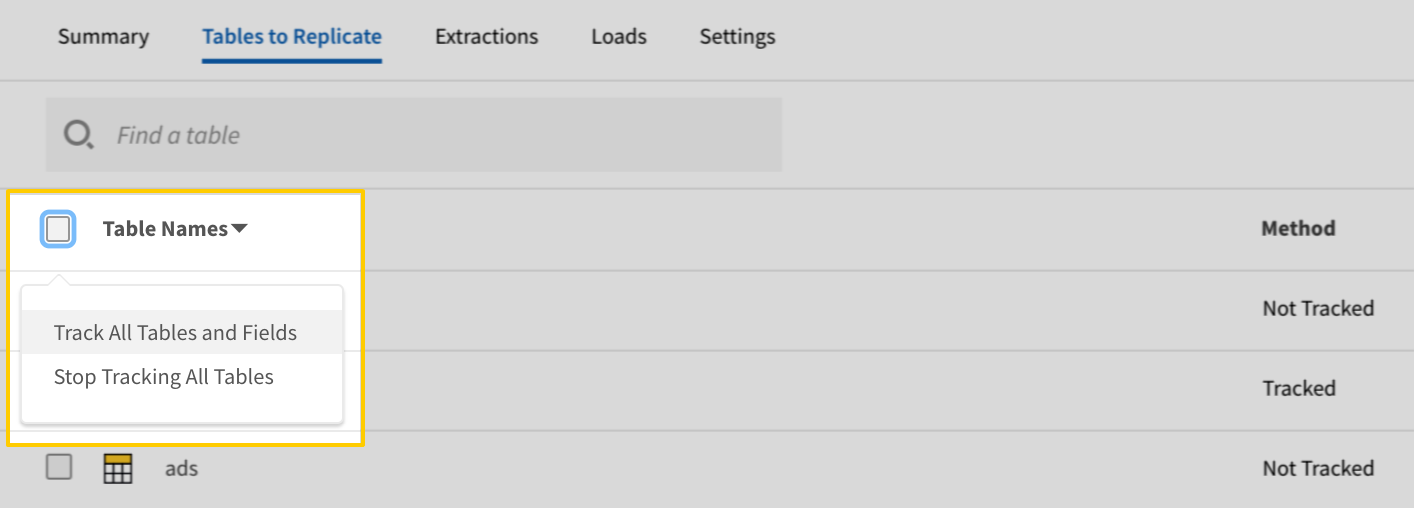
In the list of tables, click the box next to the Table Names column.
In the menu that displays, click Track all Tables and Fields:
The Track all Tables and Fields menu in the Tables to Replicate tab
Click the Finalize Your Selections button at the bottom of the page to save your data selections.
Initial and historical replication jobs
After you finish setting up Outreach, its Sync Status may show as Pending on either the Stitch Dashboard or in the Integration Details page.
For a new integration, a Pending status indicates that Stitch is in the process of scheduling the initial replication job for the integration. This may take some time to complete.
Information note
Initial replication jobs with Anchor Scheduling
If using Anchor Scheduling, an initial replication job may not kick off immediately. This depends on the selected Replication Frequency and Anchor Time. Refer to the Anchor Scheduling documentation for more information.
Free historical data loads
The first seven days of replication, beginning when data is first replicated, are free. Rows replicated from the new integration during this time won’t count towards your quota. Stitch offers this as a way of testing new integrations, measuring usage, and ensuring historical data volumes don’t quickly consume your quota.
Information noteReplication will continue after the seven days are over. If you’re no longer interested in this source, be sure to pause or delete the integration to prevent unwanted usage.
Outreach table reference
Information note
Schemas and versioning
Schemas and naming conventions can change from version to version, so we recommend verifying your integration’s version before continuing.
The schema and info displayed below is for version 1 of this integration.
This is the latest version of the Outreach integration.
Information note
Table and column names in your destination
Depending on your destination, table and column names may not appear as they are outlined below.
For example: Object names are lowercased in Redshift (CusTomERs > customers), while case is maintained in PostgreSQL destinations (CusTomERs > CusTomERs). Refer to the Loading Guide for your destination for more info.
accounts
The accounts table contains information about prospective clients in Outreach.
This is a nested data structure. If your destination doesn't natively support nested data, attributes will be denested into a subtable. <a href='/en-US/stitch/replication/loading/understanding-loading-row-usage-for-nested-data-structures' target='new'>Learn more</a>.
touchedAt
DATE-TIME
updatedAt
DATE-TIME
updaterId
INTEGER
websiteUrl
STRING
call_dispositions
The call_dispositions table contains information about call dispositions from your call log in Outreach.
This is a nested data structure. If your destination doesn't natively support nested data, attributes will be denested into a subtable. <a href='/en-US/stitch/replication/loading/understanding-loading-row-usage-for-nested-data-structures' target='new'>Learn more</a>.
taskId
INTEGER
to
STRING
uid
STRING
updatedAt
DATE-TIME
userCallType
STRING
userId
INTEGER
vendorCallId
STRING
voicemailRecordingUrl
STRING
content_categories
The content_categories table contains information about your content categories in Outreach.
This is a nested data structure. If your destination doesn't natively support nested data, attributes in this object will be flattened into the table. <a href='/en-US/stitch/replication/loading/understanding-loading-row-usage-for-nested-data-structures' target='new'>Learn more</a>.
prospectId
INTEGER
requestCity
STRING
requestDevice
STRING
requestHost
STRING
requestProxied
BOOLEAN
requestRegion
BOOLEAN
taskId
INTEGER
userId
INTEGER
mailboxes
The mailboxes table contains information about your Outreach email mailbox.
This is a nested data structure. If your destination doesn't natively support nested data, attributes will be denested into a subtable. <a href='/en-US/stitch/replication/loading/understanding-loading-row-usage-for-nested-data-structures' target='new'>Learn more</a>.
repliedAt
DATE-TIME
retryAt
DATE-TIME
retryCount
INTEGER
retryInterval
INTEGER
scheduledAt
DATE-TIME
sequenceId
INTEGER
sequenceStateId
INTEGER
sequenceStepId
INTEGER
state
STRING
stateChangedAt
DATE-TIME
subject
STRING
taskId
INTEGER
templateId
INTEGER
trackLinks
BOOLEAN
trackOpens
BOOLEAN
unsubscribedAt
DATE-TIME
updatedAt
DATE-TIME
userId
INTEGER
opportunities
The opportunities table contains information about your pending deals and sales in Outreach.
This is a nested data structure. If your destination doesn't natively support nested data, attributes will be denested into a subtable. <a href='/en-US/stitch/replication/loading/understanding-loading-row-usage-for-nested-data-structures' target='new'>Learn more</a>.
touchedAt
DATE-TIME
updatedAt
DATE-TIME
updaterId
INTEGER
personas
The personas table contains information about descriptions and types of people in Outreach.
This is a nested data structure. If your destination doesn't natively support nested data, attributes will be denested into a subtable. <a href='/en-US/stitch/replication/loading/understanding-loading-row-usage-for-nested-data-structures' target='new'>Learn more</a>.
createdAt
DATE-TIME
creatorId
INTEGER
custom1
STRING
custom10
STRING
custom100
STRING
custom101
STRING
custom102
STRING
custom103
STRING
custom104
STRING
custom105
STRING
custom106
STRING
custom107
STRING
custom108
STRING
custom109
STRING
custom11
STRING
custom110
STRING
custom111
STRING
custom112
STRING
custom113
STRING
custom114
STRING
custom115
STRING
custom116
STRING
custom117
STRING
custom118
STRING
custom119
STRING
custom12
STRING
custom120
STRING
custom121
STRING
custom122
STRING
custom123
STRING
custom124
STRING
custom125
STRING
custom126
STRING
custom127
STRING
custom128
STRING
custom129
STRING
custom13
STRING
custom130
STRING
custom131
STRING
custom132
STRING
custom133
STRING
custom134
STRING
custom135
STRING
custom136
STRING
custom137
STRING
custom138
STRING
custom139
STRING
custom14
STRING
custom140
STRING
custom141
STRING
custom142
STRING
custom143
STRING
custom144
STRING
custom145
STRING
custom146
STRING
custom147
STRING
custom148
STRING
custom149
STRING
custom15
STRING
custom150
STRING
custom16
STRING
custom17
STRING
custom18
STRING
custom19
STRING
custom2
STRING
custom20
STRING
custom21
STRING
custom22
STRING
custom23
STRING
custom24
STRING
custom25
STRING
custom26
STRING
custom27
STRING
custom28
STRING
custom29
STRING
custom3
STRING
custom30
STRING
custom31
STRING
custom32
STRING
custom33
STRING
custom34
STRING
custom35
STRING
custom36
STRING
custom37
STRING
custom38
STRING
custom39
STRING
custom4
STRING
custom40
STRING
custom41
STRING
custom42
STRING
custom43
STRING
custom44
STRING
custom45
STRING
custom46
STRING
custom47
STRING
custom48
STRING
custom49
STRING
custom5
STRING
custom50
STRING
custom51
STRING
custom52
STRING
custom53
STRING
custom54
STRING
custom55
STRING
custom56
STRING
custom57
STRING
custom58
STRING
custom59
STRING
custom6
STRING
custom60
STRING
custom61
STRING
custom62
STRING
custom63
STRING
custom64
STRING
custom65
STRING
custom66
STRING
custom67
STRING
custom68
STRING
custom69
STRING
custom7
STRING
custom70
STRING
custom71
STRING
custom72
STRING
custom73
STRING
custom74
STRING
custom75
STRING
custom76
STRING
custom77
STRING
custom78
STRING
custom79
STRING
custom8
STRING
custom80
STRING
custom81
STRING
custom82
STRING
custom83
STRING
custom84
STRING
custom85
STRING
custom86
STRING
custom87
STRING
custom88
STRING
custom89
STRING
custom9
STRING
custom90
STRING
custom91
STRING
custom92
STRING
custom93
STRING
custom94
STRING
custom95
STRING
custom96
STRING
custom97
STRING
custom98
STRING
custom99
STRING
dateOfBirth
DATE-TIME
degree
STRING
emailOptedOut
BOOLEAN
emails
ARRAY
This is a nested data structure. If your destination doesn't natively support nested data, attributes will be denested into a subtable. <a href='/en-US/stitch/replication/loading/understanding-loading-row-usage-for-nested-data-structures' target='new'>Learn more</a>.
emailsOptStatus
STRING
emailsOptedAt
DATE-TIME
engagedAt
DATE-TIME
engagedScore
NUMBER
eventName
STRING
externalId
STRING
externalOwner
STRING
externalSource
STRING
facebookUrl
STRING
firstName
STRING
gender
STRING
githubUrl
STRING
githubUsername
STRING
googlePlusUrl
STRING
graduationDate
DATE-TIME
homePhones
ARRAY
This is a nested data structure. If your destination doesn't natively support nested data, attributes will be denested into a subtable. <a href='/en-US/stitch/replication/loading/understanding-loading-row-usage-for-nested-data-structures' target='new'>Learn more</a>.
id
INTEGER
jobStartDate
DATE-TIME
lastName
STRING
linkedInConnections
INTEGER
linkedInId
STRING
linkedInSlug
STRING
linkedInUrl
STRING
middleName
STRING
mobilePhones
ARRAY
This is a nested data structure. If your destination doesn't natively support nested data, attributes will be denested into a subtable. <a href='/en-US/stitch/replication/loading/understanding-loading-row-usage-for-nested-data-structures' target='new'>Learn more</a>.
name
STRING
nickname
STRING
occupation
STRING
openCount
INTEGER
optedOut
BOOLEAN
optedOutAt
DATE-TIME
otherPhones
ARRAY
This is a nested data structure. If your destination doesn't natively support nested data, attributes will be denested into a subtable. <a href='/en-US/stitch/replication/loading/understanding-loading-row-usage-for-nested-data-structures' target='new'>Learn more</a>.
ownerId
INTEGER
personaId
INTEGER
personalNote1
STRING
personalNote2
STRING
preferredContact
STRING
quoraUrl
STRING
region
STRING
replyCount
INTEGER
school
STRING
score
NUMBER
sharingTeamId
STRING
source
STRING
specialties
STRING
stackOverflowId
STRING
stackOverflowUrl
STRING
stageId
INTEGER
tags
ARRAY
This is a nested data structure. If your destination doesn't natively support nested data, attributes will be denested into a subtable. <a href='/en-US/stitch/replication/loading/understanding-loading-row-usage-for-nested-data-structures' target='new'>Learn more</a>.
timeZone
STRING
timeZoneIana
STRING
timeZoneInferred
STRING
title
STRING
touchedAt
DATE-TIME
trashedAt
DATE-TIME
twitterUrl
STRING
twitterUsername
STRING
updatedAt
DATE-TIME
updaterId
INTEGER
voipPhones
ARRAY
This is a nested data structure. If your destination doesn't natively support nested data, attributes will be denested into a subtable. <a href='/en-US/stitch/replication/loading/understanding-loading-row-usage-for-nested-data-structures' target='new'>Learn more</a>.
websiteUrl1
STRING
websiteUrl2
STRING
websiteUrl3
STRING
workPhones
ARRAY
This is a nested data structure. If your destination doesn't natively support nested data, attributes will be denested into a subtable. <a href='/en-US/stitch/replication/loading/understanding-loading-row-usage-for-nested-data-structures' target='new'>Learn more</a>.
sequence_states
The sequence_states table contains info about currently sequenced prospects.
This is a nested data structure. If your destination doesn't natively support nested data, attributes will be denested into a subtable. <a href='/en-US/stitch/replication/loading/understanding-loading-row-usage-for-nested-data-structures' target='new'>Learn more</a>.
throttleCapacity
INTEGER
throttleMaxAddsPerDay
INTEGER
throttlePaused
BOOLEAN
throttlePausedAt
DATE-TIME
transactional
BOOLEAN
updatedAt
DATE-TIME
updaterId
INTEGER
stages
The stages table contains information about different stages in a deal process.
This is a nested data structure. If your destination doesn't natively support nested data, attributes will be denested into a subtable. <a href='/en-US/stitch/replication/loading/understanding-loading-row-usage-for-nested-data-structures' target='new'>Learn more</a>.
duty_type
STRING
id
INTEGER
name
STRING
email
STRING
enableVoiceRecordings
BOOLEAN
engagementEmailsEnabled
BOOLEAN
firstName
STRING
id
INTEGER
inboundBridgePhone
STRING
inboundBridgePhoneExtension
STRING
inboundCallBehavior
STRING
inboundPhoneType
STRING
inboundVoicemailCustomMessageText
STRING
inboundVoicemailMessageTextVoice
STRING
inboundVoicemailPromptType
STRING
kaiaRecordingsViewId
INTEGER
keepBridgePhoneConnected
BOOLEAN
lastName
STRING
lastSignInAt
DATE-TIME
locked
BOOLEAN
mailboxErrorEmailEnabled
BOOLEAN
mailboxId
INTEGER
meetingEngagementNotificationEnabled
BOOLEAN
name
STRING
notificationsEnabled
BOOLEAN
oceClickToDialEverywhere
BOOLEAN
oceGmailToolbar
BOOLEAN
oceGmailTrackingState
STRING
oceSalesforceEmailDecorating
BOOLEAN
oceSalesforcePhoneDecorating
BOOLEAN
oceUniversalTaskFlow
BOOLEAN
oceWindowMode
BOOLEAN
opportunitiesViewId
INTEGER
passwordExpiresAt
DATE-TIME
phoneCountryCode
STRING
phoneNumber
STRING
phoneType
STRING
pluginAlertNotificationEnabled
BOOLEAN
preferredVoiceRegion
STRING
prefersLocalPresence
BOOLEAN
primaryTimezone
STRING
profileId
INTEGER
prospectsViewId
INTEGER
reportsTeamPerfViewId
INTEGER
reportsViewId
INTEGER
roleId
INTEGER
scimExternalId
STRING
scimSource
STRING
secondaryTimezone
STRING
senderNotificationsExcluded
STRING
tasksViewId
INTEGER
teamsViewId
INTEGER
tertiaryTimezone
STRING
textingEmailNotifications
BOOLEAN
title
STRING
unknownReplyEmailEnabled
BOOLEAN
updatedAt
DATE-TIME
updaterId
INTEGER
userGuid
STRING
username
STRING
usersViewId
INTEGER
voicemailNotificationEnabled
BOOLEAN
weeklyDigestEmailEnabled
BOOLEAN
Did this page help you?
If you find any issues with this page or its content – a typo, a missing step, or a technical error – please let us know!