Indicates if Replication Methods can be defined by you for tables in the integration.
Configurable Replication Methods are not supported for this integration. Stitch will use pre-defined replication methods for tables you set to replicate.
Unsupported
DATA SELECTION
Table selection
The ability to select individual tables for replication in the Stitch interface. If table selection is unavailable, all tables and all the columns they contain will be set to replicate by default.
This feature is supported for this version of the integration.
Supported
Column selection
The ability to select individual columns for replication in the Stitch interface. If column selection is unavailable, all columns will be set to replicate by default.
Column selection is not supported for this integration. All available columns in tables set to replicate will be selected.
Unsupported
Select all
Indicates if the integration supports selecting all available tables and columns.
Reports detailing the Loading phase of the replication process for a given integration. Includes the number of rows loaded for each table and error info, should an error occur.
This feature is supported for this version of the integration.
Supported
Connecting Codat
Codat setup requirements
To set up Codat in Stitch, you need:
Administrator or Developer privileges in Codat. These are required to generate an API key. Refer to Codat’s documentation for more info.
Step 1: Retrieve your Codat API key
Information noteNote: This step requires Administrator or Developer privileges in Codat.
Sign into your Codat account.
Click Accounts > Profile in the sidenav.
On the Manage Profile page, locate the API Key field.
Click the copy icon to copy the API key.
Paste the API key somewhere handy - you’ll need it in the next step.
On the Stitch Dashboard page, click the Add Integration button.
Click the Codat icon.
Enter a name for the integration. This is the name that will display on the Stitch Dashboard for the integration; it’ll also be used to create the schema in your destination.
For example, the name “Stitch Codat” would create a schema called stitch_codat in the destination. Note: Schema names cannot be changed after you save the integration.
In the API Key field, paste the Codat API key you generated in Step 1.
Check the Use Codat UAT environment box if you’re connecting to your UAT (sandbox) environment in Codat.
Note: Use this setting only if you are connecting to a UAT (sandbox) Codat instance. Checking this box when the instance isn’t a sandbox will prevent a successful connection and 401 Bad Credentials errors in the connection check logs.
Step 3: Define the historical replication start date
The Sync Historical Data setting defines the starting date for your Codat integration.
This means that data equal to or newer than this date will be replicated to your data warehouse.
Change this setting if you want to replicate data beyond Codat’s default setting of 1 year. For a detailed look at historical replication jobs, check out the Syncing Historical SaaS Data guide.
Step 4: Create a replication schedule
Information note
Replication schedules affect the time Extraction begins, not the time to data loaded. Refer to the Replication Scheduling documentation for more information.
In the Replication Frequency section, you’ll create the integration’s replication schedule. An integration’s replication schedule determines how often Stitch runs a replication job, and the time that job begins.
Codat integrations support the following replication scheduling methods:
Note: If a replication job is currently in progress, new selections won’t be used until the next job starts.
For Codat integrations, you can select:
Individual tables
All tables
Click the tabs to view instructions for each selection method.
In the integration’s Tables to Replicate tab, locate a table you want to replicate.
To track a table, click the checkbox next to the table’s name. A blue checkmark means the table is set to replicate.
Repeat this process for all the tables you want to replicate.
When finished, click the Finalize Your Selections button at the bottom of the screen to save your selections.
Information noteImportant:
Using the Select All feature will overwrite any previous selections. However, selections aren’t final until Finalize Your Selections is clicked. Clicking Cancel will restore your previous selections.
Refer to the Select All guide for more info about this feature.
Click into the integration from the Stitch Dashboard page.
Click the Tables to Replicate tab.
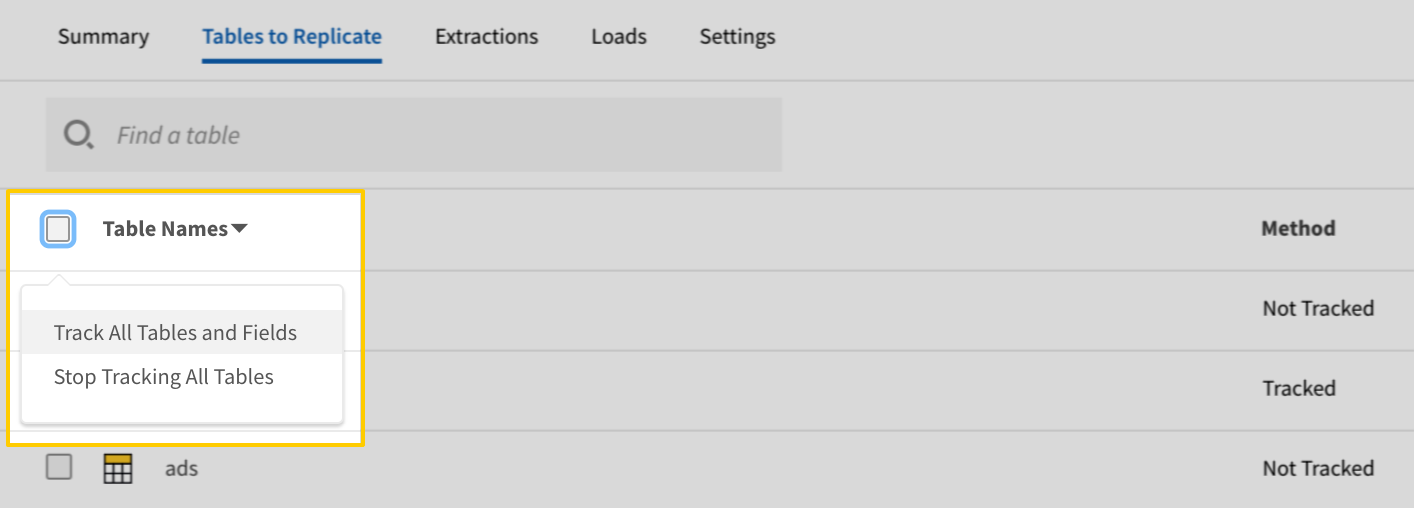
In the list of tables, click the box next to the Table Names column.
In the menu that displays, click Track all Tables and Fields:
The Track all Tables and Fields menu in the Tables to Replicate tab
Click the Finalize Your Selections button at the bottom of the page to save your data selections.
Initial and historical replication jobs
After you finish setting up Codat, its Sync Status may show as Pending on either the Stitch Dashboard or in the Integration Details page.
For a new integration, a Pending status indicates that Stitch is in the process of scheduling the initial replication job for the integration. This may take some time to complete.
Information note
Initial replication jobs with Anchor Scheduling
If using Anchor Scheduling, an initial replication job may not kick off immediately. This depends on the selected Replication Frequency and Anchor Time. Refer to the Anchor Scheduling documentation for more information.
Free historical data loads
The first seven days of replication, beginning when data is first replicated, are free. Rows replicated from the new integration during this time won’t count towards your quota. Stitch offers this as a way of testing new integrations, measuring usage, and ensuring historical data volumes don’t quickly consume your quota.
Information noteReplication will continue after the seven days are over. If you’re no longer interested in this source, be sure to pause or delete the integration to prevent unwanted usage.
Codat table reference
Information note
Schemas and versioning
Schemas and naming conventions can change from version to version, so we recommend verifying your integration’s version before continuing.
The schema and info displayed below is for version 1 of this integration.
This is the latest version of the Codat integration.
Information note
Table and column names in your destination
Depending on your destination, table and column names may not appear as they are outlined below.
For example: Object names are lowercased in Redshift (CusTomERs > customers), while case is maintained in PostgreSQL destinations (CusTomERs > CusTomERs). Refer to the Loading Guide for your destination for more info.
accounts
The accounts table contains info about the accounts in your Codat instance. In Codat, an account is a category used to record accounting transactions for a business.
The balance_sheets table contains info about the balance sheets in your Codat instance. A balance sheet is a snapshot at a point in time of a company’s accounts.
This is a nested data structure. If your destination doesn't natively support nested data, attributes will be denested into a subtable. <a href='/en-US/stitch/replication/loading/understanding-loading-row-usage-for-nested-data-structures' target='new'>Learn more</a>.
assets
ARRAY
This is a nested data structure. If your destination doesn't natively support nested data, attributes will be denested into a subtable. <a href='/en-US/stitch/replication/loading/understanding-loading-row-usage-for-nested-data-structures' target='new'>Learn more</a>.
accountId
STRING
name
STRING
value
NUMBER
date
DATE-TIME
equity
ARRAY
This is a nested data structure. If your destination doesn't natively support nested data, attributes will be denested into a subtable. <a href='/en-US/stitch/replication/loading/understanding-loading-row-usage-for-nested-data-structures' target='new'>Learn more</a>.
accountId
STRING
name
STRING
value
NUMBER
liabilities
ARRAY
This is a nested data structure. If your destination doesn't natively support nested data, attributes will be denested into a subtable. <a href='/en-US/stitch/replication/loading/understanding-loading-row-usage-for-nested-data-structures' target='new'>Learn more</a>.
accountId
STRING
name
STRING
value
NUMBER
netAssets
NUMBER
status
OBJECT, STRING
This is a nested data structure. If your destination doesn't natively support nested data, attributes in this object will be flattened into the table. <a href='/en-US/stitch/replication/loading/understanding-loading-row-usage-for-nested-data-structures' target='new'>Learn more</a>.
bank_account_transactions
The bank_account_transactions table contains information about transactions for a specified company and bank account in your Codat account.
This is a nested data structure. If your destination doesn't natively support nested data, attributes will be denested into a subtable. <a href='/en-US/stitch/replication/loading/understanding-loading-row-usage-for-nested-data-structures' target='new'>Learn more</a>.
amount
NUMBER
links
ARRAY
This is a nested data structure. If your destination doesn't natively support nested data, attributes will be denested into a subtable. <a href='/en-US/stitch/replication/loading/understanding-loading-row-usage-for-nested-data-structures' target='new'>Learn more</a>.
id
STRING
type
STRING
modifiedDate
STRING
note
STRING
sourceModifiedDate
STRING
supplierRef
OBJECT
This is a nested data structure. If your destination doesn't natively support nested data, attributes in this object will be flattened into the table. <a href='/en-US/stitch/replication/loading/understanding-loading-row-usage-for-nested-data-structures' target='new'>Learn more</a>.
addresses
ARRAY
This is a nested data structure. If your destination doesn't natively support nested data, attributes will be denested into a subtable. <a href='/en-US/stitch/replication/loading/understanding-loading-row-usage-for-nested-data-structures' target='new'>Learn more</a>.
city
STRING
country
STRING
line1
STRING
line2
STRING
postalCode
STRING
region
STRING
type
STRING
companyId
STRING
contactName
STRING
emailAddress
STRING
id
STRING
phone
STRING
registrationNumber
STRING
status
STRING
supplierName
STRING
taxNumber
STRING
totalAmount
NUMBER
bills
The bills table contains info about the bills in your Codat account. A bill is an itemized record of goods or services purchased from a supplier.
This is a nested data structure. If your destination doesn't natively support nested data, attributes will be denested into a subtable. <a href='/en-US/stitch/replication/loading/understanding-loading-row-usage-for-nested-data-structures' target='new'>Learn more</a>.
accountRef
OBJECT
This is a nested data structure. If your destination doesn't natively support nested data, attributes in this object will be flattened into the table. <a href='/en-US/stitch/replication/loading/understanding-loading-row-usage-for-nested-data-structures' target='new'>Learn more</a>.
id
STRING
name
STRING
description
STRING
discountAmount
NUMBER
discountPercentage
NUMBER
itemRef
OBJECT
This is a nested data structure. If your destination doesn't natively support nested data, attributes in this object will be flattened into the table. <a href='/en-US/stitch/replication/loading/understanding-loading-row-usage-for-nested-data-structures' target='new'>Learn more</a>.
id
STRING
name
STRING
quantity
NUMBER
subTotal
NUMBER
taxAmount
NUMBER
taxRateRef
OBJECT
This is a nested data structure. If your destination doesn't natively support nested data, attributes in this object will be flattened into the table. <a href='/en-US/stitch/replication/loading/understanding-loading-row-usage-for-nested-data-structures' target='new'>Learn more</a>.
id
STRING
name
STRING
totalAmount
NUMBER
unitAmount
NUMBER
reference
STRING
status
STRING
subTotal
NUMBER
supplierRef
OBJECT
This is a nested data structure. If your destination doesn't natively support nested data, attributes in this object will be flattened into the table. <a href='/en-US/stitch/replication/loading/understanding-loading-row-usage-for-nested-data-structures' target='new'>Learn more</a>.
addresses
ARRAY
This is a nested data structure. If your destination doesn't natively support nested data, attributes will be denested into a subtable. <a href='/en-US/stitch/replication/loading/understanding-loading-row-usage-for-nested-data-structures' target='new'>Learn more</a>.
city
STRING
country
STRING
line1
STRING
line2
STRING
postalCode
STRING
region
STRING
type
STRING
companyId
STRING
contactName
STRING
emailAddress
STRING
id
STRING
phone
STRING
registrationNumber
STRING
status
STRING
supplierName
STRING
taxNumber
STRING
taxAmount
NUMBER
totalAmount
NUMBER
companies
The companies table contains info about the companies in your Codat instance. A company represents a business who can share the connection to their financial data sources.
The company_info table contains company info. In Codat, company info includes information about a linked company such as address, phone number and company registration.
This is a nested data structure. If your destination doesn't natively support nested data, attributes will be denested into a subtable. <a href='/en-US/stitch/replication/loading/understanding-loading-row-usage-for-nested-data-structures' target='new'>Learn more</a>.
city
STRING
country
STRING
line1
STRING
line2
STRING
postalCode
STRING
region
STRING
type
STRING
baseCurrency
STRING
companyId
STRING
companyLegalName
STRING
companyName
STRING
createdDate
STRING
financialYearStartDate
DATE-TIME
phoneNumbers
ARRAY
This is a nested data structure. If your destination doesn't natively support nested data, attributes will be denested into a subtable. <a href='/en-US/stitch/replication/loading/understanding-loading-row-usage-for-nested-data-structures' target='new'>Learn more</a>.
number
STRING
type
STRING
registrationNumber
STRING
taxNumber
STRING
webLinks
ARRAY
This is a nested data structure. If your destination doesn't natively support nested data, attributes will be denested into a subtable. <a href='/en-US/stitch/replication/loading/understanding-loading-row-usage-for-nested-data-structures' target='new'>Learn more</a>.
type
STRING
url
STRING
connections
The connections table contains information about company connections in your Codat account.
This is a nested data structure. If your destination doesn't natively support nested data, attributes in this object will be flattened into the table. <a href='/en-US/stitch/replication/loading/understanding-loading-row-usage-for-nested-data-structures' target='new'>Learn more</a>.
companyName
STRING
id
STRING
id
STRING
issueDate
DATE-TIME
paymentAllocations
ARRAY
This is a nested data structure. If your destination doesn't natively support nested data, attributes will be denested into a subtable. <a href='/en-US/stitch/replication/loading/understanding-loading-row-usage-for-nested-data-structures' target='new'>Learn more</a>.
remainingCredit
NUMBER
status
STRING
totalAmount
NUMBER
customers
The customers table contains info about the customers in your Codat instance. A customer is a person or organisation that buys goods or services.
This is a nested data structure. If your destination doesn't natively support nested data, attributes will be denested into a subtable. <a href='/en-US/stitch/replication/loading/understanding-loading-row-usage-for-nested-data-structures' target='new'>Learn more</a>.
city
STRING
country
STRING
line1
STRING
line2
STRING
postalCode
STRING
region
STRING
type
STRING
companyId
STRING
contactName
STRING
contacts
ARRAY
This is a nested data structure. If your destination doesn't natively support nested data, attributes will be denested into a subtable. <a href='/en-US/stitch/replication/loading/understanding-loading-row-usage-for-nested-data-structures' target='new'>Learn more</a>.
address
OBJECT
This is a nested data structure. If your destination doesn't natively support nested data, attributes in this object will be flattened into the table. <a href='/en-US/stitch/replication/loading/understanding-loading-row-usage-for-nested-data-structures' target='new'>Learn more</a>.
city
STRING
country
STRING
line1
STRING
line2
STRING
postalCode
STRING
region
STRING
type
STRING
email
STRING
modifiedDate
DATE-TIME
name
STRING
phone
ARRAY
This is a nested data structure. If your destination doesn't natively support nested data, attributes will be denested into a subtable. <a href='/en-US/stitch/replication/loading/understanding-loading-row-usage-for-nested-data-structures' target='new'>Learn more</a>.
number
STRING
type
STRING
status
STRING
customerName
STRING
defaultCurrency
STRING
emailAddress
STRING
id
STRING
modifiedDate
DATE-TIME
phone
STRING
registrationNumber
STRING
status
STRING
taxNumber
STRING
events
The events table contains information about a given company’s events in your Codat account.
This is a nested data structure. If your destination doesn't natively support nested data, attributes in this object will be flattened into the table. <a href='/en-US/stitch/replication/loading/understanding-loading-row-usage-for-nested-data-structures' target='new'>Learn more</a>.
companyName
STRING
id
STRING
dueDate
DATE-TIME
id
STRING
invoiceNumber
STRING
issueDate
DATE-TIME
lineItems
ARRAY
This is a nested data structure. If your destination doesn't natively support nested data, attributes will be denested into a subtable. <a href='/en-US/stitch/replication/loading/understanding-loading-row-usage-for-nested-data-structures' target='new'>Learn more</a>.
description
STRING
discountAmount
NUMBER
quantity
NUMBER
subTotal
NUMBER
taxAmount
NUMBER
totalAmount
NUMBER
unitAmount
NUMBER
modifiedDate
DATE-TIME
paidOnDate
DATE-TIME
paymentAllocations
ARRAY
This is a nested data structure. If your destination doesn't natively support nested data, attributes will be denested into a subtable. <a href='/en-US/stitch/replication/loading/understanding-loading-row-usage-for-nested-data-structures' target='new'>Learn more</a>.
status
STRING
subTotal
NUMBER
totalAmount
NUMBER
totalDiscount
NUMBER
totalTaxAmount
NUMBER
items
The items table contains information about items for a given company in your Codat account.
This is a nested data structure. If your destination doesn't natively support nested data, attributes in this object will be flattened into the table. <a href='/en-US/stitch/replication/loading/understanding-loading-row-usage-for-nested-data-structures' target='new'>Learn more</a>.
accountRef
OBJECT
This is a nested data structure. If your destination doesn't natively support nested data, attributes in this object will be flattened into the table. <a href='/en-US/stitch/replication/loading/understanding-loading-row-usage-for-nested-data-structures' target='new'>Learn more</a>.
id
STRING
description
STRING
taxRateRef
OBJECT
This is a nested data structure. If your destination doesn't natively support nested data, attributes in this object will be flattened into the table. <a href='/en-US/stitch/replication/loading/understanding-loading-row-usage-for-nested-data-structures' target='new'>Learn more</a>.
id
STRING
unitPrice
NUMBER
code
STRING
companyId
STRING
id
STRING
invoiceItem
OBJECT
This is a nested data structure. If your destination doesn't natively support nested data, attributes in this object will be flattened into the table. <a href='/en-US/stitch/replication/loading/understanding-loading-row-usage-for-nested-data-structures' target='new'>Learn more</a>.
accountRef
OBJECT
This is a nested data structure. If your destination doesn't natively support nested data, attributes in this object will be flattened into the table. <a href='/en-US/stitch/replication/loading/understanding-loading-row-usage-for-nested-data-structures' target='new'>Learn more</a>.
id
STRING
description
STRING
taxRateRef
OBJECT
This is a nested data structure. If your destination doesn't natively support nested data, attributes in this object will be flattened into the table. <a href='/en-US/stitch/replication/loading/understanding-loading-row-usage-for-nested-data-structures' target='new'>Learn more</a>.
id
STRING
unitPrice
NUMBER
isBillItem
BOOLEAN
isInvoiceItem
BOOLEAN
itemStatus
STRING
modifiedDate
STRING
name
STRING
sourceModifiedDate
STRING
journal_entries
The journal_entries table contains information about journal entries for a given company in your Codat account.
This is a nested data structure. If your destination doesn't natively support nested data, attributes will be denested into a subtable. <a href='/en-US/stitch/replication/loading/understanding-loading-row-usage-for-nested-data-structures' target='new'>Learn more</a>.
accountRef
OBJECT
This is a nested data structure. If your destination doesn't natively support nested data, attributes in this object will be flattened into the table. <a href='/en-US/stitch/replication/loading/understanding-loading-row-usage-for-nested-data-structures' target='new'>Learn more</a>.
id
STRING
name
STRING
currency
STRING
description
STRING
grossAmount
NUMBER
id
STRING
netAmount
NUMBER
taxAmount
NUMBER
modifiedDate
STRING
postedOn
STRING
sourceModifiedDate
STRING
payments
The payments table contains info about the payments, or Accounts Receivable transactions, in your Codat instance. This includes details about invoices and credit notes.
This is a nested data structure. If your destination doesn't natively support nested data, attributes in this object will be flattened into the table. <a href='/en-US/stitch/replication/loading/understanding-loading-row-usage-for-nested-data-structures' target='new'>Learn more</a>.
companyName
STRING
id
STRING
date
DATE-TIME
id
STRING
lines
ARRAY
This is a nested data structure. If your destination doesn't natively support nested data, attributes will be denested into a subtable. <a href='/en-US/stitch/replication/loading/understanding-loading-row-usage-for-nested-data-structures' target='new'>Learn more</a>.
amount
NUMBER
links
ARRAY
This is a nested data structure. If your destination doesn't natively support nested data, attributes will be denested into a subtable. <a href='/en-US/stitch/replication/loading/understanding-loading-row-usage-for-nested-data-structures' target='new'>Learn more</a>.
id
STRING
type
STRING
note
STRING
totalAmount
NUMBER
profit_and_loss
The profit_and_loss table contains profit and loss report data for a company over a time period.
This is a nested data structure. If your destination doesn't natively support nested data, attributes will be denested into a subtable. <a href='/en-US/stitch/replication/loading/understanding-loading-row-usage-for-nested-data-structures' target='new'>Learn more</a>.
costOfSales
ARRAY
This is a nested data structure. If your destination doesn't natively support nested data, attributes will be denested into a subtable. <a href='/en-US/stitch/replication/loading/understanding-loading-row-usage-for-nested-data-structures' target='new'>Learn more</a>.
accountId
STRING
name
STRING
value
NUMBER
expenses
ARRAY
This is a nested data structure. If your destination doesn't natively support nested data, attributes will be denested into a subtable. <a href='/en-US/stitch/replication/loading/understanding-loading-row-usage-for-nested-data-structures' target='new'>Learn more</a>.
accountId
STRING
name
STRING
value
NUMBER
fromDate
STRING
grossProfit
NUMBER
income
ARRAY
This is a nested data structure. If your destination doesn't natively support nested data, attributes will be denested into a subtable. <a href='/en-US/stitch/replication/loading/understanding-loading-row-usage-for-nested-data-structures' target='new'>Learn more</a>.
accountId
STRING
name
STRING
value
NUMBER
netOperatingProfit
NUMBER
netOtherIncome
NUMBER
netProfit
NUMBER
otherExpenses
ARRAY
This is a nested data structure. If your destination doesn't natively support nested data, attributes will be denested into a subtable. <a href='/en-US/stitch/replication/loading/understanding-loading-row-usage-for-nested-data-structures' target='new'>Learn more</a>.
accountId
STRING
name
STRING
value
NUMBER
otherIncome
ARRAY
This is a nested data structure. If your destination doesn't natively support nested data, attributes will be denested into a subtable. <a href='/en-US/stitch/replication/loading/understanding-loading-row-usage-for-nested-data-structures' target='new'>Learn more</a>.
accountId
STRING
name
STRING
value
NUMBER
toDate
STRING
suppliers
The suppliers table contains info about the suppliers in your Codat instance. A supplier is a person or organization that provides a product or service.
This is a nested data structure. If your destination doesn't natively support nested data, attributes will be denested into a subtable. <a href='/en-US/stitch/replication/loading/understanding-loading-row-usage-for-nested-data-structures' target='new'>Learn more</a>.
city
STRING
country
STRING
line1
STRING
line2
STRING
postalCode
STRING
region
STRING
type
STRING
companyId
STRING
contactName
STRING
emailAddress
STRING
id
STRING
phone
STRING
registrationNumber
STRING
status
STRING
supplierName
STRING
taxNumber
STRING
tax_rates
The tax_rates table contains information about tax rates for a given company in your Codat account.
This is a nested data structure. If your destination doesn't natively support nested data, attributes will be denested into a subtable. <a href='/en-US/stitch/replication/loading/understanding-loading-row-usage-for-nested-data-structures' target='new'>Learn more</a>.
isCompound
BOOLEAN
name
STRING
rate
NUMBER
effectiveTaxRate
NUMBER
id
STRING
modifiedDate
STRING
name
STRING
sourceModifiedDate
STRING
totalTaxRate
NUMBER
Did this page help you?
If you find any issues with this page or its content – a typo, a missing step, or a technical error – please let us know!