
|
Address STRING |
Leave your feedback here

Already have an account? Sign in
QuickBooks (v2)
Last updated: 9/15/2026Information note
QuickBooks extraction is supported by Stitch
This integration is powered by Singer's QuickBooks tap and certified by Stitch. Check out and contribute to the repo on GitHub.
For support, contact Support.
This integration is powered by Singer's QuickBooks tap and certified by Stitch. Check out and contribute to the repo on GitHub.
For support, contact Support.
QuickBooks integration summary
Stitch’s QuickBooks integration replicates data using the QuickBooks Online API. Refer to the Schema section for a list of objects available for replication.
Note: Currently, replicating data from QuickBooks desktop apps isn’t supported.
QuickBooks feature snapshot
A high-level look at Stitch's QuickBooks (v2) integration, including release status, useful links, and the features supported in Stitch.
| STITCH | |||
| Release status |
Released on November 30, 2022 |
Supported by
Indicates if the integration is supported by Stitch or the Singer community. |
|
|
Stitch plan
The type of Stitch plan required to use the integration. |
Standard |
API availability
Indicates if the integration is available as a source in Stitch Connect. |
This version of the integration is available via the API. |
| Singer GitHub repository | |||
| REPLICATION SETTINGS | |||
|
Anchor Scheduling
A type of replication scheduling where an integration's Replication Frequency is anchored to a time you select. |
This feature is supported for this version of the integration. |
Advanced Scheduling
A type of replication scheduling that allows you to specify granular start times for data extraction using cron expressions. |
This feature is supported for this version of the integration. |
|
Table-level reset
Indicates if data can be reset at the table level. If unsupported, data can only be reset at the integration level. |
Table-level resets are not supported for this integration. Resets are only supported at the integration level. |
Configurable Replication Methods
Indicates if Replication Methods can be defined by you for tables in the integration. |
Configurable Replication Methods are not supported for this integration. Stitch will use pre-defined replication methods for tables you set to replicate. |
| DATA SELECTION | |||
|
Table selection
The ability to select individual tables for replication in the Stitch interface. If table selection is unavailable, all tables and all the columns they contain will be set to replicate by default. |
This feature is supported for this version of the integration. |
Column selection
The ability to select individual columns for replication in the Stitch interface. If column selection is unavailable, all columns will be set to replicate by default. |
This feature is supported for this version of the integration. |
|
Select all
Indicates if the integration supports selecting all available tables and columns. |
Supported |
||
| TRANSPARENCY | |||
|
Extraction Logs
Logs detailing the Extraction phase of the replication process for a given integration. Includes error info, should an error occur. |
This feature is supported for this version of the integration. |
Loading Reports
Reports detailing the Loading phase of the replication process for a given integration. Includes the number of rows loaded for each table and error info, should an error occur. |
This feature is supported for this version of the integration. |
Connecting QuickBooks
QuickBooks setup requirements
To set up QuickBooks in Stitch, you need:
-
An online QuickBooks instance. Desktop instances aren’t currently supported.
Step 1: Add QuickBooks as a Stitch data source
- Sign into your Stitch account.
-
On the Stitch Dashboard page, click the Add Integration button.
-
Click the QuickBooks icon.
-
Enter a name for the integration. This is the name that will display on the Stitch Dashboard for the integration; it’ll also be used to create the schema in your destination.
For example, the name “Stitch QuickBooks” would create a schema called
stitch_quickbooksin the destination. Note: Schema names cannot be changed after you save the integration.
Step 2: Define the historical replication start date
The Sync Historical Data setting defines the starting date for your QuickBooks integration. This means that data equal to or newer than this date will be replicated to your data warehouse.
Change this setting if you want to replicate data beyond QuickBooks’s default setting of 1 year. For a detailed look at historical replication jobs, check out the Syncing Historical SaaS Data guide.
Step 3: Create a replication schedule
Information note
Replication schedules affect the time Extraction begins, not the time to data loaded. Refer to the Replication Scheduling documentation for more information.
In the Replication Frequency section, you’ll create the integration’s replication schedule. An integration’s replication schedule determines how often Stitch runs a replication job, and the time that job begins.
QuickBooks integrations support the following replication scheduling methods:
-
Advanced Scheduling using Cron (Advanced or Premium plans only)
To keep your row usage low, consider setting the integration to replicate less frequently. See the Understanding and Reducing Your Row Usage guide for tips on reducing your usage.
Step 4: Authorize Stitch to access QuickBooks
Lastly, you’ll be directed to QuickBooks’ website to complete the setup.
- If you’re not already signed into your QuickBooks account, enter your credentials and click Login.
- A screen asking for authorization to QuickBooks will display.
- Click Authorize.
- After the authorization process successfully completes, you’ll be redirected back to Stitch.
- Click All Done.
Step 5: Set objects to replicate
Information note
Is an object missing or not replicating? Verify that the object meets the requirements for selection and replication.
The last step is to select the tables and columns you want to replicate. Learn about the available tables for this integration.
Note: If a replication job is currently in progress, new selections won’t be used until the next job starts.
For QuickBooks integrations, you can select:
-
Individual tables and columns
-
All tables and columns
Click the tabs to view instructions for each selection method.
- In the integration’s Tables to Replicate tab, locate a table you want to replicate.
-
To track a table, click the checkbox next to the table’s name. A blue checkmark means the table is set to replicate.
-
To track a column, click the checkbox next to the column’s name. A blue checkmark means the column is set to replicate.
- Repeat this process for all the tables and columns you want to replicate.
- When finished, click the Finalize Your Selections button at the bottom of the screen to save your selections.
Information note
Important:
Using the Select All feature will overwrite any previous selections. However, selections aren’t final until Finalize Your Selections is clicked. Clicking Cancel will restore your previous selections.
Refer to the Select All guide for more info about this feature.
- Click into the integration from the Stitch Dashboard page.
-
Click the Tables to Replicate tab.
- In the list of tables, click the box next to the Table Names column.
-
In the menu that displays, click Track all Tables and Fields:
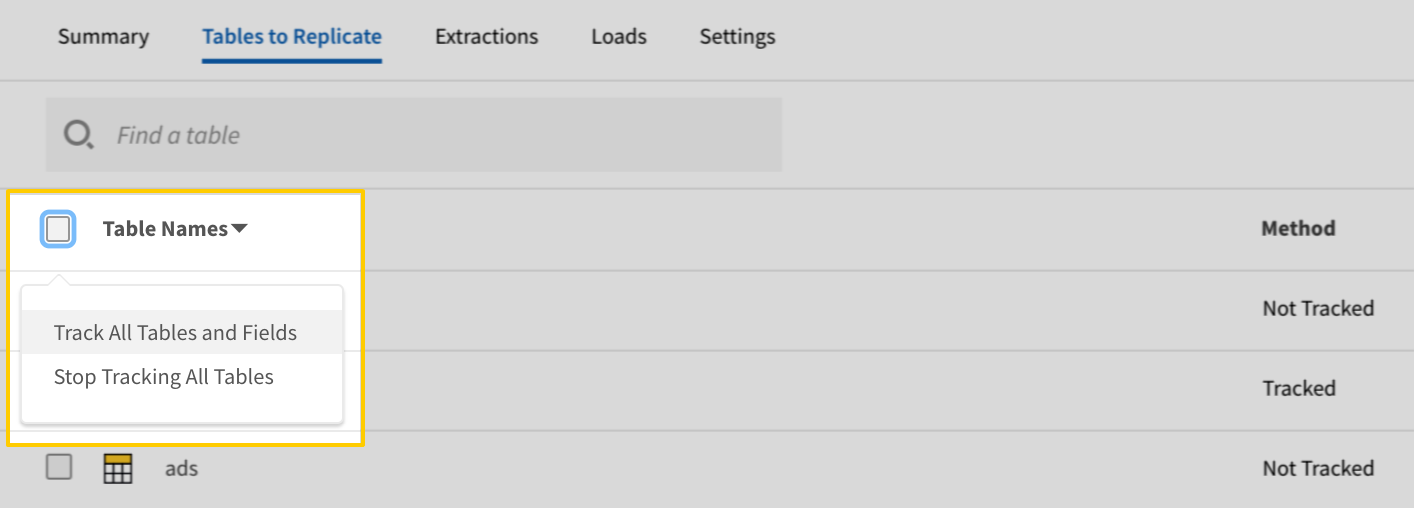
The Track all Tables and Fields menu in the Tables to Replicate tab - Click the Finalize Your Selections button at the bottom of the page to save your data selections.
Initial and historical replication jobs
After you finish setting up QuickBooks, its Sync Status may show as Pending on either the Stitch Dashboard or in the Integration Details page.
For a new integration, a Pending status indicates that Stitch is in the process of scheduling the initial replication job for the integration. This may take some time to complete.
Information note
Initial replication jobs with Anchor Scheduling
If using Anchor Scheduling, an initial replication job may not kick off immediately. This depends on the selected Replication Frequency and Anchor Time. Refer to the Anchor Scheduling documentation for more information.
Free historical data loads
The first seven days of replication, beginning when data is first replicated, are free. Rows replicated from the new integration during this time won’t count towards your quota. Stitch offers this as a way of testing new integrations, measuring usage, and ensuring historical data volumes don’t quickly consume your quota.
Information note
Replication will continue after the seven days are over. If you’re no longer interested in this source, be sure to pause or delete the integration to prevent unwanted usage.
QuickBooks table reference
Information note
Schemas and versioning
Schemas and naming conventions can change from version to version, so we recommend verifying your integration’s version before continuing.
The schema and info displayed below is for version 2 of this integration.
This is the latest version of the QuickBooks integration.
Information note
Table and column names in your destination
Depending on your destination, table and column names may not appear as they are outlined below.
For example: Object names are lowercased in Redshift (CusTomERs > customers), while case is maintained in PostgreSQL destinations (CusTomERs > CusTomERs). Refer to the Loading Guide for your destination for more info.
accounts
The accounts table contains info about the various account types in you QuickBooks instance. This table includes all account types: asset, liability, revenue (income), expenses, and equity.
Note: Both active and inactive accounts are included in the data for this table.
|
Key-based Incremental |
|
|
Primary Key |
Id |
| Useful links |
| Join accounts with | on |
|---|---|
| bill_payments |
accounts.Id = bill_payments.APAccountRef.value accounts.ParentRef.value = bill_payments.APAccountRef.value accounts.Id = bill_payments.CheckPayment.BankAccountRef.value accounts.ParentRef.value = bill_payments.CheckPayment.BankAccountRef.value accounts.Id = bill_payments.CreditCardPayment.CCAccountRef.value accounts.ParentRef.value = bill_payments.CreditCardPayment.CCAccountRef.value accounts.CurrencyRef.value = bill_payments.CurrencyRef.value |
| bills |
accounts.Id = bills.APAccountRef.value accounts.ParentRef.value = bills.APAccountRef.value accounts.Id = bills.Line.AccountBasedExpenseLineDetail.AccountRef.value accounts.ParentRef.value = bills.Line.AccountBasedExpenseLineDetail.AccountRef.value accounts.CurrencyRef.value = bills.CurrencyRef.value |
| budgets |
accounts.Id = budgets.BudgetDetail.AccountRef.value accounts.ParentRef.value = budgets.BudgetDetail.AccountRef.value |
| deposits |
accounts.Id = deposits.CashBack.AccountRef.value accounts.ParentRef.value = deposits.CashBack.AccountRef.value accounts.Id = deposits.DepositToAccountRef.value accounts.ParentRef.value = deposits.DepositToAccountRef.value accounts.Id = deposits.Line.DepositLineDetail.AccountRef.value accounts.ParentRef.value = deposits.Line.DepositLineDetail.AccountRef.value accounts.CurrencyRef.value = deposits.CurrencyRef.value |
| invoices |
accounts.Id = invoices.DepositToAccountRef.value accounts.ParentRef.value = invoices.DepositToAccountRef.value accounts.Id = invoices.Line.DiscountLineDetail.DiscountAccountRef.value accounts.ParentRef.value = invoices.Line.DiscountLineDetail.DiscountAccountRef.value accounts.CurrencyRef.value = invoices.CurrencyRef.value |
| items |
accounts.Id = items.AssetAccountRef.value accounts.ParentRef.value = items.AssetAccountRef.value accounts.Id = items.ExpenseAccountRef.value accounts.ParentRef.value = items.ExpenseAccountRef.value accounts.Id = items.IncomeAccountRef.value accounts.ParentRef.value = items.IncomeAccountRef.value |
| journal_entries |
accounts.Id = journal_entries.Line.JournalEntryLineDetail.AccountRef.value accounts.ParentRef.value = journal_entries.Line.JournalEntryLineDetail.AccountRef.value accounts.CurrencyRef.value = journal_entries.CurrencyRef.value |
| payments |
accounts.Id = payments.DepositToAccountRef.value accounts.ParentRef.value = payments.DepositToAccountRef.value accounts.CurrencyRef.value = payments.CurrencyRef.value |
| purchase_orders |
accounts.Id = purchase_orders.APAccountRef.value accounts.ParentRef.value = purchase_orders.APAccountRef.value accounts.CurrencyRef.value = purchase_orders.CurrencyRef.value |
| purchases |
accounts.Id = purchases.AccountRef.value accounts.ParentRef.value = purchases.AccountRef.value accounts.Id = purchases.Line.AccountBasedExpenseLineDetail.AccountRef.value accounts.ParentRef.value = purchases.Line.AccountBasedExpenseLineDetail.AccountRef.value accounts.CurrencyRef.value = purchases.CurrencyRef.value |
| refund_receipts |
accounts.Id = refund_receipts.DepositToAccountRef.value accounts.ParentRef.value = refund_receipts.DepositToAccountRef.value accounts.CurrencyRef.value = refund_receipts.CurrencyRef.value |
| sales_receipts |
accounts.Id = sales_receipts.DepositToAccountRef.value accounts.ParentRef.value = sales_receipts.DepositToAccountRef.value accounts.Id = sales_receipts.Line.DiscountLineDetail.DiscountAccountRef.value accounts.ParentRef.value = sales_receipts.Line.DiscountLineDetail.DiscountAccountRef.value accounts.CurrencyRef.value = sales_receipts.CurrencyRef.value |
| transfers |
accounts.Id = transfers.FromAccountRef.value accounts.ParentRef.value = transfers.FromAccountRef.value accounts.Id = transfers.ToAccountRef.value accounts.ParentRef.value = transfers.ToAccountRef.value accounts.CurrencyRef.value = transfers.CurrencyRef.value |
| vendor_credits |
accounts.Id = vendor_credits.APAccountRef.value accounts.ParentRef.value = vendor_credits.APAccountRef.value accounts.Id = vendor_credits.Line.AccountBasedExpenseLineDetail.AccountRef.value accounts.ParentRef.value = vendor_credits.Line.AccountBasedExpenseLineDetail.AccountRef.value accounts.CurrencyRef.value = vendor_credits.CurrencyRef.value |
| credit_memos |
accounts.CurrencyRef.value = credit_memos.CurrencyRef.value |
| customers |
accounts.CurrencyRef.value = customers.CurrencyRef.value |
| estimates |
accounts.CurrencyRef.value = estimates.CurrencyRef.value |
| vendors |
accounts.CurrencyRef.value = vendors.CurrencyRef.value |
|
AccountAlias STRING |
||
|
AccountSubType STRING |
||
|
AccountType STRING |
||
|
AcctNum STRING |
||
|
Active BOOLEAN |
||
|
Classification STRING |
||
|
CurrencyRef OBJECT This is a nested data structure. If your destination doesn't natively support nested data, attributes in this object will be flattened into the table. <a href='/en-US/stitch/replication/loading/understanding-loading-row-usage-for-nested-data-structures' target='new'>Learn more</a>.
|
||
|
CurrentBalance NUMBER |
||
|
CurrentBalanceWithSubAccounts NUMBER |
||
|
Description STRING |
||
|
FullyQualifiedName STRING |
||
|
Id STRING |
||
|
MetaData OBJECT This is a nested data structure. If your destination doesn't natively support nested data, attributes in this object will be flattened into the table. <a href='/en-US/stitch/replication/loading/understanding-loading-row-usage-for-nested-data-structures' target='new'>Learn more</a>.
|
||
|
Name STRING |
||
|
ParentRef OBJECT This is a nested data structure. If your destination doesn't natively support nested data, attributes in this object will be flattened into the table. <a href='/en-US/stitch/replication/loading/understanding-loading-row-usage-for-nested-data-structures' target='new'>Learn more</a>.
|
||
|
SubAccount BOOLEAN |
||
|
SyncToken STRING |
||
|
TaxCodeRef OBJECT This is a nested data structure. If your destination doesn't natively support nested data, attributes in this object will be flattened into the table. <a href='/en-US/stitch/replication/loading/understanding-loading-row-usage-for-nested-data-structures' target='new'>Learn more</a>.
|
||
|
TxnLocationType STRING |
||
|
domain STRING |
bill_payments
The bill_payments table contains info about payments made on bills received from vendors for goods or services.
|
Key-based Incremental |
|
|
Primary Key |
Id |
| Useful links |
| Join bill_payments with | on |
|---|---|
| accounts |
bill_payments.APAccountRef.value = accounts.Id bill_payments.CheckPayment.BankAccountRef.value = accounts.Id bill_payments.CreditCardPayment.CCAccountRef.value = accounts.Id bill_payments.APAccountRef.value = accounts.ParentRef.value bill_payments.CheckPayment.BankAccountRef.value = accounts.ParentRef.value bill_payments.CreditCardPayment.CCAccountRef.value = accounts.ParentRef.value bill_payments.CurrencyRef.value = accounts.CurrencyRef.value |
| bills |
bill_payments.APAccountRef.value = bills.APAccountRef.value bill_payments.CheckPayment.BankAccountRef.value = bills.APAccountRef.value bill_payments.CreditCardPayment.CCAccountRef.value = bills.APAccountRef.value bill_payments.APAccountRef.value = bills.Line.AccountBasedExpenseLineDetail.AccountRef.value bill_payments.CheckPayment.BankAccountRef.value = bills.Line.AccountBasedExpenseLineDetail.AccountRef.value bill_payments.CreditCardPayment.CCAccountRef.value = bills.Line.AccountBasedExpenseLineDetail.AccountRef.value bill_payments.Id = bills.LinkedTxn.TxnId bill_payments.Line.LinkedTxn.TxnId = bills.Id bill_payments.CurrencyRef.value = bills.CurrencyRef.value bill_payments.DepartmentRef.value = bills.DepartmentRef.value bill_payments.VendorRef.value = bills.VendorRef.value |
| budgets |
bill_payments.APAccountRef.value = budgets.BudgetDetail.AccountRef.value bill_payments.CheckPayment.BankAccountRef.value = budgets.BudgetDetail.AccountRef.value bill_payments.CreditCardPayment.CCAccountRef.value = budgets.BudgetDetail.AccountRef.value bill_payments.DepartmentRef.value = budgets.BudgetDetail.DepartmentRef.value |
| deposits |
bill_payments.APAccountRef.value = deposits.CashBack.AccountRef.value bill_payments.CheckPayment.BankAccountRef.value = deposits.CashBack.AccountRef.value bill_payments.CreditCardPayment.CCAccountRef.value = deposits.CashBack.AccountRef.value bill_payments.APAccountRef.value = deposits.DepositToAccountRef.value bill_payments.CheckPayment.BankAccountRef.value = deposits.DepositToAccountRef.value bill_payments.CreditCardPayment.CCAccountRef.value = deposits.DepositToAccountRef.value bill_payments.APAccountRef.value = deposits.Line.DepositLineDetail.AccountRef.value bill_payments.CheckPayment.BankAccountRef.value = deposits.Line.DepositLineDetail.AccountRef.value bill_payments.CreditCardPayment.CCAccountRef.value = deposits.Line.DepositLineDetail.AccountRef.value bill_payments.CurrencyRef.value = deposits.CurrencyRef.value bill_payments.DepartmentRef.value = deposits.DepartmentRef.value bill_payments.Line.LinkedTxn.TxnId = deposits.Line.LinkedTxn.TxnId |
| invoices |
bill_payments.APAccountRef.value = invoices.DepositToAccountRef.value bill_payments.CheckPayment.BankAccountRef.value = invoices.DepositToAccountRef.value bill_payments.CreditCardPayment.CCAccountRef.value = invoices.DepositToAccountRef.value bill_payments.APAccountRef.value = invoices.Line.DiscountLineDetail.DiscountAccountRef.value bill_payments.CheckPayment.BankAccountRef.value = invoices.Line.DiscountLineDetail.DiscountAccountRef.value bill_payments.CreditCardPayment.CCAccountRef.value = invoices.Line.DiscountLineDetail.DiscountAccountRef.value bill_payments.CurrencyRef.value = invoices.CurrencyRef.value bill_payments.DepartmentRef.value = invoices.DepartmentRef.value |
| items |
bill_payments.APAccountRef.value = items.AssetAccountRef.value bill_payments.CheckPayment.BankAccountRef.value = items.AssetAccountRef.value bill_payments.CreditCardPayment.CCAccountRef.value = items.AssetAccountRef.value bill_payments.APAccountRef.value = items.ExpenseAccountRef.value bill_payments.CheckPayment.BankAccountRef.value = items.ExpenseAccountRef.value bill_payments.CreditCardPayment.CCAccountRef.value = items.ExpenseAccountRef.value bill_payments.APAccountRef.value = items.IncomeAccountRef.value bill_payments.CheckPayment.BankAccountRef.value = items.IncomeAccountRef.value bill_payments.CreditCardPayment.CCAccountRef.value = items.IncomeAccountRef.value bill_payments.VendorRef.value = items.PrefVendorRef.value |
| journal_entries |
bill_payments.APAccountRef.value = journal_entries.Line.JournalEntryLineDetail.AccountRef.value bill_payments.CheckPayment.BankAccountRef.value = journal_entries.Line.JournalEntryLineDetail.AccountRef.value bill_payments.CreditCardPayment.CCAccountRef.value = journal_entries.Line.JournalEntryLineDetail.AccountRef.value bill_payments.CurrencyRef.value = journal_entries.CurrencyRef.value bill_payments.Line.LinkedTxn.TxnId = journal_entries.Id |
| payments |
bill_payments.APAccountRef.value = payments.DepositToAccountRef.value bill_payments.CheckPayment.BankAccountRef.value = payments.DepositToAccountRef.value bill_payments.CreditCardPayment.CCAccountRef.value = payments.DepositToAccountRef.value bill_payments.CurrencyRef.value = payments.CurrencyRef.value |
| purchase_orders |
bill_payments.APAccountRef.value = purchase_orders.APAccountRef.value bill_payments.CheckPayment.BankAccountRef.value = purchase_orders.APAccountRef.value bill_payments.CreditCardPayment.CCAccountRef.value = purchase_orders.APAccountRef.value bill_payments.Line.LinkedTxn.TxnId = purchase_orders.LinkedTxn.TxnId bill_payments.CurrencyRef.value = purchase_orders.CurrencyRef.value bill_payments.DepartmentRef.value = purchase_orders.DepartmentRef.value bill_payments.Id = purchase_orders.Id bill_payments.VendorRef.value = purchase_orders.VendorRef.value |
| purchases |
bill_payments.APAccountRef.value = purchases.AccountRef.value bill_payments.CheckPayment.BankAccountRef.value = purchases.AccountRef.value bill_payments.CreditCardPayment.CCAccountRef.value = purchases.AccountRef.value bill_payments.APAccountRef.value = purchases.Line.AccountBasedExpenseLineDetail.AccountRef.value bill_payments.CheckPayment.BankAccountRef.value = purchases.Line.AccountBasedExpenseLineDetail.AccountRef.value bill_payments.CreditCardPayment.CCAccountRef.value = purchases.Line.AccountBasedExpenseLineDetail.AccountRef.value bill_payments.CurrencyRef.value = purchases.CurrencyRef.value bill_payments.DepartmentRef.value = purchases.DepartmentRef.value |
| refund_receipts |
bill_payments.APAccountRef.value = refund_receipts.DepositToAccountRef.value bill_payments.CheckPayment.BankAccountRef.value = refund_receipts.DepositToAccountRef.value bill_payments.CreditCardPayment.CCAccountRef.value = refund_receipts.DepositToAccountRef.value bill_payments.CurrencyRef.value = refund_receipts.CurrencyRef.value bill_payments.DepartmentRef.value = refund_receipts.DepartmentRef.value |
| sales_receipts |
bill_payments.APAccountRef.value = sales_receipts.DepositToAccountRef.value bill_payments.CheckPayment.BankAccountRef.value = sales_receipts.DepositToAccountRef.value bill_payments.CreditCardPayment.CCAccountRef.value = sales_receipts.DepositToAccountRef.value bill_payments.APAccountRef.value = sales_receipts.Line.DiscountLineDetail.DiscountAccountRef.value bill_payments.CheckPayment.BankAccountRef.value = sales_receipts.Line.DiscountLineDetail.DiscountAccountRef.value bill_payments.CreditCardPayment.CCAccountRef.value = sales_receipts.Line.DiscountLineDetail.DiscountAccountRef.value bill_payments.CurrencyRef.value = sales_receipts.CurrencyRef.value bill_payments.DepartmentRef.value = sales_receipts.DepartmentRef.value |
| transfers |
bill_payments.APAccountRef.value = transfers.FromAccountRef.value bill_payments.CheckPayment.BankAccountRef.value = transfers.FromAccountRef.value bill_payments.CreditCardPayment.CCAccountRef.value = transfers.FromAccountRef.value bill_payments.APAccountRef.value = transfers.ToAccountRef.value bill_payments.CheckPayment.BankAccountRef.value = transfers.ToAccountRef.value bill_payments.CreditCardPayment.CCAccountRef.value = transfers.ToAccountRef.value bill_payments.CurrencyRef.value = transfers.CurrencyRef.value |
| vendor_credits |
bill_payments.APAccountRef.value = vendor_credits.APAccountRef.value bill_payments.CheckPayment.BankAccountRef.value = vendor_credits.APAccountRef.value bill_payments.CreditCardPayment.CCAccountRef.value = vendor_credits.APAccountRef.value bill_payments.APAccountRef.value = vendor_credits.Line.AccountBasedExpenseLineDetail.AccountRef.value bill_payments.CheckPayment.BankAccountRef.value = vendor_credits.Line.AccountBasedExpenseLineDetail.AccountRef.value bill_payments.CreditCardPayment.CCAccountRef.value = vendor_credits.Line.AccountBasedExpenseLineDetail.AccountRef.value bill_payments.CurrencyRef.value = vendor_credits.CurrencyRef.value bill_payments.DepartmentRef.value = vendor_credits.DepartmentRef.value bill_payments.Line.LinkedTxn.TxnId = vendor_credits.Id bill_payments.VendorRef.value = vendor_credits.VendorRef.value |
| credit_memos |
bill_payments.CurrencyRef.value = credit_memos.CurrencyRef.value |
| customers |
bill_payments.CurrencyRef.value = customers.CurrencyRef.value |
| estimates |
bill_payments.CurrencyRef.value = estimates.CurrencyRef.value bill_payments.DepartmentRef.value = estimates.DepartmentRef.value |
| vendors |
bill_payments.CurrencyRef.value = vendors.CurrencyRef.value bill_payments.VendorRef.value = vendors.Id |
| departments |
bill_payments.DepartmentRef.value = departments.ParentRef.value bill_payments.DepartmentRef.value = departments.Id |
| time_activities |
bill_payments.DepartmentRef.value = time_activities.DepartmentRef.value bill_payments.VendorRef.value = time_activities.VendorRef.value |
|
APAccountRef OBJECT This is a nested data structure. If your destination doesn't natively support nested data, attributes in this object will be flattened into the table. <a href='/en-US/stitch/replication/loading/understanding-loading-row-usage-for-nested-data-structures' target='new'>Learn more</a>.
|
|||||
|
CheckPayment OBJECT This is a nested data structure. If your destination doesn't natively support nested data, attributes in this object will be flattened into the table. <a href='/en-US/stitch/replication/loading/understanding-loading-row-usage-for-nested-data-structures' target='new'>Learn more</a>.
|
|||||
|
CreditCardPayment OBJECT This is a nested data structure. If your destination doesn't natively support nested data, attributes in this object will be flattened into the table. <a href='/en-US/stitch/replication/loading/understanding-loading-row-usage-for-nested-data-structures' target='new'>Learn more</a>.
|
|||||
|
CurrencyRef OBJECT This is a nested data structure. If your destination doesn't natively support nested data, attributes in this object will be flattened into the table. <a href='/en-US/stitch/replication/loading/understanding-loading-row-usage-for-nested-data-structures' target='new'>Learn more</a>.
|
|||||
|
DepartmentRef OBJECT This is a nested data structure. If your destination doesn't natively support nested data, attributes in this object will be flattened into the table. <a href='/en-US/stitch/replication/loading/understanding-loading-row-usage-for-nested-data-structures' target='new'>Learn more</a>.
|
|||||
|
DocNumber STRING |
|||||
|
ExchangeRate NUMBER |
|||||
|
Id STRING |
|||||
|
Line ARRAY This is a nested data structure. If your destination doesn't natively support nested data, attributes will be denested into a subtable. <a href='/en-US/stitch/replication/loading/understanding-loading-row-usage-for-nested-data-structures' target='new'>Learn more</a>.
|
|||||
|
MetaData OBJECT This is a nested data structure. If your destination doesn't natively support nested data, attributes in this object will be flattened into the table. <a href='/en-US/stitch/replication/loading/understanding-loading-row-usage-for-nested-data-structures' target='new'>Learn more</a>.
|
|||||
|
PayType STRING |
|||||
|
PrivateNote STRING |
|||||
|
ProcessBillPayment BOOLEAN |
|||||
|
SyncToken STRING |
|||||
|
TotalAmt NUMBER |
|||||
|
TransactionLocationType STRING |
|||||
|
TxnDate DATE-TIME |
|||||
|
VendorRef OBJECT This is a nested data structure. If your destination doesn't natively support nested data, attributes in this object will be flattened into the table. <a href='/en-US/stitch/replication/loading/understanding-loading-row-usage-for-nested-data-structures' target='new'>Learn more</a>.
|
|||||
|
domain STRING |
bills
The bills table contains info about the bills, or requests for payment from third parties, in your QuickBooks instance.
|
Key-based Incremental |
|
|
Primary Key |
Id |
| Useful links |
| Join bills with | on |
|---|---|
| accounts |
bills.APAccountRef.value = accounts.Id bills.Line.AccountBasedExpenseLineDetail.AccountRef.value = accounts.Id bills.APAccountRef.value = accounts.ParentRef.value bills.Line.AccountBasedExpenseLineDetail.AccountRef.value = accounts.ParentRef.value bills.CurrencyRef.value = accounts.CurrencyRef.value |
| bill_payments |
bills.APAccountRef.value = bill_payments.APAccountRef.value bills.Line.AccountBasedExpenseLineDetail.AccountRef.value = bill_payments.APAccountRef.value bills.APAccountRef.value = bill_payments.CheckPayment.BankAccountRef.value bills.Line.AccountBasedExpenseLineDetail.AccountRef.value = bill_payments.CheckPayment.BankAccountRef.value bills.APAccountRef.value = bill_payments.CreditCardPayment.CCAccountRef.value bills.Line.AccountBasedExpenseLineDetail.AccountRef.value = bill_payments.CreditCardPayment.CCAccountRef.value bills.LinkedTxn.TxnId = bill_payments.Id bills.Id = bill_payments.Line.LinkedTxn.TxnId bills.CurrencyRef.value = bill_payments.CurrencyRef.value bills.DepartmentRef.value = bill_payments.DepartmentRef.value bills.VendorRef.value = bill_payments.VendorRef.value |
| budgets |
bills.APAccountRef.value = budgets.BudgetDetail.AccountRef.value bills.Line.AccountBasedExpenseLineDetail.AccountRef.value = budgets.BudgetDetail.AccountRef.value bills.Line.AccountBasedExpenseLineDetail.CustomerRef.value = budgets.BudgetDetail.CustomerRef.value bills.DepartmentRef.value = budgets.BudgetDetail.DepartmentRef.value |
| deposits |
bills.APAccountRef.value = deposits.CashBack.AccountRef.value bills.Line.AccountBasedExpenseLineDetail.AccountRef.value = deposits.CashBack.AccountRef.value bills.APAccountRef.value = deposits.DepositToAccountRef.value bills.Line.AccountBasedExpenseLineDetail.AccountRef.value = deposits.DepositToAccountRef.value bills.APAccountRef.value = deposits.Line.DepositLineDetail.AccountRef.value bills.Line.AccountBasedExpenseLineDetail.AccountRef.value = deposits.Line.DepositLineDetail.AccountRef.value bills.CurrencyRef.value = deposits.CurrencyRef.value bills.DepartmentRef.value = deposits.DepartmentRef.value |
| invoices |
bills.APAccountRef.value = invoices.DepositToAccountRef.value bills.Line.AccountBasedExpenseLineDetail.AccountRef.value = invoices.DepositToAccountRef.value bills.APAccountRef.value = invoices.Line.DiscountLineDetail.DiscountAccountRef.value bills.Line.AccountBasedExpenseLineDetail.AccountRef.value = invoices.Line.DiscountLineDetail.DiscountAccountRef.value bills.CurrencyRef.value = invoices.CurrencyRef.value bills.Line.AccountBasedExpenseLineDetail.CustomerRef.value = invoices.CustomerRef.value bills.DepartmentRef.value = invoices.DepartmentRef.value bills.Line.ItemBasedExpenseLineDetail.ItemRef.value = invoices.Line.SalesItemLineDetail.ItemRef.value bills.Line.AccountBasedExpenseLineDetail.TaxCodeRef.value = invoices.Line.SalesItemLineDetail.TaxCodeRef.value bills.Line.ItemBasedExpenseLineDetail.TaxCodeRef.value = invoices.Line.SalesItemLineDetail.TaxCodeRef.value bills.Line.AccountBasedExpenseLineDetail.TaxCodeRef.value = invoices.TxnTaxDetail.TxnTaxCodeRef.value bills.Line.ItemBasedExpenseLineDetail.TaxCodeRef.value = invoices.TxnTaxDetail.TxnTaxCodeRef.value bills.SalesTermRef.value = invoices.SalesTermRef.value |
| items |
bills.APAccountRef.value = items.AssetAccountRef.value bills.Line.AccountBasedExpenseLineDetail.AccountRef.value = items.AssetAccountRef.value bills.APAccountRef.value = items.ExpenseAccountRef.value bills.Line.AccountBasedExpenseLineDetail.AccountRef.value = items.ExpenseAccountRef.value bills.APAccountRef.value = items.IncomeAccountRef.value bills.Line.AccountBasedExpenseLineDetail.AccountRef.value = items.IncomeAccountRef.value bills.Line.ItemBasedExpenseLineDetail.ItemRef.value = items.Id bills.Line.ItemBasedExpenseLineDetail.ItemRef.value = items.ParentRef.value bills.Line.AccountBasedExpenseLineDetail.TaxCodeRef.value = items.PurchaseTaxCodeRef.value bills.Line.ItemBasedExpenseLineDetail.TaxCodeRef.value = items.PurchaseTaxCodeRef.value bills.Line.AccountBasedExpenseLineDetail.TaxCodeRef.value = items.SalesTaxCodeRef.value bills.Line.ItemBasedExpenseLineDetail.TaxCodeRef.value = items.SalesTaxCodeRef.value bills.VendorRef.value = items.PrefVendorRef.value |
| journal_entries |
bills.APAccountRef.value = journal_entries.Line.JournalEntryLineDetail.AccountRef.value bills.Line.AccountBasedExpenseLineDetail.AccountRef.value = journal_entries.Line.JournalEntryLineDetail.AccountRef.value bills.CurrencyRef.value = journal_entries.CurrencyRef.value bills.Line.AccountBasedExpenseLineDetail.TaxCodeRef.value = journal_entries.TxnTaxDetail.TxnTaxCodeRef.value bills.Line.ItemBasedExpenseLineDetail.TaxCodeRef.value = journal_entries.TxnTaxDetail.TxnTaxCodeRef.value bills.Id = journal_entries.Id |
| payments |
bills.APAccountRef.value = payments.DepositToAccountRef.value bills.Line.AccountBasedExpenseLineDetail.AccountRef.value = payments.DepositToAccountRef.value bills.CurrencyRef.value = payments.CurrencyRef.value bills.Line.AccountBasedExpenseLineDetail.CustomerRef.value = payments.CustomerRef.value |
| purchase_orders |
bills.APAccountRef.value = purchase_orders.APAccountRef.value bills.Line.AccountBasedExpenseLineDetail.AccountRef.value = purchase_orders.APAccountRef.value bills.Id = purchase_orders.LinkedTxn.TxnId bills.CurrencyRef.value = purchase_orders.CurrencyRef.value bills.Line.AccountBasedExpenseLineDetail.CustomerRef.value = purchase_orders.Line.ItemBasedExpenseLineDetail.CustomerRef.value bills.DepartmentRef.value = purchase_orders.DepartmentRef.value bills.Line.ItemBasedExpenseLineDetail.ItemRef.value = purchase_orders.Line.ItemBasedExpenseLineDetail.ItemRef.value bills.LinkedTxn.TxnId = purchase_orders.Id bills.Line.AccountBasedExpenseLineDetail.TaxCodeRef.value = purchase_orders.Line.ItemBasedExpenseLineDetail.TaxCodeRef.value bills.Line.ItemBasedExpenseLineDetail.TaxCodeRef.value = purchase_orders.Line.ItemBasedExpenseLineDetail.TaxCodeRef.value bills.SalesTermRef.value = purchase_orders.SalesTermRef.value bills.VendorRef.value = purchase_orders.VendorRef.value |
| purchases |
bills.APAccountRef.value = purchases.AccountRef.value bills.Line.AccountBasedExpenseLineDetail.AccountRef.value = purchases.AccountRef.value bills.APAccountRef.value = purchases.Line.AccountBasedExpenseLineDetail.AccountRef.value bills.Line.AccountBasedExpenseLineDetail.AccountRef.value = purchases.Line.AccountBasedExpenseLineDetail.AccountRef.value bills.CurrencyRef.value = purchases.CurrencyRef.value bills.Line.AccountBasedExpenseLineDetail.CustomerRef.value = purchases.Line.AccountBasedExpenseLineDetail.CustomerRef.value bills.DepartmentRef.value = purchases.DepartmentRef.value bills.Line.ItemBasedExpenseLineDetail.ItemRef.value = purchases.Line.ItemBasedExpenseLineDetail.ItemRef.value bills.Line.AccountBasedExpenseLineDetail.TaxCodeRef.value = purchases.Line.AccountBasedExpenseLineDetail.TaxCodeRef.value bills.Line.ItemBasedExpenseLineDetail.TaxCodeRef.value = purchases.Line.AccountBasedExpenseLineDetail.TaxCodeRef.value bills.Line.AccountBasedExpenseLineDetail.TaxCodeRef.value = purchases.Line.ItemBasedExpenseLineDetail.TaxCodeRef.value bills.Line.ItemBasedExpenseLineDetail.TaxCodeRef.value = purchases.Line.ItemBasedExpenseLineDetail.TaxCodeRef.value |
| refund_receipts |
bills.APAccountRef.value = refund_receipts.DepositToAccountRef.value bills.Line.AccountBasedExpenseLineDetail.AccountRef.value = refund_receipts.DepositToAccountRef.value bills.CurrencyRef.value = refund_receipts.CurrencyRef.value bills.Line.AccountBasedExpenseLineDetail.CustomerRef.value = refund_receipts.CustomerRef.value bills.DepartmentRef.value = refund_receipts.DepartmentRef.value bills.Line.ItemBasedExpenseLineDetail.ItemRef.value = refund_receipts.Line.SalesItemLineDetail.ItemRef.value bills.Line.AccountBasedExpenseLineDetail.TaxCodeRef.value = refund_receipts.Line.SalesItemLineDetail.TaxCodeRef.value bills.Line.ItemBasedExpenseLineDetail.TaxCodeRef.value = refund_receipts.Line.SalesItemLineDetail.TaxCodeRef.value |
| sales_receipts |
bills.APAccountRef.value = sales_receipts.DepositToAccountRef.value bills.Line.AccountBasedExpenseLineDetail.AccountRef.value = sales_receipts.DepositToAccountRef.value bills.APAccountRef.value = sales_receipts.Line.DiscountLineDetail.DiscountAccountRef.value bills.Line.AccountBasedExpenseLineDetail.AccountRef.value = sales_receipts.Line.DiscountLineDetail.DiscountAccountRef.value bills.CurrencyRef.value = sales_receipts.CurrencyRef.value bills.Line.AccountBasedExpenseLineDetail.CustomerRef.value = sales_receipts.CustomerRef.value bills.DepartmentRef.value = sales_receipts.DepartmentRef.value bills.Line.ItemBasedExpenseLineDetail.ItemRef.value = sales_receipts.Line.SalesItemLineDetail.ItemRef.value bills.Line.AccountBasedExpenseLineDetail.TaxCodeRef.value = sales_receipts.Line.SalesItemLineDetail.TaxCodeRef.value bills.Line.ItemBasedExpenseLineDetail.TaxCodeRef.value = sales_receipts.Line.SalesItemLineDetail.TaxCodeRef.value |
| transfers |
bills.APAccountRef.value = transfers.FromAccountRef.value bills.Line.AccountBasedExpenseLineDetail.AccountRef.value = transfers.FromAccountRef.value bills.APAccountRef.value = transfers.ToAccountRef.value bills.Line.AccountBasedExpenseLineDetail.AccountRef.value = transfers.ToAccountRef.value bills.CurrencyRef.value = transfers.CurrencyRef.value |
| vendor_credits |
bills.APAccountRef.value = vendor_credits.APAccountRef.value bills.Line.AccountBasedExpenseLineDetail.AccountRef.value = vendor_credits.APAccountRef.value bills.APAccountRef.value = vendor_credits.Line.AccountBasedExpenseLineDetail.AccountRef.value bills.Line.AccountBasedExpenseLineDetail.AccountRef.value = vendor_credits.Line.AccountBasedExpenseLineDetail.AccountRef.value bills.CurrencyRef.value = vendor_credits.CurrencyRef.value bills.Line.AccountBasedExpenseLineDetail.CustomerRef.value = vendor_credits.Line.AccountBasedExpenseLineDetail.CustomerRef.value bills.DepartmentRef.value = vendor_credits.DepartmentRef.value bills.Line.AccountBasedExpenseLineDetail.TaxCodeRef.value = vendor_credits.Line.AccountBasedExpenseLineDetail.TaxCodeRef.value bills.Line.ItemBasedExpenseLineDetail.TaxCodeRef.value = vendor_credits.Line.AccountBasedExpenseLineDetail.TaxCodeRef.value bills.Id = vendor_credits.Id bills.VendorRef.value = vendor_credits.VendorRef.value |
| credit_memos |
bills.CurrencyRef.value = credit_memos.CurrencyRef.value bills.Line.AccountBasedExpenseLineDetail.CustomerRef.value = credit_memos.CustomerRef.value bills.Line.ItemBasedExpenseLineDetail.ItemRef.value = credit_memos.Line.SalesItemLineDetail.ItemRef.value bills.Line.AccountBasedExpenseLineDetail.TaxCodeRef.value = credit_memos.Line.SalesItemLineDetail.TaxCodeRef.value bills.Line.ItemBasedExpenseLineDetail.TaxCodeRef.value = credit_memos.Line.SalesItemLineDetail.TaxCodeRef.value bills.SalesTermRef.value = credit_memos.SalesTermRef.value |
| customers |
bills.CurrencyRef.value = customers.CurrencyRef.value bills.Line.AccountBasedExpenseLineDetail.CustomerRef.value = customers.Id bills.Line.AccountBasedExpenseLineDetail.TaxCodeRef.value = customers.DefaultTaxCodeRef.value bills.Line.ItemBasedExpenseLineDetail.TaxCodeRef.value = customers.DefaultTaxCodeRef.value bills.SalesTermRef.value = customers.SalesTermRef.value |
| estimates |
bills.CurrencyRef.value = estimates.CurrencyRef.value bills.Line.AccountBasedExpenseLineDetail.CustomerRef.value = estimates.CustomerRef.value bills.DepartmentRef.value = estimates.DepartmentRef.value bills.Line.ItemBasedExpenseLineDetail.ItemRef.value = estimates.Line.SalesItemLineDetail.ItemRef.value bills.Line.AccountBasedExpenseLineDetail.TaxCodeRef.value = estimates.Line.SalesItemLineDetail.TaxCodeRef.value bills.Line.ItemBasedExpenseLineDetail.TaxCodeRef.value = estimates.Line.SalesItemLineDetail.TaxCodeRef.value bills.Line.AccountBasedExpenseLineDetail.TaxCodeRef.value = estimates.TxnTaxDetail.TxnTaxCodeRef.value bills.Line.ItemBasedExpenseLineDetail.TaxCodeRef.value = estimates.TxnTaxDetail.TxnTaxCodeRef.value bills.SalesTermRef.value = estimates.SalesTermRef.value |
| vendors |
bills.CurrencyRef.value = vendors.CurrencyRef.value bills.VendorRef.value = vendors.Id |
| departments |
bills.DepartmentRef.value = departments.ParentRef.value bills.DepartmentRef.value = departments.Id |
| time_activities |
bills.DepartmentRef.value = time_activities.DepartmentRef.value bills.Line.ItemBasedExpenseLineDetail.ItemRef.value = time_activities.ItemRef.value bills.VendorRef.value = time_activities.VendorRef.value |
| terms |
bills.SalesTermRef.value = terms.Id |
|
APAccountRef OBJECT This is a nested data structure. If your destination doesn't natively support nested data, attributes in this object will be flattened into the table. <a href='/en-US/stitch/replication/loading/understanding-loading-row-usage-for-nested-data-structures' target='new'>Learn more</a>.
|
|||||||||||||||||||||||||||||||||||||||||||||||||||||||||||||
|
Balance NUMBER |
|||||||||||||||||||||||||||||||||||||||||||||||||||||||||||||
|
CurrencyRef OBJECT This is a nested data structure. If your destination doesn't natively support nested data, attributes in this object will be flattened into the table. <a href='/en-US/stitch/replication/loading/understanding-loading-row-usage-for-nested-data-structures' target='new'>Learn more</a>.
|
|||||||||||||||||||||||||||||||||||||||||||||||||||||||||||||
|
DepartmentRef OBJECT This is a nested data structure. If your destination doesn't natively support nested data, attributes in this object will be flattened into the table. <a href='/en-US/stitch/replication/loading/understanding-loading-row-usage-for-nested-data-structures' target='new'>Learn more</a>.
|
|||||||||||||||||||||||||||||||||||||||||||||||||||||||||||||
|
DocNumber STRING |
|||||||||||||||||||||||||||||||||||||||||||||||||||||||||||||
|
DueDate DATE-TIME |
|||||||||||||||||||||||||||||||||||||||||||||||||||||||||||||
|
ExchangeRate NUMBER |
|||||||||||||||||||||||||||||||||||||||||||||||||||||||||||||
|
GlobalTaxCalculation STRING |
|||||||||||||||||||||||||||||||||||||||||||||||||||||||||||||
|
HomeBalance NUMBER |
|||||||||||||||||||||||||||||||||||||||||||||||||||||||||||||
|
Id STRING |
|||||||||||||||||||||||||||||||||||||||||||||||||||||||||||||
|
IncludeInAnnualTPAR BOOLEAN |
|||||||||||||||||||||||||||||||||||||||||||||||||||||||||||||
|
Line ARRAY This is a nested data structure. If your destination doesn't natively support nested data, attributes will be denested into a subtable. <a href='/en-US/stitch/replication/loading/understanding-loading-row-usage-for-nested-data-structures' target='new'>Learn more</a>.
|
|||||||||||||||||||||||||||||||||||||||||||||||||||||||||||||
|
LinkedTxn ARRAY This is a nested data structure. If your destination doesn't natively support nested data, attributes will be denested into a subtable. <a href='/en-US/stitch/replication/loading/understanding-loading-row-usage-for-nested-data-structures' target='new'>Learn more</a>.
|
|||||||||||||||||||||||||||||||||||||||||||||||||||||||||||||
|
MetaData OBJECT This is a nested data structure. If your destination doesn't natively support nested data, attributes in this object will be flattened into the table. <a href='/en-US/stitch/replication/loading/understanding-loading-row-usage-for-nested-data-structures' target='new'>Learn more</a>.
|
|||||||||||||||||||||||||||||||||||||||||||||||||||||||||||||
|
PrivateNote STRING |
|||||||||||||||||||||||||||||||||||||||||||||||||||||||||||||
|
RecurDataRef OBJECT This is a nested data structure. If your destination doesn't natively support nested data, attributes in this object will be flattened into the table. <a href='/en-US/stitch/replication/loading/understanding-loading-row-usage-for-nested-data-structures' target='new'>Learn more</a>.
|
|||||||||||||||||||||||||||||||||||||||||||||||||||||||||||||
|
SalesTermRef OBJECT This is a nested data structure. If your destination doesn't natively support nested data, attributes in this object will be flattened into the table. <a href='/en-US/stitch/replication/loading/understanding-loading-row-usage-for-nested-data-structures' target='new'>Learn more</a>.
|
|||||||||||||||||||||||||||||||||||||||||||||||||||||||||||||
|
SyncToken STRING |
|||||||||||||||||||||||||||||||||||||||||||||||||||||||||||||
|
TotalAmt NUMBER |
|||||||||||||||||||||||||||||||||||||||||||||||||||||||||||||
|
TransactionLocationType STRING |
|||||||||||||||||||||||||||||||||||||||||||||||||||||||||||||
|
TxnDate DATE-TIME |
|||||||||||||||||||||||||||||||||||||||||||||||||||||||||||||
|
TxnTaxDetail OBJECT This is a nested data structure. If your destination doesn't natively support nested data, attributes in this object will be flattened into the table. <a href='/en-US/stitch/replication/loading/understanding-loading-row-usage-for-nested-data-structures' target='new'>Learn more</a>.
|
|||||||||||||||||||||||||||||||||||||||||||||||||||||||||||||
|
VendorRef OBJECT This is a nested data structure. If your destination doesn't natively support nested data, attributes in this object will be flattened into the table. <a href='/en-US/stitch/replication/loading/understanding-loading-row-usage-for-nested-data-structures' target='new'>Learn more</a>.
|
|||||||||||||||||||||||||||||||||||||||||||||||||||||||||||||
|
domain STRING |
budgets
The budgets table contains info about the current state of budgets in your QuickBooks instance. Note: Both active and inactive budgets are included in the data for this table.
|
Key-based Incremental |
|
|
Primary Key |
Id |
| Useful links |
| Join budgets with | on |
|---|---|
| accounts |
budgets.BudgetDetail.AccountRef.value = accounts.Id budgets.BudgetDetail.AccountRef.value = accounts.ParentRef.value |
| bill_payments |
budgets.BudgetDetail.AccountRef.value = bill_payments.APAccountRef.value budgets.BudgetDetail.AccountRef.value = bill_payments.CheckPayment.BankAccountRef.value budgets.BudgetDetail.AccountRef.value = bill_payments.CreditCardPayment.CCAccountRef.value budgets.BudgetDetail.DepartmentRef.value = bill_payments.DepartmentRef.value |
| bills |
budgets.BudgetDetail.AccountRef.value = bills.APAccountRef.value budgets.BudgetDetail.AccountRef.value = bills.Line.AccountBasedExpenseLineDetail.AccountRef.value budgets.BudgetDetail.CustomerRef.value = bills.Line.AccountBasedExpenseLineDetail.CustomerRef.value budgets.BudgetDetail.DepartmentRef.value = bills.DepartmentRef.value |
| deposits |
budgets.BudgetDetail.AccountRef.value = deposits.CashBack.AccountRef.value budgets.BudgetDetail.AccountRef.value = deposits.DepositToAccountRef.value budgets.BudgetDetail.AccountRef.value = deposits.Line.DepositLineDetail.AccountRef.value budgets.BudgetDetail.DepartmentRef.value = deposits.DepartmentRef.value |
| invoices |
budgets.BudgetDetail.AccountRef.value = invoices.DepositToAccountRef.value budgets.BudgetDetail.AccountRef.value = invoices.Line.DiscountLineDetail.DiscountAccountRef.value budgets.BudgetDetail.ClassRef.value = invoices.ClassRef.value budgets.BudgetDetail.ClassRef.value = invoices.Line.SalesItemLineDetail.ClassRef.value budgets.BudgetDetail.CustomerRef.value = invoices.CustomerRef.value budgets.BudgetDetail.DepartmentRef.value = invoices.DepartmentRef.value |
| items |
budgets.BudgetDetail.AccountRef.value = items.AssetAccountRef.value budgets.BudgetDetail.AccountRef.value = items.ExpenseAccountRef.value budgets.BudgetDetail.AccountRef.value = items.IncomeAccountRef.value budgets.BudgetDetail.ClassRef.value = items.ClassRef.value |
| journal_entries |
budgets.BudgetDetail.AccountRef.value = journal_entries.Line.JournalEntryLineDetail.AccountRef.value |
| payments |
budgets.BudgetDetail.AccountRef.value = payments.DepositToAccountRef.value budgets.BudgetDetail.CustomerRef.value = payments.CustomerRef.value |
| purchase_orders |
budgets.BudgetDetail.AccountRef.value = purchase_orders.APAccountRef.value budgets.BudgetDetail.ClassRef.value = purchase_orders.ClassRef.value budgets.BudgetDetail.ClassRef.value = purchase_orders.Line.ItemBasedExpenseLineDetail.ClassRef.value budgets.BudgetDetail.CustomerRef.value = purchase_orders.Line.ItemBasedExpenseLineDetail.CustomerRef.value budgets.BudgetDetail.DepartmentRef.value = purchase_orders.DepartmentRef.value |
| purchases |
budgets.BudgetDetail.AccountRef.value = purchases.AccountRef.value budgets.BudgetDetail.AccountRef.value = purchases.Line.AccountBasedExpenseLineDetail.AccountRef.value budgets.BudgetDetail.ClassRef.value = purchases.Line.AccountBasedExpenseLineDetail.ClassRef.value budgets.BudgetDetail.CustomerRef.value = purchases.Line.AccountBasedExpenseLineDetail.CustomerRef.value budgets.BudgetDetail.DepartmentRef.value = purchases.DepartmentRef.value |
| refund_receipts |
budgets.BudgetDetail.AccountRef.value = refund_receipts.DepositToAccountRef.value budgets.BudgetDetail.ClassRef.value = refund_receipts.ClassRef.value budgets.BudgetDetail.CustomerRef.value = refund_receipts.CustomerRef.value budgets.BudgetDetail.DepartmentRef.value = refund_receipts.DepartmentRef.value |
| sales_receipts |
budgets.BudgetDetail.AccountRef.value = sales_receipts.DepositToAccountRef.value budgets.BudgetDetail.AccountRef.value = sales_receipts.Line.DiscountLineDetail.DiscountAccountRef.value budgets.BudgetDetail.ClassRef.value = sales_receipts.ClassRef.value budgets.BudgetDetail.CustomerRef.value = sales_receipts.CustomerRef.value budgets.BudgetDetail.DepartmentRef.value = sales_receipts.DepartmentRef.value |
| transfers |
budgets.BudgetDetail.AccountRef.value = transfers.FromAccountRef.value budgets.BudgetDetail.AccountRef.value = transfers.ToAccountRef.value |
| vendor_credits |
budgets.BudgetDetail.AccountRef.value = vendor_credits.APAccountRef.value budgets.BudgetDetail.AccountRef.value = vendor_credits.Line.AccountBasedExpenseLineDetail.AccountRef.value budgets.BudgetDetail.ClassRef.value = vendor_credits.Line.AccountBasedExpenseLineDetail.ClassRef.value budgets.BudgetDetail.CustomerRef.value = vendor_credits.Line.AccountBasedExpenseLineDetail.CustomerRef.value budgets.BudgetDetail.DepartmentRef.value = vendor_credits.DepartmentRef.value |
| classes |
budgets.BudgetDetail.ClassRef.value = classes.Id budgets.BudgetDetail.ClassRef.value = classes.ParentRef.value |
| credit_memos |
budgets.BudgetDetail.ClassRef.value = credit_memos.ClassRef.value budgets.BudgetDetail.CustomerRef.value = credit_memos.CustomerRef.value |
| estimates |
budgets.BudgetDetail.ClassRef.value = estimates.ClassRef.value budgets.BudgetDetail.CustomerRef.value = estimates.CustomerRef.value budgets.BudgetDetail.DepartmentRef.value = estimates.DepartmentRef.value |
| time_activities |
budgets.BudgetDetail.ClassRef.value = time_activities.ClassRef.value budgets.BudgetDetail.DepartmentRef.value = time_activities.DepartmentRef.value |
| customers |
budgets.BudgetDetail.CustomerRef.value = customers.Id |
| departments |
budgets.BudgetDetail.DepartmentRef.value = departments.ParentRef.value budgets.BudgetDetail.DepartmentRef.value = departments.Id |
|
Active BOOLEAN |
||||||||||||||
|
BudgetDetail ARRAY This is a nested data structure. If your destination doesn't natively support nested data, attributes will be denested into a subtable. <a href='/en-US/stitch/replication/loading/understanding-loading-row-usage-for-nested-data-structures' target='new'>Learn more</a>.
|
||||||||||||||
|
BudgetEntryType STRING |
||||||||||||||
|
BudgetType STRING |
||||||||||||||
|
EndDate DATE-TIME |
||||||||||||||
|
Id STRING |
||||||||||||||
|
MetaData OBJECT This is a nested data structure. If your destination doesn't natively support nested data, attributes in this object will be flattened into the table. <a href='/en-US/stitch/replication/loading/understanding-loading-row-usage-for-nested-data-structures' target='new'>Learn more</a>.
|
||||||||||||||
|
Name STRING |
||||||||||||||
|
StartDate DATE-TIME |
||||||||||||||
|
SyncToken STRING |
||||||||||||||
|
domain STRING |
classes
The classes table contains info about the classes set up in your QuickBooks instance. Note: Both active and inactive classes are included in the data for this table.
|
Key-based Incremental |
|
|
Primary Key |
Id |
| Useful links |
| Join classes with | on |
|---|---|
| budgets |
classes.Id = budgets.BudgetDetail.ClassRef.value classes.ParentRef.value = budgets.BudgetDetail.ClassRef.value |
| credit_memos |
classes.Id = credit_memos.ClassRef.value classes.ParentRef.value = credit_memos.ClassRef.value |
| estimates |
classes.Id = estimates.ClassRef.value classes.ParentRef.value = estimates.ClassRef.value |
| invoices |
classes.Id = invoices.ClassRef.value classes.ParentRef.value = invoices.ClassRef.value classes.Id = invoices.Line.SalesItemLineDetail.ClassRef.value classes.ParentRef.value = invoices.Line.SalesItemLineDetail.ClassRef.value |
| items |
classes.Id = items.ClassRef.value classes.ParentRef.value = items.ClassRef.value |
| purchase_orders |
classes.Id = purchase_orders.ClassRef.value classes.ParentRef.value = purchase_orders.ClassRef.value classes.Id = purchase_orders.Line.ItemBasedExpenseLineDetail.ClassRef.value classes.ParentRef.value = purchase_orders.Line.ItemBasedExpenseLineDetail.ClassRef.value |
| purchases |
classes.Id = purchases.Line.AccountBasedExpenseLineDetail.ClassRef.value classes.ParentRef.value = purchases.Line.AccountBasedExpenseLineDetail.ClassRef.value |
| refund_receipts |
classes.Id = refund_receipts.ClassRef.value classes.ParentRef.value = refund_receipts.ClassRef.value |
| sales_receipts |
classes.Id = sales_receipts.ClassRef.value classes.ParentRef.value = sales_receipts.ClassRef.value |
| time_activities |
classes.Id = time_activities.ClassRef.value classes.ParentRef.value = time_activities.ClassRef.value |
| vendor_credits |
classes.Id = vendor_credits.Line.AccountBasedExpenseLineDetail.ClassRef.value classes.ParentRef.value = vendor_credits.Line.AccountBasedExpenseLineDetail.ClassRef.value |
|
Active BOOLEAN |
||
|
FullyQualifiedName STRING |
||
|
Id STRING |
||
|
MetaData OBJECT This is a nested data structure. If your destination doesn't natively support nested data, attributes in this object will be flattened into the table. <a href='/en-US/stitch/replication/loading/understanding-loading-row-usage-for-nested-data-structures' target='new'>Learn more</a>.
|
||
|
Name STRING |
||
|
ParentRef OBJECT This is a nested data structure. If your destination doesn't natively support nested data, attributes in this object will be flattened into the table. <a href='/en-US/stitch/replication/loading/understanding-loading-row-usage-for-nested-data-structures' target='new'>Learn more</a>.
|
||
|
SubClass BOOLEAN |
||
|
SyncToken STRING |
||
|
domain STRING |
credit_memos
The credit_memos table contains info about the credit memos in your QuickBooks instance. A credit memo is a transaction representing a refund or credit of payment for goods or services that have been sold.
|
Key-based Incremental |
|
|
Primary Key |
Id |
| Useful links |
| Join credit_memos with | on |
|---|---|
| budgets |
credit_memos.ClassRef.value = budgets.BudgetDetail.ClassRef.value credit_memos.CustomerRef.value = budgets.BudgetDetail.CustomerRef.value |
| classes |
credit_memos.ClassRef.value = classes.Id credit_memos.ClassRef.value = classes.ParentRef.value |
| estimates |
credit_memos.ClassRef.value = estimates.ClassRef.value credit_memos.CurrencyRef.value = estimates.CurrencyRef.value credit_memos.CustomerRef.value = estimates.CustomerRef.value credit_memos.Line.SalesItemLineDetail.ItemRef.value = estimates.Line.SalesItemLineDetail.ItemRef.value credit_memos.Line.SalesItemLineDetail.TaxCodeRef.value = estimates.Line.SalesItemLineDetail.TaxCodeRef.value credit_memos.Line.SalesItemLineDetail.TaxCodeRef.value = estimates.TxnTaxDetail.TxnTaxCodeRef.value credit_memos.SalesTermRef.value = estimates.SalesTermRef.value |
| invoices |
credit_memos.ClassRef.value = invoices.ClassRef.value credit_memos.ClassRef.value = invoices.Line.SalesItemLineDetail.ClassRef.value credit_memos.CurrencyRef.value = invoices.CurrencyRef.value credit_memos.CustomerRef.value = invoices.CustomerRef.value credit_memos.Line.SalesItemLineDetail.ItemRef.value = invoices.Line.SalesItemLineDetail.ItemRef.value credit_memos.Line.SalesItemLineDetail.TaxCodeRef.value = invoices.Line.SalesItemLineDetail.TaxCodeRef.value credit_memos.Line.SalesItemLineDetail.TaxCodeRef.value = invoices.TxnTaxDetail.TxnTaxCodeRef.value credit_memos.SalesTermRef.value = invoices.SalesTermRef.value credit_memos.Id = invoices.Id |
| items |
credit_memos.ClassRef.value = items.ClassRef.value credit_memos.Line.SalesItemLineDetail.ItemRef.value = items.Id credit_memos.Line.SalesItemLineDetail.ItemRef.value = items.ParentRef.value credit_memos.Line.SalesItemLineDetail.TaxCodeRef.value = items.PurchaseTaxCodeRef.value credit_memos.Line.SalesItemLineDetail.TaxCodeRef.value = items.SalesTaxCodeRef.value |
| purchase_orders |
credit_memos.ClassRef.value = purchase_orders.ClassRef.value credit_memos.ClassRef.value = purchase_orders.Line.ItemBasedExpenseLineDetail.ClassRef.value credit_memos.CurrencyRef.value = purchase_orders.CurrencyRef.value credit_memos.CustomerRef.value = purchase_orders.Line.ItemBasedExpenseLineDetail.CustomerRef.value credit_memos.Line.SalesItemLineDetail.ItemRef.value = purchase_orders.Line.ItemBasedExpenseLineDetail.ItemRef.value credit_memos.Line.SalesItemLineDetail.TaxCodeRef.value = purchase_orders.Line.ItemBasedExpenseLineDetail.TaxCodeRef.value credit_memos.SalesTermRef.value = purchase_orders.SalesTermRef.value |
| purchases |
credit_memos.ClassRef.value = purchases.Line.AccountBasedExpenseLineDetail.ClassRef.value credit_memos.CurrencyRef.value = purchases.CurrencyRef.value credit_memos.CustomerRef.value = purchases.Line.AccountBasedExpenseLineDetail.CustomerRef.value credit_memos.Line.SalesItemLineDetail.ItemRef.value = purchases.Line.ItemBasedExpenseLineDetail.ItemRef.value credit_memos.Line.SalesItemLineDetail.TaxCodeRef.value = purchases.Line.AccountBasedExpenseLineDetail.TaxCodeRef.value credit_memos.Line.SalesItemLineDetail.TaxCodeRef.value = purchases.Line.ItemBasedExpenseLineDetail.TaxCodeRef.value credit_memos.Id = purchases.Id |
| refund_receipts |
credit_memos.ClassRef.value = refund_receipts.ClassRef.value credit_memos.CurrencyRef.value = refund_receipts.CurrencyRef.value credit_memos.CustomerRef.value = refund_receipts.CustomerRef.value credit_memos.Line.SalesItemLineDetail.ItemRef.value = refund_receipts.Line.SalesItemLineDetail.ItemRef.value credit_memos.Line.SalesItemLineDetail.TaxCodeRef.value = refund_receipts.Line.SalesItemLineDetail.TaxCodeRef.value |
| sales_receipts |
credit_memos.ClassRef.value = sales_receipts.ClassRef.value credit_memos.CurrencyRef.value = sales_receipts.CurrencyRef.value credit_memos.CustomerRef.value = sales_receipts.CustomerRef.value credit_memos.Line.SalesItemLineDetail.ItemRef.value = sales_receipts.Line.SalesItemLineDetail.ItemRef.value credit_memos.Line.SalesItemLineDetail.TaxCodeRef.value = sales_receipts.Line.SalesItemLineDetail.TaxCodeRef.value |
| time_activities |
credit_memos.ClassRef.value = time_activities.ClassRef.value credit_memos.Line.SalesItemLineDetail.ItemRef.value = time_activities.ItemRef.value |
| vendor_credits |
credit_memos.ClassRef.value = vendor_credits.Line.AccountBasedExpenseLineDetail.ClassRef.value credit_memos.CurrencyRef.value = vendor_credits.CurrencyRef.value credit_memos.CustomerRef.value = vendor_credits.Line.AccountBasedExpenseLineDetail.CustomerRef.value credit_memos.Line.SalesItemLineDetail.TaxCodeRef.value = vendor_credits.Line.AccountBasedExpenseLineDetail.TaxCodeRef.value |
| payments |
credit_memos.Id = payments.Line.LinkedTxn.TxnId credit_memos.CurrencyRef.value = payments.CurrencyRef.value credit_memos.CustomerRef.value = payments.CustomerRef.value |
| accounts |
credit_memos.CurrencyRef.value = accounts.CurrencyRef.value |
| bill_payments |
credit_memos.CurrencyRef.value = bill_payments.CurrencyRef.value |
| bills |
credit_memos.CurrencyRef.value = bills.CurrencyRef.value credit_memos.CustomerRef.value = bills.Line.AccountBasedExpenseLineDetail.CustomerRef.value credit_memos.Line.SalesItemLineDetail.ItemRef.value = bills.Line.ItemBasedExpenseLineDetail.ItemRef.value credit_memos.Line.SalesItemLineDetail.TaxCodeRef.value = bills.Line.AccountBasedExpenseLineDetail.TaxCodeRef.value credit_memos.Line.SalesItemLineDetail.TaxCodeRef.value = bills.Line.ItemBasedExpenseLineDetail.TaxCodeRef.value credit_memos.SalesTermRef.value = bills.SalesTermRef.value |
| customers |
credit_memos.CurrencyRef.value = customers.CurrencyRef.value credit_memos.CustomerRef.value = customers.Id credit_memos.Line.SalesItemLineDetail.TaxCodeRef.value = customers.DefaultTaxCodeRef.value credit_memos.SalesTermRef.value = customers.SalesTermRef.value |
| deposits |
credit_memos.CurrencyRef.value = deposits.CurrencyRef.value |
| journal_entries |
credit_memos.CurrencyRef.value = journal_entries.CurrencyRef.value credit_memos.Line.SalesItemLineDetail.TaxCodeRef.value = journal_entries.TxnTaxDetail.TxnTaxCodeRef.value |
| transfers |
credit_memos.CurrencyRef.value = transfers.CurrencyRef.value |
| vendors |
credit_memos.CurrencyRef.value = vendors.CurrencyRef.value |
| terms |
credit_memos.SalesTermRef.value = terms.Id |
|
ApplyTaxAfterDiscount BOOLEAN |
|||||||||||||||||||||||||||||||||||||||||||||||||||||||||||||||||||||||||||||||||||||||||||||||||
|
Balance NUMBER |
|||||||||||||||||||||||||||||||||||||||||||||||||||||||||||||||||||||||||||||||||||||||||||||||||
|
BillAddr OBJECT This is a nested data structure. If your destination doesn't natively support nested data, attributes in this object will be flattened into the table. <a href='/en-US/stitch/replication/loading/understanding-loading-row-usage-for-nested-data-structures' target='new'>Learn more</a>.
|
|||||||||||||||||||||||||||||||||||||||||||||||||||||||||||||||||||||||||||||||||||||||||||||||||
|
BillEmail OBJECT This is a nested data structure. If your destination doesn't natively support nested data, attributes in this object will be flattened into the table. <a href='/en-US/stitch/replication/loading/understanding-loading-row-usage-for-nested-data-structures' target='new'>Learn more</a>.
|
|||||||||||||||||||||||||||||||||||||||||||||||||||||||||||||||||||||||||||||||||||||||||||||||||
|
ClassRef OBJECT This is a nested data structure. If your destination doesn't natively support nested data, attributes in this object will be flattened into the table. <a href='/en-US/stitch/replication/loading/understanding-loading-row-usage-for-nested-data-structures' target='new'>Learn more</a>.
|
|||||||||||||||||||||||||||||||||||||||||||||||||||||||||||||||||||||||||||||||||||||||||||||||||
|
CurrencyRef OBJECT This is a nested data structure. If your destination doesn't natively support nested data, attributes in this object will be flattened into the table. <a href='/en-US/stitch/replication/loading/understanding-loading-row-usage-for-nested-data-structures' target='new'>Learn more</a>.
|
|||||||||||||||||||||||||||||||||||||||||||||||||||||||||||||||||||||||||||||||||||||||||||||||||
|
CustomField ARRAY This is a nested data structure. If your destination doesn't natively support nested data, attributes will be denested into a subtable. <a href='/en-US/stitch/replication/loading/understanding-loading-row-usage-for-nested-data-structures' target='new'>Learn more</a>. |
|||||||||||||||||||||||||||||||||||||||||||||||||||||||||||||||||||||||||||||||||||||||||||||||||
|
CustomerMemo OBJECT This is a nested data structure. If your destination doesn't natively support nested data, attributes in this object will be flattened into the table. <a href='/en-US/stitch/replication/loading/understanding-loading-row-usage-for-nested-data-structures' target='new'>Learn more</a>.
|
|||||||||||||||||||||||||||||||||||||||||||||||||||||||||||||||||||||||||||||||||||||||||||||||||
|
CustomerRef OBJECT This is a nested data structure. If your destination doesn't natively support nested data, attributes in this object will be flattened into the table. <a href='/en-US/stitch/replication/loading/understanding-loading-row-usage-for-nested-data-structures' target='new'>Learn more</a>.
|
|||||||||||||||||||||||||||||||||||||||||||||||||||||||||||||||||||||||||||||||||||||||||||||||||
|
DepartmentRef OBJECT This is a nested data structure. If your destination doesn't natively support nested data, attributes in this object will be flattened into the table. <a href='/en-US/stitch/replication/loading/understanding-loading-row-usage-for-nested-data-structures' target='new'>Learn more</a>.
|
|||||||||||||||||||||||||||||||||||||||||||||||||||||||||||||||||||||||||||||||||||||||||||||||||
|
DocNumber STRING |
|||||||||||||||||||||||||||||||||||||||||||||||||||||||||||||||||||||||||||||||||||||||||||||||||
|
EmailStatus STRING |
|||||||||||||||||||||||||||||||||||||||||||||||||||||||||||||||||||||||||||||||||||||||||||||||||
|
ExchangeRate NUMBER |
|||||||||||||||||||||||||||||||||||||||||||||||||||||||||||||||||||||||||||||||||||||||||||||||||
|
GlobalTaxCalculation STRING |
|||||||||||||||||||||||||||||||||||||||||||||||||||||||||||||||||||||||||||||||||||||||||||||||||
|
HomeBalance NUMBER |
|||||||||||||||||||||||||||||||||||||||||||||||||||||||||||||||||||||||||||||||||||||||||||||||||
|
HomeTotalAmt NUMBER |
|||||||||||||||||||||||||||||||||||||||||||||||||||||||||||||||||||||||||||||||||||||||||||||||||
|
Id STRING |
|||||||||||||||||||||||||||||||||||||||||||||||||||||||||||||||||||||||||||||||||||||||||||||||||
|
InvoiceRef OBJECT This is a nested data structure. If your destination doesn't natively support nested data, attributes in this object will be flattened into the table. <a href='/en-US/stitch/replication/loading/understanding-loading-row-usage-for-nested-data-structures' target='new'>Learn more</a>.
|
|||||||||||||||||||||||||||||||||||||||||||||||||||||||||||||||||||||||||||||||||||||||||||||||||
|
Line ARRAY This is a nested data structure. If your destination doesn't natively support nested data, attributes will be denested into a subtable. <a href='/en-US/stitch/replication/loading/understanding-loading-row-usage-for-nested-data-structures' target='new'>Learn more</a>.
|
|||||||||||||||||||||||||||||||||||||||||||||||||||||||||||||||||||||||||||||||||||||||||||||||||
|
MetaData OBJECT This is a nested data structure. If your destination doesn't natively support nested data, attributes in this object will be flattened into the table. <a href='/en-US/stitch/replication/loading/understanding-loading-row-usage-for-nested-data-structures' target='new'>Learn more</a>.
|
|||||||||||||||||||||||||||||||||||||||||||||||||||||||||||||||||||||||||||||||||||||||||||||||||
|
PaymentMethodRef OBJECT This is a nested data structure. If your destination doesn't natively support nested data, attributes in this object will be flattened into the table. <a href='/en-US/stitch/replication/loading/understanding-loading-row-usage-for-nested-data-structures' target='new'>Learn more</a>.
|
|||||||||||||||||||||||||||||||||||||||||||||||||||||||||||||||||||||||||||||||||||||||||||||||||
|
PrintStatus STRING |
|||||||||||||||||||||||||||||||||||||||||||||||||||||||||||||||||||||||||||||||||||||||||||||||||
|
PrivateNote STRING |
|||||||||||||||||||||||||||||||||||||||||||||||||||||||||||||||||||||||||||||||||||||||||||||||||
|
RecurDataRef OBJECT This is a nested data structure. If your destination doesn't natively support nested data, attributes in this object will be flattened into the table. <a href='/en-US/stitch/replication/loading/understanding-loading-row-usage-for-nested-data-structures' target='new'>Learn more</a>.
|
|||||||||||||||||||||||||||||||||||||||||||||||||||||||||||||||||||||||||||||||||||||||||||||||||
|
RemainingCredit INTEGER |
|||||||||||||||||||||||||||||||||||||||||||||||||||||||||||||||||||||||||||||||||||||||||||||||||
|
SalesTermRef OBJECT This is a nested data structure. If your destination doesn't natively support nested data, attributes in this object will be flattened into the table. <a href='/en-US/stitch/replication/loading/understanding-loading-row-usage-for-nested-data-structures' target='new'>Learn more</a>.
|
|||||||||||||||||||||||||||||||||||||||||||||||||||||||||||||||||||||||||||||||||||||||||||||||||
|
ShipAddr OBJECT This is a nested data structure. If your destination doesn't natively support nested data, attributes in this object will be flattened into the table. <a href='/en-US/stitch/replication/loading/understanding-loading-row-usage-for-nested-data-structures' target='new'>Learn more</a>.
|
|||||||||||||||||||||||||||||||||||||||||||||||||||||||||||||||||||||||||||||||||||||||||||||||||
|
SyncToken STRING |
|||||||||||||||||||||||||||||||||||||||||||||||||||||||||||||||||||||||||||||||||||||||||||||||||
|
TaxExemptionRef OBJECT This is a nested data structure. If your destination doesn't natively support nested data, attributes in this object will be flattened into the table. <a href='/en-US/stitch/replication/loading/understanding-loading-row-usage-for-nested-data-structures' target='new'>Learn more</a>.
|
|||||||||||||||||||||||||||||||||||||||||||||||||||||||||||||||||||||||||||||||||||||||||||||||||
|
TotalAmt NUMBER |
|||||||||||||||||||||||||||||||||||||||||||||||||||||||||||||||||||||||||||||||||||||||||||||||||
|
TransactionLocationType STRING |
|||||||||||||||||||||||||||||||||||||||||||||||||||||||||||||||||||||||||||||||||||||||||||||||||
|
TxnDate DATE-TIME |
|||||||||||||||||||||||||||||||||||||||||||||||||||||||||||||||||||||||||||||||||||||||||||||||||
|
TxnTaxDetail OBJECT This is a nested data structure. If your destination doesn't natively support nested data, attributes in this object will be flattened into the table. <a href='/en-US/stitch/replication/loading/understanding-loading-row-usage-for-nested-data-structures' target='new'>Learn more</a>.
|
|||||||||||||||||||||||||||||||||||||||||||||||||||||||||||||||||||||||||||||||||||||||||||||||||
|
domain STRING |
|||||||||||||||||||||||||||||||||||||||||||||||||||||||||||||||||||||||||||||||||||||||||||||||||
|
patternProperties OBJECT This is a nested data structure. If your destination doesn't natively support nested data, attributes in this object will be flattened into the table. <a href='/en-US/stitch/replication/loading/understanding-loading-row-usage-for-nested-data-structures' target='new'>Learn more</a>. |
customer_types
The customer_types table contains info about types of customers.
|
Key-based Incremental |
|
|
Primary Key |
Id |
| Useful links |
|
Active BOOLEAN |
||
|
Id STRING |
||
|
MetaData OBJECT This is a nested data structure. If your destination doesn't natively support nested data, attributes in this object will be flattened into the table. <a href='/en-US/stitch/replication/loading/understanding-loading-row-usage-for-nested-data-structures' target='new'>Learn more</a>.
|
||
|
Name STRING |
||
|
SyncToken STRING |
||
|
domain STRING |
||
|
sparse STRING |
customers
The customers table contains info about the consumers of your business’s goods and services. Note: Both active and inactive customers are included in the data for this table.
|
Key-based Incremental |
|
|
Primary Key |
Id |
| Useful links |
| Join customers with | on |
|---|---|
| accounts |
customers.CurrencyRef.value = accounts.CurrencyRef.value |
| bill_payments |
customers.CurrencyRef.value = bill_payments.CurrencyRef.value |
| bills |
customers.CurrencyRef.value = bills.CurrencyRef.value customers.Id = bills.Line.AccountBasedExpenseLineDetail.CustomerRef.value customers.DefaultTaxCodeRef.value = bills.Line.AccountBasedExpenseLineDetail.TaxCodeRef.value customers.DefaultTaxCodeRef.value = bills.Line.ItemBasedExpenseLineDetail.TaxCodeRef.value customers.SalesTermRef.value = bills.SalesTermRef.value |
| credit_memos |
customers.CurrencyRef.value = credit_memos.CurrencyRef.value customers.Id = credit_memos.CustomerRef.value customers.DefaultTaxCodeRef.value = credit_memos.Line.SalesItemLineDetail.TaxCodeRef.value customers.SalesTermRef.value = credit_memos.SalesTermRef.value |
| deposits |
customers.CurrencyRef.value = deposits.CurrencyRef.value customers.PaymentMethodRef.value = deposits.Line.DepositLineDetail.PaymentMethodRef.value |
| estimates |
customers.CurrencyRef.value = estimates.CurrencyRef.value customers.Id = estimates.CustomerRef.value customers.DefaultTaxCodeRef.value = estimates.Line.SalesItemLineDetail.TaxCodeRef.value customers.DefaultTaxCodeRef.value = estimates.TxnTaxDetail.TxnTaxCodeRef.value customers.SalesTermRef.value = estimates.SalesTermRef.value |
| invoices |
customers.CurrencyRef.value = invoices.CurrencyRef.value customers.Id = invoices.CustomerRef.value customers.DefaultTaxCodeRef.value = invoices.Line.SalesItemLineDetail.TaxCodeRef.value customers.DefaultTaxCodeRef.value = invoices.TxnTaxDetail.TxnTaxCodeRef.value customers.SalesTermRef.value = invoices.SalesTermRef.value |
| journal_entries |
customers.CurrencyRef.value = journal_entries.CurrencyRef.value customers.DefaultTaxCodeRef.value = journal_entries.TxnTaxDetail.TxnTaxCodeRef.value |
| payments |
customers.CurrencyRef.value = payments.CurrencyRef.value customers.Id = payments.CustomerRef.value customers.PaymentMethodRef.value = payments.PaymentMethodRef.value |
| purchase_orders |
customers.CurrencyRef.value = purchase_orders.CurrencyRef.value customers.Id = purchase_orders.Line.ItemBasedExpenseLineDetail.CustomerRef.value customers.DefaultTaxCodeRef.value = purchase_orders.Line.ItemBasedExpenseLineDetail.TaxCodeRef.value customers.SalesTermRef.value = purchase_orders.SalesTermRef.value |
| purchases |
customers.CurrencyRef.value = purchases.CurrencyRef.value customers.Id = purchases.Line.AccountBasedExpenseLineDetail.CustomerRef.value customers.PaymentMethodRef.value = purchases.PaymentMethodRef.value customers.DefaultTaxCodeRef.value = purchases.Line.AccountBasedExpenseLineDetail.TaxCodeRef.value customers.DefaultTaxCodeRef.value = purchases.Line.ItemBasedExpenseLineDetail.TaxCodeRef.value |
| refund_receipts |
customers.CurrencyRef.value = refund_receipts.CurrencyRef.value customers.Id = refund_receipts.CustomerRef.value customers.PaymentMethodRef.value = refund_receipts.PaymentMethodRef.value customers.DefaultTaxCodeRef.value = refund_receipts.Line.SalesItemLineDetail.TaxCodeRef.value |
| sales_receipts |
customers.CurrencyRef.value = sales_receipts.CurrencyRef.value customers.Id = sales_receipts.CustomerRef.value customers.PaymentMethodRef.value = sales_receipts.PaymentMethodRef.value customers.DefaultTaxCodeRef.value = sales_receipts.Line.SalesItemLineDetail.TaxCodeRef.value |
| transfers |
customers.CurrencyRef.value = transfers.CurrencyRef.value |
| vendor_credits |
customers.CurrencyRef.value = vendor_credits.CurrencyRef.value customers.Id = vendor_credits.Line.AccountBasedExpenseLineDetail.CustomerRef.value customers.DefaultTaxCodeRef.value = vendor_credits.Line.AccountBasedExpenseLineDetail.TaxCodeRef.value |
| vendors |
customers.CurrencyRef.value = vendors.CurrencyRef.value |
| budgets |
customers.Id = budgets.BudgetDetail.CustomerRef.value |
| payment_methods |
customers.PaymentMethodRef.value = payment_methods.Id |
| items |
customers.DefaultTaxCodeRef.value = items.PurchaseTaxCodeRef.value customers.DefaultTaxCodeRef.value = items.SalesTaxCodeRef.value |
| terms |
customers.SalesTermRef.value = terms.Id |
|
ARAccountRef OBJECT This is a nested data structure. If your destination doesn't natively support nested data, attributes in this object will be flattened into the table. <a href='/en-US/stitch/replication/loading/understanding-loading-row-usage-for-nested-data-structures' target='new'>Learn more</a>.
|
||||||||||||
|
Active BOOLEAN |
||||||||||||
|
AlternatePhone OBJECT This is a nested data structure. If your destination doesn't natively support nested data, attributes in this object will be flattened into the table. <a href='/en-US/stitch/replication/loading/understanding-loading-row-usage-for-nested-data-structures' target='new'>Learn more</a>.
|
||||||||||||
|
Balance NUMBER |
||||||||||||
|
BalanceWithJobs NUMBER |
||||||||||||
|
BillAddr OBJECT This is a nested data structure. If your destination doesn't natively support nested data, attributes in this object will be flattened into the table. <a href='/en-US/stitch/replication/loading/understanding-loading-row-usage-for-nested-data-structures' target='new'>Learn more</a>.
|
||||||||||||
|
BillWithParent BOOLEAN |
||||||||||||
|
BusinessNumber STRING |
||||||||||||
|
CompanyName STRING |
||||||||||||
|
CurrencyRef OBJECT This is a nested data structure. If your destination doesn't natively support nested data, attributes in this object will be flattened into the table. <a href='/en-US/stitch/replication/loading/understanding-loading-row-usage-for-nested-data-structures' target='new'>Learn more</a>.
|
||||||||||||
|
CustomerTypeRef OBJECT This is a nested data structure. If your destination doesn't natively support nested data, attributes in this object will be flattened into the table. <a href='/en-US/stitch/replication/loading/understanding-loading-row-usage-for-nested-data-structures' target='new'>Learn more</a>.
|
||||||||||||
|
DefaultTaxCodeRef OBJECT This is a nested data structure. If your destination doesn't natively support nested data, attributes in this object will be flattened into the table. <a href='/en-US/stitch/replication/loading/understanding-loading-row-usage-for-nested-data-structures' target='new'>Learn more</a>.
|
||||||||||||
|
DisplayName STRING |
||||||||||||
|
FamilyName STRING |
||||||||||||
|
Fax OBJECT This is a nested data structure. If your destination doesn't natively support nested data, attributes in this object will be flattened into the table. <a href='/en-US/stitch/replication/loading/understanding-loading-row-usage-for-nested-data-structures' target='new'>Learn more</a>.
|
||||||||||||
|
FullyQualifiedName STRING |
||||||||||||
|
GSTIN STRING |
||||||||||||
|
GSTRegistrationType STRING |
||||||||||||
|
GivenName STRING |
||||||||||||
|
Id STRING |
||||||||||||
|
IsProject BOOLEAN |
||||||||||||
|
Job BOOLEAN |
||||||||||||
|
Level INTEGER |
||||||||||||
|
MetaData OBJECT This is a nested data structure. If your destination doesn't natively support nested data, attributes in this object will be flattened into the table. <a href='/en-US/stitch/replication/loading/understanding-loading-row-usage-for-nested-data-structures' target='new'>Learn more</a>.
|
||||||||||||
|
MiddleName STRING |
||||||||||||
|
Mobile OBJECT This is a nested data structure. If your destination doesn't natively support nested data, attributes in this object will be flattened into the table. <a href='/en-US/stitch/replication/loading/understanding-loading-row-usage-for-nested-data-structures' target='new'>Learn more</a>.
|
||||||||||||
|
Notes STRING |
||||||||||||
|
OpenBalanceDate DATE-TIME |
||||||||||||
|
ParentRef OBJECT This is a nested data structure. If your destination doesn't natively support nested data, attributes in this object will be flattened into the table. <a href='/en-US/stitch/replication/loading/understanding-loading-row-usage-for-nested-data-structures' target='new'>Learn more</a>.
|
||||||||||||
|
PaymentMethodRef OBJECT This is a nested data structure. If your destination doesn't natively support nested data, attributes in this object will be flattened into the table. <a href='/en-US/stitch/replication/loading/understanding-loading-row-usage-for-nested-data-structures' target='new'>Learn more</a>.
|
||||||||||||
|
PreferredDeliveryMethod STRING |
||||||||||||
|
PrimaryEmailAddr OBJECT This is a nested data structure. If your destination doesn't natively support nested data, attributes in this object will be flattened into the table. <a href='/en-US/stitch/replication/loading/understanding-loading-row-usage-for-nested-data-structures' target='new'>Learn more</a>. |
||||||||||||
|
PrimaryPhone OBJECT This is a nested data structure. If your destination doesn't natively support nested data, attributes in this object will be flattened into the table. <a href='/en-US/stitch/replication/loading/understanding-loading-row-usage-for-nested-data-structures' target='new'>Learn more</a>.
|
||||||||||||
|
PrimaryTaxIdentifier STRING |
||||||||||||
|
PrintOnCheckName STRING |
||||||||||||
|
ResaleNum STRING |
||||||||||||
|
SalesTermRef OBJECT This is a nested data structure. If your destination doesn't natively support nested data, attributes in this object will be flattened into the table. <a href='/en-US/stitch/replication/loading/understanding-loading-row-usage-for-nested-data-structures' target='new'>Learn more</a>.
|
||||||||||||
|
SecondaryTaxIdentifier STRING |
||||||||||||
|
ShipAddr OBJECT This is a nested data structure. If your destination doesn't natively support nested data, attributes in this object will be flattened into the table. <a href='/en-US/stitch/replication/loading/understanding-loading-row-usage-for-nested-data-structures' target='new'>Learn more</a>.
|
||||||||||||
|
Source STRING |
||||||||||||
|
Suffix STRING |
||||||||||||
|
SyncToken STRING |
||||||||||||
|
TaxExemptionReasonId INTEGER |
||||||||||||
|
Taxable BOOLEAN |
||||||||||||
|
Title STRING |
||||||||||||
|
WebAddr OBJECT This is a nested data structure. If your destination doesn't natively support nested data, attributes in this object will be flattened into the table. <a href='/en-US/stitch/replication/loading/understanding-loading-row-usage-for-nested-data-structures' target='new'>Learn more</a>.
|
||||||||||||
|
domain STRING |
deleted_objects
The deleted_objects table contains info about objects deleted from QuickBooks.
|
Key-based Incremental |
|
|
Primary Key |
Id |
| Useful links |
|
Id STRING |
|
|
MetaData OBJECT This is a nested data structure. If your destination doesn't natively support nested data, attributes in this object will be flattened into the table. <a href='/en-US/stitch/replication/loading/understanding-loading-row-usage-for-nested-data-structures' target='new'>Learn more</a>.
|
|
|
Type STRING |
|
|
domain STRING |
departments
The departments table contains info about the departments in your QuickBooks instance. Note: Both active and inactive departments are included in the data for this table.
|
Key-based Incremental |
|
|
Primary Key |
Id |
| Useful links |
| Join departments with | on |
|---|---|
| bills |
departments.ParentRef.value = bills.DepartmentRef.value departments.Id = bills.DepartmentRef.value |
| bill_payments |
departments.ParentRef.value = bill_payments.DepartmentRef.value departments.Id = bill_payments.DepartmentRef.value |
| budgets |
departments.ParentRef.value = budgets.BudgetDetail.DepartmentRef.value departments.Id = budgets.BudgetDetail.DepartmentRef.value |
| deposits |
departments.ParentRef.value = deposits.DepartmentRef.value departments.Id = deposits.DepartmentRef.value |
| estimates |
departments.ParentRef.value = estimates.DepartmentRef.value departments.Id = estimates.DepartmentRef.value |
| invoices |
departments.ParentRef.value = invoices.DepartmentRef.value departments.Id = invoices.DepartmentRef.value |
| purchase_orders |
departments.ParentRef.value = purchase_orders.DepartmentRef.value departments.Id = purchase_orders.DepartmentRef.value |
| purchases |
departments.ParentRef.value = purchases.DepartmentRef.value departments.Id = purchases.DepartmentRef.value |
| refund_receipts |
departments.ParentRef.value = refund_receipts.DepartmentRef.value departments.Id = refund_receipts.DepartmentRef.value |
| sales_receipts |
departments.ParentRef.value = sales_receipts.DepartmentRef.value departments.Id = sales_receipts.DepartmentRef.value |
| time_activities |
departments.ParentRef.value = time_activities.DepartmentRef.value departments.Id = time_activities.DepartmentRef.value |
| vendor_credits |
departments.ParentRef.value = vendor_credits.DepartmentRef.value departments.Id = vendor_credits.DepartmentRef.value |
|
Active BOOLEAN |
||
|
FullyQualifiedName STRING |
||
|
Id STRING |
||
|
MetaData OBJECT This is a nested data structure. If your destination doesn't natively support nested data, attributes in this object will be flattened into the table. <a href='/en-US/stitch/replication/loading/understanding-loading-row-usage-for-nested-data-structures' target='new'>Learn more</a>.
|
||
|
Name STRING |
||
|
ParentRef OBJECT This is a nested data structure. If your destination doesn't natively support nested data, attributes in this object will be flattened into the table. <a href='/en-US/stitch/replication/loading/understanding-loading-row-usage-for-nested-data-structures' target='new'>Learn more</a>.
|
||
|
SubDepartment BOOLEAN |
||
|
SyncToken STRING |
||
|
domain STRING |
deposits
The deposits table contains info about deposits in your QuickBooks instance. These can be customer payments or new direct deposits.
|
Key-based Incremental |
|
|
Primary Key |
Id |
| Useful links |
| Join deposits with | on |
|---|---|
| accounts |
deposits.CashBack.AccountRef.value = accounts.Id deposits.DepositToAccountRef.value = accounts.Id deposits.Line.DepositLineDetail.AccountRef.value = accounts.Id deposits.CashBack.AccountRef.value = accounts.ParentRef.value deposits.DepositToAccountRef.value = accounts.ParentRef.value deposits.Line.DepositLineDetail.AccountRef.value = accounts.ParentRef.value deposits.CurrencyRef.value = accounts.CurrencyRef.value |
| bill_payments |
deposits.CashBack.AccountRef.value = bill_payments.APAccountRef.value deposits.DepositToAccountRef.value = bill_payments.APAccountRef.value deposits.Line.DepositLineDetail.AccountRef.value = bill_payments.APAccountRef.value deposits.CashBack.AccountRef.value = bill_payments.CheckPayment.BankAccountRef.value deposits.DepositToAccountRef.value = bill_payments.CheckPayment.BankAccountRef.value deposits.Line.DepositLineDetail.AccountRef.value = bill_payments.CheckPayment.BankAccountRef.value deposits.CashBack.AccountRef.value = bill_payments.CreditCardPayment.CCAccountRef.value deposits.DepositToAccountRef.value = bill_payments.CreditCardPayment.CCAccountRef.value deposits.Line.DepositLineDetail.AccountRef.value = bill_payments.CreditCardPayment.CCAccountRef.value deposits.CurrencyRef.value = bill_payments.CurrencyRef.value deposits.DepartmentRef.value = bill_payments.DepartmentRef.value deposits.Line.LinkedTxn.TxnId = bill_payments.Line.LinkedTxn.TxnId |
| bills |
deposits.CashBack.AccountRef.value = bills.APAccountRef.value deposits.DepositToAccountRef.value = bills.APAccountRef.value deposits.Line.DepositLineDetail.AccountRef.value = bills.APAccountRef.value deposits.CashBack.AccountRef.value = bills.Line.AccountBasedExpenseLineDetail.AccountRef.value deposits.DepositToAccountRef.value = bills.Line.AccountBasedExpenseLineDetail.AccountRef.value deposits.Line.DepositLineDetail.AccountRef.value = bills.Line.AccountBasedExpenseLineDetail.AccountRef.value deposits.CurrencyRef.value = bills.CurrencyRef.value deposits.DepartmentRef.value = bills.DepartmentRef.value |
| budgets |
deposits.CashBack.AccountRef.value = budgets.BudgetDetail.AccountRef.value deposits.DepositToAccountRef.value = budgets.BudgetDetail.AccountRef.value deposits.Line.DepositLineDetail.AccountRef.value = budgets.BudgetDetail.AccountRef.value deposits.DepartmentRef.value = budgets.BudgetDetail.DepartmentRef.value |
| invoices |
deposits.CashBack.AccountRef.value = invoices.DepositToAccountRef.value deposits.DepositToAccountRef.value = invoices.DepositToAccountRef.value deposits.Line.DepositLineDetail.AccountRef.value = invoices.DepositToAccountRef.value deposits.CashBack.AccountRef.value = invoices.Line.DiscountLineDetail.DiscountAccountRef.value deposits.DepositToAccountRef.value = invoices.Line.DiscountLineDetail.DiscountAccountRef.value deposits.Line.DepositLineDetail.AccountRef.value = invoices.Line.DiscountLineDetail.DiscountAccountRef.value deposits.CurrencyRef.value = invoices.CurrencyRef.value deposits.DepartmentRef.value = invoices.DepartmentRef.value deposits.Line.LinkedTxn.TxnId = invoices.LinkedTxn.TxnId |
| items |
deposits.CashBack.AccountRef.value = items.AssetAccountRef.value deposits.DepositToAccountRef.value = items.AssetAccountRef.value deposits.Line.DepositLineDetail.AccountRef.value = items.AssetAccountRef.value deposits.CashBack.AccountRef.value = items.ExpenseAccountRef.value deposits.DepositToAccountRef.value = items.ExpenseAccountRef.value deposits.Line.DepositLineDetail.AccountRef.value = items.ExpenseAccountRef.value deposits.CashBack.AccountRef.value = items.IncomeAccountRef.value deposits.DepositToAccountRef.value = items.IncomeAccountRef.value deposits.Line.DepositLineDetail.AccountRef.value = items.IncomeAccountRef.value |
| journal_entries |
deposits.CashBack.AccountRef.value = journal_entries.Line.JournalEntryLineDetail.AccountRef.value deposits.DepositToAccountRef.value = journal_entries.Line.JournalEntryLineDetail.AccountRef.value deposits.Line.DepositLineDetail.AccountRef.value = journal_entries.Line.JournalEntryLineDetail.AccountRef.value deposits.CurrencyRef.value = journal_entries.CurrencyRef.value deposits.Line.LinkedTxn.TxnId = journal_entries.Id |
| payments |
deposits.CashBack.AccountRef.value = payments.DepositToAccountRef.value deposits.DepositToAccountRef.value = payments.DepositToAccountRef.value deposits.Line.DepositLineDetail.AccountRef.value = payments.DepositToAccountRef.value deposits.CurrencyRef.value = payments.CurrencyRef.value deposits.Line.LinkedTxn.TxnId = payments.Id deposits.Line.DepositLineDetail.PaymentMethodRef.value = payments.PaymentMethodRef.value |
| purchase_orders |
deposits.CashBack.AccountRef.value = purchase_orders.APAccountRef.value deposits.DepositToAccountRef.value = purchase_orders.APAccountRef.value deposits.Line.DepositLineDetail.AccountRef.value = purchase_orders.APAccountRef.value deposits.CurrencyRef.value = purchase_orders.CurrencyRef.value deposits.DepartmentRef.value = purchase_orders.DepartmentRef.value |
| purchases |
deposits.CashBack.AccountRef.value = purchases.AccountRef.value deposits.DepositToAccountRef.value = purchases.AccountRef.value deposits.Line.DepositLineDetail.AccountRef.value = purchases.AccountRef.value deposits.CashBack.AccountRef.value = purchases.Line.AccountBasedExpenseLineDetail.AccountRef.value deposits.DepositToAccountRef.value = purchases.Line.AccountBasedExpenseLineDetail.AccountRef.value deposits.Line.DepositLineDetail.AccountRef.value = purchases.Line.AccountBasedExpenseLineDetail.AccountRef.value deposits.CurrencyRef.value = purchases.CurrencyRef.value deposits.DepartmentRef.value = purchases.DepartmentRef.value deposits.Line.DepositLineDetail.PaymentMethodRef.value = purchases.PaymentMethodRef.value |
| refund_receipts |
deposits.CashBack.AccountRef.value = refund_receipts.DepositToAccountRef.value deposits.DepositToAccountRef.value = refund_receipts.DepositToAccountRef.value deposits.Line.DepositLineDetail.AccountRef.value = refund_receipts.DepositToAccountRef.value deposits.CurrencyRef.value = refund_receipts.CurrencyRef.value deposits.DepartmentRef.value = refund_receipts.DepartmentRef.value deposits.Line.DepositLineDetail.PaymentMethodRef.value = refund_receipts.PaymentMethodRef.value deposits.Line.LinkedTxn.TxnId = refund_receipts.Id |
| sales_receipts |
deposits.CashBack.AccountRef.value = sales_receipts.DepositToAccountRef.value deposits.DepositToAccountRef.value = sales_receipts.DepositToAccountRef.value deposits.Line.DepositLineDetail.AccountRef.value = sales_receipts.DepositToAccountRef.value deposits.CashBack.AccountRef.value = sales_receipts.Line.DiscountLineDetail.DiscountAccountRef.value deposits.DepositToAccountRef.value = sales_receipts.Line.DiscountLineDetail.DiscountAccountRef.value deposits.Line.DepositLineDetail.AccountRef.value = sales_receipts.Line.DiscountLineDetail.DiscountAccountRef.value deposits.CurrencyRef.value = sales_receipts.CurrencyRef.value deposits.DepartmentRef.value = sales_receipts.DepartmentRef.value deposits.Line.DepositLineDetail.PaymentMethodRef.value = sales_receipts.PaymentMethodRef.value deposits.Line.LinkedTxn.TxnId = sales_receipts.Id |
| transfers |
deposits.CashBack.AccountRef.value = transfers.FromAccountRef.value deposits.DepositToAccountRef.value = transfers.FromAccountRef.value deposits.Line.DepositLineDetail.AccountRef.value = transfers.FromAccountRef.value deposits.CashBack.AccountRef.value = transfers.ToAccountRef.value deposits.DepositToAccountRef.value = transfers.ToAccountRef.value deposits.Line.DepositLineDetail.AccountRef.value = transfers.ToAccountRef.value deposits.CurrencyRef.value = transfers.CurrencyRef.value deposits.Line.LinkedTxn.TxnId = transfers.Id |
| vendor_credits |
deposits.CashBack.AccountRef.value = vendor_credits.APAccountRef.value deposits.DepositToAccountRef.value = vendor_credits.APAccountRef.value deposits.Line.DepositLineDetail.AccountRef.value = vendor_credits.APAccountRef.value deposits.CashBack.AccountRef.value = vendor_credits.Line.AccountBasedExpenseLineDetail.AccountRef.value deposits.DepositToAccountRef.value = vendor_credits.Line.AccountBasedExpenseLineDetail.AccountRef.value deposits.Line.DepositLineDetail.AccountRef.value = vendor_credits.Line.AccountBasedExpenseLineDetail.AccountRef.value deposits.CurrencyRef.value = vendor_credits.CurrencyRef.value deposits.DepartmentRef.value = vendor_credits.DepartmentRef.value |
| credit_memos |
deposits.CurrencyRef.value = credit_memos.CurrencyRef.value |
| customers |
deposits.CurrencyRef.value = customers.CurrencyRef.value deposits.Line.DepositLineDetail.PaymentMethodRef.value = customers.PaymentMethodRef.value |
| estimates |
deposits.CurrencyRef.value = estimates.CurrencyRef.value deposits.DepartmentRef.value = estimates.DepartmentRef.value |
| vendors |
deposits.CurrencyRef.value = vendors.CurrencyRef.value |
| departments |
deposits.DepartmentRef.value = departments.ParentRef.value deposits.DepartmentRef.value = departments.Id |
| time_activities |
deposits.DepartmentRef.value = time_activities.DepartmentRef.value |
| payment_methods |
deposits.Line.DepositLineDetail.PaymentMethodRef.value = payment_methods.Id |
|
CashBack OBJECT This is a nested data structure. If your destination doesn't natively support nested data, attributes in this object will be flattened into the table. <a href='/en-US/stitch/replication/loading/understanding-loading-row-usage-for-nested-data-structures' target='new'>Learn more</a>.
|
|||||||||||||||||||||||||||||||||
|
CurrencyRef OBJECT This is a nested data structure. If your destination doesn't natively support nested data, attributes in this object will be flattened into the table. <a href='/en-US/stitch/replication/loading/understanding-loading-row-usage-for-nested-data-structures' target='new'>Learn more</a>.
|
|||||||||||||||||||||||||||||||||
|
DepartmentRef OBJECT This is a nested data structure. If your destination doesn't natively support nested data, attributes in this object will be flattened into the table. <a href='/en-US/stitch/replication/loading/understanding-loading-row-usage-for-nested-data-structures' target='new'>Learn more</a>.
|
|||||||||||||||||||||||||||||||||
|
DepositToAccountRef OBJECT This is a nested data structure. If your destination doesn't natively support nested data, attributes in this object will be flattened into the table. <a href='/en-US/stitch/replication/loading/understanding-loading-row-usage-for-nested-data-structures' target='new'>Learn more</a>.
|
|||||||||||||||||||||||||||||||||
|
ExchangeRate NUMBER |
|||||||||||||||||||||||||||||||||
|
GlobalTaxCalculation STRING |
|||||||||||||||||||||||||||||||||
|
HomeTotalAmt NUMBER |
|||||||||||||||||||||||||||||||||
|
Id STRING |
|||||||||||||||||||||||||||||||||
|
Line ARRAY This is a nested data structure. If your destination doesn't natively support nested data, attributes will be denested into a subtable. <a href='/en-US/stitch/replication/loading/understanding-loading-row-usage-for-nested-data-structures' target='new'>Learn more</a>.
|
|||||||||||||||||||||||||||||||||
|
MetaData OBJECT This is a nested data structure. If your destination doesn't natively support nested data, attributes in this object will be flattened into the table. <a href='/en-US/stitch/replication/loading/understanding-loading-row-usage-for-nested-data-structures' target='new'>Learn more</a>.
|
|||||||||||||||||||||||||||||||||
|
PrivateNote STRING |
|||||||||||||||||||||||||||||||||
|
RecurDataRef OBJECT This is a nested data structure. If your destination doesn't natively support nested data, attributes in this object will be flattened into the table. <a href='/en-US/stitch/replication/loading/understanding-loading-row-usage-for-nested-data-structures' target='new'>Learn more</a>.
|
|||||||||||||||||||||||||||||||||
|
SyncToken STRING |
|||||||||||||||||||||||||||||||||
|
TotalAmt NUMBER |
|||||||||||||||||||||||||||||||||
|
TransactionLocationType STRING |
|||||||||||||||||||||||||||||||||
|
TxnDate DATE-TIME |
|||||||||||||||||||||||||||||||||
|
TxnSource STRING |
|||||||||||||||||||||||||||||||||
|
TxnTaxDetail OBJECT This is a nested data structure. If your destination doesn't natively support nested data, attributes in this object will be flattened into the table. <a href='/en-US/stitch/replication/loading/understanding-loading-row-usage-for-nested-data-structures' target='new'>Learn more</a>.
|
|||||||||||||||||||||||||||||||||
|
domain STRING |
employees
The employees table contains info about the people working for your company. Note: Both active and inactive employees are included in the data for this table.
|
Key-based Incremental |
|
|
Primary Key |
Id |
| Useful links |
| Join employees with | on |
|---|---|
| purchases |
employees.Id = purchases.EntityRef.value |
| time_activities |
employees.Id = time_activities.EmployeeRef.value |
|
Active BOOLEAN |
||||||||||||
|
BillRate NUMBER |
||||||||||||
|
BillableTime BOOLEAN |
||||||||||||
|
BirthDate DATE-TIME |
||||||||||||
|
CostRate NUMBER |
||||||||||||
|
DisplayName STRING |
||||||||||||
|
EmployeeNumber STRING |
||||||||||||
|
FamilyName STRING |
||||||||||||
|
Gender STRING |
||||||||||||
|
GivenName STRING |
||||||||||||
|
HiredDate DATE-TIME |
||||||||||||
|
Id STRING |
||||||||||||
|
MetaData OBJECT This is a nested data structure. If your destination doesn't natively support nested data, attributes in this object will be flattened into the table. <a href='/en-US/stitch/replication/loading/understanding-loading-row-usage-for-nested-data-structures' target='new'>Learn more</a>.
|
||||||||||||
|
MiddleName STRING |
||||||||||||
|
Mobile OBJECT This is a nested data structure. If your destination doesn't natively support nested data, attributes in this object will be flattened into the table. <a href='/en-US/stitch/replication/loading/understanding-loading-row-usage-for-nested-data-structures' target='new'>Learn more</a>.
|
||||||||||||
|
Organization BOOLEAN |
||||||||||||
|
PrimaryAddr OBJECT This is a nested data structure. If your destination doesn't natively support nested data, attributes in this object will be flattened into the table. <a href='/en-US/stitch/replication/loading/understanding-loading-row-usage-for-nested-data-structures' target='new'>Learn more</a>.
|
||||||||||||
|
PrimaryEmailAddr OBJECT This is a nested data structure. If your destination doesn't natively support nested data, attributes in this object will be flattened into the table. <a href='/en-US/stitch/replication/loading/understanding-loading-row-usage-for-nested-data-structures' target='new'>Learn more</a>.
|
||||||||||||
|
PrimaryPhone OBJECT This is a nested data structure. If your destination doesn't natively support nested data, attributes in this object will be flattened into the table. <a href='/en-US/stitch/replication/loading/understanding-loading-row-usage-for-nested-data-structures' target='new'>Learn more</a>.
|
||||||||||||
|
PrintOnCheckName STRING |
||||||||||||
|
ReleasedDate DATE-TIME |
||||||||||||
|
SSN STRING |
||||||||||||
|
Suffix STRING |
||||||||||||
|
SyncToken STRING |
||||||||||||
|
Title STRING |
||||||||||||
|
V4IDPseudonym STRING |
||||||||||||
|
domain STRING |
estimates
The estimates table contains info about the estimates in your QuickBooks instance. An estimate is a financial proposal from a business to a customer for goods or services.
|
Key-based Incremental |
|
|
Primary Key |
Id |
| Useful links |
| Join estimates with | on |
|---|---|
| budgets |
estimates.ClassRef.value = budgets.BudgetDetail.ClassRef.value estimates.CustomerRef.value = budgets.BudgetDetail.CustomerRef.value estimates.DepartmentRef.value = budgets.BudgetDetail.DepartmentRef.value |
| classes |
estimates.ClassRef.value = classes.Id estimates.ClassRef.value = classes.ParentRef.value |
| credit_memos |
estimates.ClassRef.value = credit_memos.ClassRef.value estimates.CurrencyRef.value = credit_memos.CurrencyRef.value estimates.CustomerRef.value = credit_memos.CustomerRef.value estimates.Line.SalesItemLineDetail.ItemRef.value = credit_memos.Line.SalesItemLineDetail.ItemRef.value estimates.Line.SalesItemLineDetail.TaxCodeRef.value = credit_memos.Line.SalesItemLineDetail.TaxCodeRef.value estimates.TxnTaxDetail.TxnTaxCodeRef.value = credit_memos.Line.SalesItemLineDetail.TaxCodeRef.value estimates.SalesTermRef.value = credit_memos.SalesTermRef.value |
| invoices |
estimates.ClassRef.value = invoices.ClassRef.value estimates.ClassRef.value = invoices.Line.SalesItemLineDetail.ClassRef.value estimates.CurrencyRef.value = invoices.CurrencyRef.value estimates.CustomerRef.value = invoices.CustomerRef.value estimates.DepartmentRef.value = invoices.DepartmentRef.value estimates.Id = invoices.LinkedTxn.TxnId estimates.LinkedTxn.TxnId = invoices.Id estimates.Line.SalesItemLineDetail.ItemRef.value = invoices.Line.SalesItemLineDetail.ItemRef.value estimates.Line.SalesItemLineDetail.TaxCodeRef.value = invoices.Line.SalesItemLineDetail.TaxCodeRef.value estimates.TxnTaxDetail.TxnTaxCodeRef.value = invoices.Line.SalesItemLineDetail.TaxCodeRef.value estimates.Line.SalesItemLineDetail.TaxCodeRef.value = invoices.TxnTaxDetail.TxnTaxCodeRef.value estimates.TxnTaxDetail.TxnTaxCodeRef.value = invoices.TxnTaxDetail.TxnTaxCodeRef.value estimates.TxnTaxDetail.TaxLine.TaxLineDetail.TaxLine.TaxLineDetail.TaxRateRef.value = invoices.TxnTaxDetail.TaxLine.TaxLineDetail.TaxRateRef.value estimates.SalesTermRef.value = invoices.SalesTermRef.value |
| items |
estimates.ClassRef.value = items.ClassRef.value estimates.Line.SalesItemLineDetail.ItemRef.value = items.Id estimates.Line.SalesItemLineDetail.ItemRef.value = items.ParentRef.value estimates.Line.SalesItemLineDetail.TaxCodeRef.value = items.PurchaseTaxCodeRef.value estimates.TxnTaxDetail.TxnTaxCodeRef.value = items.PurchaseTaxCodeRef.value estimates.Line.SalesItemLineDetail.TaxCodeRef.value = items.SalesTaxCodeRef.value estimates.TxnTaxDetail.TxnTaxCodeRef.value = items.SalesTaxCodeRef.value |
| purchase_orders |
estimates.ClassRef.value = purchase_orders.ClassRef.value estimates.ClassRef.value = purchase_orders.Line.ItemBasedExpenseLineDetail.ClassRef.value estimates.CurrencyRef.value = purchase_orders.CurrencyRef.value estimates.CustomerRef.value = purchase_orders.Line.ItemBasedExpenseLineDetail.CustomerRef.value estimates.DepartmentRef.value = purchase_orders.DepartmentRef.value estimates.Line.SalesItemLineDetail.ItemRef.value = purchase_orders.Line.ItemBasedExpenseLineDetail.ItemRef.value estimates.Line.SalesItemLineDetail.TaxCodeRef.value = purchase_orders.Line.ItemBasedExpenseLineDetail.TaxCodeRef.value estimates.TxnTaxDetail.TxnTaxCodeRef.value = purchase_orders.Line.ItemBasedExpenseLineDetail.TaxCodeRef.value estimates.SalesTermRef.value = purchase_orders.SalesTermRef.value |
| purchases |
estimates.ClassRef.value = purchases.Line.AccountBasedExpenseLineDetail.ClassRef.value estimates.CurrencyRef.value = purchases.CurrencyRef.value estimates.CustomerRef.value = purchases.Line.AccountBasedExpenseLineDetail.CustomerRef.value estimates.DepartmentRef.value = purchases.DepartmentRef.value estimates.Line.SalesItemLineDetail.ItemRef.value = purchases.Line.ItemBasedExpenseLineDetail.ItemRef.value estimates.Line.SalesItemLineDetail.TaxCodeRef.value = purchases.Line.AccountBasedExpenseLineDetail.TaxCodeRef.value estimates.TxnTaxDetail.TxnTaxCodeRef.value = purchases.Line.AccountBasedExpenseLineDetail.TaxCodeRef.value estimates.Line.SalesItemLineDetail.TaxCodeRef.value = purchases.Line.ItemBasedExpenseLineDetail.TaxCodeRef.value estimates.TxnTaxDetail.TxnTaxCodeRef.value = purchases.Line.ItemBasedExpenseLineDetail.TaxCodeRef.value estimates.Id = purchases.Id |
| refund_receipts |
estimates.ClassRef.value = refund_receipts.ClassRef.value estimates.CurrencyRef.value = refund_receipts.CurrencyRef.value estimates.CustomerRef.value = refund_receipts.CustomerRef.value estimates.DepartmentRef.value = refund_receipts.DepartmentRef.value estimates.Line.SalesItemLineDetail.ItemRef.value = refund_receipts.Line.SalesItemLineDetail.ItemRef.value estimates.Line.SalesItemLineDetail.TaxCodeRef.value = refund_receipts.Line.SalesItemLineDetail.TaxCodeRef.value estimates.TxnTaxDetail.TxnTaxCodeRef.value = refund_receipts.Line.SalesItemLineDetail.TaxCodeRef.value |
| sales_receipts |
estimates.ClassRef.value = sales_receipts.ClassRef.value estimates.CurrencyRef.value = sales_receipts.CurrencyRef.value estimates.CustomerRef.value = sales_receipts.CustomerRef.value estimates.DepartmentRef.value = sales_receipts.DepartmentRef.value estimates.Line.SalesItemLineDetail.ItemRef.value = sales_receipts.Line.SalesItemLineDetail.ItemRef.value estimates.Line.SalesItemLineDetail.TaxCodeRef.value = sales_receipts.Line.SalesItemLineDetail.TaxCodeRef.value estimates.TxnTaxDetail.TxnTaxCodeRef.value = sales_receipts.Line.SalesItemLineDetail.TaxCodeRef.value |
| time_activities |
estimates.ClassRef.value = time_activities.ClassRef.value estimates.DepartmentRef.value = time_activities.DepartmentRef.value estimates.Line.SalesItemLineDetail.ItemRef.value = time_activities.ItemRef.value estimates.Id = time_activities.Id |
| vendor_credits |
estimates.ClassRef.value = vendor_credits.Line.AccountBasedExpenseLineDetail.ClassRef.value estimates.CurrencyRef.value = vendor_credits.CurrencyRef.value estimates.CustomerRef.value = vendor_credits.Line.AccountBasedExpenseLineDetail.CustomerRef.value estimates.DepartmentRef.value = vendor_credits.DepartmentRef.value estimates.Line.SalesItemLineDetail.TaxCodeRef.value = vendor_credits.Line.AccountBasedExpenseLineDetail.TaxCodeRef.value estimates.TxnTaxDetail.TxnTaxCodeRef.value = vendor_credits.Line.AccountBasedExpenseLineDetail.TaxCodeRef.value |
| accounts |
estimates.CurrencyRef.value = accounts.CurrencyRef.value |
| bill_payments |
estimates.CurrencyRef.value = bill_payments.CurrencyRef.value estimates.DepartmentRef.value = bill_payments.DepartmentRef.value |
| bills |
estimates.CurrencyRef.value = bills.CurrencyRef.value estimates.CustomerRef.value = bills.Line.AccountBasedExpenseLineDetail.CustomerRef.value estimates.DepartmentRef.value = bills.DepartmentRef.value estimates.Line.SalesItemLineDetail.ItemRef.value = bills.Line.ItemBasedExpenseLineDetail.ItemRef.value estimates.Line.SalesItemLineDetail.TaxCodeRef.value = bills.Line.AccountBasedExpenseLineDetail.TaxCodeRef.value estimates.TxnTaxDetail.TxnTaxCodeRef.value = bills.Line.AccountBasedExpenseLineDetail.TaxCodeRef.value estimates.Line.SalesItemLineDetail.TaxCodeRef.value = bills.Line.ItemBasedExpenseLineDetail.TaxCodeRef.value estimates.TxnTaxDetail.TxnTaxCodeRef.value = bills.Line.ItemBasedExpenseLineDetail.TaxCodeRef.value estimates.SalesTermRef.value = bills.SalesTermRef.value |
| customers |
estimates.CurrencyRef.value = customers.CurrencyRef.value estimates.CustomerRef.value = customers.Id estimates.Line.SalesItemLineDetail.TaxCodeRef.value = customers.DefaultTaxCodeRef.value estimates.TxnTaxDetail.TxnTaxCodeRef.value = customers.DefaultTaxCodeRef.value estimates.SalesTermRef.value = customers.SalesTermRef.value |
| deposits |
estimates.CurrencyRef.value = deposits.CurrencyRef.value estimates.DepartmentRef.value = deposits.DepartmentRef.value |
| journal_entries |
estimates.CurrencyRef.value = journal_entries.CurrencyRef.value estimates.Line.SalesItemLineDetail.TaxCodeRef.value = journal_entries.TxnTaxDetail.TxnTaxCodeRef.value estimates.TxnTaxDetail.TxnTaxCodeRef.value = journal_entries.TxnTaxDetail.TxnTaxCodeRef.value estimates.TxnTaxDetail.TaxLine.TaxLineDetail.TaxLine.TaxLineDetail.TaxRateRef.value = journal_entries.TaxRateRef.value estimates.TxnTaxDetail.TaxLine.TaxLineDetail.TaxLine.TaxLineDetail.TaxRateRef.value = journal_entries.TxnTaxDetail.TaxLine.TaxLineDetail.TaxRateRef.value |
| payments |
estimates.CurrencyRef.value = payments.CurrencyRef.value estimates.CustomerRef.value = payments.CustomerRef.value estimates.LinkedTxn.TxnId = payments.Line.LinkedTxn.TxnId estimates.Id = payments.Id |
| transfers |
estimates.CurrencyRef.value = transfers.CurrencyRef.value |
| vendors |
estimates.CurrencyRef.value = vendors.CurrencyRef.value |
| departments |
estimates.DepartmentRef.value = departments.ParentRef.value estimates.DepartmentRef.value = departments.Id |
| tax_codes |
estimates.TxnTaxDetail.TaxLine.TaxLineDetail.TaxLine.TaxLineDetail.TaxRateRef.value = tax_codes.PurchaseTaxRateList.TaxRateDetail.TaxRateRef.value estimates.TxnTaxDetail.TaxLine.TaxLineDetail.TaxLine.TaxLineDetail.TaxRateRef.value = tax_codes.SalesTaxRateList.TaxRateDetail.TaxRateRef.value |
| tax_rates |
estimates.TxnTaxDetail.TaxLine.TaxLineDetail.TaxLine.TaxLineDetail.TaxRateRef.value = tax_rates.Id |
| terms |
estimates.SalesTermRef.value = terms.Id |
|
AcceptedBy STRING |
|||||||||||||||||||||||||||||||||||||||||||||||||||||||||||||||||||||||||||||||||||||||||||||||||
|
AcceptedDate DATE-TIME |
|||||||||||||||||||||||||||||||||||||||||||||||||||||||||||||||||||||||||||||||||||||||||||||||||
|
ApplyTaxAfterDiscount BOOLEAN |
|||||||||||||||||||||||||||||||||||||||||||||||||||||||||||||||||||||||||||||||||||||||||||||||||
|
BillAddr OBJECT This is a nested data structure. If your destination doesn't natively support nested data, attributes in this object will be flattened into the table. <a href='/en-US/stitch/replication/loading/understanding-loading-row-usage-for-nested-data-structures' target='new'>Learn more</a>.
|
|||||||||||||||||||||||||||||||||||||||||||||||||||||||||||||||||||||||||||||||||||||||||||||||||
|
BillEmail OBJECT This is a nested data structure. If your destination doesn't natively support nested data, attributes in this object will be flattened into the table. <a href='/en-US/stitch/replication/loading/understanding-loading-row-usage-for-nested-data-structures' target='new'>Learn more</a>.
|
|||||||||||||||||||||||||||||||||||||||||||||||||||||||||||||||||||||||||||||||||||||||||||||||||
|
ClassRef OBJECT This is a nested data structure. If your destination doesn't natively support nested data, attributes in this object will be flattened into the table. <a href='/en-US/stitch/replication/loading/understanding-loading-row-usage-for-nested-data-structures' target='new'>Learn more</a>.
|
|||||||||||||||||||||||||||||||||||||||||||||||||||||||||||||||||||||||||||||||||||||||||||||||||
|
CurrencyRef OBJECT This is a nested data structure. If your destination doesn't natively support nested data, attributes in this object will be flattened into the table. <a href='/en-US/stitch/replication/loading/understanding-loading-row-usage-for-nested-data-structures' target='new'>Learn more</a>.
|
|||||||||||||||||||||||||||||||||||||||||||||||||||||||||||||||||||||||||||||||||||||||||||||||||
|
CustomField ARRAY This is a nested data structure. If your destination doesn't natively support nested data, attributes will be denested into a subtable. <a href='/en-US/stitch/replication/loading/understanding-loading-row-usage-for-nested-data-structures' target='new'>Learn more</a>. |
|||||||||||||||||||||||||||||||||||||||||||||||||||||||||||||||||||||||||||||||||||||||||||||||||
|
CustomerMemo OBJECT This is a nested data structure. If your destination doesn't natively support nested data, attributes in this object will be flattened into the table. <a href='/en-US/stitch/replication/loading/understanding-loading-row-usage-for-nested-data-structures' target='new'>Learn more</a>.
|
|||||||||||||||||||||||||||||||||||||||||||||||||||||||||||||||||||||||||||||||||||||||||||||||||
|
CustomerRef OBJECT This is a nested data structure. If your destination doesn't natively support nested data, attributes in this object will be flattened into the table. <a href='/en-US/stitch/replication/loading/understanding-loading-row-usage-for-nested-data-structures' target='new'>Learn more</a>.
|
|||||||||||||||||||||||||||||||||||||||||||||||||||||||||||||||||||||||||||||||||||||||||||||||||
|
DeliveryInfo OBJECT This is a nested data structure. If your destination doesn't natively support nested data, attributes in this object will be flattened into the table. <a href='/en-US/stitch/replication/loading/understanding-loading-row-usage-for-nested-data-structures' target='new'>Learn more</a>.
|
|||||||||||||||||||||||||||||||||||||||||||||||||||||||||||||||||||||||||||||||||||||||||||||||||
|
DepartmentRef OBJECT This is a nested data structure. If your destination doesn't natively support nested data, attributes in this object will be flattened into the table. <a href='/en-US/stitch/replication/loading/understanding-loading-row-usage-for-nested-data-structures' target='new'>Learn more</a>.
|
|||||||||||||||||||||||||||||||||||||||||||||||||||||||||||||||||||||||||||||||||||||||||||||||||
|
DocNumber STRING |
|||||||||||||||||||||||||||||||||||||||||||||||||||||||||||||||||||||||||||||||||||||||||||||||||
|
DueDate DATE-TIME |
|||||||||||||||||||||||||||||||||||||||||||||||||||||||||||||||||||||||||||||||||||||||||||||||||
|
EmailStatus STRING |
|||||||||||||||||||||||||||||||||||||||||||||||||||||||||||||||||||||||||||||||||||||||||||||||||
|
ExchangeRate NUMBER |
|||||||||||||||||||||||||||||||||||||||||||||||||||||||||||||||||||||||||||||||||||||||||||||||||
|
ExpirationDate DATE-TIME |
|||||||||||||||||||||||||||||||||||||||||||||||||||||||||||||||||||||||||||||||||||||||||||||||||
|
FreeFormAddress BOOLEAN |
|||||||||||||||||||||||||||||||||||||||||||||||||||||||||||||||||||||||||||||||||||||||||||||||||
|
GlobalTaxCalculation STRING |
|||||||||||||||||||||||||||||||||||||||||||||||||||||||||||||||||||||||||||||||||||||||||||||||||
|
HomeTotalAmt NUMBER |
|||||||||||||||||||||||||||||||||||||||||||||||||||||||||||||||||||||||||||||||||||||||||||||||||
|
Id STRING |
|||||||||||||||||||||||||||||||||||||||||||||||||||||||||||||||||||||||||||||||||||||||||||||||||
|
Line ARRAY This is a nested data structure. If your destination doesn't natively support nested data, attributes will be denested into a subtable. <a href='/en-US/stitch/replication/loading/understanding-loading-row-usage-for-nested-data-structures' target='new'>Learn more</a>.
|
|||||||||||||||||||||||||||||||||||||||||||||||||||||||||||||||||||||||||||||||||||||||||||||||||
|
LinkedTxn ARRAY This is a nested data structure. If your destination doesn't natively support nested data, attributes will be denested into a subtable. <a href='/en-US/stitch/replication/loading/understanding-loading-row-usage-for-nested-data-structures' target='new'>Learn more</a>.
|
|||||||||||||||||||||||||||||||||||||||||||||||||||||||||||||||||||||||||||||||||||||||||||||||||
|
MetaData OBJECT This is a nested data structure. If your destination doesn't natively support nested data, attributes in this object will be flattened into the table. <a href='/en-US/stitch/replication/loading/understanding-loading-row-usage-for-nested-data-structures' target='new'>Learn more</a>.
|
|||||||||||||||||||||||||||||||||||||||||||||||||||||||||||||||||||||||||||||||||||||||||||||||||
|
PrintStatus STRING |
|||||||||||||||||||||||||||||||||||||||||||||||||||||||||||||||||||||||||||||||||||||||||||||||||
|
PrivateNote STRING |
|||||||||||||||||||||||||||||||||||||||||||||||||||||||||||||||||||||||||||||||||||||||||||||||||
|
RecurDataRef OBJECT This is a nested data structure. If your destination doesn't natively support nested data, attributes in this object will be flattened into the table. <a href='/en-US/stitch/replication/loading/understanding-loading-row-usage-for-nested-data-structures' target='new'>Learn more</a>.
|
|||||||||||||||||||||||||||||||||||||||||||||||||||||||||||||||||||||||||||||||||||||||||||||||||
|
SalesTermRef OBJECT This is a nested data structure. If your destination doesn't natively support nested data, attributes in this object will be flattened into the table. <a href='/en-US/stitch/replication/loading/understanding-loading-row-usage-for-nested-data-structures' target='new'>Learn more</a>.
|
|||||||||||||||||||||||||||||||||||||||||||||||||||||||||||||||||||||||||||||||||||||||||||||||||
|
ShipAddr OBJECT This is a nested data structure. If your destination doesn't natively support nested data, attributes in this object will be flattened into the table. <a href='/en-US/stitch/replication/loading/understanding-loading-row-usage-for-nested-data-structures' target='new'>Learn more</a>.
|
|||||||||||||||||||||||||||||||||||||||||||||||||||||||||||||||||||||||||||||||||||||||||||||||||
|
ShipDate DATE-TIME |
|||||||||||||||||||||||||||||||||||||||||||||||||||||||||||||||||||||||||||||||||||||||||||||||||
|
ShipFromAddr OBJECT This is a nested data structure. If your destination doesn't natively support nested data, attributes in this object will be flattened into the table. <a href='/en-US/stitch/replication/loading/understanding-loading-row-usage-for-nested-data-structures' target='new'>Learn more</a>.
|
|||||||||||||||||||||||||||||||||||||||||||||||||||||||||||||||||||||||||||||||||||||||||||||||||
|
ShipMethodRef OBJECT This is a nested data structure. If your destination doesn't natively support nested data, attributes in this object will be flattened into the table. <a href='/en-US/stitch/replication/loading/understanding-loading-row-usage-for-nested-data-structures' target='new'>Learn more</a>.
|
|||||||||||||||||||||||||||||||||||||||||||||||||||||||||||||||||||||||||||||||||||||||||||||||||
|
SyncToken STRING |
|||||||||||||||||||||||||||||||||||||||||||||||||||||||||||||||||||||||||||||||||||||||||||||||||
|
TaxExemptionRef OBJECT This is a nested data structure. If your destination doesn't natively support nested data, attributes in this object will be flattened into the table. <a href='/en-US/stitch/replication/loading/understanding-loading-row-usage-for-nested-data-structures' target='new'>Learn more</a>.
|
|||||||||||||||||||||||||||||||||||||||||||||||||||||||||||||||||||||||||||||||||||||||||||||||||
|
TotalAmt NUMBER |
|||||||||||||||||||||||||||||||||||||||||||||||||||||||||||||||||||||||||||||||||||||||||||||||||
|
TransactionLocationType STRING |
|||||||||||||||||||||||||||||||||||||||||||||||||||||||||||||||||||||||||||||||||||||||||||||||||
|
TxnDate DATE-TIME |
|||||||||||||||||||||||||||||||||||||||||||||||||||||||||||||||||||||||||||||||||||||||||||||||||
|
TxnStatus STRING |
|||||||||||||||||||||||||||||||||||||||||||||||||||||||||||||||||||||||||||||||||||||||||||||||||
|
TxnTaxDetail OBJECT This is a nested data structure. If your destination doesn't natively support nested data, attributes in this object will be flattened into the table. <a href='/en-US/stitch/replication/loading/understanding-loading-row-usage-for-nested-data-structures' target='new'>Learn more</a>.
|
|||||||||||||||||||||||||||||||||||||||||||||||||||||||||||||||||||||||||||||||||||||||||||||||||
|
domain STRING |
|||||||||||||||||||||||||||||||||||||||||||||||||||||||||||||||||||||||||||||||||||||||||||||||||
|
patternProperties OBJECT This is a nested data structure. If your destination doesn't natively support nested data, attributes in this object will be flattened into the table. <a href='/en-US/stitch/replication/loading/understanding-loading-row-usage-for-nested-data-structures' target='new'>Learn more</a>. |
invoices
The invoices table contains info about the invoices in your QuickBooks account.
|
Key-based Incremental |
|
|
Primary Key |
Id |
| Useful links |
| Join invoices with | on |
|---|---|
| accounts |
invoices.DepositToAccountRef.value = accounts.Id invoices.Line.DiscountLineDetail.DiscountAccountRef.value = accounts.Id invoices.DepositToAccountRef.value = accounts.ParentRef.value invoices.Line.DiscountLineDetail.DiscountAccountRef.value = accounts.ParentRef.value invoices.CurrencyRef.value = accounts.CurrencyRef.value |
| bill_payments |
invoices.DepositToAccountRef.value = bill_payments.APAccountRef.value invoices.Line.DiscountLineDetail.DiscountAccountRef.value = bill_payments.APAccountRef.value invoices.DepositToAccountRef.value = bill_payments.CheckPayment.BankAccountRef.value invoices.Line.DiscountLineDetail.DiscountAccountRef.value = bill_payments.CheckPayment.BankAccountRef.value invoices.DepositToAccountRef.value = bill_payments.CreditCardPayment.CCAccountRef.value invoices.Line.DiscountLineDetail.DiscountAccountRef.value = bill_payments.CreditCardPayment.CCAccountRef.value invoices.CurrencyRef.value = bill_payments.CurrencyRef.value invoices.DepartmentRef.value = bill_payments.DepartmentRef.value |
| bills |
invoices.DepositToAccountRef.value = bills.APAccountRef.value invoices.Line.DiscountLineDetail.DiscountAccountRef.value = bills.APAccountRef.value invoices.DepositToAccountRef.value = bills.Line.AccountBasedExpenseLineDetail.AccountRef.value invoices.Line.DiscountLineDetail.DiscountAccountRef.value = bills.Line.AccountBasedExpenseLineDetail.AccountRef.value invoices.CurrencyRef.value = bills.CurrencyRef.value invoices.CustomerRef.value = bills.Line.AccountBasedExpenseLineDetail.CustomerRef.value invoices.DepartmentRef.value = bills.DepartmentRef.value invoices.Line.SalesItemLineDetail.ItemRef.value = bills.Line.ItemBasedExpenseLineDetail.ItemRef.value invoices.Line.SalesItemLineDetail.TaxCodeRef.value = bills.Line.AccountBasedExpenseLineDetail.TaxCodeRef.value invoices.TxnTaxDetail.TxnTaxCodeRef.value = bills.Line.AccountBasedExpenseLineDetail.TaxCodeRef.value invoices.Line.SalesItemLineDetail.TaxCodeRef.value = bills.Line.ItemBasedExpenseLineDetail.TaxCodeRef.value invoices.TxnTaxDetail.TxnTaxCodeRef.value = bills.Line.ItemBasedExpenseLineDetail.TaxCodeRef.value invoices.SalesTermRef.value = bills.SalesTermRef.value |
| budgets |
invoices.DepositToAccountRef.value = budgets.BudgetDetail.AccountRef.value invoices.Line.DiscountLineDetail.DiscountAccountRef.value = budgets.BudgetDetail.AccountRef.value invoices.ClassRef.value = budgets.BudgetDetail.ClassRef.value invoices.Line.SalesItemLineDetail.ClassRef.value = budgets.BudgetDetail.ClassRef.value invoices.CustomerRef.value = budgets.BudgetDetail.CustomerRef.value invoices.DepartmentRef.value = budgets.BudgetDetail.DepartmentRef.value |
| deposits |
invoices.DepositToAccountRef.value = deposits.CashBack.AccountRef.value invoices.Line.DiscountLineDetail.DiscountAccountRef.value = deposits.CashBack.AccountRef.value invoices.DepositToAccountRef.value = deposits.DepositToAccountRef.value invoices.Line.DiscountLineDetail.DiscountAccountRef.value = deposits.DepositToAccountRef.value invoices.DepositToAccountRef.value = deposits.Line.DepositLineDetail.AccountRef.value invoices.Line.DiscountLineDetail.DiscountAccountRef.value = deposits.Line.DepositLineDetail.AccountRef.value invoices.CurrencyRef.value = deposits.CurrencyRef.value invoices.DepartmentRef.value = deposits.DepartmentRef.value invoices.LinkedTxn.TxnId = deposits.Line.LinkedTxn.TxnId |
| items |
invoices.DepositToAccountRef.value = items.AssetAccountRef.value invoices.Line.DiscountLineDetail.DiscountAccountRef.value = items.AssetAccountRef.value invoices.DepositToAccountRef.value = items.ExpenseAccountRef.value invoices.Line.DiscountLineDetail.DiscountAccountRef.value = items.ExpenseAccountRef.value invoices.DepositToAccountRef.value = items.IncomeAccountRef.value invoices.Line.DiscountLineDetail.DiscountAccountRef.value = items.IncomeAccountRef.value invoices.ClassRef.value = items.ClassRef.value invoices.Line.SalesItemLineDetail.ClassRef.value = items.ClassRef.value invoices.Line.SalesItemLineDetail.ItemRef.value = items.Id invoices.Line.SalesItemLineDetail.ItemRef.value = items.ParentRef.value invoices.Line.SalesItemLineDetail.TaxCodeRef.value = items.PurchaseTaxCodeRef.value invoices.TxnTaxDetail.TxnTaxCodeRef.value = items.PurchaseTaxCodeRef.value invoices.Line.SalesItemLineDetail.TaxCodeRef.value = items.SalesTaxCodeRef.value invoices.TxnTaxDetail.TxnTaxCodeRef.value = items.SalesTaxCodeRef.value |
| journal_entries |
invoices.DepositToAccountRef.value = journal_entries.Line.JournalEntryLineDetail.AccountRef.value invoices.Line.DiscountLineDetail.DiscountAccountRef.value = journal_entries.Line.JournalEntryLineDetail.AccountRef.value invoices.CurrencyRef.value = journal_entries.CurrencyRef.value invoices.Line.SalesItemLineDetail.TaxCodeRef.value = journal_entries.TxnTaxDetail.TxnTaxCodeRef.value invoices.TxnTaxDetail.TxnTaxCodeRef.value = journal_entries.TxnTaxDetail.TxnTaxCodeRef.value invoices.TxnTaxDetail.TaxLine.TaxLineDetail.TaxRateRef.value = journal_entries.TaxRateRef.value invoices.TxnTaxDetail.TaxLine.TaxLineDetail.TaxRateRef.value = journal_entries.TxnTaxDetail.TaxLine.TaxLineDetail.TaxRateRef.value |
| payments |
invoices.DepositToAccountRef.value = payments.DepositToAccountRef.value invoices.Line.DiscountLineDetail.DiscountAccountRef.value = payments.DepositToAccountRef.value invoices.CurrencyRef.value = payments.CurrencyRef.value invoices.CustomerRef.value = payments.CustomerRef.value invoices.Id = payments.Line.LinkedTxn.TxnId invoices.LinkedTxn.TxnId = payments.Id invoices.LinkedTxn.TxnId = payments.Line.LinkedTxn.TxnId |
| purchase_orders |
invoices.DepositToAccountRef.value = purchase_orders.APAccountRef.value invoices.Line.DiscountLineDetail.DiscountAccountRef.value = purchase_orders.APAccountRef.value invoices.ClassRef.value = purchase_orders.ClassRef.value invoices.Line.SalesItemLineDetail.ClassRef.value = purchase_orders.ClassRef.value invoices.ClassRef.value = purchase_orders.Line.ItemBasedExpenseLineDetail.ClassRef.value invoices.Line.SalesItemLineDetail.ClassRef.value = purchase_orders.Line.ItemBasedExpenseLineDetail.ClassRef.value invoices.CurrencyRef.value = purchase_orders.CurrencyRef.value invoices.CustomerRef.value = purchase_orders.Line.ItemBasedExpenseLineDetail.CustomerRef.value invoices.DepartmentRef.value = purchase_orders.DepartmentRef.value invoices.Line.SalesItemLineDetail.ItemRef.value = purchase_orders.Line.ItemBasedExpenseLineDetail.ItemRef.value invoices.Line.SalesItemLineDetail.TaxCodeRef.value = purchase_orders.Line.ItemBasedExpenseLineDetail.TaxCodeRef.value invoices.TxnTaxDetail.TxnTaxCodeRef.value = purchase_orders.Line.ItemBasedExpenseLineDetail.TaxCodeRef.value invoices.SalesTermRef.value = purchase_orders.SalesTermRef.value |
| purchases |
invoices.DepositToAccountRef.value = purchases.AccountRef.value invoices.Line.DiscountLineDetail.DiscountAccountRef.value = purchases.AccountRef.value invoices.DepositToAccountRef.value = purchases.Line.AccountBasedExpenseLineDetail.AccountRef.value invoices.Line.DiscountLineDetail.DiscountAccountRef.value = purchases.Line.AccountBasedExpenseLineDetail.AccountRef.value invoices.ClassRef.value = purchases.Line.AccountBasedExpenseLineDetail.ClassRef.value invoices.Line.SalesItemLineDetail.ClassRef.value = purchases.Line.AccountBasedExpenseLineDetail.ClassRef.value invoices.CurrencyRef.value = purchases.CurrencyRef.value invoices.CustomerRef.value = purchases.Line.AccountBasedExpenseLineDetail.CustomerRef.value invoices.DepartmentRef.value = purchases.DepartmentRef.value invoices.Line.SalesItemLineDetail.ItemRef.value = purchases.Line.ItemBasedExpenseLineDetail.ItemRef.value invoices.LinkedTxn.TxnId = purchases.Id invoices.Line.SalesItemLineDetail.TaxCodeRef.value = purchases.Line.AccountBasedExpenseLineDetail.TaxCodeRef.value invoices.TxnTaxDetail.TxnTaxCodeRef.value = purchases.Line.AccountBasedExpenseLineDetail.TaxCodeRef.value invoices.Line.SalesItemLineDetail.TaxCodeRef.value = purchases.Line.ItemBasedExpenseLineDetail.TaxCodeRef.value invoices.TxnTaxDetail.TxnTaxCodeRef.value = purchases.Line.ItemBasedExpenseLineDetail.TaxCodeRef.value invoices.Id = purchases.Id |
| refund_receipts |
invoices.DepositToAccountRef.value = refund_receipts.DepositToAccountRef.value invoices.Line.DiscountLineDetail.DiscountAccountRef.value = refund_receipts.DepositToAccountRef.value invoices.ClassRef.value = refund_receipts.ClassRef.value invoices.Line.SalesItemLineDetail.ClassRef.value = refund_receipts.ClassRef.value invoices.CurrencyRef.value = refund_receipts.CurrencyRef.value invoices.CustomerRef.value = refund_receipts.CustomerRef.value invoices.DepartmentRef.value = refund_receipts.DepartmentRef.value invoices.Line.SalesItemLineDetail.ItemRef.value = refund_receipts.Line.SalesItemLineDetail.ItemRef.value invoices.Line.SalesItemLineDetail.TaxCodeRef.value = refund_receipts.Line.SalesItemLineDetail.TaxCodeRef.value invoices.TxnTaxDetail.TxnTaxCodeRef.value = refund_receipts.Line.SalesItemLineDetail.TaxCodeRef.value |
| sales_receipts |
invoices.DepositToAccountRef.value = sales_receipts.DepositToAccountRef.value invoices.Line.DiscountLineDetail.DiscountAccountRef.value = sales_receipts.DepositToAccountRef.value invoices.DepositToAccountRef.value = sales_receipts.Line.DiscountLineDetail.DiscountAccountRef.value invoices.Line.DiscountLineDetail.DiscountAccountRef.value = sales_receipts.Line.DiscountLineDetail.DiscountAccountRef.value invoices.ClassRef.value = sales_receipts.ClassRef.value invoices.Line.SalesItemLineDetail.ClassRef.value = sales_receipts.ClassRef.value invoices.CurrencyRef.value = sales_receipts.CurrencyRef.value invoices.CustomerRef.value = sales_receipts.CustomerRef.value invoices.DepartmentRef.value = sales_receipts.DepartmentRef.value invoices.Line.SalesItemLineDetail.ItemRef.value = sales_receipts.Line.SalesItemLineDetail.ItemRef.value invoices.Line.SalesItemLineDetail.TaxCodeRef.value = sales_receipts.Line.SalesItemLineDetail.TaxCodeRef.value invoices.TxnTaxDetail.TxnTaxCodeRef.value = sales_receipts.Line.SalesItemLineDetail.TaxCodeRef.value |
| transfers |
invoices.DepositToAccountRef.value = transfers.FromAccountRef.value invoices.Line.DiscountLineDetail.DiscountAccountRef.value = transfers.FromAccountRef.value invoices.DepositToAccountRef.value = transfers.ToAccountRef.value invoices.Line.DiscountLineDetail.DiscountAccountRef.value = transfers.ToAccountRef.value invoices.CurrencyRef.value = transfers.CurrencyRef.value |
| vendor_credits |
invoices.DepositToAccountRef.value = vendor_credits.APAccountRef.value invoices.Line.DiscountLineDetail.DiscountAccountRef.value = vendor_credits.APAccountRef.value invoices.DepositToAccountRef.value = vendor_credits.Line.AccountBasedExpenseLineDetail.AccountRef.value invoices.Line.DiscountLineDetail.DiscountAccountRef.value = vendor_credits.Line.AccountBasedExpenseLineDetail.AccountRef.value invoices.ClassRef.value = vendor_credits.Line.AccountBasedExpenseLineDetail.ClassRef.value invoices.Line.SalesItemLineDetail.ClassRef.value = vendor_credits.Line.AccountBasedExpenseLineDetail.ClassRef.value invoices.CurrencyRef.value = vendor_credits.CurrencyRef.value invoices.CustomerRef.value = vendor_credits.Line.AccountBasedExpenseLineDetail.CustomerRef.value invoices.DepartmentRef.value = vendor_credits.DepartmentRef.value invoices.Line.SalesItemLineDetail.TaxCodeRef.value = vendor_credits.Line.AccountBasedExpenseLineDetail.TaxCodeRef.value invoices.TxnTaxDetail.TxnTaxCodeRef.value = vendor_credits.Line.AccountBasedExpenseLineDetail.TaxCodeRef.value |
| classes |
invoices.ClassRef.value = classes.Id invoices.Line.SalesItemLineDetail.ClassRef.value = classes.Id invoices.ClassRef.value = classes.ParentRef.value invoices.Line.SalesItemLineDetail.ClassRef.value = classes.ParentRef.value |
| credit_memos |
invoices.ClassRef.value = credit_memos.ClassRef.value invoices.Line.SalesItemLineDetail.ClassRef.value = credit_memos.ClassRef.value invoices.CurrencyRef.value = credit_memos.CurrencyRef.value invoices.CustomerRef.value = credit_memos.CustomerRef.value invoices.Line.SalesItemLineDetail.ItemRef.value = credit_memos.Line.SalesItemLineDetail.ItemRef.value invoices.Line.SalesItemLineDetail.TaxCodeRef.value = credit_memos.Line.SalesItemLineDetail.TaxCodeRef.value invoices.TxnTaxDetail.TxnTaxCodeRef.value = credit_memos.Line.SalesItemLineDetail.TaxCodeRef.value invoices.SalesTermRef.value = credit_memos.SalesTermRef.value invoices.Id = credit_memos.Id |
| estimates |
invoices.ClassRef.value = estimates.ClassRef.value invoices.Line.SalesItemLineDetail.ClassRef.value = estimates.ClassRef.value invoices.CurrencyRef.value = estimates.CurrencyRef.value invoices.CustomerRef.value = estimates.CustomerRef.value invoices.DepartmentRef.value = estimates.DepartmentRef.value invoices.LinkedTxn.TxnId = estimates.Id invoices.Id = estimates.LinkedTxn.TxnId invoices.Line.SalesItemLineDetail.ItemRef.value = estimates.Line.SalesItemLineDetail.ItemRef.value invoices.Line.SalesItemLineDetail.TaxCodeRef.value = estimates.Line.SalesItemLineDetail.TaxCodeRef.value invoices.TxnTaxDetail.TxnTaxCodeRef.value = estimates.Line.SalesItemLineDetail.TaxCodeRef.value invoices.Line.SalesItemLineDetail.TaxCodeRef.value = estimates.TxnTaxDetail.TxnTaxCodeRef.value invoices.TxnTaxDetail.TxnTaxCodeRef.value = estimates.TxnTaxDetail.TxnTaxCodeRef.value invoices.TxnTaxDetail.TaxLine.TaxLineDetail.TaxRateRef.value = estimates.TxnTaxDetail.TaxLine.TaxLineDetail.TaxLine.TaxLineDetail.TaxRateRef.value invoices.SalesTermRef.value = estimates.SalesTermRef.value |
| time_activities |
invoices.ClassRef.value = time_activities.ClassRef.value invoices.Line.SalesItemLineDetail.ClassRef.value = time_activities.ClassRef.value invoices.DepartmentRef.value = time_activities.DepartmentRef.value invoices.Line.SalesItemLineDetail.ItemRef.value = time_activities.ItemRef.value invoices.LinkedTxn.TxnId = time_activities.Id |
| customers |
invoices.CurrencyRef.value = customers.CurrencyRef.value invoices.CustomerRef.value = customers.Id invoices.Line.SalesItemLineDetail.TaxCodeRef.value = customers.DefaultTaxCodeRef.value invoices.TxnTaxDetail.TxnTaxCodeRef.value = customers.DefaultTaxCodeRef.value invoices.SalesTermRef.value = customers.SalesTermRef.value |
| vendors |
invoices.CurrencyRef.value = vendors.CurrencyRef.value |
| departments |
invoices.DepartmentRef.value = departments.ParentRef.value invoices.DepartmentRef.value = departments.Id |
| tax_codes |
invoices.TxnTaxDetail.TaxLine.TaxLineDetail.TaxRateRef.value = tax_codes.PurchaseTaxRateList.TaxRateDetail.TaxRateRef.value invoices.TxnTaxDetail.TaxLine.TaxLineDetail.TaxRateRef.value = tax_codes.SalesTaxRateList.TaxRateDetail.TaxRateRef.value |
| tax_rates |
invoices.TxnTaxDetail.TaxLine.TaxLineDetail.TaxRateRef.value = tax_rates.Id |
| terms |
invoices.SalesTermRef.value = terms.Id |
|
AllowIPNPayment BOOLEAN |
|||||||||||||||||||||||||||||||||||||||||||||||||||||||||||||||||||||||||||||||||||||||||||||||||||||
|
AllowOnlineACHPayment BOOLEAN |
|||||||||||||||||||||||||||||||||||||||||||||||||||||||||||||||||||||||||||||||||||||||||||||||||||||
|
AllowOnlineCreditCardPayment BOOLEAN |
|||||||||||||||||||||||||||||||||||||||||||||||||||||||||||||||||||||||||||||||||||||||||||||||||||||
|
AllowOnlinePayment BOOLEAN |
|||||||||||||||||||||||||||||||||||||||||||||||||||||||||||||||||||||||||||||||||||||||||||||||||||||
|
ApplyTaxAfterDiscount BOOLEAN |
|||||||||||||||||||||||||||||||||||||||||||||||||||||||||||||||||||||||||||||||||||||||||||||||||||||
|
Balance NUMBER |
|||||||||||||||||||||||||||||||||||||||||||||||||||||||||||||||||||||||||||||||||||||||||||||||||||||
|
BillAddr OBJECT This is a nested data structure. If your destination doesn't natively support nested data, attributes in this object will be flattened into the table. <a href='/en-US/stitch/replication/loading/understanding-loading-row-usage-for-nested-data-structures' target='new'>Learn more</a>.
|
|||||||||||||||||||||||||||||||||||||||||||||||||||||||||||||||||||||||||||||||||||||||||||||||||||||
|
BillEmail OBJECT This is a nested data structure. If your destination doesn't natively support nested data, attributes in this object will be flattened into the table. <a href='/en-US/stitch/replication/loading/understanding-loading-row-usage-for-nested-data-structures' target='new'>Learn more</a>.
|
|||||||||||||||||||||||||||||||||||||||||||||||||||||||||||||||||||||||||||||||||||||||||||||||||||||
|
BillEmailBcc OBJECT This is a nested data structure. If your destination doesn't natively support nested data, attributes in this object will be flattened into the table. <a href='/en-US/stitch/replication/loading/understanding-loading-row-usage-for-nested-data-structures' target='new'>Learn more</a>.
|
|||||||||||||||||||||||||||||||||||||||||||||||||||||||||||||||||||||||||||||||||||||||||||||||||||||
|
BillEmailCc OBJECT This is a nested data structure. If your destination doesn't natively support nested data, attributes in this object will be flattened into the table. <a href='/en-US/stitch/replication/loading/understanding-loading-row-usage-for-nested-data-structures' target='new'>Learn more</a>.
|
|||||||||||||||||||||||||||||||||||||||||||||||||||||||||||||||||||||||||||||||||||||||||||||||||||||
|
ClassRef OBJECT This is a nested data structure. If your destination doesn't natively support nested data, attributes in this object will be flattened into the table. <a href='/en-US/stitch/replication/loading/understanding-loading-row-usage-for-nested-data-structures' target='new'>Learn more</a>.
|
|||||||||||||||||||||||||||||||||||||||||||||||||||||||||||||||||||||||||||||||||||||||||||||||||||||
|
CurrencyRef OBJECT This is a nested data structure. If your destination doesn't natively support nested data, attributes in this object will be flattened into the table. <a href='/en-US/stitch/replication/loading/understanding-loading-row-usage-for-nested-data-structures' target='new'>Learn more</a>.
|
|||||||||||||||||||||||||||||||||||||||||||||||||||||||||||||||||||||||||||||||||||||||||||||||||||||
|
CustomField ARRAY This is a nested data structure. If your destination doesn't natively support nested data, attributes will be denested into a subtable. <a href='/en-US/stitch/replication/loading/understanding-loading-row-usage-for-nested-data-structures' target='new'>Learn more</a>. |
|||||||||||||||||||||||||||||||||||||||||||||||||||||||||||||||||||||||||||||||||||||||||||||||||||||
|
CustomerMemo OBJECT This is a nested data structure. If your destination doesn't natively support nested data, attributes in this object will be flattened into the table. <a href='/en-US/stitch/replication/loading/understanding-loading-row-usage-for-nested-data-structures' target='new'>Learn more</a>.
|
|||||||||||||||||||||||||||||||||||||||||||||||||||||||||||||||||||||||||||||||||||||||||||||||||||||
|
CustomerRef OBJECT This is a nested data structure. If your destination doesn't natively support nested data, attributes in this object will be flattened into the table. <a href='/en-US/stitch/replication/loading/understanding-loading-row-usage-for-nested-data-structures' target='new'>Learn more</a>.
|
|||||||||||||||||||||||||||||||||||||||||||||||||||||||||||||||||||||||||||||||||||||||||||||||||||||
|
DeliveryInfo OBJECT This is a nested data structure. If your destination doesn't natively support nested data, attributes in this object will be flattened into the table. <a href='/en-US/stitch/replication/loading/understanding-loading-row-usage-for-nested-data-structures' target='new'>Learn more</a>.
|
|||||||||||||||||||||||||||||||||||||||||||||||||||||||||||||||||||||||||||||||||||||||||||||||||||||
|
DepartmentRef OBJECT This is a nested data structure. If your destination doesn't natively support nested data, attributes in this object will be flattened into the table. <a href='/en-US/stitch/replication/loading/understanding-loading-row-usage-for-nested-data-structures' target='new'>Learn more</a>.
|
|||||||||||||||||||||||||||||||||||||||||||||||||||||||||||||||||||||||||||||||||||||||||||||||||||||
|
Deposit NUMBER |
|||||||||||||||||||||||||||||||||||||||||||||||||||||||||||||||||||||||||||||||||||||||||||||||||||||
|
DepositToAccountRef OBJECT This is a nested data structure. If your destination doesn't natively support nested data, attributes in this object will be flattened into the table. <a href='/en-US/stitch/replication/loading/understanding-loading-row-usage-for-nested-data-structures' target='new'>Learn more</a>.
|
|||||||||||||||||||||||||||||||||||||||||||||||||||||||||||||||||||||||||||||||||||||||||||||||||||||
|
DocNumber STRING |
|||||||||||||||||||||||||||||||||||||||||||||||||||||||||||||||||||||||||||||||||||||||||||||||||||||
|
DueDate DATE-TIME |
|||||||||||||||||||||||||||||||||||||||||||||||||||||||||||||||||||||||||||||||||||||||||||||||||||||
|
EmailStatus STRING |
|||||||||||||||||||||||||||||||||||||||||||||||||||||||||||||||||||||||||||||||||||||||||||||||||||||
|
ExchangeRate NUMBER |
|||||||||||||||||||||||||||||||||||||||||||||||||||||||||||||||||||||||||||||||||||||||||||||||||||||
|
FreeFormAddress BOOLEAN |
|||||||||||||||||||||||||||||||||||||||||||||||||||||||||||||||||||||||||||||||||||||||||||||||||||||
|
GlobalTaxCalculation STRING |
|||||||||||||||||||||||||||||||||||||||||||||||||||||||||||||||||||||||||||||||||||||||||||||||||||||
|
HomeBalance NUMBER |
|||||||||||||||||||||||||||||||||||||||||||||||||||||||||||||||||||||||||||||||||||||||||||||||||||||
|
HomeTotalAmt NUMBER |
|||||||||||||||||||||||||||||||||||||||||||||||||||||||||||||||||||||||||||||||||||||||||||||||||||||
|
Id STRING |
|||||||||||||||||||||||||||||||||||||||||||||||||||||||||||||||||||||||||||||||||||||||||||||||||||||
|
InvoiceLink STRING |
|||||||||||||||||||||||||||||||||||||||||||||||||||||||||||||||||||||||||||||||||||||||||||||||||||||
|
Line ARRAY This is a nested data structure. If your destination doesn't natively support nested data, attributes will be denested into a subtable. <a href='/en-US/stitch/replication/loading/understanding-loading-row-usage-for-nested-data-structures' target='new'>Learn more</a>.
|
|||||||||||||||||||||||||||||||||||||||||||||||||||||||||||||||||||||||||||||||||||||||||||||||||||||
|
LinkedTxn ARRAY This is a nested data structure. If your destination doesn't natively support nested data, attributes will be denested into a subtable. <a href='/en-US/stitch/replication/loading/understanding-loading-row-usage-for-nested-data-structures' target='new'>Learn more</a>.
|
|||||||||||||||||||||||||||||||||||||||||||||||||||||||||||||||||||||||||||||||||||||||||||||||||||||
|
MetaData OBJECT This is a nested data structure. If your destination doesn't natively support nested data, attributes in this object will be flattened into the table. <a href='/en-US/stitch/replication/loading/understanding-loading-row-usage-for-nested-data-structures' target='new'>Learn more</a>.
|
|||||||||||||||||||||||||||||||||||||||||||||||||||||||||||||||||||||||||||||||||||||||||||||||||||||
|
PrintStatus STRING |
|||||||||||||||||||||||||||||||||||||||||||||||||||||||||||||||||||||||||||||||||||||||||||||||||||||
|
PrivateNote STRING |
|||||||||||||||||||||||||||||||||||||||||||||||||||||||||||||||||||||||||||||||||||||||||||||||||||||
|
RecurDataRef OBJECT This is a nested data structure. If your destination doesn't natively support nested data, attributes in this object will be flattened into the table. <a href='/en-US/stitch/replication/loading/understanding-loading-row-usage-for-nested-data-structures' target='new'>Learn more</a>.
|
|||||||||||||||||||||||||||||||||||||||||||||||||||||||||||||||||||||||||||||||||||||||||||||||||||||
|
SalesTermRef OBJECT This is a nested data structure. If your destination doesn't natively support nested data, attributes in this object will be flattened into the table. <a href='/en-US/stitch/replication/loading/understanding-loading-row-usage-for-nested-data-structures' target='new'>Learn more</a>.
|
|||||||||||||||||||||||||||||||||||||||||||||||||||||||||||||||||||||||||||||||||||||||||||||||||||||
|
ShipAddr OBJECT This is a nested data structure. If your destination doesn't natively support nested data, attributes in this object will be flattened into the table. <a href='/en-US/stitch/replication/loading/understanding-loading-row-usage-for-nested-data-structures' target='new'>Learn more</a>.
|
|||||||||||||||||||||||||||||||||||||||||||||||||||||||||||||||||||||||||||||||||||||||||||||||||||||
|
ShipDate DATE-TIME |
|||||||||||||||||||||||||||||||||||||||||||||||||||||||||||||||||||||||||||||||||||||||||||||||||||||
|
ShipFromAddr OBJECT This is a nested data structure. If your destination doesn't natively support nested data, attributes in this object will be flattened into the table. <a href='/en-US/stitch/replication/loading/understanding-loading-row-usage-for-nested-data-structures' target='new'>Learn more</a>.
|
|||||||||||||||||||||||||||||||||||||||||||||||||||||||||||||||||||||||||||||||||||||||||||||||||||||
|
ShipMethodRef OBJECT This is a nested data structure. If your destination doesn't natively support nested data, attributes in this object will be flattened into the table. <a href='/en-US/stitch/replication/loading/understanding-loading-row-usage-for-nested-data-structures' target='new'>Learn more</a>.
|
|||||||||||||||||||||||||||||||||||||||||||||||||||||||||||||||||||||||||||||||||||||||||||||||||||||
|
SyncToken STRING |
|||||||||||||||||||||||||||||||||||||||||||||||||||||||||||||||||||||||||||||||||||||||||||||||||||||
|
TaxExemptionRef OBJECT This is a nested data structure. If your destination doesn't natively support nested data, attributes in this object will be flattened into the table. <a href='/en-US/stitch/replication/loading/understanding-loading-row-usage-for-nested-data-structures' target='new'>Learn more</a>.
|
|||||||||||||||||||||||||||||||||||||||||||||||||||||||||||||||||||||||||||||||||||||||||||||||||||||
|
TotalAmt NUMBER |
|||||||||||||||||||||||||||||||||||||||||||||||||||||||||||||||||||||||||||||||||||||||||||||||||||||
|
TrackingNum STRING |
|||||||||||||||||||||||||||||||||||||||||||||||||||||||||||||||||||||||||||||||||||||||||||||||||||||
|
TransactionLocationType STRING |
|||||||||||||||||||||||||||||||||||||||||||||||||||||||||||||||||||||||||||||||||||||||||||||||||||||
|
TxnDate DATE-TIME |
|||||||||||||||||||||||||||||||||||||||||||||||||||||||||||||||||||||||||||||||||||||||||||||||||||||
|
TxnSource STRING |
|||||||||||||||||||||||||||||||||||||||||||||||||||||||||||||||||||||||||||||||||||||||||||||||||||||
|
TxnTaxDetail OBJECT This is a nested data structure. If your destination doesn't natively support nested data, attributes in this object will be flattened into the table. <a href='/en-US/stitch/replication/loading/understanding-loading-row-usage-for-nested-data-structures' target='new'>Learn more</a>.
|
|||||||||||||||||||||||||||||||||||||||||||||||||||||||||||||||||||||||||||||||||||||||||||||||||||||
|
domain STRING |
|||||||||||||||||||||||||||||||||||||||||||||||||||||||||||||||||||||||||||||||||||||||||||||||||||||
|
patternProperties OBJECT This is a nested data structure. If your destination doesn't natively support nested data, attributes in this object will be flattened into the table. <a href='/en-US/stitch/replication/loading/understanding-loading-row-usage-for-nested-data-structures' target='new'>Learn more</a>. |
items
The items table contains info about the items your company buys, sells, or re-sells. This includes all item types in QuickBooks, such as Inventory, Group, Service and Noninventory.
|
Key-based Incremental |
|
|
Primary Key |
Id |
| Useful links |
| Join items with | on |
|---|---|
| accounts |
items.AssetAccountRef.value = accounts.Id items.ExpenseAccountRef.value = accounts.Id items.IncomeAccountRef.value = accounts.Id items.AssetAccountRef.value = accounts.ParentRef.value items.ExpenseAccountRef.value = accounts.ParentRef.value items.IncomeAccountRef.value = accounts.ParentRef.value |
| bill_payments |
items.AssetAccountRef.value = bill_payments.APAccountRef.value items.ExpenseAccountRef.value = bill_payments.APAccountRef.value items.IncomeAccountRef.value = bill_payments.APAccountRef.value items.AssetAccountRef.value = bill_payments.CheckPayment.BankAccountRef.value items.ExpenseAccountRef.value = bill_payments.CheckPayment.BankAccountRef.value items.IncomeAccountRef.value = bill_payments.CheckPayment.BankAccountRef.value items.AssetAccountRef.value = bill_payments.CreditCardPayment.CCAccountRef.value items.ExpenseAccountRef.value = bill_payments.CreditCardPayment.CCAccountRef.value items.IncomeAccountRef.value = bill_payments.CreditCardPayment.CCAccountRef.value items.PrefVendorRef.value = bill_payments.VendorRef.value |
| bills |
items.AssetAccountRef.value = bills.APAccountRef.value items.ExpenseAccountRef.value = bills.APAccountRef.value items.IncomeAccountRef.value = bills.APAccountRef.value items.AssetAccountRef.value = bills.Line.AccountBasedExpenseLineDetail.AccountRef.value items.ExpenseAccountRef.value = bills.Line.AccountBasedExpenseLineDetail.AccountRef.value items.IncomeAccountRef.value = bills.Line.AccountBasedExpenseLineDetail.AccountRef.value items.Id = bills.Line.ItemBasedExpenseLineDetail.ItemRef.value items.ParentRef.value = bills.Line.ItemBasedExpenseLineDetail.ItemRef.value items.PurchaseTaxCodeRef.value = bills.Line.AccountBasedExpenseLineDetail.TaxCodeRef.value items.SalesTaxCodeRef.value = bills.Line.AccountBasedExpenseLineDetail.TaxCodeRef.value items.PurchaseTaxCodeRef.value = bills.Line.ItemBasedExpenseLineDetail.TaxCodeRef.value items.SalesTaxCodeRef.value = bills.Line.ItemBasedExpenseLineDetail.TaxCodeRef.value items.PrefVendorRef.value = bills.VendorRef.value |
| budgets |
items.AssetAccountRef.value = budgets.BudgetDetail.AccountRef.value items.ExpenseAccountRef.value = budgets.BudgetDetail.AccountRef.value items.IncomeAccountRef.value = budgets.BudgetDetail.AccountRef.value items.ClassRef.value = budgets.BudgetDetail.ClassRef.value |
| deposits |
items.AssetAccountRef.value = deposits.CashBack.AccountRef.value items.ExpenseAccountRef.value = deposits.CashBack.AccountRef.value items.IncomeAccountRef.value = deposits.CashBack.AccountRef.value items.AssetAccountRef.value = deposits.DepositToAccountRef.value items.ExpenseAccountRef.value = deposits.DepositToAccountRef.value items.IncomeAccountRef.value = deposits.DepositToAccountRef.value items.AssetAccountRef.value = deposits.Line.DepositLineDetail.AccountRef.value items.ExpenseAccountRef.value = deposits.Line.DepositLineDetail.AccountRef.value items.IncomeAccountRef.value = deposits.Line.DepositLineDetail.AccountRef.value |
| invoices |
items.AssetAccountRef.value = invoices.DepositToAccountRef.value items.ExpenseAccountRef.value = invoices.DepositToAccountRef.value items.IncomeAccountRef.value = invoices.DepositToAccountRef.value items.AssetAccountRef.value = invoices.Line.DiscountLineDetail.DiscountAccountRef.value items.ExpenseAccountRef.value = invoices.Line.DiscountLineDetail.DiscountAccountRef.value items.IncomeAccountRef.value = invoices.Line.DiscountLineDetail.DiscountAccountRef.value items.ClassRef.value = invoices.ClassRef.value items.ClassRef.value = invoices.Line.SalesItemLineDetail.ClassRef.value items.Id = invoices.Line.SalesItemLineDetail.ItemRef.value items.ParentRef.value = invoices.Line.SalesItemLineDetail.ItemRef.value items.PurchaseTaxCodeRef.value = invoices.Line.SalesItemLineDetail.TaxCodeRef.value items.SalesTaxCodeRef.value = invoices.Line.SalesItemLineDetail.TaxCodeRef.value items.PurchaseTaxCodeRef.value = invoices.TxnTaxDetail.TxnTaxCodeRef.value items.SalesTaxCodeRef.value = invoices.TxnTaxDetail.TxnTaxCodeRef.value |
| journal_entries |
items.AssetAccountRef.value = journal_entries.Line.JournalEntryLineDetail.AccountRef.value items.ExpenseAccountRef.value = journal_entries.Line.JournalEntryLineDetail.AccountRef.value items.IncomeAccountRef.value = journal_entries.Line.JournalEntryLineDetail.AccountRef.value items.PurchaseTaxCodeRef.value = journal_entries.TxnTaxDetail.TxnTaxCodeRef.value items.SalesTaxCodeRef.value = journal_entries.TxnTaxDetail.TxnTaxCodeRef.value |
| payments |
items.AssetAccountRef.value = payments.DepositToAccountRef.value items.ExpenseAccountRef.value = payments.DepositToAccountRef.value items.IncomeAccountRef.value = payments.DepositToAccountRef.value |
| purchase_orders |
items.AssetAccountRef.value = purchase_orders.APAccountRef.value items.ExpenseAccountRef.value = purchase_orders.APAccountRef.value items.IncomeAccountRef.value = purchase_orders.APAccountRef.value items.ClassRef.value = purchase_orders.ClassRef.value items.ClassRef.value = purchase_orders.Line.ItemBasedExpenseLineDetail.ClassRef.value items.Id = purchase_orders.Line.ItemBasedExpenseLineDetail.ItemRef.value items.ParentRef.value = purchase_orders.Line.ItemBasedExpenseLineDetail.ItemRef.value items.PurchaseTaxCodeRef.value = purchase_orders.Line.ItemBasedExpenseLineDetail.TaxCodeRef.value items.SalesTaxCodeRef.value = purchase_orders.Line.ItemBasedExpenseLineDetail.TaxCodeRef.value items.PrefVendorRef.value = purchase_orders.VendorRef.value |
| purchases |
items.AssetAccountRef.value = purchases.AccountRef.value items.ExpenseAccountRef.value = purchases.AccountRef.value items.IncomeAccountRef.value = purchases.AccountRef.value items.AssetAccountRef.value = purchases.Line.AccountBasedExpenseLineDetail.AccountRef.value items.ExpenseAccountRef.value = purchases.Line.AccountBasedExpenseLineDetail.AccountRef.value items.IncomeAccountRef.value = purchases.Line.AccountBasedExpenseLineDetail.AccountRef.value items.ClassRef.value = purchases.Line.AccountBasedExpenseLineDetail.ClassRef.value items.Id = purchases.Line.ItemBasedExpenseLineDetail.ItemRef.value items.ParentRef.value = purchases.Line.ItemBasedExpenseLineDetail.ItemRef.value items.PurchaseTaxCodeRef.value = purchases.Line.AccountBasedExpenseLineDetail.TaxCodeRef.value items.SalesTaxCodeRef.value = purchases.Line.AccountBasedExpenseLineDetail.TaxCodeRef.value items.PurchaseTaxCodeRef.value = purchases.Line.ItemBasedExpenseLineDetail.TaxCodeRef.value items.SalesTaxCodeRef.value = purchases.Line.ItemBasedExpenseLineDetail.TaxCodeRef.value |
| refund_receipts |
items.AssetAccountRef.value = refund_receipts.DepositToAccountRef.value items.ExpenseAccountRef.value = refund_receipts.DepositToAccountRef.value items.IncomeAccountRef.value = refund_receipts.DepositToAccountRef.value items.ClassRef.value = refund_receipts.ClassRef.value items.Id = refund_receipts.Line.SalesItemLineDetail.ItemRef.value items.ParentRef.value = refund_receipts.Line.SalesItemLineDetail.ItemRef.value items.PurchaseTaxCodeRef.value = refund_receipts.Line.SalesItemLineDetail.TaxCodeRef.value items.SalesTaxCodeRef.value = refund_receipts.Line.SalesItemLineDetail.TaxCodeRef.value |
| sales_receipts |
items.AssetAccountRef.value = sales_receipts.DepositToAccountRef.value items.ExpenseAccountRef.value = sales_receipts.DepositToAccountRef.value items.IncomeAccountRef.value = sales_receipts.DepositToAccountRef.value items.AssetAccountRef.value = sales_receipts.Line.DiscountLineDetail.DiscountAccountRef.value items.ExpenseAccountRef.value = sales_receipts.Line.DiscountLineDetail.DiscountAccountRef.value items.IncomeAccountRef.value = sales_receipts.Line.DiscountLineDetail.DiscountAccountRef.value items.ClassRef.value = sales_receipts.ClassRef.value items.Id = sales_receipts.Line.SalesItemLineDetail.ItemRef.value items.ParentRef.value = sales_receipts.Line.SalesItemLineDetail.ItemRef.value items.PurchaseTaxCodeRef.value = sales_receipts.Line.SalesItemLineDetail.TaxCodeRef.value items.SalesTaxCodeRef.value = sales_receipts.Line.SalesItemLineDetail.TaxCodeRef.value |
| transfers |
items.AssetAccountRef.value = transfers.FromAccountRef.value items.ExpenseAccountRef.value = transfers.FromAccountRef.value items.IncomeAccountRef.value = transfers.FromAccountRef.value items.AssetAccountRef.value = transfers.ToAccountRef.value items.ExpenseAccountRef.value = transfers.ToAccountRef.value items.IncomeAccountRef.value = transfers.ToAccountRef.value |
| vendor_credits |
items.AssetAccountRef.value = vendor_credits.APAccountRef.value items.ExpenseAccountRef.value = vendor_credits.APAccountRef.value items.IncomeAccountRef.value = vendor_credits.APAccountRef.value items.AssetAccountRef.value = vendor_credits.Line.AccountBasedExpenseLineDetail.AccountRef.value items.ExpenseAccountRef.value = vendor_credits.Line.AccountBasedExpenseLineDetail.AccountRef.value items.IncomeAccountRef.value = vendor_credits.Line.AccountBasedExpenseLineDetail.AccountRef.value items.ClassRef.value = vendor_credits.Line.AccountBasedExpenseLineDetail.ClassRef.value items.PurchaseTaxCodeRef.value = vendor_credits.Line.AccountBasedExpenseLineDetail.TaxCodeRef.value items.SalesTaxCodeRef.value = vendor_credits.Line.AccountBasedExpenseLineDetail.TaxCodeRef.value items.PrefVendorRef.value = vendor_credits.VendorRef.value |
| classes |
items.ClassRef.value = classes.Id items.ClassRef.value = classes.ParentRef.value |
| credit_memos |
items.ClassRef.value = credit_memos.ClassRef.value items.Id = credit_memos.Line.SalesItemLineDetail.ItemRef.value items.ParentRef.value = credit_memos.Line.SalesItemLineDetail.ItemRef.value items.PurchaseTaxCodeRef.value = credit_memos.Line.SalesItemLineDetail.TaxCodeRef.value items.SalesTaxCodeRef.value = credit_memos.Line.SalesItemLineDetail.TaxCodeRef.value |
| estimates |
items.ClassRef.value = estimates.ClassRef.value items.Id = estimates.Line.SalesItemLineDetail.ItemRef.value items.ParentRef.value = estimates.Line.SalesItemLineDetail.ItemRef.value items.PurchaseTaxCodeRef.value = estimates.Line.SalesItemLineDetail.TaxCodeRef.value items.SalesTaxCodeRef.value = estimates.Line.SalesItemLineDetail.TaxCodeRef.value items.PurchaseTaxCodeRef.value = estimates.TxnTaxDetail.TxnTaxCodeRef.value items.SalesTaxCodeRef.value = estimates.TxnTaxDetail.TxnTaxCodeRef.value |
| time_activities |
items.ClassRef.value = time_activities.ClassRef.value items.Id = time_activities.ItemRef.value items.ParentRef.value = time_activities.ItemRef.value items.PrefVendorRef.value = time_activities.VendorRef.value |
| customers |
items.PurchaseTaxCodeRef.value = customers.DefaultTaxCodeRef.value items.SalesTaxCodeRef.value = customers.DefaultTaxCodeRef.value |
| vendors |
items.PrefVendorRef.value = vendors.Id |
|
AbatementRate NUMBER |
||
|
Active BOOLEAN |
||
|
AssetAccountRef OBJECT This is a nested data structure. If your destination doesn't natively support nested data, attributes in this object will be flattened into the table. <a href='/en-US/stitch/replication/loading/understanding-loading-row-usage-for-nested-data-structures' target='new'>Learn more</a>.
|
||
|
ClassRef OBJECT This is a nested data structure. If your destination doesn't natively support nested data, attributes in this object will be flattened into the table. <a href='/en-US/stitch/replication/loading/understanding-loading-row-usage-for-nested-data-structures' target='new'>Learn more</a>.
|
||
|
Description STRING |
||
|
ExpenseAccountRef OBJECT This is a nested data structure. If your destination doesn't natively support nested data, attributes in this object will be flattened into the table. <a href='/en-US/stitch/replication/loading/understanding-loading-row-usage-for-nested-data-structures' target='new'>Learn more</a>.
|
||
|
FullyQualifiedName STRING |
||
|
Id STRING |
||
|
IncomeAccountRef OBJECT This is a nested data structure. If your destination doesn't natively support nested data, attributes in this object will be flattened into the table. <a href='/en-US/stitch/replication/loading/understanding-loading-row-usage-for-nested-data-structures' target='new'>Learn more</a>.
|
||
|
InvStartDate DATE-TIME |
||
|
ItemCategoryType STRING |
||
|
Level INTEGER |
||
|
MetaData OBJECT This is a nested data structure. If your destination doesn't natively support nested data, attributes in this object will be flattened into the table. <a href='/en-US/stitch/replication/loading/understanding-loading-row-usage-for-nested-data-structures' target='new'>Learn more</a>.
|
||
|
Name STRING |
||
|
ParentRef OBJECT This is a nested data structure. If your destination doesn't natively support nested data, attributes in this object will be flattened into the table. <a href='/en-US/stitch/replication/loading/understanding-loading-row-usage-for-nested-data-structures' target='new'>Learn more</a>.
|
||
|
PrefVendorRef OBJECT This is a nested data structure. If your destination doesn't natively support nested data, attributes in this object will be flattened into the table. <a href='/en-US/stitch/replication/loading/understanding-loading-row-usage-for-nested-data-structures' target='new'>Learn more</a>.
|
||
|
PurchaseCost INTEGER, NUMBER |
||
|
PurchaseDesc STRING |
||
|
PurchaseTaxCodeRef OBJECT This is a nested data structure. If your destination doesn't natively support nested data, attributes in this object will be flattened into the table. <a href='/en-US/stitch/replication/loading/understanding-loading-row-usage-for-nested-data-structures' target='new'>Learn more</a>.
|
||
|
PurchaseTaxIncluded BOOLEAN |
||
|
QtyOnHand INTEGER |
||
|
ReorderPoint NUMBER |
||
|
ReverseChargeRate NUMBER |
||
|
SalesTaxCodeRef OBJECT This is a nested data structure. If your destination doesn't natively support nested data, attributes in this object will be flattened into the table. <a href='/en-US/stitch/replication/loading/understanding-loading-row-usage-for-nested-data-structures' target='new'>Learn more</a>.
|
||
|
SalesTaxIncluded BOOLEAN |
||
|
ServiceType STRING |
||
|
Sku STRING |
||
|
Source STRING |
||
|
SubItem BOOLEAN |
||
|
SyncToken STRING |
||
|
TaxClassificationRef OBJECT This is a nested data structure. If your destination doesn't natively support nested data, attributes in this object will be flattened into the table. <a href='/en-US/stitch/replication/loading/understanding-loading-row-usage-for-nested-data-structures' target='new'>Learn more</a>.
|
||
|
Taxable BOOLEAN |
||
|
TrackQtyOnHand BOOLEAN |
||
|
Type STRING |
||
|
UQCDisplayText STRING |
||
|
UQCId STRING |
||
|
UnitPrice NUMBER |
||
|
domain STRING |
||
|
patternProperties OBJECT This is a nested data structure. If your destination doesn't natively support nested data, attributes in this object will be flattened into the table. <a href='/en-US/stitch/replication/loading/understanding-loading-row-usage-for-nested-data-structures' target='new'>Learn more</a>. |
journal_entries
The journal_entries table contains info about the journal entries in your QuickBooks instance. A journal entry is a transaction that:
- Contains a pair of distribution lines, including a debit and a credit
- Each distribution line has an account from the Chart of Accounts
- The total of the debit column equals the total of the credit column
|
Key-based Incremental |
|
|
Primary Key |
Id |
| Useful links |
| Join journal_entries with | on |
|---|---|
| accounts |
journal_entries.Line.JournalEntryLineDetail.AccountRef.value = accounts.Id journal_entries.Line.JournalEntryLineDetail.AccountRef.value = accounts.ParentRef.value journal_entries.CurrencyRef.value = accounts.CurrencyRef.value |
| bill_payments |
journal_entries.Line.JournalEntryLineDetail.AccountRef.value = bill_payments.APAccountRef.value journal_entries.Line.JournalEntryLineDetail.AccountRef.value = bill_payments.CheckPayment.BankAccountRef.value journal_entries.Line.JournalEntryLineDetail.AccountRef.value = bill_payments.CreditCardPayment.CCAccountRef.value journal_entries.CurrencyRef.value = bill_payments.CurrencyRef.value journal_entries.Id = bill_payments.Line.LinkedTxn.TxnId |
| bills |
journal_entries.Line.JournalEntryLineDetail.AccountRef.value = bills.APAccountRef.value journal_entries.Line.JournalEntryLineDetail.AccountRef.value = bills.Line.AccountBasedExpenseLineDetail.AccountRef.value journal_entries.CurrencyRef.value = bills.CurrencyRef.value journal_entries.TxnTaxDetail.TxnTaxCodeRef.value = bills.Line.AccountBasedExpenseLineDetail.TaxCodeRef.value journal_entries.TxnTaxDetail.TxnTaxCodeRef.value = bills.Line.ItemBasedExpenseLineDetail.TaxCodeRef.value journal_entries.Id = bills.Id |
| budgets |
journal_entries.Line.JournalEntryLineDetail.AccountRef.value = budgets.BudgetDetail.AccountRef.value |
| deposits |
journal_entries.Line.JournalEntryLineDetail.AccountRef.value = deposits.CashBack.AccountRef.value journal_entries.Line.JournalEntryLineDetail.AccountRef.value = deposits.DepositToAccountRef.value journal_entries.Line.JournalEntryLineDetail.AccountRef.value = deposits.Line.DepositLineDetail.AccountRef.value journal_entries.CurrencyRef.value = deposits.CurrencyRef.value journal_entries.Id = deposits.Line.LinkedTxn.TxnId |
| invoices |
journal_entries.Line.JournalEntryLineDetail.AccountRef.value = invoices.DepositToAccountRef.value journal_entries.Line.JournalEntryLineDetail.AccountRef.value = invoices.Line.DiscountLineDetail.DiscountAccountRef.value journal_entries.CurrencyRef.value = invoices.CurrencyRef.value journal_entries.TxnTaxDetail.TxnTaxCodeRef.value = invoices.Line.SalesItemLineDetail.TaxCodeRef.value journal_entries.TxnTaxDetail.TxnTaxCodeRef.value = invoices.TxnTaxDetail.TxnTaxCodeRef.value journal_entries.TaxRateRef.value = invoices.TxnTaxDetail.TaxLine.TaxLineDetail.TaxRateRef.value journal_entries.TxnTaxDetail.TaxLine.TaxLineDetail.TaxRateRef.value = invoices.TxnTaxDetail.TaxLine.TaxLineDetail.TaxRateRef.value |
| items |
journal_entries.Line.JournalEntryLineDetail.AccountRef.value = items.AssetAccountRef.value journal_entries.Line.JournalEntryLineDetail.AccountRef.value = items.ExpenseAccountRef.value journal_entries.Line.JournalEntryLineDetail.AccountRef.value = items.IncomeAccountRef.value journal_entries.TxnTaxDetail.TxnTaxCodeRef.value = items.PurchaseTaxCodeRef.value journal_entries.TxnTaxDetail.TxnTaxCodeRef.value = items.SalesTaxCodeRef.value |
| payments |
journal_entries.Line.JournalEntryLineDetail.AccountRef.value = payments.DepositToAccountRef.value journal_entries.CurrencyRef.value = payments.CurrencyRef.value journal_entries.Id = payments.Id |
| purchase_orders |
journal_entries.Line.JournalEntryLineDetail.AccountRef.value = purchase_orders.APAccountRef.value journal_entries.CurrencyRef.value = purchase_orders.CurrencyRef.value journal_entries.TxnTaxDetail.TxnTaxCodeRef.value = purchase_orders.Line.ItemBasedExpenseLineDetail.TaxCodeRef.value |
| purchases |
journal_entries.Line.JournalEntryLineDetail.AccountRef.value = purchases.AccountRef.value journal_entries.Line.JournalEntryLineDetail.AccountRef.value = purchases.Line.AccountBasedExpenseLineDetail.AccountRef.value journal_entries.CurrencyRef.value = purchases.CurrencyRef.value journal_entries.TxnTaxDetail.TxnTaxCodeRef.value = purchases.Line.AccountBasedExpenseLineDetail.TaxCodeRef.value journal_entries.TxnTaxDetail.TxnTaxCodeRef.value = purchases.Line.ItemBasedExpenseLineDetail.TaxCodeRef.value |
| refund_receipts |
journal_entries.Line.JournalEntryLineDetail.AccountRef.value = refund_receipts.DepositToAccountRef.value journal_entries.CurrencyRef.value = refund_receipts.CurrencyRef.value journal_entries.TxnTaxDetail.TxnTaxCodeRef.value = refund_receipts.Line.SalesItemLineDetail.TaxCodeRef.value journal_entries.Id = refund_receipts.Id |
| sales_receipts |
journal_entries.Line.JournalEntryLineDetail.AccountRef.value = sales_receipts.DepositToAccountRef.value journal_entries.Line.JournalEntryLineDetail.AccountRef.value = sales_receipts.Line.DiscountLineDetail.DiscountAccountRef.value journal_entries.CurrencyRef.value = sales_receipts.CurrencyRef.value journal_entries.TxnTaxDetail.TxnTaxCodeRef.value = sales_receipts.Line.SalesItemLineDetail.TaxCodeRef.value journal_entries.Id = sales_receipts.Id |
| transfers |
journal_entries.Line.JournalEntryLineDetail.AccountRef.value = transfers.FromAccountRef.value journal_entries.Line.JournalEntryLineDetail.AccountRef.value = transfers.ToAccountRef.value journal_entries.CurrencyRef.value = transfers.CurrencyRef.value journal_entries.Id = transfers.Id |
| vendor_credits |
journal_entries.Line.JournalEntryLineDetail.AccountRef.value = vendor_credits.APAccountRef.value journal_entries.Line.JournalEntryLineDetail.AccountRef.value = vendor_credits.Line.AccountBasedExpenseLineDetail.AccountRef.value journal_entries.CurrencyRef.value = vendor_credits.CurrencyRef.value journal_entries.TxnTaxDetail.TxnTaxCodeRef.value = vendor_credits.Line.AccountBasedExpenseLineDetail.TaxCodeRef.value journal_entries.Id = vendor_credits.Id |
| credit_memos |
journal_entries.CurrencyRef.value = credit_memos.CurrencyRef.value journal_entries.TxnTaxDetail.TxnTaxCodeRef.value = credit_memos.Line.SalesItemLineDetail.TaxCodeRef.value |
| customers |
journal_entries.CurrencyRef.value = customers.CurrencyRef.value journal_entries.TxnTaxDetail.TxnTaxCodeRef.value = customers.DefaultTaxCodeRef.value |
| estimates |
journal_entries.CurrencyRef.value = estimates.CurrencyRef.value journal_entries.TxnTaxDetail.TxnTaxCodeRef.value = estimates.Line.SalesItemLineDetail.TaxCodeRef.value journal_entries.TxnTaxDetail.TxnTaxCodeRef.value = estimates.TxnTaxDetail.TxnTaxCodeRef.value journal_entries.TaxRateRef.value = estimates.TxnTaxDetail.TaxLine.TaxLineDetail.TaxLine.TaxLineDetail.TaxRateRef.value journal_entries.TxnTaxDetail.TaxLine.TaxLineDetail.TaxRateRef.value = estimates.TxnTaxDetail.TaxLine.TaxLineDetail.TaxLine.TaxLineDetail.TaxRateRef.value |
| vendors |
journal_entries.CurrencyRef.value = vendors.CurrencyRef.value |
| tax_codes |
journal_entries.TaxRateRef.value = tax_codes.PurchaseTaxRateList.TaxRateDetail.TaxRateRef.value journal_entries.TxnTaxDetail.TaxLine.TaxLineDetail.TaxRateRef.value = tax_codes.PurchaseTaxRateList.TaxRateDetail.TaxRateRef.value journal_entries.TaxRateRef.value = tax_codes.SalesTaxRateList.TaxRateDetail.TaxRateRef.value journal_entries.TxnTaxDetail.TaxLine.TaxLineDetail.TaxRateRef.value = tax_codes.SalesTaxRateList.TaxRateDetail.TaxRateRef.value |
| tax_rates |
journal_entries.TaxRateRef.value = tax_rates.Id journal_entries.TxnTaxDetail.TaxLine.TaxLineDetail.TaxRateRef.value = tax_rates.Id |
|
Adjustment BOOLEAN |
||||||||||||||||||||||||||||||||||||
|
CurrencyRef OBJECT This is a nested data structure. If your destination doesn't natively support nested data, attributes in this object will be flattened into the table. <a href='/en-US/stitch/replication/loading/understanding-loading-row-usage-for-nested-data-structures' target='new'>Learn more</a>.
|
||||||||||||||||||||||||||||||||||||
|
DocNumber STRING |
||||||||||||||||||||||||||||||||||||
|
ExchangeRate NUMBER |
||||||||||||||||||||||||||||||||||||
|
GlobalTaxCalculation STRING |
||||||||||||||||||||||||||||||||||||
|
HomeTotalAmt NUMBER |
||||||||||||||||||||||||||||||||||||
|
Id STRING |
||||||||||||||||||||||||||||||||||||
|
JournalCodeRef OBJECT This is a nested data structure. If your destination doesn't natively support nested data, attributes in this object will be flattened into the table. <a href='/en-US/stitch/replication/loading/understanding-loading-row-usage-for-nested-data-structures' target='new'>Learn more</a>.
|
||||||||||||||||||||||||||||||||||||
|
Line ARRAY This is a nested data structure. If your destination doesn't natively support nested data, attributes will be denested into a subtable. <a href='/en-US/stitch/replication/loading/understanding-loading-row-usage-for-nested-data-structures' target='new'>Learn more</a>.
|
||||||||||||||||||||||||||||||||||||
|
MetaData OBJECT This is a nested data structure. If your destination doesn't natively support nested data, attributes in this object will be flattened into the table. <a href='/en-US/stitch/replication/loading/understanding-loading-row-usage-for-nested-data-structures' target='new'>Learn more</a>.
|
||||||||||||||||||||||||||||||||||||
|
PrivateNote STRING |
||||||||||||||||||||||||||||||||||||
|
RecurDataRef OBJECT This is a nested data structure. If your destination doesn't natively support nested data, attributes in this object will be flattened into the table. <a href='/en-US/stitch/replication/loading/understanding-loading-row-usage-for-nested-data-structures' target='new'>Learn more</a>.
|
||||||||||||||||||||||||||||||||||||
|
SyncToken STRING |
||||||||||||||||||||||||||||||||||||
|
TaxRateRef OBJECT This is a nested data structure. If your destination doesn't natively support nested data, attributes in this object will be flattened into the table. <a href='/en-US/stitch/replication/loading/understanding-loading-row-usage-for-nested-data-structures' target='new'>Learn more</a>.
|
||||||||||||||||||||||||||||||||||||
|
TotalAmt NUMBER |
||||||||||||||||||||||||||||||||||||
|
TransactionLocationType STRING |
||||||||||||||||||||||||||||||||||||
|
TxnDate DATE-TIME |
||||||||||||||||||||||||||||||||||||
|
TxnTaxDetail OBJECT This is a nested data structure. If your destination doesn't natively support nested data, attributes in this object will be flattened into the table. <a href='/en-US/stitch/replication/loading/understanding-loading-row-usage-for-nested-data-structures' target='new'>Learn more</a>.
|
||||||||||||||||||||||||||||||||||||
|
domain STRING |
payment_methods
The payment_methods table contains info about the methods of payment your company receives for goods. Note: Both active and inactive payment methods are included in the data for this table.
|
Key-based Incremental |
|
|
Primary Key |
Id |
| Useful links |
| Join payment_methods with | on |
|---|---|
| customers |
payment_methods.Id = customers.PaymentMethodRef.value |
| deposits |
payment_methods.Id = deposits.Line.DepositLineDetail.PaymentMethodRef.value |
| payments |
payment_methods.Id = payments.PaymentMethodRef.value |
| purchases |
payment_methods.Id = purchases.PaymentMethodRef.value |
| refund_receipts |
payment_methods.Id = refund_receipts.PaymentMethodRef.value |
| sales_receipts |
payment_methods.Id = sales_receipts.PaymentMethodRef.value |
|
Active BOOLEAN |
||
|
Id STRING |
||
|
MetaData OBJECT This is a nested data structure. If your destination doesn't natively support nested data, attributes in this object will be flattened into the table. <a href='/en-US/stitch/replication/loading/understanding-loading-row-usage-for-nested-data-structures' target='new'>Learn more</a>.
|
||
|
Name STRING |
||
|
SyncToken STRING |
||
|
Type STRING |
||
|
domain STRING |
payments
The payments table contains info about the payments recorded in your QuickBooks instance.
|
Key-based Incremental |
|
|
Primary Key |
Id |
| Useful links |
| Join payments with | on |
|---|---|
| accounts |
payments.DepositToAccountRef.value = accounts.Id payments.DepositToAccountRef.value = accounts.ParentRef.value payments.CurrencyRef.value = accounts.CurrencyRef.value |
| bill_payments |
payments.DepositToAccountRef.value = bill_payments.APAccountRef.value payments.DepositToAccountRef.value = bill_payments.CheckPayment.BankAccountRef.value payments.DepositToAccountRef.value = bill_payments.CreditCardPayment.CCAccountRef.value payments.CurrencyRef.value = bill_payments.CurrencyRef.value |
| bills |
payments.DepositToAccountRef.value = bills.APAccountRef.value payments.DepositToAccountRef.value = bills.Line.AccountBasedExpenseLineDetail.AccountRef.value payments.CurrencyRef.value = bills.CurrencyRef.value payments.CustomerRef.value = bills.Line.AccountBasedExpenseLineDetail.CustomerRef.value |
| budgets |
payments.DepositToAccountRef.value = budgets.BudgetDetail.AccountRef.value payments.CustomerRef.value = budgets.BudgetDetail.CustomerRef.value |
| deposits |
payments.DepositToAccountRef.value = deposits.CashBack.AccountRef.value payments.DepositToAccountRef.value = deposits.DepositToAccountRef.value payments.DepositToAccountRef.value = deposits.Line.DepositLineDetail.AccountRef.value payments.CurrencyRef.value = deposits.CurrencyRef.value payments.Id = deposits.Line.LinkedTxn.TxnId payments.PaymentMethodRef.value = deposits.Line.DepositLineDetail.PaymentMethodRef.value |
| invoices |
payments.DepositToAccountRef.value = invoices.DepositToAccountRef.value payments.DepositToAccountRef.value = invoices.Line.DiscountLineDetail.DiscountAccountRef.value payments.CurrencyRef.value = invoices.CurrencyRef.value payments.CustomerRef.value = invoices.CustomerRef.value payments.Line.LinkedTxn.TxnId = invoices.Id payments.Id = invoices.LinkedTxn.TxnId payments.Line.LinkedTxn.TxnId = invoices.LinkedTxn.TxnId |
| items |
payments.DepositToAccountRef.value = items.AssetAccountRef.value payments.DepositToAccountRef.value = items.ExpenseAccountRef.value payments.DepositToAccountRef.value = items.IncomeAccountRef.value |
| journal_entries |
payments.DepositToAccountRef.value = journal_entries.Line.JournalEntryLineDetail.AccountRef.value payments.CurrencyRef.value = journal_entries.CurrencyRef.value payments.Id = journal_entries.Id |
| purchase_orders |
payments.DepositToAccountRef.value = purchase_orders.APAccountRef.value payments.CurrencyRef.value = purchase_orders.CurrencyRef.value payments.CustomerRef.value = purchase_orders.Line.ItemBasedExpenseLineDetail.CustomerRef.value |
| purchases |
payments.DepositToAccountRef.value = purchases.AccountRef.value payments.DepositToAccountRef.value = purchases.Line.AccountBasedExpenseLineDetail.AccountRef.value payments.CurrencyRef.value = purchases.CurrencyRef.value payments.CustomerRef.value = purchases.Line.AccountBasedExpenseLineDetail.CustomerRef.value payments.PaymentMethodRef.value = purchases.PaymentMethodRef.value payments.Line.LinkedTxn.TxnId = purchases.Id payments.Id = purchases.Id |
| refund_receipts |
payments.DepositToAccountRef.value = refund_receipts.DepositToAccountRef.value payments.CurrencyRef.value = refund_receipts.CurrencyRef.value payments.CustomerRef.value = refund_receipts.CustomerRef.value payments.PaymentMethodRef.value = refund_receipts.PaymentMethodRef.value payments.Id = refund_receipts.Id |
| sales_receipts |
payments.DepositToAccountRef.value = sales_receipts.DepositToAccountRef.value payments.DepositToAccountRef.value = sales_receipts.Line.DiscountLineDetail.DiscountAccountRef.value payments.CurrencyRef.value = sales_receipts.CurrencyRef.value payments.CustomerRef.value = sales_receipts.CustomerRef.value payments.PaymentMethodRef.value = sales_receipts.PaymentMethodRef.value payments.Id = sales_receipts.Id |
| transfers |
payments.DepositToAccountRef.value = transfers.FromAccountRef.value payments.DepositToAccountRef.value = transfers.ToAccountRef.value payments.CurrencyRef.value = transfers.CurrencyRef.value payments.Id = transfers.Id |
| vendor_credits |
payments.DepositToAccountRef.value = vendor_credits.APAccountRef.value payments.DepositToAccountRef.value = vendor_credits.Line.AccountBasedExpenseLineDetail.AccountRef.value payments.CurrencyRef.value = vendor_credits.CurrencyRef.value payments.CustomerRef.value = vendor_credits.Line.AccountBasedExpenseLineDetail.CustomerRef.value |
| credit_memos |
payments.Line.LinkedTxn.TxnId = credit_memos.Id payments.CurrencyRef.value = credit_memos.CurrencyRef.value payments.CustomerRef.value = credit_memos.CustomerRef.value |
| customers |
payments.CurrencyRef.value = customers.CurrencyRef.value payments.CustomerRef.value = customers.Id payments.PaymentMethodRef.value = customers.PaymentMethodRef.value |
| estimates |
payments.CurrencyRef.value = estimates.CurrencyRef.value payments.CustomerRef.value = estimates.CustomerRef.value payments.Line.LinkedTxn.TxnId = estimates.LinkedTxn.TxnId payments.Id = estimates.Id |
| vendors |
payments.CurrencyRef.value = vendors.CurrencyRef.value |
| payment_methods |
payments.PaymentMethodRef.value = payment_methods.Id |
| time_activities |
payments.Id = time_activities.Id |
|
ARAccountRef OBJECT This is a nested data structure. If your destination doesn't natively support nested data, attributes in this object will be flattened into the table. <a href='/en-US/stitch/replication/loading/understanding-loading-row-usage-for-nested-data-structures' target='new'>Learn more</a>.
|
||||||||||||||||
|
CreditCardPayment OBJECT This is a nested data structure. If your destination doesn't natively support nested data, attributes in this object will be flattened into the table. <a href='/en-US/stitch/replication/loading/understanding-loading-row-usage-for-nested-data-structures' target='new'>Learn more</a>.
|
||||||||||||||||
|
CurrencyRef OBJECT This is a nested data structure. If your destination doesn't natively support nested data, attributes in this object will be flattened into the table. <a href='/en-US/stitch/replication/loading/understanding-loading-row-usage-for-nested-data-structures' target='new'>Learn more</a>.
|
||||||||||||||||
|
CustomerRef OBJECT This is a nested data structure. If your destination doesn't natively support nested data, attributes in this object will be flattened into the table. <a href='/en-US/stitch/replication/loading/understanding-loading-row-usage-for-nested-data-structures' target='new'>Learn more</a>.
|
||||||||||||||||
|
DepositToAccountRef OBJECT This is a nested data structure. If your destination doesn't natively support nested data, attributes in this object will be flattened into the table. <a href='/en-US/stitch/replication/loading/understanding-loading-row-usage-for-nested-data-structures' target='new'>Learn more</a>.
|
||||||||||||||||
|
ExchangeRate NUMBER |
||||||||||||||||
|
Id STRING |
||||||||||||||||
|
Line ARRAY This is a nested data structure. If your destination doesn't natively support nested data, attributes will be denested into a subtable. <a href='/en-US/stitch/replication/loading/understanding-loading-row-usage-for-nested-data-structures' target='new'>Learn more</a>.
|
||||||||||||||||
|
LinkedTxn ARRAY This is a nested data structure. If your destination doesn't natively support nested data, attributes will be denested into a subtable. <a href='/en-US/stitch/replication/loading/understanding-loading-row-usage-for-nested-data-structures' target='new'>Learn more</a>.
|
||||||||||||||||
|
MetaData OBJECT This is a nested data structure. If your destination doesn't natively support nested data, attributes in this object will be flattened into the table. <a href='/en-US/stitch/replication/loading/understanding-loading-row-usage-for-nested-data-structures' target='new'>Learn more</a>.
|
||||||||||||||||
|
PaymentMethodRef OBJECT This is a nested data structure. If your destination doesn't natively support nested data, attributes in this object will be flattened into the table. <a href='/en-US/stitch/replication/loading/understanding-loading-row-usage-for-nested-data-structures' target='new'>Learn more</a>.
|
||||||||||||||||
|
PaymentRefNum STRING |
||||||||||||||||
|
PrivateNote STRING |
||||||||||||||||
|
ProcessPayment BOOLEAN |
||||||||||||||||
|
SyncToken STRING |
||||||||||||||||
|
TaxExemptionRef OBJECT This is a nested data structure. If your destination doesn't natively support nested data, attributes in this object will be flattened into the table. <a href='/en-US/stitch/replication/loading/understanding-loading-row-usage-for-nested-data-structures' target='new'>Learn more</a>.
|
||||||||||||||||
|
TotalAmt NUMBER |
||||||||||||||||
|
TransactionLocationType STRING |
||||||||||||||||
|
TxnDate DATE-TIME |
||||||||||||||||
|
TxnSource STRING |
||||||||||||||||
|
UnappliedAmt NUMBER |
||||||||||||||||
|
domain STRING |
profit_loss_report
The profit_loss_report table contains reports about profit and loss recorded in your QuickBooks instance.
|
Key-based Incremental |
|
|
Primary Key |
ReportDate |
| Useful links |
|
AccountingMethod STRING |
|
Details OBJECT This is a nested data structure. If your destination doesn't natively support nested data, attributes in this object will be flattened into the table. <a href='/en-US/stitch/replication/loading/understanding-loading-row-usage-for-nested-data-structures' target='new'>Learn more</a>. |
|
ReportDate DATE-TIME |
purchase_orders
The purchase_orders table contains info about purchase orders in your QuickBooks instance. A purchase order is a request to purchase goods or services from a third party.
|
Key-based Incremental |
|
|
Primary Key |
Id |
| Useful links |
| Join purchase_orders with | on |
|---|---|
| accounts |
purchase_orders.APAccountRef.value = accounts.Id purchase_orders.APAccountRef.value = accounts.ParentRef.value purchase_orders.CurrencyRef.value = accounts.CurrencyRef.value |
| bill_payments |
purchase_orders.APAccountRef.value = bill_payments.APAccountRef.value purchase_orders.APAccountRef.value = bill_payments.CheckPayment.BankAccountRef.value purchase_orders.APAccountRef.value = bill_payments.CreditCardPayment.CCAccountRef.value purchase_orders.LinkedTxn.TxnId = bill_payments.Line.LinkedTxn.TxnId purchase_orders.CurrencyRef.value = bill_payments.CurrencyRef.value purchase_orders.DepartmentRef.value = bill_payments.DepartmentRef.value purchase_orders.Id = bill_payments.Id purchase_orders.VendorRef.value = bill_payments.VendorRef.value |
| bills |
purchase_orders.APAccountRef.value = bills.APAccountRef.value purchase_orders.APAccountRef.value = bills.Line.AccountBasedExpenseLineDetail.AccountRef.value purchase_orders.LinkedTxn.TxnId = bills.Id purchase_orders.CurrencyRef.value = bills.CurrencyRef.value purchase_orders.Line.ItemBasedExpenseLineDetail.CustomerRef.value = bills.Line.AccountBasedExpenseLineDetail.CustomerRef.value purchase_orders.DepartmentRef.value = bills.DepartmentRef.value purchase_orders.Line.ItemBasedExpenseLineDetail.ItemRef.value = bills.Line.ItemBasedExpenseLineDetail.ItemRef.value purchase_orders.Id = bills.LinkedTxn.TxnId purchase_orders.Line.ItemBasedExpenseLineDetail.TaxCodeRef.value = bills.Line.AccountBasedExpenseLineDetail.TaxCodeRef.value purchase_orders.Line.ItemBasedExpenseLineDetail.TaxCodeRef.value = bills.Line.ItemBasedExpenseLineDetail.TaxCodeRef.value purchase_orders.SalesTermRef.value = bills.SalesTermRef.value purchase_orders.VendorRef.value = bills.VendorRef.value |
| budgets |
purchase_orders.APAccountRef.value = budgets.BudgetDetail.AccountRef.value purchase_orders.ClassRef.value = budgets.BudgetDetail.ClassRef.value purchase_orders.Line.ItemBasedExpenseLineDetail.ClassRef.value = budgets.BudgetDetail.ClassRef.value purchase_orders.Line.ItemBasedExpenseLineDetail.CustomerRef.value = budgets.BudgetDetail.CustomerRef.value purchase_orders.DepartmentRef.value = budgets.BudgetDetail.DepartmentRef.value |
| deposits |
purchase_orders.APAccountRef.value = deposits.CashBack.AccountRef.value purchase_orders.APAccountRef.value = deposits.DepositToAccountRef.value purchase_orders.APAccountRef.value = deposits.Line.DepositLineDetail.AccountRef.value purchase_orders.CurrencyRef.value = deposits.CurrencyRef.value purchase_orders.DepartmentRef.value = deposits.DepartmentRef.value |
| invoices |
purchase_orders.APAccountRef.value = invoices.DepositToAccountRef.value purchase_orders.APAccountRef.value = invoices.Line.DiscountLineDetail.DiscountAccountRef.value purchase_orders.ClassRef.value = invoices.ClassRef.value purchase_orders.Line.ItemBasedExpenseLineDetail.ClassRef.value = invoices.ClassRef.value purchase_orders.ClassRef.value = invoices.Line.SalesItemLineDetail.ClassRef.value purchase_orders.Line.ItemBasedExpenseLineDetail.ClassRef.value = invoices.Line.SalesItemLineDetail.ClassRef.value purchase_orders.CurrencyRef.value = invoices.CurrencyRef.value purchase_orders.Line.ItemBasedExpenseLineDetail.CustomerRef.value = invoices.CustomerRef.value purchase_orders.DepartmentRef.value = invoices.DepartmentRef.value purchase_orders.Line.ItemBasedExpenseLineDetail.ItemRef.value = invoices.Line.SalesItemLineDetail.ItemRef.value purchase_orders.Line.ItemBasedExpenseLineDetail.TaxCodeRef.value = invoices.Line.SalesItemLineDetail.TaxCodeRef.value purchase_orders.Line.ItemBasedExpenseLineDetail.TaxCodeRef.value = invoices.TxnTaxDetail.TxnTaxCodeRef.value purchase_orders.SalesTermRef.value = invoices.SalesTermRef.value |
| items |
purchase_orders.APAccountRef.value = items.AssetAccountRef.value purchase_orders.APAccountRef.value = items.ExpenseAccountRef.value purchase_orders.APAccountRef.value = items.IncomeAccountRef.value purchase_orders.ClassRef.value = items.ClassRef.value purchase_orders.Line.ItemBasedExpenseLineDetail.ClassRef.value = items.ClassRef.value purchase_orders.Line.ItemBasedExpenseLineDetail.ItemRef.value = items.Id purchase_orders.Line.ItemBasedExpenseLineDetail.ItemRef.value = items.ParentRef.value purchase_orders.Line.ItemBasedExpenseLineDetail.TaxCodeRef.value = items.PurchaseTaxCodeRef.value purchase_orders.Line.ItemBasedExpenseLineDetail.TaxCodeRef.value = items.SalesTaxCodeRef.value purchase_orders.VendorRef.value = items.PrefVendorRef.value |
| journal_entries |
purchase_orders.APAccountRef.value = journal_entries.Line.JournalEntryLineDetail.AccountRef.value purchase_orders.CurrencyRef.value = journal_entries.CurrencyRef.value purchase_orders.Line.ItemBasedExpenseLineDetail.TaxCodeRef.value = journal_entries.TxnTaxDetail.TxnTaxCodeRef.value |
| payments |
purchase_orders.APAccountRef.value = payments.DepositToAccountRef.value purchase_orders.CurrencyRef.value = payments.CurrencyRef.value purchase_orders.Line.ItemBasedExpenseLineDetail.CustomerRef.value = payments.CustomerRef.value |
| purchases |
purchase_orders.APAccountRef.value = purchases.AccountRef.value purchase_orders.APAccountRef.value = purchases.Line.AccountBasedExpenseLineDetail.AccountRef.value purchase_orders.ClassRef.value = purchases.Line.AccountBasedExpenseLineDetail.ClassRef.value purchase_orders.Line.ItemBasedExpenseLineDetail.ClassRef.value = purchases.Line.AccountBasedExpenseLineDetail.ClassRef.value purchase_orders.CurrencyRef.value = purchases.CurrencyRef.value purchase_orders.Line.ItemBasedExpenseLineDetail.CustomerRef.value = purchases.Line.AccountBasedExpenseLineDetail.CustomerRef.value purchase_orders.DepartmentRef.value = purchases.DepartmentRef.value purchase_orders.Line.ItemBasedExpenseLineDetail.ItemRef.value = purchases.Line.ItemBasedExpenseLineDetail.ItemRef.value purchase_orders.Line.ItemBasedExpenseLineDetail.TaxCodeRef.value = purchases.Line.AccountBasedExpenseLineDetail.TaxCodeRef.value purchase_orders.Line.ItemBasedExpenseLineDetail.TaxCodeRef.value = purchases.Line.ItemBasedExpenseLineDetail.TaxCodeRef.value |
| refund_receipts |
purchase_orders.APAccountRef.value = refund_receipts.DepositToAccountRef.value purchase_orders.ClassRef.value = refund_receipts.ClassRef.value purchase_orders.Line.ItemBasedExpenseLineDetail.ClassRef.value = refund_receipts.ClassRef.value purchase_orders.CurrencyRef.value = refund_receipts.CurrencyRef.value purchase_orders.Line.ItemBasedExpenseLineDetail.CustomerRef.value = refund_receipts.CustomerRef.value purchase_orders.DepartmentRef.value = refund_receipts.DepartmentRef.value purchase_orders.Line.ItemBasedExpenseLineDetail.ItemRef.value = refund_receipts.Line.SalesItemLineDetail.ItemRef.value purchase_orders.Line.ItemBasedExpenseLineDetail.TaxCodeRef.value = refund_receipts.Line.SalesItemLineDetail.TaxCodeRef.value |
| sales_receipts |
purchase_orders.APAccountRef.value = sales_receipts.DepositToAccountRef.value purchase_orders.APAccountRef.value = sales_receipts.Line.DiscountLineDetail.DiscountAccountRef.value purchase_orders.ClassRef.value = sales_receipts.ClassRef.value purchase_orders.Line.ItemBasedExpenseLineDetail.ClassRef.value = sales_receipts.ClassRef.value purchase_orders.CurrencyRef.value = sales_receipts.CurrencyRef.value purchase_orders.Line.ItemBasedExpenseLineDetail.CustomerRef.value = sales_receipts.CustomerRef.value purchase_orders.DepartmentRef.value = sales_receipts.DepartmentRef.value purchase_orders.Line.ItemBasedExpenseLineDetail.ItemRef.value = sales_receipts.Line.SalesItemLineDetail.ItemRef.value purchase_orders.Line.ItemBasedExpenseLineDetail.TaxCodeRef.value = sales_receipts.Line.SalesItemLineDetail.TaxCodeRef.value |
| transfers |
purchase_orders.APAccountRef.value = transfers.FromAccountRef.value purchase_orders.APAccountRef.value = transfers.ToAccountRef.value purchase_orders.CurrencyRef.value = transfers.CurrencyRef.value |
| vendor_credits |
purchase_orders.APAccountRef.value = vendor_credits.APAccountRef.value purchase_orders.APAccountRef.value = vendor_credits.Line.AccountBasedExpenseLineDetail.AccountRef.value purchase_orders.ClassRef.value = vendor_credits.Line.AccountBasedExpenseLineDetail.ClassRef.value purchase_orders.Line.ItemBasedExpenseLineDetail.ClassRef.value = vendor_credits.Line.AccountBasedExpenseLineDetail.ClassRef.value purchase_orders.CurrencyRef.value = vendor_credits.CurrencyRef.value purchase_orders.Line.ItemBasedExpenseLineDetail.CustomerRef.value = vendor_credits.Line.AccountBasedExpenseLineDetail.CustomerRef.value purchase_orders.DepartmentRef.value = vendor_credits.DepartmentRef.value purchase_orders.Line.ItemBasedExpenseLineDetail.TaxCodeRef.value = vendor_credits.Line.AccountBasedExpenseLineDetail.TaxCodeRef.value purchase_orders.VendorRef.value = vendor_credits.VendorRef.value |
| classes |
purchase_orders.ClassRef.value = classes.Id purchase_orders.Line.ItemBasedExpenseLineDetail.ClassRef.value = classes.Id purchase_orders.ClassRef.value = classes.ParentRef.value purchase_orders.Line.ItemBasedExpenseLineDetail.ClassRef.value = classes.ParentRef.value |
| credit_memos |
purchase_orders.ClassRef.value = credit_memos.ClassRef.value purchase_orders.Line.ItemBasedExpenseLineDetail.ClassRef.value = credit_memos.ClassRef.value purchase_orders.CurrencyRef.value = credit_memos.CurrencyRef.value purchase_orders.Line.ItemBasedExpenseLineDetail.CustomerRef.value = credit_memos.CustomerRef.value purchase_orders.Line.ItemBasedExpenseLineDetail.ItemRef.value = credit_memos.Line.SalesItemLineDetail.ItemRef.value purchase_orders.Line.ItemBasedExpenseLineDetail.TaxCodeRef.value = credit_memos.Line.SalesItemLineDetail.TaxCodeRef.value purchase_orders.SalesTermRef.value = credit_memos.SalesTermRef.value |
| estimates |
purchase_orders.ClassRef.value = estimates.ClassRef.value purchase_orders.Line.ItemBasedExpenseLineDetail.ClassRef.value = estimates.ClassRef.value purchase_orders.CurrencyRef.value = estimates.CurrencyRef.value purchase_orders.Line.ItemBasedExpenseLineDetail.CustomerRef.value = estimates.CustomerRef.value purchase_orders.DepartmentRef.value = estimates.DepartmentRef.value purchase_orders.Line.ItemBasedExpenseLineDetail.ItemRef.value = estimates.Line.SalesItemLineDetail.ItemRef.value purchase_orders.Line.ItemBasedExpenseLineDetail.TaxCodeRef.value = estimates.Line.SalesItemLineDetail.TaxCodeRef.value purchase_orders.Line.ItemBasedExpenseLineDetail.TaxCodeRef.value = estimates.TxnTaxDetail.TxnTaxCodeRef.value purchase_orders.SalesTermRef.value = estimates.SalesTermRef.value |
| time_activities |
purchase_orders.ClassRef.value = time_activities.ClassRef.value purchase_orders.Line.ItemBasedExpenseLineDetail.ClassRef.value = time_activities.ClassRef.value purchase_orders.DepartmentRef.value = time_activities.DepartmentRef.value purchase_orders.Line.ItemBasedExpenseLineDetail.ItemRef.value = time_activities.ItemRef.value purchase_orders.VendorRef.value = time_activities.VendorRef.value |
| customers |
purchase_orders.CurrencyRef.value = customers.CurrencyRef.value purchase_orders.Line.ItemBasedExpenseLineDetail.CustomerRef.value = customers.Id purchase_orders.Line.ItemBasedExpenseLineDetail.TaxCodeRef.value = customers.DefaultTaxCodeRef.value purchase_orders.SalesTermRef.value = customers.SalesTermRef.value |
| vendors |
purchase_orders.CurrencyRef.value = vendors.CurrencyRef.value purchase_orders.VendorRef.value = vendors.Id |
| departments |
purchase_orders.DepartmentRef.value = departments.ParentRef.value purchase_orders.DepartmentRef.value = departments.Id |
| terms |
purchase_orders.SalesTermRef.value = terms.Id |
|
APAccountRef OBJECT This is a nested data structure. If your destination doesn't natively support nested data, attributes in this object will be flattened into the table. <a href='/en-US/stitch/replication/loading/understanding-loading-row-usage-for-nested-data-structures' target='new'>Learn more</a>.
|
|||||||||||||||||||||||||||||||||||||||||||||||||||||||||||||
|
ClassRef OBJECT This is a nested data structure. If your destination doesn't natively support nested data, attributes in this object will be flattened into the table. <a href='/en-US/stitch/replication/loading/understanding-loading-row-usage-for-nested-data-structures' target='new'>Learn more</a>.
|
|||||||||||||||||||||||||||||||||||||||||||||||||||||||||||||
|
CurrencyRef OBJECT This is a nested data structure. If your destination doesn't natively support nested data, attributes in this object will be flattened into the table. <a href='/en-US/stitch/replication/loading/understanding-loading-row-usage-for-nested-data-structures' target='new'>Learn more</a>.
|
|||||||||||||||||||||||||||||||||||||||||||||||||||||||||||||
|
CustomField ARRAY This is a nested data structure. If your destination doesn't natively support nested data, attributes will be denested into a subtable. <a href='/en-US/stitch/replication/loading/understanding-loading-row-usage-for-nested-data-structures' target='new'>Learn more</a>. |
|||||||||||||||||||||||||||||||||||||||||||||||||||||||||||||
|
DepartmentRef OBJECT This is a nested data structure. If your destination doesn't natively support nested data, attributes in this object will be flattened into the table. <a href='/en-US/stitch/replication/loading/understanding-loading-row-usage-for-nested-data-structures' target='new'>Learn more</a>.
|
|||||||||||||||||||||||||||||||||||||||||||||||||||||||||||||
|
DocNumber STRING |
|||||||||||||||||||||||||||||||||||||||||||||||||||||||||||||
|
DueDate DATE-TIME |
|||||||||||||||||||||||||||||||||||||||||||||||||||||||||||||
|
EmailStatus STRING |
|||||||||||||||||||||||||||||||||||||||||||||||||||||||||||||
|
ExchangeRate NUMBER |
|||||||||||||||||||||||||||||||||||||||||||||||||||||||||||||
|
GlobalTaxCalculation STRING |
|||||||||||||||||||||||||||||||||||||||||||||||||||||||||||||
|
Id STRING |
|||||||||||||||||||||||||||||||||||||||||||||||||||||||||||||
|
Line ARRAY This is a nested data structure. If your destination doesn't natively support nested data, attributes will be denested into a subtable. <a href='/en-US/stitch/replication/loading/understanding-loading-row-usage-for-nested-data-structures' target='new'>Learn more</a>.
|
|||||||||||||||||||||||||||||||||||||||||||||||||||||||||||||
|
LinkedTxn ARRAY This is a nested data structure. If your destination doesn't natively support nested data, attributes will be denested into a subtable. <a href='/en-US/stitch/replication/loading/understanding-loading-row-usage-for-nested-data-structures' target='new'>Learn more</a>.
|
|||||||||||||||||||||||||||||||||||||||||||||||||||||||||||||
|
Memo STRING |
|||||||||||||||||||||||||||||||||||||||||||||||||||||||||||||
|
MetaData OBJECT This is a nested data structure. If your destination doesn't natively support nested data, attributes in this object will be flattened into the table. <a href='/en-US/stitch/replication/loading/understanding-loading-row-usage-for-nested-data-structures' target='new'>Learn more</a>.
|
|||||||||||||||||||||||||||||||||||||||||||||||||||||||||||||
|
POEmail OBJECT This is a nested data structure. If your destination doesn't natively support nested data, attributes in this object will be flattened into the table. <a href='/en-US/stitch/replication/loading/understanding-loading-row-usage-for-nested-data-structures' target='new'>Learn more</a>.
|
|||||||||||||||||||||||||||||||||||||||||||||||||||||||||||||
|
POStatus STRING |
|||||||||||||||||||||||||||||||||||||||||||||||||||||||||||||
|
PrivateNote STRING |
|||||||||||||||||||||||||||||||||||||||||||||||||||||||||||||
|
RecurDataRef OBJECT This is a nested data structure. If your destination doesn't natively support nested data, attributes in this object will be flattened into the table. <a href='/en-US/stitch/replication/loading/understanding-loading-row-usage-for-nested-data-structures' target='new'>Learn more</a>.
|
|||||||||||||||||||||||||||||||||||||||||||||||||||||||||||||
|
SalesTermRef OBJECT This is a nested data structure. If your destination doesn't natively support nested data, attributes in this object will be flattened into the table. <a href='/en-US/stitch/replication/loading/understanding-loading-row-usage-for-nested-data-structures' target='new'>Learn more</a>.
|
|||||||||||||||||||||||||||||||||||||||||||||||||||||||||||||
|
ShipAddr OBJECT This is a nested data structure. If your destination doesn't natively support nested data, attributes in this object will be flattened into the table. <a href='/en-US/stitch/replication/loading/understanding-loading-row-usage-for-nested-data-structures' target='new'>Learn more</a>.
|
|||||||||||||||||||||||||||||||||||||||||||||||||||||||||||||
|
ShipMethodRef OBJECT This is a nested data structure. If your destination doesn't natively support nested data, attributes in this object will be flattened into the table. <a href='/en-US/stitch/replication/loading/understanding-loading-row-usage-for-nested-data-structures' target='new'>Learn more</a>.
|
|||||||||||||||||||||||||||||||||||||||||||||||||||||||||||||
|
ShipTo OBJECT This is a nested data structure. If your destination doesn't natively support nested data, attributes in this object will be flattened into the table. <a href='/en-US/stitch/replication/loading/understanding-loading-row-usage-for-nested-data-structures' target='new'>Learn more</a>.
|
|||||||||||||||||||||||||||||||||||||||||||||||||||||||||||||
|
SyncToken STRING |
|||||||||||||||||||||||||||||||||||||||||||||||||||||||||||||
|
TotalAmt NUMBER |
|||||||||||||||||||||||||||||||||||||||||||||||||||||||||||||
|
TransactionLocationType STRING |
|||||||||||||||||||||||||||||||||||||||||||||||||||||||||||||
|
TxnDate DATE-TIME |
|||||||||||||||||||||||||||||||||||||||||||||||||||||||||||||
|
TxnTaxDetail OBJECT This is a nested data structure. If your destination doesn't natively support nested data, attributes in this object will be flattened into the table. <a href='/en-US/stitch/replication/loading/understanding-loading-row-usage-for-nested-data-structures' target='new'>Learn more</a>.
|
|||||||||||||||||||||||||||||||||||||||||||||||||||||||||||||
|
VendorAddr OBJECT This is a nested data structure. If your destination doesn't natively support nested data, attributes in this object will be flattened into the table. <a href='/en-US/stitch/replication/loading/understanding-loading-row-usage-for-nested-data-structures' target='new'>Learn more</a>.
|
|||||||||||||||||||||||||||||||||||||||||||||||||||||||||||||
|
VendorRef OBJECT This is a nested data structure. If your destination doesn't natively support nested data, attributes in this object will be flattened into the table. <a href='/en-US/stitch/replication/loading/understanding-loading-row-usage-for-nested-data-structures' target='new'>Learn more</a>.
|
|||||||||||||||||||||||||||||||||||||||||||||||||||||||||||||
|
domain STRING |
purchases
The purchases table contains info about the purchases recorded in your QuickBooks instance. This table includes all purchase types: Cash, Check, and CreditCard.
|
Key-based Incremental |
|
|
Primary Key |
Id |
| Useful links |
| Join purchases with | on |
|---|---|
| accounts |
purchases.AccountRef.value = accounts.Id purchases.Line.AccountBasedExpenseLineDetail.AccountRef.value = accounts.Id purchases.AccountRef.value = accounts.ParentRef.value purchases.Line.AccountBasedExpenseLineDetail.AccountRef.value = accounts.ParentRef.value purchases.CurrencyRef.value = accounts.CurrencyRef.value |
| bill_payments |
purchases.AccountRef.value = bill_payments.APAccountRef.value purchases.Line.AccountBasedExpenseLineDetail.AccountRef.value = bill_payments.APAccountRef.value purchases.AccountRef.value = bill_payments.CheckPayment.BankAccountRef.value purchases.Line.AccountBasedExpenseLineDetail.AccountRef.value = bill_payments.CheckPayment.BankAccountRef.value purchases.AccountRef.value = bill_payments.CreditCardPayment.CCAccountRef.value purchases.Line.AccountBasedExpenseLineDetail.AccountRef.value = bill_payments.CreditCardPayment.CCAccountRef.value purchases.CurrencyRef.value = bill_payments.CurrencyRef.value purchases.DepartmentRef.value = bill_payments.DepartmentRef.value |
| bills |
purchases.AccountRef.value = bills.APAccountRef.value purchases.Line.AccountBasedExpenseLineDetail.AccountRef.value = bills.APAccountRef.value purchases.AccountRef.value = bills.Line.AccountBasedExpenseLineDetail.AccountRef.value purchases.Line.AccountBasedExpenseLineDetail.AccountRef.value = bills.Line.AccountBasedExpenseLineDetail.AccountRef.value purchases.CurrencyRef.value = bills.CurrencyRef.value purchases.Line.AccountBasedExpenseLineDetail.CustomerRef.value = bills.Line.AccountBasedExpenseLineDetail.CustomerRef.value purchases.DepartmentRef.value = bills.DepartmentRef.value purchases.Line.ItemBasedExpenseLineDetail.ItemRef.value = bills.Line.ItemBasedExpenseLineDetail.ItemRef.value purchases.Line.AccountBasedExpenseLineDetail.TaxCodeRef.value = bills.Line.AccountBasedExpenseLineDetail.TaxCodeRef.value purchases.Line.ItemBasedExpenseLineDetail.TaxCodeRef.value = bills.Line.AccountBasedExpenseLineDetail.TaxCodeRef.value purchases.Line.AccountBasedExpenseLineDetail.TaxCodeRef.value = bills.Line.ItemBasedExpenseLineDetail.TaxCodeRef.value purchases.Line.ItemBasedExpenseLineDetail.TaxCodeRef.value = bills.Line.ItemBasedExpenseLineDetail.TaxCodeRef.value |
| budgets |
purchases.AccountRef.value = budgets.BudgetDetail.AccountRef.value purchases.Line.AccountBasedExpenseLineDetail.AccountRef.value = budgets.BudgetDetail.AccountRef.value purchases.Line.AccountBasedExpenseLineDetail.ClassRef.value = budgets.BudgetDetail.ClassRef.value purchases.Line.AccountBasedExpenseLineDetail.CustomerRef.value = budgets.BudgetDetail.CustomerRef.value purchases.DepartmentRef.value = budgets.BudgetDetail.DepartmentRef.value |
| deposits |
purchases.AccountRef.value = deposits.CashBack.AccountRef.value purchases.Line.AccountBasedExpenseLineDetail.AccountRef.value = deposits.CashBack.AccountRef.value purchases.AccountRef.value = deposits.DepositToAccountRef.value purchases.Line.AccountBasedExpenseLineDetail.AccountRef.value = deposits.DepositToAccountRef.value purchases.AccountRef.value = deposits.Line.DepositLineDetail.AccountRef.value purchases.Line.AccountBasedExpenseLineDetail.AccountRef.value = deposits.Line.DepositLineDetail.AccountRef.value purchases.CurrencyRef.value = deposits.CurrencyRef.value purchases.DepartmentRef.value = deposits.DepartmentRef.value purchases.PaymentMethodRef.value = deposits.Line.DepositLineDetail.PaymentMethodRef.value |
| invoices |
purchases.AccountRef.value = invoices.DepositToAccountRef.value purchases.Line.AccountBasedExpenseLineDetail.AccountRef.value = invoices.DepositToAccountRef.value purchases.AccountRef.value = invoices.Line.DiscountLineDetail.DiscountAccountRef.value purchases.Line.AccountBasedExpenseLineDetail.AccountRef.value = invoices.Line.DiscountLineDetail.DiscountAccountRef.value purchases.Line.AccountBasedExpenseLineDetail.ClassRef.value = invoices.ClassRef.value purchases.Line.AccountBasedExpenseLineDetail.ClassRef.value = invoices.Line.SalesItemLineDetail.ClassRef.value purchases.CurrencyRef.value = invoices.CurrencyRef.value purchases.Line.AccountBasedExpenseLineDetail.CustomerRef.value = invoices.CustomerRef.value purchases.DepartmentRef.value = invoices.DepartmentRef.value purchases.Line.ItemBasedExpenseLineDetail.ItemRef.value = invoices.Line.SalesItemLineDetail.ItemRef.value purchases.Id = invoices.LinkedTxn.TxnId purchases.Line.AccountBasedExpenseLineDetail.TaxCodeRef.value = invoices.Line.SalesItemLineDetail.TaxCodeRef.value purchases.Line.ItemBasedExpenseLineDetail.TaxCodeRef.value = invoices.Line.SalesItemLineDetail.TaxCodeRef.value purchases.Line.AccountBasedExpenseLineDetail.TaxCodeRef.value = invoices.TxnTaxDetail.TxnTaxCodeRef.value purchases.Line.ItemBasedExpenseLineDetail.TaxCodeRef.value = invoices.TxnTaxDetail.TxnTaxCodeRef.value purchases.Id = invoices.Id |
| items |
purchases.AccountRef.value = items.AssetAccountRef.value purchases.Line.AccountBasedExpenseLineDetail.AccountRef.value = items.AssetAccountRef.value purchases.AccountRef.value = items.ExpenseAccountRef.value purchases.Line.AccountBasedExpenseLineDetail.AccountRef.value = items.ExpenseAccountRef.value purchases.AccountRef.value = items.IncomeAccountRef.value purchases.Line.AccountBasedExpenseLineDetail.AccountRef.value = items.IncomeAccountRef.value purchases.Line.AccountBasedExpenseLineDetail.ClassRef.value = items.ClassRef.value purchases.Line.ItemBasedExpenseLineDetail.ItemRef.value = items.Id purchases.Line.ItemBasedExpenseLineDetail.ItemRef.value = items.ParentRef.value purchases.Line.AccountBasedExpenseLineDetail.TaxCodeRef.value = items.PurchaseTaxCodeRef.value purchases.Line.ItemBasedExpenseLineDetail.TaxCodeRef.value = items.PurchaseTaxCodeRef.value purchases.Line.AccountBasedExpenseLineDetail.TaxCodeRef.value = items.SalesTaxCodeRef.value purchases.Line.ItemBasedExpenseLineDetail.TaxCodeRef.value = items.SalesTaxCodeRef.value |
| journal_entries |
purchases.AccountRef.value = journal_entries.Line.JournalEntryLineDetail.AccountRef.value purchases.Line.AccountBasedExpenseLineDetail.AccountRef.value = journal_entries.Line.JournalEntryLineDetail.AccountRef.value purchases.CurrencyRef.value = journal_entries.CurrencyRef.value purchases.Line.AccountBasedExpenseLineDetail.TaxCodeRef.value = journal_entries.TxnTaxDetail.TxnTaxCodeRef.value purchases.Line.ItemBasedExpenseLineDetail.TaxCodeRef.value = journal_entries.TxnTaxDetail.TxnTaxCodeRef.value |
| payments |
purchases.AccountRef.value = payments.DepositToAccountRef.value purchases.Line.AccountBasedExpenseLineDetail.AccountRef.value = payments.DepositToAccountRef.value purchases.CurrencyRef.value = payments.CurrencyRef.value purchases.Line.AccountBasedExpenseLineDetail.CustomerRef.value = payments.CustomerRef.value purchases.PaymentMethodRef.value = payments.PaymentMethodRef.value purchases.Id = payments.Line.LinkedTxn.TxnId purchases.Id = payments.Id |
| purchase_orders |
purchases.AccountRef.value = purchase_orders.APAccountRef.value purchases.Line.AccountBasedExpenseLineDetail.AccountRef.value = purchase_orders.APAccountRef.value purchases.Line.AccountBasedExpenseLineDetail.ClassRef.value = purchase_orders.ClassRef.value purchases.Line.AccountBasedExpenseLineDetail.ClassRef.value = purchase_orders.Line.ItemBasedExpenseLineDetail.ClassRef.value purchases.CurrencyRef.value = purchase_orders.CurrencyRef.value purchases.Line.AccountBasedExpenseLineDetail.CustomerRef.value = purchase_orders.Line.ItemBasedExpenseLineDetail.CustomerRef.value purchases.DepartmentRef.value = purchase_orders.DepartmentRef.value purchases.Line.ItemBasedExpenseLineDetail.ItemRef.value = purchase_orders.Line.ItemBasedExpenseLineDetail.ItemRef.value purchases.Line.AccountBasedExpenseLineDetail.TaxCodeRef.value = purchase_orders.Line.ItemBasedExpenseLineDetail.TaxCodeRef.value purchases.Line.ItemBasedExpenseLineDetail.TaxCodeRef.value = purchase_orders.Line.ItemBasedExpenseLineDetail.TaxCodeRef.value |
| refund_receipts |
purchases.AccountRef.value = refund_receipts.DepositToAccountRef.value purchases.Line.AccountBasedExpenseLineDetail.AccountRef.value = refund_receipts.DepositToAccountRef.value purchases.Line.AccountBasedExpenseLineDetail.ClassRef.value = refund_receipts.ClassRef.value purchases.CurrencyRef.value = refund_receipts.CurrencyRef.value purchases.Line.AccountBasedExpenseLineDetail.CustomerRef.value = refund_receipts.CustomerRef.value purchases.DepartmentRef.value = refund_receipts.DepartmentRef.value purchases.Line.ItemBasedExpenseLineDetail.ItemRef.value = refund_receipts.Line.SalesItemLineDetail.ItemRef.value purchases.PaymentMethodRef.value = refund_receipts.PaymentMethodRef.value purchases.Line.AccountBasedExpenseLineDetail.TaxCodeRef.value = refund_receipts.Line.SalesItemLineDetail.TaxCodeRef.value purchases.Line.ItemBasedExpenseLineDetail.TaxCodeRef.value = refund_receipts.Line.SalesItemLineDetail.TaxCodeRef.value |
| sales_receipts |
purchases.AccountRef.value = sales_receipts.DepositToAccountRef.value purchases.Line.AccountBasedExpenseLineDetail.AccountRef.value = sales_receipts.DepositToAccountRef.value purchases.AccountRef.value = sales_receipts.Line.DiscountLineDetail.DiscountAccountRef.value purchases.Line.AccountBasedExpenseLineDetail.AccountRef.value = sales_receipts.Line.DiscountLineDetail.DiscountAccountRef.value purchases.Line.AccountBasedExpenseLineDetail.ClassRef.value = sales_receipts.ClassRef.value purchases.CurrencyRef.value = sales_receipts.CurrencyRef.value purchases.Line.AccountBasedExpenseLineDetail.CustomerRef.value = sales_receipts.CustomerRef.value purchases.DepartmentRef.value = sales_receipts.DepartmentRef.value purchases.Line.ItemBasedExpenseLineDetail.ItemRef.value = sales_receipts.Line.SalesItemLineDetail.ItemRef.value purchases.PaymentMethodRef.value = sales_receipts.PaymentMethodRef.value purchases.Line.AccountBasedExpenseLineDetail.TaxCodeRef.value = sales_receipts.Line.SalesItemLineDetail.TaxCodeRef.value purchases.Line.ItemBasedExpenseLineDetail.TaxCodeRef.value = sales_receipts.Line.SalesItemLineDetail.TaxCodeRef.value |
| transfers |
purchases.AccountRef.value = transfers.FromAccountRef.value purchases.Line.AccountBasedExpenseLineDetail.AccountRef.value = transfers.FromAccountRef.value purchases.AccountRef.value = transfers.ToAccountRef.value purchases.Line.AccountBasedExpenseLineDetail.AccountRef.value = transfers.ToAccountRef.value purchases.CurrencyRef.value = transfers.CurrencyRef.value |
| vendor_credits |
purchases.AccountRef.value = vendor_credits.APAccountRef.value purchases.Line.AccountBasedExpenseLineDetail.AccountRef.value = vendor_credits.APAccountRef.value purchases.AccountRef.value = vendor_credits.Line.AccountBasedExpenseLineDetail.AccountRef.value purchases.Line.AccountBasedExpenseLineDetail.AccountRef.value = vendor_credits.Line.AccountBasedExpenseLineDetail.AccountRef.value purchases.Line.AccountBasedExpenseLineDetail.ClassRef.value = vendor_credits.Line.AccountBasedExpenseLineDetail.ClassRef.value purchases.CurrencyRef.value = vendor_credits.CurrencyRef.value purchases.Line.AccountBasedExpenseLineDetail.CustomerRef.value = vendor_credits.Line.AccountBasedExpenseLineDetail.CustomerRef.value purchases.DepartmentRef.value = vendor_credits.DepartmentRef.value purchases.Line.AccountBasedExpenseLineDetail.TaxCodeRef.value = vendor_credits.Line.AccountBasedExpenseLineDetail.TaxCodeRef.value purchases.Line.ItemBasedExpenseLineDetail.TaxCodeRef.value = vendor_credits.Line.AccountBasedExpenseLineDetail.TaxCodeRef.value |
| classes |
purchases.Line.AccountBasedExpenseLineDetail.ClassRef.value = classes.Id purchases.Line.AccountBasedExpenseLineDetail.ClassRef.value = classes.ParentRef.value |
| credit_memos |
purchases.Line.AccountBasedExpenseLineDetail.ClassRef.value = credit_memos.ClassRef.value purchases.CurrencyRef.value = credit_memos.CurrencyRef.value purchases.Line.AccountBasedExpenseLineDetail.CustomerRef.value = credit_memos.CustomerRef.value purchases.Line.ItemBasedExpenseLineDetail.ItemRef.value = credit_memos.Line.SalesItemLineDetail.ItemRef.value purchases.Line.AccountBasedExpenseLineDetail.TaxCodeRef.value = credit_memos.Line.SalesItemLineDetail.TaxCodeRef.value purchases.Line.ItemBasedExpenseLineDetail.TaxCodeRef.value = credit_memos.Line.SalesItemLineDetail.TaxCodeRef.value purchases.Id = credit_memos.Id |
| estimates |
purchases.Line.AccountBasedExpenseLineDetail.ClassRef.value = estimates.ClassRef.value purchases.CurrencyRef.value = estimates.CurrencyRef.value purchases.Line.AccountBasedExpenseLineDetail.CustomerRef.value = estimates.CustomerRef.value purchases.DepartmentRef.value = estimates.DepartmentRef.value purchases.Line.ItemBasedExpenseLineDetail.ItemRef.value = estimates.Line.SalesItemLineDetail.ItemRef.value purchases.Line.AccountBasedExpenseLineDetail.TaxCodeRef.value = estimates.Line.SalesItemLineDetail.TaxCodeRef.value purchases.Line.ItemBasedExpenseLineDetail.TaxCodeRef.value = estimates.Line.SalesItemLineDetail.TaxCodeRef.value purchases.Line.AccountBasedExpenseLineDetail.TaxCodeRef.value = estimates.TxnTaxDetail.TxnTaxCodeRef.value purchases.Line.ItemBasedExpenseLineDetail.TaxCodeRef.value = estimates.TxnTaxDetail.TxnTaxCodeRef.value purchases.Id = estimates.Id |
| time_activities |
purchases.Line.AccountBasedExpenseLineDetail.ClassRef.value = time_activities.ClassRef.value purchases.DepartmentRef.value = time_activities.DepartmentRef.value purchases.EntityRef.value = time_activities.EmployeeRef.value purchases.Line.ItemBasedExpenseLineDetail.ItemRef.value = time_activities.ItemRef.value purchases.Id = time_activities.Id |
| customers |
purchases.CurrencyRef.value = customers.CurrencyRef.value purchases.Line.AccountBasedExpenseLineDetail.CustomerRef.value = customers.Id purchases.PaymentMethodRef.value = customers.PaymentMethodRef.value purchases.Line.AccountBasedExpenseLineDetail.TaxCodeRef.value = customers.DefaultTaxCodeRef.value purchases.Line.ItemBasedExpenseLineDetail.TaxCodeRef.value = customers.DefaultTaxCodeRef.value |
| vendors |
purchases.CurrencyRef.value = vendors.CurrencyRef.value |
| departments |
purchases.DepartmentRef.value = departments.ParentRef.value purchases.DepartmentRef.value = departments.Id |
| employees |
purchases.EntityRef.value = employees.Id |
| payment_methods |
purchases.PaymentMethodRef.value = payment_methods.Id |
|
AccountRef OBJECT This is a nested data structure. If your destination doesn't natively support nested data, attributes in this object will be flattened into the table. <a href='/en-US/stitch/replication/loading/understanding-loading-row-usage-for-nested-data-structures' target='new'>Learn more</a>.
|
|||||||||||||||||||||||||||||||||||||||||||||||||||||||||||||
|
Credit BOOLEAN |
|||||||||||||||||||||||||||||||||||||||||||||||||||||||||||||
|
CurrencyRef OBJECT This is a nested data structure. If your destination doesn't natively support nested data, attributes in this object will be flattened into the table. <a href='/en-US/stitch/replication/loading/understanding-loading-row-usage-for-nested-data-structures' target='new'>Learn more</a>.
|
|||||||||||||||||||||||||||||||||||||||||||||||||||||||||||||
|
DepartmentRef OBJECT This is a nested data structure. If your destination doesn't natively support nested data, attributes in this object will be flattened into the table. <a href='/en-US/stitch/replication/loading/understanding-loading-row-usage-for-nested-data-structures' target='new'>Learn more</a>.
|
|||||||||||||||||||||||||||||||||||||||||||||||||||||||||||||
|
DocNumber STRING |
|||||||||||||||||||||||||||||||||||||||||||||||||||||||||||||
|
EntityRef OBJECT This is a nested data structure. If your destination doesn't natively support nested data, attributes in this object will be flattened into the table. <a href='/en-US/stitch/replication/loading/understanding-loading-row-usage-for-nested-data-structures' target='new'>Learn more</a>.
|
|||||||||||||||||||||||||||||||||||||||||||||||||||||||||||||
|
ExchangeRate NUMBER |
|||||||||||||||||||||||||||||||||||||||||||||||||||||||||||||
|
GlobalTaxCalculation STRING |
|||||||||||||||||||||||||||||||||||||||||||||||||||||||||||||
|
Id STRING |
|||||||||||||||||||||||||||||||||||||||||||||||||||||||||||||
|
IncludeInAnnualTPAR BOOLEAN |
|||||||||||||||||||||||||||||||||||||||||||||||||||||||||||||
|
Line ARRAY This is a nested data structure. If your destination doesn't natively support nested data, attributes will be denested into a subtable. <a href='/en-US/stitch/replication/loading/understanding-loading-row-usage-for-nested-data-structures' target='new'>Learn more</a>.
|
|||||||||||||||||||||||||||||||||||||||||||||||||||||||||||||
|
LinkedTxn ARRAY This is a nested data structure. If your destination doesn't natively support nested data, attributes will be denested into a subtable. <a href='/en-US/stitch/replication/loading/understanding-loading-row-usage-for-nested-data-structures' target='new'>Learn more</a>.
|
|||||||||||||||||||||||||||||||||||||||||||||||||||||||||||||
|
MetaData OBJECT This is a nested data structure. If your destination doesn't natively support nested data, attributes in this object will be flattened into the table. <a href='/en-US/stitch/replication/loading/understanding-loading-row-usage-for-nested-data-structures' target='new'>Learn more</a>.
|
|||||||||||||||||||||||||||||||||||||||||||||||||||||||||||||
|
PaymentMethodRef OBJECT This is a nested data structure. If your destination doesn't natively support nested data, attributes in this object will be flattened into the table. <a href='/en-US/stitch/replication/loading/understanding-loading-row-usage-for-nested-data-structures' target='new'>Learn more</a>.
|
|||||||||||||||||||||||||||||||||||||||||||||||||||||||||||||
|
PaymentType STRING |
|||||||||||||||||||||||||||||||||||||||||||||||||||||||||||||
|
PrintStatus STRING |
|||||||||||||||||||||||||||||||||||||||||||||||||||||||||||||
|
PrivateNote STRING |
|||||||||||||||||||||||||||||||||||||||||||||||||||||||||||||
|
PurchaseEx OBJECT This is a nested data structure. If your destination doesn't natively support nested data, attributes in this object will be flattened into the table. <a href='/en-US/stitch/replication/loading/understanding-loading-row-usage-for-nested-data-structures' target='new'>Learn more</a>.
|
|||||||||||||||||||||||||||||||||||||||||||||||||||||||||||||
|
RecurDataRef OBJECT This is a nested data structure. If your destination doesn't natively support nested data, attributes in this object will be flattened into the table. <a href='/en-US/stitch/replication/loading/understanding-loading-row-usage-for-nested-data-structures' target='new'>Learn more</a>.
|
|||||||||||||||||||||||||||||||||||||||||||||||||||||||||||||
|
RemitToAddr OBJECT This is a nested data structure. If your destination doesn't natively support nested data, attributes in this object will be flattened into the table. <a href='/en-US/stitch/replication/loading/understanding-loading-row-usage-for-nested-data-structures' target='new'>Learn more</a>.
|
|||||||||||||||||||||||||||||||||||||||||||||||||||||||||||||
|
SyncToken STRING |
|||||||||||||||||||||||||||||||||||||||||||||||||||||||||||||
|
TotalAmt NUMBER |
|||||||||||||||||||||||||||||||||||||||||||||||||||||||||||||
|
TransactionLocationType STRING |
|||||||||||||||||||||||||||||||||||||||||||||||||||||||||||||
|
TxnDate DATE-TIME |
|||||||||||||||||||||||||||||||||||||||||||||||||||||||||||||
|
TxnSource STRING |
|||||||||||||||||||||||||||||||||||||||||||||||||||||||||||||
|
TxnTaxDetail OBJECT This is a nested data structure. If your destination doesn't natively support nested data, attributes in this object will be flattened into the table. <a href='/en-US/stitch/replication/loading/understanding-loading-row-usage-for-nested-data-structures' target='new'>Learn more</a>.
|
|||||||||||||||||||||||||||||||||||||||||||||||||||||||||||||
|
domain STRING |
|||||||||||||||||||||||||||||||||||||||||||||||||||||||||||||
|
patternProperties OBJECT This is a nested data structure. If your destination doesn't natively support nested data, attributes in this object will be flattened into the table. <a href='/en-US/stitch/replication/loading/understanding-loading-row-usage-for-nested-data-structures' target='new'>Learn more</a>. |
refund_receipts
The refund_receipts table contains info about customer refunds recorded in your QuickBooks instance.
|
Key-based Incremental |
|
|
Primary Key |
Id |
| Useful links |
| Join refund_receipts with | on |
|---|---|
| accounts |
refund_receipts.DepositToAccountRef.value = accounts.Id refund_receipts.DepositToAccountRef.value = accounts.ParentRef.value refund_receipts.CurrencyRef.value = accounts.CurrencyRef.value |
| bill_payments |
refund_receipts.DepositToAccountRef.value = bill_payments.APAccountRef.value refund_receipts.DepositToAccountRef.value = bill_payments.CheckPayment.BankAccountRef.value refund_receipts.DepositToAccountRef.value = bill_payments.CreditCardPayment.CCAccountRef.value refund_receipts.CurrencyRef.value = bill_payments.CurrencyRef.value refund_receipts.DepartmentRef.value = bill_payments.DepartmentRef.value |
| bills |
refund_receipts.DepositToAccountRef.value = bills.APAccountRef.value refund_receipts.DepositToAccountRef.value = bills.Line.AccountBasedExpenseLineDetail.AccountRef.value refund_receipts.CurrencyRef.value = bills.CurrencyRef.value refund_receipts.CustomerRef.value = bills.Line.AccountBasedExpenseLineDetail.CustomerRef.value refund_receipts.DepartmentRef.value = bills.DepartmentRef.value refund_receipts.Line.SalesItemLineDetail.ItemRef.value = bills.Line.ItemBasedExpenseLineDetail.ItemRef.value refund_receipts.Line.SalesItemLineDetail.TaxCodeRef.value = bills.Line.AccountBasedExpenseLineDetail.TaxCodeRef.value refund_receipts.Line.SalesItemLineDetail.TaxCodeRef.value = bills.Line.ItemBasedExpenseLineDetail.TaxCodeRef.value |
| budgets |
refund_receipts.DepositToAccountRef.value = budgets.BudgetDetail.AccountRef.value refund_receipts.ClassRef.value = budgets.BudgetDetail.ClassRef.value refund_receipts.CustomerRef.value = budgets.BudgetDetail.CustomerRef.value refund_receipts.DepartmentRef.value = budgets.BudgetDetail.DepartmentRef.value |
| deposits |
refund_receipts.DepositToAccountRef.value = deposits.CashBack.AccountRef.value refund_receipts.DepositToAccountRef.value = deposits.DepositToAccountRef.value refund_receipts.DepositToAccountRef.value = deposits.Line.DepositLineDetail.AccountRef.value refund_receipts.CurrencyRef.value = deposits.CurrencyRef.value refund_receipts.DepartmentRef.value = deposits.DepartmentRef.value refund_receipts.PaymentMethodRef.value = deposits.Line.DepositLineDetail.PaymentMethodRef.value refund_receipts.Id = deposits.Line.LinkedTxn.TxnId |
| invoices |
refund_receipts.DepositToAccountRef.value = invoices.DepositToAccountRef.value refund_receipts.DepositToAccountRef.value = invoices.Line.DiscountLineDetail.DiscountAccountRef.value refund_receipts.ClassRef.value = invoices.ClassRef.value refund_receipts.ClassRef.value = invoices.Line.SalesItemLineDetail.ClassRef.value refund_receipts.CurrencyRef.value = invoices.CurrencyRef.value refund_receipts.CustomerRef.value = invoices.CustomerRef.value refund_receipts.DepartmentRef.value = invoices.DepartmentRef.value refund_receipts.Line.SalesItemLineDetail.ItemRef.value = invoices.Line.SalesItemLineDetail.ItemRef.value refund_receipts.Line.SalesItemLineDetail.TaxCodeRef.value = invoices.Line.SalesItemLineDetail.TaxCodeRef.value refund_receipts.Line.SalesItemLineDetail.TaxCodeRef.value = invoices.TxnTaxDetail.TxnTaxCodeRef.value |
| items |
refund_receipts.DepositToAccountRef.value = items.AssetAccountRef.value refund_receipts.DepositToAccountRef.value = items.ExpenseAccountRef.value refund_receipts.DepositToAccountRef.value = items.IncomeAccountRef.value refund_receipts.ClassRef.value = items.ClassRef.value refund_receipts.Line.SalesItemLineDetail.ItemRef.value = items.Id refund_receipts.Line.SalesItemLineDetail.ItemRef.value = items.ParentRef.value refund_receipts.Line.SalesItemLineDetail.TaxCodeRef.value = items.PurchaseTaxCodeRef.value refund_receipts.Line.SalesItemLineDetail.TaxCodeRef.value = items.SalesTaxCodeRef.value |
| journal_entries |
refund_receipts.DepositToAccountRef.value = journal_entries.Line.JournalEntryLineDetail.AccountRef.value refund_receipts.CurrencyRef.value = journal_entries.CurrencyRef.value refund_receipts.Line.SalesItemLineDetail.TaxCodeRef.value = journal_entries.TxnTaxDetail.TxnTaxCodeRef.value refund_receipts.Id = journal_entries.Id |
| payments |
refund_receipts.DepositToAccountRef.value = payments.DepositToAccountRef.value refund_receipts.CurrencyRef.value = payments.CurrencyRef.value refund_receipts.CustomerRef.value = payments.CustomerRef.value refund_receipts.PaymentMethodRef.value = payments.PaymentMethodRef.value refund_receipts.Id = payments.Id |
| purchase_orders |
refund_receipts.DepositToAccountRef.value = purchase_orders.APAccountRef.value refund_receipts.ClassRef.value = purchase_orders.ClassRef.value refund_receipts.ClassRef.value = purchase_orders.Line.ItemBasedExpenseLineDetail.ClassRef.value refund_receipts.CurrencyRef.value = purchase_orders.CurrencyRef.value refund_receipts.CustomerRef.value = purchase_orders.Line.ItemBasedExpenseLineDetail.CustomerRef.value refund_receipts.DepartmentRef.value = purchase_orders.DepartmentRef.value refund_receipts.Line.SalesItemLineDetail.ItemRef.value = purchase_orders.Line.ItemBasedExpenseLineDetail.ItemRef.value refund_receipts.Line.SalesItemLineDetail.TaxCodeRef.value = purchase_orders.Line.ItemBasedExpenseLineDetail.TaxCodeRef.value |
| purchases |
refund_receipts.DepositToAccountRef.value = purchases.AccountRef.value refund_receipts.DepositToAccountRef.value = purchases.Line.AccountBasedExpenseLineDetail.AccountRef.value refund_receipts.ClassRef.value = purchases.Line.AccountBasedExpenseLineDetail.ClassRef.value refund_receipts.CurrencyRef.value = purchases.CurrencyRef.value refund_receipts.CustomerRef.value = purchases.Line.AccountBasedExpenseLineDetail.CustomerRef.value refund_receipts.DepartmentRef.value = purchases.DepartmentRef.value refund_receipts.Line.SalesItemLineDetail.ItemRef.value = purchases.Line.ItemBasedExpenseLineDetail.ItemRef.value refund_receipts.PaymentMethodRef.value = purchases.PaymentMethodRef.value refund_receipts.Line.SalesItemLineDetail.TaxCodeRef.value = purchases.Line.AccountBasedExpenseLineDetail.TaxCodeRef.value refund_receipts.Line.SalesItemLineDetail.TaxCodeRef.value = purchases.Line.ItemBasedExpenseLineDetail.TaxCodeRef.value |
| sales_receipts |
refund_receipts.DepositToAccountRef.value = sales_receipts.DepositToAccountRef.value refund_receipts.DepositToAccountRef.value = sales_receipts.Line.DiscountLineDetail.DiscountAccountRef.value refund_receipts.ClassRef.value = sales_receipts.ClassRef.value refund_receipts.CurrencyRef.value = sales_receipts.CurrencyRef.value refund_receipts.CustomerRef.value = sales_receipts.CustomerRef.value refund_receipts.DepartmentRef.value = sales_receipts.DepartmentRef.value refund_receipts.Line.SalesItemLineDetail.ItemRef.value = sales_receipts.Line.SalesItemLineDetail.ItemRef.value refund_receipts.PaymentMethodRef.value = sales_receipts.PaymentMethodRef.value refund_receipts.Line.SalesItemLineDetail.TaxCodeRef.value = sales_receipts.Line.SalesItemLineDetail.TaxCodeRef.value refund_receipts.Id = sales_receipts.Id |
| transfers |
refund_receipts.DepositToAccountRef.value = transfers.FromAccountRef.value refund_receipts.DepositToAccountRef.value = transfers.ToAccountRef.value refund_receipts.CurrencyRef.value = transfers.CurrencyRef.value refund_receipts.Id = transfers.Id |
| vendor_credits |
refund_receipts.DepositToAccountRef.value = vendor_credits.APAccountRef.value refund_receipts.DepositToAccountRef.value = vendor_credits.Line.AccountBasedExpenseLineDetail.AccountRef.value refund_receipts.ClassRef.value = vendor_credits.Line.AccountBasedExpenseLineDetail.ClassRef.value refund_receipts.CurrencyRef.value = vendor_credits.CurrencyRef.value refund_receipts.CustomerRef.value = vendor_credits.Line.AccountBasedExpenseLineDetail.CustomerRef.value refund_receipts.DepartmentRef.value = vendor_credits.DepartmentRef.value refund_receipts.Line.SalesItemLineDetail.TaxCodeRef.value = vendor_credits.Line.AccountBasedExpenseLineDetail.TaxCodeRef.value |
| classes |
refund_receipts.ClassRef.value = classes.Id refund_receipts.ClassRef.value = classes.ParentRef.value |
| credit_memos |
refund_receipts.ClassRef.value = credit_memos.ClassRef.value refund_receipts.CurrencyRef.value = credit_memos.CurrencyRef.value refund_receipts.CustomerRef.value = credit_memos.CustomerRef.value refund_receipts.Line.SalesItemLineDetail.ItemRef.value = credit_memos.Line.SalesItemLineDetail.ItemRef.value refund_receipts.Line.SalesItemLineDetail.TaxCodeRef.value = credit_memos.Line.SalesItemLineDetail.TaxCodeRef.value |
| estimates |
refund_receipts.ClassRef.value = estimates.ClassRef.value refund_receipts.CurrencyRef.value = estimates.CurrencyRef.value refund_receipts.CustomerRef.value = estimates.CustomerRef.value refund_receipts.DepartmentRef.value = estimates.DepartmentRef.value refund_receipts.Line.SalesItemLineDetail.ItemRef.value = estimates.Line.SalesItemLineDetail.ItemRef.value refund_receipts.Line.SalesItemLineDetail.TaxCodeRef.value = estimates.Line.SalesItemLineDetail.TaxCodeRef.value refund_receipts.Line.SalesItemLineDetail.TaxCodeRef.value = estimates.TxnTaxDetail.TxnTaxCodeRef.value |
| time_activities |
refund_receipts.ClassRef.value = time_activities.ClassRef.value refund_receipts.DepartmentRef.value = time_activities.DepartmentRef.value refund_receipts.Line.SalesItemLineDetail.ItemRef.value = time_activities.ItemRef.value |
| customers |
refund_receipts.CurrencyRef.value = customers.CurrencyRef.value refund_receipts.CustomerRef.value = customers.Id refund_receipts.PaymentMethodRef.value = customers.PaymentMethodRef.value refund_receipts.Line.SalesItemLineDetail.TaxCodeRef.value = customers.DefaultTaxCodeRef.value |
| vendors |
refund_receipts.CurrencyRef.value = vendors.CurrencyRef.value |
| departments |
refund_receipts.DepartmentRef.value = departments.ParentRef.value refund_receipts.DepartmentRef.value = departments.Id |
| payment_methods |
refund_receipts.PaymentMethodRef.value = payment_methods.Id |
|
ApplyTaxAfterDiscount BOOLEAN |
|||||||||||||||||||||||||||||||||||||||||||||||||||||||||||||||||||||||||||||||||||||||||||||||||
|
Balance NUMBER |
|||||||||||||||||||||||||||||||||||||||||||||||||||||||||||||||||||||||||||||||||||||||||||||||||
|
BillAddr OBJECT This is a nested data structure. If your destination doesn't natively support nested data, attributes in this object will be flattened into the table. <a href='/en-US/stitch/replication/loading/understanding-loading-row-usage-for-nested-data-structures' target='new'>Learn more</a>.
|
|||||||||||||||||||||||||||||||||||||||||||||||||||||||||||||||||||||||||||||||||||||||||||||||||
|
BillEmail OBJECT This is a nested data structure. If your destination doesn't natively support nested data, attributes in this object will be flattened into the table. <a href='/en-US/stitch/replication/loading/understanding-loading-row-usage-for-nested-data-structures' target='new'>Learn more</a>.
|
|||||||||||||||||||||||||||||||||||||||||||||||||||||||||||||||||||||||||||||||||||||||||||||||||
|
CheckPayment OBJECT This is a nested data structure. If your destination doesn't natively support nested data, attributes in this object will be flattened into the table. <a href='/en-US/stitch/replication/loading/understanding-loading-row-usage-for-nested-data-structures' target='new'>Learn more</a>.
|
|||||||||||||||||||||||||||||||||||||||||||||||||||||||||||||||||||||||||||||||||||||||||||||||||
|
ClassRef OBJECT This is a nested data structure. If your destination doesn't natively support nested data, attributes in this object will be flattened into the table. <a href='/en-US/stitch/replication/loading/understanding-loading-row-usage-for-nested-data-structures' target='new'>Learn more</a>.
|
|||||||||||||||||||||||||||||||||||||||||||||||||||||||||||||||||||||||||||||||||||||||||||||||||
|
CreditCardPayment OBJECT This is a nested data structure. If your destination doesn't natively support nested data, attributes in this object will be flattened into the table. <a href='/en-US/stitch/replication/loading/understanding-loading-row-usage-for-nested-data-structures' target='new'>Learn more</a>.
|
|||||||||||||||||||||||||||||||||||||||||||||||||||||||||||||||||||||||||||||||||||||||||||||||||
|
CurrencyRef OBJECT This is a nested data structure. If your destination doesn't natively support nested data, attributes in this object will be flattened into the table. <a href='/en-US/stitch/replication/loading/understanding-loading-row-usage-for-nested-data-structures' target='new'>Learn more</a>.
|
|||||||||||||||||||||||||||||||||||||||||||||||||||||||||||||||||||||||||||||||||||||||||||||||||
|
CustomField ARRAY This is a nested data structure. If your destination doesn't natively support nested data, attributes will be denested into a subtable. <a href='/en-US/stitch/replication/loading/understanding-loading-row-usage-for-nested-data-structures' target='new'>Learn more</a>. |
|||||||||||||||||||||||||||||||||||||||||||||||||||||||||||||||||||||||||||||||||||||||||||||||||
|
CustomerMemo OBJECT This is a nested data structure. If your destination doesn't natively support nested data, attributes in this object will be flattened into the table. <a href='/en-US/stitch/replication/loading/understanding-loading-row-usage-for-nested-data-structures' target='new'>Learn more</a>.
|
|||||||||||||||||||||||||||||||||||||||||||||||||||||||||||||||||||||||||||||||||||||||||||||||||
|
CustomerRef OBJECT This is a nested data structure. If your destination doesn't natively support nested data, attributes in this object will be flattened into the table. <a href='/en-US/stitch/replication/loading/understanding-loading-row-usage-for-nested-data-structures' target='new'>Learn more</a>.
|
|||||||||||||||||||||||||||||||||||||||||||||||||||||||||||||||||||||||||||||||||||||||||||||||||
|
DepartmentRef OBJECT This is a nested data structure. If your destination doesn't natively support nested data, attributes in this object will be flattened into the table. <a href='/en-US/stitch/replication/loading/understanding-loading-row-usage-for-nested-data-structures' target='new'>Learn more</a>.
|
|||||||||||||||||||||||||||||||||||||||||||||||||||||||||||||||||||||||||||||||||||||||||||||||||
|
DepositToAccountRef OBJECT This is a nested data structure. If your destination doesn't natively support nested data, attributes in this object will be flattened into the table. <a href='/en-US/stitch/replication/loading/understanding-loading-row-usage-for-nested-data-structures' target='new'>Learn more</a>.
|
|||||||||||||||||||||||||||||||||||||||||||||||||||||||||||||||||||||||||||||||||||||||||||||||||
|
DocNumber STRING |
|||||||||||||||||||||||||||||||||||||||||||||||||||||||||||||||||||||||||||||||||||||||||||||||||
|
ExchangeRate NUMBER |
|||||||||||||||||||||||||||||||||||||||||||||||||||||||||||||||||||||||||||||||||||||||||||||||||
|
FreeFormAddress BOOLEAN |
|||||||||||||||||||||||||||||||||||||||||||||||||||||||||||||||||||||||||||||||||||||||||||||||||
|
GlobalTaxCalculation STRING |
|||||||||||||||||||||||||||||||||||||||||||||||||||||||||||||||||||||||||||||||||||||||||||||||||
|
HomeBalance NUMBER |
|||||||||||||||||||||||||||||||||||||||||||||||||||||||||||||||||||||||||||||||||||||||||||||||||
|
HomeTotalAmt NUMBER |
|||||||||||||||||||||||||||||||||||||||||||||||||||||||||||||||||||||||||||||||||||||||||||||||||
|
Id STRING |
|||||||||||||||||||||||||||||||||||||||||||||||||||||||||||||||||||||||||||||||||||||||||||||||||
|
Line ARRAY This is a nested data structure. If your destination doesn't natively support nested data, attributes will be denested into a subtable. <a href='/en-US/stitch/replication/loading/understanding-loading-row-usage-for-nested-data-structures' target='new'>Learn more</a>.
|
|||||||||||||||||||||||||||||||||||||||||||||||||||||||||||||||||||||||||||||||||||||||||||||||||
|
MetaData OBJECT This is a nested data structure. If your destination doesn't natively support nested data, attributes in this object will be flattened into the table. <a href='/en-US/stitch/replication/loading/understanding-loading-row-usage-for-nested-data-structures' target='new'>Learn more</a>.
|
|||||||||||||||||||||||||||||||||||||||||||||||||||||||||||||||||||||||||||||||||||||||||||||||||
|
PaymentMethodRef OBJECT This is a nested data structure. If your destination doesn't natively support nested data, attributes in this object will be flattened into the table. <a href='/en-US/stitch/replication/loading/understanding-loading-row-usage-for-nested-data-structures' target='new'>Learn more</a>.
|
|||||||||||||||||||||||||||||||||||||||||||||||||||||||||||||||||||||||||||||||||||||||||||||||||
|
PaymentRefNum STRING |
|||||||||||||||||||||||||||||||||||||||||||||||||||||||||||||||||||||||||||||||||||||||||||||||||
|
PaymentType STRING |
|||||||||||||||||||||||||||||||||||||||||||||||||||||||||||||||||||||||||||||||||||||||||||||||||
|
PrintStatus STRING |
|||||||||||||||||||||||||||||||||||||||||||||||||||||||||||||||||||||||||||||||||||||||||||||||||
|
PrivateNote STRING |
|||||||||||||||||||||||||||||||||||||||||||||||||||||||||||||||||||||||||||||||||||||||||||||||||
|
RecurDataRef OBJECT This is a nested data structure. If your destination doesn't natively support nested data, attributes in this object will be flattened into the table. <a href='/en-US/stitch/replication/loading/understanding-loading-row-usage-for-nested-data-structures' target='new'>Learn more</a>.
|
|||||||||||||||||||||||||||||||||||||||||||||||||||||||||||||||||||||||||||||||||||||||||||||||||
|
ShipAddr OBJECT This is a nested data structure. If your destination doesn't natively support nested data, attributes in this object will be flattened into the table. <a href='/en-US/stitch/replication/loading/understanding-loading-row-usage-for-nested-data-structures' target='new'>Learn more</a>.
|
|||||||||||||||||||||||||||||||||||||||||||||||||||||||||||||||||||||||||||||||||||||||||||||||||
|
SyncToken STRING |
|||||||||||||||||||||||||||||||||||||||||||||||||||||||||||||||||||||||||||||||||||||||||||||||||
|
TaxExemptionRef OBJECT This is a nested data structure. If your destination doesn't natively support nested data, attributes in this object will be flattened into the table. <a href='/en-US/stitch/replication/loading/understanding-loading-row-usage-for-nested-data-structures' target='new'>Learn more</a>.
|
|||||||||||||||||||||||||||||||||||||||||||||||||||||||||||||||||||||||||||||||||||||||||||||||||
|
TotalAmt NUMBER |
|||||||||||||||||||||||||||||||||||||||||||||||||||||||||||||||||||||||||||||||||||||||||||||||||
|
TransactionLocationType STRING |
|||||||||||||||||||||||||||||||||||||||||||||||||||||||||||||||||||||||||||||||||||||||||||||||||
|
TxnDate DATE-TIME |
|||||||||||||||||||||||||||||||||||||||||||||||||||||||||||||||||||||||||||||||||||||||||||||||||
|
TxnSource STRING |
|||||||||||||||||||||||||||||||||||||||||||||||||||||||||||||||||||||||||||||||||||||||||||||||||
|
TxnTaxDetail OBJECT This is a nested data structure. If your destination doesn't natively support nested data, attributes in this object will be flattened into the table. <a href='/en-US/stitch/replication/loading/understanding-loading-row-usage-for-nested-data-structures' target='new'>Learn more</a>.
|
|||||||||||||||||||||||||||||||||||||||||||||||||||||||||||||||||||||||||||||||||||||||||||||||||
|
domain STRING |
|||||||||||||||||||||||||||||||||||||||||||||||||||||||||||||||||||||||||||||||||||||||||||||||||
|
patternProperties OBJECT This is a nested data structure. If your destination doesn't natively support nested data, attributes in this object will be flattened into the table. <a href='/en-US/stitch/replication/loading/understanding-loading-row-usage-for-nested-data-structures' target='new'>Learn more</a>. |
sales_receipts
The sales_receipts table contains info about the sales receipts recorded in your QuickBooks instance.
|
Key-based Incremental |
|
|
Primary Key |
Id |
| Useful links |
| Join sales_receipts with | on |
|---|---|
| accounts |
sales_receipts.DepositToAccountRef.value = accounts.Id sales_receipts.Line.DiscountLineDetail.DiscountAccountRef.value = accounts.Id sales_receipts.DepositToAccountRef.value = accounts.ParentRef.value sales_receipts.Line.DiscountLineDetail.DiscountAccountRef.value = accounts.ParentRef.value sales_receipts.CurrencyRef.value = accounts.CurrencyRef.value |
| bill_payments |
sales_receipts.DepositToAccountRef.value = bill_payments.APAccountRef.value sales_receipts.Line.DiscountLineDetail.DiscountAccountRef.value = bill_payments.APAccountRef.value sales_receipts.DepositToAccountRef.value = bill_payments.CheckPayment.BankAccountRef.value sales_receipts.Line.DiscountLineDetail.DiscountAccountRef.value = bill_payments.CheckPayment.BankAccountRef.value sales_receipts.DepositToAccountRef.value = bill_payments.CreditCardPayment.CCAccountRef.value sales_receipts.Line.DiscountLineDetail.DiscountAccountRef.value = bill_payments.CreditCardPayment.CCAccountRef.value sales_receipts.CurrencyRef.value = bill_payments.CurrencyRef.value sales_receipts.DepartmentRef.value = bill_payments.DepartmentRef.value |
| bills |
sales_receipts.DepositToAccountRef.value = bills.APAccountRef.value sales_receipts.Line.DiscountLineDetail.DiscountAccountRef.value = bills.APAccountRef.value sales_receipts.DepositToAccountRef.value = bills.Line.AccountBasedExpenseLineDetail.AccountRef.value sales_receipts.Line.DiscountLineDetail.DiscountAccountRef.value = bills.Line.AccountBasedExpenseLineDetail.AccountRef.value sales_receipts.CurrencyRef.value = bills.CurrencyRef.value sales_receipts.CustomerRef.value = bills.Line.AccountBasedExpenseLineDetail.CustomerRef.value sales_receipts.DepartmentRef.value = bills.DepartmentRef.value sales_receipts.Line.SalesItemLineDetail.ItemRef.value = bills.Line.ItemBasedExpenseLineDetail.ItemRef.value sales_receipts.Line.SalesItemLineDetail.TaxCodeRef.value = bills.Line.AccountBasedExpenseLineDetail.TaxCodeRef.value sales_receipts.Line.SalesItemLineDetail.TaxCodeRef.value = bills.Line.ItemBasedExpenseLineDetail.TaxCodeRef.value |
| budgets |
sales_receipts.DepositToAccountRef.value = budgets.BudgetDetail.AccountRef.value sales_receipts.Line.DiscountLineDetail.DiscountAccountRef.value = budgets.BudgetDetail.AccountRef.value sales_receipts.ClassRef.value = budgets.BudgetDetail.ClassRef.value sales_receipts.CustomerRef.value = budgets.BudgetDetail.CustomerRef.value sales_receipts.DepartmentRef.value = budgets.BudgetDetail.DepartmentRef.value |
| deposits |
sales_receipts.DepositToAccountRef.value = deposits.CashBack.AccountRef.value sales_receipts.Line.DiscountLineDetail.DiscountAccountRef.value = deposits.CashBack.AccountRef.value sales_receipts.DepositToAccountRef.value = deposits.DepositToAccountRef.value sales_receipts.Line.DiscountLineDetail.DiscountAccountRef.value = deposits.DepositToAccountRef.value sales_receipts.DepositToAccountRef.value = deposits.Line.DepositLineDetail.AccountRef.value sales_receipts.Line.DiscountLineDetail.DiscountAccountRef.value = deposits.Line.DepositLineDetail.AccountRef.value sales_receipts.CurrencyRef.value = deposits.CurrencyRef.value sales_receipts.DepartmentRef.value = deposits.DepartmentRef.value sales_receipts.PaymentMethodRef.value = deposits.Line.DepositLineDetail.PaymentMethodRef.value sales_receipts.Id = deposits.Line.LinkedTxn.TxnId |
| invoices |
sales_receipts.DepositToAccountRef.value = invoices.DepositToAccountRef.value sales_receipts.Line.DiscountLineDetail.DiscountAccountRef.value = invoices.DepositToAccountRef.value sales_receipts.DepositToAccountRef.value = invoices.Line.DiscountLineDetail.DiscountAccountRef.value sales_receipts.Line.DiscountLineDetail.DiscountAccountRef.value = invoices.Line.DiscountLineDetail.DiscountAccountRef.value sales_receipts.ClassRef.value = invoices.ClassRef.value sales_receipts.ClassRef.value = invoices.Line.SalesItemLineDetail.ClassRef.value sales_receipts.CurrencyRef.value = invoices.CurrencyRef.value sales_receipts.CustomerRef.value = invoices.CustomerRef.value sales_receipts.DepartmentRef.value = invoices.DepartmentRef.value sales_receipts.Line.SalesItemLineDetail.ItemRef.value = invoices.Line.SalesItemLineDetail.ItemRef.value sales_receipts.Line.SalesItemLineDetail.TaxCodeRef.value = invoices.Line.SalesItemLineDetail.TaxCodeRef.value sales_receipts.Line.SalesItemLineDetail.TaxCodeRef.value = invoices.TxnTaxDetail.TxnTaxCodeRef.value |
| items |
sales_receipts.DepositToAccountRef.value = items.AssetAccountRef.value sales_receipts.Line.DiscountLineDetail.DiscountAccountRef.value = items.AssetAccountRef.value sales_receipts.DepositToAccountRef.value = items.ExpenseAccountRef.value sales_receipts.Line.DiscountLineDetail.DiscountAccountRef.value = items.ExpenseAccountRef.value sales_receipts.DepositToAccountRef.value = items.IncomeAccountRef.value sales_receipts.Line.DiscountLineDetail.DiscountAccountRef.value = items.IncomeAccountRef.value sales_receipts.ClassRef.value = items.ClassRef.value sales_receipts.Line.SalesItemLineDetail.ItemRef.value = items.Id sales_receipts.Line.SalesItemLineDetail.ItemRef.value = items.ParentRef.value sales_receipts.Line.SalesItemLineDetail.TaxCodeRef.value = items.PurchaseTaxCodeRef.value sales_receipts.Line.SalesItemLineDetail.TaxCodeRef.value = items.SalesTaxCodeRef.value |
| journal_entries |
sales_receipts.DepositToAccountRef.value = journal_entries.Line.JournalEntryLineDetail.AccountRef.value sales_receipts.Line.DiscountLineDetail.DiscountAccountRef.value = journal_entries.Line.JournalEntryLineDetail.AccountRef.value sales_receipts.CurrencyRef.value = journal_entries.CurrencyRef.value sales_receipts.Line.SalesItemLineDetail.TaxCodeRef.value = journal_entries.TxnTaxDetail.TxnTaxCodeRef.value sales_receipts.Id = journal_entries.Id |
| payments |
sales_receipts.DepositToAccountRef.value = payments.DepositToAccountRef.value sales_receipts.Line.DiscountLineDetail.DiscountAccountRef.value = payments.DepositToAccountRef.value sales_receipts.CurrencyRef.value = payments.CurrencyRef.value sales_receipts.CustomerRef.value = payments.CustomerRef.value sales_receipts.PaymentMethodRef.value = payments.PaymentMethodRef.value sales_receipts.Id = payments.Id |
| purchase_orders |
sales_receipts.DepositToAccountRef.value = purchase_orders.APAccountRef.value sales_receipts.Line.DiscountLineDetail.DiscountAccountRef.value = purchase_orders.APAccountRef.value sales_receipts.ClassRef.value = purchase_orders.ClassRef.value sales_receipts.ClassRef.value = purchase_orders.Line.ItemBasedExpenseLineDetail.ClassRef.value sales_receipts.CurrencyRef.value = purchase_orders.CurrencyRef.value sales_receipts.CustomerRef.value = purchase_orders.Line.ItemBasedExpenseLineDetail.CustomerRef.value sales_receipts.DepartmentRef.value = purchase_orders.DepartmentRef.value sales_receipts.Line.SalesItemLineDetail.ItemRef.value = purchase_orders.Line.ItemBasedExpenseLineDetail.ItemRef.value sales_receipts.Line.SalesItemLineDetail.TaxCodeRef.value = purchase_orders.Line.ItemBasedExpenseLineDetail.TaxCodeRef.value |
| purchases |
sales_receipts.DepositToAccountRef.value = purchases.AccountRef.value sales_receipts.Line.DiscountLineDetail.DiscountAccountRef.value = purchases.AccountRef.value sales_receipts.DepositToAccountRef.value = purchases.Line.AccountBasedExpenseLineDetail.AccountRef.value sales_receipts.Line.DiscountLineDetail.DiscountAccountRef.value = purchases.Line.AccountBasedExpenseLineDetail.AccountRef.value sales_receipts.ClassRef.value = purchases.Line.AccountBasedExpenseLineDetail.ClassRef.value sales_receipts.CurrencyRef.value = purchases.CurrencyRef.value sales_receipts.CustomerRef.value = purchases.Line.AccountBasedExpenseLineDetail.CustomerRef.value sales_receipts.DepartmentRef.value = purchases.DepartmentRef.value sales_receipts.Line.SalesItemLineDetail.ItemRef.value = purchases.Line.ItemBasedExpenseLineDetail.ItemRef.value sales_receipts.PaymentMethodRef.value = purchases.PaymentMethodRef.value sales_receipts.Line.SalesItemLineDetail.TaxCodeRef.value = purchases.Line.AccountBasedExpenseLineDetail.TaxCodeRef.value sales_receipts.Line.SalesItemLineDetail.TaxCodeRef.value = purchases.Line.ItemBasedExpenseLineDetail.TaxCodeRef.value |
| refund_receipts |
sales_receipts.DepositToAccountRef.value = refund_receipts.DepositToAccountRef.value sales_receipts.Line.DiscountLineDetail.DiscountAccountRef.value = refund_receipts.DepositToAccountRef.value sales_receipts.ClassRef.value = refund_receipts.ClassRef.value sales_receipts.CurrencyRef.value = refund_receipts.CurrencyRef.value sales_receipts.CustomerRef.value = refund_receipts.CustomerRef.value sales_receipts.DepartmentRef.value = refund_receipts.DepartmentRef.value sales_receipts.Line.SalesItemLineDetail.ItemRef.value = refund_receipts.Line.SalesItemLineDetail.ItemRef.value sales_receipts.PaymentMethodRef.value = refund_receipts.PaymentMethodRef.value sales_receipts.Line.SalesItemLineDetail.TaxCodeRef.value = refund_receipts.Line.SalesItemLineDetail.TaxCodeRef.value sales_receipts.Id = refund_receipts.Id |
| transfers |
sales_receipts.DepositToAccountRef.value = transfers.FromAccountRef.value sales_receipts.Line.DiscountLineDetail.DiscountAccountRef.value = transfers.FromAccountRef.value sales_receipts.DepositToAccountRef.value = transfers.ToAccountRef.value sales_receipts.Line.DiscountLineDetail.DiscountAccountRef.value = transfers.ToAccountRef.value sales_receipts.CurrencyRef.value = transfers.CurrencyRef.value sales_receipts.Id = transfers.Id |
| vendor_credits |
sales_receipts.DepositToAccountRef.value = vendor_credits.APAccountRef.value sales_receipts.Line.DiscountLineDetail.DiscountAccountRef.value = vendor_credits.APAccountRef.value sales_receipts.DepositToAccountRef.value = vendor_credits.Line.AccountBasedExpenseLineDetail.AccountRef.value sales_receipts.Line.DiscountLineDetail.DiscountAccountRef.value = vendor_credits.Line.AccountBasedExpenseLineDetail.AccountRef.value sales_receipts.ClassRef.value = vendor_credits.Line.AccountBasedExpenseLineDetail.ClassRef.value sales_receipts.CurrencyRef.value = vendor_credits.CurrencyRef.value sales_receipts.CustomerRef.value = vendor_credits.Line.AccountBasedExpenseLineDetail.CustomerRef.value sales_receipts.DepartmentRef.value = vendor_credits.DepartmentRef.value sales_receipts.Line.SalesItemLineDetail.TaxCodeRef.value = vendor_credits.Line.AccountBasedExpenseLineDetail.TaxCodeRef.value |
| classes |
sales_receipts.ClassRef.value = classes.Id sales_receipts.ClassRef.value = classes.ParentRef.value |
| credit_memos |
sales_receipts.ClassRef.value = credit_memos.ClassRef.value sales_receipts.CurrencyRef.value = credit_memos.CurrencyRef.value sales_receipts.CustomerRef.value = credit_memos.CustomerRef.value sales_receipts.Line.SalesItemLineDetail.ItemRef.value = credit_memos.Line.SalesItemLineDetail.ItemRef.value sales_receipts.Line.SalesItemLineDetail.TaxCodeRef.value = credit_memos.Line.SalesItemLineDetail.TaxCodeRef.value |
| estimates |
sales_receipts.ClassRef.value = estimates.ClassRef.value sales_receipts.CurrencyRef.value = estimates.CurrencyRef.value sales_receipts.CustomerRef.value = estimates.CustomerRef.value sales_receipts.DepartmentRef.value = estimates.DepartmentRef.value sales_receipts.Line.SalesItemLineDetail.ItemRef.value = estimates.Line.SalesItemLineDetail.ItemRef.value sales_receipts.Line.SalesItemLineDetail.TaxCodeRef.value = estimates.Line.SalesItemLineDetail.TaxCodeRef.value sales_receipts.Line.SalesItemLineDetail.TaxCodeRef.value = estimates.TxnTaxDetail.TxnTaxCodeRef.value |
| time_activities |
sales_receipts.ClassRef.value = time_activities.ClassRef.value sales_receipts.DepartmentRef.value = time_activities.DepartmentRef.value sales_receipts.Line.SalesItemLineDetail.ItemRef.value = time_activities.ItemRef.value |
| customers |
sales_receipts.CurrencyRef.value = customers.CurrencyRef.value sales_receipts.CustomerRef.value = customers.Id sales_receipts.PaymentMethodRef.value = customers.PaymentMethodRef.value sales_receipts.Line.SalesItemLineDetail.TaxCodeRef.value = customers.DefaultTaxCodeRef.value |
| vendors |
sales_receipts.CurrencyRef.value = vendors.CurrencyRef.value |
| departments |
sales_receipts.DepartmentRef.value = departments.ParentRef.value sales_receipts.DepartmentRef.value = departments.Id |
| payment_methods |
sales_receipts.PaymentMethodRef.value = payment_methods.Id |
|
ApplyTaxAfterDiscount BOOLEAN |
|||||||||||||||||||||||||||||||||||||||||||||||||||||||||||||||||||||||||||||||||||||||||||||||||
|
Balance NUMBER |
|||||||||||||||||||||||||||||||||||||||||||||||||||||||||||||||||||||||||||||||||||||||||||||||||
|
BillAddr OBJECT This is a nested data structure. If your destination doesn't natively support nested data, attributes in this object will be flattened into the table. <a href='/en-US/stitch/replication/loading/understanding-loading-row-usage-for-nested-data-structures' target='new'>Learn more</a>.
|
|||||||||||||||||||||||||||||||||||||||||||||||||||||||||||||||||||||||||||||||||||||||||||||||||
|
BillEmail OBJECT This is a nested data structure. If your destination doesn't natively support nested data, attributes in this object will be flattened into the table. <a href='/en-US/stitch/replication/loading/understanding-loading-row-usage-for-nested-data-structures' target='new'>Learn more</a>.
|
|||||||||||||||||||||||||||||||||||||||||||||||||||||||||||||||||||||||||||||||||||||||||||||||||
|
ClassRef OBJECT This is a nested data structure. If your destination doesn't natively support nested data, attributes in this object will be flattened into the table. <a href='/en-US/stitch/replication/loading/understanding-loading-row-usage-for-nested-data-structures' target='new'>Learn more</a>.
|
|||||||||||||||||||||||||||||||||||||||||||||||||||||||||||||||||||||||||||||||||||||||||||||||||
|
CreditCardPayment OBJECT This is a nested data structure. If your destination doesn't natively support nested data, attributes in this object will be flattened into the table. <a href='/en-US/stitch/replication/loading/understanding-loading-row-usage-for-nested-data-structures' target='new'>Learn more</a>.
|
|||||||||||||||||||||||||||||||||||||||||||||||||||||||||||||||||||||||||||||||||||||||||||||||||
|
CurrencyRef OBJECT This is a nested data structure. If your destination doesn't natively support nested data, attributes in this object will be flattened into the table. <a href='/en-US/stitch/replication/loading/understanding-loading-row-usage-for-nested-data-structures' target='new'>Learn more</a>.
|
|||||||||||||||||||||||||||||||||||||||||||||||||||||||||||||||||||||||||||||||||||||||||||||||||
|
CustomField ARRAY This is a nested data structure. If your destination doesn't natively support nested data, attributes will be denested into a subtable. <a href='/en-US/stitch/replication/loading/understanding-loading-row-usage-for-nested-data-structures' target='new'>Learn more</a>. |
|||||||||||||||||||||||||||||||||||||||||||||||||||||||||||||||||||||||||||||||||||||||||||||||||
|
CustomerMemo OBJECT This is a nested data structure. If your destination doesn't natively support nested data, attributes in this object will be flattened into the table. <a href='/en-US/stitch/replication/loading/understanding-loading-row-usage-for-nested-data-structures' target='new'>Learn more</a>.
|
|||||||||||||||||||||||||||||||||||||||||||||||||||||||||||||||||||||||||||||||||||||||||||||||||
|
CustomerRef OBJECT This is a nested data structure. If your destination doesn't natively support nested data, attributes in this object will be flattened into the table. <a href='/en-US/stitch/replication/loading/understanding-loading-row-usage-for-nested-data-structures' target='new'>Learn more</a>.
|
|||||||||||||||||||||||||||||||||||||||||||||||||||||||||||||||||||||||||||||||||||||||||||||||||
|
DeliveryInfo OBJECT This is a nested data structure. If your destination doesn't natively support nested data, attributes in this object will be flattened into the table. <a href='/en-US/stitch/replication/loading/understanding-loading-row-usage-for-nested-data-structures' target='new'>Learn more</a>.
|
|||||||||||||||||||||||||||||||||||||||||||||||||||||||||||||||||||||||||||||||||||||||||||||||||
|
DepartmentRef OBJECT This is a nested data structure. If your destination doesn't natively support nested data, attributes in this object will be flattened into the table. <a href='/en-US/stitch/replication/loading/understanding-loading-row-usage-for-nested-data-structures' target='new'>Learn more</a>.
|
|||||||||||||||||||||||||||||||||||||||||||||||||||||||||||||||||||||||||||||||||||||||||||||||||
|
DepositToAccountRef OBJECT This is a nested data structure. If your destination doesn't natively support nested data, attributes in this object will be flattened into the table. <a href='/en-US/stitch/replication/loading/understanding-loading-row-usage-for-nested-data-structures' target='new'>Learn more</a>.
|
|||||||||||||||||||||||||||||||||||||||||||||||||||||||||||||||||||||||||||||||||||||||||||||||||
|
DocNumber STRING |
|||||||||||||||||||||||||||||||||||||||||||||||||||||||||||||||||||||||||||||||||||||||||||||||||
|
EmailStatus STRING |
|||||||||||||||||||||||||||||||||||||||||||||||||||||||||||||||||||||||||||||||||||||||||||||||||
|
ExchangeRate NUMBER |
|||||||||||||||||||||||||||||||||||||||||||||||||||||||||||||||||||||||||||||||||||||||||||||||||
|
FreeFormAddress BOOLEAN |
|||||||||||||||||||||||||||||||||||||||||||||||||||||||||||||||||||||||||||||||||||||||||||||||||
|
GlobalTaxCalculation STRING |
|||||||||||||||||||||||||||||||||||||||||||||||||||||||||||||||||||||||||||||||||||||||||||||||||
|
HomeBalance NUMBER |
|||||||||||||||||||||||||||||||||||||||||||||||||||||||||||||||||||||||||||||||||||||||||||||||||
|
HomeTotalAmt NUMBER |
|||||||||||||||||||||||||||||||||||||||||||||||||||||||||||||||||||||||||||||||||||||||||||||||||
|
Id STRING |
|||||||||||||||||||||||||||||||||||||||||||||||||||||||||||||||||||||||||||||||||||||||||||||||||
|
Line ARRAY This is a nested data structure. If your destination doesn't natively support nested data, attributes will be denested into a subtable. <a href='/en-US/stitch/replication/loading/understanding-loading-row-usage-for-nested-data-structures' target='new'>Learn more</a>.
|
|||||||||||||||||||||||||||||||||||||||||||||||||||||||||||||||||||||||||||||||||||||||||||||||||
|
LinkedTxn ARRAY This is a nested data structure. If your destination doesn't natively support nested data, attributes will be denested into a subtable. <a href='/en-US/stitch/replication/loading/understanding-loading-row-usage-for-nested-data-structures' target='new'>Learn more</a>.
|
|||||||||||||||||||||||||||||||||||||||||||||||||||||||||||||||||||||||||||||||||||||||||||||||||
|
MetaData OBJECT This is a nested data structure. If your destination doesn't natively support nested data, attributes in this object will be flattened into the table. <a href='/en-US/stitch/replication/loading/understanding-loading-row-usage-for-nested-data-structures' target='new'>Learn more</a>.
|
|||||||||||||||||||||||||||||||||||||||||||||||||||||||||||||||||||||||||||||||||||||||||||||||||
|
PaymentMethodRef OBJECT This is a nested data structure. If your destination doesn't natively support nested data, attributes in this object will be flattened into the table. <a href='/en-US/stitch/replication/loading/understanding-loading-row-usage-for-nested-data-structures' target='new'>Learn more</a>.
|
|||||||||||||||||||||||||||||||||||||||||||||||||||||||||||||||||||||||||||||||||||||||||||||||||
|
PaymentRefNum STRING |
|||||||||||||||||||||||||||||||||||||||||||||||||||||||||||||||||||||||||||||||||||||||||||||||||
|
PrintStatus STRING |
|||||||||||||||||||||||||||||||||||||||||||||||||||||||||||||||||||||||||||||||||||||||||||||||||
|
PrivateNote STRING |
|||||||||||||||||||||||||||||||||||||||||||||||||||||||||||||||||||||||||||||||||||||||||||||||||
|
RecurDataRef OBJECT This is a nested data structure. If your destination doesn't natively support nested data, attributes in this object will be flattened into the table. <a href='/en-US/stitch/replication/loading/understanding-loading-row-usage-for-nested-data-structures' target='new'>Learn more</a>.
|
|||||||||||||||||||||||||||||||||||||||||||||||||||||||||||||||||||||||||||||||||||||||||||||||||
|
ShipAddr OBJECT This is a nested data structure. If your destination doesn't natively support nested data, attributes in this object will be flattened into the table. <a href='/en-US/stitch/replication/loading/understanding-loading-row-usage-for-nested-data-structures' target='new'>Learn more</a>.
|
|||||||||||||||||||||||||||||||||||||||||||||||||||||||||||||||||||||||||||||||||||||||||||||||||
|
ShipDate DATE-TIME |
|||||||||||||||||||||||||||||||||||||||||||||||||||||||||||||||||||||||||||||||||||||||||||||||||
|
ShipFromAddr OBJECT This is a nested data structure. If your destination doesn't natively support nested data, attributes in this object will be flattened into the table. <a href='/en-US/stitch/replication/loading/understanding-loading-row-usage-for-nested-data-structures' target='new'>Learn more</a>.
|
|||||||||||||||||||||||||||||||||||||||||||||||||||||||||||||||||||||||||||||||||||||||||||||||||
|
ShipMethodRef OBJECT This is a nested data structure. If your destination doesn't natively support nested data, attributes in this object will be flattened into the table. <a href='/en-US/stitch/replication/loading/understanding-loading-row-usage-for-nested-data-structures' target='new'>Learn more</a>.
|
|||||||||||||||||||||||||||||||||||||||||||||||||||||||||||||||||||||||||||||||||||||||||||||||||
|
SyncToken STRING |
|||||||||||||||||||||||||||||||||||||||||||||||||||||||||||||||||||||||||||||||||||||||||||||||||
|
TotalAmt NUMBER |
|||||||||||||||||||||||||||||||||||||||||||||||||||||||||||||||||||||||||||||||||||||||||||||||||
|
TrackingNum STRING |
|||||||||||||||||||||||||||||||||||||||||||||||||||||||||||||||||||||||||||||||||||||||||||||||||
|
TransactionLocationType STRING |
|||||||||||||||||||||||||||||||||||||||||||||||||||||||||||||||||||||||||||||||||||||||||||||||||
|
TxnDate DATE-TIME |
|||||||||||||||||||||||||||||||||||||||||||||||||||||||||||||||||||||||||||||||||||||||||||||||||
|
TxnSource STRING |
|||||||||||||||||||||||||||||||||||||||||||||||||||||||||||||||||||||||||||||||||||||||||||||||||
|
TxnTaxDetail OBJECT This is a nested data structure. If your destination doesn't natively support nested data, attributes in this object will be flattened into the table. <a href='/en-US/stitch/replication/loading/understanding-loading-row-usage-for-nested-data-structures' target='new'>Learn more</a>.
|
|||||||||||||||||||||||||||||||||||||||||||||||||||||||||||||||||||||||||||||||||||||||||||||||||
|
domain STRING |
|||||||||||||||||||||||||||||||||||||||||||||||||||||||||||||||||||||||||||||||||||||||||||||||||
|
patternProperties OBJECT This is a nested data structure. If your destination doesn't natively support nested data, attributes in this object will be flattened into the table. <a href='/en-US/stitch/replication/loading/understanding-loading-row-usage-for-nested-data-structures' target='new'>Learn more</a>. |
tax_agencies
The tax_agencies table contains info about the tax-collecting entites defined in your QuickBooks instance.
|
Key-based Incremental |
|
|
Primary Key |
Id |
| Useful links |
| Join tax_agencies with | on |
|---|---|
| tax_rates |
tax_agencies.Id = tax_rates.AgencyRef.value |
|
DisplayName STRING |
||
|
Id STRING |
||
|
LastFileDate DATE-TIME |
||
|
MetaData OBJECT This is a nested data structure. If your destination doesn't natively support nested data, attributes in this object will be flattened into the table. <a href='/en-US/stitch/replication/loading/understanding-loading-row-usage-for-nested-data-structures' target='new'>Learn more</a>.
|
||
|
SyncToken STRING |
||
|
TaxAgencyConfig STRING |
||
|
TaxRegistrationNumber STRING |
||
|
TaxTrackedOnPurchases BOOLEAN |
||
|
TaxTrackedOnSales BOOLEAN |
||
|
domain STRING |
tax_codes
The tax_codes table contains info about the tax codes defined in your QuickBooks instance. Note: Both active and inactive tax codes are included in the data for this table.
|
Key-based Incremental |
|
|
Primary Key |
Id |
| Useful links |
| Join tax_codes with | on |
|---|---|
| estimates |
tax_codes.PurchaseTaxRateList.TaxRateDetail.TaxRateRef.value = estimates.TxnTaxDetail.TaxLine.TaxLineDetail.TaxLine.TaxLineDetail.TaxRateRef.value tax_codes.SalesTaxRateList.TaxRateDetail.TaxRateRef.value = estimates.TxnTaxDetail.TaxLine.TaxLineDetail.TaxLine.TaxLineDetail.TaxRateRef.value |
| invoices |
tax_codes.PurchaseTaxRateList.TaxRateDetail.TaxRateRef.value = invoices.TxnTaxDetail.TaxLine.TaxLineDetail.TaxRateRef.value tax_codes.SalesTaxRateList.TaxRateDetail.TaxRateRef.value = invoices.TxnTaxDetail.TaxLine.TaxLineDetail.TaxRateRef.value |
| journal_entries |
tax_codes.PurchaseTaxRateList.TaxRateDetail.TaxRateRef.value = journal_entries.TaxRateRef.value tax_codes.SalesTaxRateList.TaxRateDetail.TaxRateRef.value = journal_entries.TaxRateRef.value tax_codes.PurchaseTaxRateList.TaxRateDetail.TaxRateRef.value = journal_entries.TxnTaxDetail.TaxLine.TaxLineDetail.TaxRateRef.value tax_codes.SalesTaxRateList.TaxRateDetail.TaxRateRef.value = journal_entries.TxnTaxDetail.TaxLine.TaxLineDetail.TaxRateRef.value |
| tax_rates |
tax_codes.PurchaseTaxRateList.TaxRateDetail.TaxRateRef.value = tax_rates.Id tax_codes.SalesTaxRateList.TaxRateDetail.TaxRateRef.value = tax_rates.Id |
|
Active BOOLEAN |
||||||
|
Description STRING |
||||||
|
Hidden BOOLEAN |
||||||
|
Id STRING |
||||||
|
MetaData OBJECT This is a nested data structure. If your destination doesn't natively support nested data, attributes in this object will be flattened into the table. <a href='/en-US/stitch/replication/loading/understanding-loading-row-usage-for-nested-data-structures' target='new'>Learn more</a>.
|
||||||
|
Name STRING |
||||||
|
PurchaseTaxRateList OBJECT This is a nested data structure. If your destination doesn't natively support nested data, attributes in this object will be flattened into the table. <a href='/en-US/stitch/replication/loading/understanding-loading-row-usage-for-nested-data-structures' target='new'>Learn more</a>.
|
||||||
|
SalesTaxRateList OBJECT This is a nested data structure. If your destination doesn't natively support nested data, attributes in this object will be flattened into the table. <a href='/en-US/stitch/replication/loading/understanding-loading-row-usage-for-nested-data-structures' target='new'>Learn more</a>.
|
||||||
|
SyncToken STRING |
||||||
|
TaxCodeConfigType STRING |
||||||
|
TaxGroup BOOLEAN |
||||||
|
Taxable BOOLEAN |
||||||
|
domain STRING |
tax_rates
The tax_rates table contains info about the tax rates defined in your QuickBooks instance. Note: Both active and inactive tax rates are included in the data for this table.
|
Key-based Incremental |
|
|
Primary Key |
Id |
| Useful links |
| Join tax_rates with | on |
|---|---|
| tax_agencies |
tax_rates.AgencyRef.value = tax_agencies.Id |
| estimates |
tax_rates.Id = estimates.TxnTaxDetail.TaxLine.TaxLineDetail.TaxLine.TaxLineDetail.TaxRateRef.value |
| invoices |
tax_rates.Id = invoices.TxnTaxDetail.TaxLine.TaxLineDetail.TaxRateRef.value |
| journal_entries |
tax_rates.Id = journal_entries.TaxRateRef.value tax_rates.Id = journal_entries.TxnTaxDetail.TaxLine.TaxLineDetail.TaxRateRef.value |
| tax_codes |
tax_rates.Id = tax_codes.PurchaseTaxRateList.TaxRateDetail.TaxRateRef.value tax_rates.Id = tax_codes.SalesTaxRateList.TaxRateDetail.TaxRateRef.value |
|
Active BOOLEAN |
|||
|
AgencyRef OBJECT This is a nested data structure. If your destination doesn't natively support nested data, attributes in this object will be flattened into the table. <a href='/en-US/stitch/replication/loading/understanding-loading-row-usage-for-nested-data-structures' target='new'>Learn more</a>.
|
|||
|
Description STRING |
|||
|
DisplayType STRING |
|||
|
EffectiveTaxRate
OBJECT This is a nested data structure. If your destination doesn't natively support nested data, attributes in this object will be flattened into the table. <a href='/en-US/stitch/replication/loading/understanding-loading-row-usage-for-nested-data-structures' target='new'>Learn more</a>. ARRAY This is a nested data structure. If your destination doesn't natively support nested data, attributes will be denested into a subtable. <a href='/en-US/stitch/replication/loading/understanding-loading-row-usage-for-nested-data-structures' target='new'>Learn more</a>.
|
|||
|
Id STRING |
|||
|
MetaData OBJECT This is a nested data structure. If your destination doesn't natively support nested data, attributes in this object will be flattened into the table. <a href='/en-US/stitch/replication/loading/understanding-loading-row-usage-for-nested-data-structures' target='new'>Learn more</a>.
|
|||
|
Name STRING |
|||
|
OriginalTaxRate STRING |
|||
|
RateValue NUMBER |
|||
|
SpecialTaxType STRING |
|||
|
SyncToken STRING |
|||
|
TaxReturnLineRef OBJECT This is a nested data structure. If your destination doesn't natively support nested data, attributes in this object will be flattened into the table. <a href='/en-US/stitch/replication/loading/understanding-loading-row-usage-for-nested-data-structures' target='new'>Learn more</a>.
|
|||
|
domain STRING |
terms
The terms table contains info about the sale terms defined in your QuickBooks instance. Note: Both active and inactive terms are included in the data for this table.
|
Key-based Incremental |
|
|
Primary Key |
Id |
| Useful links |
| Join terms with | on |
|---|---|
| bills |
terms.Id = bills.SalesTermRef.value |
| credit_memos |
terms.Id = credit_memos.SalesTermRef.value |
| customers |
terms.Id = customers.SalesTermRef.value |
| estimates |
terms.Id = estimates.SalesTermRef.value |
| invoices |
terms.Id = invoices.SalesTermRef.value |
| purchase_orders |
terms.Id = purchase_orders.SalesTermRef.value |
|
Active BOOLEAN |
||
|
DayOfMonthDue INTEGER |
||
|
DiscountDayOfMonth INTEGER |
||
|
DiscountDays INTEGER |
||
|
DiscountPercent NUMBER |
||
|
DueDays INTEGER |
||
|
DueNextMonthDays INTEGER |
||
|
Id STRING |
||
|
MetaData OBJECT This is a nested data structure. If your destination doesn't natively support nested data, attributes in this object will be flattened into the table. <a href='/en-US/stitch/replication/loading/understanding-loading-row-usage-for-nested-data-structures' target='new'>Learn more</a>.
|
||
|
Name STRING |
||
|
SyncToken STRING |
||
|
Type STRING |
||
|
domain STRING |
time_activities
The time_activities table contains info about vendor and employee time records in your QuickBooks instance.
|
Key-based Incremental |
|
|
Primary Key |
Id |
| Useful links |
| Join time_activities with | on |
|---|---|
| budgets |
time_activities.ClassRef.value = budgets.BudgetDetail.ClassRef.value time_activities.DepartmentRef.value = budgets.BudgetDetail.DepartmentRef.value |
| classes |
time_activities.ClassRef.value = classes.Id time_activities.ClassRef.value = classes.ParentRef.value |
| credit_memos |
time_activities.ClassRef.value = credit_memos.ClassRef.value time_activities.ItemRef.value = credit_memos.Line.SalesItemLineDetail.ItemRef.value |
| estimates |
time_activities.ClassRef.value = estimates.ClassRef.value time_activities.DepartmentRef.value = estimates.DepartmentRef.value time_activities.ItemRef.value = estimates.Line.SalesItemLineDetail.ItemRef.value time_activities.Id = estimates.Id |
| invoices |
time_activities.ClassRef.value = invoices.ClassRef.value time_activities.ClassRef.value = invoices.Line.SalesItemLineDetail.ClassRef.value time_activities.DepartmentRef.value = invoices.DepartmentRef.value time_activities.ItemRef.value = invoices.Line.SalesItemLineDetail.ItemRef.value time_activities.Id = invoices.LinkedTxn.TxnId |
| items |
time_activities.ClassRef.value = items.ClassRef.value time_activities.ItemRef.value = items.Id time_activities.ItemRef.value = items.ParentRef.value time_activities.VendorRef.value = items.PrefVendorRef.value |
| purchase_orders |
time_activities.ClassRef.value = purchase_orders.ClassRef.value time_activities.ClassRef.value = purchase_orders.Line.ItemBasedExpenseLineDetail.ClassRef.value time_activities.DepartmentRef.value = purchase_orders.DepartmentRef.value time_activities.ItemRef.value = purchase_orders.Line.ItemBasedExpenseLineDetail.ItemRef.value time_activities.VendorRef.value = purchase_orders.VendorRef.value |
| purchases |
time_activities.ClassRef.value = purchases.Line.AccountBasedExpenseLineDetail.ClassRef.value time_activities.DepartmentRef.value = purchases.DepartmentRef.value time_activities.EmployeeRef.value = purchases.EntityRef.value time_activities.ItemRef.value = purchases.Line.ItemBasedExpenseLineDetail.ItemRef.value time_activities.Id = purchases.Id |
| refund_receipts |
time_activities.ClassRef.value = refund_receipts.ClassRef.value time_activities.DepartmentRef.value = refund_receipts.DepartmentRef.value time_activities.ItemRef.value = refund_receipts.Line.SalesItemLineDetail.ItemRef.value |
| sales_receipts |
time_activities.ClassRef.value = sales_receipts.ClassRef.value time_activities.DepartmentRef.value = sales_receipts.DepartmentRef.value time_activities.ItemRef.value = sales_receipts.Line.SalesItemLineDetail.ItemRef.value |
| vendor_credits |
time_activities.ClassRef.value = vendor_credits.Line.AccountBasedExpenseLineDetail.ClassRef.value time_activities.DepartmentRef.value = vendor_credits.DepartmentRef.value time_activities.VendorRef.value = vendor_credits.VendorRef.value |
| bills |
time_activities.DepartmentRef.value = bills.DepartmentRef.value time_activities.ItemRef.value = bills.Line.ItemBasedExpenseLineDetail.ItemRef.value time_activities.VendorRef.value = bills.VendorRef.value |
| bill_payments |
time_activities.DepartmentRef.value = bill_payments.DepartmentRef.value time_activities.VendorRef.value = bill_payments.VendorRef.value |
| departments |
time_activities.DepartmentRef.value = departments.ParentRef.value time_activities.DepartmentRef.value = departments.Id |
| deposits |
time_activities.DepartmentRef.value = deposits.DepartmentRef.value |
| employees |
time_activities.EmployeeRef.value = employees.Id |
| payments |
time_activities.Id = payments.Id |
| vendors |
time_activities.VendorRef.value = vendors.Id |
|
BillableStatus STRING |
||
|
BreakHours INTEGER |
||
|
BreakMinutes INTEGER |
||
|
ClassRef OBJECT This is a nested data structure. If your destination doesn't natively support nested data, attributes in this object will be flattened into the table. <a href='/en-US/stitch/replication/loading/understanding-loading-row-usage-for-nested-data-structures' target='new'>Learn more</a>.
|
||
|
CostRate NUMBER |
||
|
CustomerRef OBJECT This is a nested data structure. If your destination doesn't natively support nested data, attributes in this object will be flattened into the table. <a href='/en-US/stitch/replication/loading/understanding-loading-row-usage-for-nested-data-structures' target='new'>Learn more</a>.
|
||
|
DepartmentRef OBJECT This is a nested data structure. If your destination doesn't natively support nested data, attributes in this object will be flattened into the table. <a href='/en-US/stitch/replication/loading/understanding-loading-row-usage-for-nested-data-structures' target='new'>Learn more</a>.
|
||
|
Description STRING |
||
|
EmployeeRef OBJECT This is a nested data structure. If your destination doesn't natively support nested data, attributes in this object will be flattened into the table. <a href='/en-US/stitch/replication/loading/understanding-loading-row-usage-for-nested-data-structures' target='new'>Learn more</a>.
|
||
|
EndTime DATE-TIME |
||
|
HourlyRate INTEGER |
||
|
Hours INTEGER |
||
|
Id STRING |
||
|
ItemRef OBJECT This is a nested data structure. If your destination doesn't natively support nested data, attributes in this object will be flattened into the table. <a href='/en-US/stitch/replication/loading/understanding-loading-row-usage-for-nested-data-structures' target='new'>Learn more</a>.
|
||
|
MetaData OBJECT This is a nested data structure. If your destination doesn't natively support nested data, attributes in this object will be flattened into the table. <a href='/en-US/stitch/replication/loading/understanding-loading-row-usage-for-nested-data-structures' target='new'>Learn more</a>.
|
||
|
Minutes INTEGER |
||
|
NameOf STRING |
||
|
PayrollItemRef OBJECT This is a nested data structure. If your destination doesn't natively support nested data, attributes in this object will be flattened into the table. <a href='/en-US/stitch/replication/loading/understanding-loading-row-usage-for-nested-data-structures' target='new'>Learn more</a>.
|
||
|
StartTime DATE-TIME |
||
|
SyncToken STRING |
||
|
Taxable BOOLEAN |
||
|
TransactionLocationType STRING |
||
|
TxnDate DATE-TIME |
||
|
VendorRef OBJECT This is a nested data structure. If your destination doesn't natively support nested data, attributes in this object will be flattened into the table. <a href='/en-US/stitch/replication/loading/understanding-loading-row-usage-for-nested-data-structures' target='new'>Learn more</a>.
|
||
|
domain STRING |
||
|
patternProperties OBJECT This is a nested data structure. If your destination doesn't natively support nested data, attributes in this object will be flattened into the table. <a href='/en-US/stitch/replication/loading/understanding-loading-row-usage-for-nested-data-structures' target='new'>Learn more</a>. |
transfers
The transfers table contains info about account transfers from your company’s QuickBooks chart of accounts.
|
Key-based Incremental |
|
|
Primary Key |
Id |
| Useful links |
| Join transfers with | on |
|---|---|
| accounts |
transfers.FromAccountRef.value = accounts.Id transfers.ToAccountRef.value = accounts.Id transfers.FromAccountRef.value = accounts.ParentRef.value transfers.ToAccountRef.value = accounts.ParentRef.value transfers.CurrencyRef.value = accounts.CurrencyRef.value |
| bill_payments |
transfers.FromAccountRef.value = bill_payments.APAccountRef.value transfers.ToAccountRef.value = bill_payments.APAccountRef.value transfers.FromAccountRef.value = bill_payments.CheckPayment.BankAccountRef.value transfers.ToAccountRef.value = bill_payments.CheckPayment.BankAccountRef.value transfers.FromAccountRef.value = bill_payments.CreditCardPayment.CCAccountRef.value transfers.ToAccountRef.value = bill_payments.CreditCardPayment.CCAccountRef.value transfers.CurrencyRef.value = bill_payments.CurrencyRef.value |
| bills |
transfers.FromAccountRef.value = bills.APAccountRef.value transfers.ToAccountRef.value = bills.APAccountRef.value transfers.FromAccountRef.value = bills.Line.AccountBasedExpenseLineDetail.AccountRef.value transfers.ToAccountRef.value = bills.Line.AccountBasedExpenseLineDetail.AccountRef.value transfers.CurrencyRef.value = bills.CurrencyRef.value |
| budgets |
transfers.FromAccountRef.value = budgets.BudgetDetail.AccountRef.value transfers.ToAccountRef.value = budgets.BudgetDetail.AccountRef.value |
| deposits |
transfers.FromAccountRef.value = deposits.CashBack.AccountRef.value transfers.ToAccountRef.value = deposits.CashBack.AccountRef.value transfers.FromAccountRef.value = deposits.DepositToAccountRef.value transfers.ToAccountRef.value = deposits.DepositToAccountRef.value transfers.FromAccountRef.value = deposits.Line.DepositLineDetail.AccountRef.value transfers.ToAccountRef.value = deposits.Line.DepositLineDetail.AccountRef.value transfers.CurrencyRef.value = deposits.CurrencyRef.value transfers.Id = deposits.Line.LinkedTxn.TxnId |
| invoices |
transfers.FromAccountRef.value = invoices.DepositToAccountRef.value transfers.ToAccountRef.value = invoices.DepositToAccountRef.value transfers.FromAccountRef.value = invoices.Line.DiscountLineDetail.DiscountAccountRef.value transfers.ToAccountRef.value = invoices.Line.DiscountLineDetail.DiscountAccountRef.value transfers.CurrencyRef.value = invoices.CurrencyRef.value |
| items |
transfers.FromAccountRef.value = items.AssetAccountRef.value transfers.ToAccountRef.value = items.AssetAccountRef.value transfers.FromAccountRef.value = items.ExpenseAccountRef.value transfers.ToAccountRef.value = items.ExpenseAccountRef.value transfers.FromAccountRef.value = items.IncomeAccountRef.value transfers.ToAccountRef.value = items.IncomeAccountRef.value |
| journal_entries |
transfers.FromAccountRef.value = journal_entries.Line.JournalEntryLineDetail.AccountRef.value transfers.ToAccountRef.value = journal_entries.Line.JournalEntryLineDetail.AccountRef.value transfers.CurrencyRef.value = journal_entries.CurrencyRef.value transfers.Id = journal_entries.Id |
| payments |
transfers.FromAccountRef.value = payments.DepositToAccountRef.value transfers.ToAccountRef.value = payments.DepositToAccountRef.value transfers.CurrencyRef.value = payments.CurrencyRef.value transfers.Id = payments.Id |
| purchase_orders |
transfers.FromAccountRef.value = purchase_orders.APAccountRef.value transfers.ToAccountRef.value = purchase_orders.APAccountRef.value transfers.CurrencyRef.value = purchase_orders.CurrencyRef.value |
| purchases |
transfers.FromAccountRef.value = purchases.AccountRef.value transfers.ToAccountRef.value = purchases.AccountRef.value transfers.FromAccountRef.value = purchases.Line.AccountBasedExpenseLineDetail.AccountRef.value transfers.ToAccountRef.value = purchases.Line.AccountBasedExpenseLineDetail.AccountRef.value transfers.CurrencyRef.value = purchases.CurrencyRef.value |
| refund_receipts |
transfers.FromAccountRef.value = refund_receipts.DepositToAccountRef.value transfers.ToAccountRef.value = refund_receipts.DepositToAccountRef.value transfers.CurrencyRef.value = refund_receipts.CurrencyRef.value transfers.Id = refund_receipts.Id |
| sales_receipts |
transfers.FromAccountRef.value = sales_receipts.DepositToAccountRef.value transfers.ToAccountRef.value = sales_receipts.DepositToAccountRef.value transfers.FromAccountRef.value = sales_receipts.Line.DiscountLineDetail.DiscountAccountRef.value transfers.ToAccountRef.value = sales_receipts.Line.DiscountLineDetail.DiscountAccountRef.value transfers.CurrencyRef.value = sales_receipts.CurrencyRef.value transfers.Id = sales_receipts.Id |
| vendor_credits |
transfers.FromAccountRef.value = vendor_credits.APAccountRef.value transfers.ToAccountRef.value = vendor_credits.APAccountRef.value transfers.FromAccountRef.value = vendor_credits.Line.AccountBasedExpenseLineDetail.AccountRef.value transfers.ToAccountRef.value = vendor_credits.Line.AccountBasedExpenseLineDetail.AccountRef.value transfers.CurrencyRef.value = vendor_credits.CurrencyRef.value |
| credit_memos |
transfers.CurrencyRef.value = credit_memos.CurrencyRef.value |
| customers |
transfers.CurrencyRef.value = customers.CurrencyRef.value |
| estimates |
transfers.CurrencyRef.value = estimates.CurrencyRef.value |
| vendors |
transfers.CurrencyRef.value = vendors.CurrencyRef.value |
|
Amount NUMBER |
||
|
CurrencyRef OBJECT This is a nested data structure. If your destination doesn't natively support nested data, attributes in this object will be flattened into the table. <a href='/en-US/stitch/replication/loading/understanding-loading-row-usage-for-nested-data-structures' target='new'>Learn more</a>.
|
||
|
ExchangeRate NUMBER |
||
|
FromAccountRef OBJECT This is a nested data structure. If your destination doesn't natively support nested data, attributes in this object will be flattened into the table. <a href='/en-US/stitch/replication/loading/understanding-loading-row-usage-for-nested-data-structures' target='new'>Learn more</a>.
|
||
|
Id STRING |
||
|
MetaData OBJECT This is a nested data structure. If your destination doesn't natively support nested data, attributes in this object will be flattened into the table. <a href='/en-US/stitch/replication/loading/understanding-loading-row-usage-for-nested-data-structures' target='new'>Learn more</a>.
|
||
|
PrivateNote STRING |
||
|
RecurDataRef OBJECT This is a nested data structure. If your destination doesn't natively support nested data, attributes in this object will be flattened into the table. <a href='/en-US/stitch/replication/loading/understanding-loading-row-usage-for-nested-data-structures' target='new'>Learn more</a>.
|
||
|
SyncToken STRING |
||
|
ToAccountRef OBJECT This is a nested data structure. If your destination doesn't natively support nested data, attributes in this object will be flattened into the table. <a href='/en-US/stitch/replication/loading/understanding-loading-row-usage-for-nested-data-structures' target='new'>Learn more</a>.
|
||
|
TransactionLocationType STRING |
||
|
TxnDate DATE-TIME |
||
|
domain STRING |
vendor_credits
The vendor_credits table contains info about credits that a vendor owes your company.
|
Key-based Incremental |
|
|
Primary Key |
Id |
| Useful links |
| Join vendor_credits with | on |
|---|---|
| accounts |
vendor_credits.APAccountRef.value = accounts.Id vendor_credits.Line.AccountBasedExpenseLineDetail.AccountRef.value = accounts.Id vendor_credits.APAccountRef.value = accounts.ParentRef.value vendor_credits.Line.AccountBasedExpenseLineDetail.AccountRef.value = accounts.ParentRef.value vendor_credits.CurrencyRef.value = accounts.CurrencyRef.value |
| bill_payments |
vendor_credits.APAccountRef.value = bill_payments.APAccountRef.value vendor_credits.Line.AccountBasedExpenseLineDetail.AccountRef.value = bill_payments.APAccountRef.value vendor_credits.APAccountRef.value = bill_payments.CheckPayment.BankAccountRef.value vendor_credits.Line.AccountBasedExpenseLineDetail.AccountRef.value = bill_payments.CheckPayment.BankAccountRef.value vendor_credits.APAccountRef.value = bill_payments.CreditCardPayment.CCAccountRef.value vendor_credits.Line.AccountBasedExpenseLineDetail.AccountRef.value = bill_payments.CreditCardPayment.CCAccountRef.value vendor_credits.CurrencyRef.value = bill_payments.CurrencyRef.value vendor_credits.DepartmentRef.value = bill_payments.DepartmentRef.value vendor_credits.Id = bill_payments.Line.LinkedTxn.TxnId vendor_credits.VendorRef.value = bill_payments.VendorRef.value |
| bills |
vendor_credits.APAccountRef.value = bills.APAccountRef.value vendor_credits.Line.AccountBasedExpenseLineDetail.AccountRef.value = bills.APAccountRef.value vendor_credits.APAccountRef.value = bills.Line.AccountBasedExpenseLineDetail.AccountRef.value vendor_credits.Line.AccountBasedExpenseLineDetail.AccountRef.value = bills.Line.AccountBasedExpenseLineDetail.AccountRef.value vendor_credits.CurrencyRef.value = bills.CurrencyRef.value vendor_credits.Line.AccountBasedExpenseLineDetail.CustomerRef.value = bills.Line.AccountBasedExpenseLineDetail.CustomerRef.value vendor_credits.DepartmentRef.value = bills.DepartmentRef.value vendor_credits.Line.AccountBasedExpenseLineDetail.TaxCodeRef.value = bills.Line.AccountBasedExpenseLineDetail.TaxCodeRef.value vendor_credits.Line.AccountBasedExpenseLineDetail.TaxCodeRef.value = bills.Line.ItemBasedExpenseLineDetail.TaxCodeRef.value vendor_credits.Id = bills.Id vendor_credits.VendorRef.value = bills.VendorRef.value |
| budgets |
vendor_credits.APAccountRef.value = budgets.BudgetDetail.AccountRef.value vendor_credits.Line.AccountBasedExpenseLineDetail.AccountRef.value = budgets.BudgetDetail.AccountRef.value vendor_credits.Line.AccountBasedExpenseLineDetail.ClassRef.value = budgets.BudgetDetail.ClassRef.value vendor_credits.Line.AccountBasedExpenseLineDetail.CustomerRef.value = budgets.BudgetDetail.CustomerRef.value vendor_credits.DepartmentRef.value = budgets.BudgetDetail.DepartmentRef.value |
| deposits |
vendor_credits.APAccountRef.value = deposits.CashBack.AccountRef.value vendor_credits.Line.AccountBasedExpenseLineDetail.AccountRef.value = deposits.CashBack.AccountRef.value vendor_credits.APAccountRef.value = deposits.DepositToAccountRef.value vendor_credits.Line.AccountBasedExpenseLineDetail.AccountRef.value = deposits.DepositToAccountRef.value vendor_credits.APAccountRef.value = deposits.Line.DepositLineDetail.AccountRef.value vendor_credits.Line.AccountBasedExpenseLineDetail.AccountRef.value = deposits.Line.DepositLineDetail.AccountRef.value vendor_credits.CurrencyRef.value = deposits.CurrencyRef.value vendor_credits.DepartmentRef.value = deposits.DepartmentRef.value |
| invoices |
vendor_credits.APAccountRef.value = invoices.DepositToAccountRef.value vendor_credits.Line.AccountBasedExpenseLineDetail.AccountRef.value = invoices.DepositToAccountRef.value vendor_credits.APAccountRef.value = invoices.Line.DiscountLineDetail.DiscountAccountRef.value vendor_credits.Line.AccountBasedExpenseLineDetail.AccountRef.value = invoices.Line.DiscountLineDetail.DiscountAccountRef.value vendor_credits.Line.AccountBasedExpenseLineDetail.ClassRef.value = invoices.ClassRef.value vendor_credits.Line.AccountBasedExpenseLineDetail.ClassRef.value = invoices.Line.SalesItemLineDetail.ClassRef.value vendor_credits.CurrencyRef.value = invoices.CurrencyRef.value vendor_credits.Line.AccountBasedExpenseLineDetail.CustomerRef.value = invoices.CustomerRef.value vendor_credits.DepartmentRef.value = invoices.DepartmentRef.value vendor_credits.Line.AccountBasedExpenseLineDetail.TaxCodeRef.value = invoices.Line.SalesItemLineDetail.TaxCodeRef.value vendor_credits.Line.AccountBasedExpenseLineDetail.TaxCodeRef.value = invoices.TxnTaxDetail.TxnTaxCodeRef.value |
| items |
vendor_credits.APAccountRef.value = items.AssetAccountRef.value vendor_credits.Line.AccountBasedExpenseLineDetail.AccountRef.value = items.AssetAccountRef.value vendor_credits.APAccountRef.value = items.ExpenseAccountRef.value vendor_credits.Line.AccountBasedExpenseLineDetail.AccountRef.value = items.ExpenseAccountRef.value vendor_credits.APAccountRef.value = items.IncomeAccountRef.value vendor_credits.Line.AccountBasedExpenseLineDetail.AccountRef.value = items.IncomeAccountRef.value vendor_credits.Line.AccountBasedExpenseLineDetail.ClassRef.value = items.ClassRef.value vendor_credits.Line.AccountBasedExpenseLineDetail.TaxCodeRef.value = items.PurchaseTaxCodeRef.value vendor_credits.Line.AccountBasedExpenseLineDetail.TaxCodeRef.value = items.SalesTaxCodeRef.value vendor_credits.VendorRef.value = items.PrefVendorRef.value |
| journal_entries |
vendor_credits.APAccountRef.value = journal_entries.Line.JournalEntryLineDetail.AccountRef.value vendor_credits.Line.AccountBasedExpenseLineDetail.AccountRef.value = journal_entries.Line.JournalEntryLineDetail.AccountRef.value vendor_credits.CurrencyRef.value = journal_entries.CurrencyRef.value vendor_credits.Line.AccountBasedExpenseLineDetail.TaxCodeRef.value = journal_entries.TxnTaxDetail.TxnTaxCodeRef.value vendor_credits.Id = journal_entries.Id |
| payments |
vendor_credits.APAccountRef.value = payments.DepositToAccountRef.value vendor_credits.Line.AccountBasedExpenseLineDetail.AccountRef.value = payments.DepositToAccountRef.value vendor_credits.CurrencyRef.value = payments.CurrencyRef.value vendor_credits.Line.AccountBasedExpenseLineDetail.CustomerRef.value = payments.CustomerRef.value |
| purchase_orders |
vendor_credits.APAccountRef.value = purchase_orders.APAccountRef.value vendor_credits.Line.AccountBasedExpenseLineDetail.AccountRef.value = purchase_orders.APAccountRef.value vendor_credits.Line.AccountBasedExpenseLineDetail.ClassRef.value = purchase_orders.ClassRef.value vendor_credits.Line.AccountBasedExpenseLineDetail.ClassRef.value = purchase_orders.Line.ItemBasedExpenseLineDetail.ClassRef.value vendor_credits.CurrencyRef.value = purchase_orders.CurrencyRef.value vendor_credits.Line.AccountBasedExpenseLineDetail.CustomerRef.value = purchase_orders.Line.ItemBasedExpenseLineDetail.CustomerRef.value vendor_credits.DepartmentRef.value = purchase_orders.DepartmentRef.value vendor_credits.Line.AccountBasedExpenseLineDetail.TaxCodeRef.value = purchase_orders.Line.ItemBasedExpenseLineDetail.TaxCodeRef.value vendor_credits.VendorRef.value = purchase_orders.VendorRef.value |
| purchases |
vendor_credits.APAccountRef.value = purchases.AccountRef.value vendor_credits.Line.AccountBasedExpenseLineDetail.AccountRef.value = purchases.AccountRef.value vendor_credits.APAccountRef.value = purchases.Line.AccountBasedExpenseLineDetail.AccountRef.value vendor_credits.Line.AccountBasedExpenseLineDetail.AccountRef.value = purchases.Line.AccountBasedExpenseLineDetail.AccountRef.value vendor_credits.Line.AccountBasedExpenseLineDetail.ClassRef.value = purchases.Line.AccountBasedExpenseLineDetail.ClassRef.value vendor_credits.CurrencyRef.value = purchases.CurrencyRef.value vendor_credits.Line.AccountBasedExpenseLineDetail.CustomerRef.value = purchases.Line.AccountBasedExpenseLineDetail.CustomerRef.value vendor_credits.DepartmentRef.value = purchases.DepartmentRef.value vendor_credits.Line.AccountBasedExpenseLineDetail.TaxCodeRef.value = purchases.Line.AccountBasedExpenseLineDetail.TaxCodeRef.value vendor_credits.Line.AccountBasedExpenseLineDetail.TaxCodeRef.value = purchases.Line.ItemBasedExpenseLineDetail.TaxCodeRef.value |
| refund_receipts |
vendor_credits.APAccountRef.value = refund_receipts.DepositToAccountRef.value vendor_credits.Line.AccountBasedExpenseLineDetail.AccountRef.value = refund_receipts.DepositToAccountRef.value vendor_credits.Line.AccountBasedExpenseLineDetail.ClassRef.value = refund_receipts.ClassRef.value vendor_credits.CurrencyRef.value = refund_receipts.CurrencyRef.value vendor_credits.Line.AccountBasedExpenseLineDetail.CustomerRef.value = refund_receipts.CustomerRef.value vendor_credits.DepartmentRef.value = refund_receipts.DepartmentRef.value vendor_credits.Line.AccountBasedExpenseLineDetail.TaxCodeRef.value = refund_receipts.Line.SalesItemLineDetail.TaxCodeRef.value |
| sales_receipts |
vendor_credits.APAccountRef.value = sales_receipts.DepositToAccountRef.value vendor_credits.Line.AccountBasedExpenseLineDetail.AccountRef.value = sales_receipts.DepositToAccountRef.value vendor_credits.APAccountRef.value = sales_receipts.Line.DiscountLineDetail.DiscountAccountRef.value vendor_credits.Line.AccountBasedExpenseLineDetail.AccountRef.value = sales_receipts.Line.DiscountLineDetail.DiscountAccountRef.value vendor_credits.Line.AccountBasedExpenseLineDetail.ClassRef.value = sales_receipts.ClassRef.value vendor_credits.CurrencyRef.value = sales_receipts.CurrencyRef.value vendor_credits.Line.AccountBasedExpenseLineDetail.CustomerRef.value = sales_receipts.CustomerRef.value vendor_credits.DepartmentRef.value = sales_receipts.DepartmentRef.value vendor_credits.Line.AccountBasedExpenseLineDetail.TaxCodeRef.value = sales_receipts.Line.SalesItemLineDetail.TaxCodeRef.value |
| transfers |
vendor_credits.APAccountRef.value = transfers.FromAccountRef.value vendor_credits.Line.AccountBasedExpenseLineDetail.AccountRef.value = transfers.FromAccountRef.value vendor_credits.APAccountRef.value = transfers.ToAccountRef.value vendor_credits.Line.AccountBasedExpenseLineDetail.AccountRef.value = transfers.ToAccountRef.value vendor_credits.CurrencyRef.value = transfers.CurrencyRef.value |
| classes |
vendor_credits.Line.AccountBasedExpenseLineDetail.ClassRef.value = classes.Id vendor_credits.Line.AccountBasedExpenseLineDetail.ClassRef.value = classes.ParentRef.value |
| credit_memos |
vendor_credits.Line.AccountBasedExpenseLineDetail.ClassRef.value = credit_memos.ClassRef.value vendor_credits.CurrencyRef.value = credit_memos.CurrencyRef.value vendor_credits.Line.AccountBasedExpenseLineDetail.CustomerRef.value = credit_memos.CustomerRef.value vendor_credits.Line.AccountBasedExpenseLineDetail.TaxCodeRef.value = credit_memos.Line.SalesItemLineDetail.TaxCodeRef.value |
| estimates |
vendor_credits.Line.AccountBasedExpenseLineDetail.ClassRef.value = estimates.ClassRef.value vendor_credits.CurrencyRef.value = estimates.CurrencyRef.value vendor_credits.Line.AccountBasedExpenseLineDetail.CustomerRef.value = estimates.CustomerRef.value vendor_credits.DepartmentRef.value = estimates.DepartmentRef.value vendor_credits.Line.AccountBasedExpenseLineDetail.TaxCodeRef.value = estimates.Line.SalesItemLineDetail.TaxCodeRef.value vendor_credits.Line.AccountBasedExpenseLineDetail.TaxCodeRef.value = estimates.TxnTaxDetail.TxnTaxCodeRef.value |
| time_activities |
vendor_credits.Line.AccountBasedExpenseLineDetail.ClassRef.value = time_activities.ClassRef.value vendor_credits.DepartmentRef.value = time_activities.DepartmentRef.value vendor_credits.VendorRef.value = time_activities.VendorRef.value |
| customers |
vendor_credits.CurrencyRef.value = customers.CurrencyRef.value vendor_credits.Line.AccountBasedExpenseLineDetail.CustomerRef.value = customers.Id vendor_credits.Line.AccountBasedExpenseLineDetail.TaxCodeRef.value = customers.DefaultTaxCodeRef.value |
| vendors |
vendor_credits.CurrencyRef.value = vendors.CurrencyRef.value vendor_credits.VendorRef.value = vendors.Id |
| departments |
vendor_credits.DepartmentRef.value = departments.ParentRef.value vendor_credits.DepartmentRef.value = departments.Id |
|
APAccountRef OBJECT This is a nested data structure. If your destination doesn't natively support nested data, attributes in this object will be flattened into the table. <a href='/en-US/stitch/replication/loading/understanding-loading-row-usage-for-nested-data-structures' target='new'>Learn more</a>.
|
|||||||||||||||||||||||||||||||||||||||||||||||||||||||||||||
|
Balance NUMBER |
|||||||||||||||||||||||||||||||||||||||||||||||||||||||||||||
|
CurrencyRef OBJECT This is a nested data structure. If your destination doesn't natively support nested data, attributes in this object will be flattened into the table. <a href='/en-US/stitch/replication/loading/understanding-loading-row-usage-for-nested-data-structures' target='new'>Learn more</a>.
|
|||||||||||||||||||||||||||||||||||||||||||||||||||||||||||||
|
DepartmentRef OBJECT This is a nested data structure. If your destination doesn't natively support nested data, attributes in this object will be flattened into the table. <a href='/en-US/stitch/replication/loading/understanding-loading-row-usage-for-nested-data-structures' target='new'>Learn more</a>.
|
|||||||||||||||||||||||||||||||||||||||||||||||||||||||||||||
|
DocNumber STRING |
|||||||||||||||||||||||||||||||||||||||||||||||||||||||||||||
|
ExchangeRate NUMBER |
|||||||||||||||||||||||||||||||||||||||||||||||||||||||||||||
|
GlobalTaxCalculation STRING |
|||||||||||||||||||||||||||||||||||||||||||||||||||||||||||||
|
Id STRING |
|||||||||||||||||||||||||||||||||||||||||||||||||||||||||||||
|
IncludeInAnnualTPAR BOOLEAN |
|||||||||||||||||||||||||||||||||||||||||||||||||||||||||||||
|
Line ARRAY This is a nested data structure. If your destination doesn't natively support nested data, attributes will be denested into a subtable. <a href='/en-US/stitch/replication/loading/understanding-loading-row-usage-for-nested-data-structures' target='new'>Learn more</a>.
|
|||||||||||||||||||||||||||||||||||||||||||||||||||||||||||||
|
LinkedTxn ARRAY This is a nested data structure. If your destination doesn't natively support nested data, attributes will be denested into a subtable. <a href='/en-US/stitch/replication/loading/understanding-loading-row-usage-for-nested-data-structures' target='new'>Learn more</a>.
|
|||||||||||||||||||||||||||||||||||||||||||||||||||||||||||||
|
MetaData OBJECT This is a nested data structure. If your destination doesn't natively support nested data, attributes in this object will be flattened into the table. <a href='/en-US/stitch/replication/loading/understanding-loading-row-usage-for-nested-data-structures' target='new'>Learn more</a>.
|
|||||||||||||||||||||||||||||||||||||||||||||||||||||||||||||
|
PrivateNote STRING |
|||||||||||||||||||||||||||||||||||||||||||||||||||||||||||||
|
RecurDataRef OBJECT This is a nested data structure. If your destination doesn't natively support nested data, attributes in this object will be flattened into the table. <a href='/en-US/stitch/replication/loading/understanding-loading-row-usage-for-nested-data-structures' target='new'>Learn more</a>.
|
|||||||||||||||||||||||||||||||||||||||||||||||||||||||||||||
|
SyncToken STRING |
|||||||||||||||||||||||||||||||||||||||||||||||||||||||||||||
|
TotalAmt NUMBER |
|||||||||||||||||||||||||||||||||||||||||||||||||||||||||||||
|
TransactionLocationType STRING |
|||||||||||||||||||||||||||||||||||||||||||||||||||||||||||||
|
TxnDate DATE-TIME |
|||||||||||||||||||||||||||||||||||||||||||||||||||||||||||||
|
VendorRef OBJECT This is a nested data structure. If your destination doesn't natively support nested data, attributes in this object will be flattened into the table. <a href='/en-US/stitch/replication/loading/understanding-loading-row-usage-for-nested-data-structures' target='new'>Learn more</a>.
|
|||||||||||||||||||||||||||||||||||||||||||||||||||||||||||||
|
domain STRING |
vendors
The vendors table contains info about the sellers your company purchases products from. Note: Both active and inactive vendors are included in the data for this table.
|
Key-based Incremental |
|
|
Primary Key |
Id |
| Useful links |
| Join vendors with | on |
|---|---|
| accounts |
vendors.CurrencyRef.value = accounts.CurrencyRef.value |
| bill_payments |
vendors.CurrencyRef.value = bill_payments.CurrencyRef.value vendors.Id = bill_payments.VendorRef.value |
| bills |
vendors.CurrencyRef.value = bills.CurrencyRef.value vendors.Id = bills.VendorRef.value |
| credit_memos |
vendors.CurrencyRef.value = credit_memos.CurrencyRef.value |
| customers |
vendors.CurrencyRef.value = customers.CurrencyRef.value |
| deposits |
vendors.CurrencyRef.value = deposits.CurrencyRef.value |
| estimates |
vendors.CurrencyRef.value = estimates.CurrencyRef.value |
| invoices |
vendors.CurrencyRef.value = invoices.CurrencyRef.value |
| journal_entries |
vendors.CurrencyRef.value = journal_entries.CurrencyRef.value |
| payments |
vendors.CurrencyRef.value = payments.CurrencyRef.value |
| purchase_orders |
vendors.CurrencyRef.value = purchase_orders.CurrencyRef.value vendors.Id = purchase_orders.VendorRef.value |
| purchases |
vendors.CurrencyRef.value = purchases.CurrencyRef.value |
| refund_receipts |
vendors.CurrencyRef.value = refund_receipts.CurrencyRef.value |
| sales_receipts |
vendors.CurrencyRef.value = sales_receipts.CurrencyRef.value |
| transfers |
vendors.CurrencyRef.value = transfers.CurrencyRef.value |
| vendor_credits |
vendors.CurrencyRef.value = vendor_credits.CurrencyRef.value vendors.Id = vendor_credits.VendorRef.value |
| items |
vendors.Id = items.PrefVendorRef.value |
| time_activities |
vendors.Id = time_activities.VendorRef.value |
|
APAccountRef OBJECT This is a nested data structure. If your destination doesn't natively support nested data, attributes in this object will be flattened into the table. <a href='/en-US/stitch/replication/loading/understanding-loading-row-usage-for-nested-data-structures' target='new'>Learn more</a>.
|
||||||||||||
|
AcctNum STRING |
||||||||||||
|
Active BOOLEAN |
||||||||||||
|
AlternatePhone OBJECT This is a nested data structure. If your destination doesn't natively support nested data, attributes in this object will be flattened into the table. <a href='/en-US/stitch/replication/loading/understanding-loading-row-usage-for-nested-data-structures' target='new'>Learn more</a>.
|
||||||||||||
|
Balance NUMBER |
||||||||||||
|
BillAddr OBJECT This is a nested data structure. If your destination doesn't natively support nested data, attributes in this object will be flattened into the table. <a href='/en-US/stitch/replication/loading/understanding-loading-row-usage-for-nested-data-structures' target='new'>Learn more</a>.
|
||||||||||||
|
BillRate NUMBER |
||||||||||||
|
BusinessNumber STRING |
||||||||||||
|
CompanyName STRING |
||||||||||||
|
CostRate NUMBER |
||||||||||||
|
CurrencyRef OBJECT This is a nested data structure. If your destination doesn't natively support nested data, attributes in this object will be flattened into the table. <a href='/en-US/stitch/replication/loading/understanding-loading-row-usage-for-nested-data-structures' target='new'>Learn more</a>.
|
||||||||||||
|
DisplayName STRING |
||||||||||||
|
FamilyName STRING |
||||||||||||
|
Fax OBJECT This is a nested data structure. If your destination doesn't natively support nested data, attributes in this object will be flattened into the table. <a href='/en-US/stitch/replication/loading/understanding-loading-row-usage-for-nested-data-structures' target='new'>Learn more</a>.
|
||||||||||||
|
GSTIN STRING |
||||||||||||
|
GSTRegistrationType STRING |
||||||||||||
|
GivenName STRING |
||||||||||||
|
HasTPAR BOOLEAN |
||||||||||||
|
Id STRING |
||||||||||||
|
MetaData OBJECT This is a nested data structure. If your destination doesn't natively support nested data, attributes in this object will be flattened into the table. <a href='/en-US/stitch/replication/loading/understanding-loading-row-usage-for-nested-data-structures' target='new'>Learn more</a>.
|
||||||||||||
|
MiddleName STRING |
||||||||||||
|
Mobile OBJECT This is a nested data structure. If your destination doesn't natively support nested data, attributes in this object will be flattened into the table. <a href='/en-US/stitch/replication/loading/understanding-loading-row-usage-for-nested-data-structures' target='new'>Learn more</a>.
|
||||||||||||
|
OtherContactInfo OBJECT This is a nested data structure. If your destination doesn't natively support nested data, attributes in this object will be flattened into the table. <a href='/en-US/stitch/replication/loading/understanding-loading-row-usage-for-nested-data-structures' target='new'>Learn more</a>.
|
||||||||||||
|
PrimaryEmailAddr OBJECT This is a nested data structure. If your destination doesn't natively support nested data, attributes in this object will be flattened into the table. <a href='/en-US/stitch/replication/loading/understanding-loading-row-usage-for-nested-data-structures' target='new'>Learn more</a>.
|
||||||||||||
|
PrimaryPhone OBJECT This is a nested data structure. If your destination doesn't natively support nested data, attributes in this object will be flattened into the table. <a href='/en-US/stitch/replication/loading/understanding-loading-row-usage-for-nested-data-structures' target='new'>Learn more</a>.
|
||||||||||||
|
PrintOnCheckName STRING |
||||||||||||
|
Source STRING |
||||||||||||
|
Suffix STRING |
||||||||||||
|
SyncToken STRING |
||||||||||||
|
T4AEligible BOOLEAN |
||||||||||||
|
T5018Eligible BOOLEAN |
||||||||||||
|
TaxIdentifier STRING |
||||||||||||
|
TaxReportingBasis STRING |
||||||||||||
|
TermRef OBJECT This is a nested data structure. If your destination doesn't natively support nested data, attributes in this object will be flattened into the table. <a href='/en-US/stitch/replication/loading/understanding-loading-row-usage-for-nested-data-structures' target='new'>Learn more</a>.
|
||||||||||||
|
Title STRING |
||||||||||||
|
Vendor1099 BOOLEAN |
||||||||||||
|
VendorPaymentBankDetail OBJECT This is a nested data structure. If your destination doesn't natively support nested data, attributes in this object will be flattened into the table. <a href='/en-US/stitch/replication/loading/understanding-loading-row-usage-for-nested-data-structures' target='new'>Learn more</a>.
|
||||||||||||
|
WebAddr OBJECT This is a nested data structure. If your destination doesn't natively support nested data, attributes in this object will be flattened into the table. <a href='/en-US/stitch/replication/loading/understanding-loading-row-usage-for-nested-data-structures' target='new'>Learn more</a>.
|
||||||||||||
|
domain STRING |
||||||||||||
|
patternProperties OBJECT This is a nested data structure. If your destination doesn't natively support nested data, attributes in this object will be flattened into the table. <a href='/en-US/stitch/replication/loading/understanding-loading-row-usage-for-nested-data-structures' target='new'>Learn more</a>. |
Did this page help you?
If you find any issues with this page or its content – a typo, a missing step, or a technical error – please let us know!