
COVID-19 Public Data (v1)
Last updated: 9/15/2026This integration is powered by Singer's COVID-19 tap. For support, visit the GitHub repo or join the Singer Slack.
COVID-19 Public Data integration summary
Stitch’s COVID-19 Public Data integration was developed in a collaboration between Bytecode and Talend. It replicates data from multiple public data sources using the GitHub REST API v3. Refer to the Schema section for a list of objects available for replication.
COVID-19 Public Data feature snapshot
A high-level look at Stitch's COVID-19 Public Data (v1) integration, including release status, useful links, and the features supported in Stitch.
| STITCH | |||
| Release status |
Released on April 2, 2020 |
Supported by
|
|
|
Stitch plan
|
Standard |
API availability
|
Available
|
| Singer GitHub repository | |||
| REPLICATION SETTINGS | |||
|
Anchor Scheduling
|
Supported
|
Advanced Scheduling
|
Supported
|
|
Table-level reset
|
Unsupported
|
Configurable Replication Methods
|
Unsupported
|
| DATA SELECTION | |||
|
Table selection
|
Supported
|
Column selection
|
Supported
|
|
Select all
|
Supported
|
||
| TRANSPARENCY | |||
|
Extraction Logs
|
Supported
|
Loading Reports
|
Supported
|
Connecting COVID-19 Public Data
COVID-19 Public Data setup requirements
To set up COVID-19 Public Data in Stitch, you need:
-
A regular (free) GitHub account. The GitHub repo for this integration is public - no special access is required.
Step 1: Create a GitHub personal access token
- Sign into your GitHub account.
- Click the User menu (your icon) > Settings.
- Click Developer settings in the navigation on the left side of the page.
- Click Personal access tokens.
- On the Personal access tokens page, click the Generate new token button. If prompted, enter your password.
- In the Description field, enter
stitch. This will allow you to easily identify what application is using the token. -
In the Select Scopes section, check the repo option:
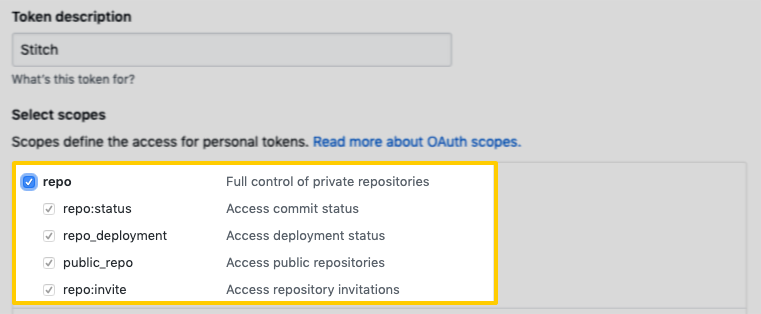
Highlighted repo scopes on the GitHub Personal Access Tokens page Note: While these are full permissions, Stitch will only ever read your data. The repo scope is required due to how GitHub structures permissions.
- Click the Generate token button.
- The new access token will display on the next page. Copy the token before navigating away from the page - GitHub won’t display it again.
Step 2: Add COVID-19 Public Data as a Stitch data source
- Sign into your Stitch account.
-
On the Stitch Dashboard page, click the Add Integration button.
-
Click the COVID-19 icon.
-
Enter a name for the integration. This is the name that will display on the Stitch Dashboard for the integration; it’ll also be used to create the schema in your destination.
For example, the name “Stitch COVID-19 Public Data” would create a schema called
stitch_covid_19_public_datain the destination. Note: Schema names cannot be changed after you save the integration. - In the GitHub Access Token field, paste the access token you created in Step 1.
Step 3: Define the historical replication start date
The Sync Historical Data setting defines the starting date for your COVID-19 Public Data integration. This means that data equal to or newer than this date will be replicated to your data warehouse.
Change this setting if you want to replicate data beyond COVID-19 Public Data’s default setting of 1 year. For a detailed look at historical replication jobs, check out the Syncing Historical SaaS Data guide.
Step 4: Create a replication schedule
In the Replication Frequency section, you’ll create the integration’s replication schedule. An integration’s replication schedule determines how often Stitch runs a replication job, and the time that job begins.
COVID-19 Public Data integrations support the following replication scheduling methods:
-
Advanced Scheduling using Cron (Advanced or Premium plans only)
To keep your row usage low, consider setting the integration to replicate less frequently. See the Understanding and Reducing Your Row Usage guide for tips on reducing your usage.
Step 5: Set objects to replicate
The last step is to select the tables and columns you want to replicate. Learn about the available tables for this integration.
Note: If a replication job is currently in progress, new selections won’t be used until the next job starts.
For COVID-19 Public Data integrations, you can select:
-
Individual tables and columns
-
All tables and columns
Click the tabs to view instructions for each selection method.
- In the integration’s Tables to Replicate tab, locate a table you want to replicate.
-
To track a table, click the checkbox next to the table’s name. A blue checkmark means the table is set to replicate.
-
To track a column, click the checkbox next to the column’s name. A blue checkmark means the column is set to replicate.
- Repeat this process for all the tables and columns you want to replicate.
- When finished, click the Finalize Your Selections button at the bottom of the screen to save your selections.
- Click into the integration from the Stitch Dashboard page.
-
Click the Tables to Replicate tab.
- In the list of tables, click the box next to the Table Names column.
-
In the menu that displays, click Track all Tables and Fields:
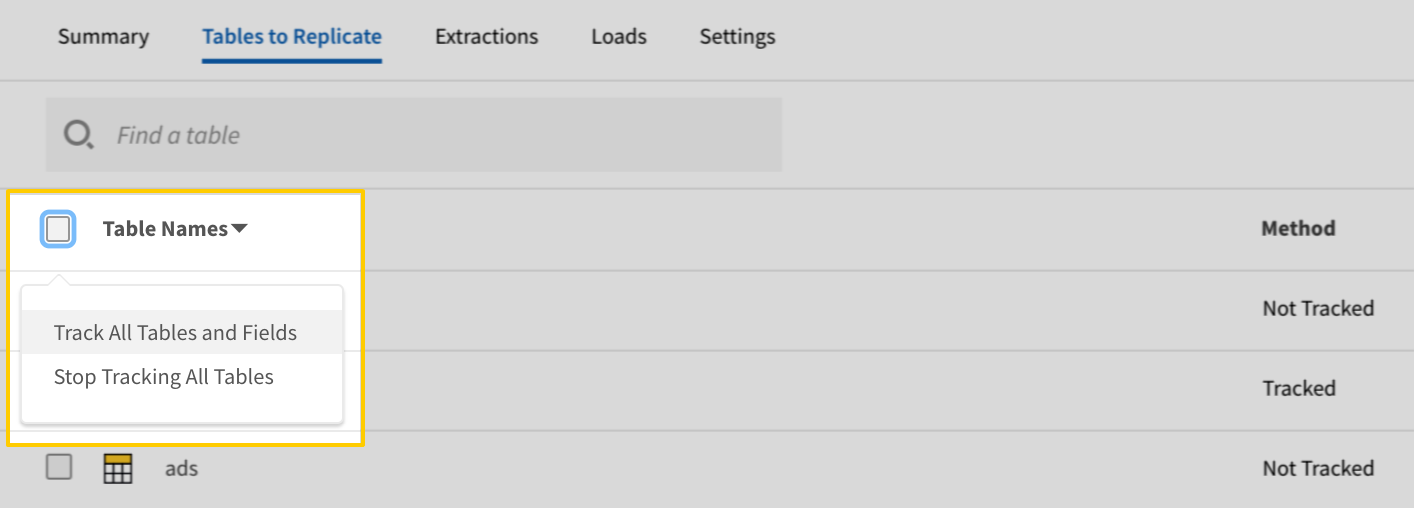
The Track all Tables and Fields menu in the Tables to Replicate tab - Click the Finalize Your Selections button at the bottom of the page to save your data selections.
Initial and historical replication jobs
After you finish setting up COVID-19 Public Data, its Sync Status may show as Pending on either the Stitch Dashboard or in the Integration Details page.
For a new integration, a Pending status indicates that Stitch is in the process of scheduling the initial replication job for the integration. This may take some time to complete.
Initial replication jobs with Anchor Scheduling
If using Anchor Scheduling, an initial replication job may not kick off immediately. This depends on the selected Replication Frequency and Anchor Time. Refer to the Anchor Scheduling documentation for more information.
Free historical data loads
The first seven days of replication, beginning when data is first replicated, are free. Rows replicated from the new integration during this time won’t count towards your quota. Stitch offers this as a way of testing new integrations, measuring usage, and ensuring historical data volumes don’t quickly consume your quota.
COVID-19 Public Data table reference
Schemas and versioning
Schemas and naming conventions can change from version to version, so we recommend verifying your integration’s version before continuing.
The schema and info displayed below is for version 1 of this integration.
This is the latest version of the COVID-19 Public Data integration.
Table and column names in your destination
Depending on your destination, table and column names may not appear as they are outlined below.
For example: Object names are lowercased in Redshift (CusTomERs > customers), while case is maintained in PostgreSQL destinations (CusTomERs > CusTomERs). Refer to the Loading Guide for your destination for more info.
c19_trk_us_daily
The c19_trk_us_daily table contains statistics for the United States, aggregated by day.
Note: The source file for this table is a single file that updates on a daily basis. When Stitch replicates this table, it will replicate the entire contents of the file, but only if the file has been modified since the integration’s last replication job.
|
Key-based Incremental |
|
|
Primary Key |
__sdc_row_number |
|
Replication Key |
git_last_modified |
| Useful links |


c19_trk_us_population_counties
The c19_trk_us_population_counties table contains statistics for reporting counties in the United States.
Note: The source file for this table is a single file that updates on a daily basis. When Stitch replicates this table, it will replicate the entire contents of the file, but only if the file has been modified since the integration’s last replication job.
|
Key-based Incremental |
|
|
Primary Key |
__sdc_row_number |
|
Replication Key |
git_last_modified |
| Useful links |
c19_trk_us_population_states
The c19_trk_us_population_states table contains population statistics for states in the United States.
Note: The source file for this table is a single file that updates on a daily basis. When Stitch replicates this table, it will replicate the entire contents of the file, but only if the file has been modified since the integration’s last replication job.
|
Key-based Incremental |
|
|
Primary Key |
__sdc_row_number |
|
Replication Key |
git_last_modified |
| Useful links |
c19_trk_us_population_states_age_groups
The c19_trk_us_population_states_age_groups table contains population statistics in the United States, aggregated by age group and state.
Note: The source file for this table is a single file that updates on a daily basis. When Stitch replicates this table, it will replicate the entire contents of the file, but only if the file has been modified since the integration’s last replication job.
|
Key-based Incremental |
|
|
Primary Key |
__sdc_row_number |
|
Replication Key |
git_last_modified |
| Useful links |
c19_trk_us_states_acs_health_insurance
The c19_trk_us_states_acs_health_insurance table contains health insurance statistics for the United States.
Note: The source file for this table is a single file that updates on a daily basis. When Stitch replicates this table, it will replicate the entire contents of the file, but only if the file has been modified since the integration’s last replication job.
|
Key-based Incremental |
|
|
Primary Key |
__sdc_row_number |
|
Replication Key |
git_last_modified |
| Useful links |
c19_trk_us_states_current
The c19_trk_us_states_current table contains current statistics for states in the United States.
Note: The source file for this table is a single file that updates on a daily basis. When Stitch replicates this table, it will replicate the entire contents of the file, but only if the file has been modified since the integration’s last replication job.
|
Key-based Incremental |
|
|
Primary Key |
__sdc_row_number |
|
Replication Key |
git_last_modified |
| Useful links |
c19_trk_us_states_daily
The c19_trk_us_states_daily table contains historical data for states in the United States, aggregated by day. Note: COVID-19 Public Data updates this data every day at 4PM ET.
Note: The source file for this table is a single file that updates on a daily basis. When Stitch replicates this table, it will replicate the entire contents of the file, but only if the file has been modified since the integration’s last replication job.
|
Key-based Incremental |
|
|
Primary Key |
__sdc_row_number |
|
Replication Key |
git_last_modified |
| Useful links |
c19_trk_us_states_info
The c19_trk_us_states_info table contains information about states in the United States.
Note: The source file for this table is a single file that updates on a daily basis. When Stitch replicates this table, it will replicate the entire contents of the file, but only if the file has been modified since the integration’s last replication job.
|
Key-based Incremental |
|
|
Primary Key |
__sdc_row_number |
|
Replication Key |
git_last_modified |
| Useful links |
c19_trk_us_states_kff_hospital_beds
The c19_trk_us_states_kff_hospital_beds table contains statistics about hospital beds per 1,000 population, segmented by hospital ownership type.
Note: The source file for this table is a single file that updates on a daily basis. When Stitch replicates this table, it will replicate the entire contents of the file, but only if the file has been modified since the integration’s last replication job.
|
Key-based Incremental |
|
|
Primary Key |
__sdc_row_number |
|
Replication Key |
git_last_modified |
| Useful links |
eu_daily
The eu_daily table contains statistics for the European Union, aggregated by day. This data is sourced from the covid19-eu-data GitHub repository.
|
Key-based Incremental |
|
|
Primary Keys |
__sdc_row_number git_path |
|
Replication Key |
git_last_modified |
| Useful links |
eu_ecdc_daily
The eu_ecdc_daily table contains statistics reported to the European Centre for Disease Prevention and Control, segmented by day.
|
Key-based Incremental |
|
|
Primary Keys |
__sdc_row_number git_path |
|
Replication Key |
git_last_modified |
| Useful links |
italy_national_daily
The italy_national_daily table contains statistics for Italy, segmented by day.
|
Key-based Incremental |
|
|
Primary Keys |
__sdc_row_number git_path |
|
Replication Key |
git_last_modified |
| Useful links |
italy_provincial_daily
The italy_provincial_daily table contains statistics for Italian provinces, segmented by day.
|
Key-based Incremental |
|
|
Primary Keys |
__sdc_row_number git_path |
|
Replication Key |
git_last_modified |
| Useful links |
italy_regional_daily
The italy_regional_daily table contains statistics for Italian regions, segmented by day.
|
Key-based Incremental |
|
|
Primary Keys |
__sdc_row_number git_path |
|
Replication Key |
git_last_modified |
| Useful links |
jh_csse_daily
The jh_csse_daily table contains data collected by Johns Hopkins CSSE.
|
Key-based Incremental |
|
|
Primary Keys |
__sdc_row_number git_path |
|
Replication Key |
git_last_modified |
| Useful links |
neherlab_case_counts
The neherlab_case_counts table contains Neherlab Scenarios Data from Neherlab Biozentrum, Center for Computational Biology.
|
Key-based Incremental |
|
|
Primary Keys |
__sdc_row_number git_path |
|
Replication Key |
git_last_modified |
| Useful links |
neherlab_country_codes
The neherlab_country_codes table contains Neherlab Scenarios Data from Neherlab Biozentrum, Center for Computational Biology.
Note: The source file for this table is a single file that updates on a daily basis. When Stitch replicates this table, it will replicate the entire contents of the file, but only if the file has been modified since the integration’s last replication job.
|
Key-based Incremental |
|
|
Primary Key |
__sdc_row_number |
|
Replication Key |
git_last_modified |
| Useful links |
neherlab_icu_capacity
The neherlab_icu_capacity table contains Neherlab Scenarios Data from Neherlab Biozentrum, Center for Computational Biology.
Note: The source file for this table is a single file that updates on a daily basis. When Stitch replicates this table, it will replicate the entire contents of the file, but only if the file has been modified since the integration’s last replication job.
|
Key-based Incremental |
|
|
Primary Keys |
__sdc_row_number git_path |
|
Replication Key |
git_last_modified |
| Useful links |
neherlab_population
The neherlab_population table contains Neherlab Scenarios Data from Neherlab Biozentrum, Center for Computational Biology.
Note: The source file for this table is a single file that updates on a daily basis. When Stitch replicates this table, it will replicate the entire contents of the file, but only if the file has been modified since the integration’s last replication job.
|
Key-based Incremental |
|
|
Primary Keys |
__sdc_row_number git_path |
|
Replication Key |
git_last_modified |
| Useful links |
nytimes_us_counties
The nytimes_us_counties table contains data
Note: The source file for this table is a single file that updates on a daily basis. When Stitch replicates this table, it will replicate the entire contents of the file, but only if the file has been modified since the integration’s last replication job.
|
Key-based Incremental |
|
|
Primary Key |
__sdc_row_number |
|
Replication Key |
git_last_modified |
| Useful links |
nytimes_us_states
The nytimes_us_states table contains data collected by Johns Hopkins CSSE.
Note: The source file for this table is a single file that updates on a daily basis. When Stitch replicates this table, it will replicate the entire contents of the file, but only if the file has been modified since the integration’s last replication job.
|
Full Table |
|
|
Primary Key |
__sdc_row_number |
|
Replication Key |
git_last_modified |
| Useful links |