
Shippo (v1)
Last updated: 9/15/2026This integration is powered by Singer's Shippo tap. For support, visit the GitHub repo or join the Singer Slack.
Shippo integration summary
Stitch’s Shippo integration replicates data using the Shippo API. Refer to the Schema section for a list of objects available for replication.
Shippo feature snapshot
A high-level look at Stitch's Shippo (v1) integration, including release status, useful links, and the features supported in Stitch.
| STITCH | |||
| Release status |
Released on March 1, 2017 |
Supported by
|
|
|
Stitch plan
|
Standard |
API availability
|
Available
|
| Singer GitHub repository | |||
| REPLICATION SETTINGS | |||
|
Anchor Scheduling
|
Supported
|
Advanced Scheduling
|
Supported
|
|
Table-level reset
|
Unsupported
|
Configurable Replication Methods
|
Unsupported
|
| DATA SELECTION | |||
|
Table selection
|
Unsupported
|
Column selection
|
Unsupported
|
|
Select all
|
Unsupported
|
||
| TRANSPARENCY | |||
|
Extraction Logs
|
Supported
|
Loading Reports
|
Supported
|
Connecting Shippo
Step 1: Retrieve your Shippo API token
- Sign into your Shippo account.
- In the left nav tab, click API.
-
Locate the API LIve Token field in the Tokens section:
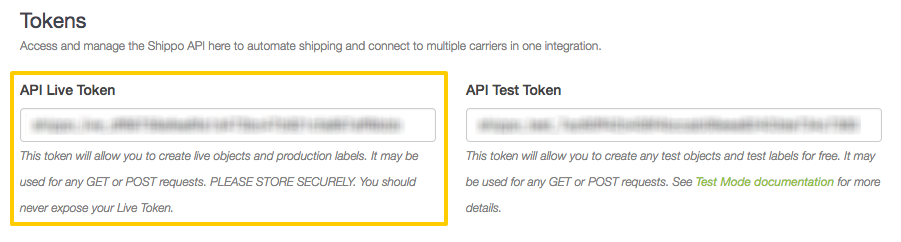
Shippo API token. Leave this page open for now - you’ll need it to complete the setup.
Step 2: Add Shippo as a Stitch data source
- Sign into your Stitch account.
-
On the Stitch Dashboard page, click the Add Integration button.
-
Click the Shippo icon.
-
Enter a name for the integration. This is the name that will display on the Stitch Dashboard for the integration; it’ll also be used to create the schema in your destination.
For example, the name “Stitch Shippo” would create a schema called
stitch_shippoin the destination. Note: Schema names cannot be changed after you save the integration. - In the Shippo Token field, paste your Shippo API Live token.
Step 3: Define the historical replication start date
The Sync Historical Data setting defines the starting date for your Shippo integration. This means that data equal to or newer than this date will be replicated to your data warehouse.
Change this setting if you want to replicate data beyond Shippo’s default setting of 1 year. For a detailed look at historical replication jobs, check out the Syncing Historical SaaS Data guide.
Step 4: Create a replication schedule
In the Replication Frequency section, you’ll create the integration’s replication schedule. An integration’s replication schedule determines how often Stitch runs a replication job, and the time that job begins.
Shippo integrations support the following replication scheduling methods:
-
Advanced Scheduling using Cron (Advanced or Premium plans only)
To keep your row usage low, consider setting the integration to replicate less frequently. See the Understanding and Reducing Your Row Usage guide for tips on reducing your usage.
Initial and historical replication jobs
After you finish setting up Shippo, its Sync Status may show as Pending on either the Stitch Dashboard or in the Integration Details page.
For a new integration, a Pending status indicates that Stitch is in the process of scheduling the initial replication job for the integration. This may take some time to complete.
Initial replication jobs with Anchor Scheduling
If using Anchor Scheduling, an initial replication job may not kick off immediately. This depends on the selected Replication Frequency and Anchor Time. Refer to the Anchor Scheduling documentation for more information.
Free historical data loads
The first seven days of replication, beginning when data is first replicated, are free. Rows replicated from the new integration during this time won’t count towards your quota. Stitch offers this as a way of testing new integrations, measuring usage, and ensuring historical data volumes don’t quickly consume your quota.
Shippo table reference
Schemas and versioning
Schemas and naming conventions can change from version to version, so we recommend verifying your integration’s version before continuing.
The schema and info displayed below is for version 1 of this integration.
This is the latest version of the Shippo integration.
Table and column names in your destination
Depending on your destination, table and column names may not appear as they are outlined below.
For example: Object names are lowercased in Redshift (CusTomERs > customers), while case is maintained in PostgreSQL destinations (CusTomERs > CusTomERs). Refer to the Loading Guide for your destination for more info.
addresses
The addresses table contains info about address objects. These are used to create shipments, obtain rates, and print labels.
|
Key-based Incremental |
|
|
Primary Key |
object_id |
|
Replication Key |
object_updated |
| Useful links |


parcels
The parcels table contains info about parcel objects. Parcels are used to create shipments, obtain rates, and print labels.
|
Key-based Incremental |
|
|
Primary Key |
object_id |
|
Replication Key |
object_updated |
| Useful links |
refunds
The refunds table contains info about refunds, which are reimbursements for successfully created but unused transactions.
Refund processing time and data discrepancies
If the data in this table doesn’t look like you’d expect it to, keep in mind that refunds can take up to 14 days to be processed.
|
Key-based Incremental |
|
|
Primary Key |
object_id |
|
Replication Key |
object_updated |
| Useful links |
shipments
The shipments table contains info about shipment objects. Shipment objects are made up of to and from addresses and the parcel to be shipped.
|
Key-based Incremental |
|
|
Primary Key |
object_id |
|
Replication Key |
object_updated |
| Useful links |
transactions
The transactions table contains info about transactions, which are the purchases of shipping labels from a shipping provider for a specific service.
|
Key-based Incremental |
|
|
Primary Key |
object_id |
| Useful links |