Indicates if Replication Methods can be defined by you for tables in the integration.
Configurable Replication Methods are not supported for this integration. Stitch will use pre-defined replication methods for tables you set to replicate.
Unsupported
DATA SELECTION
Table selection
The ability to select individual tables for replication in the Stitch interface. If table selection is unavailable, all tables and all the columns they contain will be set to replicate by default.
This feature is supported for this version of the integration.
Supported
Column selection
The ability to select individual columns for replication in the Stitch interface. If column selection is unavailable, all columns will be set to replicate by default.
This feature is supported for this version of the integration.
Supported
Select all
Indicates if the integration supports selecting all available tables and columns.
Reports detailing the Loading phase of the replication process for a given integration. Includes the number of rows loaded for each table and error info, should an error occur.
This feature is supported for this version of the integration.
Supported
Connecting Lever
Lever setup requirements
To set up Lever in Stitch, you need:
Super Admin privileges. Your role in Lever must be Super Admin in order to obtain an API Key.
Step 1: Obtain your API token
Login to your Lever account.
Hover over your account icon in the upper right corner of the page and click Settings.
On the settings page, click API Credentials.
On the API Credentials page, locate the Generate New Key link in the Lever API credentials section.
If you would like your key to access confidential information, click on the Allow access to confidential data toggle. If not, skip to the next step.
Click Done.
Keep your API key readily available for the next step.
Information noteNote: Once you save your API key, you cannot change its access settings. You’ll need to generate a new API key to change access settings.
On the Stitch Dashboard page, click the Add Integration button.
Click the Lever icon.
Enter a name for the integration. This is the name that will display on the Stitch Dashboard for the integration; it’ll also be used to create the schema in your destination.
For example, the name “Stitch Lever” would create a schema called stitch_lever in the destination. Note: Schema names cannot be changed after you save the integration.
In the Token field, paste the API Key you obtained in Step 1.
Step 3: Define the historical replication start date
The Sync Historical Data setting defines the starting date for your Lever integration.
This means that data equal to or newer than this date will be replicated to your data warehouse.
Change this setting if you want to replicate data beyond Lever’s default setting of 1 year. For a detailed look at historical replication jobs, check out the Syncing Historical SaaS Data guide.
Step 4: Create a replication schedule
Information note
Replication schedules affect the time Extraction begins, not the time to data loaded. Refer to the Replication Scheduling documentation for more information.
In the Replication Frequency section, you’ll create the integration’s replication schedule. An integration’s replication schedule determines how often Stitch runs a replication job, and the time that job begins.
Lever integrations support the following replication scheduling methods:
Note: If a replication job is currently in progress, new selections won’t be used until the next job starts.
For Lever integrations, you can select:
Individual tables and columns
All tables and columns
Click the tabs to view instructions for each selection method.
In the integration’s Tables to Replicate tab, locate a table you want to replicate.
To track a table, click the checkbox next to the table’s name. A blue checkmark means the table is set to replicate.
To track a column, click the checkbox next to the column’s name. A blue checkmark means the column is set to replicate.
Repeat this process for all the tables and columns you want to replicate.
When finished, click the Finalize Your Selections button at the bottom of the screen to save your selections.
Information noteImportant:
Using the Select All feature will overwrite any previous selections. However, selections aren’t final until Finalize Your Selections is clicked. Clicking Cancel will restore your previous selections.
Refer to the Select All guide for more info about this feature.
Click into the integration from the Stitch Dashboard page.
Click the Tables to Replicate tab.
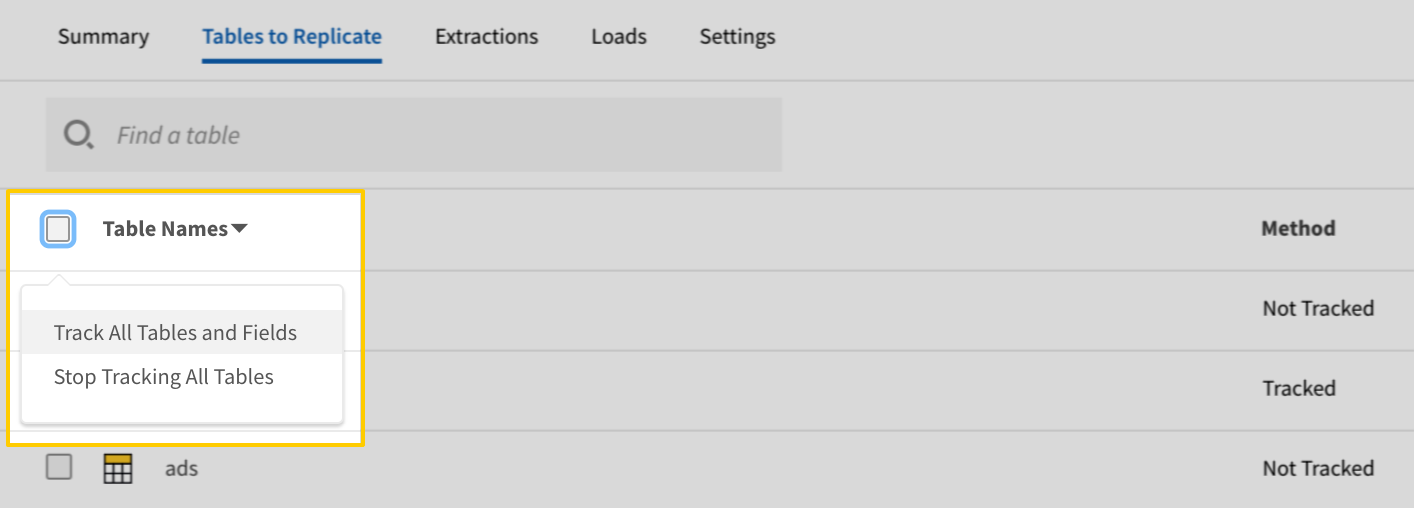
In the list of tables, click the box next to the Table Names column.
In the menu that displays, click Track all Tables and Fields:
The Track all Tables and Fields menu in the Tables to Replicate tab
Click the Finalize Your Selections button at the bottom of the page to save your data selections.
Initial and historical replication jobs
After you finish setting up Lever, its Sync Status may show as Pending on either the Stitch Dashboard or in the Integration Details page.
For a new integration, a Pending status indicates that Stitch is in the process of scheduling the initial replication job for the integration. This may take some time to complete.
Information note
Initial replication jobs with Anchor Scheduling
If using Anchor Scheduling, an initial replication job may not kick off immediately. This depends on the selected Replication Frequency and Anchor Time. Refer to the Anchor Scheduling documentation for more information.
Free historical data loads
The first seven days of replication, beginning when data is first replicated, are free. Rows replicated from the new integration during this time won’t count towards your quota. Stitch offers this as a way of testing new integrations, measuring usage, and ensuring historical data volumes don’t quickly consume your quota.
Information noteReplication will continue after the seven days are over. If you’re no longer interested in this source, be sure to pause or delete the integration to prevent unwanted usage.
Lever table reference
Information note
Schemas and versioning
Schemas and naming conventions can change from version to version, so we recommend verifying your integration’s version before continuing.
The schema and info displayed below is for version 1 of this integration.
This is the latest version of the Lever integration.
Information note
Table and column names in your destination
Depending on your destination, table and column names may not appear as they are outlined below.
For example: Object names are lowercased in Redshift (CusTomERs > customers), while case is maintained in PostgreSQL destinations (CusTomERs > CusTomERs). Refer to the Loading Guide for your destination for more info.
archive_reasons
The archive_reasons table contains info about the reasons candidates have exited your active hiring pipeline. Refer to Lever’s documentation for more info.
This is a nested data structure. If your destination doesn't natively support nested data, attributes will be denested into a subtable. <a href='/en-US/stitch/replication/loading/understanding-loading-row-usage-for-nested-data-structures' target='new'>Learn more</a>.
identifier
STRING
text
STRING
value
STRING
id
STRING
sentAt
DATE-TIME
signatures
OBJECT
This is a nested data structure. If your destination doesn't natively support nested data, attributes in this object will be flattened into the table. <a href='/en-US/stitch/replication/loading/understanding-loading-row-usage-for-nested-data-structures' target='new'>Learn more</a>.
email
STRING
firstOpenedAt
DATE-TIME
lastOpenedAt
DATE-TIME
name
STRING
role
STRING
signed
BOOLEAN
signedAt
DATE-TIME
status
STRING
candidate_referrals
The candidate_referrals table contains info about the referrals in your Lever account.
This is a nested data structure. If your destination doesn't natively support nested data, attributes will be denested into a subtable. <a href='/en-US/stitch/replication/loading/understanding-loading-row-usage-for-nested-data-structures' target='new'>Learn more</a>.
description
STRING
options
ARRAY
This is a nested data structure. If your destination doesn't natively support nested data, attributes will be denested into a subtable. <a href='/en-US/stitch/replication/loading/understanding-loading-row-usage-for-nested-data-structures' target='new'>Learn more</a>.
text
STRING
prompt
STRING
required
BOOLEAN
text
STRING
type
STRING
value
STRING
id
STRING
instructions
STRING
referrer
STRING
stage
STRING
text
STRING
type
STRING
user
STRING
candidate_resumes
The candidate_resumes table contains info about candidate resumes.
This is a nested data structure. If your destination doesn't natively support nested data, attributes in this object will be flattened into the table. <a href='/en-US/stitch/replication/loading/understanding-loading-row-usage-for-nested-data-structures' target='new'>Learn more</a>.
id
STRING
parsedData
OBJECT
This is a nested data structure. If your destination doesn't natively support nested data, attributes in this object will be flattened into the table. <a href='/en-US/stitch/replication/loading/understanding-loading-row-usage-for-nested-data-structures' target='new'>Learn more</a>.
candidates
The candidates table contains info about candidates, or individuals who’ve been added to your Lever account as potential fits for job opportunities.
Note: This table must be set to replicate in order to replicate the candidate_applications, candidate_offers, candidate_referrals, and candidate_resumes tables.
During Extraction, this table will be replicated before any other selected candidate_* tables. Then, for every candidate, Stitch will query for every candidate’s applications, offers, referrals, and resumes.
For example: During Extraction, Stitch replicates a candidate with id: 12345 from Lever’s /candidates endpoint.
Using id: 12345, Stitch will then query for the rest of the candidate’s data:
This is a nested data structure. If your destination doesn't natively support nested data, attributes will be denested into a subtable. <a href='/en-US/stitch/replication/loading/understanding-loading-row-usage-for-nested-data-structures' target='new'>Learn more</a>.
archived
OBJECT
This is a nested data structure. If your destination doesn't natively support nested data, attributes in this object will be flattened into the table. <a href='/en-US/stitch/replication/loading/understanding-loading-row-usage-for-nested-data-structures' target='new'>Learn more</a>.
archivedAt
DATE-TIME
reason
STRING
contact
STRING
createdAt
DATE-TIME
dataProtection
OBJECT
This is a nested data structure. If your destination doesn't natively support nested data, attributes in this object will be flattened into the table. <a href='/en-US/stitch/replication/loading/understanding-loading-row-usage-for-nested-data-structures' target='new'>Learn more</a>.
emails
ARRAY
This is a nested data structure. If your destination doesn't natively support nested data, attributes will be denested into a subtable. <a href='/en-US/stitch/replication/loading/understanding-loading-row-usage-for-nested-data-structures' target='new'>Learn more</a>.
followers
ARRAY
This is a nested data structure. If your destination doesn't natively support nested data, attributes will be denested into a subtable. <a href='/en-US/stitch/replication/loading/understanding-loading-row-usage-for-nested-data-structures' target='new'>Learn more</a>.
headline
STRING
id
STRING
isAnonymized
BOOLEAN
lastAdvancedAt
DATE-TIME
lastInteractionAt
DATE-TIME
links
ARRAY
This is a nested data structure. If your destination doesn't natively support nested data, attributes will be denested into a subtable. <a href='/en-US/stitch/replication/loading/understanding-loading-row-usage-for-nested-data-structures' target='new'>Learn more</a>.
location
STRING
name
STRING
origin
STRING
owner
STRING
phones
ARRAY
This is a nested data structure. If your destination doesn't natively support nested data, attributes will be denested into a subtable. <a href='/en-US/stitch/replication/loading/understanding-loading-row-usage-for-nested-data-structures' target='new'>Learn more</a>.
type
STRING
value
STRING
resume
OBJECT
This is a nested data structure. If your destination doesn't natively support nested data, attributes in this object will be flattened into the table. <a href='/en-US/stitch/replication/loading/understanding-loading-row-usage-for-nested-data-structures' target='new'>Learn more</a>.
snoozedUntil
DATE-TIME
sources
ARRAY
This is a nested data structure. If your destination doesn't natively support nested data, attributes will be denested into a subtable. <a href='/en-US/stitch/replication/loading/understanding-loading-row-usage-for-nested-data-structures' target='new'>Learn more</a>.
stage
STRING
stageChanges
ARRAY
This is a nested data structure. If your destination doesn't natively support nested data, attributes will be denested into a subtable. <a href='/en-US/stitch/replication/loading/understanding-loading-row-usage-for-nested-data-structures' target='new'>Learn more</a>.
tags
ARRAY
This is a nested data structure. If your destination doesn't natively support nested data, attributes will be denested into a subtable. <a href='/en-US/stitch/replication/loading/understanding-loading-row-usage-for-nested-data-structures' target='new'>Learn more</a>.
urls
OBJECT
This is a nested data structure. If your destination doesn't natively support nested data, attributes in this object will be flattened into the table. <a href='/en-US/stitch/replication/loading/understanding-loading-row-usage-for-nested-data-structures' target='new'>Learn more</a>.
opportunities
The opportunities table contains info about opportunities. In Lever, an opportunity represents each of an individual candidate’s unique candidacies or journeys through your hiring pipeline for a position. A candidate can be associated with multiple opportunities.
Note: This table must be set to replicate in order to replicate the opportunity_applications, opportunity_offers, opportunity_referrals, and opportunity_resumes tables.
During Extraction, this table will be replicated before any other selected opportunity_* tables. Then, for every opportunity, Stitch will query for every opportunity’s applications, offers, referrals, and resumes.
For example: During Extraction, Stitch replicates an opportunity with id: 12345 from Lever’s /opportunities endpoint.
Using id: 12345, Stitch will then query for the rest of the opportunity’s data:
This is a nested data structure. If your destination doesn't natively support nested data, attributes will be denested into a subtable. <a href='/en-US/stitch/replication/loading/understanding-loading-row-usage-for-nested-data-structures' target='new'>Learn more</a>.
archived
OBJECT
This is a nested data structure. If your destination doesn't natively support nested data, attributes in this object will be flattened into the table. <a href='/en-US/stitch/replication/loading/understanding-loading-row-usage-for-nested-data-structures' target='new'>Learn more</a>.
archivedAt
DATE-TIME
reason
STRING
contact
STRING
createdAt
DATE-TIME
dataProtection
OBJECT
This is a nested data structure. If your destination doesn't natively support nested data, attributes in this object will be flattened into the table. <a href='/en-US/stitch/replication/loading/understanding-loading-row-usage-for-nested-data-structures' target='new'>Learn more</a>.
emails
ARRAY
This is a nested data structure. If your destination doesn't natively support nested data, attributes will be denested into a subtable. <a href='/en-US/stitch/replication/loading/understanding-loading-row-usage-for-nested-data-structures' target='new'>Learn more</a>.
followers
ARRAY
This is a nested data structure. If your destination doesn't natively support nested data, attributes will be denested into a subtable. <a href='/en-US/stitch/replication/loading/understanding-loading-row-usage-for-nested-data-structures' target='new'>Learn more</a>.
headline
STRING
id
STRING
isAnonymized
BOOLEAN
lastAdvancedAt
DATE-TIME
lastInteractionAt
DATE-TIME
links
ARRAY
This is a nested data structure. If your destination doesn't natively support nested data, attributes will be denested into a subtable. <a href='/en-US/stitch/replication/loading/understanding-loading-row-usage-for-nested-data-structures' target='new'>Learn more</a>.
location
STRING
name
STRING
origin
STRING
owner
STRING
phones
ARRAY
This is a nested data structure. If your destination doesn't natively support nested data, attributes will be denested into a subtable. <a href='/en-US/stitch/replication/loading/understanding-loading-row-usage-for-nested-data-structures' target='new'>Learn more</a>.
type
STRING
value
STRING
snoozedUntil
DATE-TIME
sources
ARRAY
This is a nested data structure. If your destination doesn't natively support nested data, attributes will be denested into a subtable. <a href='/en-US/stitch/replication/loading/understanding-loading-row-usage-for-nested-data-structures' target='new'>Learn more</a>.
stage
STRING
stageChanges
ARRAY
This is a nested data structure. If your destination doesn't natively support nested data, attributes will be denested into a subtable. <a href='/en-US/stitch/replication/loading/understanding-loading-row-usage-for-nested-data-structures' target='new'>Learn more</a>.
tags
ARRAY
This is a nested data structure. If your destination doesn't natively support nested data, attributes will be denested into a subtable. <a href='/en-US/stitch/replication/loading/understanding-loading-row-usage-for-nested-data-structures' target='new'>Learn more</a>.
urls
OBJECT
This is a nested data structure. If your destination doesn't natively support nested data, attributes in this object will be flattened into the table. <a href='/en-US/stitch/replication/loading/understanding-loading-row-usage-for-nested-data-structures' target='new'>Learn more</a>.
opportunity_applications
The opportunity_applications table contains info about candidate applications in your Lever account.
Note: To replicate this table, the opportunities table must be set to replicate.
This is a nested data structure. If your destination doesn't natively support nested data, attributes will be denested into a subtable. <a href='/en-US/stitch/replication/loading/understanding-loading-row-usage-for-nested-data-structures' target='new'>Learn more</a>.
identifier
STRING
text
STRING
value
STRING
id
STRING
opportunityId
STRING
posting
STRING
sentAt
DATE-TIME
sentDocument
OBJECT
This is a nested data structure. If your destination doesn't natively support nested data, attributes in this object will be flattened into the table. <a href='/en-US/stitch/replication/loading/understanding-loading-row-usage-for-nested-data-structures' target='new'>Learn more</a>.
downloadUrl
STRING
fileName
STRING
uploadedAt
DATE-TIME
signatures
OBJECT
This is a nested data structure. If your destination doesn't natively support nested data, attributes in this object will be flattened into the table. <a href='/en-US/stitch/replication/loading/understanding-loading-row-usage-for-nested-data-structures' target='new'>Learn more</a>.
candidate
OBJECT
This is a nested data structure. If your destination doesn't natively support nested data, attributes in this object will be flattened into the table. <a href='/en-US/stitch/replication/loading/understanding-loading-row-usage-for-nested-data-structures' target='new'>Learn more</a>.
email
STRING
firstOpenedAt
DATE-TIME
lastOpenedAt
DATE-TIME
name
STRING
role
STRING
signed
BOOLEAN
signedAt
DATE-TIME
email
STRING
firstOpenedAt
DATE-TIME
lastOpenedAt
DATE-TIME
name
STRING
role
STRING
signed
BOOLEAN
signedAt
DATE-TIME
signedDocument
OBJECT
This is a nested data structure. If your destination doesn't natively support nested data, attributes in this object will be flattened into the table. <a href='/en-US/stitch/replication/loading/understanding-loading-row-usage-for-nested-data-structures' target='new'>Learn more</a>.
downloadUrl
STRING
fileName
STRING
uploadedAt
DATE-TIME
status
STRING
opportunity_referrals
The opportunity_referrals table contains info about the referrals in your Lever account.
Note: To replicate this table, the opportunities table must be set to replicate.
This is a nested data structure. If your destination doesn't natively support nested data, attributes will be denested into a subtable. <a href='/en-US/stitch/replication/loading/understanding-loading-row-usage-for-nested-data-structures' target='new'>Learn more</a>.
description
STRING
options
ARRAY
This is a nested data structure. If your destination doesn't natively support nested data, attributes will be denested into a subtable. <a href='/en-US/stitch/replication/loading/understanding-loading-row-usage-for-nested-data-structures' target='new'>Learn more</a>.
text
STRING
prompt
STRING
required
BOOLEAN
text
STRING
type
STRING
value
STRING
id
STRING
instructions
STRING
referrer
STRING
stage
STRING
text
STRING
type
STRING
user
STRING
opportunity_resumes
The opportunity_resumes table contains info about candidate resumes.
Note: To replicate this table, the opportunities table must be set to replicate.
This is a nested data structure. If your destination doesn't natively support nested data, attributes in this object will be flattened into the table. <a href='/en-US/stitch/replication/loading/understanding-loading-row-usage-for-nested-data-structures' target='new'>Learn more</a>.
id
STRING
parsedData
OBJECT
This is a nested data structure. If your destination doesn't natively support nested data, attributes in this object will be flattened into the table. <a href='/en-US/stitch/replication/loading/understanding-loading-row-usage-for-nested-data-structures' target='new'>Learn more</a>.
postings
The postings table contains info about job postings in your Lever account.
This is a nested data structure. If your destination doesn't natively support nested data, attributes in this object will be flattened into the table. <a href='/en-US/stitch/replication/loading/understanding-loading-row-usage-for-nested-data-structures' target='new'>Learn more</a>.
commitment
STRING
department
STRING
level
STRING
location
STRING
team
STRING
content
OBJECT
This is a nested data structure. If your destination doesn't natively support nested data, attributes in this object will be flattened into the table. <a href='/en-US/stitch/replication/loading/understanding-loading-row-usage-for-nested-data-structures' target='new'>Learn more</a>.
closing
STRING
customQuestions
ARRAY
This is a nested data structure. If your destination doesn't natively support nested data, attributes will be denested into a subtable. <a href='/en-US/stitch/replication/loading/understanding-loading-row-usage-for-nested-data-structures' target='new'>Learn more</a>.
description
STRING
lists
ARRAY
This is a nested data structure. If your destination doesn't natively support nested data, attributes will be denested into a subtable. <a href='/en-US/stitch/replication/loading/understanding-loading-row-usage-for-nested-data-structures' target='new'>Learn more</a>.
content
STRING
text
STRING
createdAt
DATE-TIME
distributionChannels
ARRAY
This is a nested data structure. If your destination doesn't natively support nested data, attributes will be denested into a subtable. <a href='/en-US/stitch/replication/loading/understanding-loading-row-usage-for-nested-data-structures' target='new'>Learn more</a>.
followers
STRING
hiringManager
STRING
id
STRING
owner
STRING
reqCode
STRING
state
STRING
tags
ARRAY
This is a nested data structure. If your destination doesn't natively support nested data, attributes will be denested into a subtable. <a href='/en-US/stitch/replication/loading/understanding-loading-row-usage-for-nested-data-structures' target='new'>Learn more</a>.
text
STRING
updatedAt
DATE-TIME
urls
OBJECT
This is a nested data structure. If your destination doesn't natively support nested data, attributes in this object will be flattened into the table. <a href='/en-US/stitch/replication/loading/understanding-loading-row-usage-for-nested-data-structures' target='new'>Learn more</a>.
apply
STRING
list
STRING
show
STRING
user
STRING
requisitions
The requisitions table contains info about requisitions in your Lever account.
This is a nested data structure. If your destination doesn't natively support nested data, attributes will be denested into a subtable. <a href='/en-US/stitch/replication/loading/understanding-loading-row-usage-for-nested-data-structures' target='new'>Learn more</a>.
owner
STRING
postings
ARRAY
This is a nested data structure. If your destination doesn't natively support nested data, attributes will be denested into a subtable. <a href='/en-US/stitch/replication/loading/understanding-loading-row-usage-for-nested-data-structures' target='new'>Learn more</a>.
requisitionCode
STRING
status
STRING
team
STRING
sources
The sources table contains info about sources, or the ways that candidates enter into your Lever account.
The users table contains info about the users in your Lever account. A user includes anyone who has been invited to Lever to collaborate on recruiting efforts.