Indicates if Replication Methods can be defined by you for tables in the integration.
Configurable Replication Methods are not supported for this integration. Stitch will use pre-defined replication methods for tables you set to replicate.
Unsupported
DATA SELECTION
Table selection
The ability to select individual tables for replication in the Stitch interface. If table selection is unavailable, all tables and all the columns they contain will be set to replicate by default.
This feature is supported for this version of the integration.
Supported
Column selection
The ability to select individual columns for replication in the Stitch interface. If column selection is unavailable, all columns will be set to replicate by default.
This feature is supported for this version of the integration.
Supported
Select all
Indicates if the integration supports selecting all available tables and columns.
Reports detailing the Loading phase of the replication process for a given integration. Includes the number of rows loaded for each table and error info, should an error occur.
This feature is supported for this version of the integration.
Supported
Connecting Impact
Impact setup requirements
To set up Impact in Stitch, you need:
To have API access enabled for your Impact account. To do this, login to the Impact console. Locate the gear icon and then click Technical Settings > API Access. Click Enable API Access Now.
Step 1: Retrieve your Impact account SID and auth token
Login to your Impact console.
Click on the verticle ellipsis in the lower-left corner.
Click Settings.
On the settings page, locate the Technical section and click API.
Copy the read-only versions of your Account SID and Auth Token, and save it in a safe place.
On the Stitch Dashboard page, click the Add Integration button.
Click the Impact icon.
Enter a name for the integration. This is the name that will display on the Stitch Dashboard for the integration; it’ll also be used to create the schema in your destination.
For example, the name “Stitch Impact” would create a schema called stitch_impact in the destination. Note: Schema names cannot be changed after you save the integration.
In the Account SID field, paste the read-only Account SID you retrieved in Step 1.
In the API Catalog field, select Advertisers.
In the Auth Token field, paste the read-only Auth Token that you retrieved in Step 1.
Optional: In the Model ID field, enter your model ID. This is used in the conversion_paths table to extract data about conversions from clicks to conversion purchases.
Step 3: Define the historical replication start date
The Sync Historical Data setting defines the starting date for your Impact integration.
This means that data equal to or newer than this date will be replicated to your data warehouse.
Change this setting if you want to replicate data beyond Impact’s default setting of 1 year. For a detailed look at historical replication jobs, check out the Syncing Historical SaaS Data guide.
Step 4: Create a replication schedule
Information note
Replication schedules affect the time Extraction begins, not the time to data loaded. Refer to the Replication Scheduling documentation for more information.
In the Replication Frequency section, you’ll create the integration’s replication schedule. An integration’s replication schedule determines how often Stitch runs a replication job, and the time that job begins.
Impact integrations support the following replication scheduling methods:
Note: If a replication job is currently in progress, new selections won’t be used until the next job starts.
For Impact integrations, you can select:
Individual tables and columns
All tables and columns
Click the tabs to view instructions for each selection method.
In the integration’s Tables to Replicate tab, locate a table you want to replicate.
To track a table, click the checkbox next to the table’s name. A blue checkmark means the table is set to replicate.
To track a column, click the checkbox next to the column’s name. A blue checkmark means the column is set to replicate.
Repeat this process for all the tables and columns you want to replicate.
When finished, click the Finalize Your Selections button at the bottom of the screen to save your selections.
Information noteImportant:
Using the Select All feature will overwrite any previous selections. However, selections aren’t final until Finalize Your Selections is clicked. Clicking Cancel will restore your previous selections.
Refer to the Select All guide for more info about this feature.
Click into the integration from the Stitch Dashboard page.
Click the Tables to Replicate tab.
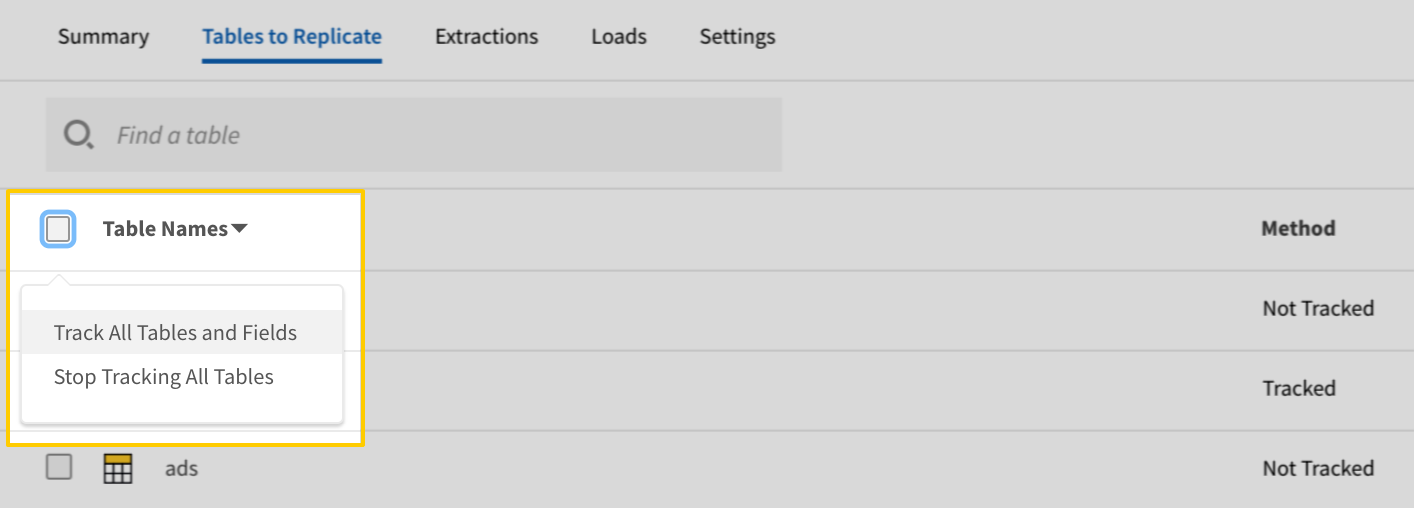
In the list of tables, click the box next to the Table Names column.
In the menu that displays, click Track all Tables and Fields:
The Track all Tables and Fields menu in the Tables to Replicate tab
Click the Finalize Your Selections button at the bottom of the page to save your data selections.
Initial and historical replication jobs
After you finish setting up Impact, its Sync Status may show as Pending on either the Stitch Dashboard or in the Integration Details page.
For a new integration, a Pending status indicates that Stitch is in the process of scheduling the initial replication job for the integration. This may take some time to complete.
Information note
Initial replication jobs with Anchor Scheduling
If using Anchor Scheduling, an initial replication job may not kick off immediately. This depends on the selected Replication Frequency and Anchor Time. Refer to the Anchor Scheduling documentation for more information.
Free historical data loads
The first seven days of replication, beginning when data is first replicated, are free. Rows replicated from the new integration during this time won’t count towards your quota. Stitch offers this as a way of testing new integrations, measuring usage, and ensuring historical data volumes don’t quickly consume your quota.
Information noteReplication will continue after the seven days are over. If you’re no longer interested in this source, be sure to pause or delete the integration to prevent unwanted usage.
Impact table reference
Information note
Schemas and versioning
Schemas and naming conventions can change from version to version, so we recommend verifying your integration’s version before continuing.
The schema and info displayed below is for version 1 of this integration.
This is the latest version of the Impact integration.
Information note
Table and column names in your destination
Depending on your destination, table and column names may not appear as they are outlined below.
For example: Object names are lowercased in Redshift (CusTomERs > customers), while case is maintained in PostgreSQL destinations (CusTomERs > CusTomERs). Refer to the Loading Guide for your destination for more info.
action_inquiries
The action_inquiries table contains info about a campaign’s action inquiries.
This is a nested data structure. If your destination doesn't natively support nested data, attributes will be denested into a subtable. <a href='/en-US/stitch/replication/loading/understanding-loading-row-usage-for-nested-data-structures' target='new'>Learn more</a>.
comment
STRING
date
DATE-TIME
user
STRING
creation_date
DATE-TIME
expected_payout
NUMBER
final_payout
NUMBER
id
INTEGER
inquiry_type
STRING
media_partner_id
INTEGER
media_partner_name
STRING
order_id
STRING
reject_reason
STRING
resolution_date
DATE-TIME
resolution_deadline_date
DATE-TIME
resolution_status
STRING
tracking_link
STRING
transaction_amount
NUMBER
transaction_date
DATE-TIME
uri
STRING
action_updates
The action_updates table contains info about a campaign’s action updates.
This is a nested data structure. If your destination doesn't natively support nested data, attributes will be denested into a subtable. <a href='/en-US/stitch/replication/loading/understanding-loading-row-usage-for-nested-data-structures' target='new'>Learn more</a>.
product_after_price_amount
NUMBER
product_after_price_currency
STRING
product_before_price_amount
NUMBER
product_before_price_currency
STRING
product_image_url
STRING
product_name
STRING
deal_restricted_media_partner_groups
ARRAY
This is a nested data structure. If your destination doesn't natively support nested data, attributes will be denested into a subtable. <a href='/en-US/stitch/replication/loading/understanding-loading-row-usage-for-nested-data-structures' target='new'>Learn more</a>.
deal_restricted_media_partners
ARRAY
This is a nested data structure. If your destination doesn't natively support nested data, attributes will be denested into a subtable. <a href='/en-US/stitch/replication/loading/understanding-loading-row-usage-for-nested-data-structures' target='new'>Learn more</a>.
deal_scope
STRING
deal_start_date
DATE-TIME
deal_state
STRING
deal_type
STRING
description
STRING
discount_amount
NUMBER
discount_currency
STRING
discount_maximum_percent
NUMBER
discount_percent
NUMBER
discount_percent_range_end
NUMBER
discount_percent_range_start
NUMBER
discount_type
STRING
get_html_code_type
STRING
gift
STRING
iab_ad_unit
STRING
id
INTEGER
labels
STRING
landing_page
STRING
language
STRING
limited_time_end_date
DATE-TIME
limited_time_start_date
DATE-TIME
link_text
STRING
maximum_savings_amount
NUMBER
maximum_savings_currency
STRING
minimum_purchase_amount
NUMBER
minimum_purchase_amount_currency
STRING
mobile_ready
BOOLEAN
name
STRING
phone_tracking
BOOLEAN
promo_code_tracking
BOOLEAN
purchase_limit_quantity
STRING
rebate_amount
NUMBER
rebate_currency
STRING
restricted_media_partner_groups
ARRAY
This is a nested data structure. If your destination doesn't natively support nested data, attributes will be denested into a subtable. <a href='/en-US/stitch/replication/loading/understanding-loading-row-usage-for-nested-data-structures' target='new'>Learn more</a>.
restricted_media_partners
ARRAY
This is a nested data structure. If your destination doesn't natively support nested data, attributes will be denested into a subtable. <a href='/en-US/stitch/replication/loading/understanding-loading-row-usage-for-nested-data-structures' target='new'>Learn more</a>.
season
STRING
synch_ads_promo_codes
STRING
third_party_servable_ad_creative_height
STRING
third_party_servable_ad_creative_width
STRING
top_seller
BOOLEAN
uri
STRING
api_submissions
The api_submissions table contains info about API submissions.
This is a nested data structure. If your destination doesn't natively support nested data, attributes in this object will be flattened into the table. <a href='/en-US/stitch/replication/loading/understanding-loading-row-usage-for-nested-data-structures' target='new'>Learn more</a>.
additional_category
STRING
additional_sub_categories
ARRAY
This is a nested data structure. If your destination doesn't natively support nested data, attributes will be denested into a subtable. <a href='/en-US/stitch/replication/loading/understanding-loading-row-usage-for-nested-data-structures' target='new'>Learn more</a>.
primary_category
STRING
primary_sub_categories
ARRAY
This is a nested data structure. If your destination doesn't natively support nested data, attributes will be denested into a subtable. <a href='/en-US/stitch/replication/loading/understanding-loading-row-usage-for-nested-data-structures' target='new'>Learn more</a>.
company_contacts
ARRAY
This is a nested data structure. If your destination doesn't natively support nested data, attributes will be denested into a subtable. <a href='/en-US/stitch/replication/loading/understanding-loading-row-usage-for-nested-data-structures' target='new'>Learn more</a>.
email_address
STRING
first_name
STRING
last_name
STRING
phone_number
STRING
direct_tracking_settings
OBJECT
This is a nested data structure. If your destination doesn't natively support nested data, attributes in this object will be flattened into the table. <a href='/en-US/stitch/replication/loading/understanding-loading-row-usage-for-nested-data-structures' target='new'>Learn more</a>.
session_window_length
INTEGER
unidentified_source_name
STRING
display_future_ads
BOOLEAN
display_servicing_agency
BOOLEAN
gateway_tracking_settings
OBJECT
This is a nested data structure. If your destination doesn't natively support nested data, attributes in this object will be flattened into the table. <a href='/en-US/stitch/replication/loading/understanding-loading-row-usage-for-nested-data-structures' target='new'>Learn more</a>.
campaign_tracking_template
STRING
deep_link_domains
STRING
deep_linking
BOOLEAN
default_landing_page
STRING
media_partner_tracking_template
STRING
ssl_support
BOOLEAN
third_party_gateway_query_string_parameters
STRING
third_party_gateway_url
STRING
unique_click_window_length
STRING
unique_click_window_type
STRING
gift_card_payouts
BOOLEAN
id
INTEGER
identity_collapsing
STRING
impression_tracking
BOOLEAN
list_in_marketplace
BOOLEAN
long_description
STRING
mobile_ready_ads
BOOLEAN
name
STRING
promo_code_tracking
BOOLEAN
rating
INTEGER
resources
OBJECT
This is a nested data structure. If your destination doesn't natively support nested data, attributes in this object will be flattened into the table. <a href='/en-US/stitch/replication/loading/understanding-loading-row-usage-for-nested-data-structures' target='new'>Learn more</a>.
additional_related_links
ARRAY
This is a nested data structure. If your destination doesn't natively support nested data, attributes will be denested into a subtable. <a href='/en-US/stitch/replication/loading/understanding-loading-row-usage-for-nested-data-structures' target='new'>Learn more</a>.
link_display_name
STRING
link_type
STRING
link_url
STRING
company_homepage
STRING
example_landing_page
STRING
information_page
STRING
search_keywords
STRING
shipping_regions
STRING
short_description
STRING
site_definition
STRING
state
STRING
third_party_impression_pixel
STRING
tracking_domain
STRING
trademark_bidding
BOOLEAN
view_through_crediting
BOOLEAN
catalog_items
The catalog_items table contains info about a catalog’s items.
This is a nested data structure. If your destination doesn't natively support nested data, attributes will be denested into a subtable. <a href='/en-US/stitch/replication/loading/understanding-loading-row-usage-for-nested-data-structures' target='new'>Learn more</a>.
adult
BOOLEAN
age_group
STRING
asin
STRING
bullets
ARRAY
This is a nested data structure. If your destination doesn't natively support nested data, attributes will be denested into a subtable. <a href='/en-US/stitch/replication/loading/understanding-loading-row-usage-for-nested-data-structures' target='new'>Learn more</a>.
catalog_id
INTEGER
catalog_item_id
STRING
category
STRING
colors
ARRAY
This is a nested data structure. If your destination doesn't natively support nested data, attributes will be denested into a subtable. <a href='/en-US/stitch/replication/loading/understanding-loading-row-usage-for-nested-data-structures' target='new'>Learn more</a>.
condition
STRING
currency
STRING
current_price
NUMBER
description
STRING
estimated_ship_date
DATE-TIME
expiration_date
DATE-TIME
gender
STRING
gtin
STRING
gtin_type
STRING
image_url
STRING
inventory
NUMBER
is_parent
BOOLEAN
labels
ARRAY
This is a nested data structure. If your destination doesn't natively support nested data, attributes will be denested into a subtable. <a href='/en-US/stitch/replication/loading/understanding-loading-row-usage-for-nested-data-structures' target='new'>Learn more</a>.
launch_date
DATE-TIME
manufacturer
STRING
manufacturing_cost
NUMBER
material
STRING
mobile_url
STRING
money1
NUMBER
money2
NUMBER
money3
NUMBER
mpn
STRING
multi_pack
INTEGER
name
STRING
numeric1
NUMBER
numeric2
NUMBER
numeric3
NUMBER
original_format_category
STRING
original_format_category_id
INTEGER
original_price
NUMBER
parent_name
STRING
parent_sku
STRING
pattern
STRING
product_bid
NUMBER
shipping_height
NUMBER
shipping_label
STRING
shipping_length
NUMBER
shipping_length_unit
STRING
shipping_rate
NUMBER
shipping_weight
NUMBER
shipping_weight_unit
STRING
shipping_width
NUMBER
size
STRING
size_unit
STRING
stock_availability
STRING
text1
STRING
text2
STRING
text3
STRING
uri
STRING
url
STRING
weight
NUMBER
weight_unit
STRING
catalogs
The catalogs table contains info about the catalogs in your Impact account.
This is a nested data structure. If your destination doesn't natively support nested data, attributes in this object will be flattened into the table. <a href='/en-US/stitch/replication/loading/understanding-loading-row-usage-for-nested-data-structures' target='new'>Learn more</a>.
address_line1
STRING
address_line2
STRING
city
STRING
country
STRING
postal_code
STRING
state
STRING
commercial_contact
OBJECT
This is a nested data structure. If your destination doesn't natively support nested data, attributes in this object will be flattened into the table. <a href='/en-US/stitch/replication/loading/understanding-loading-row-usage-for-nested-data-structures' target='new'>Learn more</a>.
cell_phone_number
STRING
cell_phone_number_country
STRING
email
STRING
name
STRING
user_id
INTEGER
work_phone_number
STRING
work_phone_number_country
STRING
company_name
STRING
corporate_address
OBJECT
This is a nested data structure. If your destination doesn't natively support nested data, attributes in this object will be flattened into the table. <a href='/en-US/stitch/replication/loading/understanding-loading-row-usage-for-nested-data-structures' target='new'>Learn more</a>.
address_line1
STRING
address_line2
STRING
city
STRING
country
STRING
postal_code
STRING
state
STRING
currency
STRING
ein_ssn_foreign_tax_id
STRING
financial_contact
OBJECT
This is a nested data structure. If your destination doesn't natively support nested data, attributes in this object will be flattened into the table. <a href='/en-US/stitch/replication/loading/understanding-loading-row-usage-for-nested-data-structures' target='new'>Learn more</a>.
cell_phone_number
STRING
cell_phone_number_country
STRING
email
STRING
name
STRING
user_id
INTEGER
work_phone_number
STRING
work_phone_number_country
STRING
indirect_tax_number
STRING
industry
OBJECT
This is a nested data structure. If your destination doesn't natively support nested data, attributes in this object will be flattened into the table. <a href='/en-US/stitch/replication/loading/understanding-loading-row-usage-for-nested-data-structures' target='new'>Learn more</a>.
industry_id
INTEGER
industry_name
STRING
minimum_contact_rating
INTEGER
organization_type
STRING
primary_phone_number
STRING
primary_phone_number_country
STRING
registered_for_indirect_tax
BOOLEAN
secondary_phone_number
STRING
secondary_phone_number_country
STRING
technical_contact
OBJECT
This is a nested data structure. If your destination doesn't natively support nested data, attributes in this object will be flattened into the table. <a href='/en-US/stitch/replication/loading/understanding-loading-row-usage-for-nested-data-structures' target='new'>Learn more</a>.
cell_phone_number
STRING
cell_phone_number_country
STRING
email
STRING
name
STRING
user_id
INTEGER
work_phone_number
STRING
work_phone_number_country
STRING
timezone
STRING
uri
STRING
website
STRING
contacts
The contacts table contains info about a campaign’s contacts.
This is a nested data structure. If your destination doesn't natively support nested data, attributes will be denested into a subtable. <a href='/en-US/stitch/replication/loading/understanding-loading-row-usage-for-nested-data-structures' target='new'>Learn more</a>.
id
INTEGER
name
STRING
OBJECT
This is a nested data structure. If your destination doesn't natively support nested data, attributes in this object will be flattened into the table. <a href='/en-US/stitch/replication/loading/understanding-loading-row-usage-for-nested-data-structures' target='new'>Learn more</a>.
campaign_id
INTEGER
cellphone_number
STRING
cellphone_number_country
STRING
email_address
STRING
first_name
STRING
id
STRING
labels
ARRAY
This is a nested data structure. If your destination doesn't natively support nested data, attributes will be denested into a subtable. <a href='/en-US/stitch/replication/loading/understanding-loading-row-usage-for-nested-data-structures' target='new'>Learn more</a>.
last_name
STRING
profile_image
STRING
title
STRING
uri
STRING
work_phone_number
INTEGER
work_phone_number_country
STRING
conversion_paths
The conversion_paths table contains info about a campaign’s conversions.
This is a nested data structure. If your destination doesn't natively support nested data, attributes will be denested into a subtable. <a href='/en-US/stitch/replication/loading/understanding-loading-row-usage-for-nested-data-structures' target='new'>Learn more</a>.
action_date
DATE-TIME
action_id
STRING
action_tracker_id
INTEGER
action_tracker_name
STRING
ad_campaign
STRING
ad_distribution_type
STRING
ad_group
STRING
ad_id
INTEGER
ad_name
STRING
ad_site_location
STRING
amount
NUMBER
app_name
STRING
app_package_name
STRING
app_version
STRING
attributed_credit
NUMBER
attributed_revenue
NUMBER
browser
STRING
channel
STRING
customer_area
STRING
customer_city
STRING
customer_country
STRING
customer_post_code
STRING
customer_region
STRING
customer_status
STRING
date_1
DATE
date_2
DATE
date_3
DATE
deal_name
STRING
deal_scope
STRING
deal_type
STRING
device_family
STRING
device_type
STRING
event_date
DATE-TIME
fingerprint
STRING
id
STRING
keyword
STRING
landing_page
STRING
match_type
STRING
media_id
INTEGER
media_name
STRING
money_1
NUMBER
money_2
NUMBER
money_3
NUMBER
note
STRING
numeric_1
NUMBER
numeric_2
NUMBER
numeric_3
NUMBER
order_discount
NUMBER
order_id
STRING
order_margin
NUMBER
order_shipping
NUMBER
order_subtotal
NUMBER
order_tax
NUMBER
order_vat
NUMBER
os
STRING
payout
NUMBER
phone_number
STRING
platform
STRING
position_type
STRING
profile_id
STRING
promocode
STRING
referring_url
STRING
shared_id
STRING
site_category
STRING
site_version
STRING
step
INTEGER
sub_id_1
INTEGER
sub_id_2
INTEGER
sub_id_3
INTEGER
sub_type
STRING
text_1
STRING
text_2
STRING
text_3
STRING
traffic_type
STRING
type
STRING
latency
NUMBER
media_count
INTEGER
model_id
INTEGER
model_name
STRING
referral_counts
ARRAY
This is a nested data structure. If your destination doesn't natively support nested data, attributes will be denested into a subtable. <a href='/en-US/stitch/replication/loading/understanding-loading-row-usage-for-nested-data-structures' target='new'>Learn more</a>.
count
INTEGER
type
STRING
revenue
NUMBER
steps
INTEGER
uri
STRING
deals
The deals table contains info about the deals in your Impact account.
This is a nested data structure. If your destination doesn't natively support nested data, attributes will be denested into a subtable. <a href='/en-US/stitch/replication/loading/understanding-loading-row-usage-for-nested-data-structures' target='new'>Learn more</a>.
product_after_price_amount
NUMBER
product_after_price_currency
STRING
product_before_price_amount
NUMBER
product_before_price_currency
STRING
product_image_url
STRING
product_name
STRING
purchase_limit_quantity
STRING
rebate_amount
NUMBER
rebate_currency
STRING
restricted_media_partner_groups
ARRAY
This is a nested data structure. If your destination doesn't natively support nested data, attributes will be denested into a subtable. <a href='/en-US/stitch/replication/loading/understanding-loading-row-usage-for-nested-data-structures' target='new'>Learn more</a>.
restricted_media_partners
ARRAY
This is a nested data structure. If your destination doesn't natively support nested data, attributes will be denested into a subtable. <a href='/en-US/stitch/replication/loading/understanding-loading-row-usage-for-nested-data-structures' target='new'>Learn more</a>.
scope
STRING
start_date
DATE-TIME
state
STRING
synch_ads_promo_codes
STRING
type
STRING
uri
STRING
exception_list_items
The exception_list_items table contains info about an exception list’s items.
This is a nested data structure. If your destination doesn't natively support nested data, attributes will be denested into a subtable. <a href='/en-US/stitch/replication/loading/understanding-loading-row-usage-for-nested-data-structures' target='new'>Learn more</a>.
id
INTEGER
name
STRING
campaign_id
INTEGER
created_date
DATE-TIME
deactivation_date
DATE-TIME
id
INTEGER
items_uri
STRING
name
STRING
number_of_items
INTEGER
state
STRING
type
STRING
uri
STRING
ftp_file_submissions
The ftp_file_submissions table contains info about FTP file submissions.
This is a nested data structure. If your destination doesn't natively support nested data, attributes will be denested into a subtable. <a href='/en-US/stitch/replication/loading/understanding-loading-row-usage-for-nested-data-structures' target='new'>Learn more</a>.
actions
INTEGER
campaign_id
INTEGER
campaign_name
STRING
description
STRING
due_date
DATE-TIME
event_month_year
STRING
net_item_amount
NUMBER
paid_date
DATE-TIME
status
STRING
total_item_amount
NUMBER
vat_item_amount
NUMBER
media_id
INTEGER
media_name
STRING
pdf
STRING
total_amount
NUMBER
total_vat_amount
NUMBER
media_partner_groups
The media_partner_groups table contains info about a campaign’s media partner groups.
This is a nested data structure. If your destination doesn't natively support nested data, attributes will be denested into a subtable. <a href='/en-US/stitch/replication/loading/understanding-loading-row-usage-for-nested-data-structures' target='new'>Learn more</a>.
partner_id
INTEGER
partner_name
STRING
partner_uri
STRING
name
STRING
uri
STRING
media_partners
The media_partners table contains info about the media partners in your Impact account.
This is a nested data structure. If your destination doesn't natively support nested data, attributes will be denested into a subtable. <a href='/en-US/stitch/replication/loading/understanding-loading-row-usage-for-nested-data-structures' target='new'>Learn more</a>.
campaign_id
INTEGER
campaign_name
STRING
insertion_order_id
INTEGER
insertion_order_name
STRING
join_date
DATE-TIME
city
STRING
contact
OBJECT
This is a nested data structure. If your destination doesn't natively support nested data, attributes in this object will be flattened into the table. <a href='/en-US/stitch/replication/loading/understanding-loading-row-usage-for-nested-data-structures' target='new'>Learn more</a>.
email_address
STRING
first_name
STRING
last_name
STRING
phone_number
STRING
country
STRING
country_state
STRING
currency
STRING
date_created
DATE-TIME
description
STRING
groups
ARRAY
This is a nested data structure. If your destination doesn't natively support nested data, attributes will be denested into a subtable. <a href='/en-US/stitch/replication/loading/understanding-loading-row-usage-for-nested-data-structures' target='new'>Learn more</a>.
group_id
INTEGER
group_name
STRING
id
INTEGER
mp_value1
STRING
mp_value2
STRING
mp_value3
STRING
name
STRING
partner_type
STRING
phone_number
STRING
postal_code
STRING
primary_promotional_method
STRING
promoting_countries
STRING
promotional_methods
STRING
rating
INTEGER
relationship_state
STRING
state
STRING
timezone
STRING
uri
STRING
website
STRING
notes
The notes table contains info about a campaign’s notes.
This is a nested data structure. If your destination doesn't natively support nested data, attributes will be denested into a subtable. <a href='/en-US/stitch/replication/loading/understanding-loading-row-usage-for-nested-data-structures' target='new'>Learn more</a>.
campaign_id
INTEGER
content
STRING
creation_date
STRING
creator
STRING
id
INTEGER
media_id
INTEGER
media_name
STRING
modification_date
DATE-TIME
type
STRING
uri
STRING
phone_numbers
The phone_numbers table contains info about phone numbers.
This is a nested data structure. If your destination doesn't natively support nested data, attributes will be denested into a subtable. <a href='/en-US/stitch/replication/loading/understanding-loading-row-usage-for-nested-data-structures' target='new'>Learn more</a>.
product_after_price_amount
NUMBER
product_after_price_currency
STRING
product_before_price_amount
NUMBER
product_before_price_currency
STRING
product_image_url
STRING
product_name
STRING
deal_restricted_media_partner_groups
ARRAY
This is a nested data structure. If your destination doesn't natively support nested data, attributes will be denested into a subtable. <a href='/en-US/stitch/replication/loading/understanding-loading-row-usage-for-nested-data-structures' target='new'>Learn more</a>.
deal_restricted_media_partners
ARRAY
This is a nested data structure. If your destination doesn't natively support nested data, attributes will be denested into a subtable. <a href='/en-US/stitch/replication/loading/understanding-loading-row-usage-for-nested-data-structures' target='new'>Learn more</a>.
deal_scope
STRING
deal_start_date
DATE-TIME
deal_state
STRING
deal_type
STRING
discount_amount
NUMBER
discount_currency
STRING
discount_maximum_percent
INTEGER
discount_percent
INTEGER
discount_percent_range_end
INTEGER
discount_percent_range_start
INTEGER
discount_type
STRING
end_date
DATE-TIME
gift
STRING
id
INTEGER
maximum_savings_amount
NUMBER
maximum_savings_currency
STRING
minimum_purchase_amount
NUMBER
minimum_purchase_amount_currency
STRING
purchase_limit_quantity
STRING
rebate_amount
NUMBER
rebate_currency
STRING
start_date
DATE-TIME
state
STRING
synch_ads_promo_codes
STRING
type
STRING
uri
STRING
report_metadata
The report_metadata table contains info about metadata associated with reports.
This is a nested data structure. If your destination doesn't natively support nested data, attributes will be denested into a subtable. <a href='/en-US/stitch/replication/loading/understanding-loading-row-usage-for-nested-data-structures' target='new'>Learn more</a>.
data_type
STRING
description
STRING
name
STRING
description
STRING
filters
ARRAY
This is a nested data structure. If your destination doesn't natively support nested data, attributes will be denested into a subtable. <a href='/en-US/stitch/replication/loading/understanding-loading-row-usage-for-nested-data-structures' target='new'>Learn more</a>.
data_type
STRING
format
STRING
name
STRING
id
STRING
name
STRING
run_uri
STRING
uri
STRING
reports
The reports table contains info about the reports in your Impact account.
This is a nested data structure. If your destination doesn't natively support nested data, attributes will be denested into a subtable. <a href='/en-US/stitch/replication/loading/understanding-loading-row-usage-for-nested-data-structures' target='new'>Learn more</a>.
product_after_price_amount
NUMBER
product_after_price_currency
STRING
product_before_price_amount
NUMBER
product_before_price_currency
STRING
product_image_url
STRING
product_name
STRING
deal_restricted_media_partner_groups
ARRAY
This is a nested data structure. If your destination doesn't natively support nested data, attributes will be denested into a subtable. <a href='/en-US/stitch/replication/loading/understanding-loading-row-usage-for-nested-data-structures' target='new'>Learn more</a>.
deal_restricted_media_partners
ARRAY
This is a nested data structure. If your destination doesn't natively support nested data, attributes will be denested into a subtable. <a href='/en-US/stitch/replication/loading/understanding-loading-row-usage-for-nested-data-structures' target='new'>Learn more</a>.
deal_scope
STRING
deal_start_date
DATE-TIME
deal_state
STRING
deal_type
STRING
discount_amount
NUMBER
discount_currency
STRING
discount_maximum_percent
INTEGER
discount_percent
INTEGER
discount_percent_range_end
INTEGER
discount_percent_range_start
INTEGER
discount_type
STRING
gift
STRING
id
INTEGER
maximum_savings_amount
NUMBER
maximum_savings_currency
STRING
media_partner_id
INTEGER
media_partner_name
STRING
minimum_purchase_amount
NUMBER
minimum_purchase_amount_currency
STRING
number_requested
INTEGER
phone_numbers
ARRAY
This is a nested data structure. If your destination doesn't natively support nested data, attributes will be denested into a subtable. <a href='/en-US/stitch/replication/loading/understanding-loading-row-usage-for-nested-data-structures' target='new'>Learn more</a>.
assigned_phone_number
STRING
assigned_phone_number_id
INTEGER
id
INTEGER
processing_comments
STRING
promo_codes
ARRAY
This is a nested data structure. If your destination doesn't natively support nested data, attributes will be denested into a subtable. <a href='/en-US/stitch/replication/loading/understanding-loading-row-usage-for-nested-data-structures' target='new'>Learn more</a>.
approved_code
STRING
credit_policy
STRING
id
INTEGER
match_mode
STRING
requested_code
STRING
purchase_limit_quantity
STRING
rebate_amount
NUMBER
rebate_currency
STRING
request_type
STRING
state
STRING
synch_ads_promo_codes
STRING
unique_urls
ARRAY
This is a nested data structure. If your destination doesn't natively support nested data, attributes will be denested into a subtable. <a href='/en-US/stitch/replication/loading/understanding-loading-row-usage-for-nested-data-structures' target='new'>Learn more</a>.
id
INTEGER
url
STRING
url_id
INTEGER
uri
STRING
unique_urls
The unique_urls table contains info about unique URLs.