
GitHub (v2)
Last updated: 9/15/2026This integration is powered by Singer's GitHub tap and certified by Stitch. Check out and contribute to the repo on GitHub.
For support, contact Support.
GitHub integration summary
Stitch’s GitHub integration replicates data using the GitHub REST API v3. Refer to the Schema section for a list of objects available for replication.
GitHub feature snapshot
A high-level look at Stitch's GitHub (v2) integration, including release status, useful links, and the features supported in Stitch.
| STITCH | |||
| Release status |
Released on September 29, 2022 |
Supported by
Indicates if the integration is supported by Stitch or the Singer community. |
|
|
Stitch plan
The type of Stitch plan required to use the integration. |
Standard |
API availability
Indicates if the integration is available as a source in Stitch Connect. |
This version of the integration is available via the API. |
| Singer GitHub repository | |||
| REPLICATION SETTINGS | |||
|
Anchor Scheduling
A type of replication scheduling where an integration's Replication Frequency is anchored to a time you select. |
This feature is supported for this version of the integration. |
Advanced Scheduling
A type of replication scheduling that allows you to specify granular start times for data extraction using cron expressions. |
This feature is supported for this version of the integration. |
|
Table-level reset
Indicates if data can be reset at the table level. If unsupported, data can only be reset at the integration level. |
Table-level resets are not supported for this integration. Resets are only supported at the integration level. |
Configurable Replication Methods
Indicates if Replication Methods can be defined by you for tables in the integration. |
Configurable Replication Methods are not supported for this integration. Stitch will use pre-defined replication methods for tables you set to replicate. |
| DATA SELECTION | |||
|
Table selection
The ability to select individual tables for replication in the Stitch interface. If table selection is unavailable, all tables and all the columns they contain will be set to replicate by default. |
This feature is supported for this version of the integration. |
Column selection
The ability to select individual columns for replication in the Stitch interface. If column selection is unavailable, all columns will be set to replicate by default. |
This feature is supported for this version of the integration. |
|
Select all
Indicates if the integration supports selecting all available tables and columns. |
Supported |
||
| TRANSPARENCY | |||
|
Extraction Logs
Logs detailing the Extraction phase of the replication process for a given integration. Includes error info, should an error occur. |
This feature is supported for this version of the integration. |
Loading Reports
Reports detailing the Loading phase of the replication process for a given integration. Includes the number of rows loaded for each table and error info, should an error occur. |
This feature is supported for this version of the integration. |
Connecting GitHub
GitHub setup requirements
To set up GitHub in Stitch, you need:
-
Access to the projects you want to replicate data from. Stitch will only be able to access the same projects as the user who authorizes the connection in Stitch.
Step 1: Add GitHub as a Stitch data source
- Sign into your Stitch account.
-
On the Stitch Dashboard page, click the Add Integration button.
-
Click the GitHub icon.
-
Enter a name for the integration. This is the name that will display on the Stitch Dashboard for the integration; it’ll also be used to create the schema in your destination.
For example, the name “Stitch GitHub” would create a schema called
stitch_githubin the destination. Note: Schema names cannot be changed after you save the integration. - In the Base Url field, enter the GitHub URL to use. This is required only if you are using a custom base URL, such as
https://git.your-company.example.com. The default value ishttps://api.github.com. -
In the GitHub Repository Name field, enter the paths of the repositories you want to track. The path is relative to the base URL. For example: The path for the Stitch Docs repository is
stitchdata/docs.- To track multiple repositories, enter a space delimited list of the repository paths. For example:
stitchdata/docs stitchdata/docs-about-docs - To track all repositories in an organization, use
*to replace the repository name in the path. For example:singer-io/*
- To track multiple repositories, enter a space delimited list of the repository paths. For example:
Step 2: Define the historical replication start date
The Sync Historical Data setting defines the starting date for your GitHub integration. This means that data equal to or newer than this date will be replicated to your data warehouse.
Change this setting if you want to replicate data beyond GitHub’s default setting of 1 year. For a detailed look at historical replication jobs, check out the Syncing Historical SaaS Data guide.
Step 3: Create a replication schedule
In the Replication Frequency section, you’ll create the integration’s replication schedule. An integration’s replication schedule determines how often Stitch runs a replication job, and the time that job begins.
GitHub integrations support the following replication scheduling methods:
-
Advanced Scheduling using Cron (Advanced or Premium plans only)
To keep your row usage low, consider setting the integration to replicate less frequently. See the Understanding and Reducing Your Row Usage guide for tips on reducing your usage.
Step 4: Authorize Stitch to access GitHub
- Once you’ve configured the integration parameters, click Authorize. You will be prompted to grant Stitch access to your GitHub account.
- Sign in to GitHub.
-
If you want to replicate data from private repositories, click Request next to the name of the relevant GitHub organization, then click Request approval from owners. The owners of the repository will then receive an email prompting them to approve or deny the request.
Note: This step is not needed if you only want to access public repositories. Any public repository, even within your work organization, should be available without approval from the owners.
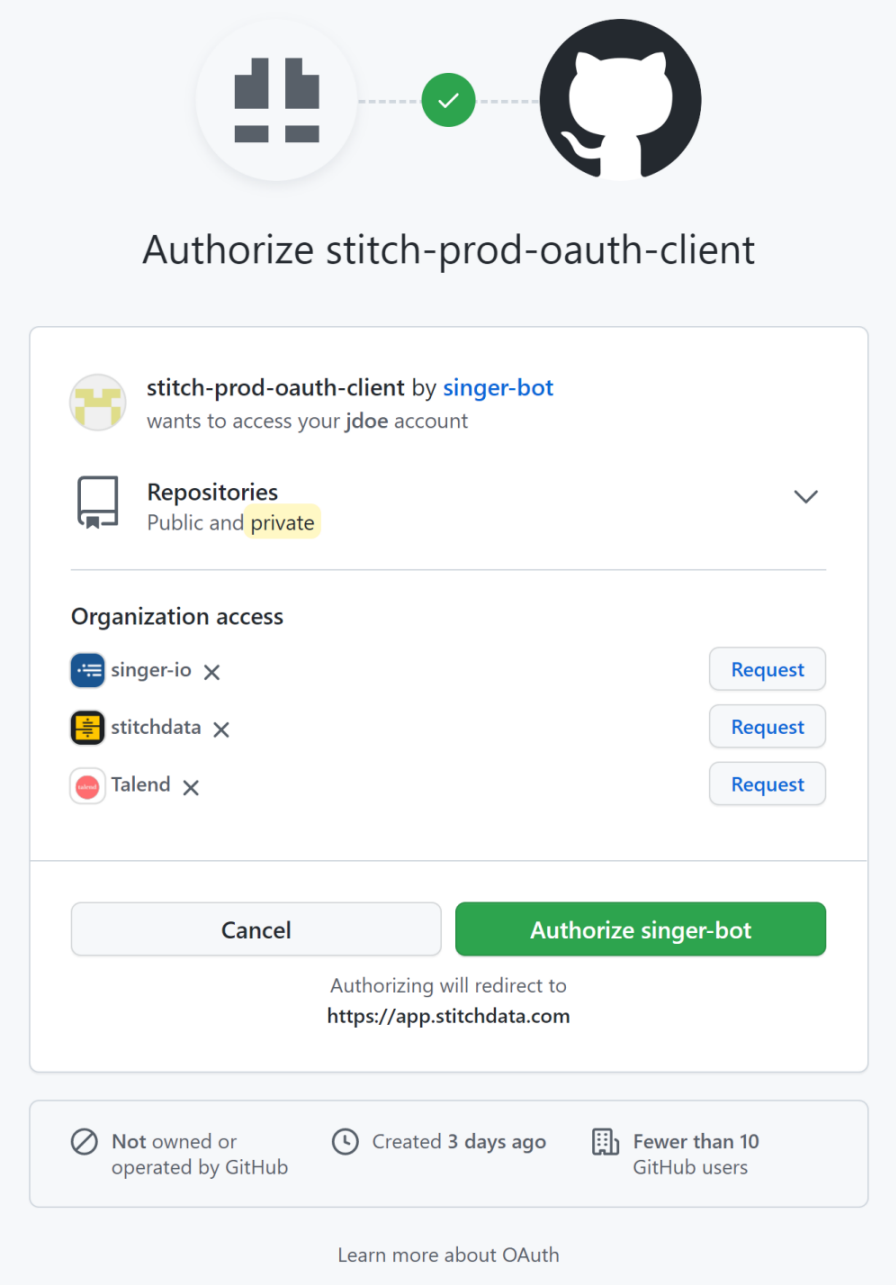
GitHub authorization screen - Click Authorize singer-bot.
Once the authorization process is completed, you will be redirected to Stitch. You will be able to start replicating data from public repositories. The extraction from private repositories will fail until the owner has approved the access request.
Initial and historical replication jobs
After you finish setting up GitHub, its Sync Status may show as Pending on either the Stitch Dashboard or in the Integration Details page.
For a new integration, a Pending status indicates that Stitch is in the process of scheduling the initial replication job for the integration. This may take some time to complete.
Initial replication jobs with Anchor Scheduling
If using Anchor Scheduling, an initial replication job may not kick off immediately. This depends on the selected Replication Frequency and Anchor Time. Refer to the Anchor Scheduling documentation for more information.
Free historical data loads
The first seven days of replication, beginning when data is first replicated, are free. Rows replicated from the new integration during this time won’t count towards your quota. Stitch offers this as a way of testing new integrations, measuring usage, and ensuring historical data volumes don’t quickly consume your quota.
GitHub table reference
Schemas and versioning
Schemas and naming conventions can change from version to version, so we recommend verifying your integration’s version before continuing.
The schema and info displayed below is for version 2 of this integration.
This is the latest version of the GitHub integration.
Table and column names in your destination
Depending on your destination, table and column names may not appear as they are outlined below.
For example: Object names are lowercased in Redshift (CusTomERs > customers), while case is maintained in PostgreSQL destinations (CusTomERs > CusTomERs). Refer to the Loading Guide for your destination for more info.
assignees
The assignees table contains info about the available assignees for issues in the repositories specified for the integration.
|
Full Table |
|
|
Primary Key |
id |
| Useful links |

|
_sdc_repository STRING |
|
avatar_url STRING |
|
STRING |
|
events_url STRING |
|
followers_url STRING |
|
following_url STRING |
|
gists_url STRING |
|
gravatar_id STRING |
|
html_url STRING |
|
id INTEGER |
|
login STRING |
|
name STRING |
|
node_id STRING |
|
organizations_url STRING |
|
received_events_url STRING |
|
repos_url STRING |
|
site_admin BOOLEAN |
|
starred_at STRING |
|
starred_url STRING |
|
subscriptions_url STRING |
|
type STRING |
|
url STRING |
collaborators
The collaborators table contains info about the users who contribute to the repositories specified for the integration.
For organization-owned repositories, this will include outside collaborators, organization owners, organization members that are direct collaborators, who have access through team memberships, or have access through default organization permissions.
|
Full Table |
|
|
Primary Key |
id |
| Useful links |
| Join collaborators with | on |
|---|---|
| pull_requests |
collaborators.id = pull_requests.user.id |
| reviews |
collaborators.id = reviews.user.id |
|
_sdc_repository STRING |
|||||
|
avatar_url STRING |
|||||
|
STRING |
|||||
|
events_url STRING |
|||||
|
followers_url STRING |
|||||
|
following_url STRING |
|||||
|
gists_url STRING |
|||||
|
gravatar_id STRING |
|||||
|
html_url STRING |
|||||
|
id INTEGER |
|||||
|
login STRING |
|||||
|
name STRING |
|||||
|
node_id STRING |
|||||
|
organizations_url STRING |
|||||
|
permissions OBJECT This is a nested data structure. If your destination doesn't natively support nested data, attributes in this object will be flattened into the table. <a href='/en-US/stitch/replication/loading/understanding-loading-row-usage-for-nested-data-structures' target='new'>Learn more</a>.
|
|||||
|
received_events_url STRING |
|||||
|
repos_url STRING |
|||||
|
role_name STRING |
|||||
|
site_admin BOOLEAN |
|||||
|
starred_url STRING |
|||||
|
subscriptions_url STRING |
|||||
|
type STRING |
|||||
|
url STRING |
comments
The comments table contains info about comments made on issues in the repositories specified for the integration.
|
Key-based Incremental |
|
|
Primary Key |
id |
| Useful links |
|
_sdc_repository STRING |
|||||||||||||||||||||||||||||||||||||||||||
|
author_association STRING |
|||||||||||||||||||||||||||||||||||||||||||
|
body STRING |
|||||||||||||||||||||||||||||||||||||||||||
|
body_html STRING |
|||||||||||||||||||||||||||||||||||||||||||
|
body_text STRING |
|||||||||||||||||||||||||||||||||||||||||||
|
created_at DATE-TIME |
|||||||||||||||||||||||||||||||||||||||||||
|
home_url STRING |
|||||||||||||||||||||||||||||||||||||||||||
|
html_url STRING |
|||||||||||||||||||||||||||||||||||||||||||
|
id INTEGER |
|||||||||||||||||||||||||||||||||||||||||||
|
issue_url STRING |
|||||||||||||||||||||||||||||||||||||||||||
|
node_id STRING |
|||||||||||||||||||||||||||||||||||||||||||
|
performed_via_github_app OBJECT This is a nested data structure. If your destination doesn't natively support nested data, attributes in this object will be flattened into the table. <a href='/en-US/stitch/replication/loading/understanding-loading-row-usage-for-nested-data-structures' target='new'>Learn more</a>.
|
|||||||||||||||||||||||||||||||||||||||||||
|
reactions OBJECT This is a nested data structure. If your destination doesn't natively support nested data, attributes in this object will be flattened into the table. <a href='/en-US/stitch/replication/loading/understanding-loading-row-usage-for-nested-data-structures' target='new'>Learn more</a>.
|
|||||||||||||||||||||||||||||||||||||||||||
|
updated_at DATE-TIME |
|||||||||||||||||||||||||||||||||||||||||||
|
url STRING |
|||||||||||||||||||||||||||||||||||||||||||
|
user OBJECT This is a nested data structure. If your destination doesn't natively support nested data, attributes in this object will be flattened into the table. <a href='/en-US/stitch/replication/loading/understanding-loading-row-usage-for-nested-data-structures' target='new'>Learn more</a>.
|
commit_comments
The commit_comments table contains info about the commit comments in the repositories specified for the integration.
|
Key-based Incremental |
|
|
Primary Key |
id |
|
Replication Key |
updated_at |
| Useful links |

|
author_association STRING |
|||||||||||||||||||||
|
body STRING |
|||||||||||||||||||||
|
commit_id STRING |
|||||||||||||||||||||
|
created_at DATE-TIME |
|||||||||||||||||||||
|
html_url STRING |
|||||||||||||||||||||
|
id NUMBER |
|||||||||||||||||||||
|
line NUMBER |
|||||||||||||||||||||
|
node_id STRING |
|||||||||||||||||||||
|
path STRING |
|||||||||||||||||||||
|
position NUMBER |
|||||||||||||||||||||
|
reactions OBJECT This is a nested data structure. If your destination doesn't natively support nested data, attributes in this object will be flattened into the table. <a href='/en-US/stitch/replication/loading/understanding-loading-row-usage-for-nested-data-structures' target='new'>Learn more</a>.
|
|||||||||||||||||||||
|
updated_at DATE-TIME |
|||||||||||||||||||||
|
url STRING |
|||||||||||||||||||||
|
user OBJECT This is a nested data structure. If your destination doesn't natively support nested data, attributes in this object will be flattened into the table. <a href='/en-US/stitch/replication/loading/understanding-loading-row-usage-for-nested-data-structures' target='new'>Learn more</a>.
|
commits
The commits table contains info about repository commits in a project.
|
Key-based Incremental |
|
|
Primary Key |
sha |
| Useful links |
| Join commits with | on |
|---|---|
| issue_events |
commits.id = issue_events.commit_id |
| reviews |
commits.id = reviews.commit_id |
| review_comments |
commits.id = review_comments.commit_id commits.id = review_comments.original_commit_id |
| events |
commits.sha = events.payload.commits.sha |
| pr_commits |
commits.sha = pr_commits.sha |
|
_sdc_repository STRING |
||||||||||||||||||||||||||||||||||||||||||||||||||||
|
author OBJECT This is a nested data structure. If your destination doesn't natively support nested data, attributes in this object will be flattened into the table. <a href='/en-US/stitch/replication/loading/understanding-loading-row-usage-for-nested-data-structures' target='new'>Learn more</a>.
|
||||||||||||||||||||||||||||||||||||||||||||||||||||
|
comments_url STRING |
||||||||||||||||||||||||||||||||||||||||||||||||||||
|
commit OBJECT This is a nested data structure. If your destination doesn't natively support nested data, attributes in this object will be flattened into the table. <a href='/en-US/stitch/replication/loading/understanding-loading-row-usage-for-nested-data-structures' target='new'>Learn more</a>.
|
||||||||||||||||||||||||||||||||||||||||||||||||||||
|
committer OBJECT This is a nested data structure. If your destination doesn't natively support nested data, attributes in this object will be flattened into the table. <a href='/en-US/stitch/replication/loading/understanding-loading-row-usage-for-nested-data-structures' target='new'>Learn more</a>.
|
||||||||||||||||||||||||||||||||||||||||||||||||||||
|
html_url STRING |
||||||||||||||||||||||||||||||||||||||||||||||||||||
|
id STRING |
||||||||||||||||||||||||||||||||||||||||||||||||||||
|
node_id STRING |
||||||||||||||||||||||||||||||||||||||||||||||||||||
|
parents ARRAY This is a nested data structure. If your destination doesn't natively support nested data, attributes will be denested into a subtable. <a href='/en-US/stitch/replication/loading/understanding-loading-row-usage-for-nested-data-structures' target='new'>Learn more</a>.
|
||||||||||||||||||||||||||||||||||||||||||||||||||||
|
pr_id STRING |
||||||||||||||||||||||||||||||||||||||||||||||||||||
|
pr_number INTEGER |
||||||||||||||||||||||||||||||||||||||||||||||||||||
|
sha STRING |
||||||||||||||||||||||||||||||||||||||||||||||||||||
|
updated_at DATE-TIME |
||||||||||||||||||||||||||||||||||||||||||||||||||||
|
url STRING |
events
The events table contains information about events in the repositories specified for the integration.
|
Key-based Incremental |
|
|
Primary Key |
id |
| Useful links |
| Join events with | on |
|---|---|
| commits |
events.payload.commits.sha = commits.sha |
| pr_commits |
events.payload.commits.sha = pr_commits.sha |
|
_sdc_repository STRING |
||||||||||||||||||||||||||||||||||||||||||||||||||||||||||||||||||||||||||||||||||||||||||||||||||||||||||||||||||||||||||||||||||||||||||||||||||||||||||||||||||||||||||||||||||||||||||||||||||||||||||||||||||||||||||||||||||||||||||||||||||||||||||||||||||||||||||||||||||||||||||||||||||||||||||||||||||||||||
|
actor OBJECT This is a nested data structure. If your destination doesn't natively support nested data, attributes in this object will be flattened into the table. <a href='/en-US/stitch/replication/loading/understanding-loading-row-usage-for-nested-data-structures' target='new'>Learn more</a>.
|
||||||||||||||||||||||||||||||||||||||||||||||||||||||||||||||||||||||||||||||||||||||||||||||||||||||||||||||||||||||||||||||||||||||||||||||||||||||||||||||||||||||||||||||||||||||||||||||||||||||||||||||||||||||||||||||||||||||||||||||||||||||||||||||||||||||||||||||||||||||||||||||||||||||||||||||||||||||||
|
created_at STRING |
||||||||||||||||||||||||||||||||||||||||||||||||||||||||||||||||||||||||||||||||||||||||||||||||||||||||||||||||||||||||||||||||||||||||||||||||||||||||||||||||||||||||||||||||||||||||||||||||||||||||||||||||||||||||||||||||||||||||||||||||||||||||||||||||||||||||||||||||||||||||||||||||||||||||||||||||||||||||
|
distinct_size NUMBER |
||||||||||||||||||||||||||||||||||||||||||||||||||||||||||||||||||||||||||||||||||||||||||||||||||||||||||||||||||||||||||||||||||||||||||||||||||||||||||||||||||||||||||||||||||||||||||||||||||||||||||||||||||||||||||||||||||||||||||||||||||||||||||||||||||||||||||||||||||||||||||||||||||||||||||||||||||||||||
|
head STRING |
||||||||||||||||||||||||||||||||||||||||||||||||||||||||||||||||||||||||||||||||||||||||||||||||||||||||||||||||||||||||||||||||||||||||||||||||||||||||||||||||||||||||||||||||||||||||||||||||||||||||||||||||||||||||||||||||||||||||||||||||||||||||||||||||||||||||||||||||||||||||||||||||||||||||||||||||||||||||
|
id NUMBER |
||||||||||||||||||||||||||||||||||||||||||||||||||||||||||||||||||||||||||||||||||||||||||||||||||||||||||||||||||||||||||||||||||||||||||||||||||||||||||||||||||||||||||||||||||||||||||||||||||||||||||||||||||||||||||||||||||||||||||||||||||||||||||||||||||||||||||||||||||||||||||||||||||||||||||||||||||||||||
|
org OBJECT This is a nested data structure. If your destination doesn't natively support nested data, attributes in this object will be flattened into the table. <a href='/en-US/stitch/replication/loading/understanding-loading-row-usage-for-nested-data-structures' target='new'>Learn more</a>.
|
||||||||||||||||||||||||||||||||||||||||||||||||||||||||||||||||||||||||||||||||||||||||||||||||||||||||||||||||||||||||||||||||||||||||||||||||||||||||||||||||||||||||||||||||||||||||||||||||||||||||||||||||||||||||||||||||||||||||||||||||||||||||||||||||||||||||||||||||||||||||||||||||||||||||||||||||||||||||
|
payload OBJECT This is a nested data structure. If your destination doesn't natively support nested data, attributes in this object will be flattened into the table. <a href='/en-US/stitch/replication/loading/understanding-loading-row-usage-for-nested-data-structures' target='new'>Learn more</a>.
|
||||||||||||||||||||||||||||||||||||||||||||||||||||||||||||||||||||||||||||||||||||||||||||||||||||||||||||||||||||||||||||||||||||||||||||||||||||||||||||||||||||||||||||||||||||||||||||||||||||||||||||||||||||||||||||||||||||||||||||||||||||||||||||||||||||||||||||||||||||||||||||||||||||||||||||||||||||||||
|
public BOOLEAN |
||||||||||||||||||||||||||||||||||||||||||||||||||||||||||||||||||||||||||||||||||||||||||||||||||||||||||||||||||||||||||||||||||||||||||||||||||||||||||||||||||||||||||||||||||||||||||||||||||||||||||||||||||||||||||||||||||||||||||||||||||||||||||||||||||||||||||||||||||||||||||||||||||||||||||||||||||||||||
|
push_id NUMBER |
||||||||||||||||||||||||||||||||||||||||||||||||||||||||||||||||||||||||||||||||||||||||||||||||||||||||||||||||||||||||||||||||||||||||||||||||||||||||||||||||||||||||||||||||||||||||||||||||||||||||||||||||||||||||||||||||||||||||||||||||||||||||||||||||||||||||||||||||||||||||||||||||||||||||||||||||||||||||
|
ref STRING |
||||||||||||||||||||||||||||||||||||||||||||||||||||||||||||||||||||||||||||||||||||||||||||||||||||||||||||||||||||||||||||||||||||||||||||||||||||||||||||||||||||||||||||||||||||||||||||||||||||||||||||||||||||||||||||||||||||||||||||||||||||||||||||||||||||||||||||||||||||||||||||||||||||||||||||||||||||||||
|
repo OBJECT This is a nested data structure. If your destination doesn't natively support nested data, attributes in this object will be flattened into the table. <a href='/en-US/stitch/replication/loading/understanding-loading-row-usage-for-nested-data-structures' target='new'>Learn more</a>.
|
||||||||||||||||||||||||||||||||||||||||||||||||||||||||||||||||||||||||||||||||||||||||||||||||||||||||||||||||||||||||||||||||||||||||||||||||||||||||||||||||||||||||||||||||||||||||||||||||||||||||||||||||||||||||||||||||||||||||||||||||||||||||||||||||||||||||||||||||||||||||||||||||||||||||||||||||||||||||
|
size NUMBER |
||||||||||||||||||||||||||||||||||||||||||||||||||||||||||||||||||||||||||||||||||||||||||||||||||||||||||||||||||||||||||||||||||||||||||||||||||||||||||||||||||||||||||||||||||||||||||||||||||||||||||||||||||||||||||||||||||||||||||||||||||||||||||||||||||||||||||||||||||||||||||||||||||||||||||||||||||||||||
|
type STRING |
issue_events
The issue_events table contains info about issue events in the repositories specified for the integration.
|
Key-based Incremental |
|
|
Primary Key |
id |
| Useful links |
| Join issue_events with | on |
|---|---|
| commits |
issue_events.commit_id = commits.id |
| reviews |
issue_events.commit_id = reviews.commit_id |
| review_comments |
issue_events.commit_id = review_comments.commit_id issue_events.commit_id = review_comments.original_commit_id |
| issues |
issue_events.id = issues.id |
| pull_requests |
issue_events.id = pull_requests.id |
|
_sdc_repository STRING |
||||||||||||||||||||||||||||||||||||||||||||||||||||||||||||||||||||||||||||||||||||||||||||||||||||||||||||||||||||||||||||||||||||||||||||||||||||||||||||||||||||||||||||||||||||||||||||||||||
|
actor OBJECT This is a nested data structure. If your destination doesn't natively support nested data, attributes in this object will be flattened into the table. <a href='/en-US/stitch/replication/loading/understanding-loading-row-usage-for-nested-data-structures' target='new'>Learn more</a>.
|
||||||||||||||||||||||||||||||||||||||||||||||||||||||||||||||||||||||||||||||||||||||||||||||||||||||||||||||||||||||||||||||||||||||||||||||||||||||||||||||||||||||||||||||||||||||||||||||||||
|
assignee OBJECT This is a nested data structure. If your destination doesn't natively support nested data, attributes in this object will be flattened into the table. <a href='/en-US/stitch/replication/loading/understanding-loading-row-usage-for-nested-data-structures' target='new'>Learn more</a>.
|
||||||||||||||||||||||||||||||||||||||||||||||||||||||||||||||||||||||||||||||||||||||||||||||||||||||||||||||||||||||||||||||||||||||||||||||||||||||||||||||||||||||||||||||||||||||||||||||||||
|
assigner OBJECT This is a nested data structure. If your destination doesn't natively support nested data, attributes in this object will be flattened into the table. <a href='/en-US/stitch/replication/loading/understanding-loading-row-usage-for-nested-data-structures' target='new'>Learn more</a>.
|
||||||||||||||||||||||||||||||||||||||||||||||||||||||||||||||||||||||||||||||||||||||||||||||||||||||||||||||||||||||||||||||||||||||||||||||||||||||||||||||||||||||||||||||||||||||||||||||||||
|
author_association STRING |
||||||||||||||||||||||||||||||||||||||||||||||||||||||||||||||||||||||||||||||||||||||||||||||||||||||||||||||||||||||||||||||||||||||||||||||||||||||||||||||||||||||||||||||||||||||||||||||||||
|
commit_id STRING |
||||||||||||||||||||||||||||||||||||||||||||||||||||||||||||||||||||||||||||||||||||||||||||||||||||||||||||||||||||||||||||||||||||||||||||||||||||||||||||||||||||||||||||||||||||||||||||||||||
|
commit_url STRING |
||||||||||||||||||||||||||||||||||||||||||||||||||||||||||||||||||||||||||||||||||||||||||||||||||||||||||||||||||||||||||||||||||||||||||||||||||||||||||||||||||||||||||||||||||||||||||||||||||
|
created_at DATE-TIME |
||||||||||||||||||||||||||||||||||||||||||||||||||||||||||||||||||||||||||||||||||||||||||||||||||||||||||||||||||||||||||||||||||||||||||||||||||||||||||||||||||||||||||||||||||||||||||||||||||
|
dismissed_review OBJECT This is a nested data structure. If your destination doesn't natively support nested data, attributes in this object will be flattened into the table. <a href='/en-US/stitch/replication/loading/understanding-loading-row-usage-for-nested-data-structures' target='new'>Learn more</a>.
|
||||||||||||||||||||||||||||||||||||||||||||||||||||||||||||||||||||||||||||||||||||||||||||||||||||||||||||||||||||||||||||||||||||||||||||||||||||||||||||||||||||||||||||||||||||||||||||||||||
|
draft BOOLEAN |
||||||||||||||||||||||||||||||||||||||||||||||||||||||||||||||||||||||||||||||||||||||||||||||||||||||||||||||||||||||||||||||||||||||||||||||||||||||||||||||||||||||||||||||||||||||||||||||||||
|
event STRING |
||||||||||||||||||||||||||||||||||||||||||||||||||||||||||||||||||||||||||||||||||||||||||||||||||||||||||||||||||||||||||||||||||||||||||||||||||||||||||||||||||||||||||||||||||||||||||||||||||
|
id INTEGER |
||||||||||||||||||||||||||||||||||||||||||||||||||||||||||||||||||||||||||||||||||||||||||||||||||||||||||||||||||||||||||||||||||||||||||||||||||||||||||||||||||||||||||||||||||||||||||||||||||
|
issue OBJECT This is a nested data structure. If your destination doesn't natively support nested data, attributes in this object will be flattened into the table. <a href='/en-US/stitch/replication/loading/understanding-loading-row-usage-for-nested-data-structures' target='new'>Learn more</a>.
|
||||||||||||||||||||||||||||||||||||||||||||||||||||||||||||||||||||||||||||||||||||||||||||||||||||||||||||||||||||||||||||||||||||||||||||||||||||||||||||||||||||||||||||||||||||||||||||||||||
|
label OBJECT This is a nested data structure. If your destination doesn't natively support nested data, attributes in this object will be flattened into the table. <a href='/en-US/stitch/replication/loading/understanding-loading-row-usage-for-nested-data-structures' target='new'>Learn more</a>.
|
||||||||||||||||||||||||||||||||||||||||||||||||||||||||||||||||||||||||||||||||||||||||||||||||||||||||||||||||||||||||||||||||||||||||||||||||||||||||||||||||||||||||||||||||||||||||||||||||||
|
lock_reason STRING |
||||||||||||||||||||||||||||||||||||||||||||||||||||||||||||||||||||||||||||||||||||||||||||||||||||||||||||||||||||||||||||||||||||||||||||||||||||||||||||||||||||||||||||||||||||||||||||||||||
|
milestone OBJECT This is a nested data structure. If your destination doesn't natively support nested data, attributes in this object will be flattened into the table. <a href='/en-US/stitch/replication/loading/understanding-loading-row-usage-for-nested-data-structures' target='new'>Learn more</a>.
|
||||||||||||||||||||||||||||||||||||||||||||||||||||||||||||||||||||||||||||||||||||||||||||||||||||||||||||||||||||||||||||||||||||||||||||||||||||||||||||||||||||||||||||||||||||||||||||||||||
|
node_id STRING |
||||||||||||||||||||||||||||||||||||||||||||||||||||||||||||||||||||||||||||||||||||||||||||||||||||||||||||||||||||||||||||||||||||||||||||||||||||||||||||||||||||||||||||||||||||||||||||||||||
|
performed_via_github_app OBJECT This is a nested data structure. If your destination doesn't natively support nested data, attributes in this object will be flattened into the table. <a href='/en-US/stitch/replication/loading/understanding-loading-row-usage-for-nested-data-structures' target='new'>Learn more</a>.
|
||||||||||||||||||||||||||||||||||||||||||||||||||||||||||||||||||||||||||||||||||||||||||||||||||||||||||||||||||||||||||||||||||||||||||||||||||||||||||||||||||||||||||||||||||||||||||||||||||
|
project_card OBJECT This is a nested data structure. If your destination doesn't natively support nested data, attributes in this object will be flattened into the table. <a href='/en-US/stitch/replication/loading/understanding-loading-row-usage-for-nested-data-structures' target='new'>Learn more</a>.
|
||||||||||||||||||||||||||||||||||||||||||||||||||||||||||||||||||||||||||||||||||||||||||||||||||||||||||||||||||||||||||||||||||||||||||||||||||||||||||||||||||||||||||||||||||||||||||||||||||
|
rename OBJECT This is a nested data structure. If your destination doesn't natively support nested data, attributes in this object will be flattened into the table. <a href='/en-US/stitch/replication/loading/understanding-loading-row-usage-for-nested-data-structures' target='new'>Learn more</a>.
|
||||||||||||||||||||||||||||||||||||||||||||||||||||||||||||||||||||||||||||||||||||||||||||||||||||||||||||||||||||||||||||||||||||||||||||||||||||||||||||||||||||||||||||||||||||||||||||||||||
|
requested_reviewer OBJECT This is a nested data structure. If your destination doesn't natively support nested data, attributes in this object will be flattened into the table. <a href='/en-US/stitch/replication/loading/understanding-loading-row-usage-for-nested-data-structures' target='new'>Learn more</a>.
|
||||||||||||||||||||||||||||||||||||||||||||||||||||||||||||||||||||||||||||||||||||||||||||||||||||||||||||||||||||||||||||||||||||||||||||||||||||||||||||||||||||||||||||||||||||||||||||||||||
|
requested_team OBJECT This is a nested data structure. If your destination doesn't natively support nested data, attributes in this object will be flattened into the table. <a href='/en-US/stitch/replication/loading/understanding-loading-row-usage-for-nested-data-structures' target='new'>Learn more</a>.
|
||||||||||||||||||||||||||||||||||||||||||||||||||||||||||||||||||||||||||||||||||||||||||||||||||||||||||||||||||||||||||||||||||||||||||||||||||||||||||||||||||||||||||||||||||||||||||||||||||
|
review_requester OBJECT This is a nested data structure. If your destination doesn't natively support nested data, attributes in this object will be flattened into the table. <a href='/en-US/stitch/replication/loading/understanding-loading-row-usage-for-nested-data-structures' target='new'>Learn more</a>.
|
||||||||||||||||||||||||||||||||||||||||||||||||||||||||||||||||||||||||||||||||||||||||||||||||||||||||||||||||||||||||||||||||||||||||||||||||||||||||||||||||||||||||||||||||||||||||||||||||||
|
url STRING |
issue_labels
The issue_labels table contains info about issue labels in the repositories specified for the integration.
|
Full Table |
|
|
Primary Key |
id |
| Useful links |
| Join issue_labels with | on |
|---|---|
| issues |
issue_labels.id = issues.labels.id |
| pull_requests |
issue_labels.id = pull_requests.labels.id |
|
_sdc_repository STRING |
|
color STRING |
|
default BOOLEAN |
|
description STRING |
|
id NUMBER |
|
name STRING |
|
node_id STRING |
|
url STRING |
issue_milestones
The issue_milestones table contains info about issue milestones in the repositories specified for the integration.
|
Key-based Incremental |
|
|
Primary Key |
id |
| Useful links |
|
_sdc_repository STRING |
|||||||||||||||||||||
|
closed_at DATE-TIME |
|||||||||||||||||||||
|
closed_issues NUMBER |
|||||||||||||||||||||
|
created_at DATE-TIME |
|||||||||||||||||||||
|
creator OBJECT This is a nested data structure. If your destination doesn't natively support nested data, attributes in this object will be flattened into the table. <a href='/en-US/stitch/replication/loading/understanding-loading-row-usage-for-nested-data-structures' target='new'>Learn more</a>.
|
|||||||||||||||||||||
|
description STRING |
|||||||||||||||||||||
|
due_on DATE-TIME |
|||||||||||||||||||||
|
html_url STRING |
|||||||||||||||||||||
|
id NUMBER |
|||||||||||||||||||||
|
labels_url STRING |
|||||||||||||||||||||
|
node_id STRING |
|||||||||||||||||||||
|
number NUMBER |
|||||||||||||||||||||
|
open_issues NUMBER |
|||||||||||||||||||||
|
state STRING |
|||||||||||||||||||||
|
title STRING |
|||||||||||||||||||||
|
updated_at DATE-TIME |
|||||||||||||||||||||
|
url STRING |
issues
The issues table contains info about issues in the repositories specified for the integration.
Issues and pull requests
GitHub’s API considers every pull request an issue, but not every issue may be a pull request. Therefore, this table may contain both issues and pull requests.
|
Key-based Incremental |
|
|
Primary Key |
id |
| Useful links |
| Join issues with | on |
|---|---|
| issue_events |
issues.id = issue_events.id |
| pull_requests |
issues.id = pull_requests.id issues.labels.id = pull_requests.labels.id |
| issue_labels |
issues.labels.id = issue_labels.id |
| pr_commits |
issues.id = pr_commits.pr_id |
|
_sdc_repository STRING |
|||||||||||||||||||||||||||||||||||||||||||
|
active_lock_reason STRING |
|||||||||||||||||||||||||||||||||||||||||||
|
assignee OBJECT This is a nested data structure. If your destination doesn't natively support nested data, attributes in this object will be flattened into the table. <a href='/en-US/stitch/replication/loading/understanding-loading-row-usage-for-nested-data-structures' target='new'>Learn more</a>.
|
|||||||||||||||||||||||||||||||||||||||||||
|
assignees ARRAY This is a nested data structure. If your destination doesn't natively support nested data, attributes will be denested into a subtable. <a href='/en-US/stitch/replication/loading/understanding-loading-row-usage-for-nested-data-structures' target='new'>Learn more</a>. |
|||||||||||||||||||||||||||||||||||||||||||
|
author_association STRING |
|||||||||||||||||||||||||||||||||||||||||||
|
body STRING |
|||||||||||||||||||||||||||||||||||||||||||
|
body_html STRING |
|||||||||||||||||||||||||||||||||||||||||||
|
body_text STRING |
|||||||||||||||||||||||||||||||||||||||||||
|
closed_at DATE-TIME |
|||||||||||||||||||||||||||||||||||||||||||
|
closed_by OBJECT This is a nested data structure. If your destination doesn't natively support nested data, attributes in this object will be flattened into the table. <a href='/en-US/stitch/replication/loading/understanding-loading-row-usage-for-nested-data-structures' target='new'>Learn more</a>.
|
|||||||||||||||||||||||||||||||||||||||||||
|
comments INTEGER |
|||||||||||||||||||||||||||||||||||||||||||
|
comments_url STRING |
|||||||||||||||||||||||||||||||||||||||||||
|
created_at DATE-TIME |
|||||||||||||||||||||||||||||||||||||||||||
|
draft BOOLEAN |
|||||||||||||||||||||||||||||||||||||||||||
|
events_url STRING |
|||||||||||||||||||||||||||||||||||||||||||
|
html_url STRING |
|||||||||||||||||||||||||||||||||||||||||||
|
id INTEGER |
|||||||||||||||||||||||||||||||||||||||||||
|
labels ARRAY This is a nested data structure. If your destination doesn't natively support nested data, attributes will be denested into a subtable. <a href='/en-US/stitch/replication/loading/understanding-loading-row-usage-for-nested-data-structures' target='new'>Learn more</a>.
|
|||||||||||||||||||||||||||||||||||||||||||
|
labels_url STRING |
|||||||||||||||||||||||||||||||||||||||||||
|
locked BOOLEAN |
|||||||||||||||||||||||||||||||||||||||||||
|
milestone OBJECT This is a nested data structure. If your destination doesn't natively support nested data, attributes in this object will be flattened into the table. <a href='/en-US/stitch/replication/loading/understanding-loading-row-usage-for-nested-data-structures' target='new'>Learn more</a>.
|
|||||||||||||||||||||||||||||||||||||||||||
|
node_id STRING |
|||||||||||||||||||||||||||||||||||||||||||
|
number INTEGER |
|||||||||||||||||||||||||||||||||||||||||||
|
performed_via_github_app OBJECT This is a nested data structure. If your destination doesn't natively support nested data, attributes in this object will be flattened into the table. <a href='/en-US/stitch/replication/loading/understanding-loading-row-usage-for-nested-data-structures' target='new'>Learn more</a>.
|
|||||||||||||||||||||||||||||||||||||||||||
|
pull_request OBJECT This is a nested data structure. If your destination doesn't natively support nested data, attributes in this object will be flattened into the table. <a href='/en-US/stitch/replication/loading/understanding-loading-row-usage-for-nested-data-structures' target='new'>Learn more</a>.
|
|||||||||||||||||||||||||||||||||||||||||||
|
reactions OBJECT This is a nested data structure. If your destination doesn't natively support nested data, attributes in this object will be flattened into the table. <a href='/en-US/stitch/replication/loading/understanding-loading-row-usage-for-nested-data-structures' target='new'>Learn more</a>.
|
|||||||||||||||||||||||||||||||||||||||||||
|
repository_url STRING |
|||||||||||||||||||||||||||||||||||||||||||
|
state STRING |
|||||||||||||||||||||||||||||||||||||||||||
|
state_reason STRING |
|||||||||||||||||||||||||||||||||||||||||||
|
timeline_url STRING |
|||||||||||||||||||||||||||||||||||||||||||
|
title STRING |
|||||||||||||||||||||||||||||||||||||||||||
|
updated_at DATE-TIME |
|||||||||||||||||||||||||||||||||||||||||||
|
url STRING |
|||||||||||||||||||||||||||||||||||||||||||
|
user OBJECT This is a nested data structure. If your destination doesn't natively support nested data, attributes in this object will be flattened into the table. <a href='/en-US/stitch/replication/loading/understanding-loading-row-usage-for-nested-data-structures' target='new'>Learn more</a>.
|
pr_commits
The pr_commits table contains info about pull request commits and is a slight variation of the commits table. This allows you to associate commits to pull requests that are squash merged.
|
Key-based Incremental |
|
|
Primary Key |
id |
| Useful links |
| Join pr_commits with | on |
|---|---|
| issues |
pr_commits.pr_id = issues.id |
| pull_requests |
pr_commits.pr_id = pull_requests.id |
| commits |
pr_commits.sha = commits.sha |
| events |
pr_commits.sha = events.payload.commits.sha |
|
_sdc_repository STRING |
|||||||||||||||||||||||||||||||||||||||
|
author OBJECT This is a nested data structure. If your destination doesn't natively support nested data, attributes in this object will be flattened into the table. <a href='/en-US/stitch/replication/loading/understanding-loading-row-usage-for-nested-data-structures' target='new'>Learn more</a>.
|
|||||||||||||||||||||||||||||||||||||||
|
comments_url STRING |
|||||||||||||||||||||||||||||||||||||||
|
commit OBJECT This is a nested data structure. If your destination doesn't natively support nested data, attributes in this object will be flattened into the table. <a href='/en-US/stitch/replication/loading/understanding-loading-row-usage-for-nested-data-structures' target='new'>Learn more</a>.
|
|||||||||||||||||||||||||||||||||||||||
|
committer OBJECT This is a nested data structure. If your destination doesn't natively support nested data, attributes in this object will be flattened into the table. <a href='/en-US/stitch/replication/loading/understanding-loading-row-usage-for-nested-data-structures' target='new'>Learn more</a>.
|
|||||||||||||||||||||||||||||||||||||||
|
html_url STRING |
|||||||||||||||||||||||||||||||||||||||
|
id STRING |
|||||||||||||||||||||||||||||||||||||||
|
node_id STRING |
|||||||||||||||||||||||||||||||||||||||
|
parents ARRAY This is a nested data structure. If your destination doesn't natively support nested data, attributes will be denested into a subtable. <a href='/en-US/stitch/replication/loading/understanding-loading-row-usage-for-nested-data-structures' target='new'>Learn more</a>.
|
|||||||||||||||||||||||||||||||||||||||
|
pr_id STRING |
|||||||||||||||||||||||||||||||||||||||
|
pr_number INTEGER |
|||||||||||||||||||||||||||||||||||||||
|
sha STRING |
|||||||||||||||||||||||||||||||||||||||
|
updated_at DATE-TIME |
|||||||||||||||||||||||||||||||||||||||
|
url STRING |
project_cards
The project_cards table contains information about project cards in the repositories specified for the integration.
|
Key-based Incremental |
|
|
Primary Key |
id |
| Useful links |
|
_sdc_repository STRING |
|||||||||||||||||||||
|
archived BOOLEAN |
|||||||||||||||||||||
|
cards_url STRING |
|||||||||||||||||||||
|
column_name STRING |
|||||||||||||||||||||
|
column_url STRING |
|||||||||||||||||||||
|
content_url STRING |
|||||||||||||||||||||
|
created_at DATE-TIME |
|||||||||||||||||||||
|
creator OBJECT This is a nested data structure. If your destination doesn't natively support nested data, attributes in this object will be flattened into the table. <a href='/en-US/stitch/replication/loading/understanding-loading-row-usage-for-nested-data-structures' target='new'>Learn more</a>.
|
|||||||||||||||||||||
|
id NUMBER |
|||||||||||||||||||||
|
name STRING |
|||||||||||||||||||||
|
node_id STRING |
|||||||||||||||||||||
|
note STRING |
|||||||||||||||||||||
|
project_id STRING |
|||||||||||||||||||||
|
project_url STRING |
|||||||||||||||||||||
|
updated_at DATE-TIME |
|||||||||||||||||||||
|
url STRING |
project_columns
The project_columns table contains info about the columns of projects in the repositories specified for the integration.
|
Key-based Incremental |
|
|
Primary Key |
id |
| Useful links |
|
_sdc_repository STRING |
|
cards_url STRING |
|
created_at DATE-TIME |
|
id NUMBER |
|
name STRING |
|
node_id STRING |
|
project_url STRING |
|
updated_at DATE-TIME |
|
url STRING |
projects
The projects table contains info about projects in the repositories specified for the integration.
|
Key-based Incremental |
|
|
Primary Key |
id |
| Useful links |
|
body STRING |
|||||||||||||||||||||
|
columns_url STRING |
|||||||||||||||||||||
|
created_at DATE-TIME |
|||||||||||||||||||||
|
creator OBJECT This is a nested data structure. If your destination doesn't natively support nested data, attributes in this object will be flattened into the table. <a href='/en-US/stitch/replication/loading/understanding-loading-row-usage-for-nested-data-structures' target='new'>Learn more</a>.
|
|||||||||||||||||||||
|
html_url STRING |
|||||||||||||||||||||
|
id NUMBER |
|||||||||||||||||||||
|
name STRING |
|||||||||||||||||||||
|
node_id STRING |
|||||||||||||||||||||
|
number NUMBER |
|||||||||||||||||||||
|
organization_permission STRING |
|||||||||||||||||||||
|
owner_url STRING |
|||||||||||||||||||||
|
private BOOLEAN |
|||||||||||||||||||||
|
state STRING |
|||||||||||||||||||||
|
updated_at DATE-TIME |
|||||||||||||||||||||
|
url STRING |
pull_requests
The pull_requests table contains info about pull requests made against the repositories specified for the integration.
|
Key-based Incremental |
|
|
Primary Key |
id |
| Useful links |
| Join pull_requests with | on |
|---|---|
| collaborators |
pull_requests.user.id = collaborators.id |
| reviews |
pull_requests.user.id = reviews.user.id |
| issues |
pull_requests.id = issues.id pull_requests.labels.id = issues.labels.id |
| issue_events |
pull_requests.id = issue_events.id |
| issue_labels |
pull_requests.labels.id = issue_labels.id |
| pr_commits |
pull_requests.id = pr_commits.pr_id |
|
_links OBJECT This is a nested data structure. If your destination doesn't natively support nested data, attributes in this object will be flattened into the table. <a href='/en-US/stitch/replication/loading/understanding-loading-row-usage-for-nested-data-structures' target='new'>Learn more</a>.
|
|||||||||||||||||||||||||||||||||||||
|
_sdc_repository STRING |
|||||||||||||||||||||||||||||||||||||
|
active_lock_reason STRING |
|||||||||||||||||||||||||||||||||||||
|
assignee OBJECT This is a nested data structure. If your destination doesn't natively support nested data, attributes in this object will be flattened into the table. <a href='/en-US/stitch/replication/loading/understanding-loading-row-usage-for-nested-data-structures' target='new'>Learn more</a>.
|
|||||||||||||||||||||||||||||||||||||
|
assignees ARRAY This is a nested data structure. If your destination doesn't natively support nested data, attributes will be denested into a subtable. <a href='/en-US/stitch/replication/loading/understanding-loading-row-usage-for-nested-data-structures' target='new'>Learn more</a>. |
|||||||||||||||||||||||||||||||||||||
|
author_association STRING |
|||||||||||||||||||||||||||||||||||||
|
auto_merge OBJECT This is a nested data structure. If your destination doesn't natively support nested data, attributes in this object will be flattened into the table. <a href='/en-US/stitch/replication/loading/understanding-loading-row-usage-for-nested-data-structures' target='new'>Learn more</a>.
|
|||||||||||||||||||||||||||||||||||||
|
base OBJECT This is a nested data structure. If your destination doesn't natively support nested data, attributes in this object will be flattened into the table. <a href='/en-US/stitch/replication/loading/understanding-loading-row-usage-for-nested-data-structures' target='new'>Learn more</a>.
|
|||||||||||||||||||||||||||||||||||||
|
body STRING |
|||||||||||||||||||||||||||||||||||||
|
closed_at DATE-TIME |
|||||||||||||||||||||||||||||||||||||
|
comments_url STRING |
|||||||||||||||||||||||||||||||||||||
|
commits_url STRING |
|||||||||||||||||||||||||||||||||||||
|
created_at DATE-TIME |
|||||||||||||||||||||||||||||||||||||
|
diff_url STRING |
|||||||||||||||||||||||||||||||||||||
|
draft BOOLEAN |
|||||||||||||||||||||||||||||||||||||
|
head OBJECT This is a nested data structure. If your destination doesn't natively support nested data, attributes in this object will be flattened into the table. <a href='/en-US/stitch/replication/loading/understanding-loading-row-usage-for-nested-data-structures' target='new'>Learn more</a>.
|
|||||||||||||||||||||||||||||||||||||
|
html_url STRING |
|||||||||||||||||||||||||||||||||||||
|
id STRING |
|||||||||||||||||||||||||||||||||||||
|
issues_url STRING |
|||||||||||||||||||||||||||||||||||||
|
labels ARRAY This is a nested data structure. If your destination doesn't natively support nested data, attributes will be denested into a subtable. <a href='/en-US/stitch/replication/loading/understanding-loading-row-usage-for-nested-data-structures' target='new'>Learn more</a>.
|
|||||||||||||||||||||||||||||||||||||
|
locked BOOLEAN |
|||||||||||||||||||||||||||||||||||||
|
merge_commit_sha STRING |
|||||||||||||||||||||||||||||||||||||
|
merged_at DATE-TIME |
|||||||||||||||||||||||||||||||||||||
|
milestone OBJECT This is a nested data structure. If your destination doesn't natively support nested data, attributes in this object will be flattened into the table. <a href='/en-US/stitch/replication/loading/understanding-loading-row-usage-for-nested-data-structures' target='new'>Learn more</a>.
|
|||||||||||||||||||||||||||||||||||||
|
node_id STRING |
|||||||||||||||||||||||||||||||||||||
|
number INTEGER |
|||||||||||||||||||||||||||||||||||||
|
patch_url STRING |
|||||||||||||||||||||||||||||||||||||
|
requested_reviewers ARRAY This is a nested data structure. If your destination doesn't natively support nested data, attributes will be denested into a subtable. <a href='/en-US/stitch/replication/loading/understanding-loading-row-usage-for-nested-data-structures' target='new'>Learn more</a>.
|
|||||||||||||||||||||||||||||||||||||
|
requested_teams ARRAY This is a nested data structure. If your destination doesn't natively support nested data, attributes will be denested into a subtable. <a href='/en-US/stitch/replication/loading/understanding-loading-row-usage-for-nested-data-structures' target='new'>Learn more</a>.
|
|||||||||||||||||||||||||||||||||||||
|
review_comments_url STRING |
|||||||||||||||||||||||||||||||||||||
|
state STRING |
|||||||||||||||||||||||||||||||||||||
|
statuses_url STRING |
|||||||||||||||||||||||||||||||||||||
|
title STRING |
|||||||||||||||||||||||||||||||||||||
|
updated_at DATE-TIME |
|||||||||||||||||||||||||||||||||||||
|
url STRING |
|||||||||||||||||||||||||||||||||||||
|
user OBJECT This is a nested data structure. If your destination doesn't natively support nested data, attributes in this object will be flattened into the table. <a href='/en-US/stitch/replication/loading/understanding-loading-row-usage-for-nested-data-structures' target='new'>Learn more</a>.
|
releases
The releases table contains info about releases in the repositories specified for the integration.
Note: GitHub doesn’t include regular Git tags that haven’t been associated with a release.
|
Full Table |
|
|
Primary Key |
id |
| Useful links |
|
_sdc_repository STRING |
|||||||||||||||||||||
|
assets ARRAY This is a nested data structure. If your destination doesn't natively support nested data, attributes will be denested into a subtable. <a href='/en-US/stitch/replication/loading/understanding-loading-row-usage-for-nested-data-structures' target='new'>Learn more</a>. |
|||||||||||||||||||||
|
assets_url STRING |
|||||||||||||||||||||
|
author OBJECT This is a nested data structure. If your destination doesn't natively support nested data, attributes in this object will be flattened into the table. <a href='/en-US/stitch/replication/loading/understanding-loading-row-usage-for-nested-data-structures' target='new'>Learn more</a>.
|
|||||||||||||||||||||
|
body STRING |
|||||||||||||||||||||
|
body_html STRING |
|||||||||||||||||||||
|
body_text STRING |
|||||||||||||||||||||
|
created_at DATE-TIME |
|||||||||||||||||||||
|
discussion_url STRING |
|||||||||||||||||||||
|
draft BOOLEAN |
|||||||||||||||||||||
|
html_url STRING |
|||||||||||||||||||||
|
id STRING |
|||||||||||||||||||||
|
mentions_count INTEGER |
|||||||||||||||||||||
|
name STRING |
|||||||||||||||||||||
|
node_id STRING |
|||||||||||||||||||||
|
prerelease BOOLEAN |
|||||||||||||||||||||
|
published_at DATE-TIME |
|||||||||||||||||||||
|
reactions OBJECT This is a nested data structure. If your destination doesn't natively support nested data, attributes in this object will be flattened into the table. <a href='/en-US/stitch/replication/loading/understanding-loading-row-usage-for-nested-data-structures' target='new'>Learn more</a>.
|
|||||||||||||||||||||
|
tag_name STRING |
|||||||||||||||||||||
|
tarball_url STRING |
|||||||||||||||||||||
|
target_commitish STRING |
|||||||||||||||||||||
|
upload_url STRING |
|||||||||||||||||||||
|
url STRING |
|||||||||||||||||||||
|
zipball_url STRING |
review_comments
The review_comments table contains info about comments made on pull request reviews in the repositories specified for the integration.
|
Key-based Incremental |
|
|
Primary Key |
id |
| Useful links |
| Join review_comments with | on |
|---|---|
| commits |
review_comments.commit_id = commits.id review_comments.original_commit_id = commits.id |
| issue_events |
review_comments.commit_id = issue_events.commit_id review_comments.original_commit_id = issue_events.commit_id |
| reviews |
review_comments.commit_id = reviews.commit_id review_comments.original_commit_id = reviews.commit_id review_comments.pull_request_review_id = reviews.id |
|
_links OBJECT This is a nested data structure. If your destination doesn't natively support nested data, attributes in this object will be flattened into the table. <a href='/en-US/stitch/replication/loading/understanding-loading-row-usage-for-nested-data-structures' target='new'>Learn more</a>.
|
|||||||||||||||||||||
|
_sdc_repository STRING |
|||||||||||||||||||||
|
assignee STRING |
|||||||||||||||||||||
|
assignees STRING |
|||||||||||||||||||||
|
author_association STRING |
|||||||||||||||||||||
|
base STRING |
|||||||||||||||||||||
|
body STRING |
|||||||||||||||||||||
|
body_html STRING |
|||||||||||||||||||||
|
body_text STRING |
|||||||||||||||||||||
|
comments_url STRING |
|||||||||||||||||||||
|
commit_id STRING |
|||||||||||||||||||||
|
commits_url STRING |
|||||||||||||||||||||
|
created_at DATE-TIME |
|||||||||||||||||||||
|
diff_hunk STRING |
|||||||||||||||||||||
|
diff_url STRING |
|||||||||||||||||||||
|
head STRING |
|||||||||||||||||||||
|
html_url STRING |
|||||||||||||||||||||
|
id INTEGER |
|||||||||||||||||||||
|
in_reply_to_id INTEGER |
|||||||||||||||||||||
|
issue_url STRING |
|||||||||||||||||||||
|
labels STRING |
|||||||||||||||||||||
|
line INTEGER |
|||||||||||||||||||||
|
locked STRING |
|||||||||||||||||||||
|
merge_commit_sha STRING |
|||||||||||||||||||||
|
milestone STRING |
|||||||||||||||||||||
|
node_id STRING |
|||||||||||||||||||||
|
original_commit_id STRING |
|||||||||||||||||||||
|
original_line INTEGER |
|||||||||||||||||||||
|
original_position INTEGER |
|||||||||||||||||||||
|
original_start_line INTEGER |
|||||||||||||||||||||
|
patch_url STRING |
|||||||||||||||||||||
|
path STRING |
|||||||||||||||||||||
|
position INTEGER |
|||||||||||||||||||||
|
pr_id STRING |
|||||||||||||||||||||
|
pull_request_review_id INTEGER |
|||||||||||||||||||||
|
pull_request_url STRING |
|||||||||||||||||||||
|
reactions OBJECT This is a nested data structure. If your destination doesn't natively support nested data, attributes in this object will be flattened into the table. <a href='/en-US/stitch/replication/loading/understanding-loading-row-usage-for-nested-data-structures' target='new'>Learn more</a>.
|
|||||||||||||||||||||
|
requested_reviewers STRING |
|||||||||||||||||||||
|
requested_teams STRING |
|||||||||||||||||||||
|
review_comment_url STRING |
|||||||||||||||||||||
|
review_comments_url STRING |
|||||||||||||||||||||
|
side STRING |
|||||||||||||||||||||
|
start_line INTEGER |
|||||||||||||||||||||
|
start_side STRING |
|||||||||||||||||||||
|
statuses_url STRING |
|||||||||||||||||||||
|
updated_at DATE-TIME |
|||||||||||||||||||||
|
url STRING |
|||||||||||||||||||||
|
user OBJECT This is a nested data structure. If your destination doesn't natively support nested data, attributes in this object will be flattened into the table. <a href='/en-US/stitch/replication/loading/understanding-loading-row-usage-for-nested-data-structures' target='new'>Learn more</a>.
|
reviews
The reviews table contains info about pull request reviews in the repositories specified for the integration. A pull request review is a group of comments on a pull request.
|
Key-based Incremental |
|
|
Primary Key |
id |
| Useful links |
| Join reviews with | on |
|---|---|
| collaborators |
reviews.user.id = collaborators.id |
| pull_requests |
reviews.user.id = pull_requests.user.id |
| commits |
reviews.commit_id = commits.id |
| issue_events |
reviews.commit_id = issue_events.commit_id |
| review_comments |
reviews.commit_id = review_comments.commit_id reviews.commit_id = review_comments.original_commit_id reviews.id = review_comments.pull_request_review_id |
|
_links OBJECT This is a nested data structure. If your destination doesn't natively support nested data, attributes in this object will be flattened into the table. <a href='/en-US/stitch/replication/loading/understanding-loading-row-usage-for-nested-data-structures' target='new'>Learn more</a>.
|
|||||||||||||||||||||
|
_sdc_repository STRING |
|||||||||||||||||||||
|
author_association STRING |
|||||||||||||||||||||
|
body STRING |
|||||||||||||||||||||
|
body_html STRING |
|||||||||||||||||||||
|
body_text STRING |
|||||||||||||||||||||
|
commit_id STRING |
|||||||||||||||||||||
|
html_url STRING |
|||||||||||||||||||||
|
id INTEGER |
|||||||||||||||||||||
|
node_id STRING |
|||||||||||||||||||||
|
pr_id STRING |
|||||||||||||||||||||
|
pull_request_url STRING |
|||||||||||||||||||||
|
state STRING |
|||||||||||||||||||||
|
submitted_at DATE-TIME |
|||||||||||||||||||||
|
user OBJECT This is a nested data structure. If your destination doesn't natively support nested data, attributes in this object will be flattened into the table. <a href='/en-US/stitch/replication/loading/understanding-loading-row-usage-for-nested-data-structures' target='new'>Learn more</a>.
|
stargazers
The stargazers table contains info about users who have starred the repositories specified for the integration.
|
Full Table |
|
|
Primary Key |
user_id |
| Useful links |
|
_sdc_repository STRING |
|||||||||||||||||||||
|
starred_at DATE-TIME |
|||||||||||||||||||||
|
user OBJECT This is a nested data structure. If your destination doesn't natively support nested data, attributes in this object will be flattened into the table. <a href='/en-US/stitch/replication/loading/understanding-loading-row-usage-for-nested-data-structures' target='new'>Learn more</a>.
|
|||||||||||||||||||||
|
user_id INTEGER |
team_members
The team_members table contains info about members of organization teams that are visible to the user who authorized the integration.
|
Full Table |
|
|
Primary Key |
id |
| Useful links |
|
_sdc_repository STRING |
|
avatar_url STRING |
|
STRING |
|
events_url STRING |
|
followers_url STRING |
|
following_url STRING |
|
gists_url STRING |
|
gravatar_id STRING |
|
html_url STRING |
|
id NUMBER |
|
login STRING |
|
name STRING |
|
node_id STRING |
|
organizations_url STRING |
|
received_events_url STRING |
|
repos_url STRING |
|
site_admin BOOLEAN |
|
starred_at STRING |
|
starred_url STRING |
|
subscriptions_url STRING |
|
team_slug STRING |
|
type STRING |
|
url STRING |
team_memberships
The team_memberships table contains info about membership of users in of organization teams that are visible to the user who authorized the integration.
|
Full Table |
|
|
Primary Key |
url |
| Useful links |
|
_sdc_repository STRING |
|
login STRING |
|
role STRING |
|
state STRING |
|
url STRING |
teams
The teams table contains info about the teams in an organization. Only teams that are visible to the user who authorized the integration in Stitch will be replicated.
|
Full Table |
|
|
Primary Key |
id |
| Useful links |
|
_sdc_repository STRING |
|||||
|
description STRING |
|||||
|
html_url STRING |
|||||
|
id NUMBER |
|||||
|
members_url STRING |
|||||
|
name STRING |
|||||
|
node_id STRING |
|||||
|
parent OBJECT, STRING This is a nested data structure. If your destination doesn't natively support nested data, attributes in this object will be flattened into the table. <a href='/en-US/stitch/replication/loading/understanding-loading-row-usage-for-nested-data-structures' target='new'>Learn more</a>. |
|||||
|
permission STRING |
|||||
|
permissions OBJECT This is a nested data structure. If your destination doesn't natively support nested data, attributes in this object will be flattened into the table. <a href='/en-US/stitch/replication/loading/understanding-loading-row-usage-for-nested-data-structures' target='new'>Learn more</a>.
|
|||||
|
privacy STRING |
|||||
|
repositories_url STRING |
|||||
|
slug STRING |
|||||
|
url STRING |
Did this page help you?
If you find any issues with this page or its content – a typo, a missing step, or a technical error – please let us know!