
Chargebee (v1)
Last updated: 9/15/2026This integration is powered by Singer's Chargebee tap. For support, visit the GitHub repo or join the Singer Slack.
Chargebee integration summary
Stitch’s Chargebee integration replicates data using the Chargebee v2 API . Refer to the Schema section for a list of objects available for replication.
This integration supports Chargebee sites that use version 1.0 or version 2.0 of Chargebee’s Product Catalog. The Product Catalog version your site uses determines which tables and fields you can select for replication, however. Refer to the Table and field availability and Chargebee product catalogs section for more info.
Chargebee feature snapshot
A high-level look at Stitch's Chargebee (v1) integration, including release status, useful links, and the features supported in Stitch.
| STITCH | |||
| Release status |
Released on May 21, 2019 |
Supported by
Indicates if the integration is supported by Stitch or the Singer community. |
|
|
Stitch plan
The type of Stitch plan required to use the integration. |
Standard |
API availability
Indicates if the integration is available as a source in Stitch Connect. |
This version of the integration is available via the API. |
| Singer GitHub repository | |||
| REPLICATION SETTINGS | |||
|
Anchor Scheduling
A type of replication scheduling where an integration's Replication Frequency is anchored to a time you select. |
This feature is supported for this version of the integration. |
Advanced Scheduling
A type of replication scheduling that allows you to specify granular start times for data extraction using cron expressions. |
This feature is supported for this version of the integration. |
|
Table-level reset
Indicates if data can be reset at the table level. If unsupported, data can only be reset at the integration level. |
Table-level resets are not supported for this integration. Resets are only supported at the integration level. |
Configurable Replication Methods
Indicates if Replication Methods can be defined by you for tables in the integration. |
Configurable Replication Methods are not supported for this integration. Stitch will use pre-defined replication methods for tables you set to replicate. |
| DATA SELECTION | |||
|
Table selection
The ability to select individual tables for replication in the Stitch interface. If table selection is unavailable, all tables and all the columns they contain will be set to replicate by default. |
This feature is supported for this version of the integration. |
Column selection
The ability to select individual columns for replication in the Stitch interface. If column selection is unavailable, all columns will be set to replicate by default. |
This feature is supported for this version of the integration. |
|
Select all
Indicates if the integration supports selecting all available tables and columns. |
Supported |
||
| TRANSPARENCY | |||
|
Extraction Logs
Logs detailing the Extraction phase of the replication process for a given integration. Includes error info, should an error occur. |
This feature is supported for this version of the integration. |
Loading Reports
Reports detailing the Loading phase of the replication process for a given integration. Includes the number of rows loaded for each table and error info, should an error occur. |
This feature is supported for this version of the integration. |
Connecting Chargebee
Step 1: Generate an API Key
First, you’ll generate a Chargebee API Key for Stitch. This will allow Stitch to read data from your Chargebee account using the Chargebee API.
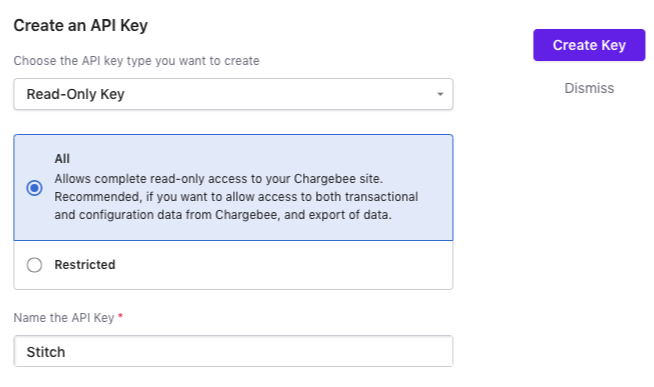
- Sign into your Chargebee account.
- In the left sidenav, click Settings > Configure Chargebee.
- Click the API keys and webhooks button.
- On the API Keys page, click the + Add API Key button. The Create an API Key modal will display.
- Select Read-Only Key as the API key type.
- Select All to define the API key’s access. This will grant read-only access to your Chargebee site.
- In the Name the API key field, enter
Stitch. - Click Create Key.
Chargebee will create the API key and redirect you back to the API Keys page:
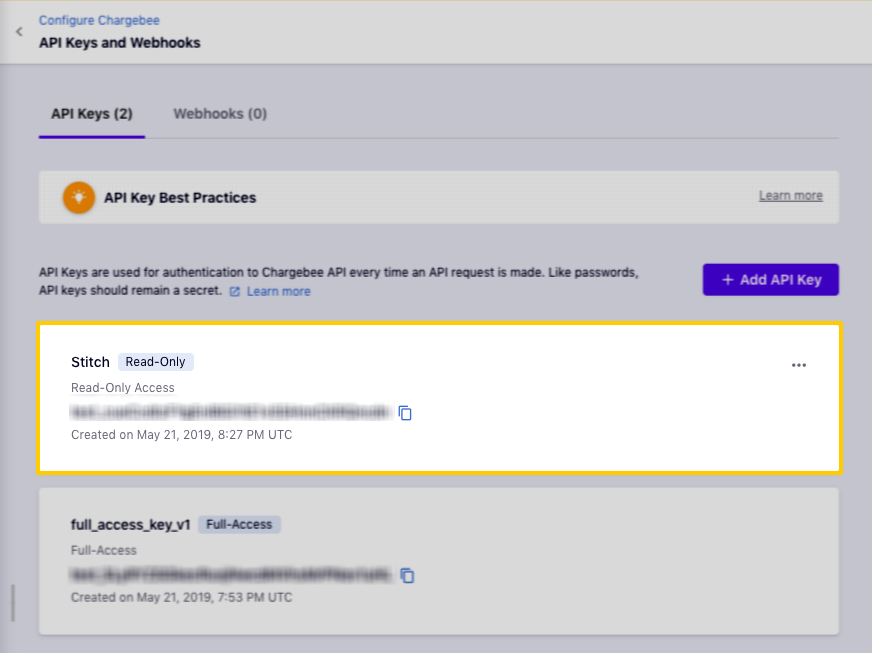
Copy the API key somwhere handy - you’ll need it to complete the setup in Stitch.
Step 2: Add Chargebee as a Stitch data source
- Sign into your Stitch account.
-
On the Stitch Dashboard page, click the Add Integration button.
-
Click the Chargebee icon.
-
Enter a name for the integration. This is the name that will display on the Stitch Dashboard for the integration; it’ll also be used to create the schema in your destination.
For example, the name “Stitch Chargebee” would create a schema called
stitch_chargebeein the destination. Note: Schema names cannot be changed after you save the integration. - In the API Key field, paste the API key you generated in Step 1.
- In the Site field, enter the name of your Chargebee site. This can be found in the URL of your Chargebee site. For example: If the URL was
https://stitch.chargebee.com, onlystitchwould be entered into this field.
Step 3: Define the historical replication start date
The Sync Historical Data setting defines the starting date for your Chargebee integration. This means that data equal to or newer than this date will be replicated to your data warehouse.
Change this setting if you want to replicate data beyond Chargebee’s default setting of 1 year. For a detailed look at historical replication jobs, check out the Syncing Historical SaaS Data guide.
Step 4: Create a replication schedule
In the Replication Frequency section, you’ll create the integration’s replication schedule. An integration’s replication schedule determines how often Stitch runs a replication job, and the time that job begins.
Chargebee integrations support the following replication scheduling methods:
-
Advanced Scheduling using Cron (Advanced or Premium plans only)
To keep your row usage low, consider setting the integration to replicate less frequently. See the Understanding and Reducing Your Row Usage guide for tips on reducing your usage.
Step 5: Set objects to replicate
The last step is to select the tables and columns you want to replicate. Learn about the available tables for this integration.
Note: If a replication job is currently in progress, new selections won’t be used until the next job starts.
For Chargebee integrations, you can select:
-
Individual tables and columns
-
All tables and columns
Click the tabs to view instructions for each selection method.
- In the integration’s Tables to Replicate tab, locate a table you want to replicate.
-
To track a table, click the checkbox next to the table’s name. A blue checkmark means the table is set to replicate.
-
To track a column, click the checkbox next to the column’s name. A blue checkmark means the column is set to replicate.
- Repeat this process for all the tables and columns you want to replicate.
- When finished, click the Finalize Your Selections button at the bottom of the screen to save your selections.
- Click into the integration from the Stitch Dashboard page.
-
Click the Tables to Replicate tab.
- In the list of tables, click the box next to the Table Names column.
-
In the menu that displays, click Track all Tables and Fields:
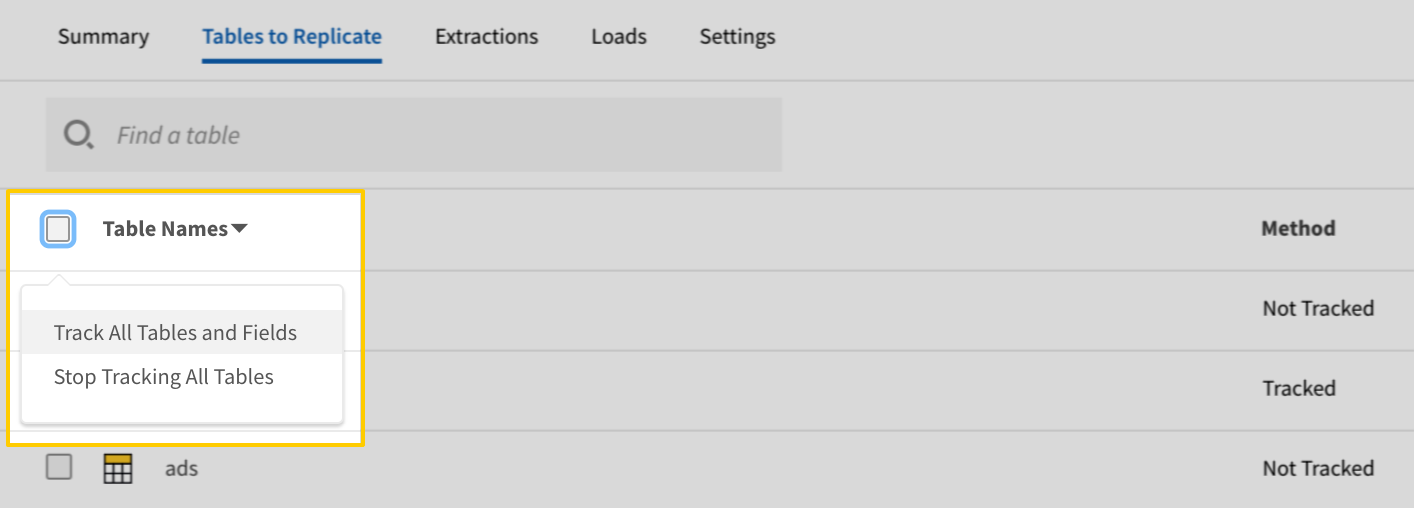
The Track all Tables and Fields menu in the Tables to Replicate tab - Click the Finalize Your Selections button at the bottom of the page to save your data selections.
Initial and historical replication jobs
After you finish setting up Chargebee, its Sync Status may show as Pending on either the Stitch Dashboard or in the Integration Details page.
For a new integration, a Pending status indicates that Stitch is in the process of scheduling the initial replication job for the integration. This may take some time to complete.
Initial replication jobs with Anchor Scheduling
If using Anchor Scheduling, an initial replication job may not kick off immediately. This depends on the selected Replication Frequency and Anchor Time. Refer to the Anchor Scheduling documentation for more information.
Free historical data loads
The first seven days of replication, beginning when data is first replicated, are free. Rows replicated from the new integration during this time won’t count towards your quota. Stitch offers this as a way of testing new integrations, measuring usage, and ensuring historical data volumes don’t quickly consume your quota.
Chargebee replication
Table and field availability and Chargebee product catalogs
The availability of some tables and fields is dependent on the Chargebee Product Catalog version your Chargebee site uses. Refer to Chargebee’s documentation for more info, including how to identify which Product Catalog version your site is using.
The following table contains a list of the tables included in this version of Stitch’s Chargebee integration and the Product Catalog version required to replicate the table.
Additionally, some fields are also subject to Product Catalog version requirements. These fields are noted in the attribute documentation for individual tables.
Note: If your site is using a Product Catalog version that a table or field doesn’t support, the table/field won’t display in the Tables to Replicate tab in Stitch. For example: If the site is using v2.0 of the Product Catalog, tables/fields that require v1.0 won’t display in Stitch.
| Table name | Required Product Catalog version |
Chargebee table reference
Schemas and versioning
Schemas and naming conventions can change from version to version, so we recommend verifying your integration’s version before continuing.
The schema and info displayed below is for version 1 of this integration.
This is the latest version of the Chargebee integration.
Table and column names in your destination
Depending on your destination, table and column names may not appear as they are outlined below.
For example: Object names are lowercased in Redshift (CusTomERs > customers), while case is maintained in PostgreSQL destinations (CusTomERs > CusTomERs). Refer to the Loading Guide for your destination for more info.
addons
The addons table contains info about the addons in your Chargebee account. Addons are additional charges applied to subscriptions apart from base charges.
Note: This table is available Refer to the Table and field availability and Chargebee Product Catalogs section for more info.
|
Key-based Incremental |
|
|
Primary Key |
id |
|
Replication Key |
updated_at |
| Useful links |


|
accounting_category1 STRING |
|||||||
|
accounting_category2 STRING |
|||||||
|
accounting_category3 STRING |
|||||||
|
accounting_category4 STRING |
|||||||
|
accounting_code STRING |
|||||||
|
archived_at DATE-TIME |
|||||||
|
avalara_sale_type STRING |
|||||||
|
avalara_service_type INTEGER |
|||||||
|
avalara_transaction_type INTEGER |
|||||||
|
channel STRING |
|||||||
|
charge_type STRING |
|||||||
|
currency_code STRING |
|||||||
|
custom_fields STRING |
|||||||
|
description STRING |
|||||||
|
enabled_in_portal BOOLEAN |
|||||||
|
id STRING |
|||||||
|
included_in_mrr BOOLEAN |
|||||||
|
invoice_name STRING |
|||||||
|
invoice_notes STRING |
|||||||
|
is_shippable BOOLEAN |
|||||||
|
meta_data STRING |
|||||||
|
name STRING |
|||||||
|
object STRING |
|||||||
|
period INTEGER |
|||||||
|
period_unit STRING |
|||||||
|
price INTEGER |
|||||||
|
price_in_decimal STRING |
|||||||
|
pricing_model STRING |
|||||||
|
resource_version INTEGER |
|||||||
|
shipping_frequency_period INTEGER |
|||||||
|
shipping_frequency_period_unit STRING |
|||||||
|
show_description_in_invoices BOOLEAN |
|||||||
|
show_description_in_quotes BOOLEAN |
|||||||
|
sku STRING |
|||||||
|
status STRING |
|||||||
|
tax_code STRING |
|||||||
|
tax_profile_id STRING |
|||||||
|
taxable BOOLEAN |
|||||||
|
taxjar_product_code STRING |
|||||||
|
tiers ARRAY This is a nested data structure. If your destination doesn't natively support nested data, attributes will be denested into a subtable. <a href='/en-US/stitch/replication/loading/understanding-loading-row-usage-for-nested-data-structures' target='new'>Learn more</a>.
|
|||||||
|
type STRING |
|||||||
|
unit STRING |
|||||||
|
updated_at DATE-TIME |
comments
The comments table contains info about comments in your Chargebee account.
|
Key-based Incremental |
|
|
Primary Key |
id |
|
Replication Key |
created_at |
| Useful links |
|
added_by STRING |
|
created_at DATE-TIME |
|
entity_id STRING |
|
entity_type STRING |
|
id STRING |
|
notes STRING |
|
object STRING |
|
type STRING |
coupons
The coupons table contains info about the coupons in your Chargebee account.
Note: This table is available Refer to the Table and field availability and Chargebee Product Catalogs section for more info.
|
Key-based Incremental |
|
|
Primary Key |
id |
|
Replication Key |
updated_at |
| Useful links |
| Join coupons with | on |
|---|---|
| credit_notes |
coupons.id = credit_notes.discounts.entity_id coupons.id = credit_notes.line_item_discounts.coupon_id |
| events |
coupons.id = events.content.coupon.id coupons.id = events.content.invoice.discounts.entity_id coupons.id = events.content.invoice.line_item_discounts.coupon_id coupons.id = events.content.subscription.coupons.coupon_id |
| invoices |
coupons.id = invoices.discounts.entity_id coupons.id = invoices.line_item_discounts.coupon_id coupons.id = invoices.notes.entity_id |
| subscriptions |
coupons.id = subscriptions.coupons.coupon_id |
| orders |
coupons.id = orders.line_item_discounts.coupon_id |
|
apply_discount_on STRING |
||||
|
apply_on STRING |
||||
|
archived_at DATE-TIME |
||||
|
created_at DATE-TIME |
||||
|
currency_code STRING |
||||
|
discount_amount NUMBER |
||||
|
discount_percentage NUMBER |
||||
|
discount_type STRING |
||||
|
duration_month INTEGER |
||||
|
duration_type STRING |
||||
|
id STRING |
||||
|
invoice_name STRING |
||||
|
invoice_notes STRING |
||||
|
item_constraint_criteria ARRAY This is a nested data structure. If your destination doesn't natively support nested data, attributes will be denested into a subtable. <a href='/en-US/stitch/replication/loading/understanding-loading-row-usage-for-nested-data-structures' target='new'>Learn more</a>.
|
||||
|
item_constraints ARRAY This is a nested data structure. If your destination doesn't natively support nested data, attributes will be denested into a subtable. <a href='/en-US/stitch/replication/loading/understanding-loading-row-usage-for-nested-data-structures' target='new'>Learn more</a>.
|
||||
|
max_redemptions INTEGER |
||||
|
meta_data STRING |
||||
|
name STRING |
||||
|
object STRING |
||||
|
period INTEGER |
||||
|
period_unit STRING |
||||
|
redemptions INTEGER |
||||
|
resource_version INTEGER |
||||
|
status STRING |
||||
|
updated_at DATE-TIME |
||||
|
valid_till DATE-TIME |
credit_notes
The credit_notes table contains info about the credit notes in your Chargebee account. A credit note is a document that specifies the money owed by a business to a customer.
Note: This table is available Refer to the Table and field availability and Chargebee Product Catalogs section for more info.
|
Key-based Incremental |
|
|
Primary Key |
id |
|
Replication Key |
updated_at |
| Useful links |
| Join credit_notes with | on |
|---|---|
| coupons |
credit_notes.discounts.entity_id = coupons.id credit_notes.line_item_discounts.coupon_id = coupons.id |
| events |
credit_notes.discounts.entity_id = events.content.coupon.id credit_notes.line_item_discounts.coupon_id = events.content.coupon.id credit_notes.discounts.entity_id = events.content.invoice.discounts.entity_id credit_notes.line_item_discounts.coupon_id = events.content.invoice.discounts.entity_id credit_notes.discounts.entity_id = events.content.invoice.line_item_discounts.coupon_id credit_notes.line_item_discounts.coupon_id = events.content.invoice.line_item_discounts.coupon_id credit_notes.discounts.entity_id = events.content.subscription.coupons.coupon_id credit_notes.line_item_discounts.coupon_id = events.content.subscription.coupons.coupon_id credit_notes.id = events.content.invoice.adjustment_credit_notes.cn_id credit_notes.id = events.content.invoice.applied_credits.cn_id credit_notes.id = events.content.invoice.issued_credit_notes.cn_id credit_notes.customer_id = events.content.customer.id credit_notes.customer_id = events.content.invoice.customer_id credit_notes.customer_id = events.content.subscription.customer_id credit_notes.customer_id = events.content.transaction.customer_id credit_notes.allocations.invoice_id = events.content.invoice.id credit_notes.reference_invoice_id = events.content.invoice.id credit_notes.allocations.invoice_id = events.content.transaction.linked_credit_notes.cn_reference_invoice_id credit_notes.reference_invoice_id = events.content.transaction.linked_credit_notes.cn_reference_invoice_id credit_notes.line_item_discounts.line_item_id = events.content.invoice.line_item_discounts.line_item_id credit_notes.line_item_taxes.line_item_id = events.content.invoice.line_item_discounts.line_item_id credit_notes.line_item_tiers.line_item_id = events.content.invoice.line_item_discounts.line_item_id credit_notes.line_items.id = events.content.invoice.line_item_discounts.line_item_id credit_notes.line_item_discounts.line_item_id = events.content.invoice.line_item_taxes.line_item_id credit_notes.line_item_taxes.line_item_id = events.content.invoice.line_item_taxes.line_item_id credit_notes.line_item_tiers.line_item_id = events.content.invoice.line_item_taxes.line_item_id credit_notes.line_items.id = events.content.invoice.line_item_taxes.line_item_id credit_notes.line_item_discounts.line_item_id = events.content.invoice.line_items.id credit_notes.line_item_taxes.line_item_id = events.content.invoice.line_items.id credit_notes.line_item_tiers.line_item_id = events.content.invoice.line_items.id credit_notes.line_items.id = events.content.invoice.line_items.id credit_notes.subscription_id = events.content.subscription.id credit_notes.line_items.subscription_id = events.content.subscription.id credit_notes.subscription_id = events.content.invoice.subscription_id credit_notes.line_items.subscription_id = events.content.invoice.subscription_id credit_notes.subscription_id = events.content.transaction.subscription_id credit_notes.line_items.subscription_id = events.content.transaction.subscription_id credit_notes.linked_refunds.txn_id = events.content.invoice.linked_payments.txn_id credit_notes.linked_refunds.txn_id = events.content.transaction.id credit_notes.linked_refunds.txn_id = events.content.transaction.linked_refunds.txn_id credit_notes.linked_refunds.txn_id = events.content.transaction.reference_transaction_id credit_notes.linked_refunds.txn_id = events.content.transaction.refunded_txn_id |
| invoices |
credit_notes.discounts.entity_id = invoices.discounts.entity_id credit_notes.line_item_discounts.coupon_id = invoices.discounts.entity_id credit_notes.discounts.entity_id = invoices.line_item_discounts.coupon_id credit_notes.line_item_discounts.coupon_id = invoices.line_item_discounts.coupon_id credit_notes.discounts.entity_id = invoices.notes.entity_id credit_notes.line_item_discounts.coupon_id = invoices.notes.entity_id credit_notes.id = invoices.adjustment_credit_notes.cn_id credit_notes.id = invoices.applied_credits.cn_id credit_notes.id = invoices.issued_credit_notes.cn_id credit_notes.customer_id = invoices.customer_id credit_notes.customer_id = invoices.notes.entity_id credit_notes.allocations.invoice_id = invoices.id credit_notes.reference_invoice_id = invoices.id credit_notes.line_item_discounts.line_item_id = invoices.line_item_discounts.line_item_id credit_notes.line_item_taxes.line_item_id = invoices.line_item_discounts.line_item_id credit_notes.line_item_tiers.line_item_id = invoices.line_item_discounts.line_item_id credit_notes.line_items.id = invoices.line_item_discounts.line_item_id credit_notes.line_item_discounts.line_item_id = invoices.line_item_taxes.line_item_id credit_notes.line_item_taxes.line_item_id = invoices.line_item_taxes.line_item_id credit_notes.line_item_tiers.line_item_id = invoices.line_item_taxes.line_item_id credit_notes.line_items.id = invoices.line_item_taxes.line_item_id credit_notes.line_item_discounts.line_item_id = invoices.line_item_tiers.line_item_id credit_notes.line_item_taxes.line_item_id = invoices.line_item_tiers.line_item_id credit_notes.line_item_tiers.line_item_id = invoices.line_item_tiers.line_item_id credit_notes.line_items.id = invoices.line_item_tiers.line_item_id credit_notes.line_item_discounts.line_item_id = invoices.line_items.id credit_notes.line_item_taxes.line_item_id = invoices.line_items.id credit_notes.line_item_tiers.line_item_id = invoices.line_items.id credit_notes.line_items.id = invoices.line_items.id credit_notes.subscription_id = invoices.line_items.subscription_id credit_notes.line_items.subscription_id = invoices.line_items.subscription_id credit_notes.subscription_id = invoices.notes.entity_id credit_notes.line_items.subscription_id = invoices.notes.entity_id credit_notes.subscription_id = invoices.subscription_id credit_notes.line_items.subscription_id = invoices.subscription_id credit_notes.linked_refunds.txn_id = invoices.linked_payments.txn_id |
| subscriptions |
credit_notes.discounts.entity_id = subscriptions.coupons.coupon_id credit_notes.line_item_discounts.coupon_id = subscriptions.coupons.coupon_id credit_notes.customer_id = subscriptions.customer_id credit_notes.subscription_id = subscriptions.id credit_notes.line_items.subscription_id = subscriptions.id |
| orders |
credit_notes.discounts.entity_id = orders.line_item_discounts.coupon_id credit_notes.line_item_discounts.coupon_id = orders.line_item_discounts.coupon_id credit_notes.id = orders.linked_credit_notes.id credit_notes.customer_id = orders.customer_id credit_notes.allocations.invoice_id = orders.invoice_id credit_notes.reference_invoice_id = orders.invoice_id credit_notes.line_item_discounts.line_item_id = orders.line_item_discounts.line_item_id credit_notes.line_item_taxes.line_item_id = orders.line_item_discounts.line_item_id credit_notes.line_item_tiers.line_item_id = orders.line_item_discounts.line_item_id credit_notes.line_items.id = orders.line_item_discounts.line_item_id credit_notes.line_item_discounts.line_item_id = orders.line_item_taxes.line_item_id credit_notes.line_item_taxes.line_item_id = orders.line_item_taxes.line_item_id credit_notes.line_item_tiers.line_item_id = orders.line_item_taxes.line_item_id credit_notes.line_items.id = orders.line_item_taxes.line_item_id credit_notes.subscription_id = orders.subscription_id credit_notes.line_items.subscription_id = orders.subscription_id |
| customers |
credit_notes.customer_id = customers.id |
| payment_sources |
credit_notes.customer_id = payment_sources.customer_id |
| promotional_credits |
credit_notes.customer_id = promotional_credits.customer_id |
| transactions |
credit_notes.customer_id = transactions.customer_id credit_notes.allocations.invoice_id = transactions.linked_credit_notes.cn_reference_invoice_id credit_notes.reference_invoice_id = transactions.linked_credit_notes.cn_reference_invoice_id credit_notes.subscription_id = transactions.subscription_id credit_notes.line_items.subscription_id = transactions.subscription_id credit_notes.linked_refunds.txn_id = transactions.id credit_notes.linked_refunds.txn_id = transactions.linked_refunds.txn_id credit_notes.linked_refunds.txn_id = transactions.reference_transaction_id credit_notes.linked_refunds.txn_id = transactions.refunded_txn_id |
| virtual_bank_accounts |
credit_notes.customer_id = virtual_bank_accounts.customer_id |
| gifts |
credit_notes.customer_id = gifts.gift_receiver.customer_id credit_notes.customer_id = gifts.gifter.customer_id credit_notes.allocations.invoice_id = gifts.gifter.invoice_id credit_notes.reference_invoice_id = gifts.gifter.invoice_id credit_notes.subscription_id = gifts.gift_receiver.subscription_id credit_notes.line_items.subscription_id = gifts.gift_receiver.subscription_id |
|
allocations ARRAY This is a nested data structure. If your destination doesn't natively support nested data, attributes will be denested into a subtable. <a href='/en-US/stitch/replication/loading/understanding-loading-row-usage-for-nested-data-structures' target='new'>Learn more</a>.
|
|||||||||||||||||||||||
|
amount_allocated INTEGER |
|||||||||||||||||||||||
|
amount_available INTEGER |
|||||||||||||||||||||||
|
amount_refunded INTEGER |
|||||||||||||||||||||||
|
base_currency_code STRING |
|||||||||||||||||||||||
|
channel STRING |
|||||||||||||||||||||||
|
create_reason_code STRING |
|||||||||||||||||||||||
|
currency_code STRING |
|||||||||||||||||||||||
|
customer_id STRING |
|||||||||||||||||||||||
|
date DATE-TIME |
|||||||||||||||||||||||
|
deleted BOOLEAN |
|||||||||||||||||||||||
|
discounts ARRAY This is a nested data structure. If your destination doesn't natively support nested data, attributes will be denested into a subtable. <a href='/en-US/stitch/replication/loading/understanding-loading-row-usage-for-nested-data-structures' target='new'>Learn more</a>.
|
|||||||||||||||||||||||
|
einvoice OBJECT This is a nested data structure. If your destination doesn't natively support nested data, attributes in this object will be flattened into the table. <a href='/en-US/stitch/replication/loading/understanding-loading-row-usage-for-nested-data-structures' target='new'>Learn more</a>.
|
|||||||||||||||||||||||
|
exchange_rate NUMBER |
|||||||||||||||||||||||
|
fractional_correction INTEGER |
|||||||||||||||||||||||
|
generated_at DATE-TIME |
|||||||||||||||||||||||
|
id STRING |
|||||||||||||||||||||||
|
line_item_discounts ARRAY This is a nested data structure. If your destination doesn't natively support nested data, attributes will be denested into a subtable. <a href='/en-US/stitch/replication/loading/understanding-loading-row-usage-for-nested-data-structures' target='new'>Learn more</a>.
|
|||||||||||||||||||||||
|
line_item_taxes ARRAY This is a nested data structure. If your destination doesn't natively support nested data, attributes will be denested into a subtable. <a href='/en-US/stitch/replication/loading/understanding-loading-row-usage-for-nested-data-structures' target='new'>Learn more</a>.
|
|||||||||||||||||||||||
|
line_item_tiers ARRAY This is a nested data structure. If your destination doesn't natively support nested data, attributes will be denested into a subtable. <a href='/en-US/stitch/replication/loading/understanding-loading-row-usage-for-nested-data-structures' target='new'>Learn more</a>.
|
|||||||||||||||||||||||
|
line_items ARRAY This is a nested data structure. If your destination doesn't natively support nested data, attributes will be denested into a subtable. <a href='/en-US/stitch/replication/loading/understanding-loading-row-usage-for-nested-data-structures' target='new'>Learn more</a>.
|
|||||||||||||||||||||||
|
linked_refunds ARRAY This is a nested data structure. If your destination doesn't natively support nested data, attributes will be denested into a subtable. <a href='/en-US/stitch/replication/loading/understanding-loading-row-usage-for-nested-data-structures' target='new'>Learn more</a>.
|
|||||||||||||||||||||||
|
local_currency_code STRING |
|||||||||||||||||||||||
|
object STRING |
|||||||||||||||||||||||
|
price_type STRING |
|||||||||||||||||||||||
|
reason_code STRING |
|||||||||||||||||||||||
|
reference_invoice_id STRING |
|||||||||||||||||||||||
|
refunded_at DATE-TIME |
|||||||||||||||||||||||
|
resource_version INTEGER |
|||||||||||||||||||||||
|
round_off_amount INTEGER |
|||||||||||||||||||||||
|
status STRING |
|||||||||||||||||||||||
|
sub_total INTEGER |
|||||||||||||||||||||||
|
sub_total_in_local_currency INTEGER |
|||||||||||||||||||||||
|
subscription_id STRING |
|||||||||||||||||||||||
|
taxes ARRAY This is a nested data structure. If your destination doesn't natively support nested data, attributes will be denested into a subtable. <a href='/en-US/stitch/replication/loading/understanding-loading-row-usage-for-nested-data-structures' target='new'>Learn more</a>.
|
|||||||||||||||||||||||
|
total INTEGER |
|||||||||||||||||||||||
|
total_in_local_currency INTEGER |
|||||||||||||||||||||||
|
type STRING |
|||||||||||||||||||||||
|
updated_at DATE-TIME |
|||||||||||||||||||||||
|
vat_number STRING |
|||||||||||||||||||||||
|
vat_number_prefix STRING |
|||||||||||||||||||||||
|
voided_at DATE-TIME |
customers
The customers table contains info about the customers in your Chargebee account.
Note: This table is available Refer to the Table and field availability and Chargebee Product Catalogs section for more info.
|
Key-based Incremental |
|
|
Primary Key |
id |
|
Replication Key |
updated_at |
| Useful links |
| Join customers with | on |
|---|---|
| credit_notes |
customers.id = credit_notes.customer_id |
| events |
customers.id = events.content.customer.id customers.id = events.content.invoice.customer_id customers.id = events.content.subscription.customer_id customers.id = events.content.transaction.customer_id customers.primary_payment_source_id = events.content.subscription.payment_source_id customers.primary_payment_source_id = events.content.transaction.payment_source_id |
| invoices |
customers.id = invoices.customer_id customers.id = invoices.notes.entity_id |
| payment_sources |
customers.id = payment_sources.customer_id customers.primary_payment_source_id = payment_sources.id |
| promotional_credits |
customers.id = promotional_credits.customer_id |
| subscriptions |
customers.id = subscriptions.customer_id customers.primary_payment_source_id = subscriptions.payment_source_id |
| transactions |
customers.id = transactions.customer_id customers.primary_payment_source_id = transactions.payment_source_id |
| virtual_bank_accounts |
customers.id = virtual_bank_accounts.customer_id |
| gifts |
customers.id = gifts.gift_receiver.customer_id customers.id = gifts.gifter.customer_id |
| orders |
customers.id = orders.customer_id |
|
allow_direct_debit BOOLEAN |
|||||||||||||||
|
auto_close_invoices BOOLEAN |
|||||||||||||||
|
auto_collection STRING |
|||||||||||||||
|
backup_payment_source_id STRING |
|||||||||||||||
|
balances ARRAY This is a nested data structure. If your destination doesn't natively support nested data, attributes will be denested into a subtable. <a href='/en-US/stitch/replication/loading/understanding-loading-row-usage-for-nested-data-structures' target='new'>Learn more</a>.
|
|||||||||||||||
|
billing_address OBJECT This is a nested data structure. If your destination doesn't natively support nested data, attributes in this object will be flattened into the table. <a href='/en-US/stitch/replication/loading/understanding-loading-row-usage-for-nested-data-structures' target='new'>Learn more</a>.
|
|||||||||||||||
|
billing_date BOOLEAN |
|||||||||||||||
|
billing_date_mode STRING |
|||||||||||||||
|
billing_day_of_week BOOLEAN |
|||||||||||||||
|
billing_day_of_week_mode STRING |
|||||||||||||||
|
business_customer_without_vat_number BOOLEAN |
|||||||||||||||
|
business_entity_id STRING |
|||||||||||||||
|
card_status STRING |
|||||||||||||||
|
cf_company_id INTEGER, STRING |
|||||||||||||||
|
cf_people_id STRING |
|||||||||||||||
|
channel STRING |
|||||||||||||||
|
child_account_access OBJECT This is a nested data structure. If your destination doesn't natively support nested data, attributes in this object will be flattened into the table. <a href='/en-US/stitch/replication/loading/understanding-loading-row-usage-for-nested-data-structures' target='new'>Learn more</a>.
|
|||||||||||||||
|
client_profile_id STRING |
|||||||||||||||
|
company STRING |
|||||||||||||||
|
consolidated_invoicing BOOLEAN |
|||||||||||||||
|
contacts ARRAY This is a nested data structure. If your destination doesn't natively support nested data, attributes will be denested into a subtable. <a href='/en-US/stitch/replication/loading/understanding-loading-row-usage-for-nested-data-structures' target='new'>Learn more</a>.
|
|||||||||||||||
|
created_at DATE-TIME |
|||||||||||||||
|
created_from_ip STRING |
|||||||||||||||
|
custom_fields STRING |
|||||||||||||||
|
customer_type STRING |
|||||||||||||||
|
deleted BOOLEAN |
|||||||||||||||
|
STRING |
|||||||||||||||
|
entity_code STRING |
|||||||||||||||
|
entity_identifier_scheme STRING |
|||||||||||||||
|
entity_identifier_standard STRING |
|||||||||||||||
|
entity_identifiers ARRAY This is a nested data structure. If your destination doesn't natively support nested data, attributes will be denested into a subtable. <a href='/en-US/stitch/replication/loading/understanding-loading-row-usage-for-nested-data-structures' target='new'>Learn more</a>.
|
|||||||||||||||
|
excess_payments INTEGER |
|||||||||||||||
|
exempt_number STRING |
|||||||||||||||
|
exemption_details STRING |
|||||||||||||||
|
first_name STRING |
|||||||||||||||
|
fraud_flag STRING |
|||||||||||||||
|
id STRING |
|||||||||||||||
|
invoice_notes STRING |
|||||||||||||||
|
is_einvoice_enabled BOOLEAN |
|||||||||||||||
|
is_location_valid BOOLEAN |
|||||||||||||||
|
last_name STRING |
|||||||||||||||
|
locale STRING |
|||||||||||||||
|
meta_data STRING |
|||||||||||||||
|
mrr INTEGER |
|||||||||||||||
|
net_term_days INTEGER |
|||||||||||||||
|
object STRING |
|||||||||||||||
|
offline_payment_method STRING |
|||||||||||||||
|
parent_account_access OBJECT This is a nested data structure. If your destination doesn't natively support nested data, attributes in this object will be flattened into the table. <a href='/en-US/stitch/replication/loading/understanding-loading-row-usage-for-nested-data-structures' target='new'>Learn more</a>.
|
|||||||||||||||
|
payment_method OBJECT This is a nested data structure. If your destination doesn't natively support nested data, attributes in this object will be flattened into the table. <a href='/en-US/stitch/replication/loading/understanding-loading-row-usage-for-nested-data-structures' target='new'>Learn more</a>.
|
|||||||||||||||
|
phone STRING |
|||||||||||||||
|
pii_cleared STRING |
|||||||||||||||
|
preferred_currency_code STRING |
|||||||||||||||
|
primary_payment_source_id STRING |
|||||||||||||||
|
promotional_credits INTEGER |
|||||||||||||||
|
referral_urls ARRAY This is a nested data structure. If your destination doesn't natively support nested data, attributes will be denested into a subtable. <a href='/en-US/stitch/replication/loading/understanding-loading-row-usage-for-nested-data-structures' target='new'>Learn more</a>.
|
|||||||||||||||
|
refundable_credits INTEGER |
|||||||||||||||
|
registered_for_gst BOOLEAN |
|||||||||||||||
|
relationship OBJECT This is a nested data structure. If your destination doesn't natively support nested data, attributes in this object will be flattened into the table. <a href='/en-US/stitch/replication/loading/understanding-loading-row-usage-for-nested-data-structures' target='new'>Learn more</a>.
|
|||||||||||||||
|
resource_version INTEGER |
|||||||||||||||
|
tax_providers_fields STRING |
|||||||||||||||
|
taxability STRING |
|||||||||||||||
|
unbilled_charges INTEGER |
|||||||||||||||
|
updated_at DATE-TIME |
|||||||||||||||
|
use_default_hierarchy_settings BOOLEAN |
|||||||||||||||
|
vat_number STRING |
|||||||||||||||
|
vat_number_prefix STRING |
|||||||||||||||
|
vat_number_status STRING |
|||||||||||||||
|
vat_number_validated_time DATE-TIME |
events
The events table contains info about the events that have occurred on your Chargebee site. Event records contain data about affected resources and additional details, such as when the change occurred. This can be used to create a log of events for a record and analyze how it has changed over time.
Note: This table is available Refer to the Table and field availability and Chargebee Product Catalogs section for more info.
|
Key-based Incremental |
|
|
Primary Key |
id |
|
Replication Key |
occurred_at |
| Useful links |
| Join events with | on |
|---|---|
| coupons |
events.content.coupon.id = coupons.id events.content.invoice.discounts.entity_id = coupons.id events.content.invoice.line_item_discounts.coupon_id = coupons.id events.content.subscription.coupons.coupon_id = coupons.id |
| credit_notes |
events.content.coupon.id = credit_notes.discounts.entity_id events.content.invoice.discounts.entity_id = credit_notes.discounts.entity_id events.content.invoice.line_item_discounts.coupon_id = credit_notes.discounts.entity_id events.content.subscription.coupons.coupon_id = credit_notes.discounts.entity_id events.content.coupon.id = credit_notes.line_item_discounts.coupon_id events.content.invoice.discounts.entity_id = credit_notes.line_item_discounts.coupon_id events.content.invoice.line_item_discounts.coupon_id = credit_notes.line_item_discounts.coupon_id events.content.subscription.coupons.coupon_id = credit_notes.line_item_discounts.coupon_id events.content.invoice.adjustment_credit_notes.cn_id = credit_notes.id events.content.invoice.applied_credits.cn_id = credit_notes.id events.content.invoice.issued_credit_notes.cn_id = credit_notes.id events.content.customer.id = credit_notes.customer_id events.content.invoice.customer_id = credit_notes.customer_id events.content.subscription.customer_id = credit_notes.customer_id events.content.transaction.customer_id = credit_notes.customer_id events.content.invoice.id = credit_notes.allocations.invoice_id events.content.transaction.linked_credit_notes.cn_reference_invoice_id = credit_notes.allocations.invoice_id events.content.invoice.id = credit_notes.reference_invoice_id events.content.transaction.linked_credit_notes.cn_reference_invoice_id = credit_notes.reference_invoice_id events.content.invoice.line_item_discounts.line_item_id = credit_notes.line_item_discounts.line_item_id events.content.invoice.line_item_taxes.line_item_id = credit_notes.line_item_discounts.line_item_id events.content.invoice.line_items.id = credit_notes.line_item_discounts.line_item_id events.content.invoice.line_item_discounts.line_item_id = credit_notes.line_item_taxes.line_item_id events.content.invoice.line_item_taxes.line_item_id = credit_notes.line_item_taxes.line_item_id events.content.invoice.line_items.id = credit_notes.line_item_taxes.line_item_id events.content.invoice.line_item_discounts.line_item_id = credit_notes.line_item_tiers.line_item_id events.content.invoice.line_item_taxes.line_item_id = credit_notes.line_item_tiers.line_item_id events.content.invoice.line_items.id = credit_notes.line_item_tiers.line_item_id events.content.invoice.line_item_discounts.line_item_id = credit_notes.line_items.id events.content.invoice.line_item_taxes.line_item_id = credit_notes.line_items.id events.content.invoice.line_items.id = credit_notes.line_items.id events.content.subscription.id = credit_notes.subscription_id events.content.invoice.subscription_id = credit_notes.subscription_id events.content.transaction.subscription_id = credit_notes.subscription_id events.content.subscription.id = credit_notes.line_items.subscription_id events.content.invoice.subscription_id = credit_notes.line_items.subscription_id events.content.transaction.subscription_id = credit_notes.line_items.subscription_id events.content.invoice.linked_payments.txn_id = credit_notes.linked_refunds.txn_id events.content.transaction.id = credit_notes.linked_refunds.txn_id events.content.transaction.linked_refunds.txn_id = credit_notes.linked_refunds.txn_id events.content.transaction.reference_transaction_id = credit_notes.linked_refunds.txn_id events.content.transaction.refunded_txn_id = credit_notes.linked_refunds.txn_id |
| invoices |
events.content.coupon.id = invoices.discounts.entity_id events.content.invoice.discounts.entity_id = invoices.discounts.entity_id events.content.invoice.line_item_discounts.coupon_id = invoices.discounts.entity_id events.content.subscription.coupons.coupon_id = invoices.discounts.entity_id events.content.coupon.id = invoices.line_item_discounts.coupon_id events.content.invoice.discounts.entity_id = invoices.line_item_discounts.coupon_id events.content.invoice.line_item_discounts.coupon_id = invoices.line_item_discounts.coupon_id events.content.subscription.coupons.coupon_id = invoices.line_item_discounts.coupon_id events.content.coupon.id = invoices.notes.entity_id events.content.invoice.discounts.entity_id = invoices.notes.entity_id events.content.invoice.line_item_discounts.coupon_id = invoices.notes.entity_id events.content.subscription.coupons.coupon_id = invoices.notes.entity_id events.content.invoice.adjustment_credit_notes.cn_id = invoices.adjustment_credit_notes.cn_id events.content.invoice.applied_credits.cn_id = invoices.adjustment_credit_notes.cn_id events.content.invoice.issued_credit_notes.cn_id = invoices.adjustment_credit_notes.cn_id events.content.invoice.adjustment_credit_notes.cn_id = invoices.applied_credits.cn_id events.content.invoice.applied_credits.cn_id = invoices.applied_credits.cn_id events.content.invoice.issued_credit_notes.cn_id = invoices.applied_credits.cn_id events.content.invoice.adjustment_credit_notes.cn_id = invoices.issued_credit_notes.cn_id events.content.invoice.applied_credits.cn_id = invoices.issued_credit_notes.cn_id events.content.invoice.issued_credit_notes.cn_id = invoices.issued_credit_notes.cn_id events.content.customer.id = invoices.customer_id events.content.invoice.customer_id = invoices.customer_id events.content.subscription.customer_id = invoices.customer_id events.content.transaction.customer_id = invoices.customer_id events.content.customer.id = invoices.notes.entity_id events.content.invoice.customer_id = invoices.notes.entity_id events.content.subscription.customer_id = invoices.notes.entity_id events.content.transaction.customer_id = invoices.notes.entity_id events.content.invoice.id = invoices.id events.content.transaction.linked_credit_notes.cn_reference_invoice_id = invoices.id events.content.invoice.line_item_discounts.line_item_id = invoices.line_item_discounts.line_item_id events.content.invoice.line_item_taxes.line_item_id = invoices.line_item_discounts.line_item_id events.content.invoice.line_items.id = invoices.line_item_discounts.line_item_id events.content.invoice.line_item_discounts.line_item_id = invoices.line_item_taxes.line_item_id events.content.invoice.line_item_taxes.line_item_id = invoices.line_item_taxes.line_item_id events.content.invoice.line_items.id = invoices.line_item_taxes.line_item_id events.content.invoice.line_item_discounts.line_item_id = invoices.line_item_tiers.line_item_id events.content.invoice.line_item_taxes.line_item_id = invoices.line_item_tiers.line_item_id events.content.invoice.line_items.id = invoices.line_item_tiers.line_item_id events.content.invoice.line_item_discounts.line_item_id = invoices.line_items.id events.content.invoice.line_item_taxes.line_item_id = invoices.line_items.id events.content.invoice.line_items.id = invoices.line_items.id events.content.subscription.id = invoices.line_items.subscription_id events.content.invoice.subscription_id = invoices.line_items.subscription_id events.content.transaction.subscription_id = invoices.line_items.subscription_id events.content.subscription.id = invoices.notes.entity_id events.content.invoice.subscription_id = invoices.notes.entity_id events.content.transaction.subscription_id = invoices.notes.entity_id events.content.subscription.id = invoices.subscription_id events.content.invoice.subscription_id = invoices.subscription_id events.content.transaction.subscription_id = invoices.subscription_id events.content.invoice.linked_payments.txn_id = invoices.linked_payments.txn_id events.content.transaction.id = invoices.linked_payments.txn_id events.content.transaction.linked_refunds.txn_id = invoices.linked_payments.txn_id events.content.transaction.reference_transaction_id = invoices.linked_payments.txn_id events.content.transaction.refunded_txn_id = invoices.linked_payments.txn_id |
| subscriptions |
events.content.coupon.id = subscriptions.coupons.coupon_id events.content.invoice.discounts.entity_id = subscriptions.coupons.coupon_id events.content.invoice.line_item_discounts.coupon_id = subscriptions.coupons.coupon_id events.content.subscription.coupons.coupon_id = subscriptions.coupons.coupon_id events.content.customer.id = subscriptions.customer_id events.content.invoice.customer_id = subscriptions.customer_id events.content.subscription.customer_id = subscriptions.customer_id events.content.transaction.customer_id = subscriptions.customer_id events.content.subscription.payment_source_id = subscriptions.payment_source_id events.content.transaction.payment_source_id = subscriptions.payment_source_id events.content.subscription.id = subscriptions.id events.content.invoice.subscription_id = subscriptions.id events.content.transaction.subscription_id = subscriptions.id |
| orders |
events.content.coupon.id = orders.line_item_discounts.coupon_id events.content.invoice.discounts.entity_id = orders.line_item_discounts.coupon_id events.content.invoice.line_item_discounts.coupon_id = orders.line_item_discounts.coupon_id events.content.subscription.coupons.coupon_id = orders.line_item_discounts.coupon_id events.content.invoice.adjustment_credit_notes.cn_id = orders.linked_credit_notes.id events.content.invoice.applied_credits.cn_id = orders.linked_credit_notes.id events.content.invoice.issued_credit_notes.cn_id = orders.linked_credit_notes.id events.content.customer.id = orders.customer_id events.content.invoice.customer_id = orders.customer_id events.content.subscription.customer_id = orders.customer_id events.content.transaction.customer_id = orders.customer_id events.content.invoice.id = orders.invoice_id events.content.transaction.linked_credit_notes.cn_reference_invoice_id = orders.invoice_id events.content.invoice.line_item_discounts.line_item_id = orders.line_item_discounts.line_item_id events.content.invoice.line_item_taxes.line_item_id = orders.line_item_discounts.line_item_id events.content.invoice.line_items.id = orders.line_item_discounts.line_item_id events.content.invoice.line_item_discounts.line_item_id = orders.line_item_taxes.line_item_id events.content.invoice.line_item_taxes.line_item_id = orders.line_item_taxes.line_item_id events.content.invoice.line_items.id = orders.line_item_taxes.line_item_id events.content.subscription.id = orders.subscription_id events.content.invoice.subscription_id = orders.subscription_id events.content.transaction.subscription_id = orders.subscription_id |
| customers |
events.content.customer.id = customers.id events.content.invoice.customer_id = customers.id events.content.subscription.customer_id = customers.id events.content.transaction.customer_id = customers.id events.content.subscription.payment_source_id = customers.primary_payment_source_id events.content.transaction.payment_source_id = customers.primary_payment_source_id |
| payment_sources |
events.content.customer.id = payment_sources.customer_id events.content.invoice.customer_id = payment_sources.customer_id events.content.subscription.customer_id = payment_sources.customer_id events.content.transaction.customer_id = payment_sources.customer_id events.content.subscription.payment_source_id = payment_sources.id events.content.transaction.payment_source_id = payment_sources.id |
| promotional_credits |
events.content.customer.id = promotional_credits.customer_id events.content.invoice.customer_id = promotional_credits.customer_id events.content.subscription.customer_id = promotional_credits.customer_id events.content.transaction.customer_id = promotional_credits.customer_id |
| transactions |
events.content.customer.id = transactions.customer_id events.content.invoice.customer_id = transactions.customer_id events.content.subscription.customer_id = transactions.customer_id events.content.transaction.customer_id = transactions.customer_id events.content.invoice.id = transactions.linked_credit_notes.cn_reference_invoice_id events.content.transaction.linked_credit_notes.cn_reference_invoice_id = transactions.linked_credit_notes.cn_reference_invoice_id events.content.subscription.payment_source_id = transactions.payment_source_id events.content.transaction.payment_source_id = transactions.payment_source_id events.content.subscription.id = transactions.subscription_id events.content.invoice.subscription_id = transactions.subscription_id events.content.transaction.subscription_id = transactions.subscription_id events.content.invoice.linked_payments.txn_id = transactions.id events.content.transaction.id = transactions.id events.content.transaction.linked_refunds.txn_id = transactions.id events.content.transaction.reference_transaction_id = transactions.id events.content.transaction.refunded_txn_id = transactions.id events.content.invoice.linked_payments.txn_id = transactions.linked_refunds.txn_id events.content.transaction.id = transactions.linked_refunds.txn_id events.content.transaction.linked_refunds.txn_id = transactions.linked_refunds.txn_id events.content.transaction.reference_transaction_id = transactions.linked_refunds.txn_id events.content.transaction.refunded_txn_id = transactions.linked_refunds.txn_id events.content.invoice.linked_payments.txn_id = transactions.reference_transaction_id events.content.transaction.id = transactions.reference_transaction_id events.content.transaction.linked_refunds.txn_id = transactions.reference_transaction_id events.content.transaction.reference_transaction_id = transactions.reference_transaction_id events.content.transaction.refunded_txn_id = transactions.reference_transaction_id events.content.invoice.linked_payments.txn_id = transactions.refunded_txn_id events.content.transaction.id = transactions.refunded_txn_id events.content.transaction.linked_refunds.txn_id = transactions.refunded_txn_id events.content.transaction.reference_transaction_id = transactions.refunded_txn_id events.content.transaction.refunded_txn_id = transactions.refunded_txn_id |
| virtual_bank_accounts |
events.content.customer.id = virtual_bank_accounts.customer_id events.content.invoice.customer_id = virtual_bank_accounts.customer_id events.content.subscription.customer_id = virtual_bank_accounts.customer_id events.content.transaction.customer_id = virtual_bank_accounts.customer_id |
| gifts |
events.content.customer.id = gifts.gift_receiver.customer_id events.content.invoice.customer_id = gifts.gift_receiver.customer_id events.content.subscription.customer_id = gifts.gift_receiver.customer_id events.content.transaction.customer_id = gifts.gift_receiver.customer_id events.content.customer.id = gifts.gifter.customer_id events.content.invoice.customer_id = gifts.gifter.customer_id events.content.subscription.customer_id = gifts.gifter.customer_id events.content.transaction.customer_id = gifts.gifter.customer_id events.content.invoice.id = gifts.gifter.invoice_id events.content.transaction.linked_credit_notes.cn_reference_invoice_id = gifts.gifter.invoice_id events.content.subscription.id = gifts.gift_receiver.subscription_id events.content.invoice.subscription_id = gifts.gift_receiver.subscription_id events.content.transaction.subscription_id = gifts.gift_receiver.subscription_id |
|
api_version STRING |
|||||||||||||||||||||||||||||||||||||||||||||||||||||||||||||||||||||||||||||||||||||||||||||||||||||||||||||||||||||||||||||||||||||||||||||||||||||||||||||||||||||||||||||||||||||||||||||||||||||||||||||||||||||||||||||||||||||||||||||||||||||||||||||||||||||||||||||||||||||||||||||||||||||||||||||||||||||||||||||||||||||||||||||||||||||||||||||||||||||||||||||||||||||||||||||||||||||||||||||||||||||||||||||||||||||||||||||||||||||||||||||||||||||||||||||||||||||||||||||||||||||||||||||||||||||||||||||||||||||||||||||||||||||||||||||||||||||||||||||||||||||||||||||||||||||||||||||||||||||||||||||||||||||||||||||||||||||||||||||||||||||||||||||||||||||||||||||||||||||||||||||||||||||||||||||||||||||||||||||||||||||||||||||||||||||||||||||||||||||||||||||||||||||||||||||||||||||||||||||||||||||||||||||||||||||||||||||||||||||||||||||||||||||||||||||||||||||||||||||||||||||||||||||||||||||||||||||||||||||||||||||||||||||||||||||||||||||||||||||||||||||||||||||||||||||||||||||||||||||||
|
content OBJECT This is a nested data structure. If your destination doesn't natively support nested data, attributes in this object will be flattened into the table. <a href='/en-US/stitch/replication/loading/understanding-loading-row-usage-for-nested-data-structures' target='new'>Learn more</a>.
|
|||||||||||||||||||||||||||||||||||||||||||||||||||||||||||||||||||||||||||||||||||||||||||||||||||||||||||||||||||||||||||||||||||||||||||||||||||||||||||||||||||||||||||||||||||||||||||||||||||||||||||||||||||||||||||||||||||||||||||||||||||||||||||||||||||||||||||||||||||||||||||||||||||||||||||||||||||||||||||||||||||||||||||||||||||||||||||||||||||||||||||||||||||||||||||||||||||||||||||||||||||||||||||||||||||||||||||||||||||||||||||||||||||||||||||||||||||||||||||||||||||||||||||||||||||||||||||||||||||||||||||||||||||||||||||||||||||||||||||||||||||||||||||||||||||||||||||||||||||||||||||||||||||||||||||||||||||||||||||||||||||||||||||||||||||||||||||||||||||||||||||||||||||||||||||||||||||||||||||||||||||||||||||||||||||||||||||||||||||||||||||||||||||||||||||||||||||||||||||||||||||||||||||||||||||||||||||||||||||||||||||||||||||||||||||||||||||||||||||||||||||||||||||||||||||||||||||||||||||||||||||||||||||||||||||||||||||||||||||||||||||||||||||||||||||||||||||||||||||||||
|
event_type STRING |
|||||||||||||||||||||||||||||||||||||||||||||||||||||||||||||||||||||||||||||||||||||||||||||||||||||||||||||||||||||||||||||||||||||||||||||||||||||||||||||||||||||||||||||||||||||||||||||||||||||||||||||||||||||||||||||||||||||||||||||||||||||||||||||||||||||||||||||||||||||||||||||||||||||||||||||||||||||||||||||||||||||||||||||||||||||||||||||||||||||||||||||||||||||||||||||||||||||||||||||||||||||||||||||||||||||||||||||||||||||||||||||||||||||||||||||||||||||||||||||||||||||||||||||||||||||||||||||||||||||||||||||||||||||||||||||||||||||||||||||||||||||||||||||||||||||||||||||||||||||||||||||||||||||||||||||||||||||||||||||||||||||||||||||||||||||||||||||||||||||||||||||||||||||||||||||||||||||||||||||||||||||||||||||||||||||||||||||||||||||||||||||||||||||||||||||||||||||||||||||||||||||||||||||||||||||||||||||||||||||||||||||||||||||||||||||||||||||||||||||||||||||||||||||||||||||||||||||||||||||||||||||||||||||||||||||||||||||||||||||||||||||||||||||||||||||||||||||||||||||||
|
id STRING |
|||||||||||||||||||||||||||||||||||||||||||||||||||||||||||||||||||||||||||||||||||||||||||||||||||||||||||||||||||||||||||||||||||||||||||||||||||||||||||||||||||||||||||||||||||||||||||||||||||||||||||||||||||||||||||||||||||||||||||||||||||||||||||||||||||||||||||||||||||||||||||||||||||||||||||||||||||||||||||||||||||||||||||||||||||||||||||||||||||||||||||||||||||||||||||||||||||||||||||||||||||||||||||||||||||||||||||||||||||||||||||||||||||||||||||||||||||||||||||||||||||||||||||||||||||||||||||||||||||||||||||||||||||||||||||||||||||||||||||||||||||||||||||||||||||||||||||||||||||||||||||||||||||||||||||||||||||||||||||||||||||||||||||||||||||||||||||||||||||||||||||||||||||||||||||||||||||||||||||||||||||||||||||||||||||||||||||||||||||||||||||||||||||||||||||||||||||||||||||||||||||||||||||||||||||||||||||||||||||||||||||||||||||||||||||||||||||||||||||||||||||||||||||||||||||||||||||||||||||||||||||||||||||||||||||||||||||||||||||||||||||||||||||||||||||||||||||||||||||||||
|
object STRING |
|||||||||||||||||||||||||||||||||||||||||||||||||||||||||||||||||||||||||||||||||||||||||||||||||||||||||||||||||||||||||||||||||||||||||||||||||||||||||||||||||||||||||||||||||||||||||||||||||||||||||||||||||||||||||||||||||||||||||||||||||||||||||||||||||||||||||||||||||||||||||||||||||||||||||||||||||||||||||||||||||||||||||||||||||||||||||||||||||||||||||||||||||||||||||||||||||||||||||||||||||||||||||||||||||||||||||||||||||||||||||||||||||||||||||||||||||||||||||||||||||||||||||||||||||||||||||||||||||||||||||||||||||||||||||||||||||||||||||||||||||||||||||||||||||||||||||||||||||||||||||||||||||||||||||||||||||||||||||||||||||||||||||||||||||||||||||||||||||||||||||||||||||||||||||||||||||||||||||||||||||||||||||||||||||||||||||||||||||||||||||||||||||||||||||||||||||||||||||||||||||||||||||||||||||||||||||||||||||||||||||||||||||||||||||||||||||||||||||||||||||||||||||||||||||||||||||||||||||||||||||||||||||||||||||||||||||||||||||||||||||||||||||||||||||||||||||||||||||||||||
|
occurred_at DATE-TIME |
|||||||||||||||||||||||||||||||||||||||||||||||||||||||||||||||||||||||||||||||||||||||||||||||||||||||||||||||||||||||||||||||||||||||||||||||||||||||||||||||||||||||||||||||||||||||||||||||||||||||||||||||||||||||||||||||||||||||||||||||||||||||||||||||||||||||||||||||||||||||||||||||||||||||||||||||||||||||||||||||||||||||||||||||||||||||||||||||||||||||||||||||||||||||||||||||||||||||||||||||||||||||||||||||||||||||||||||||||||||||||||||||||||||||||||||||||||||||||||||||||||||||||||||||||||||||||||||||||||||||||||||||||||||||||||||||||||||||||||||||||||||||||||||||||||||||||||||||||||||||||||||||||||||||||||||||||||||||||||||||||||||||||||||||||||||||||||||||||||||||||||||||||||||||||||||||||||||||||||||||||||||||||||||||||||||||||||||||||||||||||||||||||||||||||||||||||||||||||||||||||||||||||||||||||||||||||||||||||||||||||||||||||||||||||||||||||||||||||||||||||||||||||||||||||||||||||||||||||||||||||||||||||||||||||||||||||||||||||||||||||||||||||||||||||||||||||||||||||||||||
|
source STRING |
|||||||||||||||||||||||||||||||||||||||||||||||||||||||||||||||||||||||||||||||||||||||||||||||||||||||||||||||||||||||||||||||||||||||||||||||||||||||||||||||||||||||||||||||||||||||||||||||||||||||||||||||||||||||||||||||||||||||||||||||||||||||||||||||||||||||||||||||||||||||||||||||||||||||||||||||||||||||||||||||||||||||||||||||||||||||||||||||||||||||||||||||||||||||||||||||||||||||||||||||||||||||||||||||||||||||||||||||||||||||||||||||||||||||||||||||||||||||||||||||||||||||||||||||||||||||||||||||||||||||||||||||||||||||||||||||||||||||||||||||||||||||||||||||||||||||||||||||||||||||||||||||||||||||||||||||||||||||||||||||||||||||||||||||||||||||||||||||||||||||||||||||||||||||||||||||||||||||||||||||||||||||||||||||||||||||||||||||||||||||||||||||||||||||||||||||||||||||||||||||||||||||||||||||||||||||||||||||||||||||||||||||||||||||||||||||||||||||||||||||||||||||||||||||||||||||||||||||||||||||||||||||||||||||||||||||||||||||||||||||||||||||||||||||||||||||||||||||||||||||
|
user STRING |
|||||||||||||||||||||||||||||||||||||||||||||||||||||||||||||||||||||||||||||||||||||||||||||||||||||||||||||||||||||||||||||||||||||||||||||||||||||||||||||||||||||||||||||||||||||||||||||||||||||||||||||||||||||||||||||||||||||||||||||||||||||||||||||||||||||||||||||||||||||||||||||||||||||||||||||||||||||||||||||||||||||||||||||||||||||||||||||||||||||||||||||||||||||||||||||||||||||||||||||||||||||||||||||||||||||||||||||||||||||||||||||||||||||||||||||||||||||||||||||||||||||||||||||||||||||||||||||||||||||||||||||||||||||||||||||||||||||||||||||||||||||||||||||||||||||||||||||||||||||||||||||||||||||||||||||||||||||||||||||||||||||||||||||||||||||||||||||||||||||||||||||||||||||||||||||||||||||||||||||||||||||||||||||||||||||||||||||||||||||||||||||||||||||||||||||||||||||||||||||||||||||||||||||||||||||||||||||||||||||||||||||||||||||||||||||||||||||||||||||||||||||||||||||||||||||||||||||||||||||||||||||||||||||||||||||||||||||||||||||||||||||||||||||||||||||||||||||||||||||||
|
webhook_status STRING |
gifts
The gifts table contains info about the gifts in your Chargebee account.
Note: This table is available Refer to the Table and field availability and Chargebee Product Catalogs section for more info.
|
Key-based Incremental |
|
|
Primary Key |
id |
|
Replication Key |
updated_at |
| Useful links |
| Join gifts with | on |
|---|---|
| credit_notes |
gifts.gift_receiver.customer_id = credit_notes.customer_id gifts.gifter.customer_id = credit_notes.customer_id gifts.gifter.invoice_id = credit_notes.allocations.invoice_id gifts.gifter.invoice_id = credit_notes.reference_invoice_id gifts.gift_receiver.subscription_id = credit_notes.subscription_id gifts.gift_receiver.subscription_id = credit_notes.line_items.subscription_id |
| customers |
gifts.gift_receiver.customer_id = customers.id gifts.gifter.customer_id = customers.id |
| events |
gifts.gift_receiver.customer_id = events.content.customer.id gifts.gifter.customer_id = events.content.customer.id gifts.gift_receiver.customer_id = events.content.invoice.customer_id gifts.gifter.customer_id = events.content.invoice.customer_id gifts.gift_receiver.customer_id = events.content.subscription.customer_id gifts.gifter.customer_id = events.content.subscription.customer_id gifts.gift_receiver.customer_id = events.content.transaction.customer_id gifts.gifter.customer_id = events.content.transaction.customer_id gifts.gifter.invoice_id = events.content.invoice.id gifts.gifter.invoice_id = events.content.transaction.linked_credit_notes.cn_reference_invoice_id gifts.gift_receiver.subscription_id = events.content.subscription.id gifts.gift_receiver.subscription_id = events.content.invoice.subscription_id gifts.gift_receiver.subscription_id = events.content.transaction.subscription_id |
| invoices |
gifts.gift_receiver.customer_id = invoices.customer_id gifts.gifter.customer_id = invoices.customer_id gifts.gift_receiver.customer_id = invoices.notes.entity_id gifts.gifter.customer_id = invoices.notes.entity_id gifts.gifter.invoice_id = invoices.id gifts.gift_receiver.subscription_id = invoices.line_items.subscription_id gifts.gift_receiver.subscription_id = invoices.notes.entity_id gifts.gift_receiver.subscription_id = invoices.subscription_id |
| payment_sources |
gifts.gift_receiver.customer_id = payment_sources.customer_id gifts.gifter.customer_id = payment_sources.customer_id |
| promotional_credits |
gifts.gift_receiver.customer_id = promotional_credits.customer_id gifts.gifter.customer_id = promotional_credits.customer_id |
| subscriptions |
gifts.gift_receiver.customer_id = subscriptions.customer_id gifts.gifter.customer_id = subscriptions.customer_id gifts.gift_receiver.subscription_id = subscriptions.id |
| transactions |
gifts.gift_receiver.customer_id = transactions.customer_id gifts.gifter.customer_id = transactions.customer_id gifts.gifter.invoice_id = transactions.linked_credit_notes.cn_reference_invoice_id gifts.gift_receiver.subscription_id = transactions.subscription_id |
| virtual_bank_accounts |
gifts.gift_receiver.customer_id = virtual_bank_accounts.customer_id gifts.gifter.customer_id = virtual_bank_accounts.customer_id |
| orders |
gifts.gift_receiver.customer_id = orders.customer_id gifts.gifter.customer_id = orders.customer_id gifts.id = orders.gift_id gifts.gifter.invoice_id = orders.invoice_id gifts.gift_receiver.subscription_id = orders.subscription_id |
|
auto_claim BOOLEAN |
|||||
|
claim_expiry_date DATE-TIME |
|||||
|
gift_receiver OBJECT This is a nested data structure. If your destination doesn't natively support nested data, attributes in this object will be flattened into the table. <a href='/en-US/stitch/replication/loading/understanding-loading-row-usage-for-nested-data-structures' target='new'>Learn more</a>.
|
|||||
|
gift_timelines ARRAY This is a nested data structure. If your destination doesn't natively support nested data, attributes will be denested into a subtable. <a href='/en-US/stitch/replication/loading/understanding-loading-row-usage-for-nested-data-structures' target='new'>Learn more</a>.
|
|||||
|
gifter OBJECT This is a nested data structure. If your destination doesn't natively support nested data, attributes in this object will be flattened into the table. <a href='/en-US/stitch/replication/loading/understanding-loading-row-usage-for-nested-data-structures' target='new'>Learn more</a>.
|
|||||
|
id STRING |
|||||
|
no_expiry BOOLEAN |
|||||
|
resource_version INTEGER |
|||||
|
scheduled_at DATE-TIME |
|||||
|
status STRING |
|||||
|
updated_at DATE-TIME |
invoices
The invoices table contains info about the invoices in your Chargebee account. Invoices are statements containing charges, adjustments, and any discounts for a subscription specific to a term.
Note: This table is available Refer to the Table and field availability and Chargebee Product Catalogs section for more info.
|
Key-based Incremental |
|
|
Primary Key |
id |
|
Replication Key |
updated_at |
| Useful links |
| Join invoices with | on |
|---|---|
| addons |
invoices.notes.entity_id = addons.id |
| plans |
invoices.notes.entity_id = plans.applicable_addons.id invoices.notes.entity_id = plans.id |
| coupons |
invoices.discounts.entity_id = coupons.id invoices.line_item_discounts.coupon_id = coupons.id invoices.notes.entity_id = coupons.id |
| credit_notes |
invoices.discounts.entity_id = credit_notes.discounts.entity_id invoices.line_item_discounts.coupon_id = credit_notes.discounts.entity_id invoices.notes.entity_id = credit_notes.discounts.entity_id invoices.discounts.entity_id = credit_notes.line_item_discounts.coupon_id invoices.line_item_discounts.coupon_id = credit_notes.line_item_discounts.coupon_id invoices.notes.entity_id = credit_notes.line_item_discounts.coupon_id invoices.adjustment_credit_notes.cn_id = credit_notes.id invoices.applied_credits.cn_id = credit_notes.id invoices.issued_credit_notes.cn_id = credit_notes.id invoices.customer_id = credit_notes.customer_id invoices.notes.entity_id = credit_notes.customer_id invoices.id = credit_notes.allocations.invoice_id invoices.id = credit_notes.reference_invoice_id invoices.line_item_discounts.line_item_id = credit_notes.line_item_discounts.line_item_id invoices.line_item_taxes.line_item_id = credit_notes.line_item_discounts.line_item_id invoices.line_item_tiers.line_item_id = credit_notes.line_item_discounts.line_item_id invoices.line_items.id = credit_notes.line_item_discounts.line_item_id invoices.line_item_discounts.line_item_id = credit_notes.line_item_taxes.line_item_id invoices.line_item_taxes.line_item_id = credit_notes.line_item_taxes.line_item_id invoices.line_item_tiers.line_item_id = credit_notes.line_item_taxes.line_item_id invoices.line_items.id = credit_notes.line_item_taxes.line_item_id invoices.line_item_discounts.line_item_id = credit_notes.line_item_tiers.line_item_id invoices.line_item_taxes.line_item_id = credit_notes.line_item_tiers.line_item_id invoices.line_item_tiers.line_item_id = credit_notes.line_item_tiers.line_item_id invoices.line_items.id = credit_notes.line_item_tiers.line_item_id invoices.line_item_discounts.line_item_id = credit_notes.line_items.id invoices.line_item_taxes.line_item_id = credit_notes.line_items.id invoices.line_item_tiers.line_item_id = credit_notes.line_items.id invoices.line_items.id = credit_notes.line_items.id invoices.line_items.subscription_id = credit_notes.subscription_id invoices.notes.entity_id = credit_notes.subscription_id invoices.subscription_id = credit_notes.subscription_id invoices.line_items.subscription_id = credit_notes.line_items.subscription_id invoices.notes.entity_id = credit_notes.line_items.subscription_id invoices.subscription_id = credit_notes.line_items.subscription_id invoices.linked_payments.txn_id = credit_notes.linked_refunds.txn_id |
| events |
invoices.discounts.entity_id = events.content.coupon.id invoices.line_item_discounts.coupon_id = events.content.coupon.id invoices.notes.entity_id = events.content.coupon.id invoices.discounts.entity_id = events.content.invoice.discounts.entity_id invoices.line_item_discounts.coupon_id = events.content.invoice.discounts.entity_id invoices.notes.entity_id = events.content.invoice.discounts.entity_id invoices.discounts.entity_id = events.content.invoice.line_item_discounts.coupon_id invoices.line_item_discounts.coupon_id = events.content.invoice.line_item_discounts.coupon_id invoices.notes.entity_id = events.content.invoice.line_item_discounts.coupon_id invoices.discounts.entity_id = events.content.subscription.coupons.coupon_id invoices.line_item_discounts.coupon_id = events.content.subscription.coupons.coupon_id invoices.notes.entity_id = events.content.subscription.coupons.coupon_id invoices.adjustment_credit_notes.cn_id = events.content.invoice.adjustment_credit_notes.cn_id invoices.applied_credits.cn_id = events.content.invoice.adjustment_credit_notes.cn_id invoices.issued_credit_notes.cn_id = events.content.invoice.adjustment_credit_notes.cn_id invoices.adjustment_credit_notes.cn_id = events.content.invoice.applied_credits.cn_id invoices.applied_credits.cn_id = events.content.invoice.applied_credits.cn_id invoices.issued_credit_notes.cn_id = events.content.invoice.applied_credits.cn_id invoices.adjustment_credit_notes.cn_id = events.content.invoice.issued_credit_notes.cn_id invoices.applied_credits.cn_id = events.content.invoice.issued_credit_notes.cn_id invoices.issued_credit_notes.cn_id = events.content.invoice.issued_credit_notes.cn_id invoices.customer_id = events.content.customer.id invoices.notes.entity_id = events.content.customer.id invoices.customer_id = events.content.invoice.customer_id invoices.notes.entity_id = events.content.invoice.customer_id invoices.customer_id = events.content.subscription.customer_id invoices.notes.entity_id = events.content.subscription.customer_id invoices.customer_id = events.content.transaction.customer_id invoices.notes.entity_id = events.content.transaction.customer_id invoices.id = events.content.invoice.id invoices.id = events.content.transaction.linked_credit_notes.cn_reference_invoice_id invoices.line_item_discounts.line_item_id = events.content.invoice.line_item_discounts.line_item_id invoices.line_item_taxes.line_item_id = events.content.invoice.line_item_discounts.line_item_id invoices.line_item_tiers.line_item_id = events.content.invoice.line_item_discounts.line_item_id invoices.line_items.id = events.content.invoice.line_item_discounts.line_item_id invoices.line_item_discounts.line_item_id = events.content.invoice.line_item_taxes.line_item_id invoices.line_item_taxes.line_item_id = events.content.invoice.line_item_taxes.line_item_id invoices.line_item_tiers.line_item_id = events.content.invoice.line_item_taxes.line_item_id invoices.line_items.id = events.content.invoice.line_item_taxes.line_item_id invoices.line_item_discounts.line_item_id = events.content.invoice.line_items.id invoices.line_item_taxes.line_item_id = events.content.invoice.line_items.id invoices.line_item_tiers.line_item_id = events.content.invoice.line_items.id invoices.line_items.id = events.content.invoice.line_items.id invoices.line_items.subscription_id = events.content.subscription.id invoices.notes.entity_id = events.content.subscription.id invoices.subscription_id = events.content.subscription.id invoices.line_items.subscription_id = events.content.invoice.subscription_id invoices.notes.entity_id = events.content.invoice.subscription_id invoices.subscription_id = events.content.invoice.subscription_id invoices.line_items.subscription_id = events.content.transaction.subscription_id invoices.notes.entity_id = events.content.transaction.subscription_id invoices.subscription_id = events.content.transaction.subscription_id invoices.linked_payments.txn_id = events.content.invoice.linked_payments.txn_id invoices.linked_payments.txn_id = events.content.transaction.id invoices.linked_payments.txn_id = events.content.transaction.linked_refunds.txn_id invoices.linked_payments.txn_id = events.content.transaction.reference_transaction_id invoices.linked_payments.txn_id = events.content.transaction.refunded_txn_id |
| subscriptions |
invoices.discounts.entity_id = subscriptions.coupons.coupon_id invoices.line_item_discounts.coupon_id = subscriptions.coupons.coupon_id invoices.notes.entity_id = subscriptions.coupons.coupon_id invoices.customer_id = subscriptions.customer_id invoices.notes.entity_id = subscriptions.customer_id invoices.line_items.subscription_id = subscriptions.id invoices.notes.entity_id = subscriptions.id invoices.subscription_id = subscriptions.id |
| orders |
invoices.discounts.entity_id = orders.line_item_discounts.coupon_id invoices.line_item_discounts.coupon_id = orders.line_item_discounts.coupon_id invoices.notes.entity_id = orders.line_item_discounts.coupon_id invoices.adjustment_credit_notes.cn_id = orders.linked_credit_notes.id invoices.applied_credits.cn_id = orders.linked_credit_notes.id invoices.issued_credit_notes.cn_id = orders.linked_credit_notes.id invoices.customer_id = orders.customer_id invoices.notes.entity_id = orders.customer_id invoices.id = orders.invoice_id invoices.line_item_discounts.line_item_id = orders.line_item_discounts.line_item_id invoices.line_item_taxes.line_item_id = orders.line_item_discounts.line_item_id invoices.line_item_tiers.line_item_id = orders.line_item_discounts.line_item_id invoices.line_items.id = orders.line_item_discounts.line_item_id invoices.line_item_discounts.line_item_id = orders.line_item_taxes.line_item_id invoices.line_item_taxes.line_item_id = orders.line_item_taxes.line_item_id invoices.line_item_tiers.line_item_id = orders.line_item_taxes.line_item_id invoices.line_items.id = orders.line_item_taxes.line_item_id invoices.line_items.subscription_id = orders.subscription_id invoices.notes.entity_id = orders.subscription_id invoices.subscription_id = orders.subscription_id invoices.linked_orders.id = orders.id |
| customers |
invoices.customer_id = customers.id invoices.notes.entity_id = customers.id |
| payment_sources |
invoices.customer_id = payment_sources.customer_id invoices.notes.entity_id = payment_sources.customer_id |
| promotional_credits |
invoices.customer_id = promotional_credits.customer_id invoices.notes.entity_id = promotional_credits.customer_id |
| transactions |
invoices.customer_id = transactions.customer_id invoices.notes.entity_id = transactions.customer_id invoices.id = transactions.linked_credit_notes.cn_reference_invoice_id invoices.line_items.subscription_id = transactions.subscription_id invoices.notes.entity_id = transactions.subscription_id invoices.subscription_id = transactions.subscription_id invoices.linked_payments.txn_id = transactions.id invoices.linked_payments.txn_id = transactions.linked_refunds.txn_id invoices.linked_payments.txn_id = transactions.reference_transaction_id invoices.linked_payments.txn_id = transactions.refunded_txn_id |
| virtual_bank_accounts |
invoices.customer_id = virtual_bank_accounts.customer_id invoices.notes.entity_id = virtual_bank_accounts.customer_id |
| gifts |
invoices.customer_id = gifts.gift_receiver.customer_id invoices.notes.entity_id = gifts.gift_receiver.customer_id invoices.customer_id = gifts.gifter.customer_id invoices.notes.entity_id = gifts.gifter.customer_id invoices.id = gifts.gifter.invoice_id invoices.line_items.subscription_id = gifts.gift_receiver.subscription_id invoices.notes.entity_id = gifts.gift_receiver.subscription_id invoices.subscription_id = gifts.gift_receiver.subscription_id |
|
adjustment_credit_notes ARRAY This is a nested data structure. If your destination doesn't natively support nested data, attributes will be denested into a subtable. <a href='/en-US/stitch/replication/loading/understanding-loading-row-usage-for-nested-data-structures' target='new'>Learn more</a>.
|
|||||||||||||||||||||||
|
amount_adjusted INTEGER |
|||||||||||||||||||||||
|
amount_due INTEGER |
|||||||||||||||||||||||
|
amount_paid INTEGER |
|||||||||||||||||||||||
|
amount_to_collect INTEGER |
|||||||||||||||||||||||
|
applied_credits ARRAY This is a nested data structure. If your destination doesn't natively support nested data, attributes will be denested into a subtable. <a href='/en-US/stitch/replication/loading/understanding-loading-row-usage-for-nested-data-structures' target='new'>Learn more</a>.
|
|||||||||||||||||||||||
|
base_currency_code STRING |
|||||||||||||||||||||||
|
billing_address OBJECT This is a nested data structure. If your destination doesn't natively support nested data, attributes in this object will be flattened into the table. <a href='/en-US/stitch/replication/loading/understanding-loading-row-usage-for-nested-data-structures' target='new'>Learn more</a>.
|
|||||||||||||||||||||||
|
channel STRING |
|||||||||||||||||||||||
|
credits_applied INTEGER |
|||||||||||||||||||||||
|
currency_code STRING |
|||||||||||||||||||||||
|
customer_id STRING |
|||||||||||||||||||||||
|
date DATE-TIME |
|||||||||||||||||||||||
|
deleted BOOLEAN |
|||||||||||||||||||||||
|
discounts ARRAY This is a nested data structure. If your destination doesn't natively support nested data, attributes will be denested into a subtable. <a href='/en-US/stitch/replication/loading/understanding-loading-row-usage-for-nested-data-structures' target='new'>Learn more</a>.
|
|||||||||||||||||||||||
|
due_date DATE-TIME |
|||||||||||||||||||||||
|
dunning_attempts ARRAY This is a nested data structure. If your destination doesn't natively support nested data, attributes will be denested into a subtable. <a href='/en-US/stitch/replication/loading/understanding-loading-row-usage-for-nested-data-structures' target='new'>Learn more</a>.
|
|||||||||||||||||||||||
|
dunning_status STRING |
|||||||||||||||||||||||
|
einvoice OBJECT This is a nested data structure. If your destination doesn't natively support nested data, attributes in this object will be flattened into the table. <a href='/en-US/stitch/replication/loading/understanding-loading-row-usage-for-nested-data-structures' target='new'>Learn more</a>.
|
|||||||||||||||||||||||
|
exchange_rate NUMBER |
|||||||||||||||||||||||
|
expected_payment_date DATE-TIME |
|||||||||||||||||||||||
|
first_invoice BOOLEAN |
|||||||||||||||||||||||
|
generated_at DATE-TIME |
|||||||||||||||||||||||
|
has_advance_charges BOOLEAN |
|||||||||||||||||||||||
|
id STRING |
|||||||||||||||||||||||
|
is_gifted BOOLEAN |
|||||||||||||||||||||||
|
issued_credit_notes ARRAY This is a nested data structure. If your destination doesn't natively support nested data, attributes will be denested into a subtable. <a href='/en-US/stitch/replication/loading/understanding-loading-row-usage-for-nested-data-structures' target='new'>Learn more</a>.
|
|||||||||||||||||||||||
|
line_item_discounts ARRAY This is a nested data structure. If your destination doesn't natively support nested data, attributes will be denested into a subtable. <a href='/en-US/stitch/replication/loading/understanding-loading-row-usage-for-nested-data-structures' target='new'>Learn more</a>.
|
|||||||||||||||||||||||
|
line_item_taxes ARRAY This is a nested data structure. If your destination doesn't natively support nested data, attributes will be denested into a subtable. <a href='/en-US/stitch/replication/loading/understanding-loading-row-usage-for-nested-data-structures' target='new'>Learn more</a>.
|
|||||||||||||||||||||||
|
line_item_tiers ARRAY This is a nested data structure. If your destination doesn't natively support nested data, attributes will be denested into a subtable. <a href='/en-US/stitch/replication/loading/understanding-loading-row-usage-for-nested-data-structures' target='new'>Learn more</a>.
|
|||||||||||||||||||||||
|
line_items ARRAY This is a nested data structure. If your destination doesn't natively support nested data, attributes will be denested into a subtable. <a href='/en-US/stitch/replication/loading/understanding-loading-row-usage-for-nested-data-structures' target='new'>Learn more</a>.
|
|||||||||||||||||||||||
|
linked_orders ARRAY This is a nested data structure. If your destination doesn't natively support nested data, attributes will be denested into a subtable. <a href='/en-US/stitch/replication/loading/understanding-loading-row-usage-for-nested-data-structures' target='new'>Learn more</a>.
|
|||||||||||||||||||||||
|
linked_payments ARRAY This is a nested data structure. If your destination doesn't natively support nested data, attributes will be denested into a subtable. <a href='/en-US/stitch/replication/loading/understanding-loading-row-usage-for-nested-data-structures' target='new'>Learn more</a>.
|
|||||||||||||||||||||||
|
local_currency_code STRING |
|||||||||||||||||||||||
|
net_term_days INTEGER |
|||||||||||||||||||||||
|
new_sales_amount INTEGER |
|||||||||||||||||||||||
|
next_retry_at DATE-TIME |
|||||||||||||||||||||||
|
notes ARRAY This is a nested data structure. If your destination doesn't natively support nested data, attributes will be denested into a subtable. <a href='/en-US/stitch/replication/loading/understanding-loading-row-usage-for-nested-data-structures' target='new'>Learn more</a>.
|
|||||||||||||||||||||||
|
object STRING |
|||||||||||||||||||||||
|
paid_at DATE-TIME |
|||||||||||||||||||||||
|
payment_owner STRING |
|||||||||||||||||||||||
|
po_number STRING |
|||||||||||||||||||||||
|
price_type STRING |
|||||||||||||||||||||||
|
recurring BOOLEAN |
|||||||||||||||||||||||
|
resource_version INTEGER |
|||||||||||||||||||||||
|
round_off_amount INTEGER |
|||||||||||||||||||||||
|
shipping_address OBJECT This is a nested data structure. If your destination doesn't natively support nested data, attributes in this object will be flattened into the table. <a href='/en-US/stitch/replication/loading/understanding-loading-row-usage-for-nested-data-structures' target='new'>Learn more</a>.
|
|||||||||||||||||||||||
|
status STRING |
|||||||||||||||||||||||
|
sub_total INTEGER |
|||||||||||||||||||||||
|
sub_total_in_local_currency INTEGER |
|||||||||||||||||||||||
|
subscription_id STRING |
|||||||||||||||||||||||
|
tax INTEGER |
|||||||||||||||||||||||
|
taxes ARRAY This is a nested data structure. If your destination doesn't natively support nested data, attributes will be denested into a subtable. <a href='/en-US/stitch/replication/loading/understanding-loading-row-usage-for-nested-data-structures' target='new'>Learn more</a>.
|
|||||||||||||||||||||||
|
term_finalized BOOLEAN |
|||||||||||||||||||||||
|
total INTEGER |
|||||||||||||||||||||||
|
total_in_local_currency INTEGER |
|||||||||||||||||||||||
|
updated_at DATE-TIME |
|||||||||||||||||||||||
|
vat_number STRING |
|||||||||||||||||||||||
|
vat_number_prefix STRING |
|||||||||||||||||||||||
|
void_reason_code STRING |
|||||||||||||||||||||||
|
voided_at DATE-TIME |
|||||||||||||||||||||||
|
write_off_amount INTEGER |
item_families
The item_families table contains info about item families.
Note: This table is available Refer to the Table and field availability and Chargebee Product Catalogs section for more info.
|
Key-based Incremental |
|
|
Primary Key |
id |
|
Replication Key |
updated_at |
| Useful links |
| Join item_families with | on |
|---|---|
| item_prices |
item_families.id = item_prices.item_family_id |
| items |
item_families.id = items.item_family_id |
|
channel STRING |
|
custom_fields STRING |
|
description STRING |
|
id STRING |
|
name STRING |
|
object STRING |
|
resource_version INTEGER |
|
status STRING |
|
updated_at DATE-TIME |
item_prices
The item_prices table contains info about item prices.
Note: This table is available Refer to the Table and field availability and Chargebee Product Catalogs section for more info.
|
Key-based Incremental |
|
|
Primary Key |
id |
|
Replication Key |
updated_at |
| Useful links |
| Join item_prices with | on |
|---|---|
| item_families |
item_prices.item_family_id = item_families.id |
| items |
item_prices.item_family_id = items.item_family_id item_prices.item_id = items.id |
|
accounting_detail OBJECT This is a nested data structure. If your destination doesn't natively support nested data, attributes in this object will be flattened into the table. <a href='/en-US/stitch/replication/loading/understanding-loading-row-usage-for-nested-data-structures' target='new'>Learn more</a>.
|
||||||
|
archivable BOOLEAN, STRING |
||||||
|
archived_at DATE-TIME |
||||||
|
billing_cycles INTEGER |
||||||
|
channel STRING |
||||||
|
created_at DATE-TIME |
||||||
|
currency_code STRING |
||||||
|
custom_fields STRING |
||||||
|
description STRING |
||||||
|
external_name STRING |
||||||
|
free_quantity INTEGER |
||||||
|
free_quantity_in_decimal STRING |
||||||
|
id STRING |
||||||
|
invoice_notes STRING |
||||||
|
is_taxable BOOLEAN |
||||||
|
item_family_id STRING |
||||||
|
item_id STRING |
||||||
|
item_type STRING |
||||||
|
metadata STRING |
||||||
|
name STRING |
||||||
|
object STRING |
||||||
|
period INTEGER |
||||||
|
period_unit STRING |
||||||
|
price INTEGER |
||||||
|
price_in_decimal STRING |
||||||
|
pricing_model STRING |
||||||
|
resource_version INTEGER |
||||||
|
shipping_period INTEGER |
||||||
|
shipping_period_unit STRING |
||||||
|
show_description_in_invoices BOOLEAN |
||||||
|
show_description_in_quotes BOOLEAN |
||||||
|
status STRING |
||||||
|
tax_detail OBJECT This is a nested data structure. If your destination doesn't natively support nested data, attributes in this object will be flattened into the table. <a href='/en-US/stitch/replication/loading/understanding-loading-row-usage-for-nested-data-structures' target='new'>Learn more</a>.
|
||||||
|
tiers ARRAY This is a nested data structure. If your destination doesn't natively support nested data, attributes will be denested into a subtable. <a href='/en-US/stitch/replication/loading/understanding-loading-row-usage-for-nested-data-structures' target='new'>Learn more</a>.
|
||||||
|
trial_end_action STRING |
||||||
|
trial_period INTEGER |
||||||
|
trial_period_unit STRING |
||||||
|
updated_at DATE-TIME |
items
The items table contains info about the items in your Chargebee account.
Note: This table is available Refer to the Table and field availability and Chargebee Product Catalogs section for more info.
|
Key-based Incremental |
|
|
Primary Key |
id |
|
Replication Key |
updated_at |
| Useful links |
| Join items with | on |
|---|---|
| item_families |
items.item_family_id = item_families.id |
| item_prices |
items.item_family_id = item_prices.item_family_id items.id = item_prices.item_id |
|
applicable_items ARRAY This is a nested data structure. If your destination doesn't natively support nested data, attributes will be denested into a subtable. <a href='/en-US/stitch/replication/loading/understanding-loading-row-usage-for-nested-data-structures' target='new'>Learn more</a>.
|
|
|
archivable BOOLEAN, STRING |
|
|
archived_at DATE-TIME |
|
|
channel STRING |
|
|
custom_fields STRING |
|
|
description STRING |
|
|
enabled_for_checkout BOOLEAN |
|
|
enabled_in_portal BOOLEAN |
|
|
external_name STRING |
|
|
gift_claim_redirect_url STRING |
|
|
id STRING |
|
|
included_in_mrr BOOLEAN |
|
|
is_giftable BOOLEAN |
|
|
is_shippable BOOLEAN |
|
|
item_applicability STRING |
|
|
item_family_id STRING |
|
|
metadata STRING |
|
|
metered BOOLEAN |
|
|
name STRING |
|
|
object STRING |
|
|
redirect_url STRING |
|
|
resource_version INTEGER |
|
|
status STRING |
|
|
type STRING |
|
|
unit STRING |
|
|
updated_at DATE-TIME |
|
|
usage_calculation STRING |
orders
The orders table contains info about the orders in your Chargebee account. The Order Management feature must be enabled to replicate this table. For more information, refer to the Chargebee docs.
Note: This table is available Refer to the Table and field availability and Chargebee Product Catalogs section for more info.
|
Key-based Incremental |
|
|
Primary Key |
id |
|
Replication Key |
updated_at |
| Useful links |
| Join orders with | on |
|---|---|
| coupons |
orders.line_item_discounts.coupon_id = coupons.id |
| credit_notes |
orders.line_item_discounts.coupon_id = credit_notes.discounts.entity_id orders.line_item_discounts.coupon_id = credit_notes.line_item_discounts.coupon_id orders.linked_credit_notes.id = credit_notes.id orders.customer_id = credit_notes.customer_id orders.invoice_id = credit_notes.allocations.invoice_id orders.invoice_id = credit_notes.reference_invoice_id orders.line_item_discounts.line_item_id = credit_notes.line_item_discounts.line_item_id orders.line_item_taxes.line_item_id = credit_notes.line_item_discounts.line_item_id orders.line_item_discounts.line_item_id = credit_notes.line_item_taxes.line_item_id orders.line_item_taxes.line_item_id = credit_notes.line_item_taxes.line_item_id orders.line_item_discounts.line_item_id = credit_notes.line_item_tiers.line_item_id orders.line_item_taxes.line_item_id = credit_notes.line_item_tiers.line_item_id orders.line_item_discounts.line_item_id = credit_notes.line_items.id orders.line_item_taxes.line_item_id = credit_notes.line_items.id orders.subscription_id = credit_notes.subscription_id orders.subscription_id = credit_notes.line_items.subscription_id |
| events |
orders.line_item_discounts.coupon_id = events.content.coupon.id orders.line_item_discounts.coupon_id = events.content.invoice.discounts.entity_id orders.line_item_discounts.coupon_id = events.content.invoice.line_item_discounts.coupon_id orders.line_item_discounts.coupon_id = events.content.subscription.coupons.coupon_id orders.linked_credit_notes.id = events.content.invoice.adjustment_credit_notes.cn_id orders.linked_credit_notes.id = events.content.invoice.applied_credits.cn_id orders.linked_credit_notes.id = events.content.invoice.issued_credit_notes.cn_id orders.customer_id = events.content.customer.id orders.customer_id = events.content.invoice.customer_id orders.customer_id = events.content.subscription.customer_id orders.customer_id = events.content.transaction.customer_id orders.invoice_id = events.content.invoice.id orders.invoice_id = events.content.transaction.linked_credit_notes.cn_reference_invoice_id orders.line_item_discounts.line_item_id = events.content.invoice.line_item_discounts.line_item_id orders.line_item_taxes.line_item_id = events.content.invoice.line_item_discounts.line_item_id orders.line_item_discounts.line_item_id = events.content.invoice.line_item_taxes.line_item_id orders.line_item_taxes.line_item_id = events.content.invoice.line_item_taxes.line_item_id orders.line_item_discounts.line_item_id = events.content.invoice.line_items.id orders.line_item_taxes.line_item_id = events.content.invoice.line_items.id orders.subscription_id = events.content.subscription.id orders.subscription_id = events.content.invoice.subscription_id orders.subscription_id = events.content.transaction.subscription_id |
| invoices |
orders.line_item_discounts.coupon_id = invoices.discounts.entity_id orders.line_item_discounts.coupon_id = invoices.line_item_discounts.coupon_id orders.line_item_discounts.coupon_id = invoices.notes.entity_id orders.linked_credit_notes.id = invoices.adjustment_credit_notes.cn_id orders.linked_credit_notes.id = invoices.applied_credits.cn_id orders.linked_credit_notes.id = invoices.issued_credit_notes.cn_id orders.customer_id = invoices.customer_id orders.customer_id = invoices.notes.entity_id orders.invoice_id = invoices.id orders.line_item_discounts.line_item_id = invoices.line_item_discounts.line_item_id orders.line_item_taxes.line_item_id = invoices.line_item_discounts.line_item_id orders.line_item_discounts.line_item_id = invoices.line_item_taxes.line_item_id orders.line_item_taxes.line_item_id = invoices.line_item_taxes.line_item_id orders.line_item_discounts.line_item_id = invoices.line_item_tiers.line_item_id orders.line_item_taxes.line_item_id = invoices.line_item_tiers.line_item_id orders.line_item_discounts.line_item_id = invoices.line_items.id orders.line_item_taxes.line_item_id = invoices.line_items.id orders.subscription_id = invoices.line_items.subscription_id orders.subscription_id = invoices.notes.entity_id orders.subscription_id = invoices.subscription_id orders.id = invoices.linked_orders.id |
| subscriptions |
orders.line_item_discounts.coupon_id = subscriptions.coupons.coupon_id orders.customer_id = subscriptions.customer_id orders.subscription_id = subscriptions.id |
| customers |
orders.customer_id = customers.id |
| payment_sources |
orders.customer_id = payment_sources.customer_id |
| promotional_credits |
orders.customer_id = promotional_credits.customer_id |
| transactions |
orders.customer_id = transactions.customer_id orders.invoice_id = transactions.linked_credit_notes.cn_reference_invoice_id orders.subscription_id = transactions.subscription_id |
| virtual_bank_accounts |
orders.customer_id = virtual_bank_accounts.customer_id |
| gifts |
orders.customer_id = gifts.gift_receiver.customer_id orders.customer_id = gifts.gifter.customer_id orders.gift_id = gifts.id orders.invoice_id = gifts.gifter.invoice_id orders.subscription_id = gifts.gift_receiver.subscription_id |
|
amount_adjusted INTEGER |
||||||||||||||||||||
|
amount_paid INTEGER |
||||||||||||||||||||
|
batch_id STRING |
||||||||||||||||||||
|
billing_address OBJECT This is a nested data structure. If your destination doesn't natively support nested data, attributes in this object will be flattened into the table. <a href='/en-US/stitch/replication/loading/understanding-loading-row-usage-for-nested-data-structures' target='new'>Learn more</a>.
|
||||||||||||||||||||
|
cancellation_reason STRING |
||||||||||||||||||||
|
cancelled_at DATE-TIME |
||||||||||||||||||||
|
created_at DATE-TIME |
||||||||||||||||||||
|
created_by STRING |
||||||||||||||||||||
|
currency_code STRING |
||||||||||||||||||||
|
customer_id STRING |
||||||||||||||||||||
|
deleted BOOLEAN |
||||||||||||||||||||
|
delivered_at DATE-TIME |
||||||||||||||||||||
|
discount INTEGER |
||||||||||||||||||||
|
document_number STRING |
||||||||||||||||||||
|
fulfillment_status STRING |
||||||||||||||||||||
|
gift_id STRING |
||||||||||||||||||||
|
gift_note STRING |
||||||||||||||||||||
|
id STRING |
||||||||||||||||||||
|
invoice_id STRING |
||||||||||||||||||||
|
invoice_round_off_amount INTEGER |
||||||||||||||||||||
|
is_gifted BOOLEAN |
||||||||||||||||||||
|
is_resent BOOLEAN |
||||||||||||||||||||
|
line_item_discounts ARRAY This is a nested data structure. If your destination doesn't natively support nested data, attributes will be denested into a subtable. <a href='/en-US/stitch/replication/loading/understanding-loading-row-usage-for-nested-data-structures' target='new'>Learn more</a>.
|
||||||||||||||||||||
|
line_item_taxes ARRAY This is a nested data structure. If your destination doesn't natively support nested data, attributes will be denested into a subtable. <a href='/en-US/stitch/replication/loading/understanding-loading-row-usage-for-nested-data-structures' target='new'>Learn more</a>.
|
||||||||||||||||||||
|
linked_credit_notes ARRAY This is a nested data structure. If your destination doesn't natively support nested data, attributes will be denested into a subtable. <a href='/en-US/stitch/replication/loading/understanding-loading-row-usage-for-nested-data-structures' target='new'>Learn more</a>.
|
||||||||||||||||||||
|
note STRING |
||||||||||||||||||||
|
order_date DATE-TIME |
||||||||||||||||||||
|
order_line_items ARRAY This is a nested data structure. If your destination doesn't natively support nested data, attributes will be denested into a subtable. <a href='/en-US/stitch/replication/loading/understanding-loading-row-usage-for-nested-data-structures' target='new'>Learn more</a>.
|
||||||||||||||||||||
|
order_type STRING |
||||||||||||||||||||
|
original_order_id STRING |
||||||||||||||||||||
|
paid_on DATE-TIME |
||||||||||||||||||||
|
payment_status STRING |
||||||||||||||||||||
|
price_type STRING |
||||||||||||||||||||
|
reference_id STRING |
||||||||||||||||||||
|
refundable_credits INTEGER |
||||||||||||||||||||
|
refundable_credits_issued INTEGER |
||||||||||||||||||||
|
resend_reason STRING |
||||||||||||||||||||
|
resent_orders ARRAY This is a nested data structure. If your destination doesn't natively support nested data, attributes will be denested into a subtable. <a href='/en-US/stitch/replication/loading/understanding-loading-row-usage-for-nested-data-structures' target='new'>Learn more</a>.
|
||||||||||||||||||||
|
resent_status STRING |
||||||||||||||||||||
|
resource_version INTEGER |
||||||||||||||||||||
|
rounding_adjustement INTEGER |
||||||||||||||||||||
|
shipment_carrier STRING |
||||||||||||||||||||
|
shipped_at DATE-TIME |
||||||||||||||||||||
|
shipping_address OBJECT This is a nested data structure. If your destination doesn't natively support nested data, attributes in this object will be flattened into the table. <a href='/en-US/stitch/replication/loading/understanding-loading-row-usage-for-nested-data-structures' target='new'>Learn more</a>.
|
||||||||||||||||||||
|
shipping_cut_off_date DATE-TIME |
||||||||||||||||||||
|
shipping_date DATE-TIME |
||||||||||||||||||||
|
status STRING |
||||||||||||||||||||
|
status_update_at DATE-TIME |
||||||||||||||||||||
|
sub_total INTEGER |
||||||||||||||||||||
|
subscription_id STRING |
||||||||||||||||||||
|
tax INTEGER |
||||||||||||||||||||
|
total INTEGER |
||||||||||||||||||||
|
tracking_id STRING |
||||||||||||||||||||
|
tracking_url STRING |
||||||||||||||||||||
|
updated_at DATE-TIME |
payment_sources
The payment_sources table contains info about customer payment sources.
Note: This table is available Refer to the Table and field availability and Chargebee Product Catalogs section for more info.
|
Key-based Incremental |
|
|
Primary Key |
id |
|
Replication Key |
updated_at |
| Useful links |
| Join payment_sources with | on |
|---|---|
| credit_notes |
payment_sources.customer_id = credit_notes.customer_id |
| customers |
payment_sources.customer_id = customers.id payment_sources.id = customers.primary_payment_source_id |
| events |
payment_sources.customer_id = events.content.customer.id payment_sources.customer_id = events.content.invoice.customer_id payment_sources.customer_id = events.content.subscription.customer_id payment_sources.customer_id = events.content.transaction.customer_id payment_sources.id = events.content.subscription.payment_source_id payment_sources.id = events.content.transaction.payment_source_id |
| invoices |
payment_sources.customer_id = invoices.customer_id payment_sources.customer_id = invoices.notes.entity_id |
| promotional_credits |
payment_sources.customer_id = promotional_credits.customer_id |
| subscriptions |
payment_sources.customer_id = subscriptions.customer_id payment_sources.id = subscriptions.payment_source_id |
| transactions |
payment_sources.customer_id = transactions.customer_id payment_sources.id = transactions.payment_source_id |
| virtual_bank_accounts |
payment_sources.customer_id = virtual_bank_accounts.customer_id |
| gifts |
payment_sources.customer_id = gifts.gift_receiver.customer_id payment_sources.customer_id = gifts.gifter.customer_id |
| orders |
payment_sources.customer_id = orders.customer_id |
|
amazon_payment OBJECT This is a nested data structure. If your destination doesn't natively support nested data, attributes in this object will be flattened into the table. <a href='/en-US/stitch/replication/loading/understanding-loading-row-usage-for-nested-data-structures' target='new'>Learn more</a>.
|
|||||||||||||||||
|
bank_account OBJECT This is a nested data structure. If your destination doesn't natively support nested data, attributes in this object will be flattened into the table. <a href='/en-US/stitch/replication/loading/understanding-loading-row-usage-for-nested-data-structures' target='new'>Learn more</a>.
|
|||||||||||||||||
|
card OBJECT This is a nested data structure. If your destination doesn't natively support nested data, attributes in this object will be flattened into the table. <a href='/en-US/stitch/replication/loading/understanding-loading-row-usage-for-nested-data-structures' target='new'>Learn more</a>.
|
|||||||||||||||||
|
created_at DATE-TIME |
|||||||||||||||||
|
customer_id STRING |
|||||||||||||||||
|
deleted BOOLEAN |
|||||||||||||||||
|
gateway STRING |
|||||||||||||||||
|
gateway_account_id STRING |
|||||||||||||||||
|
id STRING |
|||||||||||||||||
|
ip_address STRING |
|||||||||||||||||
|
issuing_country STRING |
|||||||||||||||||
|
mandates ARRAY This is a nested data structure. If your destination doesn't natively support nested data, attributes will be denested into a subtable. <a href='/en-US/stitch/replication/loading/understanding-loading-row-usage-for-nested-data-structures' target='new'>Learn more</a>.
|
|||||||||||||||||
|
object STRING |
|||||||||||||||||
|
paypal OBJECT This is a nested data structure. If your destination doesn't natively support nested data, attributes in this object will be flattened into the table. <a href='/en-US/stitch/replication/loading/understanding-loading-row-usage-for-nested-data-structures' target='new'>Learn more</a>.
|
|||||||||||||||||
|
reference_id STRING |
|||||||||||||||||
|
resource_version INTEGER |
|||||||||||||||||
|
status STRING |
|||||||||||||||||
|
type STRING |
|||||||||||||||||
|
updated_at DATE-TIME |
|||||||||||||||||
|
upi OBJECT This is a nested data structure. If your destination doesn't natively support nested data, attributes in this object will be flattened into the table. <a href='/en-US/stitch/replication/loading/understanding-loading-row-usage-for-nested-data-structures' target='new'>Learn more</a>.
|
plans
The plans table contains info about the plans in your Chargebee account. Plans are used to specify prices and billing frequencies for subscriptions.
Note: This table is available Refer to the Table and field availability and Chargebee Product Catalogs section for more info.
|
Key-based Incremental |
|
|
Primary Key |
id |
|
Replication Key |
updated_at |
| Useful links |
|
account_code STRING |
||||||
|
accounting_category1 STRING |
||||||
|
accounting_category2 STRING |
||||||
|
accounting_category3 STRING |
||||||
|
accounting_category4 STRING |
||||||
|
accounting_code STRING |
||||||
|
addon_applicability STRING |
||||||
|
applicable_addons ARRAY This is a nested data structure. If your destination doesn't natively support nested data, attributes will be denested into a subtable. <a href='/en-US/stitch/replication/loading/understanding-loading-row-usage-for-nested-data-structures' target='new'>Learn more</a>.
|
||||||
|
archived_at DATE-TIME |
||||||
|
attached_addons ARRAY This is a nested data structure. If your destination doesn't natively support nested data, attributes will be denested into a subtable. <a href='/en-US/stitch/replication/loading/understanding-loading-row-usage-for-nested-data-structures' target='new'>Learn more</a>.
|
||||||
|
avalara_sale_type STRING |
||||||
|
avalara_service_type INTEGER |
||||||
|
avalara_transaction_type INTEGER |
||||||
|
billing_cycles INTEGER |
||||||
|
channel STRING |
||||||
|
charge_model STRING |
||||||
|
claim_url STRING |
||||||
|
currency_code STRING |
||||||
|
custom_fields STRING |
||||||
|
description STRING |
||||||
|
enabled_in_hosted_pages BOOLEAN |
||||||
|
enabled_in_portal BOOLEAN |
||||||
|
event_based_addons ARRAY This is a nested data structure. If your destination doesn't natively support nested data, attributes will be denested into a subtable. <a href='/en-US/stitch/replication/loading/understanding-loading-row-usage-for-nested-data-structures' target='new'>Learn more</a>.
|
||||||
|
free_quantity INTEGER |
||||||
|
free_quantity_in_decimal STRING |
||||||
|
giftable BOOLEAN |
||||||
|
id STRING |
||||||
|
invoice_name STRING |
||||||
|
invoice_notes STRING |
||||||
|
is_shippable BOOLEAN |
||||||
|
meta_data STRING |
||||||
|
name STRING |
||||||
|
object STRING |
||||||
|
period INTEGER |
||||||
|
period_unit STRING |
||||||
|
price INTEGER |
||||||
|
price_in_decimal STRING |
||||||
|
pricing_model STRING |
||||||
|
redirect_url STRING |
||||||
|
resource_version INTEGER |
||||||
|
setup_cost INTEGER |
||||||
|
shipping_frequency_period INTEGER |
||||||
|
shipping_frequency_period_unit STRING |
||||||
|
show_description_in_invoices BOOLEAN |
||||||
|
show_description_in_quotes BOOLEAN |
||||||
|
sku STRING |
||||||
|
status STRING |
||||||
|
tax_code STRING |
||||||
|
tax_profile_id STRING |
||||||
|
taxable BOOLEAN |
||||||
|
taxjar_product_code STRING |
||||||
|
tiers ARRAY This is a nested data structure. If your destination doesn't natively support nested data, attributes will be denested into a subtable. <a href='/en-US/stitch/replication/loading/understanding-loading-row-usage-for-nested-data-structures' target='new'>Learn more</a>.
|
||||||
|
trial_end_action STRING |
||||||
|
trial_period INTEGER |
||||||
|
trial_period_unit STRING |
||||||
|
updated_at DATE-TIME |
promotional_credits
The promotional_credits table contains info about the promotional_credits in your Chargebee account.
Note: This table is available Refer to the Table and field availability and Chargebee Product Catalogs section for more info.
|
Key-based Incremental |
|
|
Primary Key |
id |
|
Replication Key |
created_at |
| Useful links |
| Join promotional_credits with | on |
|---|---|
| credit_notes |
promotional_credits.customer_id = credit_notes.customer_id |
| customers |
promotional_credits.customer_id = customers.id |
| events |
promotional_credits.customer_id = events.content.customer.id promotional_credits.customer_id = events.content.invoice.customer_id promotional_credits.customer_id = events.content.subscription.customer_id promotional_credits.customer_id = events.content.transaction.customer_id |
| invoices |
promotional_credits.customer_id = invoices.customer_id promotional_credits.customer_id = invoices.notes.entity_id |
| payment_sources |
promotional_credits.customer_id = payment_sources.customer_id |
| subscriptions |
promotional_credits.customer_id = subscriptions.customer_id |
| transactions |
promotional_credits.customer_id = transactions.customer_id |
| virtual_bank_accounts |
promotional_credits.customer_id = virtual_bank_accounts.customer_id |
| gifts |
promotional_credits.customer_id = gifts.gift_receiver.customer_id promotional_credits.customer_id = gifts.gifter.customer_id |
| orders |
promotional_credits.customer_id = orders.customer_id |
|
amount STRING |
|
amount_in_decimal STRING |
|
closing_balance INTEGER |
|
created_at DATE-TIME |
|
credit_type STRING |
|
currency_code STRING |
|
customer_id STRING |
|
description STRING |
|
done_by STRING |
|
id STRING |
|
object STRING |
|
reference STRING |
|
type STRING |
quotes
The quotes table contains info about quotes in your Chargebee account.
|
Key-based Incremental |
|
|
Primary Key |
id |
|
Replication Key |
updated_at |
| Useful links |
|
amount_due INTEGER |
||||||||||||||||||
|
amount_paid INTEGER |
||||||||||||||||||
|
billing_address OBJECT This is a nested data structure. If your destination doesn't natively support nested data, attributes in this object will be flattened into the table. <a href='/en-US/stitch/replication/loading/understanding-loading-row-usage-for-nested-data-structures' target='new'>Learn more</a>.
|
||||||||||||||||||
|
charge_on_acceptance INTEGER |
||||||||||||||||||
|
contract_term_end DATE-TIME |
||||||||||||||||||
|
contract_term_start DATE-TIME |
||||||||||||||||||
|
contract_term_termination_fee INTEGER |
||||||||||||||||||
|
credits_applied INTEGER |
||||||||||||||||||
|
currency_code STRING |
||||||||||||||||||
|
customer_id STRING |
||||||||||||||||||
|
date DATE-TIME |
||||||||||||||||||
|
discounts ARRAY This is a nested data structure. If your destination doesn't natively support nested data, attributes will be denested into a subtable. <a href='/en-US/stitch/replication/loading/understanding-loading-row-usage-for-nested-data-structures' target='new'>Learn more</a>.
|
||||||||||||||||||
|
id STRING |
||||||||||||||||||
|
invoice_id STRING |
||||||||||||||||||
|
line_item_discounts ARRAY This is a nested data structure. If your destination doesn't natively support nested data, attributes will be denested into a subtable. <a href='/en-US/stitch/replication/loading/understanding-loading-row-usage-for-nested-data-structures' target='new'>Learn more</a>.
|
||||||||||||||||||
|
line_item_taxes ARRAY This is a nested data structure. If your destination doesn't natively support nested data, attributes will be denested into a subtable. <a href='/en-US/stitch/replication/loading/understanding-loading-row-usage-for-nested-data-structures' target='new'>Learn more</a>.
|
||||||||||||||||||
|
line_item_tiers ARRAY This is a nested data structure. If your destination doesn't natively support nested data, attributes will be denested into a subtable. <a href='/en-US/stitch/replication/loading/understanding-loading-row-usage-for-nested-data-structures' target='new'>Learn more</a>.
|
||||||||||||||||||
|
line_items ARRAY This is a nested data structure. If your destination doesn't natively support nested data, attributes will be denested into a subtable. <a href='/en-US/stitch/replication/loading/understanding-loading-row-usage-for-nested-data-structures' target='new'>Learn more</a>.
|
||||||||||||||||||
|
name STRING |
||||||||||||||||||
|
notes STRING |
||||||||||||||||||
|
operation_type STRING |
||||||||||||||||||
|
po_number STRING |
||||||||||||||||||
|
price_type STRING |
||||||||||||||||||
|
resource_version INTEGER |
||||||||||||||||||
|
shipping_address OBJECT This is a nested data structure. If your destination doesn't natively support nested data, attributes in this object will be flattened into the table. <a href='/en-US/stitch/replication/loading/understanding-loading-row-usage-for-nested-data-structures' target='new'>Learn more</a>.
|
||||||||||||||||||
|
status STRING |
||||||||||||||||||
|
sub_total INTEGER |
||||||||||||||||||
|
subscription_id STRING |
||||||||||||||||||
|
taxes ARRAY This is a nested data structure. If your destination doesn't natively support nested data, attributes will be denested into a subtable. <a href='/en-US/stitch/replication/loading/understanding-loading-row-usage-for-nested-data-structures' target='new'>Learn more</a>.
|
||||||||||||||||||
|
total INTEGER |
||||||||||||||||||
|
total_payable INTEGER |
||||||||||||||||||
|
updated_at DATE-TIME |
||||||||||||||||||
|
valid_till DATE-TIME |
||||||||||||||||||
|
vat_number STRING |
||||||||||||||||||
|
vat_number_prefix STRING |
||||||||||||||||||
|
version INTEGER |
subscriptions
The subscriptions table contains info about the subscriptions your customers have subscribed to. A subscription is a recurring item that customers are billed for, such as a plan or addon. It may also contain discount items.
Note: Chargebee does not update the updated_at value when the following attributes on a subscription are modified:
due_invoices_countdue_sincetotal_dues
Because of this functionality and Stitch’s use of this value as a Replication Key, updates made to subscriptions where only these attributes are modified may not be detected. You should ensure that another attribute on the subscription is also modified to ensure that the updated_at value is updated, which will allow Stitch to detect and replicate the record.
Note: This table is available Refer to the Table and field availability and Chargebee Product Catalogs section for more info.
|
Key-based Incremental |
|
|
Primary Key |
id |
|
Replication Key |
updated_at |
| Useful links |
| Join subscriptions with | on |
|---|---|
| coupons |
subscriptions.coupons.coupon_id = coupons.id |
| credit_notes |
subscriptions.coupons.coupon_id = credit_notes.discounts.entity_id subscriptions.coupons.coupon_id = credit_notes.line_item_discounts.coupon_id subscriptions.customer_id = credit_notes.customer_id subscriptions.id = credit_notes.subscription_id subscriptions.id = credit_notes.line_items.subscription_id |
| events |
subscriptions.coupons.coupon_id = events.content.coupon.id subscriptions.coupons.coupon_id = events.content.invoice.discounts.entity_id subscriptions.coupons.coupon_id = events.content.invoice.line_item_discounts.coupon_id subscriptions.coupons.coupon_id = events.content.subscription.coupons.coupon_id subscriptions.customer_id = events.content.customer.id subscriptions.customer_id = events.content.invoice.customer_id subscriptions.customer_id = events.content.subscription.customer_id subscriptions.customer_id = events.content.transaction.customer_id subscriptions.payment_source_id = events.content.subscription.payment_source_id subscriptions.payment_source_id = events.content.transaction.payment_source_id subscriptions.id = events.content.subscription.id subscriptions.id = events.content.invoice.subscription_id subscriptions.id = events.content.transaction.subscription_id |
| invoices |
subscriptions.coupons.coupon_id = invoices.discounts.entity_id subscriptions.coupons.coupon_id = invoices.line_item_discounts.coupon_id subscriptions.coupons.coupon_id = invoices.notes.entity_id subscriptions.customer_id = invoices.customer_id subscriptions.customer_id = invoices.notes.entity_id subscriptions.id = invoices.line_items.subscription_id subscriptions.id = invoices.notes.entity_id subscriptions.id = invoices.subscription_id |
| orders |
subscriptions.coupons.coupon_id = orders.line_item_discounts.coupon_id subscriptions.customer_id = orders.customer_id subscriptions.id = orders.subscription_id |
| customers |
subscriptions.customer_id = customers.id subscriptions.payment_source_id = customers.primary_payment_source_id |
| payment_sources |
subscriptions.customer_id = payment_sources.customer_id subscriptions.payment_source_id = payment_sources.id |
| promotional_credits |
subscriptions.customer_id = promotional_credits.customer_id |
| transactions |
subscriptions.customer_id = transactions.customer_id subscriptions.payment_source_id = transactions.payment_source_id subscriptions.id = transactions.subscription_id |
| virtual_bank_accounts |
subscriptions.customer_id = virtual_bank_accounts.customer_id |
| gifts |
subscriptions.customer_id = gifts.gift_receiver.customer_id subscriptions.customer_id = gifts.gifter.customer_id subscriptions.id = gifts.gift_receiver.subscription_id |
|
activated_at DATE-TIME |
|||||||||||||||||||||
|
auto_close_invoices BOOLEAN |
|||||||||||||||||||||
|
auto_collection STRING |
|||||||||||||||||||||
|
base_currency_code STRING |
|||||||||||||||||||||
|
billing_period INTEGER |
|||||||||||||||||||||
|
billing_period_unit STRING |
|||||||||||||||||||||
|
cancel_reason STRING |
|||||||||||||||||||||
|
cancel_reason_code STRING |
|||||||||||||||||||||
|
cancel_schedule_created_at DATE-TIME |
|||||||||||||||||||||
|
cancelled_at DATE-TIME |
|||||||||||||||||||||
|
changes_scheduled_at DATE-TIME |
|||||||||||||||||||||
|
channel STRING |
|||||||||||||||||||||
|
charged_items ARRAY This is a nested data structure. If your destination doesn't natively support nested data, attributes will be denested into a subtable. <a href='/en-US/stitch/replication/loading/understanding-loading-row-usage-for-nested-data-structures' target='new'>Learn more</a>.
|
|||||||||||||||||||||
|
contract_term OBJECT This is a nested data structure. If your destination doesn't natively support nested data, attributes in this object will be flattened into the table. <a href='/en-US/stitch/replication/loading/understanding-loading-row-usage-for-nested-data-structures' target='new'>Learn more</a>.
|
|||||||||||||||||||||
|
contract_term_billing_cycle_on_renewal INTEGER |
|||||||||||||||||||||
|
coupon STRING |
|||||||||||||||||||||
|
coupons ARRAY This is a nested data structure. If your destination doesn't natively support nested data, attributes will be denested into a subtable. <a href='/en-US/stitch/replication/loading/understanding-loading-row-usage-for-nested-data-structures' target='new'>Learn more</a>.
|
|||||||||||||||||||||
|
create_pending_invoices BOOLEAN |
|||||||||||||||||||||
|
created_at DATE-TIME |
|||||||||||||||||||||
|
created_from_ip STRING |
|||||||||||||||||||||
|
currency_code STRING |
|||||||||||||||||||||
|
current_term_end DATE-TIME |
|||||||||||||||||||||
|
current_term_start DATE-TIME |
|||||||||||||||||||||
|
custom_fields STRING |
|||||||||||||||||||||
|
customer_id STRING |
|||||||||||||||||||||
|
deleted BOOLEAN |
|||||||||||||||||||||
|
discounts ARRAY This is a nested data structure. If your destination doesn't natively support nested data, attributes will be denested into a subtable. <a href='/en-US/stitch/replication/loading/understanding-loading-row-usage-for-nested-data-structures' target='new'>Learn more</a>.
|
|||||||||||||||||||||
|
due_invoices_count INTEGER |
|||||||||||||||||||||
|
due_since DATE-TIME |
|||||||||||||||||||||
|
exchange_rate NUMBER |
|||||||||||||||||||||
|
free_period INTEGER |
|||||||||||||||||||||
|
free_period_unit STRING |
|||||||||||||||||||||
|
has_scheduled_advance_invoices BOOLEAN |
|||||||||||||||||||||
|
has_scheduled_changes BOOLEAN |
|||||||||||||||||||||
|
id STRING |
|||||||||||||||||||||
|
invoice_notes STRING |
|||||||||||||||||||||
|
item_tiers ARRAY This is a nested data structure. If your destination doesn't natively support nested data, attributes will be denested into a subtable. <a href='/en-US/stitch/replication/loading/understanding-loading-row-usage-for-nested-data-structures' target='new'>Learn more</a>.
|
|||||||||||||||||||||
|
meta_data STRING |
|||||||||||||||||||||
|
mrr INTEGER |
|||||||||||||||||||||
|
next_billing_at DATE-TIME |
|||||||||||||||||||||
|
object STRING |
|||||||||||||||||||||
|
override_relationship BOOLEAN |
|||||||||||||||||||||
|
pause_date DATE-TIME |
|||||||||||||||||||||
|
payment_source_id STRING |
|||||||||||||||||||||
|
plan_amount_in_decimal STRING |
|||||||||||||||||||||
|
plan_free_quantity_in_decimal STRING |
|||||||||||||||||||||
|
plan_quantity_in_decimal STRING |
|||||||||||||||||||||
|
plan_unit_price_in_decimal STRING |
|||||||||||||||||||||
|
po_number STRING |
|||||||||||||||||||||
|
referral_info OBJECT This is a nested data structure. If your destination doesn't natively support nested data, attributes in this object will be flattened into the table. <a href='/en-US/stitch/replication/loading/understanding-loading-row-usage-for-nested-data-structures' target='new'>Learn more</a>.
|
|||||||||||||||||||||
|
remaining_billing_cycles INTEGER |
|||||||||||||||||||||
|
resource_version INTEGER |
|||||||||||||||||||||
|
resume_date DATE-TIME |
|||||||||||||||||||||
|
shipping_address OBJECT This is a nested data structure. If your destination doesn't natively support nested data, attributes in this object will be flattened into the table. <a href='/en-US/stitch/replication/loading/understanding-loading-row-usage-for-nested-data-structures' target='new'>Learn more</a>.
|
|||||||||||||||||||||
|
start_date DATE-TIME |
|||||||||||||||||||||
|
started_at DATE-TIME |
|||||||||||||||||||||
|
status STRING |
|||||||||||||||||||||
|
subscription_items ARRAY This is a nested data structure. If your destination doesn't natively support nested data, attributes will be denested into a subtable. <a href='/en-US/stitch/replication/loading/understanding-loading-row-usage-for-nested-data-structures' target='new'>Learn more</a>.
|
|||||||||||||||||||||
|
total_dues INTEGER |
|||||||||||||||||||||
|
trial_end DATE-TIME |
|||||||||||||||||||||
|
trial_end_action STRING |
|||||||||||||||||||||
|
trial_start DATE-TIME |
|||||||||||||||||||||
|
updated_at DATE-TIME |
transactions
The transactions table contains info about the transactions that have occurred in your Chargebee account.
Note: This table is available Refer to the Table and field availability and Chargebee Product Catalogs section for more info.
|
Key-based Incremental |
|
|
Primary Key |
id |
|
Replication Key |
updated_at |
| Useful links |
| Join transactions with | on |
|---|---|
| credit_notes |
transactions.customer_id = credit_notes.customer_id transactions.linked_credit_notes.cn_reference_invoice_id = credit_notes.allocations.invoice_id transactions.linked_credit_notes.cn_reference_invoice_id = credit_notes.reference_invoice_id transactions.subscription_id = credit_notes.subscription_id transactions.subscription_id = credit_notes.line_items.subscription_id transactions.id = credit_notes.linked_refunds.txn_id transactions.linked_refunds.txn_id = credit_notes.linked_refunds.txn_id transactions.reference_transaction_id = credit_notes.linked_refunds.txn_id transactions.refunded_txn_id = credit_notes.linked_refunds.txn_id |
| customers |
transactions.customer_id = customers.id transactions.payment_source_id = customers.primary_payment_source_id |
| events |
transactions.customer_id = events.content.customer.id transactions.customer_id = events.content.invoice.customer_id transactions.customer_id = events.content.subscription.customer_id transactions.customer_id = events.content.transaction.customer_id transactions.linked_credit_notes.cn_reference_invoice_id = events.content.invoice.id transactions.linked_credit_notes.cn_reference_invoice_id = events.content.transaction.linked_credit_notes.cn_reference_invoice_id transactions.payment_source_id = events.content.subscription.payment_source_id transactions.payment_source_id = events.content.transaction.payment_source_id transactions.subscription_id = events.content.subscription.id transactions.subscription_id = events.content.invoice.subscription_id transactions.subscription_id = events.content.transaction.subscription_id transactions.id = events.content.invoice.linked_payments.txn_id transactions.linked_refunds.txn_id = events.content.invoice.linked_payments.txn_id transactions.reference_transaction_id = events.content.invoice.linked_payments.txn_id transactions.refunded_txn_id = events.content.invoice.linked_payments.txn_id transactions.id = events.content.transaction.id transactions.linked_refunds.txn_id = events.content.transaction.id transactions.reference_transaction_id = events.content.transaction.id transactions.refunded_txn_id = events.content.transaction.id transactions.id = events.content.transaction.linked_refunds.txn_id transactions.linked_refunds.txn_id = events.content.transaction.linked_refunds.txn_id transactions.reference_transaction_id = events.content.transaction.linked_refunds.txn_id transactions.refunded_txn_id = events.content.transaction.linked_refunds.txn_id transactions.id = events.content.transaction.reference_transaction_id transactions.linked_refunds.txn_id = events.content.transaction.reference_transaction_id transactions.reference_transaction_id = events.content.transaction.reference_transaction_id transactions.refunded_txn_id = events.content.transaction.reference_transaction_id transactions.id = events.content.transaction.refunded_txn_id transactions.linked_refunds.txn_id = events.content.transaction.refunded_txn_id transactions.reference_transaction_id = events.content.transaction.refunded_txn_id transactions.refunded_txn_id = events.content.transaction.refunded_txn_id |
| invoices |
transactions.customer_id = invoices.customer_id transactions.customer_id = invoices.notes.entity_id transactions.linked_credit_notes.cn_reference_invoice_id = invoices.id transactions.subscription_id = invoices.line_items.subscription_id transactions.subscription_id = invoices.notes.entity_id transactions.subscription_id = invoices.subscription_id transactions.id = invoices.linked_payments.txn_id transactions.linked_refunds.txn_id = invoices.linked_payments.txn_id transactions.reference_transaction_id = invoices.linked_payments.txn_id transactions.refunded_txn_id = invoices.linked_payments.txn_id |
| payment_sources |
transactions.customer_id = payment_sources.customer_id transactions.payment_source_id = payment_sources.id |
| promotional_credits |
transactions.customer_id = promotional_credits.customer_id |
| subscriptions |
transactions.customer_id = subscriptions.customer_id transactions.payment_source_id = subscriptions.payment_source_id transactions.subscription_id = subscriptions.id |
| virtual_bank_accounts |
transactions.customer_id = virtual_bank_accounts.customer_id |
| gifts |
transactions.customer_id = gifts.gift_receiver.customer_id transactions.customer_id = gifts.gifter.customer_id transactions.linked_credit_notes.cn_reference_invoice_id = gifts.gifter.invoice_id transactions.subscription_id = gifts.gift_receiver.subscription_id |
| orders |
transactions.customer_id = orders.customer_id transactions.linked_credit_notes.cn_reference_invoice_id = orders.invoice_id transactions.subscription_id = orders.subscription_id |
|
amount INTEGER |
|||||||||
|
amount_capturable STRING |
|||||||||
|
amount_unused INTEGER |
|||||||||
|
authorization_reason STRING |
|||||||||
|
base_currency_code STRING |
|||||||||
|
currency_code STRING |
|||||||||
|
customer_id STRING |
|||||||||
|
date DATE-TIME |
|||||||||
|
deleted BOOLEAN |
|||||||||
|
error_code STRING |
|||||||||
|
error_text STRING |
|||||||||
|
exchange_rate NUMBER |
|||||||||
|
fraud_flag STRING |
|||||||||
|
fraud_reason STRING |
|||||||||
|
gateway STRING |
|||||||||
|
gateway_account_id STRING |
|||||||||
|
id STRING |
|||||||||
|
id_at_gateway STRING |
|||||||||
|
iin STRING |
|||||||||
|
initiator_type STRING |
|||||||||
|
last4 STRING |
|||||||||
|
linked_credit_notes ARRAY This is a nested data structure. If your destination doesn't natively support nested data, attributes will be denested into a subtable. <a href='/en-US/stitch/replication/loading/understanding-loading-row-usage-for-nested-data-structures' target='new'>Learn more</a>.
|
|||||||||
|
linked_invoices ARRAY This is a nested data structure. If your destination doesn't natively support nested data, attributes will be denested into a subtable. <a href='/en-US/stitch/replication/loading/understanding-loading-row-usage-for-nested-data-structures' target='new'>Learn more</a>.
|
|||||||||
|
linked_payments ARRAY This is a nested data structure. If your destination doesn't natively support nested data, attributes will be denested into a subtable. <a href='/en-US/stitch/replication/loading/understanding-loading-row-usage-for-nested-data-structures' target='new'>Learn more</a>.
|
|||||||||
|
linked_refunds ARRAY This is a nested data structure. If your destination doesn't natively support nested data, attributes will be denested into a subtable. <a href='/en-US/stitch/replication/loading/understanding-loading-row-usage-for-nested-data-structures' target='new'>Learn more</a>.
|
|||||||||
|
masked_card_number STRING |
|||||||||
|
merchant_reference_id STRING |
|||||||||
|
object STRING |
|||||||||
|
payment_method STRING |
|||||||||
|
payment_source_id STRING |
|||||||||
|
reference_authorization_id STRING |
|||||||||
|
reference_number STRING |
|||||||||
|
reference_transaction_id STRING |
|||||||||
|
refunded_txn_id STRING |
|||||||||
|
resource_version INTEGER |
|||||||||
|
reversal_transaction_id STRING |
|||||||||
|
reversal_txn_id STRING |
|||||||||
|
settled_at DATE-TIME |
|||||||||
|
status STRING |
|||||||||
|
subscription_id STRING |
|||||||||
|
three_d_secure BOOLEAN |
|||||||||
|
type STRING |
|||||||||
|
updated_at DATE-TIME |
|||||||||
|
validated_at DATE-TIME |
|||||||||
|
voided_at DATE-TIME |
virtual_bank_accounts
The virtual_bank_accounts table contains info about the virtual bank accounts in your Chargebee account. A virtual bank account is a unique account number that can be shared with your users while still protecting your sensitive bank account details.
Note: This table is available Refer to the Table and field availability and Chargebee Product Catalogs section for more info.
|
Key-based Incremental |
|
|
Primary Key |
id |
|
Replication Key |
updated_at |
| Useful links |
| Join virtual_bank_accounts with | on |
|---|---|
| credit_notes |
virtual_bank_accounts.customer_id = credit_notes.customer_id |
| customers |
virtual_bank_accounts.customer_id = customers.id |
| events |
virtual_bank_accounts.customer_id = events.content.customer.id virtual_bank_accounts.customer_id = events.content.invoice.customer_id virtual_bank_accounts.customer_id = events.content.subscription.customer_id virtual_bank_accounts.customer_id = events.content.transaction.customer_id |
| invoices |
virtual_bank_accounts.customer_id = invoices.customer_id virtual_bank_accounts.customer_id = invoices.notes.entity_id |
| payment_sources |
virtual_bank_accounts.customer_id = payment_sources.customer_id |
| promotional_credits |
virtual_bank_accounts.customer_id = promotional_credits.customer_id |
| subscriptions |
virtual_bank_accounts.customer_id = subscriptions.customer_id |
| transactions |
virtual_bank_accounts.customer_id = transactions.customer_id |
| gifts |
virtual_bank_accounts.customer_id = gifts.gift_receiver.customer_id virtual_bank_accounts.customer_id = gifts.gifter.customer_id |
| orders |
virtual_bank_accounts.customer_id = orders.customer_id |
|
account_number STRING |
|
bank_name STRING |
|
created_at DATE-TIME |
|
customer_id STRING |
|
deleted BOOLEAN |
|
STRING |
|
gateway STRING |
|
gateway_account_id STRING |
|
id STRING |
|
object STRING |
|
reference_id STRING |
|
resource_version INTEGER |
|
routing_number STRING |
|
scheme STRING |
|
swift_code STRING |
|
updated_at DATE-TIME |
Did this page help you?
If you find any issues with this page or its content – a typo, a missing step, or a technical error – please let us know!