
Customer-managed keys
Last updated: 2026-11-18Customer-managed keys (CMK) let you encrypt your tenant data at rest with a key that you create and control in AWS Key Management Service (AWS KMS).
How customer-managed keys work
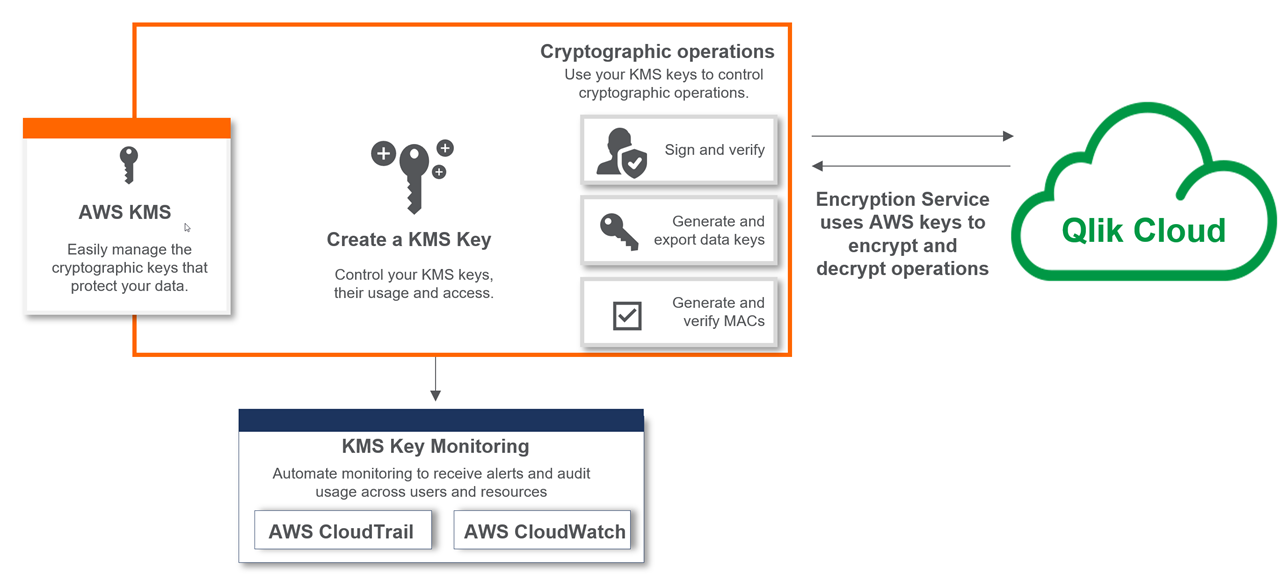
By default, Qlik Cloud encrypts tenant data with keys generated by Qlik Internal KMS. With Customer Managed Keys, AWS KMS generates the keys that your tenant uses instead. Each time a service in Qlik Cloud encrypts or decrypts data, the encryption service calls AWS KMS and uses your key.
Qlik Cloud encryption architecture with CMK
Limitations and considerations
The following limitations and considerations apply to CMK in Qlik Cloud:
-
CMK encrypts data at rest on the tenant. It doesn’t encrypt data in transit.
-
CMK doesn’t encrypt data in the Qlik Analytics mobile app, Data Gateway - Direct Access, or Data Gateway - Data Movement.
-
CMK isn’t available with Qlik Sense Business.
-
CMK supports only AWS KMS as an external key provider.
-
CMK supports only symmetric encryption keys.
-
CMK supports single-region or multi-region keys, depending on the region where the tenant resides.
-
After you configure the tenant to use your own CMK, you can revert to Qlik Internal KMS encryption or change the key to a different CMK. If you operate PHI workloads under a HIPAA Business Associate Agreement (BAA), you can’t revert to Qlik Internal KMS. See Customer-managed keys and HIPAA.
Your responsibilities with customer-managed keys
With CMK, you have full control over your keys. You are responsible for creating, maintaining, and managing every aspect of the key life cycle.
Set up your key in AWS KMS
You are responsible for:
-
Creating an AWS account and setting up KMS.
-
Creating the key and defining AWS KMS key policies for Identity and Access Management (IAM) permissions and roles, including who can create, disable, and delete keys.
For the steps, see Setting up AWS KMS for customer-managed keys and Configuring customer-managed keys.
Manage your keys in AWS KMS
After you configure your tenant to use an AWS KMS key to encrypt data at rest, you are responsible for managing the key. Protect it from being accidentally deleted or disabled. Qlik recommends that you establish a process for the tasks below. Qlik Cloud cannot prevent you from disabling or deactivating your CMK.
-
Disabling a key: Temporarily prevents Qlik Cloud from making API calls to AWS KMS to generate data keys and decrypt data. For example, scheduled reloads and other background tasks that need encryption or decryption fail while the key, or access to it, is disabled. Re-enabling the key restores access to the tenant.
-
Deleting a key: Permanently disables the tenant. When you schedule a key for deletion, the tenant is immediately disabled and locked. AWS KMS lets you set a waiting period before deletion, use alerts, and cancel the deletion during the waiting period.
-
Rotating a key: You can enable automatic key rotation when you create the key. AWS KMS then generates new cryptographic material once a year and keeps all earlier versions, so data encrypted before the rotation can still be decrypted. Rotation doesn’t affect your CMK integration with Qlik Cloud. This is different from changing Qlik Internal KMS to a completely new AWS KMS key, which forces a complete re-encryption of the tenant. See Configuring customer-managed keys.
-
Auditing key usage: Use KMS monitoring tools, such as AWS CloudTrail, to monitor encryption operations.
-
Controlling key access: Secure the key policy to prevent unwanted access or changes.
-
Ensuring key availability: Keep the key active and avoid actions that could cut off access. If access to AWS KMS is interrupted, tenant data is unavailable. AWS KMS has built-in resilience through regions and availability zones. For more information, see Resilience in AWS Key Management Service in the AWS documentation.
Regions and disaster recovery
The type of key you can use depends on the region where your tenant is provisioned:
- Regions with data sovereignty requirements that prohibit data exfiltration even for disaster recovery purposes: you can use a single-region or multi-region key from AWS KMS.
- Regions without these requirements: you must create a multi-region key that matches the primary and disaster recovery regions of your tenant. The multi-region key keeps your tenant running if a disaster affects the primary region and the tenant fails over to the disaster recovery region.
Moving from a single-region key to a multi-region key
If you currently use a single-region key, create a multi-region key so that you can use your tenant in the backup region if the primary region has an outage. For the steps, see Create a multi-region key.
Customer-managed keys and HIPAA
CMK is mandatory in Qlik Cloud tenants that process protected health information (PHI). To operate PHI workloads, you must apply a customer-managed key to your tenant and sign a HIPAA Business Associate Agreement (BAA). Qlik Cloud can host PHI subject to the US Health Insurance Portability and Accountability Act of 1996 (HIPAA) only under these conditions.
Qlik Cloud can support you in meeting your HIPAA regulatory requirements, but you are responsible for your own compliance with HIPAA. For more information, see Trust and security at Qlik.