
tHTTPClient: configuration for retrieving specific data from a JSON array
This article lists configuration combinations for retrieving specific data from a JSON array using the Extract a sub-part of the response field and the Output key/value pairs option and the corresponding output. This article uses the following Job to retrieve and display data. The sub-elements of the element specified in the Extract a sub-part of the response field will be retrieved. If the sub-elements form an array, the component will generate one output record for each of the array elements.
org.talend.components.common.dssldictionary.DSSLDictionary.SINGLE_ELEMENT_NOT_ARRAYThis property is intended for backward compatibility; prefer updating Jobs to handle arrays where possible.

[
  {
    "name": "Peter",
    "age": 40,
    "male": true,
    "addresses": {
       "city": "Nantes",
       "zip": "44000",
       "street": "bd prairie au duc"
    },
    "cars": [
       {"brand": "Ford", "model": "Transit", "km": 123456},
       {"brand": "Renault", "model": "Clio", "km": 87234}
    ]
  },
   {
    "name": "Emma",
    "age": 34,
    "male": true,
    "addresses": {
       "city": "Paris",
       "zip": "75000",
       "street": "bd Saint-Germain"
    },
    "cars": [
       {"brand": "Tesla", "model": "Model 3", "km": 63456},
       {"brand": "Ford", "model": "Mustang Mach-E", "km": 32543},
       {"brand": "Volkswagen", "model": "Golf 8", "km": 43876},
    ]
  }
]
- Retrieving all the elements under the root element.
- Configuration
Configuration item
Setting Schema columns - name, type String
- age, type Int
- address, type String
Response body format JSON Extract a sub-part of the response field Empty, . (a dot), or .root
This configuration points to the root element of the JSON array.
- Output
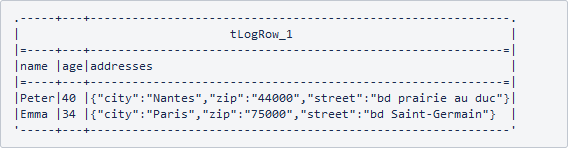
- Configuration
- Retrieving a sub-element under the root element.
- Configuration
Configuration item
Setting Schema columns - name, type String
- age, type Int
- address, type String
Response body format JSON Extract a sub-part of the response field .root[1]
This configuration points to the second element under the root element of the JSON array. Note that array element index begins from 0.
- Output
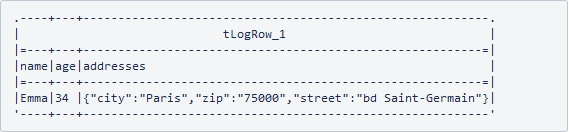
- Configuration
- Retrieving the information about Emma's cars.
- Configuration
Configuration item
Setting Schema columns - brand, type String
- model, type String
- km, type Int
Response body format JSON Extract a sub-part of the response field .root[1].cars
This configuration points to the cars element of Emma, the second element under the root element.
- Output
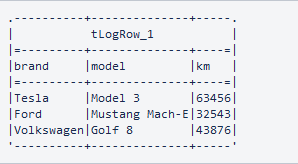
- Configuration
- Retrieving the information about Emma's cars with the values of the km
elements larger than 40000.
- Configuration
Configuration item
Setting Schema columns - brand, type String
- model, type String
- km, type Int
Response body format JSON Extract a sub-part of the response field .root[1].cars{.km>40000}
This configuration points to the cars element of Emma with the values of the km elements larger than 40000.
- Output

- Configuration
- Retrieving data using key/value pairs.
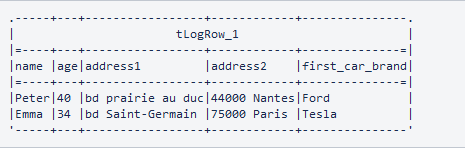
Once the main data is extracted using Extract a sub-part of the response field, you can also extract values of specific elements to create flat records. To do so, select the Output key/value pairs option and add some name/value pairs in the table. For a name/value pair, name is the name of a schema column and value is an expression pointing to an element of the response. The expression can contain some DSSL selectors to retrieve values from the response of the HTTP query configured in the connector. In the following example, Extract a sub-part of the reponse holds a value of . (a dot) and the two records, Peter and Emma, will be looped.
- Configuration
Configuration item
Setting Schema columns - name, type String
- age, type Int
- address1, type String
- address2, type String
- first_car_brand, type String
Response body format JSON Extract a sub-part of the response field . (a dot)
This configuration points to the cars element of Emma with the values of the km elements larger than 40000.
Output key/value pairs Selected, with the name/values pairs shown in the following figure. 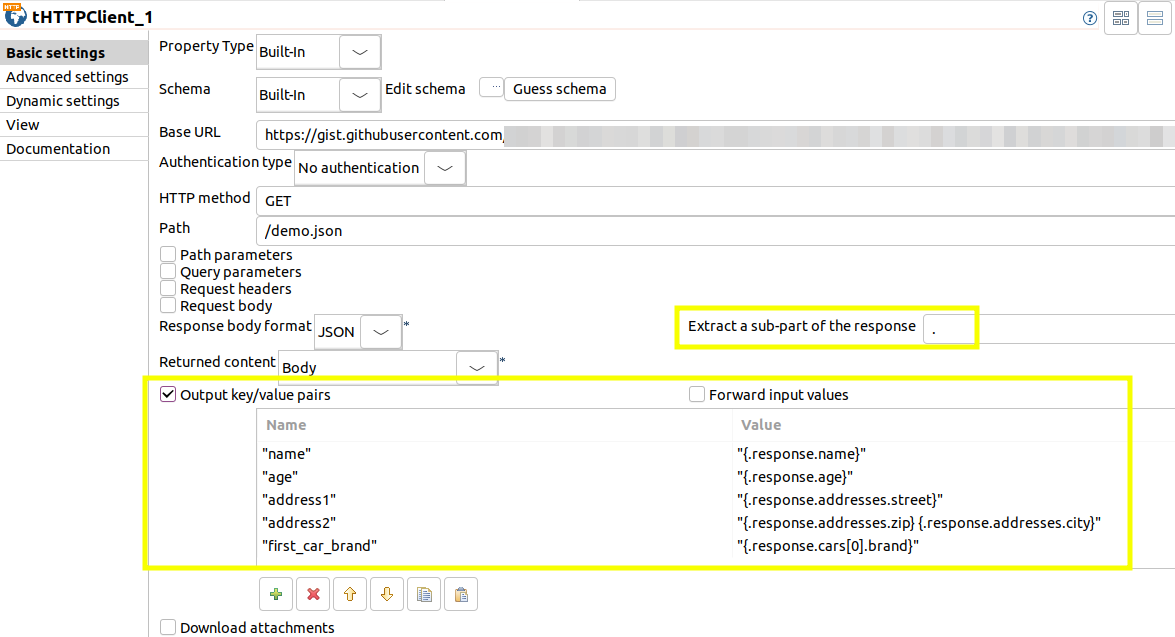
- Output
- Configuration