
다변량 시계열 예측 작업
마지막 업데이트: 2026. 10. 20.Qlik Predict를 사용하면 기계 학습 모델을 훈련하여 시간별 지표를 예측할 수 있습니다. 신경망 기반 방법을 사용하여 모델은 시간별 연관성, 그룹화된 대상 데이터, 과거 기능 및 알려진 미래 변수와 관련된 복잡한 패턴을 학습하고 예측합니다. 시계열 예측을 생성하려면 훈련 데이터 세트를 준비하고, 이를 시계열 실험에 사용하고, 모델을 배포한 다음, 예측을 생성하는 데 사용할 수 있는 적용 데이터 세트를 생성합니다.
시계열 문제의 구성 요소
시계열 예측의 목표는 미래의 특정 날짜에 대한 대상 값을 예측하는 것입니다. 예를 들어 다음 주, 다음 달 또는 다음 분기의 매출을 예측할 수 있습니다.
시계열 문제를 개발할 때 다음 구성 요소를 정의합니다.
-
대상 및 그룹
-
날짜 인덱스
-
예측 범위
-
공변량
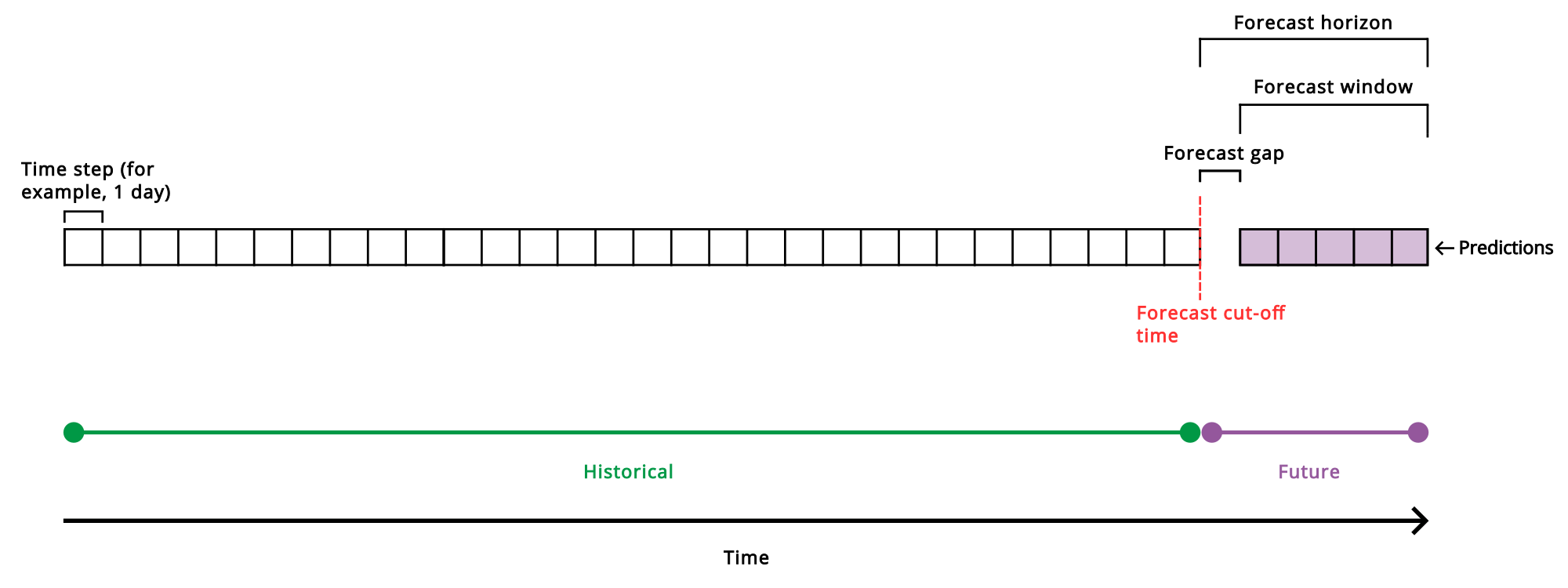
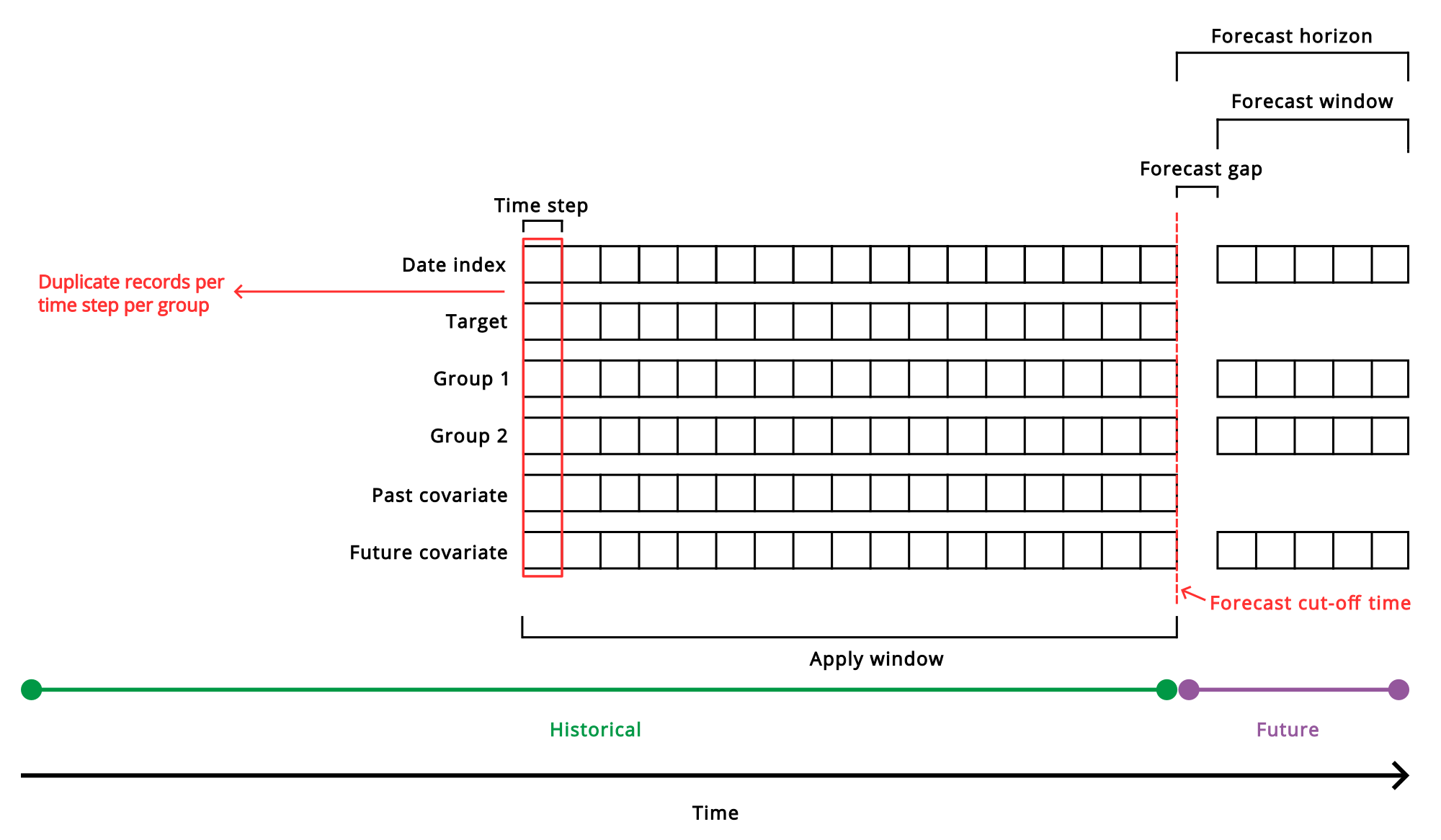
Qlik Predict의 시계열 예측 문제 구성 요소를 간략하게 보여주는 그림입니다.
대상
다른 실험 유형과 마찬가지로 대상은 모델이 미래 값을 예측하도록 하려는 열입니다. 시계열 실험의 경우 대상에는 숫자 데이터(예: 매출 또는 재고)가 포함되어야 합니다.
시계열 예측에서 그룹을 사용하는 경우 모델은 예측 창의 시간 단계당 그룹별로 하나의 대상 값을 예측합니다. 그룹을 사용하지 않는 경우 훈련된 모델은 예측 창의 각 시간 단계에 대해 하나의 대상 값을 예측합니다.
날짜 인덱스
날짜 인덱스는 연속적인 시간 간격(시간 단계)에 걸쳐 시계열 지표를 추적합니다. 초기 단계에서 시간 단계를 결정해야 합니다. 미래 값을 얼마나 자주 예측해야 합니까?
구체적으로 날짜 인덱스는 시계열 문제에 대한 훈련 및 적용 데이터 세트에 나타나는 열입니다. 날짜 인덱스는 이 두 적용 데이터 세트의 구조를 결정합니다. 각 행은 시간 단계(또는 그룹의 경우 각 고유 그룹화에 대한 시간 단계)를 나타냅니다.
시계열 실험에 훈련 데이터 세트를 추가하면 가능한 날짜 인덱스 열이 자동으로 식별되어 열 수준에서 통찰력으로 표시됩니다. 스키마 보기의 가능한 날짜 인덱스 통찰력에서 이를 식별할 수 있습니다.
그룹
그룹은 예측을 별도로 생성하려는 범주형 정보가 포함된 기능입니다. 그룹의 전형적인 예로는 매장 번호와 제품이 있으며, 이는 매출과 같은 대상에 대한 데이터를 구성하는 데 사용될 수 있습니다. 매장 번호와 제품 유형을 그룹으로 선택하면 시계열 모델이 이러한 열의 각 개별 값에 대한 예측을 제공합니다. 예를 들어 매출을 대상으로 할 때 3개의 매장 번호(1, 2, 3)와 2개의 제품 유형(식료품 및 농산물)이 있는 경우 모델은 이러한 값의 각 고유 조합에 대한 매출 예측을 생성합니다.
데이터가 있고 범주별 개별 예측이 필요한 경우 시계열 문제에 그룹을 통합해야 합니다. 그룹의 또 다른 장점은 모델이 전역적으로 학습하여 정의한 여러 그룹화 사이에 존재하는 패턴을 더 잘 이해할 수 있다는 것입니다.
각 실험 버전에 사용할 그룹을 구성할 수 있습니다. 그룹을 지정하지 않았지만 훈련 데이터 세트에서 그룹이 식별되는 경우 훈련에서 그룹을 사용합니다.
그룹은 날짜 인덱 열의 중복 값으로 식별됩니다. 예를 들어 2025년 1월 14일 날짜의 경우 매장 A에 대한 레코드 하나와 매장 B에 대한 레코드 하나, 총 두 개의 레코드가 있습니다.
대상 자체를 포함하여 시계열 실험의 각 그룹은 데이터 세트 내에서 별도의 시계열로 간주됩니다. 시계열이란 무엇입니까?를 참조하십시오.
기본 및 보조 그룹
두 개의 그룹 열이 있는 시계열 문제의 경우 한 그룹은 기본 그룹이고 다른 그룹은 보조 그룹입니다. 예제는 훈련 데이터 세트 준비, 훈련 데이터 세트 예제 — 두 개의 그룹 및 적용 데이터 집합 예 — 두 그룹를 참조하십시오.
기본 그룹화는 독립적인 시계열을 정의합니다. 예를 들어 각 매장은 고유한 개별 시계열이 되어 모델이 매장 전체의 다양한 동작과 패턴을 학습할 수 있습니다.
보조 그룹화는 다르게 처리됩니다. 완전히 분리된 계열을 생성하는 대신 시스템은 해당 값을 추가 기능(공변량)으로 피벗하여 관련 하위 계열이 서로에게 컨텍스트 정보를 제공할 수 있도록 합니다.
실험에서 선택적으로 기본 그룹을 선택할 수 있지만 일반적으로 어떤 그룹이 기본이고 어떤 그룹이 보조인지 알 필요는 없습니다. 배포된 시계열 모델로 예측할 때 특정 고려 사항이 적용됩니다. 적용 데이터 세트 준비를 참조하십시오.
모든 기본 그룹은 동일한 보조 그룹을 공유해야 합니다. 예를 들어 매장이 기본 그룹이고 제품이 보조 그룹인 경우 각 매장에는 동일한 제품 세트가 포함되어야 합니다. 보조 그룹이 누락되면 시계열 전체에서 일관되지 않은 기능 차원이 발생합니다.
예측 시 보조 그룹 값이 기본 그룹 값과 일치하지 않을 것으로 예상되는 경우 가능한 한 가지 접근 방식은 원래 기본 및 보조 그룹 값을 새 그룹화 열로 결합하고 모델을 다시 훈련할 때 이를 기본 그룹으로 사용하는 것입니다. 이 설정에서 모델은 더 이상 보조 그룹에 의존하지 않지만 그룹 간의 상관 정보가 줄어들 수 있습니다.
예측 범위
예측 범위는 미래를 얼마나 멀리 예측할지 지정합니다. 예측 범위는 예측 창(예측이 필요한 시간 단계 수)과 예측 간격(예측을 원하지 않는 과거 데이터 이후의 선택적 시간 단계 수)으로 구성됩니다.
실험 버전을 구성할 때 예측 창과 간격 크기를 설정합니다. 이러한 값은 모델 훈련 중과 ML 배포로 배포된 모델에서 예측을 생성할 때 모두 사용됩니다.
예측 창은 미래를 예측하려는 시간 단계의 수입니다. 예를 들어 시간 단계가 1일이고 다음 2주 동안의 매출을 예측하려는 경우 예측 창을 14로 설정합니다.
예측 간격은 예측이 필요하지 않은 미래의 시간입니다. 예측 간격이 필요할 수도 있고 필요하지 않을 수도 있으므로 예측 간격을 설정하는 것은 선택 사항입니다. 예측 간격은 제공한 기록된 과거 훈련 데이터의 끝에서 시작됩니다. 예측 창은 예측 간격이 끝나는 곳에서 시작됩니다.
예를 들어 미래 매출을 예측하려고 하지만 입력 데이터가 끝난 후 1주일 이후의 날짜에 대한 미래 매출에만 관심이 있을 수 있습니다. 이 경우 시간 단계를 일 단위로 하여 예측 간격 크기를 7개의 시간 단계로 설정할 수 있습니다.
선택한 예측 창은 보유한 훈련 데이터의 양과 함께 미래를 얼마나 멀리 예측할 수 있는지를 제한합니다. 자세한 내용은 최대 예측 창를 참조하십시오.
공변량
시계열 문제에서 기능은 종종 공변량이라고 합니다. 다른 기계 학습 문제와 마찬가지로 공변량은 대상의 결과에 영향을 미칠 것으로 의심되는 다른 변수입니다. 각 공변량은 훈련 데이터 세트에서 단일 열로 표시됩니다.
시계열 예측에는 여러 유형의 공변량이 있으며 몇 가지 중요한 차이점이 있습니다.
-
정적 공변량: 시계열 과정에서 변하지 않는 열입니다. 정적 공변량은 그룹이 사용되는 시계열 실험에 적용할 수 있습니다. 예를 들어 제품 및 매장 번호에 대한 그룹이 있고 기본 할인이라는 기능이 있다고 가정해 보겠습니다. 매장 1의 제품 A에 10%의 기본 할인이 있고 매장 2의 제품 B에 20%의 기본 할인이 있는 경우 기본 할인은 정적 공변량이 됩니다. 즉, 표시되는 그룹의 데이터 내에서는 변하지 않습니다.
정적 공변량은 실험에 포함된 과거 기능에서 자동으로 감지됩니다. 어떤 기능이 정적 공변량인지 나타낼 필요는 없습니다.
-
과거 공변량: 과거 데이터에서만 사용할 수 있고 이 데이터 전반에 걸쳐 변하는 시간 종속 변수입니다. 과거 공변량은 실험에 포함된 과거 기능에서 자동으로 감지됩니다. 어떤 기능이 과거 공변량인지 명시적으로 나타낼 필요는 없습니다.
-
미래 공변량: 미래 기능이라고도 하는 미래 공변량은 예측 범위 내에서 미래 값을 알 수 있는 시간 종속 변수입니다. 훈련에서 미래 공변량을 사용할 때 훈련 구성에서 이를 미래 기능으로 표시해야 합니다.
미래 기능
미래 기능을 사용하면 이미 알고 있거나 합리적으로 예상할 수 있는 미래 정보에 대한 추가 데이터를 모델에 제공할 수 있습니다. 특히 선택한 예측 범위에 걸쳐 이 기능의 미래 값에 액세스할 수 있습니다. 미래 기능을 정의할 때 미래 데이터뿐만 아니라 과거 데이터도 제공해야 합니다.
예를 들어 매장에서 제공하는 미래 할인의 영향을 받을 수 있는 지표를 예측하는 모델의 경우 과거에 관찰된 할인과 예측 창 내의 미래 기간에 대한 할인을 포함할 수 있습니다. 미래 기능의 다른 예로는 날씨 또는 달력 정보가 있을 수 있습니다.
기타 중요한 개념
이 섹션에서는 시계열 문제와 관련이 있지만 실험이나 ML 배포에서 직접 구성하지 않는 개념을 간략하게 설명합니다. 이는 데이터 또는 모델에 대해 구성하는 다른 속성에 의해 정의되는 속성입니다.
시간 단계
시간 단계는 훈련 데이터 세트에 의해 정의되며 훈련 및 예측 모두에 중요합니다.
훈련 데이터 세트에서 시간 단계는 날짜 인덱스의 데이터가 기록되는 간격입니다. 예를 들어 시간 단계는 매일, 매시간, 매분 또는 매초일 수 있습니다. 감지되는 가장 작은 시간 단계는 밀리초입니다.
훈련 데이터에 사용된 시간 단계를 인식하는 것이 중요합니다. 예측 창 및 예측 간격 크기와 같이 정의하는 다른 실험 매개 변수는 이 시간 단계 간격을 따릅니다.
모델을 배포한 후 예측을 생성하려는 적용 데이터는 훈련 데이터 세트에 정의된 것과 동일한 시간 단계를 따라야 합니다.
품질
훈련 데이터 세트를 선택하면 시스템은 사용된 시간 단계를 유추합니다. 날짜 인덱스에 누락된 값이나 간격이 있는 경우 대상, 그룹 및 공변량과 같은 열은 종종 시스템에서 자동으로 보간될 수 있습니다. 누락된 값으로 인해 발생하는 반복적인 간격 패턴은 자동으로 처리되며 그 자체로 새로운 시간 단계를 도입하지 않습니다. 그러나 데이터에 서로 다른 기본 시간 단계가 감지될 정도로 혼합된 기록 간격이 포함되어 있는 경우 데이터를 먼저 수정해야 합니다. 예를 들어 매일 한 번씩 기록된 몇 달 간의 데이터가 있지만 데이터가 매주 일관되게 기록되는 섹션이 있는 경우 여러 시간 단계가 감지되므로 데이터 세트를 사용할 수 없습니다.
적용 창
적용 창 또는 룩백 기간은 알고리즘이 지정된 예측 창에 대한 예측을 제공하는 데 사용할 수 있는 훈련 데이터의 일부입니다.
적용 창은 시스템에서 계산하고 설정합니다. 시간 단계로 측정됩니다. 적용 창은 예측 창 및 간격(예측 범위)으로 설정한 내용에 따라 정의됩니다. 적용 창 크기는 하나 이상의 실험 버전을 실행한 후 실험 구성 패널과 모델 훈련 요약에 표시됩니다. 또한 일괄 예측 구성을 생성하거나 편집할 때 ML 배포 모델 스키마에도 표시됩니다.
적용 창은 훈련 구성에서 자동으로 식별됩니다. 주어진 예측 창에 대한 예측을 생성하려면 최소한 적용 창을 포함하는 과거 데이터를 제공해야 합니다. 이는 적용 데이터 세트에서 제공됩니다. 적용 데이터 세트 준비를 참조하십시오.
최대 예측 창
최대 예측 창은 시계열 실험을 구성할 때 추정됩니다. 훈련 버전을 실행한 후 최대 예측 창이 확실하게 확인됩니다. 실험 구성 패널에서 대상 및 실험 유형을 열면 최대 예측 창이 데이터 기반 아래에 예상 최대 예측 또는 최대 예측으로 표시됩니다. 최대 예측 창은 선택한 예측 창, 제공한 과거 데이터의 양, 시스템에서 예상하는 최소 샘플 크기를 고려할 때 예측을 생성할 수 있는 최대 시간 단계 수입니다. 더 많은 과거 데이터를 제공할수록 더 먼 미래를 예측할 수 있습니다. 그러나 신뢰할 수 있는 예측을 생성하려면 합리적인 예측 창을 선택하는 것이 중요합니다.
최대 예측 기간은 180 시간 단계까지 가능합니다.
예측 컷오프 시간
예측 컷오프 시간은 예측 중에 적용 데이터 세트를 정의할 때 특히 중요합니다. 예측 컷오프 시간은 대상 값이 있는 샘플의 마지막 날짜입니다. 기본적으로 이 컷오프 시간 이후의 날짜는 예측을 생성하려는 날짜입니다.
시계열이란 무엇입니까?
Qlik Predict 시계열 예측에서 대상 자체를 포함한 각 그룹은 훈련 데이터 세트 내에서 별도의 시계열로 간주됩니다. 예를 들어 훈련 데이터 세트에 매출 지표가 포함되어 있다고 가정해 보겠습니다. 이러한 매출 지표는 각 매장 및 제품 유형에 대해 정의됩니다. 매장 및 제품 유형 열이 그룹으로 정의된 경우 훈련 데이터 세트에는 세 개의 시계열이 있습니다.
훈련 데이터 세트 준비
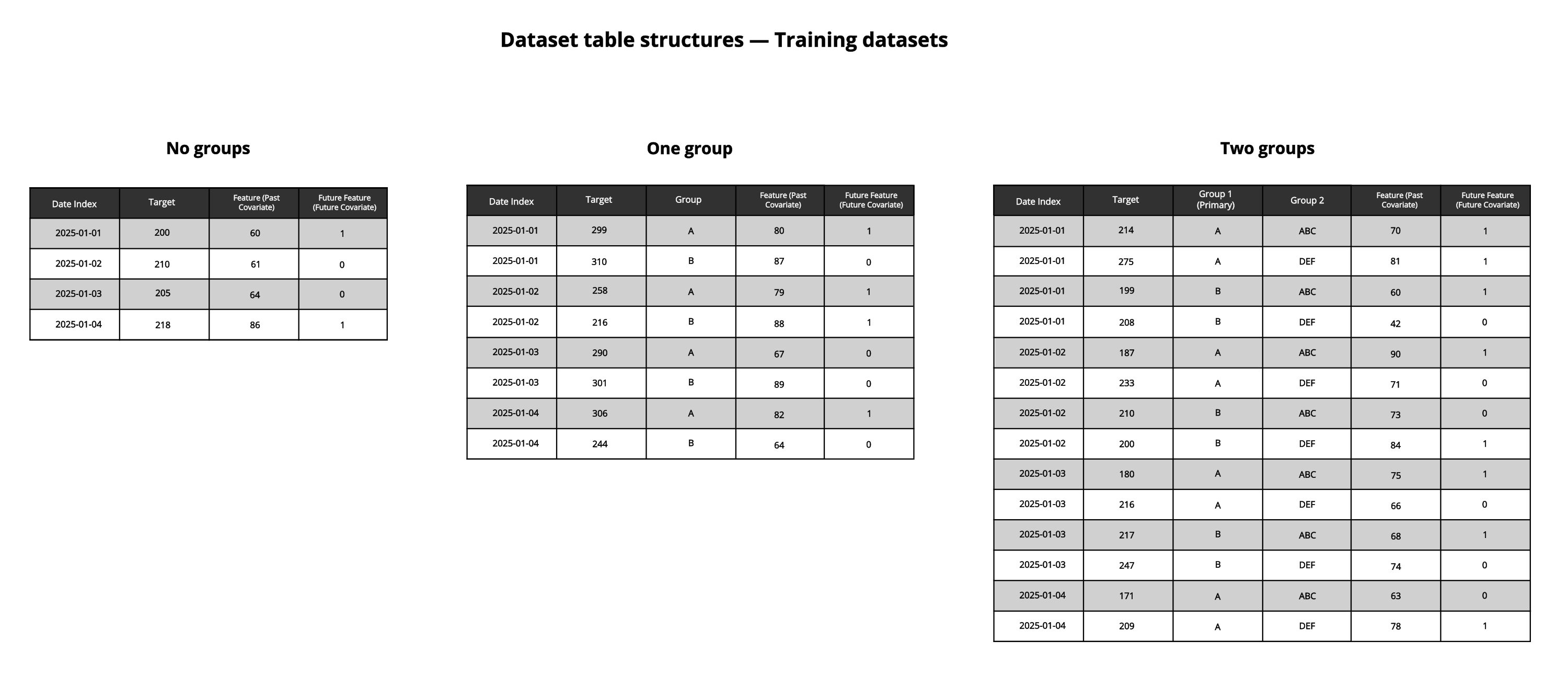
다변량 시계열 예측의 경우 훈련 데이터 세트에 다음 열이 포함되어야 합니다.
-
날짜 인덱스
-
대상 열
-
그룹 열(선택 사항)
-
기능 열(선택 사항 - 기능이 없으면 단변량 예측 모델을 훈련하는 것입니다.)
시계열 훈련 데이터 세트에 필요한 열과 데이터를 보여주는 그림입니다. 그룹이 없는 시나리오, 그룹이 하나인 시나리오, 그룹이 두 개인 시나리오가 설명되어 있습니다.
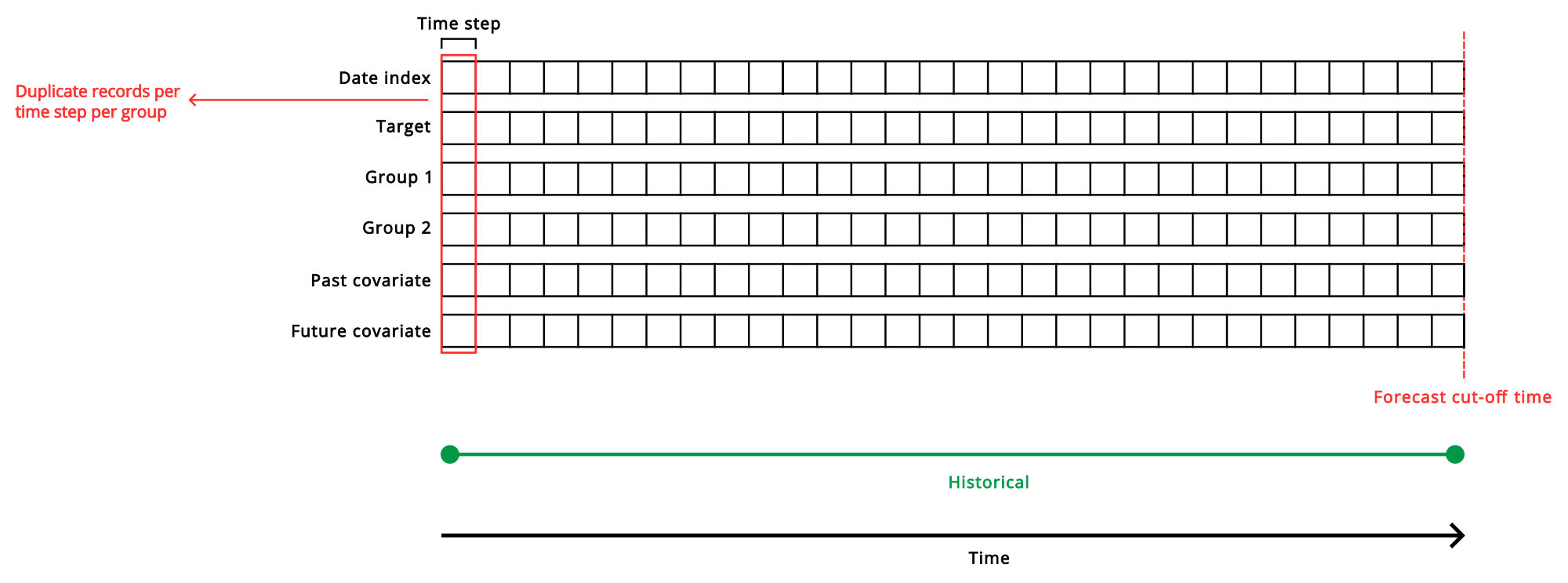
시계열 예측 모델을 위한 훈련 데이터 세트의 필요한 구성 요소와 타임라인을 간략하게 보여주는 선형 다이어그램입니다.
날짜 인덱스 열
전체 날짜 또는 타임스탬프가 포함된 날짜 인덱스가 필요합니다. 이 열은 대상 및 공변량 지표가 추적되는 연대순 인덱스입니다. 날짜 인덱스 열은 일관된 시간 간격(시간 단계)을 따라 시간 기반 측정값을 순차적으로 구성합니다.
날짜 인덱스 열은 그룹 사용 여부에 따라 다음과 같이 구성됩니다.
-
그룹 없음: 각 시간 단계에 대한 단일 레코드입니다. 예를 들어 일일 예측의 경우 각 행은 하루를 나타냅니다.
-
그룹 있음: 사용된 그룹에 따라 각 시간 단계에 대해 하나 이상의 중복 항목이 있습니다.
다변량 훈련 데이터 세트의 경우 사용된 그룹에 따라 각 시간 단계에 대해 하나 이상의 중복 항목이 있습니다. 사용하는 시간 단계에는 유연성이 있습니다. 예를 들어 매일, 매주 또는 매월 기준으로 날짜를 한 번 이상 기록할 수 있습니다.
이 열에 누락되거나 일관성 없이 기록된 값은 보간할 수 있는 경우 허용되는 경우가 있으며, 누락된 값으로 인한 반복적인 간격 패턴은 자동으로 처리됩니다. 그러나 날짜 인덱스 값에는 여러 개의 서로 다른 기본 시간 단계가 포함될 수 없습니다. 예를 들어 간격이 매일 한 번으로 결정되었지만 어느 시점에서 매일 두 번의 간격이 식별되면 훈련 중에 오류가 발생합니다.
대상 열 및 그룹 열
데이터 세트에는 예측하려는 숫자 지표가 포함된 대상 열이 있어야 합니다. 일반적인 예는 매출입니다.
그룹을 사용하는 경우 추가하는 그룹의 가능한 각 값에 대한 과거 대상 값을 제공합니다. 예를 들어 대상이 매출이고 매장 A와 매장 B에 대한 데이터가 포함된 매장 번호 그룹을 추가하는 경우 데이터 세트에는 각 시간 단계에 대해 두 개의 개별 레코드(매장 A의 매출 값이 있는 레코드 하나와 매장 B의 매출 값이 있는 레코드 하나)가 포함되어야 합니다.
기능 열
공변량 없이 시계열 모델을 훈련할 수 있습니다. 그러나 공변량을 포함하는 경우 데이터 세트에 각 기능에 대한 열을 제공하십시오. 미래 기능을 추가하지 않는 한 기능 데이터는 일반적으로 과거에 기록된 데이터여야 합니다. 미래 기능 열에는 과거 데이터와 미래 데이터가 모두 포함될 수 있습니다. 예측을 생성할 때 이러한 열의 미래 값을 알 수 있다고 확신하는 경우에만 훈련 데이터 세트에 미래 기능 데이터를 포함해야 합니다.
훈련 구성에서 미래 기능으로 선택해야 하므로 어떤 기능을 미래 기능으로 사용할지 추적하십시오.
데이터 볼륨
데이터 세트에는 충분한 레코드가 포함되어야 합니다. 데이터 볼륨은 모든 그룹에서 공유되는 시간 범위에 의해 결정됩니다. 이 겹치는 기간의 데이터만 실험을 훈련하는 데 사용됩니다.
과거 데이터의 볼륨은 미래를 얼마나 멀리 예측할 수 있는지 결정하는 데 중요한 역할을 합니다. 원하는 예측 창도 필요한 과거 데이터의 양에 영향을 미칩니다.
일반적으로 과거 데이터는 적은 것보다 많은 것이 좋습니다. 그러나 데이터는 품질이 좋아야 하고 원하는 추세를 포착해야 합니다. 데이터가 관련 없는 정보를 제공하거나 부정확성을 포함하는 경우 모델에 포함하는 것은 도움이 되지 않습니다. 볼륨 최적화와 품질 및 관련성 유지 사이의 균형을 고려하십시오.
예제
아래 표는 그룹을 사용하지 않는 훈련 데이터 세트의 잘린 예제입니다.
이 예제에서는 다음과 같습니다.
-
간격 없이 2주간의 일일 매출을 예측하려고 합니다. 이 원하는 예측 범위 및 간격 크기는 훈련 데이터에 직접 표시되지 않지만 구성에서 이 예측 범위를 사용할 수 있도록 충분한 레코드를 제공합니다.
-
Date는 시간 단계가 1일인 날짜 인덱스입니다.
-
Sales는 총 일일 매출을 추적하는 대상입니다.
-
Transactions Per Hour는 시간당 발생한 반올림된 평균 거래 수를 추적합니다. 이것은 과거 데이터만 포함하는 과거 공변량입니다. 이 정보는 미래에는 알 수 없습니다.
-
On Promotion은 지정된 날짜에 프로모션 요금으로 할인되는 제품 수를 추적합니다. 이 경우 할인이 미리 알려지고 계획되기 때문에 미래 기능으로 사용할 수 있습니다. 이 경우 과거 데이터만 제공합니다.
| ID | Date | On Promotion | Transactions per Hour | Sales |
|---|---|---|---|---|
| 1 | 1/1/2024 | 0 | 301 | 90010.01 |
| 2 | 1/2/2024 | 100 | 291 | 19491.65 |
| 3 | 1/3/2024 | 0 | 163 | 70001.87 |
| 4 | 1/4/2024 | 14 | 499 | 50240.33 |
| 5 | 1/5/2024 | 55 | 211 | 106943.00 |
| 6 | 1/6/2024 | 2 | 309 | 131492.59 |
| 7 | 1/7/2024 | 1341 | 300 | 46349.49 |
| 8 | 1/8/2024 | 0 | 432 | 88203.08 |
| 9 | 1/9/2024 | 0 | 104 | 40254.95 |
| 10 | 1/10/2024 | 150 | 495 | 45964.44 |
| 11 | 1/11/2024 | 65 | 204 | 90185.50 |
| 12 | 1/12/2024 | 12 | 252 | 76340.25 |
| 13 | 1/13/2024 | 70 | 99 | 71311.11 |
| 14 | 1/14/2024 | 5 | 305 | 50396.70 |
| ... | ... | ... | ... | ... |
| 610 | 9/1/2025 | 158 | 168 | 104205.33 |
아래 표는 두 개의 그룹 열을 사용하는 훈련 데이터 세트의 잘린 예제입니다.
이 예제에서는 다음과 같습니다.
-
간격 없이 2주간의 일일 매출을 예측하려고 합니다. 이 원하는 예측 범위 크기는 훈련 데이터에 직접 표시되지 않지만 구성에서 이 예측 범위를 사용할 수 있도록 충분한 레코드를 제공합니다.
-
Date는 시간 단계가 1일인 날짜 인덱스입니다.
-
Sales는 총 일일 매출을 추적하는 대상입니다.
-
Store 및 Product는 그룹입니다. 훈련 데이터의 각 고유한 시간 단계에 대해 각 매장 및 제품에 대한 별도의 행이 포함됩니다.
이 컨텍스트에서 Store는 기본 그룹이고 Product는 보조 그룹입니다.
-
Transactions Per Hour는 각 매장 및 제품에 대해 시간당 발생하는 평균 거래 수를 추적합니다. 이것은 과거 데이터만 포함하는 과거 공변량입니다. 이 정보는 미래에는 알 수 없습니다.
-
On Promotion은 각 매장 및 제품에 대해 지정된 날짜에 프로모션 요금으로 할인되는 제품 수를 추적합니다. 이 경우 할인이 미리 알려지고 계획되기 때문에 미래 기능으로 사용할 수 있습니다. 이 경우 과거 데이터만 제공합니다.
| Date | Store | Product | On Promotion | Transactions per Hour | Sales |
|---|---|---|---|---|---|
| 1/1/2024 | Store 1 | A | 0 | 343 | 90010.01 |
| 1/1/2024 | Store 2 | A | 100 | 545 | 19491.65 |
| 1/1/2024 | Store 3 | A | 0 | 1004 | 70001.87 |
| 1/1/2024 | Store 1 | B | 14 | 305 | 39522.11 |
| 1/1/2024 | Store 2 | B | 55 | 700 | 91859.30 |
| 1/1/2024 | Store 3 | B | 2 | 94 | 19583.55 |
| 1/1/2024 | Store 1 | C | 1341 | 267 | 194863.00 |
| 1/1/2024 | Store 2 | C | 0 | 630 | 140244.13 |
| 1/1/2024 | Store 3 | C | 0 | 1143 | 76666.66 |
| 1/2/2024 | Store 1 | A | 56 | 576 | 30593.55 |
| 1/2/2024 | Store 2 | A | 3 | 403 | 10549.33 |
| 1/2/2024 | Store 3 | A | 14 | 1303 | 100003.33 |
| 1/2/2024 | Store 1 | B | 29 | 593 | 105893.99 |
| 1/2/2024 | Store 2 | B | 100 | 305 | 80195.22 |
| 1/2/2024 | Store 3 | B | 0 | 305 | 61051.13 |
| 1/2/2024 | Store 1 | C | 5 | 105 | 55938.38 |
| 1/2/2024 | Store 2 | C | 33 | 72 | 104823.33 |
| 1/2/2024 | Store 3 | C | 15 | 1052 | 99105.99 |
| 1/3/2024 | Store 1 | A | 5 | 521 | 130533.31 |
| 1/3/2024 | Store 2 | A | 1 | 205 | 67676.73 |
| 1/3/2024 | Store 3 | A | 36 | 302 | 52745.45 |
| 1/3/2024 | Store 1 | B | 111 | 502 | 99642.10 |
| 1/3/2024 | Store 2 | B | 350 | 693 | 34660.34 |
| 1/3/2024 | Store 3 | B | 34 | 200 | 60345.44 |
| 1/3/2024 | Store 1 | C | 93 | 205 | 44603.33 |
| 1/3/2024 | Store 2 | C | 60 | 295 | 105844.44 |
| 1/3/2024 | Store 3 | C | 10 | 76 | 150385.44 |
| ... | ... | ... | ... | ... | ... |
| 9/10/2025 | Store 1 | A | 15 | 1058 | 159383.33 |
| 9/10/2025 | Store 2 | A | 20 | 402 | 80119.11 |
| 9/10/2025 | Store 3 | A | 20 | 191 | 106020.00 |
| 9/10/2025 | Store 1 | B | 39 | 100 | 39581.34 |
| 9/10/2025 | Store 2 | B | 109 | 190 | 76939.23 |
| 9/10/2025 | Store 3 | B | 37 | 99 | 49548.42 |
| 9/10/2025 | Store 1 | C | 75 | 1555 | 93150.77 |
| 9/10/2025 | Store 2 | C | 190 | 1603 | 15923.49 |
| 9/10/2025 | Store 3 | C | 0 | 403 | 159342.05 |
적용 데이터 세트 준비
시계열 모델을 배포한 후 예측을 수행할 적용 데이터 세트를 개발해야 합니다.
-
학습 데이터 세트에 포함된 모든 열의 열 및 열 머리글입니다.
-
학습 데이터 세트와 동일한 시간 단계입니다.
-
학습 데이터 세트에 존재했던 모든 그룹 및 그룹 값입니다.
정보 메모적용 데이터 세트에 (학습 데이터에는 없었던) 새로운 그룹 값이 있는 경우 해당 행에 대한 예측은 생성되지 않습니다. 이러한 새로운 그룹 값에 대한 예측이 필요한 경우 해당 값을 포함하는 학습 데이터로 모델을 다시 학습시키는 것이 좋습니다.정보 메모예측 시 또는 적용 데이터 세트에서 누락된 그룹 값은 다음과 같이 처리됩니다.
-
모델이 학습된 기본 그룹 값이 없는 것은 허용됩니다.
-
누락된 보조 그룹 값은 허용되지 않습니다. 예측이 오류와 함께 실패합니다.
가능한 한 예측 중에 모든 보조 그룹 데이터를 수집하고 제공하는 것이 가장 좋습니다. 그러나 주로 예측 시에 보조 그룹이 누락될 것으로 예상되는 경우 가능한 한 가지 해결책은 보조 그룹을 전혀 사용하지 않는 것입니다.
대신 원래의 기본 및 보조 그룹 값을 단일 새 그룹화 열로 결합하고 이를 새 기본 그룹으로 사용한 다음 해당 구조를 기반으로 모델을 다시 학습시킬 수 있습니다. 이 설정에서 새 모델은 새로 도입된 기본 그룹에만 의존합니다.
단점은 그룹 간의 상관된 정보 중 일부를 잃을 수 있다는 것입니다. 이제 그룹이 서로에게 컨텍스트 정보를 제공하는 관련 하위 시리즈가 아니라 완전히 별개의 시계열로 취급되기 때문입니다.
-
-
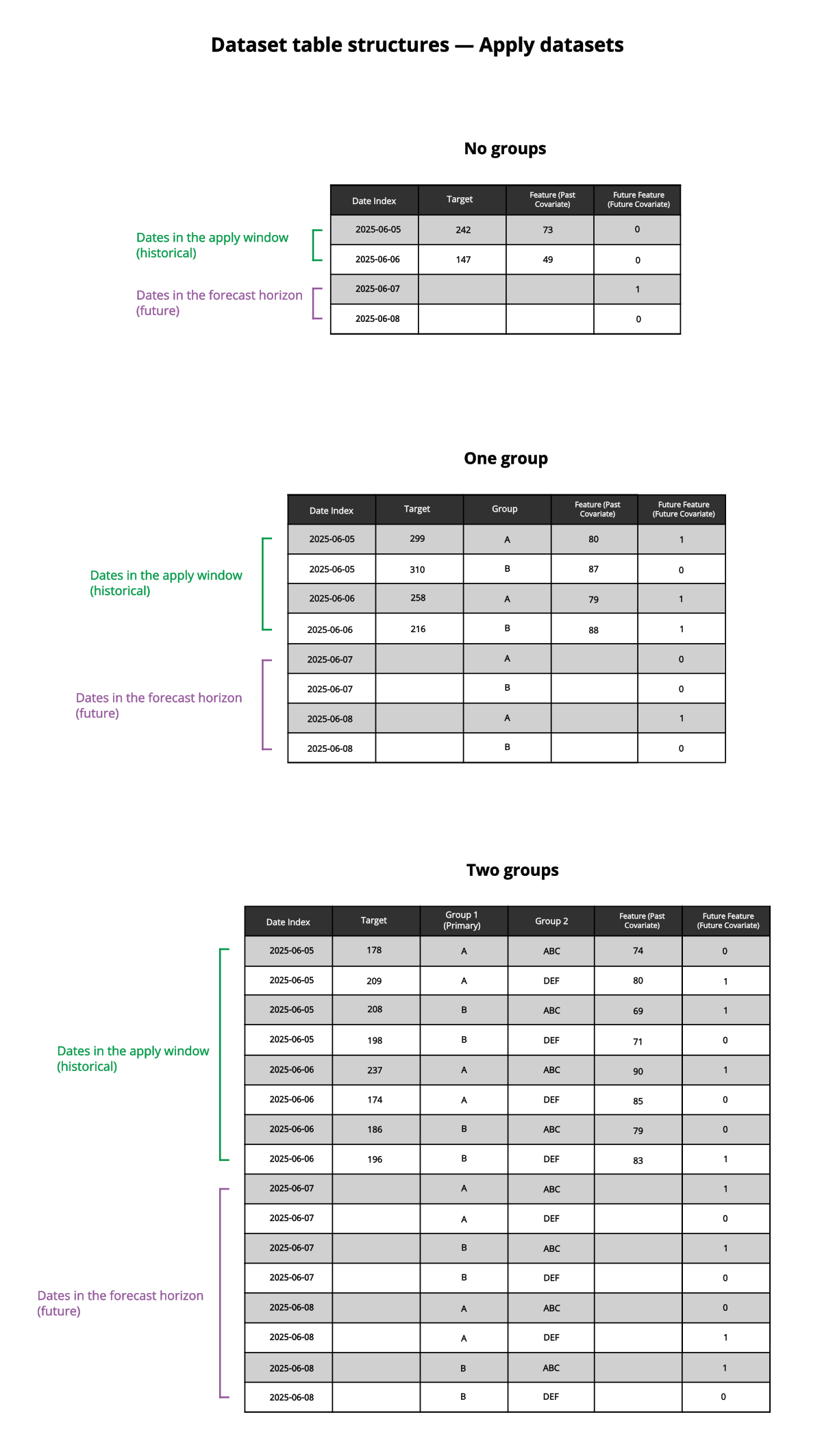
모델의 적용 창에 있는 레코드 수만큼 예측 마감 시간 이전의 과거 데이터 레코드(대상 및 그룹당)가 필요합니다. 이는 과거에 관찰된 날짜 또는 타임스탬프, 대상 및 공변량 값을 포함하는 전체 레코드여야 합니다. 적용 창은 학습 중에 구성된 예측 창 및 간격에 의해 결정됩니다. 즉, 더 먼 미래를 예측해야 할수록 예측을 실행하기 위해 적용 데이터 세트에 더 많은 과거 데이터가 필요합니다.
-
예측 범위의 모든 미래 시간 단계에 대한 레코드입니다. 이러한 미래 레코드의 경우 날짜 인덱스 열의 값과 모든 미래 기능만 포함합니다. 다른 열의 값은 비워 둡니다.
시계열 예측 모델에서 예측을 생성하는 데 사용되는 적용 데이터 집합에 필요한 열과 데이터를 보여주는 그림입니다. 그룹이 없는 시나리오, 하나의 그룹이 있는 시나리오, 두 개의 그룹이 있는 시나리오가 설명되어 있습니다.
시계열 예측 모델로 예측을 생성하는 데 사용되는 적용 데이터 집합의 필요한 구성 요소와 타임라인을 요약한 선형 다이어그램입니다.
예
다음과 같이 구성된 시계열 모델이 있다고 가정해 보겠습니다.
-
대상: Sales
-
그룹 없음
-
날짜 인덱스: Date
-
시간 단계: 1일
-
예측 창은 7일이고 예측 간격은 14일입니다. 따라서 예측 범위는 21일입니다.
-
예측 마감 시간은 2025년 9월 1일입니다. 이는 과거 데이터가 제공된 마지막 날짜입니다.
-
시간당 발생한 평균 트랜잭션 수를 추적하는 과거 공변량 Transactions Per Hour입니다.
-
지정된 날짜에 프로모션 요금으로 할인된 제품 수를 추적하는 미래 공변량 On Promotion입니다.
이 예에서는 시스템 정의 적용 창이 63일이라고 가정합니다. 63일간의 과거 데이터(2025년 7월 1일 ~ 2025년 9월 1일) 외에도 데이터 집합은 21일 예측 범위(2025년 9월 2일 ~ 22일)에 대한 미래 공변량 데이터를 제공합니다.
| ID | Date | On Promotion | Transactions per Hour | Sales |
|---|---|---|---|---|
| 548 | 7/1/2025 | 0 | 343 | 90010.01 |
| 549 | 7/2/2025 | 100 | 545 | 19491.65 |
| 550 | 7/3/2025 | 0 | 1004 | 70001.87 |
| 551 | 7/4/2025 | 14 | 305 | 39522.11 |
| 552 | 7/5/2025 | 55 | 700 | 91859.30 |
| 553 | 7/6/2025 | 2 | 94 | 19583.55 |
| 554 | 7/7/2025 | 1341 | 267 | 194863.00 |
| 555 | 7/8/2025 | 0 | 630 | 140244.13 |
| 556 | 7/9/2025 | 0 | 1143 | 76666.66 |
| 557 | 7/10/2025 | 56 | 576 | 30593.55 |
| 558 | 7/11/2025 | 3 | 403 | 10549.33 |
| 559 | 7/12/2025 | 14 | 1303 | 100003.33 |
| 560 | 7/13/2025 | 29 | 593 | 105893.99 |
| 561 | 7/14/2025 | 100 | 305 | 80195.22 |
| 562 | 7/15/2025 | 0 | 305 | 61051.13 |
| 563 | 7/16/2025 | 5 | 105 | 55938.38 |
| 564 | 7/17/2025 | 33 | 72 | 104823.33 |
| 565 | 7/18/2025 | 15 | 1052 | 99105.99 |
| 566 | 7/19/2025 | 5 | 521 | 130533.31 |
| 567 | 7/20/2025 | 1 | 205 | 67676.73 |
| 568 | 7/21/2025 | 36 | 302 | 52745.45 |
| 569 | 7/22/2025 | 111 | 502 | 99642.10 |
| 570 | 7/23/2025 | 350 | 693 | 34660.34 |
| 571 | 7/24/2025 | 34 | 200 | 60345.44 |
| 572 | 7/25/2025 | 93 | 205 | 44603.33 |
| 573 | 7/26/2025 | 60 | 295 | 105844.44 |
| 574 | 7/27/2025 | 10 | 76 | 150385.44 |
| 575 | 7/28/2025 | 402 | 473 | 40963.10 |
| 576 | 7/29/2025 | 15 | 1058 | 159383.33 |
| 577 | 7/30/2025 | 20 | 402 | 80119.11 |
| 578 | 7/31/2025 | 20 | 191 | 106020.00 |
| 579 | 8/1/2025 | 39 | 100 | 39581.34 |
| 580 | 8/2/2025 | 109 | 190 | 76939.23 |
| 581 | 8/3/2025 | 37 | 99 | 49548.42 |
| 582 | 8/4/2025 | 75 | 1555 | 93150.77 |
| 583 | 8/5/2025 | 190 | 1603 | 15923.49 |
| 584 | 8/6/2025 | 0 | 403 | 159342.05 |
| 585 | 8/7/2025 | 32 | 430 | 20451.33 |
| 586 | 8/8/2025 | 436 | 1000 | 150314.44 |
| 587 | 8/9/2025 | 1 | 1532 | 15923.91 |
| 588 | 8/10/2025 | 40 | 99 | 15944.10 |
| 589 | 8/11/2025 | 42 | 1058 | 60000.01 |
| 590 | 8/12/2025 | 25 | 734 | 39583.55 |
| 591 | 8/13/2025 | 1 | 569 | 150333.65 |
| 592 | 8/14/2025 | 305 | 692 | 124594.13 |
| 593 | 8/15/2025 | 11 | 164 | 59303.13 |
| 594 | 8/16/2025 | 60 | 205 | 150333.31 |
| 595 | 8/17/2025 | 70 | 186 | 103483.53 |
| 596 | 8/18/2025 | 25 | 1483 | 105038.13 |
| 597 | 8/19/2025 | 30 | 999 | 201857.11 |
| 598 | 8/20/2025 | 30 | 1533 | 35439.33 |
| 599 | 8/21/2025 | 30 | 1583 | 51956.24 |
| 600 | 8/22/2025 | 0 | 350 | 55334.30 |
| 601 | 8/23/2025 | 33 | 1509 | 11111.12 |
| 602 | 8/24/2025 | 145 | 74 | 15493.33 |
| 603 | 8/25/2025 | 33 | 140 | 159334.14 |
| 604 | 8/26/2025 | 59 | 884 | 45603.39 |
| 605 | 8/27/2025 | 65 | 239 | 46593.34 |
| 606 | 8/28/2025 | 16 | 502 | 74747.74 |
| 607 | 8/29/2025 | 17 | 158 | 45491.34 |
| 608 | 8/30/2025 | 15 | 1693 | 34503.11 |
| 609 | 8/31/2025 | 36 | 1544 | 159334.13 |
| 610 | 9/1/2025 | 62 | 1999 | 193803.15 |
| 611 | 9/2/2025 | 45 | - | - |
| 612 | 9/3/2025 | 32 | - | - |
| 613 | 9/4/2025 | 52 | - | - |
| 614 | 9/5/2025 | 10 | - | - |
| 615 | 9/6/2025 | 0 | - | - |
| 616 | 9/7/2025 | 13 | - | - |
| 617 | 9/8/2025 | 99 | - | - |
| 618 | 9/9/2025 | 14 | - | - |
| 619 | 9/10/2025 | 56 | - | - |
| 620 | 9/11/2025 | 32 | - | - |
| 621 | 9/12/2025 | 13 | - | - |
| 622 | 9/13/2025 | 15 | - | - |
| 623 | 9/14/2025 | 70 | - | - |
| 624 | 9/15/2025 | 71 | - | - |
| 625 | 9/16/2025 | 17 | - | - |
| 626 | 9/17/2025 | 3 | - | - |
| 627 | 9/18/2025 | 0 | - | - |
| 628 | 9/19/2025 | 32 | - | - |
| 629 | 9/20/2025 | 4 | - | - |
| 630 | 9/21/2025 | 15 | - | - |
| 631 | 9/22/2025 | 0 | - | - |
다음과 같이 구성된 시계열 모델이 있다고 가정해 보겠습니다.
-
대상: Sales
-
날짜 인덱스: Date
-
시간 단계: 1일
-
Store 및 Product는 그룹입니다. 이 컨텍스트에서 Store는 기본 그룹이고 Product는 보조 그룹입니다.
-
예측 창은 3일이고 예측 간격은 1일입니다. 따라서 예측 범위는 4일입니다.
-
예측 마감 시간은 2025년 9월 1일입니다. 이는 과거 데이터가 제공된 마지막 날짜입니다.
-
각 상점 및 제품에 대해 시간당 발생하는 평균 트랜잭션 수를 추적하는 과거 공변량 Transactions Per Hour입니다.
-
각 상점 및 제품에 대해 지정된 날짜에 프로모션 요금으로 할인된 제품 수를 추적하는 미래 공변량 On Promotion입니다.
이 예에서는 시스템 정의 적용 창이 12일이라고 가정합니다. 12일간의 과거 데이터(2025년 8월 21일 ~ 9월 1일) 외에도 데이터 집합은 4일 예측 범위(2025년 9월 2일 ~ 5일)에 대한 미래 공변량 데이터를 제공합니다.
| Date | Store | Product | On Promotion | Transactions per Hour | Sales |
|---|---|---|---|---|---|
| 8/21/2025 | Store 1 | A | 0 | 343 | 90010.01 |
| 8/21/2025 | Store 2 | A | 100 | 545 | 19491.65 |
| 8/21/2025 | Store 3 | A | 0 | 1004 | 70001.87 |
| 8/21/2025 | Store 1 | B | 14 | 305 | 39522.11 |
| 8/21/2025 | Store 2 | B | 55 | 700 | 91859.30 |
| 8/21/2025 | Store 3 | B | 2 | 94 | 19583.55 |
| 8/21/2025 | Store 1 | C | 1341 | 267 | 194863.00 |
| 8/21/2025 | Store 2 | C | 0 | 630 | 140244.13 |
| 8/21/2025 | Store 3 | C | 0 | 1143 | 76666.66 |
| 8/22/2025 | Store 1 | A | 56 | 576 | 30593.55 |
| 8/22/2025 | Store 2 | A | 3 | 403 | 10549.33 |
| 8/22/2025 | Store 3 | A | 14 | 1303 | 100003.33 |
| 8/22/2025 | Store 1 | B | 29 | 593 | 105893.99 |
| 8/22/2025 | Store 2 | B | 100 | 305 | 80195.22 |
| 8/22/2025 | Store 3 | B | 0 | 305 | 61051.13 |
| 8/22/2025 | Store 1 | C | 5 | 105 | 55938.38 |
| 8/22/2025 | Store 2 | C | 33 | 72 | 104823.33 |
| 8/22/2025 | Store 3 | C | 15 | 1052 | 99105.99 |
| 8/23/2025 | Store 1 | A | 5 | 521 | 130533.31 |
| 8/23/2025 | Store 2 | A | 1 | 205 | 67676.73 |
| 8/23/2025 | Store 3 | A | 36 | 302 | 52745.45 |
| 8/23/2025 | Store 1 | B | 111 | 502 | 99642.10 |
| 8/23/2025 | Store 2 | B | 350 | 693 | 34660.34 |
| 8/23/2025 | Store 3 | B | 34 | 200 | 60345.44 |
| 8/23/2025 | Store 1 | C | 93 | 205 | 44603.33 |
| 8/23/2025 | Store 2 | C | 60 | 295 | 105844.44 |
| 8/23/2025 | Store 3 | C | 10 | 76 | 150385.44 |
| 8/24/2025 | Store 1 | A | 402 | 473 | 80195.22 |
| 8/24/2025 | Store 2 | A | 15 | 1058 | 61051.13 |
| 8/24/2025 | Store 3 | A | 20 | 402 | 55938.38 |
| 8/24/2025 | Store 1 | B | 20 | 191 | 104823.33 |
| 8/24/2025 | Store 2 | B | 39 | 100 | 11111.12 |
| 8/24/2025 | Store 3 | B | 109 | 190 | 15493.33 |
| 8/24/2025 | Store 1 | C | 37 | 99 | 159334.14 |
| 8/24/2025 | Store 2 | C | 75 | 1555 | 45603.39 |
| 8/24/2025 | Store 3 | C | 190 | 1603 | 19491.65 |
| 8/25/2025 | Store 1 | A | 0 | 403 | 70001.87 |
| 8/25/2025 | Store 2 | A | 32 | 430 | 45642.25 |
| 8/25/2025 | Store 3 | A | 436 | 1000 | 25633.19 |
| 8/25/2025 | Store 1 | B | 1 | 1532 | 19191.31 |
| 8/25/2025 | Store 2 | B | 40 | 99 | 90010.01 |
| 8/25/2025 | Store 3 | B | 42 | 1058 | 19491.65 |
| 8/25/2025 | Store 1 | C | 25 | 734 | 70001.87 |
| 8/25/2025 | Store 2 | C | 1 | 569 | 39522.11 |
| 8/25/2025 | Store 3 | C | 305 | 692 | 91859.30 |
| 8/26/2025 | Store 1 | A | 11 | 164 | 19583.55 |
| 8/26/2025 | Store 2 | A | 60 | 205 | 194863.00 |
| 8/26/2025 | Store 3 | A | 70 | 186 | 140244.13 |
| 8/26/2025 | Store 1 | B | 25 | 1483 | 76666.66 |
| 8/26/2025 | Store 2 | B | 30 | 999 | 30593.55 |
| 8/26/2025 | Store 3 | B | 30 | 1533 | 10549.33 |
| 8/26/2025 | Store 1 | C | 30 | 1583 | 100003.33 |
| 8/26/2025 | Store 2 | C | 0 | 350 | 105893.99 |
| 8/26/2025 | Store 3 | C | 33 | 1509 | 80195.22 |
| 8/27/2025 | Store 1 | A | 145 | 74 | 61051.13 |
| 8/27/2025 | Store 2 | A | 33 | 140 | 55938.38 |
| 8/27/2025 | Store 3 | A | 59 | 884 | 104823.33 |
| 8/27/2025 | Store 1 | B | 65 | 239 | 99105.99 |
| 8/27/2025 | Store 2 | B | 16 | 502 | 130533.31 |
| 8/27/2025 | Store 3 | B | 17 | 158 | 67676.73 |
| 8/27/2025 | Store 1 | C | 15 | 1693 | 52745.45 |
| 8/27/2025 | Store 2 | C | 36 | 1544 | 99642.10 |
| 8/27/2025 | Store 3 | C | 62 | 1999 | 34660.34 |
| 8/28/2025 | Store 1 | A | 45 | 343 | 60345.44 |
| 8/28/2025 | Store 2 | A | 32 | 545 | 44603.33 |
| 8/28/2025 | Store 3 | A | 52 | 1004 | 105844.44 |
| 8/28/2025 | Store 1 | B | 10 | 305 | 150385.44 |
| 8/28/2025 | Store 2 | B | 0 | 700 | 40963.10 |
| 8/28/2025 | Store 3 | B | 13 | 94 | 159383.33 |
| 8/28/2025 | Store 1 | C | 99 | 267 | 80119.11 |
| 8/28/2025 | Store 2 | C | 14 | 630 | 106020.00 |
| 8/28/2025 | Store 3 | C | 56 | 1143 | 39581.34 |
| 8/29/2025 | Store 1 | A | 32 | 576 | 76939.23 |
| 8/29/2025 | Store 2 | A | 13 | 403 | 49548.42 |
| 8/29/2025 | Store 3 | A | 15 | 1303 | 93150.77 |
| 8/29/2025 | Store 1 | B | 70 | 593 | 15923.49 |
| 8/29/2025 | Store 2 | B | 71 | 305 | 159342.05 |
| 8/29/2025 | Store 3 | B | 17 | 305 | 20451.33 |
| 8/29/2025 | Store 1 | C | 3 | 105 | 150314.44 |
| 8/29/2025 | Store 2 | C | 0 | 72 | 15923.91 |
| 8/29/2025 | Store 3 | C | 32 | 1052 | 15944.10 |
| 8/30/2025 | Store 1 | A | 4 | 521 | 60000.01 |
| 8/30/2025 | Store 2 | A | 15 | 205 | 39583.55 |
| 8/30/2025 | Store 3 | A | 0 | 302 | 150333.65 |
| 8/30/2025 | Store 1 | B | 15 | 502 | 124594.13 |
| 8/30/2025 | Store 2 | B | 20 | 693 | 59303.13 |
| 8/30/2025 | Store 3 | B | 20 | 200 | 150333.31 |
| 8/30/2025 | Store 1 | C | 39 | 205 | 103483.53 |
| 8/30/2025 | Store 2 | C | 109 | 295 | 105038.13 |
| 8/30/2025 | Store 3 | C | 37 | 76 | 201857.11 |
| 8/31/2025 | Store 1 | A | 75 | 1058 | 35439.33 |
| 8/31/2025 | Store 2 | A | 190 | 402 | 51956.24 |
| 8/31/2025 | Store 3 | A | 0 | 191 | 55334.30 |
| 8/31/2025 | Store 1 | B | 0 | 100 | 11111.12 |
| 8/31/2025 | Store 2 | B | 100 | 190 | 15493.33 |
| 8/31/2025 | Store 3 | B | 0 | 99 | 159334.14 |
| 8/31/2025 | Store 1 | C | 14 | 1555 | 45603.39 |
| 8/31/2025 | Store 2 | C | 55 | 1603 | 46593.34 |
| 8/31/2025 | Store 3 | C | 2 | 403 | 74747.74 |
| 9/1/2025 | Store 1 | A | 1341 | 158 | 45491.34 |
| 9/1/2025 | Store 2 | A | 0 | 1693 | 34503.11 |
| 9/1/2025 | Store 3 | A | 0 | 1544 | 159334.13 |
| 9/1/2025 | Store 1 | B | 56 | 1999 | 193803.15 |
| 9/1/2025 | Store 2 | B | 3 | 343 | 76666.66 |
| 9/1/2025 | Store 3 | B | 14 | 545 | 30593.55 |
| 9/1/2025 | Store 1 | C | 29 | 303 | 10549.33 |
| 9/1/2025 | Store 2 | C | 100 | 154 | 100003.33 |
| 9/1/2025 | Store 3 | C | 0 | 531 | 34351.42 |
| 9/2/2025 | Store 1 | A | 5 | - | - |
| 9/2/2025 | Store 2 | A | 33 | - | - |
| 9/2/2025 | Store 3 | A | 15 | - | - |
| 9/2/2025 | Store 1 | B | 5 | - | - |
| 9/2/2025 | Store 2 | B | 1 | - | - |
| 9/2/2025 | Store 3 | B | 36 | - | - |
| 9/2/2025 | Store 1 | C | 111 | - | - |
| 9/2/2025 | Store 2 | C | 350 | - | - |
| 9/2/2025 | Store 3 | C | 34 | - | - |
| 9/3/2025 | Store 1 | A | 93 | - | - |
| 9/3/2025 | Store 2 | A | 60 | - | - |
| 9/3/2025 | Store 3 | A | 10 | - | - |
| 9/3/2025 | Store 1 | B | 465 | - | - |
| 9/3/2025 | Store 2 | B | 22 | - | - |
| 9/3/2025 | Store 3 | B | 249 | - | - |
| 9/3/2025 | Store 1 | C | 50 | - | - |
| 9/3/2025 | Store 2 | C | 15 | - | - |
| 9/3/2025 | Store 3 | C | 25 | - | - |
| 9/4/2025 | Store 1 | A | 1 | - | - |
| 9/4/2025 | Store 2 | A | 0 | - | - |
| 9/4/2025 | Store 3 | A | 112 | - | - |
| 9/4/2025 | Store 1 | B | 50 | - | - |
| 9/4/2025 | Store 2 | B | 75 | - | - |
| 9/4/2025 | Store 3 | B | 130 | - | - |
| 9/4/2025 | Store 1 | C | 139 | - | - |
| 9/4/2025 | Store 2 | C | 136 | - | - |
| 9/4/2025 | Store 3 | C | 168 | - | - |
| 9/5/2025 | Store 1 | A | 155 | - | - |
| 9/5/2025 | Store 2 | A | 73 | - | - |
| 9/5/2025 | Store 3 | A | 19 | - | - |
| 9/5/2025 | Store 1 | B | 103 | - | - |
| 9/5/2025 | Store 2 | B | 54 | - | - |
| 9/5/2025 | Store 3 | B | 23 | - | - |
| 9/5/2025 | Store 1 | C | 24 | - | - |
| 9/5/2025 | Store 2 | C | 134 | - | - |
| 9/5/2025 | Store 3 | C | 193 | - | - |