Comparing the content of two online pages with Gemini
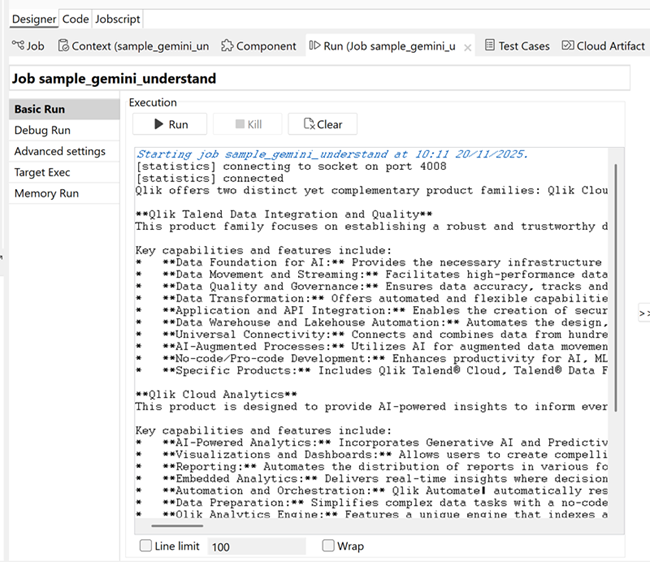
The following Job aims at accessing a Gemini API, using a Gemini model to extract the information from online pages about Qlik products, compare the information, and displaying the result in the run console.
Before you begin
This scenario uses Gemini model capabilities. For more information, read the
corresponding Gemini documentation.
Linking the components
Procedure
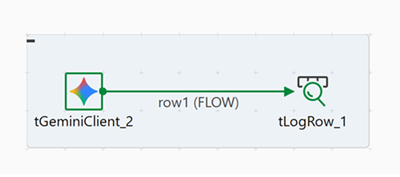
Drag and drop the following components from the Palette:
tGeminiClient, and tLogRow.
Connect the components using a Row >
FLOW connection.
Configuring the components
Procedure
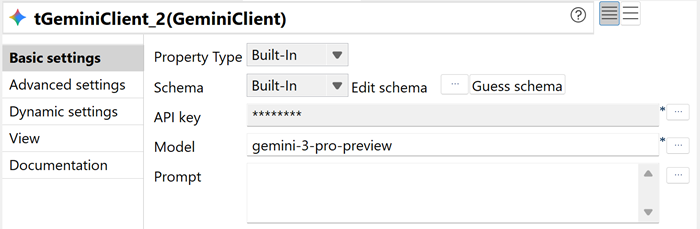
Double-click the tGeminiClient component to display its
Component view.
In the Basic settings view, enter your Gemini API key and
select the desired Gemini model.
In this scenario, the gemini-3-pro-preview is used. For
more information on the Gemini models that support PDF files, read the
corresponding Gemini documentation.
You can leave the Prompt field empty as it will be
provided in the Advanced settings as a JSON code.
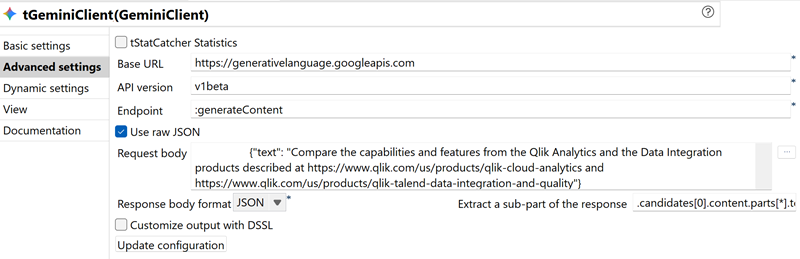
In the Advanced settings view, enter the API version of
your choice, and configure the JSON request that will reference your PDF and
provide the prompt.
To do so, select Use raw JSON, and enter the following
JSON in the Request body field:
{
      "contents": [
          {
              "parts": [
                  {"text": "Compare the capabilities and features from the Qlik Analytics and the Data Integration products described at https://www.qlik.com/us/products/qlik-cloud-analytics and https://www.qlik.com/us/products/qlik-talend-data-integration-and-quality"}
              ]
          }
      ],
      "tools": [
          {
              "url_context": {}
          }
      ]
  }
In this scenario, two web pages on the Qlik website about the Qlik Analytics
and Data Integration products are processed and compared.
Double-click the tLogRow component to display its
Component view.
Click Sync columns to retrieve the schema structure from
the previous component if needed.
In the Mode area, select Basic,
and click Print content with log4j to display the Job
result in the console.
Executing the Job
Procedure
Press Ctrl + S to save your Job.
Press F6 to execute it.
Results
The Run console displays the result of the comparison of the
two Qlik products and their capabilities.

 In this scenario, two web pages on the Qlik website about the Qlik Analytics and Data Integration products are processed and compared.