Export Analytics Information
Last updated: 10/27/2026To build and maintain this capability, you will use an operation to generate usage analytics from the repository database, REST API activity, audit log information and the search indexes.
Steps
Sign in as a user with at least the Application Administrator capability global role assignment.
Go to Manage > Repository in the banner.
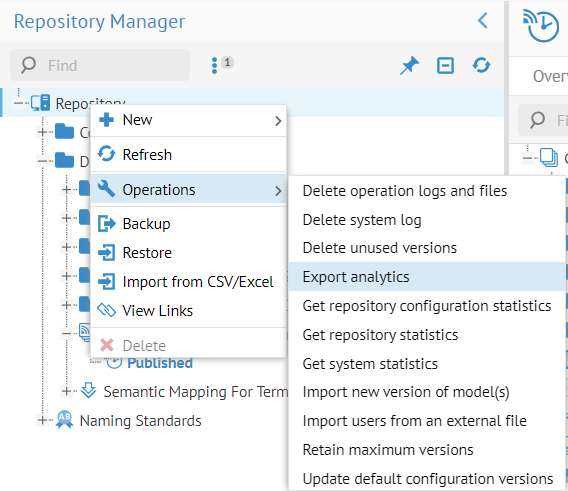
Right-click on the root (Repository) in the Repository Tree and select Operations > Export analytics.
Click RUN OPERATION.
You may schedule this operation to generate the analytics daily, weekly or any frequency of you choosing.
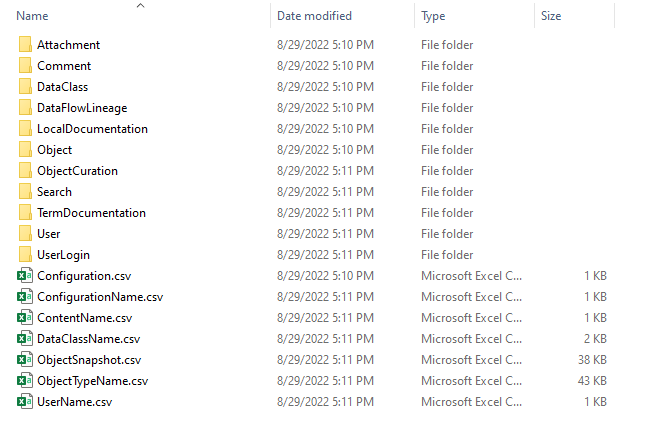
The results are placed into CSV files which are placed by default in /data/files/mm/analytics/ in the installation folder.
Example
Sign in as Administrator and go to Manage > Repository.
Right-click on the root (Repository) and select Operations > Export analytics.

Click RUN OPERATION.
On the application server machine in /data/files/mm/analytics we see all the analytics data files in CSV format.