
Migrating the Manage space permission
Last updated: 10/8/2026The Manage space permission has been replaced with a new permission model that combines a new user permission (also called individual permission) Studio connections and Studio resources – Edit (ID: TMC_CONNECTION_RESOURCE_EDIT) and existing space permission, Editor (Author) or Viewer (View).
This change allows Talend Management Console to align its permission model with the Qlik Management Console permission structure, which is a standard RBAC (Role-Based Access Control) model. In this model, user permissions determine what can be accessed, and space permissions determine where content can be accessed.
Permission model changes
The old Manage space permission allows you to create, edit, and delete Studio connections and resources assigned to a specific space. With the new model, the Manage space permission no longer exists. Its allowed operations are allocated to the following entitlement combinations:
| User permission | Space permission | Allowed actions |
|---|---|---|
| Studio connections and Studio resources – Edit | Editor (Author) | Create, edit, delete, and view Studio connections and resources |
| Studio connections and Studio resources – Edit | Viewer (View) | View Studio connections and resources only |
Impact on existing users
The removal of the Manage space permission can affect all users, whether you previously had the Manage space permission or not.
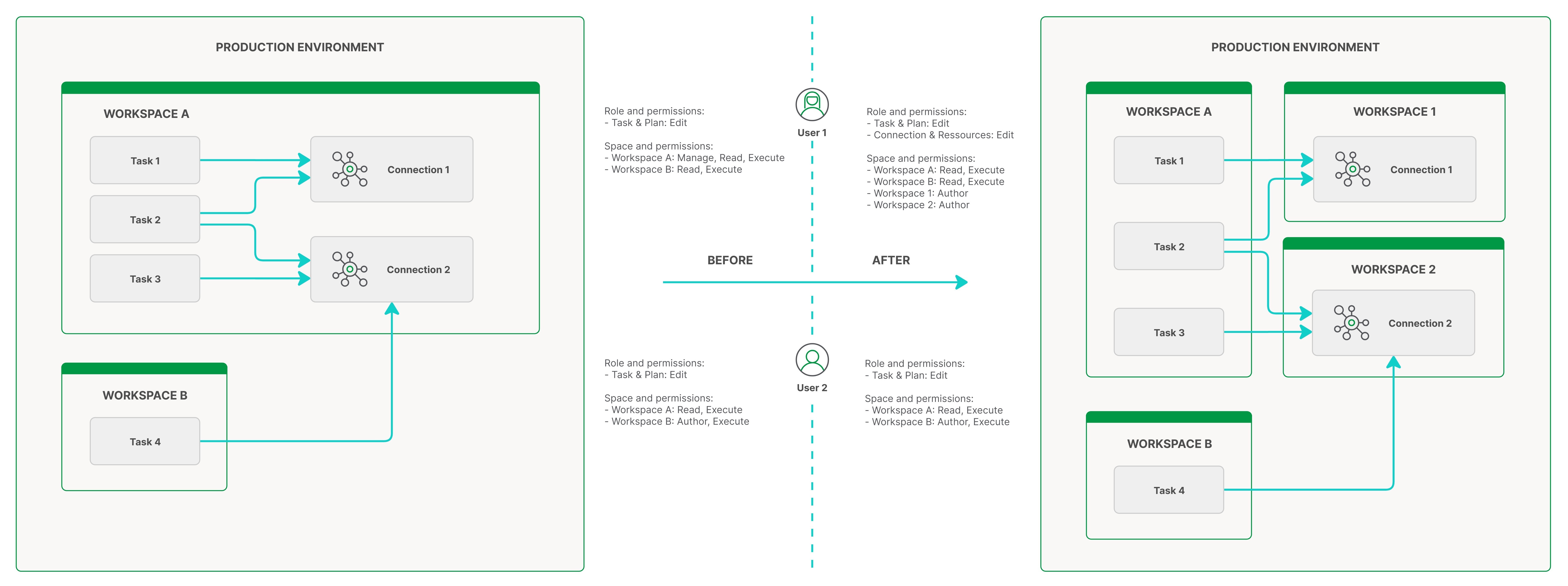
The image shows how the user permissions and space permissions change along with the removal of the Manage space permission. More details are provided below:
- Users previously granted the Manage permission:
- You automatically receive the Studio connections and Studio resources – Edit user permission, which is included in the new Assets Manager user role that is assigned to you by default.
- If you have the Editor (Author) permission, you retain the ability to create, edit, delete, and view Studio connections and resources in the space.
- If you do not have the Editor (Author) permission, you
lose the ability to create, edit, or delete Studio connections and resources.
If you have the Viewer (View) permission, you can still
see and use these Studio connections and resources, but you cannot create,
edit, or delete them.
For instructions about how to restore the edit ability, see Restoring the edit access.
- Users without the Manage permission:
- You need to be granted the Studio connections and Studio resources
– Edit user permission to continue to view and assign Studio
connections and resources in the spaces where you have the Editor
(Author) permission.
However, when you obtain Studio connections and Studio resources – Edit, your permissions are inadvertently expanded. You automatically gain the ability to create, edit, and delete Studio connections and resources in those spaces. You also gain the ability to view Studio resources and connections in any space where you have the Viewer (View) permission.
For instructions about how to restrict the expanded permissions and restore the original access boundaries, see Restricting the expanded permissions and restoring the original access scope.
- You need to be granted the Studio connections and Studio resources
– Edit user permission to continue to view and assign Studio
connections and resources in the spaces where you have the Editor
(Author) permission.