Identifying countries from input addresses using OpenAI
This Job uses fixed input data containing addresses provided by sales team in
different formats without country names, sends them to OpenAI to identify the countries,
and displays the results in the console.
Before you begin
Before running this Job, ensure you have:
- An active OpenAI API account with a valid API token.
- Sufficient API credits to process translation requests.
Linking the components
Procedure
-
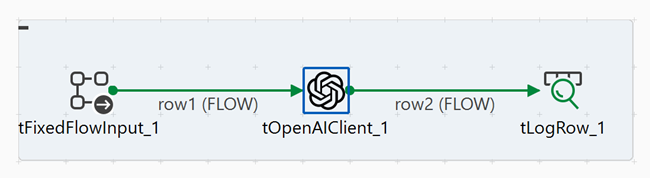
Connect tOpenAIClient to tLogRow
using a Row > FLOW
connection.
Configuring the components
Procedure
-
In the Content field, add a line for each address:
"23 Shevchenka St., Kyiv, 01001"
"17 Rue de la République, Lyon, 69002"
"東京都新宿区西新宿3丁目7−1"
"Avenida Paulista, São Paulo"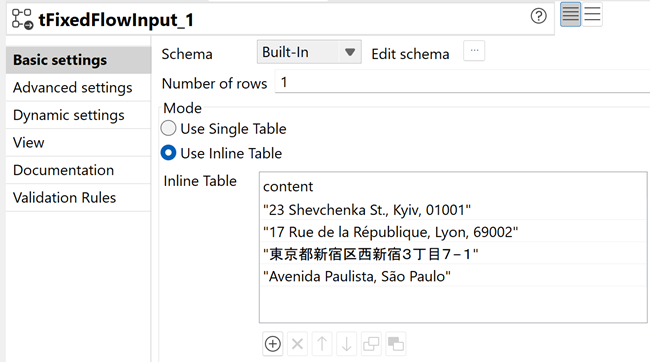
-
In the Basic settings tab, configure the following parameters:
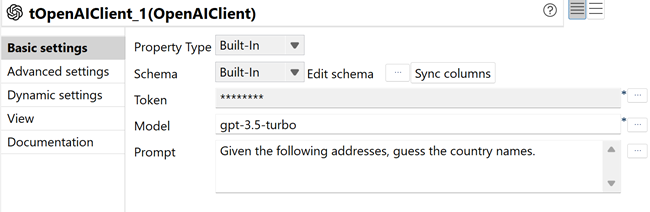
- Click Sync columns to retrieve the schema from tFixedFlowInput.
- In the Token field, click the [...] button and enter your OpenAI API token in the password dialog box, then click OK.
- In the Model field, click the [...] button and select gpt-3.5-turbo from the list.
- In the Prompt field, enter the following
instruction:
Given the following addresses, guess the country names.
Executing the Job
Procedure
- Press Ctrl+S to save the Job.
- Press F6 to execute the Job.
Results
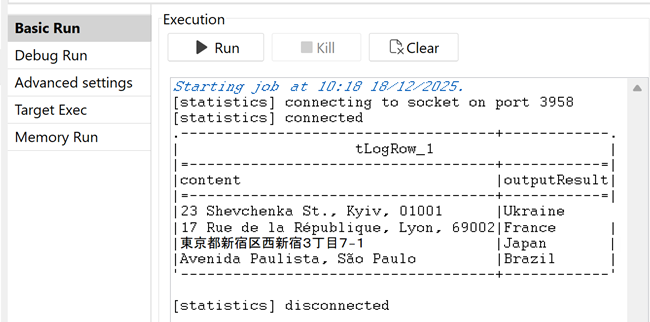
The Job reads the addresses from the fixed input data, sends each address to the OpenAI API to identify the country, and displays the identified country names corresponding to the addresses in the console. The OpenAI model analyzed the address format, postal codes, city names, and street patterns to determine the country. Each address is processed individually.