
Analyzing business intelligence questions using Amazon Bedrock
Last updated: 9/30/2026
This Job uses the tBedrockClient component to send a business intelligence question to Amazon Bedrock using the Titan Text Lite model to generate insights, and displays the AI-generated answer in the console.
Before you begin
Before running this Job, ensure you have:
- An active AWS account with Amazon Bedrock enabled.
- Amazon Bedrock API keys configured in your AWS account. For more information, see How Amazon Bedrock API keys work.
- Access to the amazon.titan-text-lite-v1 model in your AWS region.
- Your AWS access key and secret key stored securely.
Linking the components
Procedure
-
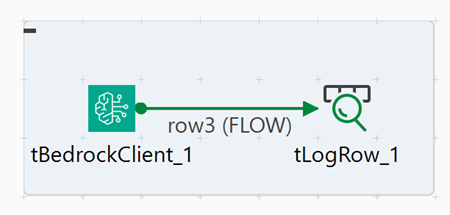
Connect tBedrockClient to tLogRow
using a Row > FLOW
connection.
Configuring the components
Procedure
-
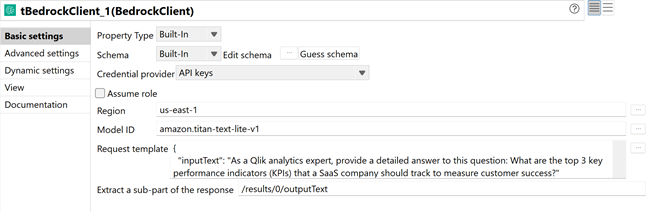
In the Basic settings tab, configure the following parameters:
- In the Credential provider list, select
API keys.
Make sure the API key is set as an environment variable. For more information, see Use an Amazon Bedrock API key.
- In the Region field, select or enter your AWS region (for example, "us-east-1").
- In the Model ID field, click the [...] button and select amazon.titan-text-lite-v1 from the list.
- In the Request template field, enter the following
JSON:
{
  "inputText": "As a Qlik analytics expert, provide a detailed answer to this question: What are the top 3 key performance indicators (KPIs) that a SaaS company should track to measure customer success?"
}
- In the Credential provider list, select
API keys.
Executing the Job
Procedure
- Press Ctrl+S to save the Job.
- Press F6 to execute the Job.
Results
The Job sends the business intelligence question to Amazon Bedrock using the Titan Text Lite model with a Qlik Analytics expert context, and displays the AI-generated detailed answer in the console.
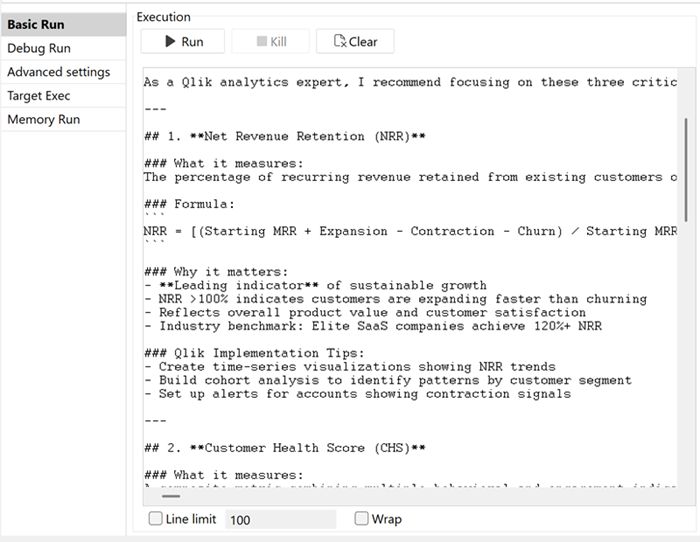
The console output displays the detailed AI-generated answer identifying the top three customer success KPIs with explanations tailored for Qlik Analytics users.