
Compound search
Last updated: 10/15/2026With a compound search, you can combine two or more searches with search operators. This allows customized and specific filtering of data. A compound search is triggered by enclosing the search within a set of parentheses. You can use multiple search operators in a single compound search.
Compound search in Qlik Sense

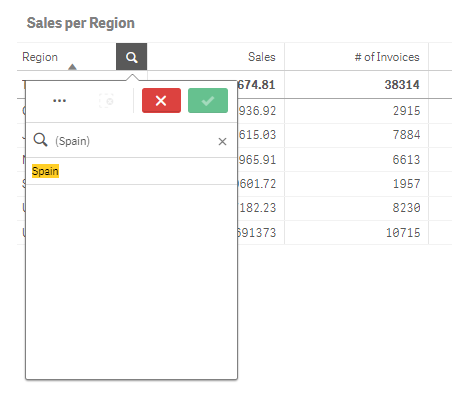
In its most basic form, a compound search can contain a single value. Unlike other search methods, a compound search for a single term will only return values that are an exact match with the search term. This can help you create more specific searches of your data.
Compound search using a single search term
A compound search can contain one or more wildcards. If search content contains spaces, use quotation marks to enclose the value as it appears within the compound search.
For more information about quotation marks and wildcards, see Text search.
Compound search using multiple wildcards and quotation marks
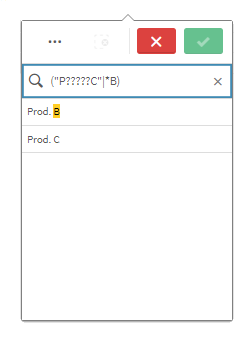
OR search operator ("|")
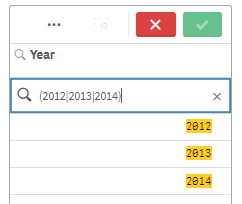
Using the OR operator, the compound search will return values that match any of the included searches.
Compound search using the OR search operator
AND search operator ("&")
Using the AND operator, the compound search will return values that match all of the search items included in the statement. Since compound searches return exact matches only, this operator is typically only used with one or more wildcards.
Compound search using the AND search operator
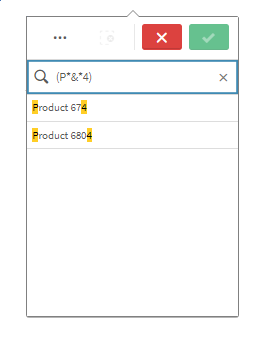
This additional example uses the AND operator and multiple wildcards in a compound search.
Additional example of compound search using the AND search operator
![Compound search using the AND operator. In this case, the search text is '(*ABC* ['and' operator symbol] ?Inc*)', with no quotation marks in the actual search. The results include the value 'Solutions ABC Inc'.](../../../Resources/Images/ui_CompoundSearch-and-operator.png "Click to view full size")
XOR search operator ("^")
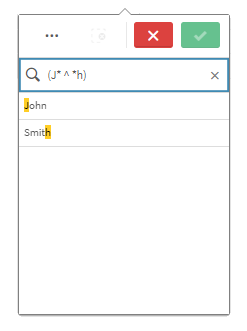
Using the XOR operator, the compound search will return values that match either the first or second search, but not both.
In the example below, the search returns values that either start with the letter "j'" or end with the letter "h", but values that match both these criteria (such as "Josh") are not included.
Compound search using the XOR search operator
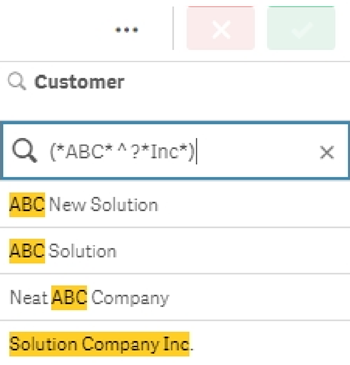
This example uses the XOR operator and multiple wildcards.
Additional example of compound search using the XOR search operator
Considerations for normal searches within a compound search
Due to differences between how client and engine process your search inputs, the standard space character is the only separator that is fully supported as a word-boundary token. Other separators might be supported and interpreted as valid word-boundary tokens by the engine but cannot be used due to client-sided input limitations.
These client-sided limitations are necessary for the client to be able to parse and structure the text-strings entered character by character (through an ASCII-only regex) and translate these into separated, searchable words.
The actual interpretation of word-boundary classifiers is a rule-based classification provided by the ICU library via Unicode and is highly dependent on system language settings.