
Dataset architecture in a Qlik Open Lakehouse
Streaming sources have their own architecture in Qlik Open Lakehouse as they do not require the Data Movement gateway to load data into the landing bucket, but are powered by the lakehouse cluster.
When you ingest data from files that include a data pattern within the file name, this enables the lakehouse cluster to perform targeted list operations in S3, which dramatically speeds up the time to read the file list. Furthermore, Qlik Open Lakehouse can predict arriving files based on the date pattern. The Streaming landing task does not have to list the entire bucket each time, but instead can request the files from S3 within a specific date range. Having a smaller file list leads to better performance. The optional Delete after load setting can be used to maintain a small file count. There is no full load performed, the first records are considered inserted changes.
In a Qlik Open Lakehouse, the Streaming Transform task replaces the storage task. This task is used to transform and store landed data as Iceberg tables. A Streaming Transform task can only be added after a Streaming landing task. The Streaming Transform task supports two modes for updating records:
- Append only: Adds new records without modifying existing data, and key constraints are not enforced if duplicate records arrive.
-
Apply changes (Merge): Updates existing records and inserts new records based on key fields. This mode gives you the option of using a soft delete, or retain historical data (Type 2).
The Streaming Transform task is a target based task, that maps between source and target and includes schema evolution capabilities. It provides extended transformation capabilities including unnesting of nested structures and flattening of arrays. For more information on the functions you can use in the Steaming Transform task, see Transformation functions.
When you ingest from a streaming source, you have the ability to configure Iceberg partitioning, retention management, sort columns, snapshot expiration to control storage costs, and optimize for query performance.
Architecture for a streaming Qlik Open Lakehouse data pipeline in Append only mode
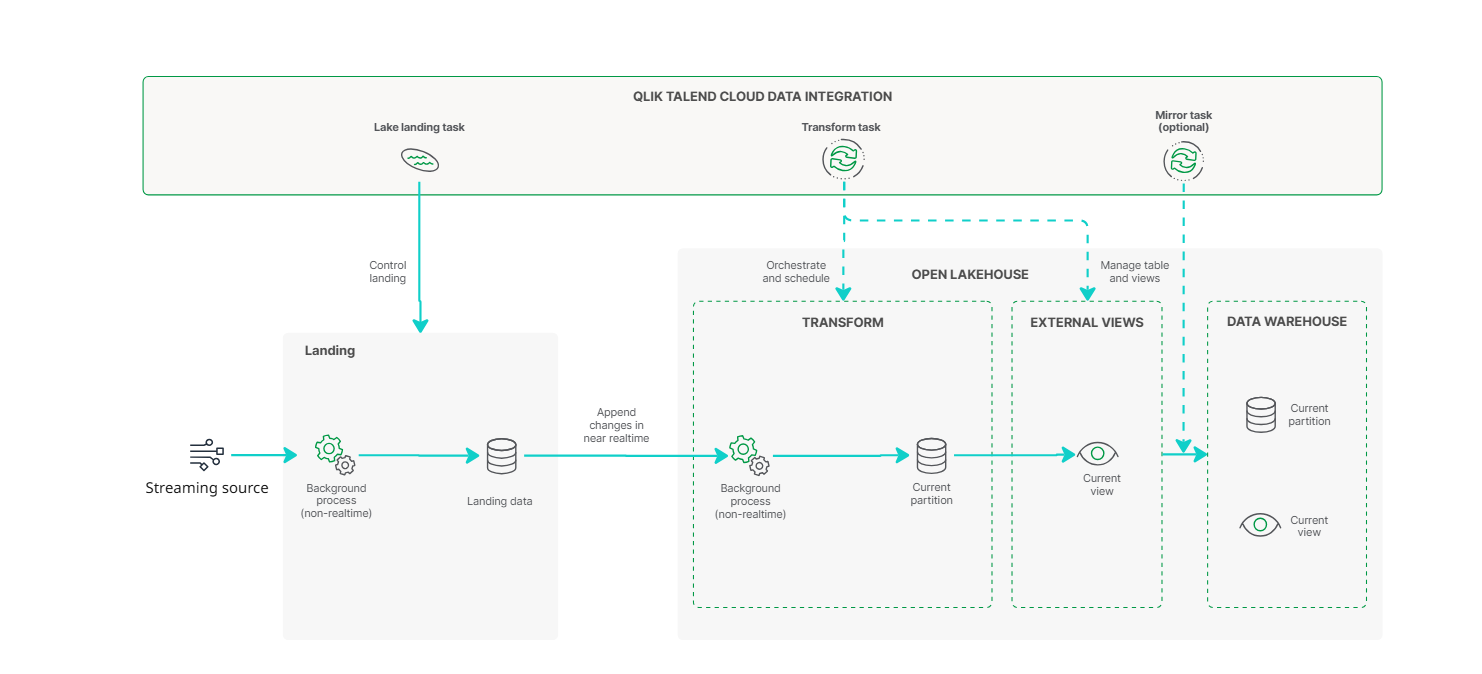
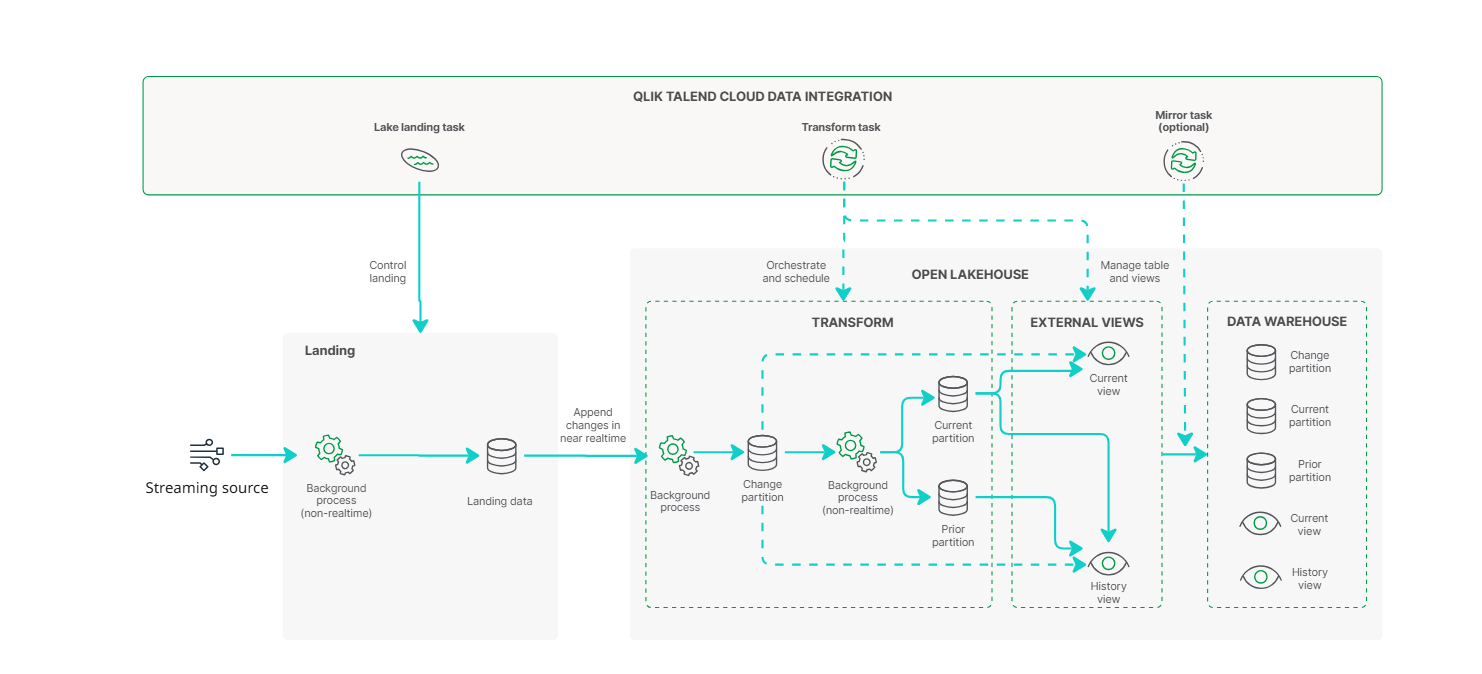
Architecture for a streaming Qlik Open Lakehouse data pipeline in Merge mode
Landing tables
The following header fields are added to the landing tables. These field always exist in landing data, but by default not in the downstream transform. You can add the fields to the transform using an expression.
| Field | Type | Description |
|---|---|---|
| hdr__kafka_partition | Long | Kafka partition |
| hdr__kafka_topic | String | Kafka topic |
| hdr__kafka_offset | Long | Running value in partition |
| hdr__kafka_key | String | Base64 encoded key. Set to NULL string if not available. |
| hdr__kafka_headers | String |
JSON with all message headers. Set to NULL string if not available. |
| Field | Type | Description |
|---|---|---|
| hdr__kinesis_stream | String | Amazon Kinesis stream |
| hdr__kinesis_shard | String | Amazon Kinesis shard |
| hdr__kinesis_offset | String | Amazon KInesis offset |
| Field | Type | Description |
|---|---|---|
| hdr__file_name | String | File name |
| hdr__file_size | Long | File size in bytes. |
Schemas
Artifacts are generated in an internal schema and a data task schema.
-
The internal schema contains a physical table with multiple partitions.
-
The data task schema contains the views that you can use to consume the data.
When a schema is associated with more than one data task, each data task must use a unique prefix for tables and views. You can set the prefix in the data task settings.
Only internal schemas are checked for naming conflicts. For other schemas, you must ensure there are no naming conflicts in the table names. The best practice is to name the internal schema the same name as the data task schema with _internal added. This ensures that every schema and prefix combination is unique.
Tables
For each source table, a table is created in the internal schema with the suffix _internal, using the format:
<INTERNAL_SCHEMA>.<TABLE_NAME>_internal
This table contains five partitions in Apply changes (Merge) mode, each serving a distinct purpose in how the data is processed and stored. Each partition leverages a subset of the table’s columns based on its role in the data lifecycle. In Append only mode the table has no partitions and behaves like the Current partition (ODS).
The internal dataset is structured to efficiently manage incoming data from your source system, supporting real-time ingestion and historical tracking. The flow of data is managed through several specialized partitions, each described below:
-
Changes partition – Real-time ingestion
All changes from the source system—inserts, updates, and deletes—are first appended to the Changes partition.
-
Acting as a raw changelog, the partition provides a complete feed of source activity before any transformations occur.
-
Each change is tagged with a type (I, U, or D), indicating how it is processed.
-
Events are captured from the source as they occur. The partition is updated in near real-time.
-
The Changes partition is available when the following settings are applied in the Lake landing data task.
-
In the General tab, the Update method is set to CDC.
-
Full load is enabled.
-
-
-
Asset_state partition - Tracking progress
As changes are ingested, the Asset_state partition logs two key timestamps:
-
When changes were last appended to the Changes partition.
-
When changes were last applied to the Current partition.
This provides full visibility into the synchronization pipeline and helps with monitoring or troubleshooting delays.
-
-
Current partition (ODS) – Latest replica of the source
Changes from the Changes partition are periodically applied to the Current partition to maintain an up-to-date, query-optimized copy of the source data.
-
A background task runs automatically to apply those updates. This is based on the volume of accumulated changes, rather than a fixed schedule.
-
The initial full load is written directly to the Current partition.
-
This partition reflects the current state of the data and is designed for efficient querying.
-
-
Prior partition (HDS) – Historical data
When an a record is updated or deleted in the Current partition, a copy of the previous version is written to the Prior partition.
-
Records contain metadata, including change history and the date range when the data is valid.
-
This supports Type 2 slowly changing dimension (SCD2).
-
The Prior partition is available when Keep historical records and archive of change records is enabled in the General tab of the Storage data task settings.
-
When an updated version of a record enters the Current partition, the previous record is moved to the Prior partition for historical tracking.
-
-
Reload partition
The Reload partition acts as a temporary staging area during manual or scheduled full reloads:
-
New data is first written to the Reload partition.
-
Regular maintenance tasks clear any pending changes before they are paused.
-
Data is compared with the Current partition, and only the differences are moved to the Current partition.
-
The Reload partition is cleared when the operation completes.
This process ensure minimal disruption to the main dataset during full reload operations.
-
Current partition
| Field | Type | Description |
|---|---|---|
| hdr__key_hash | VARBINARY (20) | Hash of all record primary keys. Hash format is SHA1. Columns are separated by a backspace character. |
| hdr__from_timestamp | TIMESTAMP |
Timestamp in UTC:
|
| hdr__operation | VARCHAR (1) |
Latest operation of this record.
|
| hdr__inserted_timestamp | TIMESTAMP | UTC timestamp of the first time the key was added. When using full load, the start time of the full load. |
| hdr__modified_timestamp | TIMESTAMP | UTC timestamp of when the last update was made. |
Prior partition
| Field | Type | Description |
|---|---|---|
| hdr__key_hash | VARBINARY (20) | Hash of all record primary keys. |
| hdr__from_timestamp | TIMESTAMP | Timestamp in UTC. |
| hdr__to_timestamp | TIMESTAMP | Timestamp in UTC. |
| hdr__operation | STRING (1) |
Latest operation of this record.
|
| hdr__was_current_from_timestamp | TIMESTAMP | Timestamp in UTC for the first time record was current. |
| hdr__was_current_to_timestamp | TIMESTAMP | Timestamp in UTC for the last time record was current. |
Changes partition
| Field | Type | Description |
|---|---|---|
| hdr__change_identifier | VARCHAR (50) |
The change identifier is a string with two parts:
|
| hdr__operation | VARCHAR (1) |
Latest operation of this record.
|
| hdr__timestamp | TIMESTAMP | Timestamp in UTC. |
| hdr__key_hash | BINARY (20) | Hash of all record primary keys. |
| hdr__inserted_timestamp | TIMESTAMP | UTC timestamp of the time when the change was processed by Qlik. |
Asset_state partition
| Field | Type | Description |
|---|---|---|
| hdr__apply_change_identifier | VARCHAR (50) | The change identifier of the latest change applied to the Current partition. |
| hdr__copy_change_identifier | VARCHAR (50) | The change identifier of the latest change appended to the Changes partition. |
Reload partition
The columns used by the Reload partition are identical to the Current partition.
Views
All views created are updated in near real time. The following views are available to simplify querying and reporting:
Current
The Current view reflects the most recent state of the data. This view represents a replica of the source table, updated in near-real time. It merges data from the Current and Changes partitions.
Name: <EXTERNAL_SCHEMA>.[<PREFIX>]<TABLE_NAME>
No header columns are added to the table structure.
History
A History view is generated in the data asset schema for each selected source table when History is enabled in the data task settings. The History view merges data from the Prior and Changes partitions. It provides a complete timeline of changes, ideal for audit or historical analysis.
Name: <EXTERNAL_SCHEMA>.[<PREFIX>]<TABLE_NAME>_<Suffix for history views>
The following header fields are added to the History view:
| Field | Type | Description |
|---|---|---|
| hdr__key_hash | BINARY (20) | Hash of all record primary keys. |
| hdr__from_timestamp | TIMESTAMP | The timestamp when the change occurred in the source system. This reflects when the user originally made the change. |
| hdr__to_timestamp | TIMESTAMP | The timestamp when the change was reversed or updated in the source system. |
| hdr__store | VARCHAR (10) |
This indicates where the record resides:
|
| hdr__operation | STRING (1) |
Latest operation of this record.
|
| hdr__deleted | BIT | Indicates if the record is soft deleted, based on if hdr__operation is D or d. |
| hdr__was_current_from_timestamp | TIMESTAMP | The time (UTC) when this row entered the Current partition. This is typically when the storage job ran and the change was applied. |
| hdr__was_current_to_timestamp | TIMESTAMP | The time (UTC) when the row was removed from the Current table, for example, due to a newer version. |