
Semantic models in data products
Last updated: 10/28/2026A semantic model is a model within a data product that defines how data is structured and understood. Semantic models help describe the business context of your data—they allow you to add relationships, measures, and dimensions to the tables in the data product.
- Qlik Talend Cloud Enterprise
- Qlik Talend Cloud Premium
- Qlik Cloud Analytics Premium
- Qlik Cloud Analytics Enterprise
- Qlik Sense Enterprise SaaS
Semantic models enable you to create reusable data structures that analytics developers can consume in analytics applications. By defining relationships, measures, and dimensions once in a data product, you ensure consistent business metrics and data models across your organization.
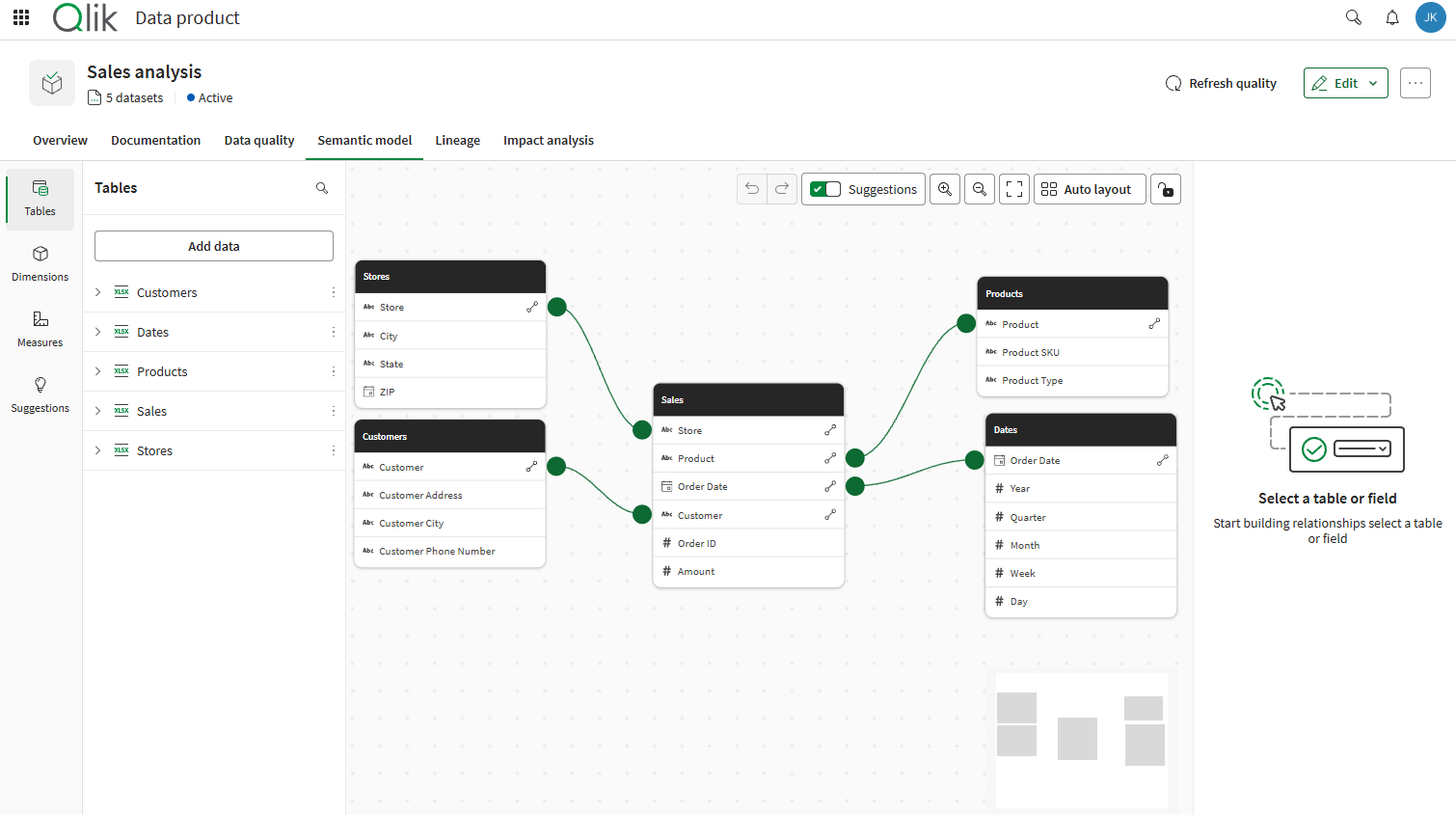
What is a semantic model?
A semantic model is a structured representation of data that includes:
- Tables: The data tables in the data product.
- Relationships: Defined connections between tables based on matching fields, enabling associative analysis.
- Dimensions: Fields used for grouping and categorizing data, such as customer name or product category.
- Measures: Calculated metrics using expressions, such as sum of sales or average order value.
Semantic models are created within data products, which can be accessed from both Analytics and Data Integration. Semantic models are consumed in analytics applications.
Why use semantic models?
Semantic models provide several benefits for data governance and analytics use cases:
- Reusability: Define data structures, relationships, and business metrics once and reuse them across multiple applications.
- Consistency: Ensure that all applications use the same calculations and definitions for key business metrics.
- Accelerated development: Analytics developers can build applications faster by inheriting pre-built data models instead of creating them from scratch.
- Governance: Centralize control of business logic and data structures in governed data products.
- Reduced errors: Minimize the risk of calculation errors by using validated expressions from the semantic model.
- Controlled updates: When the semantic model changes, the changes are reflected upon reload of the consuming application. You can choose whether or not the application automatically inherits new data and master items.
-
Context for AI: Measures and dimensions carry over as master items with links to corresponding business glossary terms, keeping their descriptions and expressions that feed the semantic understanding for Qlik Answers.
Components of a semantic model
Tables
Tables contain the raw data that the semantic model describes. Each table represents a collection of related data, such as sales transactions or customer records. You can include multiple tables from different datasets to create a comprehensive data model.
Relationships
Relationships connect tables based on matching fields, such as linking a sales table to a customer table using a customer ID field. Relationships enable associative queries across tables and ensure that data is properly connected together in analytics applications.
For data products that are downstream from a Qlik Talend Data Integration data pipeline, original relationships from the source pipeline are provided as suggestions when you edit the semantic model.
Measures
Measures are calculated metrics defined using expressions, such as Sum(Amount) or Avg(Value). Measures appear as master items in applications that consume the semantic model, allowing developers to use them directly in visualizations.
Measures can also be linked to business glossary terms, allowing easy understanding of concepts and definitions related to the business use case.
Dimensions
Dimensions are fields used to categorize and group data, such as customer name, product category, or region. Like measures, dimensions appear as master items in consuming applications.
Dimensions can also be linked to business glossary terms, allowing easy understanding of concepts and definitions related to the business use case.
Workflow overview
The semantic model workflow consists of the following phases:
- Define: In Data Integration or Analytics, create a data product with datasets, then define a semantic model by defining relationships, measures, and dimensions.
- Activate: Activate the data product so it becomes available in the Data Marketplace for analytics developers. Note that the data product does not need to be activated to be consumable—however, activation helps to indicate it is ready for production use cases.
- Consume: In Analytics, use the data catalog to browse semantic models, select the tables and items you need, and insert the generated script into your application. After reload, measures and dimensions from the semantic model automatically appear as master items.
Prerequisites
To work with semantic models, you need the following prerequisites.
Subscription
Your subscription needs to allow access to data products. For a list of compatible subscriptions, see Working with data products.
Permissions
To work with semantic models, you need permissions to create and manage data products. For full details, see Data products roles and permissions.
For consuming semantic models, the required permissions are as follows:
- Administrator-assigned permissions: You need specific permissions to be assigned to you by an administrator in order to create and manage data products. See Default permissions and custom roles.
- Space permissions: To consume the semantic model of data products in shared, managed, and data spaces, you need the Can consume data or Can view permission in the space containing the data product.
Access control
The access control of data stored within the semantic model is governed by the access control rules of the data product. This includes references to metadata and data of other resources. For example, the content of expressions in the semantic model are under the access control of the data product, not the dataset where those resources reside.
Next steps
To get started with semantic models:
- Data product managers: See Managing semantic models in data products to learn how to create and configure semantic models.
- Analytics developers: See Consuming data products in applications to learn how to use semantic models in your applications.