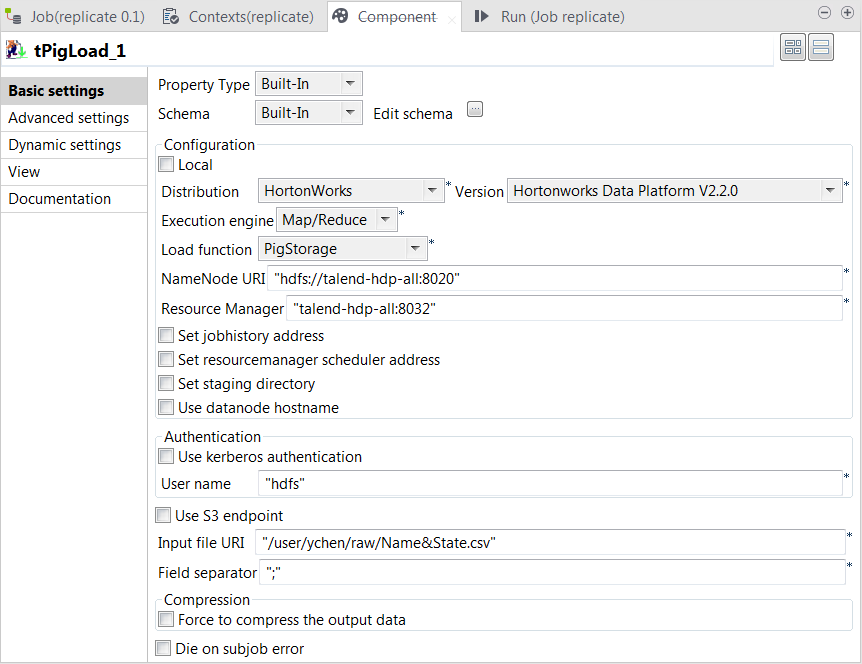
Click the button next to Edit schema to open the schema editor.
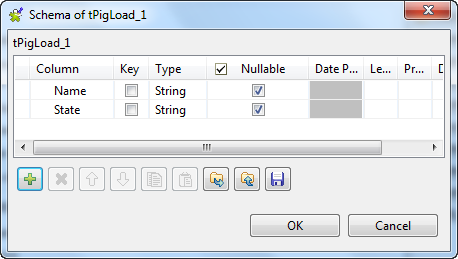
Click the
button twice to add two rows and name them Name and State, respectively.
Click OK to validate these changes and
accept the propagation prompted by the pop-up dialog box.
In the Mode area, select Map/Reduce because the Hadoop to be used in this
scenario is installed in a remote machine. Once selecting it, the parameters
to be set appear.
In the Distribution and the Version lists, select the Hadoop distribution to
be used.
In the Load function list, select
PigStorage
In the NameNode URI field
and the Resource Manager field, enter the
locations of the NameNode and the ResourceManager to be used for Map/Reduce,
respectively. If you are using WebHDFS, the location should be
webhdfs://masternode:portnumber; WebHDFS with SSL is not
supported yet.
In the Input file URI field, enter the
location of the data to be read from HDFS. In this example, the location is
/user/ychen/raw/NameState.csv.
In the Field separator field, enter the
semicolon ;.
Did this page help you?
If you find any issues with this page or its content – a typo, a missing step, or a technical error – please let us know!