
New features
Last updated: 9/24/2026Shared features
| Feature | Description |
|---|---|
| New landing page for Talend Studio | The Talend Studio
landing page is redesigned to provide a simplified and enhanced experience for
both new and existing users. The new landing page includes the following tiles:
Information noteTip: If you do not see the Welcome landing
page on startup, you can click , and select the Show welcome page on
startup checkbox.

|
Big Data
| Feature | Description |
|---|---|
| Support for Databricks 17.3 LTS with Spark Universal 4.x in Spark Batch Jobs | You can now run your Spark Batch Jobs on job and all-purpose Databricks
clusters on AWS and Azure using Spark Universal with Spark 4.x. You can configure
it either in the Spark Configuration view of your Spark
Jobs or in the Hadoop Cluster Connection metadata
wizard. When you select this mode, Talend Studio is compatible with Databricks 17.3 LTS version. 
|
Continuous Integration
| Feature | Description |
|---|---|
|
Upgrade of Talend CI Builder to version 8.0.31 |
Talend CI Builder is upgraded to version 8.0.31. Use Talend CI Builder 8.0.31 in your CI commands or pipeline scripts from this monthly version onwards until a new version of Talend CI Builder is released. |
Data Integration
| Feature | Description |
|---|---|
| Support for Amazon RDS for PostgreSQL with pgvector for PostgreSQL components in Standard Jobs | The PostgreSQL components now support Amazon RDS for PostgreSQL with pgvector, allowing you to store and query vector embeddings. |
| Support for Microsoft OneLake for MSSql and Azure Synapse components in Standard Jobs | The MSSql and Azure Synapse components now support reading data from
Microsoft OneLake via the Azure Active Directory authentication mode. Breaking change: The Microsoft SQL Server JDBC driver now defaults to encrypt=true and trustServerCertificate=false. For self-signed certificates, use trustServerCertificate=true or a trust store; for non-secure development or test servers, set encrypt=false in additional JDBC parameters. |
| Support for API v3 in Jira components to support Jira Cloud in Standard Jobs | The tJIRAInput and tJIRAOutput components now support API v3 for Jira Cloud, improving compatibility with current Jira Cloud operations. |
| Support for Kerberos authentication for tKafkaCreateTopic in Standard Jobs | The tKafkaCreateTopic component now supports Kerberos authentication, allowing secure topic creation in Kerberos-enabled Kafka environments. |
Data Mapper
| Feature | Description |
|---|---|
| New DSQL editor for tDSQL4JSON component | The tDSQL4JSON component now supports a new DSQL editor providing:
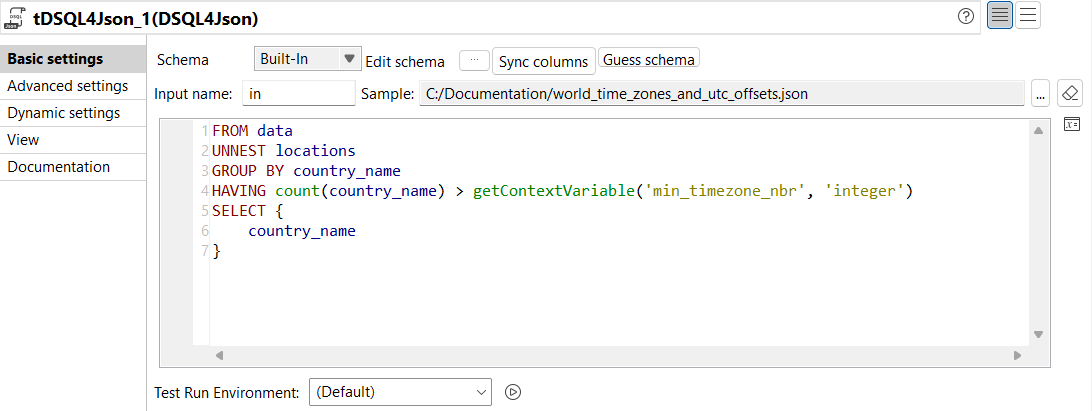
|
Data Quality
| Feature | Description |
|---|---|
| User experience and user interface enhancement of the Profiling perspective | The UX and UI of the Profiling perspective have been enhanced to offer a better navigation and usability. |
| Support for latest MySQL 8.x | MySQL has been upgraded to the latest 8.x |
| Support for more operators in tDQRules | You can now use the following operators in the tDQRules component:
|
| Support for Databricks with Universal Spark 3.x | You can now run all DQ components on Databricks with Universal Spark 3.x. |
| Support for Apache Spark 4.0 in local mode | You can now run all DQ components with Apache Spark 4.0 in local mode. |