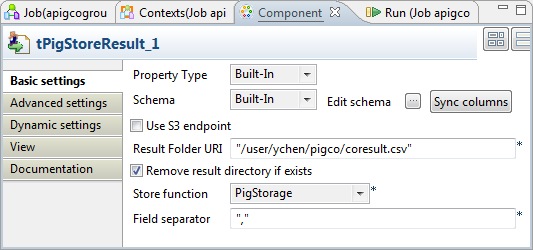
Double-click tPigStoreResult to open its
Component view.
If this component does not have the same schema of the preceding component, a warning
icon appears. In this case, click the Sync
columns button to retrieve the schema from the
preceding one and once done, the warning icon disappears.
In the Result folder URI field, enter the path in HDFS
pointing to the location you want to write the result in.
Select the Remove result directory if exists check
box.
From the Store function list, select PigStorage.
In the Field separator field, enter the separator you want to
use. In this scenario, enter a comma (,).
Did this page help you?
If you find any issues with this page or its content – a typo, a missing step, or a technical error – please let us know!