Follow these steps to create the first Job, which will set up an HCatalog
database to manage the access log file to be analyzed.
Procedure
In the Repository tree view, expand the Job
Designs node, right-click Standard
Jobs and select Create folder to create a new folder to group the
Jobs that you will create.
In the Repository tree view, right-click Job Designs and select Create folder to create a new folder to group the
Jobs that you will create.
Right-click the folder you just created, and select Create job to create your first Job. Name it A_HCatalog_Create to identify its role and
execution order among the example Jobs.
You can also provide a short
description for your Job, which will appear as a tooltip when you move your
mouse over the Job.
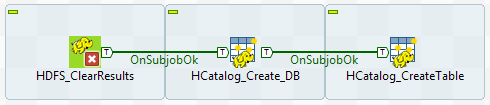
Drop a tHDFSDelete and two tHCatalogOperation components from the Palette onto the design workspace.
Connect the three components using Trigger > On Subjob Ok
connections.
The HDFS subjob will be used to remove any previous results of
this demo example, if any, to prevent possible errors in Job execution, and
the two HCatalog subjobs will be used to create an HCatalog database and set
up an HCatalog table and partition in the created HCatalog table,
respectively.
Label these components to better identify their functionality.
Did this page help you?
If you find any issues with this page or its content – a typo, a missing step, or a technical error – please let us know!