Skip to main content Skip to complementary content

Sharing an API repository

Share a repository with users or groups to give them full access to its content. This option applies only to repositories outside the Default repository.

Before you begin

You have created the repository or have permissions to share it.

Procedure

  1. In the left panel, click Repository actions menu next to the repository name.
  2. Click Share.
  3. In the Sharing repository dialog box, select the user or group to grant access to the repository.
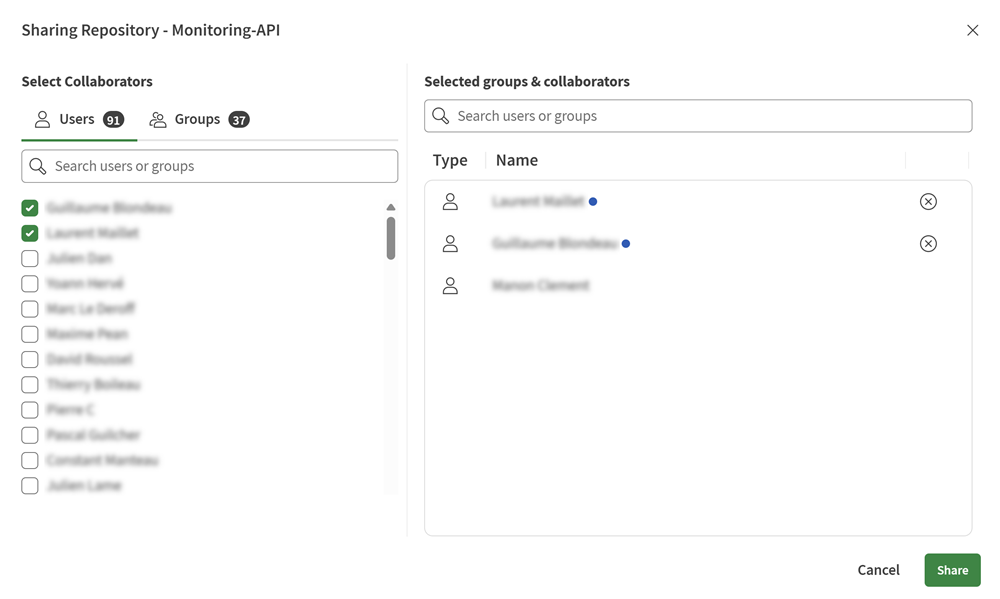
    Sharing repository dialog box.
  4. Repeat with as many users or groups as necessary, then click Share.

Results

The selected users and groups have full access to the repository. They can create, update, copy, move, and delete folders, API contracts, and contract versions. They can also share and unshare the repository.

Did this page help you?

If you find any issues with this page or its content – a typo, a missing step, or a technical error – please let us know!