
When you work on a touch device or a computer with a touch screen, you can long-touch a visualization to open an options menu.
You can toggle touch support on and off from the global menu ( ).
).
The options menu opens when you long-touch a visualization.
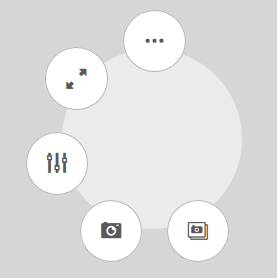
All the options may not be available to you. The options depend on whether you are editing or analyzing (viewing) an app. Some options also may not be available depending on the privileges granted to you by your administrator.
- ¥ Shortcut menu: View data, Copy link, Embed chart, or Download.
- s Full screen
- Ú Exploration menu
- Å Snapshot
- ↓ Snapshot library
- é Save as a master item or unlink from a master item (not shown)