
Feature preview
Last updated: 10/21/2026Feature preview gives you early access to upcoming features before they become generally available. With feature preview, you can explore new capabilities, provide feedback, and help shape the future of Qlik Cloud.
What are preview features
Preview features are new features that we make available before general availability. These features are production-ready but may change based on customer feedback and real-world usage. Preview features let you:
-
Test new functionality in your environment
-
Provide feedback that influences product direction
-
Prepare for upcoming changes before general availability
-
Ensure a smooth transition when features become generally available
How preview features differ from generally available features
Preview features differ from generally available features in the following ways:
-
Opt-in model: You must explicitly activate preview features. They are not activated by default.
-
Subject to change: Functionality, behavior, and user interface elements may be modified based on feedback.
-
Permission-based access: Permissions determine whether you can view and activate preview features.
-
Limited documentation: Documentation for preview features may be less comprehensive than for generally available features.
Tenant-level controls and permissions are managed by tenant administrators. For more information, see Managing feature preview for your tenant.
Activating and deactivating preview features
To activate preview features, your tenant administrator must enable feature preview for the tenant and grant you the required permissions.
You can activate or deactivate preview features from your user profile.
Do the following:
-
Click your user profile in Qlik Cloud and select
 Feature preview.
 -
Read the description for each preview feature to understand what it does.
-
Turn the Activate toggle on or off for a preview feature.
-
Click Refresh now to apply the changes.
Available preview features and activations controls
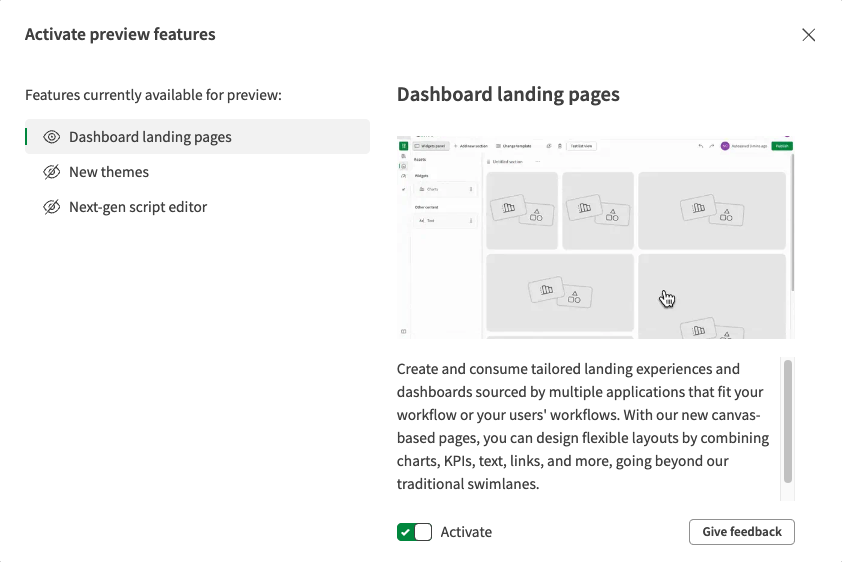
You can deactivate a preview feature at any time. Your data and configurations related to the preview feature are preserved, and you can activate the feature again later.
Providing feedback
Your feedback helps us improve preview features. To provide useful feedback:
-
Be specific: Describe what you were trying to accomplish, what happened, and what you expected.
-
Include context: Mention your use case, environment, and any relevant details about your workflow.
-
Report issues early: Share issues while the details are fresh.
-
Suggest improvements: Share ideas about how the feature could better meet your needs.
You can provide feedback in the following ways:
-
In the Activate preview features dialog, click Give feedback.
-
Use the Qlik Community Public Previews page.
-
Use the Ideation portal.
-
Contact your Qlik account team.