
Qlik Replicate UI server configurations
Last updated: 9/23/2026You can either install Qlik Replicate on a single machine or on two separate machines. The possible configurations for installing Qlik Replicate on two separate machines are described below.
Configuration overview
The method you use to access Qlik Replicate should be determined by your organization's access control needs.
Accessing Qlik Replicate Server via the .NET UI Server
The Qlik Replicate .NET UI Server (Windows only) provides role-based access control by integrating with Windows Active Directory. You assign users to groups—Viewers, Operators, Designers, or Administrators—and users authenticate using Windows credentials or Windows Authentication. Their access permissions are determined by group membership.
Role-based permissions apply globally across all replication tasks and endpoints. The .NET UI Server does not support fine-grained task-level or endpoint-level permissions. If you need advanced permission models, use Qlik Enterprise Manager instead.
The .NET UI Server leverages the Windows HTTP.SYS subsystem for HTTPS implementation and port sharing. This architecture allows your IT department to centrally manage certificate configuration, encryption protocols, and cipher suites through Windows domain security policies.
Port sharing enables multiple local applications on a single Windows machine to coexist on the default HTTPS port 443. The .NET UI Server registers the URL prefix /attunityreplicate for access (for example, https://host/attunityreplicate), allowing other applications to use different prefixes on the same port. Qlik Replicate Server requires port 3552 and cannot share this port with other applications.
In summary, if you need to provide users direct access to Qlik Replicate Server while implementing baseline role-based access restrictions, deploy the .NET UI Server.
Accessing Qlik Replicate Server directly
When you access the Qlik Replicate Server directly via port 3552, all users receive administrator privileges. On Linux, you can enable PAM (Pluggable Authentication Modules) to support multiple user accounts; however, all users retain full administrative access regardless of group membership.
Accessing Qlik Replicate Server via Qlik Enterprise Manager
When you access the Qlik Replicate Server through Qlik Enterprise Manager, certificate trust validation is not required. Qlik Enterprise Manager and the Qlik Replicate Server use a secure authentication mechanism that works with self-signed certificates.
When the Qlik Replicate .NET UI Server is running on one machine and the Qlik Replicate Server is running on another, the Qlik Replicate Server password must be the same on both machines. The password is used during the SSL handshake to establish a secure connection between the participating machines.
For information on setting the password, see Changing the server password.
Configuration 1: Replicate Server running on Windows
In this configuration, the Replicate Console component and the Replicate Server components are running on two separate Windows machines.
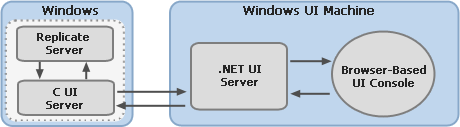
Configuration 2: Replicate server running on Linux
In this configuration, the Replicate Console component and the Replicate Server components are running on two separate machines - the former on Windows and the latter on Linux.
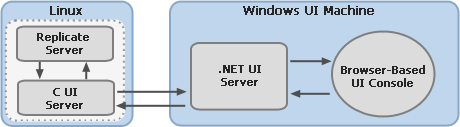
Configuration 3: Two Linux machines
In this configuration, a web-browser is used to access the Replicate Server installed on Linux. The web-browser connects directly to Replicate Server on the Linux machines via port 3552 (the default).
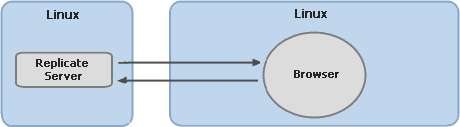
Note that in such a configuration, the ability to assign different roles (as described in User permissions) is not supported. In other words, all users will have the admin role.
PAM prerequisites
To establish a secure connection using PAM, make sure that the following prerequisites have been met:
- The Attunity user or group (or the user/group set during the installation) must be granted permission to read the file: etc/shadow. Note that this prerequisite is only required when Qlik Replicate is accessed from a remote Linux machine.
-
Edit the repctl.cfg file and modify the path to the fully qualified name of the libpam.so.0 library if required.
Example:
"login_pam_libpam_full_path":"/lib64/libpam.so.0",
"login_pam_service_name": "system-auth"
}