
When using Microsoft IIS as web server for Custom Users, configuration is needed.
Proceed as follows to configure IIS for Custom Users:
- In QlikView Management Console, change the parameters on the System>Setup>Authentication tab in accordance to the following:
- Select the QlikView virtual folder and then Authentication.
- Disable Windows Authentication and enable Anonymous Authentication.
- Select the QvAjaxZfc folder and then Authentication.
- Disable Windows Authentication and enable Anonymous Authentication.
- Right-click QvAjaxZfc and select Switch to Content View.
- The configuration of IIS for the Custom User is complete.
| Parameter | Changes |
|---|---|
| Authentication | Always |
| Type | Custom User |
| Parameters | CUSTOM\ |
| Login Address | Alternate login page (web form) |
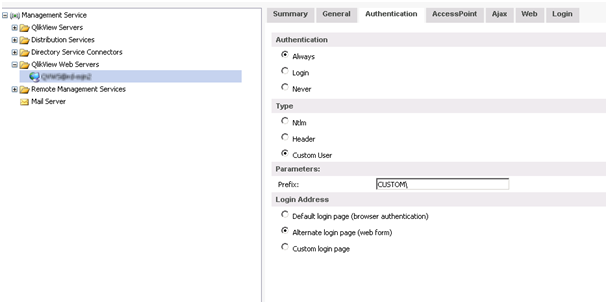
Authentication tab
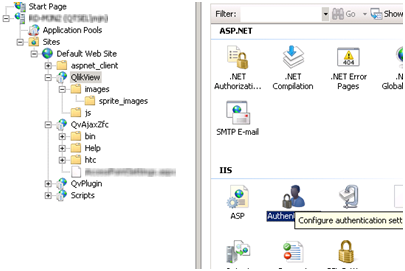
Selecting Authentication
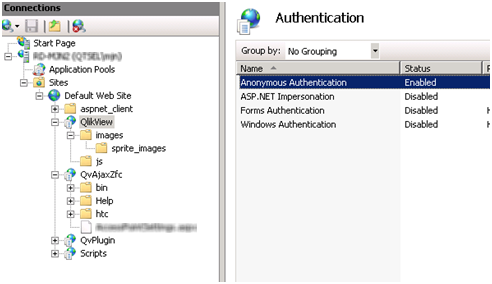
Enabling Anonymous Authentication for the QlikView virtual folder
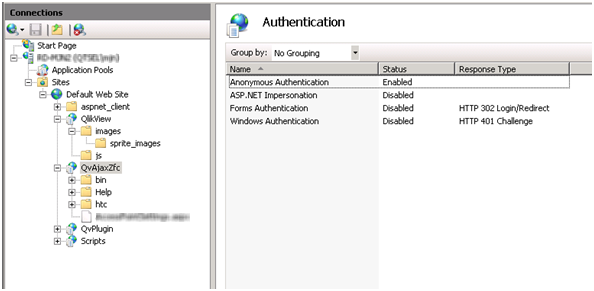
Enabling Anonymous Authentication for the QvAjaxZfc folder
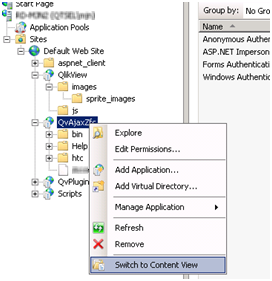
Selecting Switch to Content View
