
Agentic Data Engineering in Qlik Talend Cloud
Last updated: 10/12/2026Qlik Talend Cloud's agentic data engineering capabilities represent a fundamental shift in how data pipelines are designed, built, and operated. Rather than requiring data engineers to work exclusively through a graphical interface, the platform now supports declarative, code-first, and AI-assisted approaches — enabling teams to work in the tools they already use, automate at scale, and collaborate through standard development workflows.
Qlik's agentic data engineering capabilities are organized around three outcomes:
Faster development and time-to-market. AI assistance accelerates pipeline design, configuration, and deployment. Data engineers can use third-party coding agents — such as Anthropic Claude Code or GitHub Copilot — to generate and validate pipeline configuration, reducing the time from requirements to working pipeline.
Platform metadata at scale. Qlik's native platform metadata — spanning data models, catalogs, quality scores, lineage, and business glossaries — provides the context that AI agents need to operate accurately and cost-effectively. Rather than requiring engineers to supply context manually, agents can draw on this metadata directly, improving the quality of AI-generated outputs while reducing the prompt engineering overhead.
Trusted, AI-ready data. Agentic data quality assessment and governance tooling increases confidence in the data that flows into analytics and AI models. Data that has been profiled, quality-checked, and governed through Qlik's agentic workflows carries the provenance and trust scores that downstream AI decision-making requires.
Capabilities
The agentic data engineering feature set comprises four integrated capability areas:
Declarative data pipelines. A YAML-based, code-first approach to pipeline definition that supports creation and editing via the Qlik Talend Cloud UI, third-party IDEs (including VS Code), and AI coding agents. Pipelines are version-controlled in Git and integrate with standard CI/CD workflows.
Agentic data agents. Purpose-built agents for data engineering workflows, accessible through Qlik Answers: the Data Product Agent, Data Quality Agent, and Catalog and Business Glossary Agent. Each agent supports iterative, conversational interaction with the corresponding platform capability.
Talend Agentic Routes. Workflow components that enable LLM calls, retrieval-augmented generation (RAG) pipelines, and event-driven agent orchestration to be incorporated directly into data integration jobs.
Qlik MCP Server. An MCP-compliant server that exposes Qlik Cloud's analytical and data governance capabilities — including data products, quality metrics, lineage, and catalog — as tools accessible by any MCP-compatible AI assistant.
Declarative data pipelines
What are declarative data pipelines?
Declarative data pipelines in Qlik Talend Cloud are a programmatic approach to defining, versioning, and deploying data pipelines using YAML configuration files. Rather than configuring pipelines through the UI alone, data engineers can describe the entire pipeline structure — tasks, sources, schedules, and transformations — in human-readable YAML files that live in source control alongside application code.
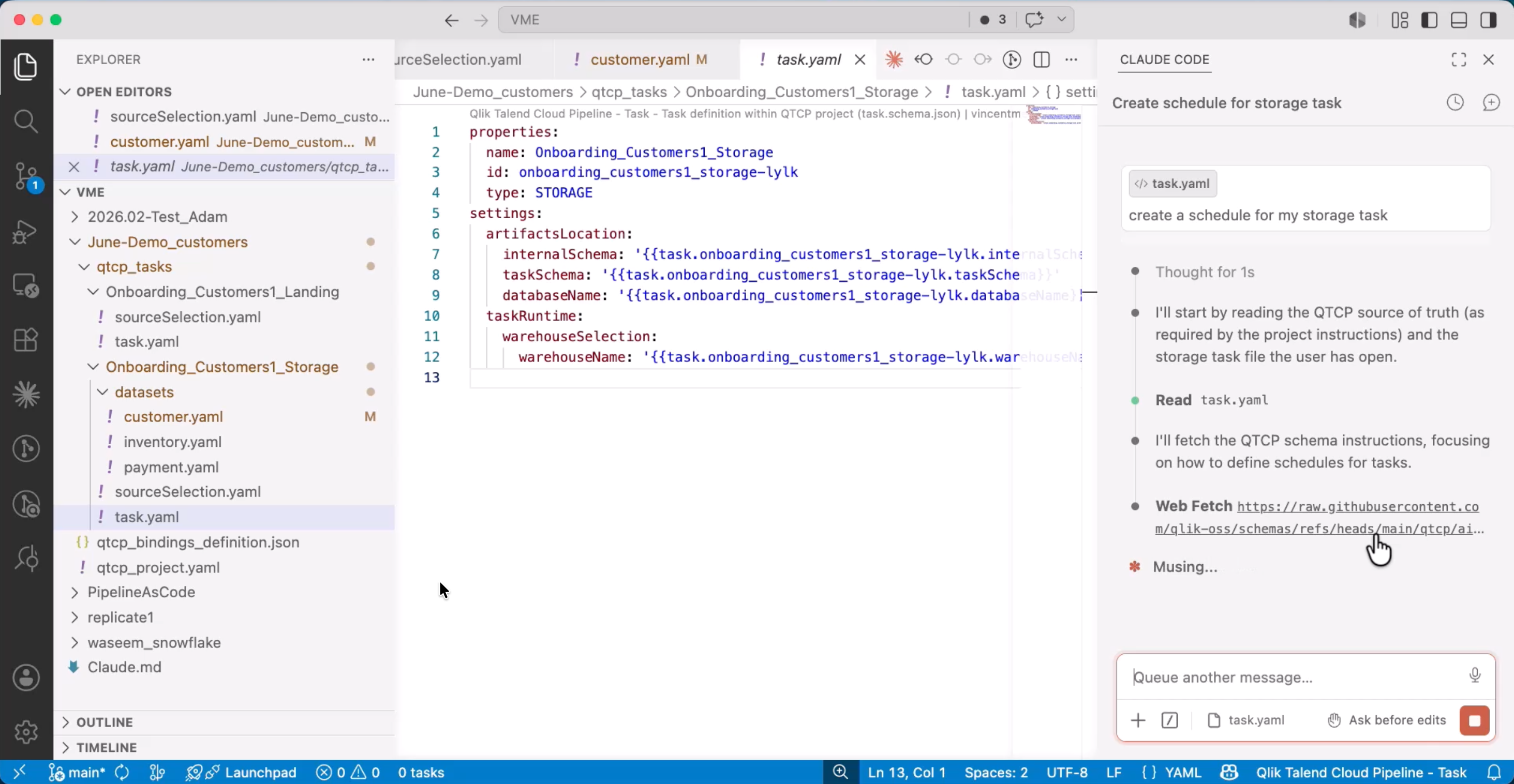
Declarative pipelines complement, rather than replace, the visual interface. The same pipeline can be created and edited visually, programmatically, or agentically — with all three approaches working from a single underlying YAML representation that remains the authoritative source of truth.
This approach is particularly valuable for enterprise and regulated environments where pipeline configuration must be auditable, reproducible, and subject to code review processes.
Benefits
Automation. Pipelines can be built and deployed programmatically, without manual UI interaction. This makes it straightforward to automate deployment across environments — development, QA, and production — as part of a CI/CD workflow.
Reusability. A pipeline defined once in YAML can be redeployed, templatized, and reused across projects, teams, or tenants. This standardizes pipeline structure and reduces duplicated configuration effort.
Version control and collaboration. YAML pipeline files are stored in Git, where they benefit from the full suite of source control capabilities: branching, pull requests, diff comparison, change tracking, and rollback. This makes pipeline changes as reviewable and auditable as application code.
Headless operation. Pipelines can be designed and operated entirely via API — without using the Qlik Talend Cloud interface — making it possible to integrate pipeline management into existing toolchains and orchestration platforms.
AI-readiness. YAML files are a structured, machine-readable format that coding agents can parse, generate, validate, and modify. This makes declarative pipelines the natural entry point for AI-assisted pipeline development.
YAML structure
A declarative pipeline is represented as a folder of YAML files. The structure is consistent across pipeline types, with task-specific configuration expressed as delta content on top of a common base. Each pipeline consists of the following yaml files:
- project.yaml - Project level configuration including the project type and data platform (universal, required).
- task.yaml — defines the task type, source, and target configuration (universal, required for all pipeline types)
- sourceSelection.yaml — specifies the datasets or objects selected from the source (universal, required)
- schedule.yaml — defines execution schedule (optional)
The full schemas as well as instructions for AI clients are available at Qlik OSS Schemas.
Version control and deployment
Declarative pipelines support multiple synchronization mechanisms:
- GitHub integration - Pipeline YAML files can be pushed to and pulled from a connected Git repository directly from within the Qlik Talend Cloud interface. Changes made in the UI are reflected in the repository; changes committed to the repository can be synced back to the platform.
- UI sync - Pipeline changes made directly in YAML files can be synchronized to the visual interface in a single action, keeping the UI and the file representation in consistent alignment.
- Export and import - Pipelines can be exported as a portable ZIP file via the UI or API, enabling manual transport between environments or archiving of specific configurations.
All three mechanisms operate from the same underlying YAML — there is no format divergence between the UI representation and the file representation.
Integration with the Qlik Talend Cloud API
Declarative pipelines are designed as a complement to the existing QTC API landscape, not a replacement for it. The YAML format handles pipeline design and configuration, while the API handles operational concerns.
| Capability | Mechanism |
|---|---|
| Pipeline design and configuration | Declarative YAML |
| Dataset recreation and reload | API |
| Start, stop, resume | API |
| Monitoring and status | API |
| Environment objects (connections, spaces) | API |
| Project import/export | API |
This separation of concerns means that pipeline-as-code workflows integrate naturally with existing API-based automation and orchestration.
AI-assisted pipeline development with coding agents
Declarative pipelines are specifically designed to be agent-friendly. Because they are expressed as structured YAML files with published schemas, AI coding agents can plan, generate, validate, and modify pipeline configurations without requiring access to the Qlik Talend Cloud UI.
The target architecture for agent-assisted pipeline development involves the following components:
- AI coding agent (for example, Claude Code in VS Code) — plans and executes pipeline design tasks based on natural language instructions
- MCP client — connects the agent to the Qlik MCP Server
- Pipeline YAML files — the agent reads, generates, and edits these directly in the IDE
- Schemas — published JSON schemas enable auto-completion and validation within the IDE
- QTC Pipelines API — used by the agent for synchronization and operational actions
- GitHub — pipeline files are committed to and synchronized from source control
The agent workflow relies on a CLAUDE.md (or equivalent) file in the project root that references a hosted instructions file on the QTCP Public GitHub. This file is what gives the coding agent its knowledge of project structure, task types, and constraints.
The YAML schemas are registered with Red Hat's YAML Language Support extension for VS Code — this is the specific mechanism for auto-completion and validation in the IDE. The only setup step required is installing the Red Hat YAML extension; the schemas are then retrieved automatically.
The workflow for an engineer working with an AI coding agent follows this pattern:
- Engineer describes a pipeline requirement in natural language within the IDE.
- The coding agent reads existing YAML files and the pipeline schema to understand the current state and constraints.
- The agent generates or modifies YAML configuration files, validated against the schema.
- The engineer reviews the changes in the IDE before committing.
- Validated configurations are synchronized to Qlik Talend Cloud via GitHub or the export/import mechanism.
This human-in-the-loop workflow ensures that AI-generated pipeline configuration is reviewed before deployment, while significantly accelerating the design phase.
Agentic data agents
Qlik Talend Cloud's agentic data engineering capabilities extend into Qlik Answers, which now surfaces purpose-built agents for data engineering workflows. These agents are accessible via the Qlik Answers interface and are designed to reduce the time and expertise required to create, govern, and manage data products, data quality rules, and catalog assets. Agents are Qlik Answers capabilities, not separate products.
Data Product Agent
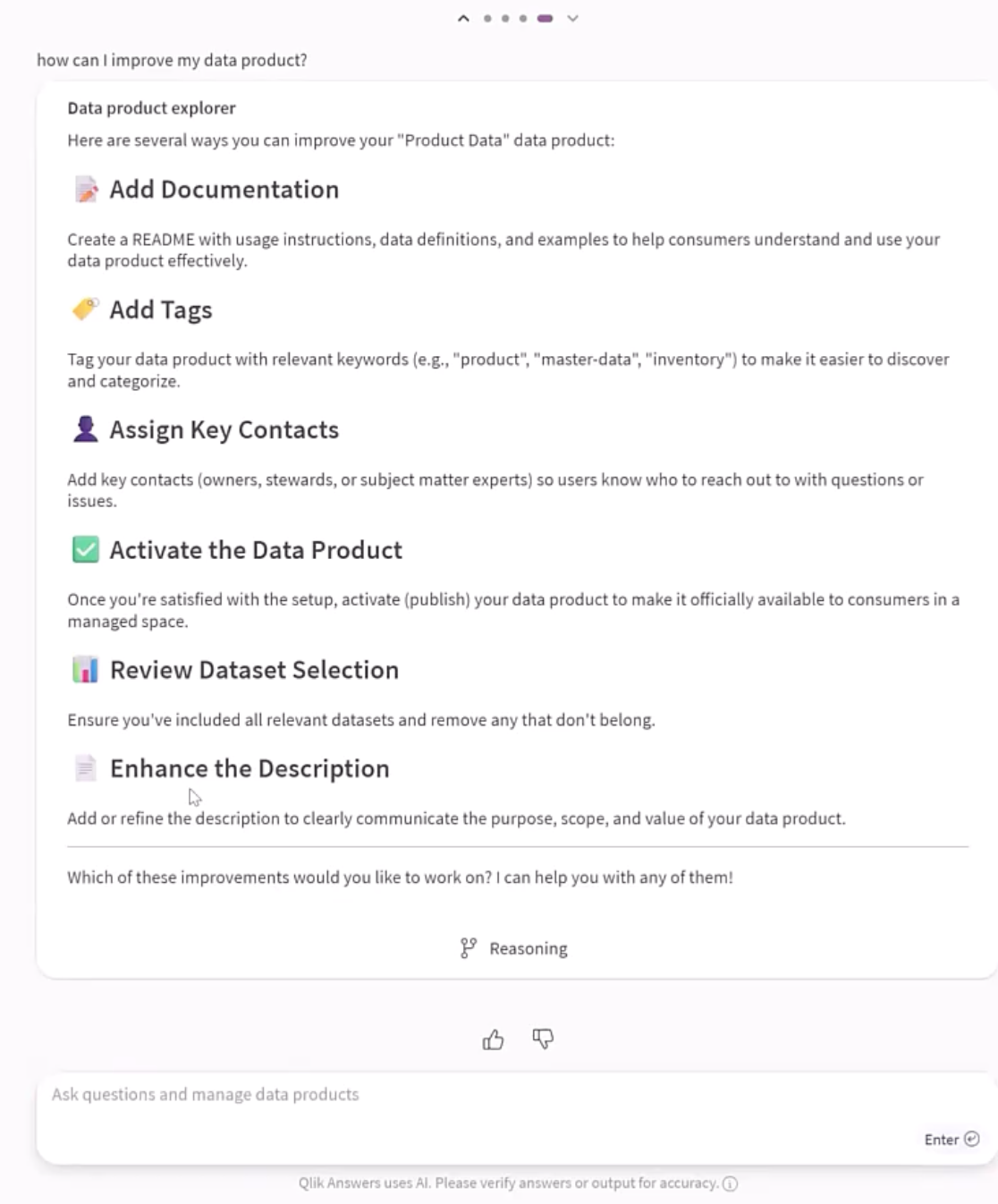
The Data Product Agent helps users create and manage data products through natural language interaction. It supports the full lifecycle of a data product, from initial creation through to governance and distribution.
Key capabilities:
- Create, read, update, and delete data products via natural language instructions
- Discover and interact with existing data products conversationally
- Review and improve data product quality and completeness
Value. The agent encourages consumption of trusted, governed data by making data product management accessible to a broader range of users. It reduces the time from data availability to packaged, analytics-ready data product, and lowers the risk of ungoverned data proliferation.
Data Quality Agent
The Data Quality Agent supports data stewards and quality teams in assessing, defining, and enforcing data quality rules through conversational interaction. The Data Quality Agent bridges business and technical users; the aim is to close the gap between a business user who can describe a rule in natural language and a technical user who can implement it. The Agent operates independently from the Data Stewardship model.
Key capabilities:
- Assess data quality across datasets
- Create, manage, and map data quality rules
- Run data quality metrics calculations
Value. The agent improves overall data quality by making rule creation and assessment more accessible to stewards who may not have expertise in the technical configuration of quality rules. This lowers the barrier to entry for data quality governance and increases the productivity of data steward teams.
Catalog and Business Glossary Agent
The Catalog and Business Glossary Agent helps users discover data assets, understand their context and relationships, and define consistent business terminology across the organization. Generated glossary terms are placed in draft status by default, requiring human review in the standard glossary UX before publication. Users can ask the agent to approve these drafts, or this can be done manually as part of a customer's governance processes.
Key capabilities:
- Natural language queries against platform metadata stored in Qlik Cloud Catalog
- Generate business glossaries from existing apps, data products, datasets, or a user-specified domain
- Define relationships between business objects
- Standardize terms and synonyms to improve how Answers interprets data model fields
Value. Inconsistent business terminology is one of the most common barriers to trusted analytics. By automating glossary generation and relationship mapping, this agent significantly reduces the manual effort required to build and maintain a governed business vocabulary — and ensures that AI-assisted analytics correctly interprets domain-specific terminology.
The Catalog and Business Glossary Agent works best with apps that have master measures/dimensions: The agent can generate a glossary from a data product, app, or dataset, but apps with existing master items defined give the best results because there's already a governed vocabulary to work from.
Talend Agentic Routes
Talend Agentic Routes extend Qlik Talend Cloud's data integration capabilities to support AI-native data workflows. They enable data engineers to incorporate LLM calls, RAG pipelines, and agentic orchestration patterns directly into data integration jobs and services.
LLM integration in data tasks
Agentic Routes support direct integration with both cloud-hosted and on-premise large language models within data pipeline tasks:
- Cloud LLMs: OpenAI, Anthropic Claude, Google Gemini, Amazon Bedrock
- On-premise LLMs: Ollama, Mistral, Gemma 3, Phi 4, and other locally hosted models
This enables use cases such as sentiment analysis on text fields, AI-assisted data quality operations, entity extraction, and content classification — applied directly within a data transformation task, without requiring a separate AI platform.
Retrieval-Augmented Generation pipelines
Agentic Routes support the construction of RAG pipelines that feed vector databases with organizational data, enabling custom knowledge bases for natural language processing applications.
Supported vector store targets include:
- Cloud: Pinecone, MongoDB, Snowflake, Databricks
- On-premise: Milvus, Oracle, MongoDB
Agentic orchestration patterns
Beyond LLM calls and RAG pipelines, Agentic Routes support three higher-level agentic patterns:
- Event-driven AI agent orchestration. Pipeline tasks can trigger AI agent actions in response to data events, enabling reactive, data-grounded automation.
- Conversational AI with contextual chat. Routes can maintain conversational context across multiple interactions, supporting use cases where a data service needs to respond to multi-turn natural language queries.
- Extensible tool and MCP client support. Agentic Routes include MCP client capabilities, enabling data pipeline tasks to invoke tools exposed by any MCP-compatible server — including the Qlik MCP Server itself.
Putting it together
The agentic data engineering capabilities in Qlik Talend Cloud are designed to work together as a coherent system rather than as isolated features.
Declarative pipelines provide the structured, version-controlled data movement foundation — built in an IDE of choice, with an AI coding agent of choice, committed to the team's existing Git repository. The Data Quality Agent ensures that data flowing through those pipelines meets defined quality thresholds. The Data Product Agent packages validated, quality-checked data into governed products with understood dependencies. The Catalog and Business Glossary Agent ensures that every asset in the system has consistent, discoverable meaning across the organization. Agentic Routes extend the pipeline layer to incorporate AI capabilities — LLM calls, RAG pipelines, and event-driven agent orchestration — directly within data tasks. And the Qlik MCP Server exposes the entire analytical and data governance layer to any MCP-compatible AI assistant.
The result is a path from raw data to trusted, AI-ready data product that keeps human expertise in the loop at each stage — with AI handling the time-consuming, repetitive, and error-prone parts of pipeline design, quality assessment, and governance documentation.