
Qlik MCP Server™ - Security Architecture and Controls
Last updated: 10/12/2026Document Purpose: This document describes the security architecture and controls governing the Qlik Model Context Protocol (MCP) server. It clarifies how authentication, authorization, and data access work when third-party MCP clients interact with Qlik Cloud data — and where Qlik's responsibility ends.
Executive Summary
Qlik's MCP server enables third-party MCP clients — such as Claude Desktop/Cowork/Code, VS Code + GitHub Copilot, Cursor, or ChatGPT — to query Qlik Cloud data using the user's own credentials and permissions.
This document clarifies:
- Authentication is OAuth 2.0 — the MCP server never accepts unauthenticated connections; all requests are bound to a verified Qlik user identity
- Data access is governed by Qlik's Section Access controls — applied at the account level, users can only retrieve data they are already authorized to see
- MCP is a tool-calling interface, not an AI service — Qlik exposes governed data access via the MCP protocol; it does not perform AI inference, generate completions, or process prompts on behalf of the client
- Data returned to the user's LLM client is governed by that provider's policies — once data leaves the Qlik MCP server boundary, Qlik's controls no longer apply
Key Insight: Qlik's MCP server functions as a governed data access layer. Qlik controls identity, entitlements, and what data is made accessible — equivalent to API-level access to Qlik Cloud. The user's choice of LLM client determines what happens to that data thereafter.
What MCP Is / What MCP Is Not
| MCP Is | MCP Is Not |
|---|---|
| A protocol-based interface for external tools to call Qlik Cloud APIs | An AI inference service — Qlik does not run models or generate completions |
| Governed by the same OAuth 2.0 and Section Access controls as any Qlik Cloud interaction | A bypass of existing Qlik security — no privilege escalation path exists |
| An open interface where the user chooses which LLM client to connect | A closed-loop pipeline — data exits Qlik's boundary when returned to the client |
| Architecturally equivalent to a governed API or data export | A data warehouse or bulk extraction tool — results are scoped, per-request responses |
For a detailed technical overview of the MCP standard, see the Architecture Overview — Model Context Protocol.
Qlik's Trust Boundary
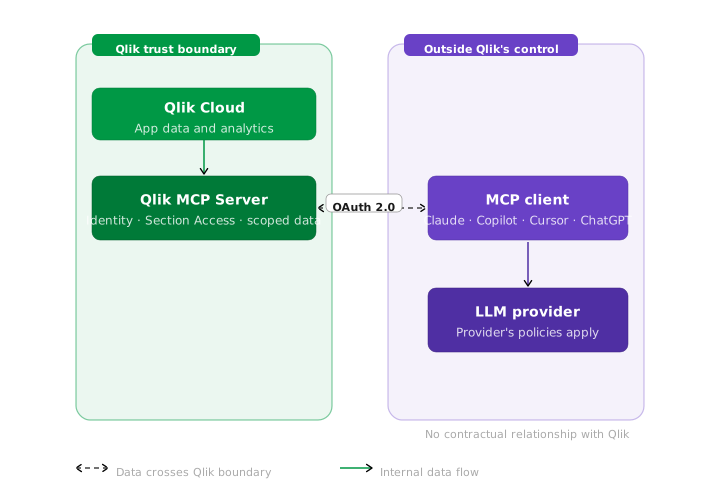
The external LLM provider — whether ChatGPT (OpenAI), Claude (Anthropic), Gemini (Google), Cursor, or others — is outside Qlik's trust boundary. Data handling beyond the MCP response is governed by that provider's policies. No contractual relationship exists between Qlik and the LLM provider.
Common Misconceptions vs. Reality
| Misconception | Reality |
|---|---|
Anyone can query Qlik data via MCP |
❌ False. All MCP connections require OAuth 2.0 authentication. Unauthenticated requests are rejected. |
MCP bypasses Qlik's data access controls |
❌ False. Section Access is enforced at the account level. Users retrieve only data they are authorized to see — identical to their Qlik Cloud access. |
Qlik controls what the external LLM does with the data |
❌ False. Once data is sent to the user's MCP client, it is governed by the user's chosen LLM provider's policies — it is equivalent to a data export. |
Security Controls Deep Dive
1. Authentication — OAuth 2.0
All MCP connections require OAuth 2.0 authorization:
- User-bound tokens — access tokens are tied to a specific Qlik user identity; no service account or shared credentials
- Scoped permissions — OAuth scopes restrict what operations the MCP client can perform
- Token expiry and rotation — short-lived tokens reduce the window for credential misuse
- No static API keys — eliminates long-lived credential risks associated with API key models
Implication: A compromised or malicious MCP client can only access data that the authenticated user is authorized to see. There is no privilege escalation path via MCP.
2. Data Entitlements — Section Access
Section Access is Qlik's row- and field-level security framework, enforced at the user account level:
- Applied before data is returned — MCP queries are subject to the same Section Access rules as any other Qlik interaction; no bypass mechanism exists
- Account-level enforcement — not a client-side filter; enforcement occurs server-side within Qlik Cloud before data leaves the platform
- Consistent with existing Qlik access — a user accessing Qlik via MCP sees exactly the same data they would see in the Qlik Cloud browser interface; nothing more
3. The External LLM Boundary
This is the key architectural consideration for any security assessment of MCP.
What Qlik Controls
| Control | Coverage |
|---|---|
| User authentication | ✅ OAuth 2.0 — all requests |
| Data access entitlements | ✅ Section Access — enforced server-side |
| Data in transit (Qlik → MCP client) | ✅ TLS encryption |
| Content logging within Qlik | ✅ No content logged |
What Qlik Does Not Control
| Factor | Responsibility |
|---|---|
| LLM provider's data handling policies | User's chosen LLM provider |
| Whether the LLM provider logs request content | User's chosen LLM provider |
| Whether the LLM provider uses data for model training | User's chosen LLM provider |
| Data sovereignty once data reaches the LLM provider | User's chosen LLM provider |
Implication: The MCP server cannot expose data beyond what the user is already entitled to access within Qlik Cloud.
Analogy: This is equivalent to a user exporting a data extract from Qlik Cloud and uploading it to an external AI tool. Qlik governs what data they are permitted to export (Section Access); the user and their chosen tool's provider govern what happens next.
Enterprises wishing to control which LLM clients their users may connect to Qlik via MCP should address this through internal AI usage policies, LLM provider vetting, and endpoint controls — in the same way they would govern other data export or third-party AI tool usage.
What Gets Stored Where
| Data Type | Qlik Cloud (Home Region) | MCP Client / External LLM | Persistence |
|---|---|---|---|
| Raw application data | ✅ Stored in Qlik Cloud | ⚠ Governed by LLM provider policy | Permanent in home region |
| MCP query results (data values, measures) | ✅ Transient during API response | ⚠ Governed by LLM provider policy | Qlik: session-based only |
| OAuth tokens | ✅ Managed per session | ⚠ Stored in MCP client | Token lifetime only |
| Content logs | ❌ Not logged by Qlik | ⚠ LLM provider policy | N/A for Qlik |
MCP Risk Profile
| Risk Factor | MCP Coverage |
|---|---|
| User authentication | ✅ OAuth 2.0 |
| Data access entitlements | ✅ Section Access |
| Data stays within Qlik boundary | ⚠ Qlik-side only; external LLM is outside Qlik's control |
| Single compliance framework | ⚠ Qlik's framework applies to data at rest and in transit; LLM provider's framework applies thereafter |
| No model training on data | ⚠ LLM provider governs what happens with query-time data |
| Content logging | ✅ Qlik: no content logged; ⚠ LLM provider policy applies for query content |
| Audit trail | ✅ Qlik logs; ⚠ LLM provider audit trail is separate |
Summary and Recommendations
Key Takeaways
- Strong access controls at the boundary: OAuth 2.0 authentication and Section Access enforcement ensure that the Qlik MCP server cannot expose data beyond a user's existing entitlements.
- MCP is data access, not AI inference: The MCP server exposes governed, scoped data to external tools via a standard protocol. It does not run models, generate completions, or process prompts.
- Honest boundary acknowledgment: Once data is returned to the user's LLM client, Qlik's controls end. This is architecturally equivalent to data export and should be treated as such in risk assessments.
- Organizational controls are the appropriate mitigation: Qlik cannot — and should not — restrict which LLM providers users may connect to via MCP. Enterprises should address external LLM risk through internal AI usage policies and approved provider lists.
For Security Assessments
| Disposition | Conditions |
|---|---|
| ✅ Accept this risk if... | Your org permits users to access Qlik data via API or export mechanisms. You trust users to operate within acceptable LLM provider boundaries. Internal AI usage policies govern which LLM providers are approved for use with business data. |
| ⚠ Mitigate this risk by... | Establishing and communicating an approved LLM provider list. Ensuring Section Access rules are correctly configured. Reviewing the data handling and training policies of likely LLM providers. Enabling audit logging within Qlik Cloud to monitor MCP tool usage patterns. |
| ❌ Reject this risk if... | Data sovereignty laws prohibit any transfer of data to non-approved infrastructure. Regulatory requirements mandate all AI processing occur within a specific compliance boundary. Your threat model cannot accept data leaving Qlik's environment under any circumstances. |
Configuration option: Organizations may restrict or disable MCP server access at the tenant level. This prevents any external LLM connectivity while retaining full Qlik Cloud native functionality.
Document Version: 2.0 | Last Updated: March 2026
For questions or additional security documentation, please contact your Qlik account team or consult the Qlik Help Center.
For background on the Model Context Protocol standard referenced in this document, see What is the Model Context Protocol (MCP)? and the MCP Architecture Overview.