
Managing Live Documentation
Enabling the Live Documentation
In order to share your API documentation with people who are not in your team, you need to enable the Live Documentation feature.
Until it is enabled, it is only viewable as a preview for users who have access to the API definition.
- Toggle the Enabled button from Off
to On and enter a URL.
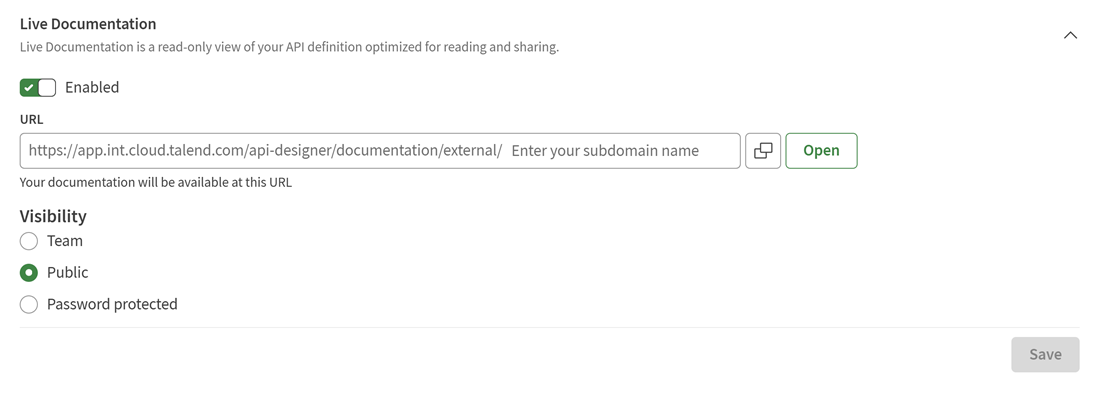
Your Live Documentation is now available. You can click Open to open it in a new tab.
Disabling the Live Documentation
Disable your documentation and select whether you want to retain its subdomain.
- If you want to release the documentation subdomain, clear the Retain
Live API documentation subdomain check box.
By default, API Designer saves the subdomain you defined when you enabled the Live Documentation. This allows you to keep the same URL if you enable it again later. If you want to use this subdomain for a different API, you first need to release it.
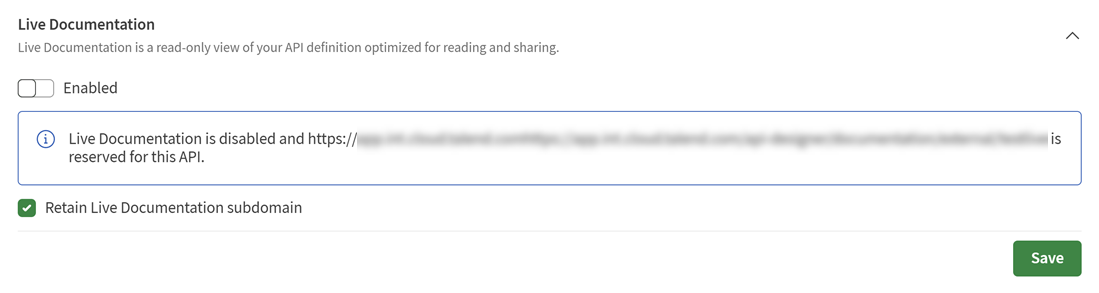
Your Live Documentation is disabled. If you retained the subdomain, you can enable
it again at any time. If not, the subdomain can be used by another API and you will need
to enter a subdomain if you want to enable this documentation again.