Publishing a Route or Data Service Job as a Microservice (Spring-boot) for ESB Docker
image
Talend Studio allows you to publish your Routes and
Data Service Jobs into a Docker registry.
Procedure
Open the Route or Job that you want to build as a Microservice
Docker image in the design work space. In the Deployment view of the Job tab, from the Build
Type list, select RouteMicroservice for Routes and Microservice for
ESB for Jobs. Save the Route or Job.
In the Repository tree view, select the Route or Job
item you want to publish into a Docker registry.
Right-click it and select Publish in the menu.
In the Publish wizard, select Docker
Image as the export type, and click
Next.
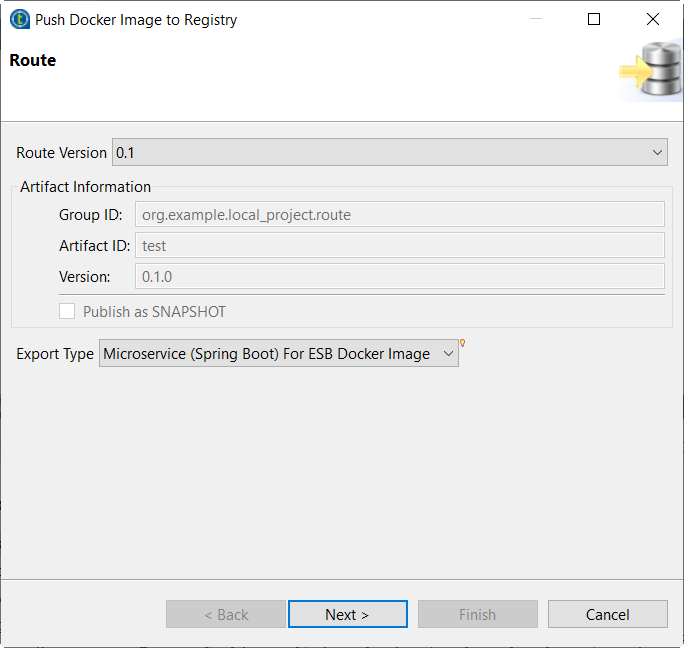
Select the Only export the default
context option to export only the default context used in the
Route or Job.
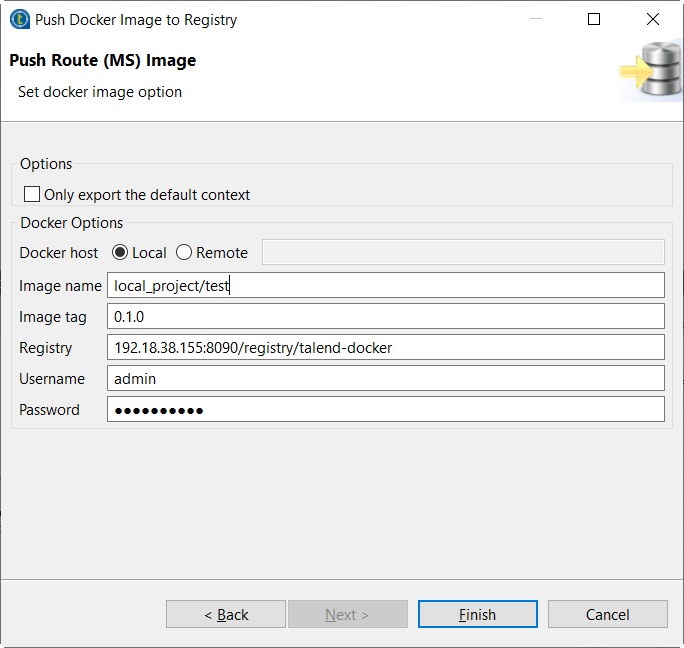
Select Local or specify a remote address based on your
Docker engine installation.
Information noteWarning: If you select the Remote option,
make sure that Docker deamon is started with a remote port.
Specify your Docker image name, and image tag.
By default, the image name is derived from the project name and Route or Job
name, and the image tag is derived from the version of the Route or Job. You can
specify a new name and tag here or customize the default settings globally in
Project Settings. For more information, see Customizing Docker images build settings.
Information noteWarning: Underscore characters are not supported in Docker image
names, therefore make sure the Docker image name value does not contain
underscore characters.
Specify your user name and password.
Click Finish to start publishing your Docker image to
the specified Docker registry.
Did this page help you?
If you find any issues with this page or its content – a typo, a missing step, or a technical error – please let us know!