
New features
Last updated: 9/24/2026Big Data
| Feature | Description |
|---|---|
| Support for Amazon Athena connectivity that allows interoperability with Open Lakehouse in Spark Batch Jobs | Amazon Athena is now supported in your Spark Batch Jobs with the following
components:
You can connect to Athena and read data. Writing data to Athena is not available. |
| Support for Spark Universal 4.0.2 in Spark Batch Jobs in Local runtime mode | You can now run your Spark Batch Jobs with Spark 4.0.x in
Local mode. You can configure it either in the
Spark Configuration view of your Spark Jobs or in the
Hadoop Cluster Connection metadata wizard. The
following components are not supported with Spark 4.0.x:

|
Data Integration
| Feature | Description |
|---|---|
| Support for Amazon Athena connectivity that allows interoperability with Open Lakehouse in Standard Jobs |
The generic database components now officially support connecting to Amazon
Athena, and the following components are added to the palette:
|
| Support for S3 Express One Zone and Directory buckets for Amazon S3 components in Standard Jobs | The S3 components now support Amazon S3 Express One Zone directory buckets. Directory buckets require standard AWS credentials and appropriate IAM permissions for regional endpoint operations. |
| New authorization method for BigQuery components to use recommended OAuth 2.0 authorization code in Standard Jobs | The OAuth 2.0 (Authorization Code grant) authentication mode has been added to the BigQuery components. Authorization is completed via a one-time browser flow launched from the Run console, and the configuration is then saved so subsequent Job runs can access BigQuery without repeating the setup. |
| New property in tEmbeddingAI component to allow users to define the base URL for AI platforms in Standard Jobs | The Base URL option has been added to the Advanced settings of the tEmbeddingAI component, allowing you to enter the base URL address of the API server you want to access. This option is available for the Ali Bailian, Cohere, Hugging Face, and Mistral AI platforms. |
Data Mapper
| Feature | Description |
|---|---|
| Support for copying and pasting schema columns from a component to a structure | You can now copy schema columns from Talend Studio
components and paste them as elements in hierarchical mapper structures. The
schema columns are automatically converted to structure elements with the
appropriate data types. You can paste columns either as child elements or as
sibling elements. For more information, see Copying schema columns from Studio components. |
| Support for HTTP and HTTPS schemes in ReadURL function in the non-Eclipse runtime | The ReadURL function now supports HTTP and HTTPS schemes in the non-Eclipse runtime. |
| Enhancement of schema column output options in tDSQL4JSON | The Set output column(s) option is enhanced allowing
you to select how to map your JSON transformation results. With the new
Output column mode dropdown list, you can now either
choose to map your JSON output to multiple schema columns or in a single column.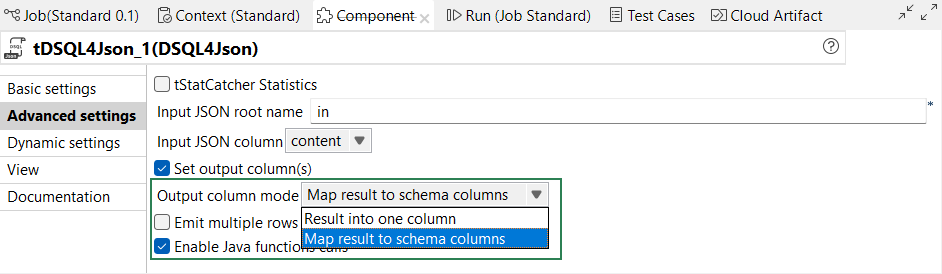
|
Data Quality
| Feature | Description |
|---|---|
| Support for more operators in tDQRules | You can now use the following operators in the tDQRules component:
The case sensitivity in the String operators is also now supported. |
| Displaying recent items | You can now display the recent items.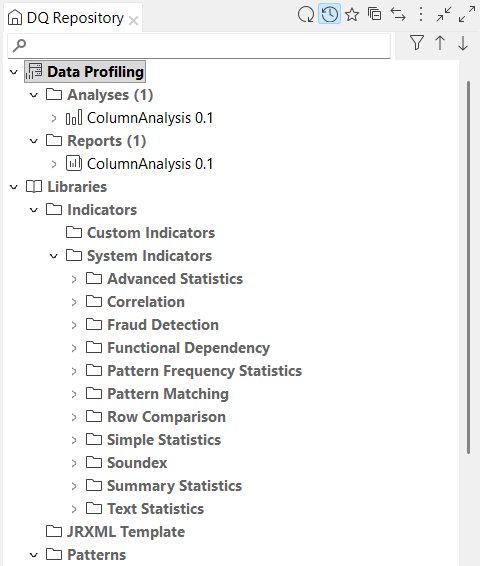
|