You are part of the campaign and
have been granted the role to access the tasks at the right state in the
workflow.
Procedure
On the TASKS page, click
the name of the campaign which holds the tasks.
On the menu bar, use the combinations State > Resolved and Assignment > Unassigned to open the list of the tasks which are transitioned to the final
status in the workflow.
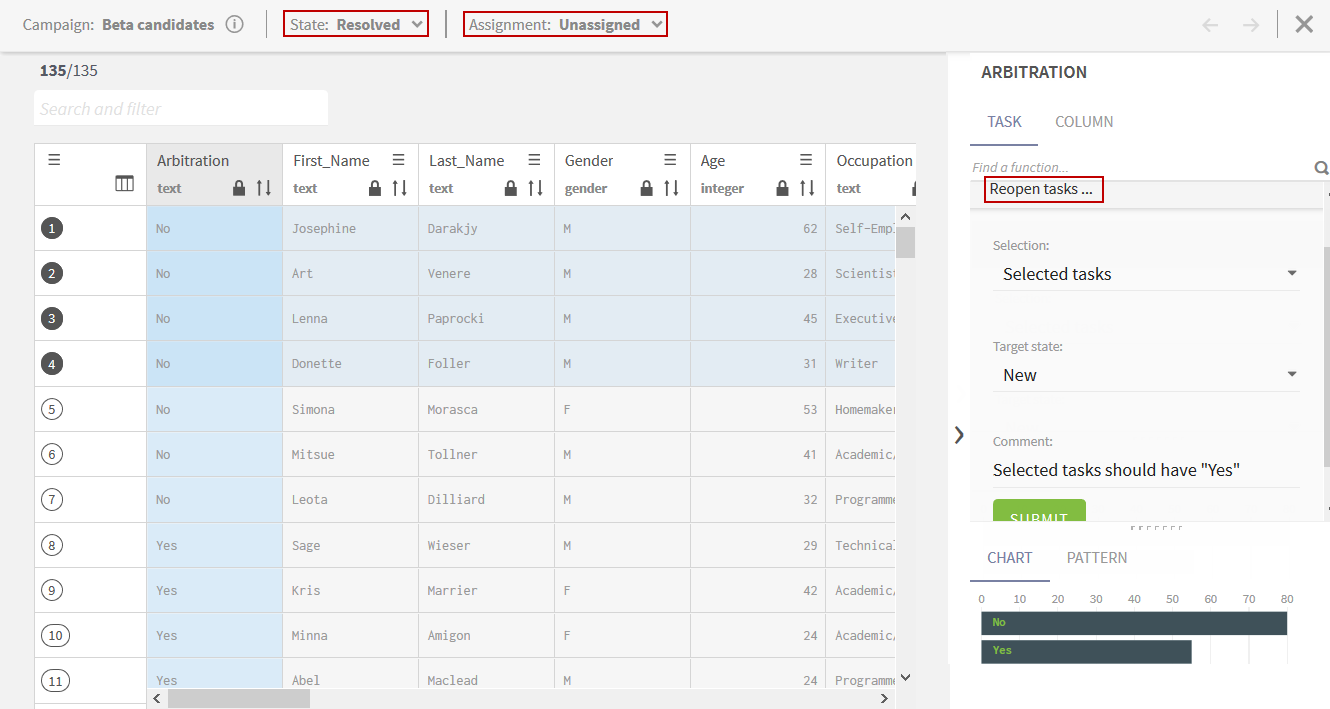
In the right panel, click TASK and expand Reopen tasks.
From the Selection list, select to reopen all the tasks or only to reopen the tasks you select in the list. If you have set a filter on the tasks, you can select to reopen the filtered tasks.
From the Target state list, select one of the following:
New to send the tasks back to the initial state.
To validate to send the tasks back to the second state in the workflow.
The To validate option is available only if the workflow has three states.
Optionally, enter in the Comment field an explanation of the decision to reopen the
selected tasks and transition them back in the workflow.
Click SUBMIT.
The tasks are removed from the list and transitioned back to the initial state in the workflow or to the validation state.
Did this page help you?
If you find any issues with this page or its content – a typo, a missing step, or a technical error – please let us know!