When handling tasks in a Merging campaign, data stewards
may find that the source records of two or more tasks should be merged into a single
task.
Procedure
On the TASKS page, click the name of the Merging campaign you want to open.
From the list of the tasks assigned to you, whether at the
initial state or at the validation state of the workflow, select the tasks you
want to merge.
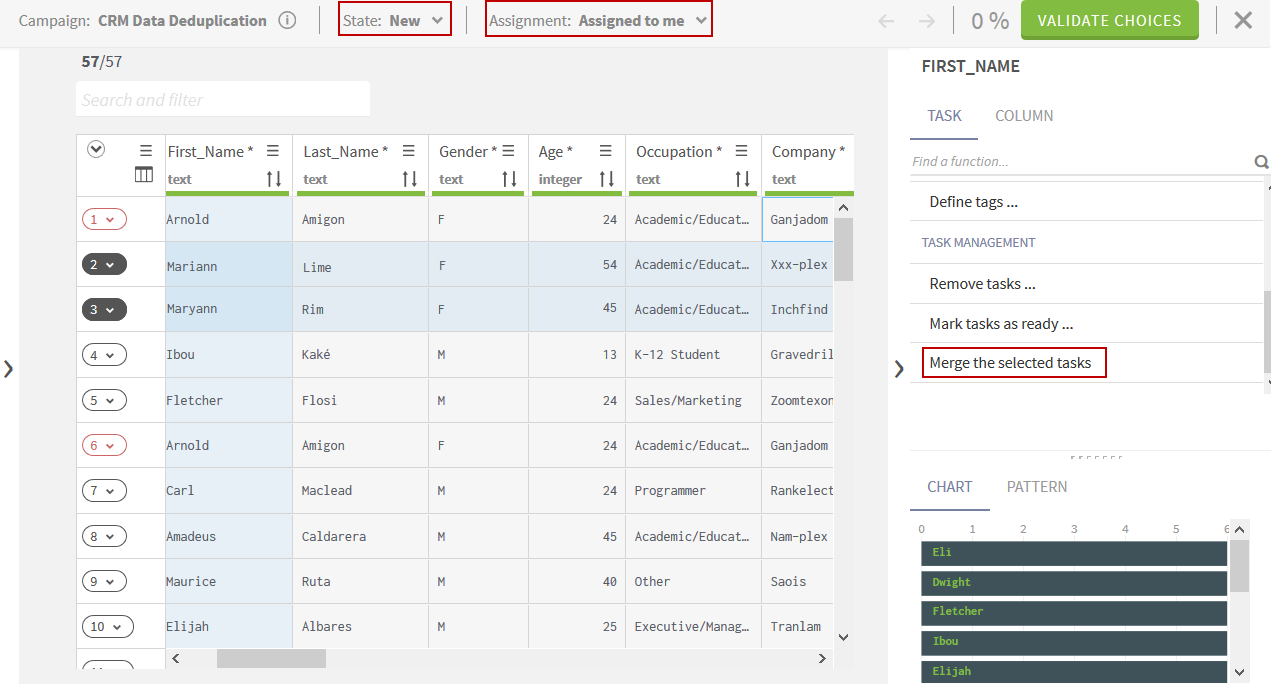
In the right panel, click TASK > Merge the selected tasks.
The values in the new task are selected according to the
campaign default survivorship rules applied to all source records. This means
that any manual change done in the meantime on the tasks just merged is lost.
The selected tasks are merged into one and moved to the
bottom of the list. Any comments attached to the merged tasks will be
removed and the new task will have no comments.
Optionally, click the Undo arrow in the top right corner to revert the merge and
split the merged task into the initial individual tasks.
Did this page help you?
If you find any issues with this page or its content – a typo, a missing step, or a technical error – please let us know!