Skip to main content Skip to complementary content

Translating the stored values

About this task

To translate the stored values, complete the following:

Procedure

  1. In the Basic settings view, select the Translate label check box.
  2. Click Sync Schema a second time to retrieve the schema after translation.
    A message opens up prompting you to accept retrieving the schema from the defined SPSS file.
  3. Click Yes to close the message and proceed to the next step.
    A second message opens up prompting you to accept propagating the changes.
  4. Click Yes to close the message and proceed to the next step.
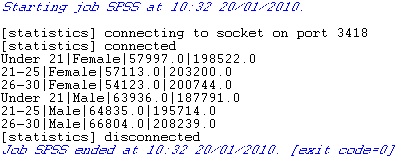
  5. Save the Job and press F6 to execute it.

Results

The SPSS file is read row by row and the extracted fields are displayed on the log console after translating the stored values.

Did this page help you?

If you find any issues with this page or its content – a typo, a missing step, or a technical error – please let us know!