프로필 실행
마지막 업데이트: 2026. 10. 14.이 시나리오에서는 Talend API를 사용하여 프로필을 실행하여 프로젝트 품질을 개선합니다.
이 작업 정보
API 호출에 대한 세부 정보는 다음과 같습니다.
Method: POST
endpoint: api/v1/projects/quality/profiles/{id}/executions
payload:
    {
  "repository": "string",
  "authentication": {
    "username": "string",
    "passcode": "string"
  },
  "branch": "string",
  "workspace": "string",
  "client": "UI"
    }
엔드포인트는 Talend 프로젝트에서 실행할 사양 목록을 포함하는 프로필 ID를 매개변수로 사용합니다.
절차
결과
{
  "id": "67",
  "status": "FAILED",
  "startTimestamp": "2023-10-13 17:36",
  "duration": "2s",
  "specifications": [
    {
      "id": "69",
      "specification": {
        "id": "2",
        "name": "best-practice",
        "description": "This specification contains rules related to best practices",
        "operator": "is_Equal_to",
        "threshold": 100,
        "thresholdType": "PERCENTAGE",
        "createdBy": "system"
      },
      "status": "FAILED",
      "rules": [
        {
          "id": "77",
          "rule": {
            "id": "4",
            "name": "Active-tLogRow",
            "description": "Identify jobs with tLogRow components",
            "category": "COMPONENT",
            "severity": "MINOR",
            "operator": "is_less_than_or_Equal",
            "threshold": "5",
            "thresholdType": "PERCENTAGE",
            "createdBy": "system"
          },
          "result": "30",
          "status": "FAILED"
        },
        {
          "id": "78",
          "rule": {
            "id": "5",
            "name": "JavaLogs",
            "description": "Identify jobs that contain java logs.",
            "category": "COMPONENT",
            "severity": "INFO",
            "operator": "is_less_than_or_Equal",
            "threshold": "50",
            "thresholdType": "PERCENTAGE",
            "createdBy": "system"
          },
          "result": "4.56",
          "status": "PASSED"
        }
      ],
      "duration": "1s"
    }
  ],
  "sourceProvider": {
    "providerType": "LOCAL",
    "workspace": "D:\\Talend_Studio\\studio\\workspaces\\qtcmt_test",
    "project": "PROJECT_73"
  },
  "info": {
    "version": "7.3.1",
    "label": "PROJECT_73",
    "description": "Project imported from TalendPS organization",
    "productVersion": "Talend Real-time Big Data Platform-7.3.1.20221115_1012-patch",
    "type": "DQ",
    "bigData": false,
    "local": false
  },
  "inventory": {
    "total_artifact_assets": 258,
    "context_group": 11,
    "standard_job": 210,
    "standard_job_versions": 211,
    "standard_joblet": 24,
    "standard_joblet_versions": 24,
    "resource": 2,
    "resource_versions": 24,
    "bd_batch": 1,
    "bd_batch_versions": 1,
    "bd_batch_joblet": 0,
    "bd_batch_joblet_versions": 0,
    "bd_streaming": 1,
    "bd_streaming_versions": 1,
    "bd_streaming_joblet": 0,
    "bd_streaming_joblet_versions": 0,
    "route": 46,
    "route_versions": 46,
    "routelet": 1,
    "routelet_versions": 1
  },
  "commits": [
    {
      "id": "24b228d45561e0a741a0409195ef492437bf3",
      "date": "Tue Feb 21 01:29:11 2023 +0000",
      "author": "talend <talend@3bed803c5b79>",
      "message": "\tCreate Project: PRJ_731\n"
    }
  ]
}
이 예시의 결과는 30입니다.규칙의 품질 검사가 실패했습니다.규칙의 상태는 실패입니다.각 규칙의 상태는 결과와 임계값 간의 비교를 기반으로 평가됩니다.
프로젝트의 전반적인 품질은 사양의 상태에 따라 결정됩니다.사양의 상태는 모든 규칙의 누적 결과 또는 상태에 의해 유효성이 검사됩니다.이 예시에서는 임계값이 100%로 설정되어 있습니다.여기서 단일 조건 또는 규칙이 실패하더라도 사양이 실패하고 상태는 실패로 설정됩니다.
임계값, 임계값 유형 및 연산자는 규칙과 사양이 Talend 프로젝트의 품질에 미치는 영향에 따라 업데이트될 수 있습니다.
모든 사양이 실행되면 실행 상태는 다음 조건에 따라 설정됩니다.
- 통과: 모든 사양이 통과된 경우의 상태.
- 실패함: 어떤 사양이라도 실패한 경우의 상태.
- 취소됨: 실행이 취소된 경우의 상태.
- 실행 중: 실행이 진행 중인 경우의 상태.
실행은 GET /api/v1/projects/quality/profiles/executions 엔드포인트를 사용하여 액세스할 수 있습니다.실행은 여러 기준에 따라 필터링할 수 있습니다: 특정 시작 시간부터의 실행 상태 또는 프로젝트 이름.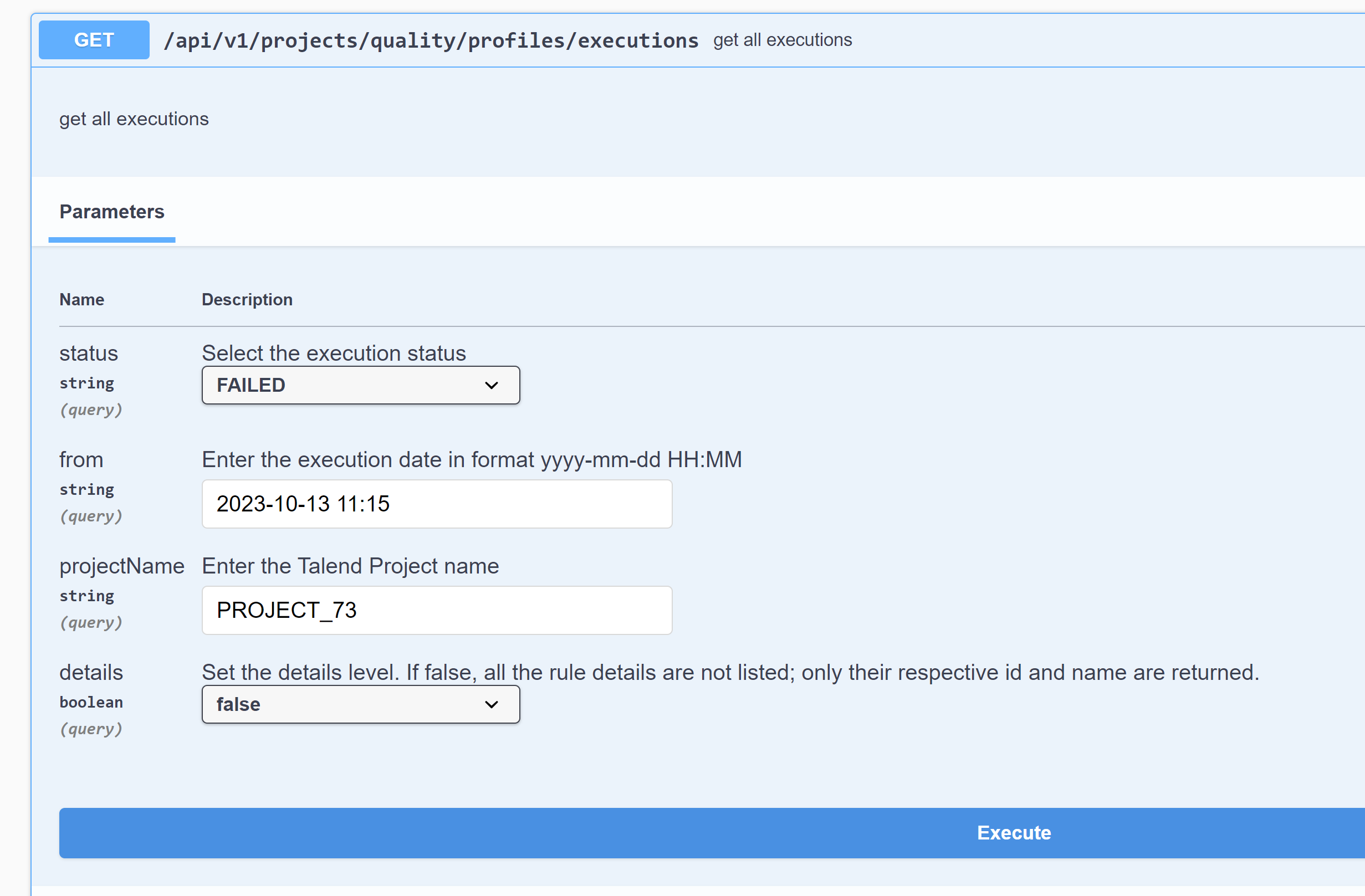
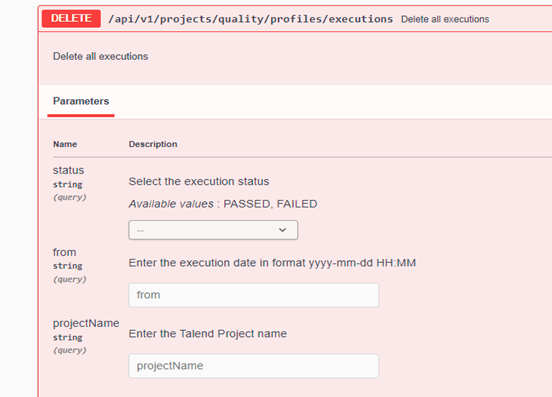
실행은 실행 ID 또는 상태, 시작 시간 또는 프로젝트 이름으로도 삭제될 수 있습니다.