
Export a Data Mapping for Forward Engineering (Development) into a DI or BI Tool
Last updated: 9/29/2026The data mapping allows you to define all the physical data integration constructs, including joins, filters, transformation operations, etc.. You may forward engineer (export) this metadata into 3^rd^-party data integration DI) tools.
In addition, you may export a query mapping (one target table at a time) to BI tools to export joins, etc., (only Tableau has been implemented in this case).
Forward Engineering Export menus are only available with certain licenses.
Forward Engineering a Data Mapping to a DI Tool
The data mapping allows you to define all the physical data integration constructs, including joins, filters, transformation operations, etc.. You may forward engineer (export) this metadata into 3^rd^-party data integration DI) tools.
Forward Engineering Export menus are only available with certain licenses.
Steps
Sign in as a user with at least the Metadata Viewing capability object role assignment on the Data Mapping you are going to edit.
Navigate to the object page for the data mapping model.
Go to More Actions... > Export.
Select the 3^rd^ party tool format from the Export to pull-down.
Click Export.
Example
Sign in as Administrator and go to the object page for the Adjustments to Staging data mapping.
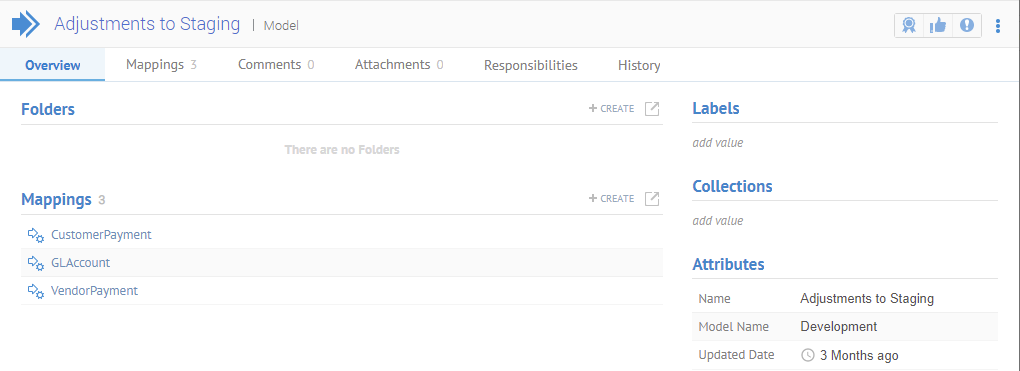
Go to  More Actions... > Export and select
the format to export to and click EXPORT.
More Actions... > Export and select
the format to export to and click EXPORT.
Forward Engineering a Query Mapping to a BI Tool
The data mapping allows you to define all the physical data integration constructs, including joins, filters, transformation operations, etc. You may export a query mapping (one target table at a time) to BI tools to export joins, etc., (only Tableau has been implemented in this case).
Forward Engineering Export menus are only available with certain licenses.
Steps
Sign in as a user with at least the Metadata Viewing capability object role assignment on the Data Mapping you are going to edit.
Navigate to the object page for the query mapping inside the data mapping model.
Go to
More Actions... > Export.Select the 3^rd^ party tool format from the Export to pull-down.
Click Export.
Example
Sign in as Administrator and go to the object page for the CustomerPayment query mapping in the Adjustments to Staging data mapping.
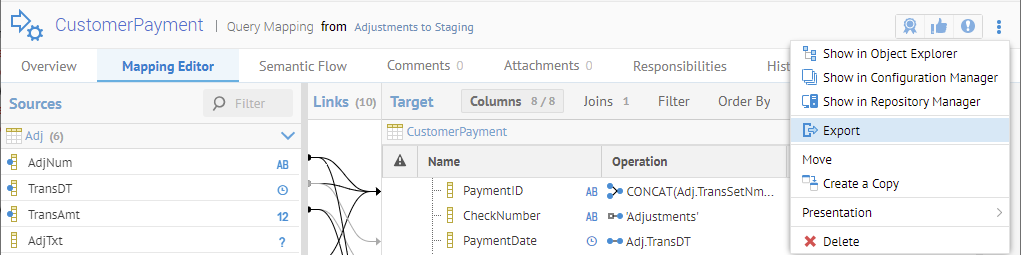
Go to More Actions... > Export and select
the format to export to and click EXPORT.
Only Tableau is supported as an export format at this time.